• Skip to main content
Year End Offer: Save 30% + Teams Save Up to an Extra 25%!

EuroSTAR Conference

Europe's Largest Quality Engineering Conference

  • Programme
    • Programme Committee
    • 2025 Programme
    • Community Hub
    • Awards
    • Social Events
    • Volunteer
  • Attend
    • Location
    • Highlights
    • Get Approval
    • Why Attend
    • Bring your Team
    • Testimonials
    • 2025 Photos
  • Sponsor
    • Sponsor Opportunities
    • Sponsor Testimonials
  • About
    • About Us
    • Our Timeline
    • FAQ
    • Blog
    • Organisations
    • Contact Us
  • Book Now

Test Automation

Achieving Rapid Test Automation: a case study

September 25, 2020 by Fiona Nic Dhonnacha

Learn how ArisGlobal achieved rapid test automation using Sahi Pro web test automation tool

How ArisGlobal achieved rapid test automation using Sahi Pro web test automation tool

Who is ArisGlobal?

ArisGlobal is a global provider of R&D software solutions and consultancy services, serving life sciences companies in the management of their clinical trial, safety and regulatory information.

Currently, more than 200 life sciences companies and CROs around the world rely on ArisGlobal, including top pharmas, biotechs and devices, CROs and regulatory agencies: ArisGlobal an established market leader in every ICH region.

They provide leading solutions for adverse event reporting, regulatory tracking and e-Clinical. 32 of the top 50 pharmas rely on ArisGlobal solutions.

The Challenges

ArisGlobal started test automation with one of the leading commercial tools. Due to limitations in supporting automation for their products, they moved to an in-house test automation framework based on Watij and Selenium.

Existing testing tool had no record and play  back feature. Secondly, there were no available relative APIs.

Thirdly, complex conditional automation could not be automated as the tool used did not support scripting.

Lastly, maintaining an object repository was mandatory. This was a major effort for maintenance.

The Solution

Based on business requirement for rapid test automation, ArisGlobal decided to use Sahi Pro. The record and playback feature, along with the keyword and data driven test support in Sahi Pro, was used by ArisGlobal to its advantage.

ArisGlobal used Sahi Pro for functional testing including testing of speci_c functionality for ArisGlobal products. ArisGlobal also used Sahi Pro for integration testing and user acceptance testing. The web technologies that were used included:

JSP | JSF | HTML | HTML5 | ExtJS | .NET

Benefits

ArisGlobal achieved the following benefits while using Sahi Pro Web Test Automation tool.

  • The record and play back feature reduced the time required for testing scenarios which require repetitive manual tests
  • Data driven test support in Sahi Pro helped reduce testing cycles with multiple test data sets,thus improving the test coverage.
  • Extensive APIs along with support for native JavaScript helped automate actions on any application, irrespective of the underlying technology.
  • Positional Relation APIs help automate controls even without specific unique identifiers.
  • Reduction of time by 70% for multiple report generation for one of the products.
“Sahi Pro provides a one stop solution to most of our test automation requirements. It’s innovative feature of smart combination of record-playback along key-word generation for key-word driven tests and datadriven tests and suite executions makes it a unique test automation tool to meet the demand for rapid automation.”

Dr. Kailash K P Chanduka (PhD), Head- Testing Shared Services, Aris Global Software Pvt. Ltd.

About Sahi Pro

Sahi was born as an open source product in 2005 with specific focus on automation of emerging web 2.0 technologies but as a tool geared towards testers. With consistent work over the past years, Sahi has grown to be a powerful but easy-to-use tool for testers, handling with ease most complexities presented by modern web, mobile and desktop applications.

Want to learn more about Sahi Pro? They will be exhibiting at EuroSTAR Online in November.

Find out more about the EuroSTAR programme here.

Filed Under: EuroSTAR Conference, Test Automation

The Ultimate Guide to getting started with Test Automation

September 24, 2020 by Fiona Nic Dhonnacha

Introduction

Getting started with test automation can seem daunting. How do you know where to start and what to focus on? We’re getting actionable and concrete advice from a Selenium enthusiast and UI testing whiz Diego Molina at Sauce Labs:

“I currently work as a software engineer at Sauce Labs. I co-created Zalenium, and help maintain the most used docker-selenium images. But it might be helpful to share with you some background on my personal testing story. I too was once just getting started with automation, and hopefully my experience can help you do the same.”

Step 1. Getting Started with test Automation – understand the benefits

Years ago, after getting my degree in computer science, I got a job as a developer. At that time, testing was primarily done by end users—we would hand over spreadsheets with all the test cases. Later, I got a job as an automation engineer where I wrote tests for every single use case. I started doing UI automation with Selenium and took the same approach, again writing tests for every use case.

At the time, I didn’t think about whether that was the right approach or not. But then I noticed a problem. My test suite went from taking 20 minutes to run to upwards of 60-70 minutes! Uh-oh. Could it be too many tests? Or did I just need to tune the infrastructure?

I ended up building my own infrastructure and scaled it up. I was able to improve the performance of the tests back down to 15-20 minutes. So then, of course, I thought the best idea would be to—you guessed it—add yet more tests. I started writing tests for every use case again.

It’s a vicious cycle! After a few rounds of this, I realized I was not tackling the problem the right way, and that automation was the key to solving it.

Why Automate?


Test automation team working together around a table

Simply put, automation gives you the opportunity to spend less time on repetitive tasks and move on to solving bigger challenges, hopefully ones that are more fun.

Also, there is a trend in the software industry: getting software out the door faster and faster. We are finding ways to speed up our releases more and more, and in order to keep up, we have to automate.


I’ll cover 5 specific areas that will help you jumpstart test automation and get the most out of it in 5 easy steps

  • Team Setup: I’ll give advice on how to handle various team setups and ensure great communication, whether the testing team is integrated with the dev team or stands alone.
  • Testing Framework: I’ll discuss why to use a framework, talk about what features a framework should have—and why you should consider open source.
  • Test The Right Thing: We can’t automate everything. Creating and maintaining automated tests takes time, so I’ll help you think critically about what to automate.
  • When To Run Tests: I’ll discuss the evolution of testing and how to use automation to move your organization forward toward Continuous Testing.
  • Get People to Join You: In the final installment, I’ll offer advice on how to motivate yourself, your entire team, and your company to invest in automation (and discuss the risks of not doing so).


Team Setup


When testers are on a separate team to developers

Choose a programming language such as Ruby or Python that has an easy setup and low barrier to entry. In fact, according to the 2019 Stack Overflow survey, Python has recently proven to be one of the most popular languages. But what’s more important than programming language? One word: communication. You have to communicate regularly with the product owner and with the development team in order to test effectively.

Here are some specific action items to facilitate this communication:

  • Get access to the story/task/feature definitions to create tests.
  • Get business context from the product owner to prioritize testing activities.
  • Get as much information as possible about the tech stack, system architecture, etc.

Also, be in sync with the dev team. Go step by step as you’re implementing the first automated tests. Work together to agree on a working pace and define a bug report flow.

When testers and developers are on the same team

This can look one of two ways: either the testers and developers have separate, defined roles (QA/Dev), or each team members serves both functions as part of their role. It really helps when one or more team members are responsible to guide the team in testing.

In this scenario, it also helps when application code and test code use the same programming language, as it really leverages team collaboration. Also, when you’re testing, take advantage of the good practices used in the software development lifecycle. Keep test code in the same repository as the app code. This simplifies the flow required to write tests for features that are not yet in production.

The bottom line is that you should look at test automation as a software project… because it is!

Key Takeaways

  • Invest time looking for a test framework that helps the team move faster. I will cover this in more detail in my next post, but this can be a huge time saver and make everyone more efficient.
  • Make test design and implementation a team task. This cannot just be one person’s job: testing and quality need to be a part of the overall team culture.
  • Document how tests are structured.Keep records of configuration as well as how to run, add and remove tests.
  • Pair program and do code reviews.When you’re adding new tests, it’s really helpful to pair up with a teammate to check each other’s code and think through each other’s approach.
  • Continuously evaluate if the existing test cases deliver enough value. We always want to be sure that we are testing the right thing and getting the results we need. Constantly evaluate and make sure this is happening!


How the team setup should evolve over time

No matter what your team setup looks like, there’s always room to evolve over time to get better and better. The goal is constant improvement, moving toward more efficient practices to let automated testing do the heavy lifting for you.

Of course, there will always be room for manual testing. However, the focus on it will change: manual testing will be used strategically for debugging and exploratory testing, instead of dominating your testing landscape.

Step 3. Testing Framework

What is a testing framework and why should you have one?

A framework isn’t just one thing. It’s a union of different things—guidelines, coding standards, good practices, tools and libraries—that work together to make us faster and more efficient. An effective test framework can lower maintenance costs, improve code reusability, help us focus on writing tests instead of writing boilerplate code before coding tests, and more. The point is that a single/library tool will hardly cover all my testing needs, but putting together a few testing tools and libraries that work in harmony will help me get there. When I say “framework,” that’s what I’m talking about.

From my perspective, there are three reasons to use a framework:

  • Reduce maintenance costs– a framework simplifies sharing common functionality that’s needed across the team.
  • Be faster– we can make changes by only changing things in one place when we have a single testing framework.
  • Be reactive– we can bootstrap code to write tests, and this is embedded in the framework. When we are creating new test cases, we can get to implementation much faster.

What features should your framework have?

The below list is a guideline, not necessarily a set blueprint—and there may be additional things to consider given your individual situation.

  • Assertions on actions
  • Initialization and cleanup
  • Data modelling/mocking configuration
  • Site modelling abstractions
  • Wrappers and helpers
  • API usage
  • Built-in reporting or easy to plug in
  • future ready features
  • Speed
  • Debugging features
  • Cross Browser
  • Simulators-Emulators/Real Devices


It’s also important that you take into account whether the framework you’re considering is future-ready. Does it change and adapt to trends, which will enable you to evolve appropriately?  For example, will it allow the dev team to switch JavaScript frameworks?

Consider this scenario. If your web app is written in Angular, but the team decides for some reason to change it to React, will your framework allow you to start testing the React app without too much additional work?

Another good example why you need a “future ready” framework could be a situation where the team starts out only needing to write tests for a web application, but after some time has passed, they develop a mobile app that needs to be tested via Appium as well.

“An effective test framework should be able to support/leverage the team to write tests for the mobile app without the need of going through all the hassle of setting everything up from scratch.”

How to build your testing framework

Two words: open source. “But Diego,” you may say, “Why should I use open source tools to create a testing framework?” Simply put, it’s because you don’t need to reinvent the wheel! You may think you’re the only person who has encountered a particular testing problem, but I assure you that isn’t true. Many other people have likely experienced the same issue and have created and shared open source tools and resources in the community that can solve your challenge.

So how do we choose open source tools? First, you’ll be guided by the programming language you’re using. Also, check GitHub to see how many stars and forks, as well as how active the project is. Are people replying and does the community appear active? Is there solid documentation? Often when a project fails, it’s because it lacks good documentation. Conversely, good documentation can really help you get started easily.

Also, choosing an open source tool should really be an effort of the entire team. Everyone should be involved putting in their own concepts and ideas. First do you your research, and then do a proof of concept. Try out an open source tool with your team to determine if it’s a good fit for you.

Step 4. How to Test the Right Things

Software tester working at selenium workdesk


We know automation is important, so now we need to determine which tests to automate. But if automation is so valuable, shouldn’t we automate everything? As great as that sounds, the answer is a definite no. The fact is that automation takes time. It takes time to implement and it takes time to maintain, so we have to think critically about what to automate.

I believe you should prioritize automating tests that have high value for you, the team, and your organization as a whole. For example, if you’re testing an online shopping site, the checkout process may hold the highest value for your organization simply because of the revenue potential.

How do you identify what you do want to test?

The first step is to identify the main application flows that must always work. Ask yourself a few key questions:

  • How bad is it if this feature/behaviour breaks?
  • How much value does the test have?
  • How big is the risk that mitigates?


Using our example of an online shopping site, we might decide that the following application flows are the most critical:


  • Users can login
  • Users can register their accounts
  • Product images display correctly
  • Items can be added to the shopping cart
  • Payment can be collected


It’s important to know that you don’t need to write hundreds of tests to have your website tested! As in the example above, we can start with five prioritized tests for now, and then use analytics and user traffic data to help you evaluate the answers and determine the browsers, versions, and operating systems to test.

Putting a test into practice

Ultimately, using our example, we could have 5 tests executed in different browser, version, and operating system combinations, which then would give us around 200 test executions.

To put this into practice, you might look at the data and determine that the majority of your site users are using Chrome, Firefox and Safari.

Then, you can look further to determine the browser versions that are used most often, and then do the same for OS and device.

Based on our research thus far, we have identified our key application flows that will give us the most value. These will give us security knowing that testing these lowers the risk of something going wrong. Also, by looking at the analytics, we’ve decided to test on:

  • Three different browsers (Chrome, Firefox, Safari)
  • Two different OS (Windows, OS X)
  • Three different screen resolutions
  • Seven different browser versions (Chrome 71-74, Firefox 64-65, Safari 12)

This gives us the assurance that we are automating the highest value tests on the platforms being used most often.

Now that we know WHAT to automate, let’s turn to a few best practices for making your automated tests successful. Here are five best practices.

  • Focus on reusability and maintainability. Avoid code duplication across tests and helper classes/methods.
  • Every test must be autonomous. Tests can run in any order without depending on each other!
  • Write tests and code only for the current requirements. Avoid complex designs that consider potential future use cases.
  • Get familiar with software design patterns. They can benefit automation testing as well.
  • Base your work on testing plans and/or strategies, not on tools. Don’t choose a tool and then look for ways to use it. Start with your strategy and plan, and only then should you consider the tools that can help.

Step 5. Where—and when—to run tests

The answer to these questions will really depend on which stage of testing you’re in.

Waterfall

Waterfall is the legacy that we are hopefully moving away from. For example, if you’re in waterfall, you may be doing a lot of manual testing. In this scenario, everyone may be working together towards a major release, possibly doing joint bug-hunting sessions together to prepare. In this situation you’re likely doing local testing on desktops, and it’s common to have shared testing environments. Due to the nature of manual testing, you just won’t have time to test more often.

Fast Waterfall

If you’re in fast waterfall, OK—that’s a good start when moving from manual testing to automation. It allows for a safe environment to learn how to automate and do proof of concepts for different approaches. Fast waterfall is where automation begins. Here, we start enabling testing to happen more often, perhaps one or more times per day. Tests are triggered manually and often combined with manual testing that takes place during the pre-release phase. We need to learn how our tests are evolving and working properly. In this scenario, we may still be testing locally or you may have built your own grid, and you may begin to dabble in cloud-based testing.

Continuous Integration 

Once you move to Continuous Integration, automation dominates. With CI, all high-value tests are automated, everyone can execute them, they are part of the CI pipeline and give fast feedback. This is the true benefit of automation. Manual testing will still happen, but will be used more often for debugging or exploratory testing. A cloud infrastructure is vital for success at this stage, because maintaining your own test grid is difficult and expensive—and you need comprehensive browser and operating system coverage.

Continuous Delivery 

With CD, the development process is fully automated. All teams should be able to do testing and development. Manual is used for exploratory testing only. Tests are also used to validate production deployments. When are you running tests? All the time: pre-commit, commit, after merge/pull requests, after merging, release, etc.

The result is that automated tests are fully resilient and trustworthy, and can be used in all environments. Again, at this stage, you should be trusting a cloud-based testing platform to ensure you can be confident in the tests across multiple browsers, devices and operating systems.

Conclusion

Now you’re ready to jump-start your test automation! If you want to learn even more about test automation, check out our EuroSTAR Online programme.

——————————————————————————————–

Diego MolinaAuthor: Diego Molina, Software Engineer at Sauce Labs
Diego is part of the live testing team at Sauce, helping users get the most out of their manual and exploratory testing. He is part of the Sauce Labs Open Source Program Office, helping other Saucers get started with open source. Diego has put in a great deal of time working on the Selenium project, especially in improving the documentation and expanding into different languages so people across cultures can use Selenium to simplify and enhance their continuous testing efforts.  Diego runs the Continuous Testing Meetup Berlin, a group that provides an environment for local testers to share knowledge and participate in the community.

Filed Under: Test Automation Tagged With: Test Automation

Test Automation: 5 Top Talks at EuroSTAR Online

September 8, 2020 by Fiona Nic Dhonnacha

Test automation can help with testing efficiency and re-usability of test suites – and it’s here to stay. The good news: we’ve got lots of test automation sessions at EuroSTAR Online, from automation challenges to inclusivity to different concepts.

From Rags to Riches: Turning Your Test Automation Into a Cinderella Story | Niranjani Manoharan

In the era of DevOps and continuous deployment, more and more organisations are demanding a move from lengthy release cycles to shorter deployments – occurring weekly and sometimes even daily. To accomplish this, test automation is now an integral piece of the continuous integration pipeline. In the past, teams treated test automation as a side project but now, test automation is now the “belle of the ball”.

So, how does this change how we develop test automation? Niranjani will share her experiences driving test automation from rags to riches at companies such as Lyft and Pinterest. She’ll discuss the practices of building a team and culture to support test automation, as well as failures and mishaps that they endured.

She’ll also share the lessons learned of how to prepare tests and infrastructure for this new and richer lifestyle of being a part of CI/CD.

Key Takeaways:

  1. Best design patterns to adhere to while developing a test framework
  2. Case Study with challenges and solutions based on my experience
  3. How to go about inducing a testing culture at startups

BUY TICKETS

Surviving and Thriving in the Automation Jungle | Martin Gijsen 

The automation journey is often perceived as complicated and dangerous: So many things that can go wrong. So many automation pyramids and tools. So many choices and probably more that we are not even aware of yet. In order to help avoid (most of) the danger, the PUPPET approach to automation in testing divides it into 5 clearly defined areas: People, Product, Process, Execution, Technology

Martin details these areas in his talks, in context to his personal experiences in automation. Clearly defining the areas not only provides a map through the ‘jungle’, it also identifies automation opportunities for testers.

Key Takeaways:

  1. Automation is no longer a jungle but consists of 5 clearly defined areas that all make sense.
  2. Always consider the context and fit the automation approach to your situation for each of the areas, as pointed out in the talk.
  3. There are various roles for testers relating to automation, not all of them requiring programming. Try (some of) them and boost your value as a tester!

BUY TICKETS

RisingSTAR Talk: Inclusive Automation | Brendan Connolly

The RisingSTAR Award is designed to stimulate innovation in the software testing and quality assurance industry. It was created to encourage the development of new ideas, support the growth of the community through mentorship and bring new innovators to the fore.

Brendan Connolly was the winner of the 2019 RisingSTAR Award with his idea of Inclusive Automation. Brendan wants to foster, support and promote automation that integrates exploration, collaboration, monitoring/observabilty, reporting and ultimately the human tester into a holistic solution to help teams succeed in the agile/devops world.

During his talk at EuroSTAR 2020 Online, Brendan will present his idea and his progress throughout the year.

The 2020 RisingSTAR Award is now open for entry. If you have a great new testing idea, or know of a colleague that does, why not submit your entry for this year’s award.

BUY TICKETS

Progressing Beyond Continuous Delivery | Joost van Wollingen

Companies are looking for ways to roll out new software even faster to meet consumer expectations, but they also need to manage the risk of exposing their customers to software that is broken.

Continuous delivery fixed the technical hurdles to ship artifacts more quickly to production. So, how do we avoid low-quality software for our users?

Front runners in this field, that already have continuous delivery in place, have turned to observability, traffic management, and user segmentation. An emerging term for these practices is Progressive Delivery: continuous delivery with fine-grained control over the blast radius.”

This talk explore the four pillars of progressive delivery: automation, observability, traffic management, and user segmentation.

Key Takeaways:

  1. Introduction to the concept of Progressive Delivery and why you’d want to apply it
  2. Learn about the pillars of Progressive Delivery: Automation, Observability, Traffic Management and User Segmentation
  3. Next steps to take if you want to get started with Progressive Delivery tomorrow

BUY TICKETS

The Importance of Building in Accessibility from the Start | Kristoffer Nordström

Accessibility is often seen as something expensive; a necessary evil when building software.

This talk flips this theory on its head, and shows just how relatively easy it is building accessibility into our products

Kristoffer will illustrate what testing you can do in a manual way, and which accessibility checking you can do in an automated fashion using the free tools that are available, such as html-validate.

He also highlights the different benefits that comes out of this work if we do it from the start – not only for users, but your business. It’s much less expensive to do it this way, rather than being forced to do it before the release.

Key Takeaways:

  1. Accessibility testing is not scary
  2. It’s possible to automate some of the accessibility testing
  3. Building in accessibility from the start leads to a better product

BUY TICKETS

More EuroSTAR Online resources:

Check out our 6 top agile talks.

Filed Under: Test Automation

Continuous Testing Is Not Automation

September 2, 2020 by Fiona Nic Dhonnacha

Many people confuse continuous testing with test automation. That makes sense, because you cannot do continuous testing without automated tests. But, it’s much more.

There are four basic questions you can ask to see if your automation is truly continuous:

  1. Are your tests automated in real time?
  2. Are they included as part of your continuous integration (CI) pipeline?
  3. Do you allow them, alone, to determine that a version of code can move to the next step in the process?
  4. Are performance and security tests included in questions 1,2, and 3?

If you cannot say yes to all four questions, then you are not doing continuous testing.

So, how do you go from automated tests to continuous testing?

First, try to run your test suite back to back. If it takes more than a minute or two for each test to run, you need to look at the tools you are using for automation. Are you able to automate in real time without a complex abstraction layer for the testers? Are you using a third party that is inherently slower than an open source tool? Your answers might indicate that your automation tools do not support continuous testing.

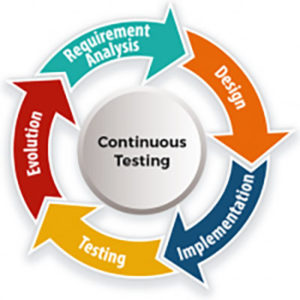
continuous testing in automationThe other reason tests could be slow is if they all originated from your regression suite and thus are all end-to-end UI tests. In this case, you will need to adjust how you have applied the testing pyramid to ensure you reduce the number of tests, so that more is done at the API and component level.

Second, look at the failed tests to see if different tests failed in both runs. If a test passes in one run and fails in the next, then you might have flaky tests, which again can be solved by refining your testing approach, as well as evaluating your testing framework for good coding practices.

Flaky tests could also be caused by dependencies on data or downstream systems that are not reliable. In these cases, you should pull out all the data conditioning into its own suite of tests, or find a more reliable way to inject data, like via a test data management tool or through APIs directly. You also might need to leverage a service virtualization tool to replace unreliable or unavailable systems.

Third, integrate the suite with your CI tool. You could start with deconstructing your suite of tests so that you have multiple suites running at different points of the process, each building on so that coverage increases. You will also need a dashboard so teams can see the results of the tests and gain confidence that a failed test is truly a defect.

Finally, integrate performance and security tests into this process. You can follow the same steps as above, because the tool, approach, and CI integration may all have to be addressed.

Continuous testing has a higher-level maturity than automated testing that could require a totally different way of working. The result is a fast feedback loop for developers—and a faster path to production.

Learn more about continuous testing and automation at EuroSTAR Online this November:


From Rags to Riches: Turning Your Test Automation Into a Cinderella Story

Surviving and Thriving in the Automation Jungle

Continuous Delivery in 4 months for 15 Teams and their 1 Monolith

——————————————————————————————–

Epam blog author imageAuthor: Adam Auerbach, VP, Co-Head of Cloud and DevTestSecOps Practice at EPAM Systems
 

Filed Under: DevOps, Test Automation

3 Layer Approach to Maintainable Test Automation

October 30, 2019 by Fiona Nic Dhonnacha

Testers worldwide are faced with similar issues and challenges in their test automation journey. The most common issues teams face pertaining to test automation are that scripts are brittle, fail too often and require a lot of maintenance.

This mostly happens because we are scripting everything at the same level, and when something changes at business level or at a UI level or at the data level, we end up going to the same script every time and trying to alter it.

So, what does it take to be in sync and achieve maintainable test automation?

  1. Less Work to be Done: We need to reduce time of creation and try to offload it to machine instead of manual scripting. This is where a robust tool with good recorder, object spy and authoring capabilities can help.
  2. More Hands to Help: We need to focus on getting more stakeholders and people involved and participate in the process, by contributing in some way to the overall process of test automation.

We can make this happen by understanding the different layers of test automation and how to separate them.

Maintainable test automation: Let’s consider the case of a user transferring money to another person and see how these layers help.

Layer 1: Business Layer

  • This layer expresses business intent.
  • It is agnostic of the UI or the web application itself, testing tool and interaction code, for example: Create User, Approve User, Login User etc.
  • This layer will change only if business logic itself changes. So, it survives across UI implementations (web or mobile or desktop), and survives architectural changes.
  • In this layer we can talk in the language of the business, without assuming anything about the UI, tool or code.

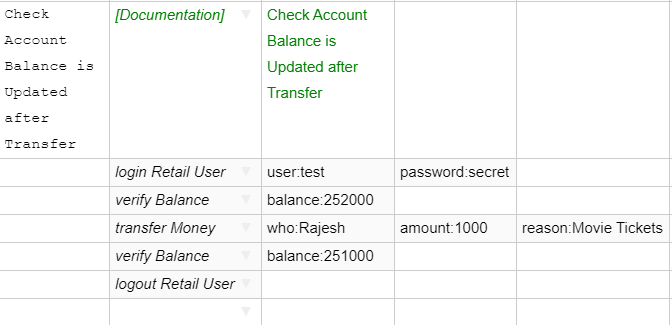
In Sahi Pro, this layer is implemented as Scenario files. This is a csv file which can be edited in our Editor or via MS Excel. A sample scenario looks like this:

Sahi Pro test automation graphic explaining a business layer scenario


Notice how the business layer does not assume anything about the user interface. It does not matter if this is on a web application or on a mobile app.

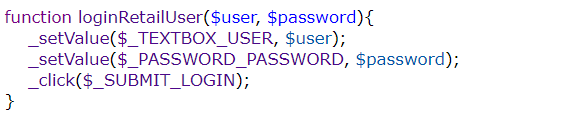
Also, each of the steps in this business flow will correspond to functions or methods implemented separately.

Layer 2: Implementation Layer

This layer implements the business keywords specified in the previous layer

  • Understands interactions between different actions performed on UI
  • Library file with implementation of keywords used in Business Layer
  • Will change if interaction flow changes


Sahi pro graphic explaining test automation functionsNote the name of the method corresponds to the relevant step in the scenario file, the number of arguments and their values are also picked from the provided scenario, while the actual code for the step is implemented inside the method.
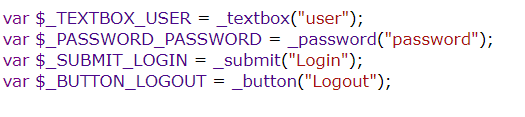
 

Layer 3: Accessor Repository Layer

This is the layer where we store every element’s locator and accessors.

  • This is the Central repository of all elements in the automation code
  • This changes when a particular element changes in the application UI (for example, due to HTML/Javascript changes in web interfaces)

Sahi Pro graphic explaining test automation functionAs you see now, the business layer will be where you will define the flows and actions for every use case. This is high level and mostly worded in natural language. So, eventually your business team as well as manual testers will be able to write the scenario files easily.



The implementation layer is where you take each action and define the methods containing steps to perform that action. This is easily doable using any automation tool. With Sahi Pro, you can use record and playback as well as write your own using simple java script. These functions are stored in library files. These will change only if the flow or sequence of steps changes. These functions are not hard coded with your object ids, so they will not change even if an object’s locator changes. The locators are all in the Accessor Repository layer.

The Object locators are saved in Accessor Repository (AR) files.

In Sahi Pro, you can create an AR automatically as you record your script, and you can also have a single AR for multiple scenarios and scripts. This AR is the place you need to go and edit the object locator if anything changes.

Conclusion

  • Automation code is most useful when there is a lot of change planned in your application
    • Acts as a safety net and guideline
    • Automation code should not be thrown away when application technology changes
  • Building the right layers and strictly following them helps in minimal maintenance efforts and long-lived useful automation scripts


Find out more about maintainable test automation at the EuroSTAR Conference, Nov 11-15. Book your tickets now!

——————————————————————————————–

Author: Nishi Grover Garg – Product Evangelist and Head of Trainings, Sahi Pro

Nishi Grover Garg - Product Evangelist and Head of Trainings, Sahi Pro

Nishi is a corporate trainer, an agile enthusiast and a keen tester at heart! With 11+ years of industry experience in Agile environment, she has worked in various roles as a hands-on tester, automation developer, a freelance consulting trainer and currently works with Sahi Pro as the Evangelist and Trainings Head. Nishi is passionate about training, organizing testing community events and meetups, and has trained hundreds of professionals and teams on agile, test automation, QA bootcamps and DevOps courses.

Nishi is also a writer on technical topics of interest in the industry and has numerous articles published at numerous popular forums and her own blog testwithnishi.com where she writes about the latest topics in Agile and Testing domains. Connect with her at @testwithnishi


Filed Under: Test Automation Tagged With: Test Automation

Smarter Testing. Superior Outcomes. Achieve Both With Micro Focus.

October 25, 2019 by Fiona Nic Dhonnacha

EuroSTAR is Europe’s No.1 software testing conference. Whether your thing is testing, devOps, agile or QA, you’ll be among Europe’s testing stars. The Micro Focus team looks at what delegates can expect.

This year’s conference theme is ‘working well’, and we will be busy at booth 6 proving how our Application Delivery Management solutions can transform your testing environment. We’re bringing our a-Game – and some of our best solutions – to the show.

Visit us at booth 6

See how to minimize risk and maximize user satisfaction by testing early and often with our industry-leading, integrated portfolio for continuous and comprehensive testing of web, mobile, and enterprise applications. The results – smarter testing.

From development through to production, you and your teams will have the benefit of specific, actionable feedback on your applications’ security, functionality, performance, and application readiness status. Ask for a demo in booth 6 and leave the conference with a plan to deliver smarter testing and superior outcomes!

Check out the best in:

  • Micro Focus Functional Testing
  • Micro Focus Performance Testing
  • Micro Focus ALM Octane

Intelligent test automation

Our Functional Testing solutions deliver AI-driven test automation across an unparalleled range of technologies; on the most popular browsers, mobile devices, operating systems, and form-factors; from the cloud or on-premises; to deliver the speed and resiliency required to support rapid application changes within a continuous delivery pipeline.


Optimized application performance

Do you need to test applications and complex scenarios on-premises or in the cloud? Stop by and see how to achieve superb quality at scale. Performance Testing must be part of your DevOps pipeline AND your definition of “Done.”  We help customers confidently test the complex load, stress, and performance scenarios that their applications require while simultaneously providing comprehensive analytics for root cause analysis and accelerated identification of performance issues. Test any application type and protocol on-premises or in the cloud while incorporating real or simulated services and networks.

ALM Octane

Enterprise Agile and DevOps software development faces many challenges and organizations want to improve application delivery processes across the entire application life-cycle. The powerful capabilities in ALM Octane include:

  • Delivering at enterprise scale and optimizing application delivery
  • Providing full application visibility and traceability
  • Increasing application quality
  • Reducing integration costs and achieve better value flow
  • Achieving DevOps management, scalability, automation and intelligence

Stop by and be in with a chance to win

We’re also participating in the “passport around the expo” and the “Expo-Prize giving”, so when you are not hearing from peers in the sessions, be sure to stop by for your chance to win some Lego! Haven’t got your EuroSTAR ticket yet? For a limited time you can use code MICES19 at checkout for a 10% discount.

——————————————————————————————–

Author: Gil Cattelain, Product Marketing Manager, Micro Focus

Micro Focus product marketing manager

Gil has 20+ years of experience in software marketing, including recent time at Echopass and Genesys as Director of Digital Marketing where he specialized in digital marketing for the cloud-based contact center market.

His expertise also includes director of corporate marketing at Matrix42 and product marketing at Novell. He has also held positions as international public relations manager and channel marketing manager.

Gil holds a B.A. in political science from Brigham Young University and is fluent in French.


Filed Under: Application Testing, Test Automation Tagged With: applicat, software testing tools

3 Tips for Your Test Automation Success

October 18, 2019 by Fiona Nic Dhonnacha

Everyone’s talking about test automation: test teams, test managers and project managers. Why? The answer is simple: test automation saves a lot of time and money! BUT test automation is not just test automation…


In order to take full advantage of an automated solution, some rules should be observed. Follow and implement the following 3 tips from our test experts and get an easily maintainable test automation. This quickly pays for itself!

Tip 1: Separation of Concerns

Apart from trivial “Hello World” examples and “Proofs of Concept”, test automation for a technically relevant IT system necessarily results in a comprehensive automation code. This code can then no longer be effectively managed in a monolithic structure. The decisive factor for economic efficiency is that the code has a modular, low-redundancy structure.

A separation of the code into a logical level and a technical level has top priority. The logical level describes the workflow of the test case. The technical level contains the interaction of the code with the test object. This separation ensures that if the test object is changed technically, only the technical level has to be adjusted. Under ideal circumstances, this is exactly one method of the code.

Man sitting at his laptop getting frustrated over test automation

Tip 2: Framework

Complex code for test cases is difficult to understand, debug, and maintain. However, maintenance represents a large part of the total test automation effort. The costs are correspondingly high. It is therefore particularly important to keep this effort as low as possible.
A test automation framework covers a large part of frequently repeating code and thus reduces the complexity of the code.

By outsourcing this code from the test cases into the framework, the implementation of automated test cases is greatly simplified and thus more economical in terms of structure and maintenance.

Tip 3: Re-usability

A test automation component has a high re-usability when used by a large number of automated test cases. The higher the re-use rate, the more “useful” the component is.
A component-based model can automatically lead to a high re-use rate if implemented correctly. This is supported by a hierarchical layered architecture that separates the different levels of abstraction. This leads to a desirable high reuse rate at all levels of the test automation architecture.

Cost Analysis

Do you want to know if your automation is economical? Request the cost analysis and the data table. Get in touch with us via email: marketing@aqua-cloud.io

In order to decide when automation is economical, a cost analysis can be carried out according to a formula tested by our test experts. This formula is used to create a data table with all the cumulative costs of manual and automated operations. This shows from which release the break-even is reached.

——————————————————————————————–

Author: Martin Koch

Martin Koch from Aqua

A fixed parameter in the aqua world – Martin Koch is responsible for product management concerning anything to do with quality assurance software aqua.

Process consulting ITIL – focusing on release – and change management, QM, QA as well as requirements management all belong to his job profile. Equally, project work for customers such as T-Mobile/Telekom and Vodafone. He started off as a Java lead developer, development and project leader for the iTAP project before taking care of conception and development within the aqua team.

In addition to his diploma in computer science, Martin Koch also contributes to the company with his experience in banking, as a developer and graphic designer for interactive media (video game ‘Creatures’) and as a developer of the tele-cooperation software used by the aircraft construction company Airbus.

Filed Under: Test Automation

QA Automation vs. Humans: Can You Automate Everything?

October 2, 2019 by Fiona Nic Dhonnacha

Increasingly, we rely on software to automate our lives. “Hey Google,” we say, “what’s the weather going to be like today?”…“Alexa”, we call, “order me a new dishwasher”.  In the workplace, we use automated HR services to check through applications at breakneck speed, create chatbots to answer all of our customer’s burning questions and rely on automation tools like Zapier to boost our productivity.

Every task we do seems to be heading towards automation. The robots are taking over! But is QA automation also the way forward? Can you really automate everything?

What is automated QA testing?

Automated QA testing uses specialist software to execute pre-scripted test cases. This means that you can run thousands of tests efficiently by programming an automation tool. For example, your new social media app may require a registration form with multiple-choice questions. A script could automate each answer to make sure that all options perform correctly. If the outcomes don’t match the script, they would be flagged for review. In cases like these, automation can be a huge time saver versus a human tester.

But can you automate everything?

Automation is an important part of any testing toolkit. If you know exactly what you want to test, you can effectively achieve a pass or fail scenario, and quickly identify any problems that may arise. But can every part of testing be automated?

Dan Ashby, former Head of Testing at eBay, answered this perfectly when he spoke to Global App Testing co-founder, Ronald Cummings-John for our Amazon best-selling book, Leading Quality. Dan argues that there are two types of testing:

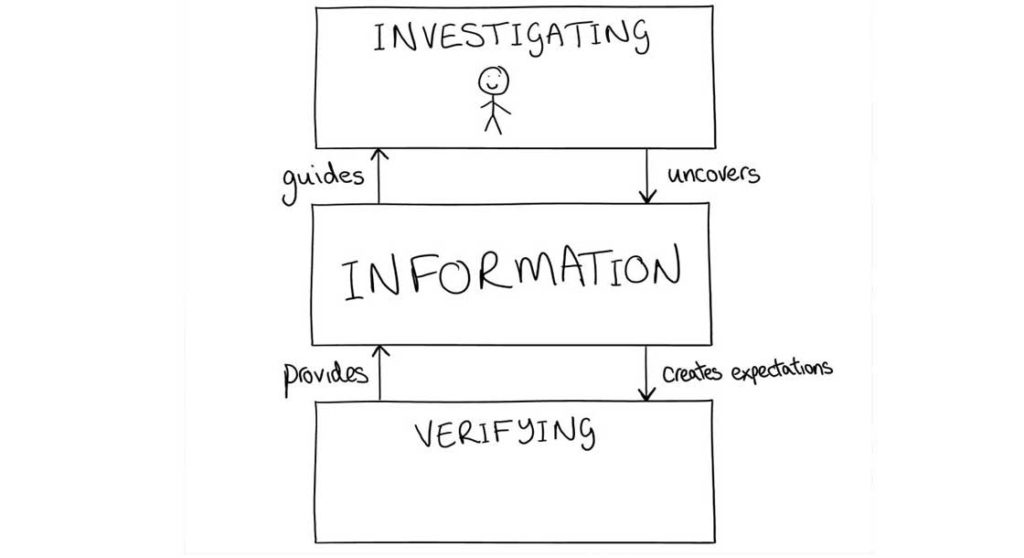
  • Investigating: using our ideas and creativity to attempt to uncover information about a product.
  • Verifying: confirming or denying our pre-conceived expectations of how a product will behave.

For example, if you wanted to conduct investigative testing on your new hotel booking app, you might manually test by attempting to book a room in Paris for the following month. In turn, you may discover a bug you hadn’t expected. This will then lead to verifying testing to confirm whether this is a common issue when trying to book a room. If similar issues arise, this will provide more information to guide the investigation.

Dan says:

“The problem with verifying activities is that you can only verify what you know needs to be checked. But once a problem is uncovered, you then have to investigate it. And that is why you will always need some form of manual testing.”

 When software engineers create apps, they can write up a checklist of all the things it should be able to do. A QA automation specialist can then turn that checklist into a test to verify that the software can do everything it’s supposed to. But, a level of creativity is required to identify ways in which software may not work, and to think up scenarios whereby programmes may not perform as expected.

 There will always be unexpected and unknown possibilities in software development that need to be explored. If you can’t plan for it, you can’t create an automation script for it. Therefore, you will always need professional testers who can use human imagination, knowledge, and experience to conduct investigative testing. Without them, you cannot prepare for the unexpected.

When should you automate?

It isn’t currently possible to automate everything in QA testing – so when should you automate?

Let’s look at the research. In a study conducted by IBM where researchers calculated the cost of manual testing vs. automation, it was found that there were three main situations where automation was more efficient than manual testing:

  1. The automated test case is expected to have a relatively long life without needing to be changed or edited.
  2. The test case is comparatively easy to automate, meaning that it can be created from a generalized manual process; the more complex the task, the more difficult it is to automate.
  3. The comparative cost of automating is lower than that of executing the test manually.

If these situations are in place, then it will likely be cost-efficient and/or time-efficient to automate your testing.

Automation vs humans?

You wouldn’t ask an engineer “what’s the best way to code?”, because that would suggest they were limiting themselves to just one method each time. So why should you only limit your testing to just automation or manual?

What have we shown?

  • There are two types of testing: investigating and verifying.
  • For investigative purposes, you need creativity, and therefore require manual testing
  • For verifying activities you can use either manual or automated testing to test pass or fail scenarios.
  • In certain situations, like those we outlined in ‘when should you automate?’ automated testing can save money and time, and increase productivity
  • In other situations, the creativity of humans can help you discover bugs that you might not have expected.

The answer is clear: by using a blend of automated and manual testing, you can find bugs that may impact your customers before they do. Global App Testing combines humans and intelligent automation to deliver fast, accurate, actionable test results – effortlessly.

If you would like to learn more about manual testing vs. automation, read Leading Quality, the software industries’ ultimate guide to quality.

——————————————————————————————–


Author: Amelia Whyman

Amelia is a Marketing Executive at Global App Testing, a crowdsourced testing company with 25,000+ testers in 105 countries. She writes about QA, software bugs and quality company cultures. She is interested in the future of autonomous testing.

Filed Under: Test Automation

  • « Previous Page
  • Page 1
  • …
  • Page 3
  • Page 4
  • Page 5
  • Page 6
  • Next Page »
  • Code of Conduct
  • Privacy Policy
  • T&C
  • Media Partners
  • Contact Us