• Skip to main content
EuroSTAR 2027 - Sign up for early access

EuroSTAR Conference

Europe's Largest Software Testing Conference.

  • Programme
    • Call for Speakers
    • 2026 Programme
    • Community Hub
    • Awards
  • Attend
    • Why Attend
    • Bring your Team
    • Testimonials
  • Sponsor
    • Sponsor Opportunities
    • Sponsor Testimonials
  • About
    • About Us
    • Our Timeline
    • FAQ
    • Blog
    • Organisations
    • Contact Us
  • Book Now

Test Automation

Moving Beyond Traditional Testing: The Need for Autonomous Testing in Software Development.

July 24, 2023 by Lauren Payne

Thanks to Hexaware for providing us with this blog post.

Software testing is struggling to keep up with the fast-paced and constantly accelerating rate of releases. According to a survey by Gitlab in 2022, seven out of ten developers reported that their teams release code at least every few days, with many doing so on a daily basis. In today’s world, customers and end-users expect new features and functionality at an increasingly rapid pace. Companies that lag behind on new software releases risk being displaced by competitors who can keep up with the latest updates.

When testing fails to keep up with the release pace, organizations face well-known risks associated with releasing software that hasn’t been adequately tested and may contain bugs. For instance, in July 2022, former Volkswagen CEO Herbert Diess was forced out of the company because the automaker’s software unit was unable to produce software of sufficient quality, delaying the launch of its new Porsche, Audi, and Bentley models. Even more recently, in October 2022, Nintendo had to take Nintendo Switch Sports’ servers offline for nearly a week due to a bug that caused the game to crash.

Development teams have attempted to address this dilemma of either issuing potentially buggy software faster or slowing down to test sufficiently with test automation. However, there are significant challenges associated with how test automation is traditionally implemented, and automation still requires highly skilled testers who are always in high demand, making them difficult to hire and retain.
Testing organizations face challenges beyond just automating the creation of tests. Maintaining tests is equally challenging as automation scripts can become outdated and fail to test the required functions in the desired ways. Even with enough testers available, analyzing the impact of changes and configuring the test suite is too complicated to be performed manually. However, the problem extends beyond maintaining automated tests as human analysis cannot identify all areas that require testing.

To overcome these challenges, organizations need to move beyond automation and embrace autonomous testing.

AI-Powered Autonomous Testing

Autonomous testing is the solution to the challenges faced by testing organizations as it enables faster decision-making about which scenarios to test based on the impact of a change without relying too much on human involvement. This dramatically increases testing depth and scope while simultaneously speeding up the process.

In contrast, traditional test automation only addresses one stage of the testing process, which is the automated script execution in the DevOps pipeline, as illustrated in Figure 1.
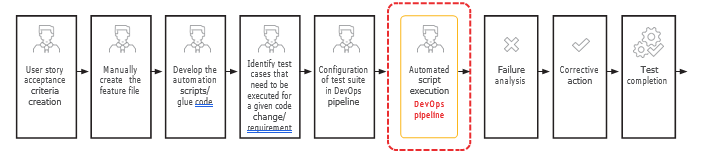
Traditional Testing Process
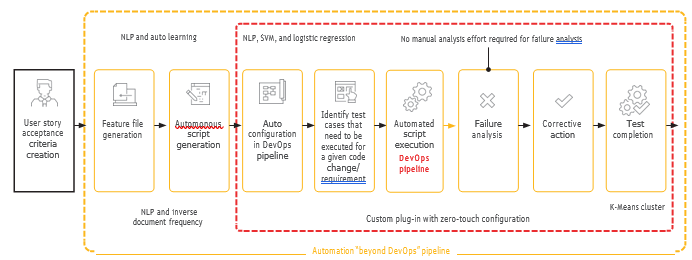
Automation Beyond the DevOps Pipeline

Autonomous testing has the potential to significantly reduce the need for human involvement throughout the testing process (as shown in Figure 2), unlike traditional test automation, which only impacts script execution in the DevOps pipeline (as shown in Figure 1). By utilizing natural language processing (NLP) and machine learning (ML) technologies, organizations can automate the generation of feature files and autonomous scripts. With the addition of deep learning through a support vector machine (SVM), tests can be auto-configured, and cases can be identified for execution when there are changes to code or requirements. Autonomous testing can also perform failure analysis and take corrective action.

As the AI continues to learn from development behavior, test results, and other data, it becomes smarter and more accurate. For example, post-production logs are rarely used, but AI can analyze them and match them to post-production to identify previously unidentified “white spaces” that are likely to have bugs in the future and therefore require testing.

It is crucial to understand that autonomous testing is not a one-time fix, but a continual process of improvement, one case at a time. Organizations can start by identifying a specific bottleneck in the testing process that autonomous testing can address, such as the generation of UI/API scripts or identifying sensitive columns that require masking or synthetic data replacement. Ideally, the case should involve different functions for a particular phase to have a more significant impact. Once the solution has been successfully implemented and shown results, organizations can leverage that success to expand to a new case and continue to improve their testing process over time.

Think of it in terms of autonomous driving. Automakers first rolled out discrete capabilities such as automatic breaking to avoid hitting a stationary object, lane assist, and adaptive cruise control. Implementing autonomous testing requires a similar approach.

Organizations are under pressure to conduct extensive testing within a shorter time frame and with fewer resources, all while delivering high-quality software on schedule. Autonomous testing, powered by AI and ML, can help organizations achieve this goal, but it requires a strategic, long-term approach to implementation. The ultimate outcome is that development teams can release new features more frequently, leading to a better customer experience and a stronger bottom line for the organization.

Learn More

Listen to a Thoughtcast that answers key questions about autonomous software testing and explainshow to move seamlessly from automation.

Reach us at marketing@hexaware.com for more information.

Nagendra BS, Vice President – Digital Assurance, Practice & Solutions at Hexaware

Nagendra has around 21 years of experience in Software industry and is passionate about Quality and Testing and have helped number of customers in their testing transformation journey. He is currently responsible for Go to Market function of the Digital Assurance (Testing) business which includes creation of all service offerings, global presales support, alliances, analyst and marketing functions for Digital Assurance services.

Hexaware is an EXPO exhibitor at EuroSTAR 2023

Filed Under: Development, Test Automation Tagged With: EuroSTAR Conference

How to calculate whether QA tests should be Automated or Manual

July 13, 2023 by Lauren Payne

Thanks to Global App Testing for providing us with this blog post.

In a recent webinar with the easy CI/CD tool Buddy Works, we looked at how businesses can calculate the true cost of testing and use it to determine whether tests should be automated or manual. You can check out our thinking on the subject below .👇

Why do businesses believe they will automate so many tests?

In TestRail’s first annual survey in 2018, businesses set out their plans for test automation. The 6,000 respondents automated 42% of their tests and planned to automate a further 21% next year. 

But they didn’t. In the 2019 survey, the same 42% of tests were automated, and this time, businesses said they would automate 61% in 2020. By the most recent survey in 2021, just 38% of tests were automated. By now, the pattern is consistent. Businesses systematically overestimate the amount they will automate. 

But why?

Why businesses like test automation

Teams tend to like the idea of automating tests. That’s because:

  • You can run automated tests whenever you like
  • Automated tests return results instantly
  • Automation is perceived as a one-time investment, which would make it cheaper to automate over the long term. (In our experience, this is only sometimes true.) 

And then together these factors lead to even better second-order effects: 

  • You can remove bottleneck slowing down your releases if your tests are instant 
  • You can improve your DORA metrics as you measure your progress. 

But the reality of testing difficulty belies this. We ran a survey during a separate webinar about the top reasons businesses felt they couldn’t automate more tests. And here’s the TLDR: 

  • The top result (28%) of respondents cited flaky tests due to a changing product. The second result (26%) is not enough time to automate.  
  • Both answers are time. “Flaky tests due to a changing product” really refers to the time investment of maintaining your tests. “Not enough time to automate” refers to the time investment of setting them up.
  • Businesses are underequipped to calculate the time costs of building and maintaining tests, or the other time demands which will be made of them in the cut and thrust of product development. 

What’s the equation to calculate whether a manual or automated test is better?

setuptime1

ST + (ET x N) = the true time cost of testing.

You can check this for automated and manual tests to identify whether it’s cheaper for your business to execute a test manually or to automate it. 

ET is the execution time. We know that automation is much faster here, and it’s the main metric businesses focus on when they want to automate all their tests. For Global App Testing, we offer 2-6 hour test turnaround with real time results. Tests land in tester inboxes straight away, so in many cases the first results come through much faster.

ST is the setup time including any maintenance time investment. It takes more time to automate a test script than it does to quickly test something or to send it to a crowdtester like Global App Testing. Setup time is also the second barrier to setting up tests, so it’s worth running this algorithm twice – one to add up which is more expensive, and one with adapted algebra to calculate the maximum time your business can invest in one go. 

N is the number of times a test will be used before it flakes. It’s great that execution on an automated test is very rapid; but the saving is immense on a test used 1000s of times. If the test will be used twice before it flakes, the return is less impressive.

A final note is to ensure you know what you’re optimizing for. Is time or money more important? The labour costs of the individuals setting up the automated test (developers) versus the labour costs of individuals executing tests (global QA professionals) could be different; and try running this algorithm with both units plugged in/.

Author

Adam Stead

Adam is the editor-at-large at Global App Testing. He has written extensively about technology business and strategy for a variety of businesses since 2015.

Global App Testing is an EXPO exhibitor at EuroSTAR 2023, join us in Antwerp.

Filed Under: Test Automation Tagged With: 2023, EuroSTAR Conference

The A-Z of Mobile Test Automation

June 7, 2023 by Lauren Payne

Thanks to ACCELQ for providing us with this blog post.

Did you know? There are 5.48 billion unique mobile phone users across the globe. That’s almost 68.6% of the world’s population. No doubt, mobile app testing is soaring in popularity.

Mobile App Testing Is the Need of the Hour


About 59.72% of web traffic today comes from mobile phones. Imagine the quality and performance levels today’s teams must meet to cater to this web traffic. A top priority for teams is ensuring each mobile user has a seamless, secure, and satisfying experience every time they pick up the phone.

Crafting and maintaining this top-notch user experience demands rigorous and continuous testing. The right approach to mobile app testing can bring several benefits to the table. It can:

  • Improve user experience and boost retention rates
  • Reduce the frequency and complexity of bugs
  • Bring much-needed stability into mobile apps
  • Test if new features, changes, and enhancements are working properly
  • Boost user ratings and downloads and improve public perception

But Traditional Approaches to Mobile App Testing Are No Longer Scalable

Device fragmentation is at an all-time high. Testing the rich diversity of browsers, devices, and platform versions would require hiring an army of testers. Add to it the unique characteristics of different types of educational, lifestyle, social media, productivity, and gaming apps and the way they are built. For example:

  • Native apps are developed specifically for a single mobile platform such as iOS or Android. Built using the platform’s native programming language and development tool, they are typically faster and more responsive than other types of apps. Since they take advantage of device-specific features such as sensors and Bluetooth, they provide a more interactive UI/UX and have lesser compatibility issues.
  • Web apps are generally developed for mobile devices and accessed via any internet browser on a mobile device. They do not need any storage space and are constantly updated. They dramatically reduce the business costs associated with development and maintenance. They are responsive websites that adapt the user interface to the user’s device.
  • Hybrid apps are developed using web technologies such as HTML and CSS and wrapped in a native container that allows them to run on multiple platforms. Typically, they are easier and faster to develop than native apps but may not be as fast or responsive. However, hybrid apps are ideal in situations where high performance and full device access are not key requirements.

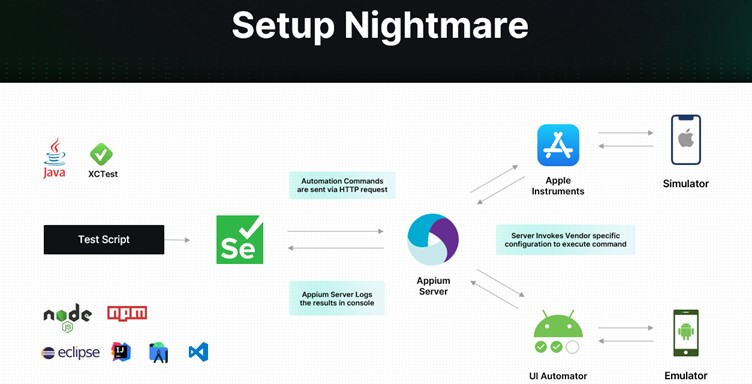
Mobile app testing isn’t just about writing a handful of test cases and running a few tests. Several challenges make testing a nightmare.

Setup

As depicted below, you must first feed your test script to a Selenium tool. Selenium then sends automation commands to an Appium Server, which logs results in a console. The Server also invokes vendor-specific configuration to execute commands via a simulator and an emulator.

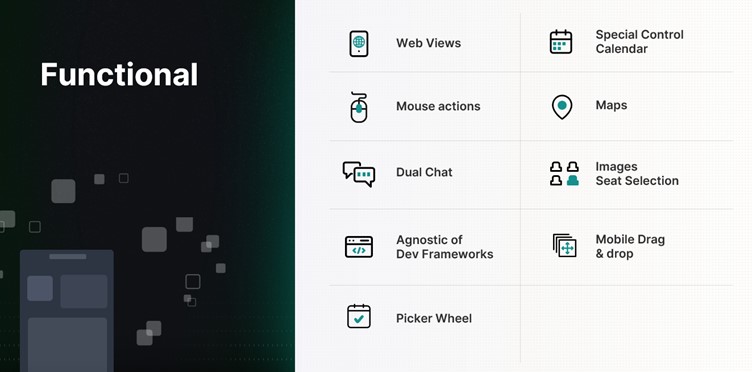
Functional

When it comes to functional testing, several aspects of the mobile app have to be continuously and carefully tested — from web views to mouse actions, maps to images.

Miscellaneous

Mobile apps must also be continuously tested for interruptions. Evaluating how the app behaves during low battery, when a notification pops up, or when a call is received is equally important. In addition, it pays to test:

  • User experience during installation/uninstallation
  • UI with all forms of gesture navigation
  • When users don’t have permissions
  • When the network is not available
  • If your app updates correctly from previous versions

Building and maintaining a QA lab is extremely difficult, with varying mobile architectures, app security requirements, and feature demands. Since every mobile app must be tested for functionality, compatibility, usability, performance, security, and localization, it is critical to automate the testing process. Taking the mobile test automation route can open doors to several time, cost, and efficiency benefits.

Investing in the Right Test Automation Framework Is Key

A modern test automation framework can simultaneously test apps on multiple platforms and quicken the feedback cycle. It can maximize test coverage, enable 24/7 text execution, and allow reusability of test cases. It can also pave the way for seamless scalability – regardless of how big the app grows or how large the user base becomes.

But with so many frameworks available in the market today, how do you make the right choice?

  • How do you ensure the framework keeps up with the pace of app changes?
  • How do you efficiently simulate real-world user scenarios?
  • How do you ensure integration with backend systems?
  • How do you handle different types of apps and different types of mobile platforms?
  • How do you ensure continuous testing?

How To Choose the Right Mobile Test Automation Framework

If you want to transform your testing results, here are some things to keep in mind:

  • Identify your testing requirements
  • Evaluate different solutions
  • Consider ease of use and the overall learning curve
  • Look for a solution that is easy to maintain and scale and is extensible
  • Look for a solution that supports different app types and mobile platforms
  • Invest in a Unified Test Automation platform
  • Evaluate the tool’s DevOps – CI/CD integration capabilities
  • Assess reporting and analytics capabilities
  • Consider support features and evaluate community support
  • Take into consideration the cost and feasibility

How ACCELQ Handles Mobile Test Automation

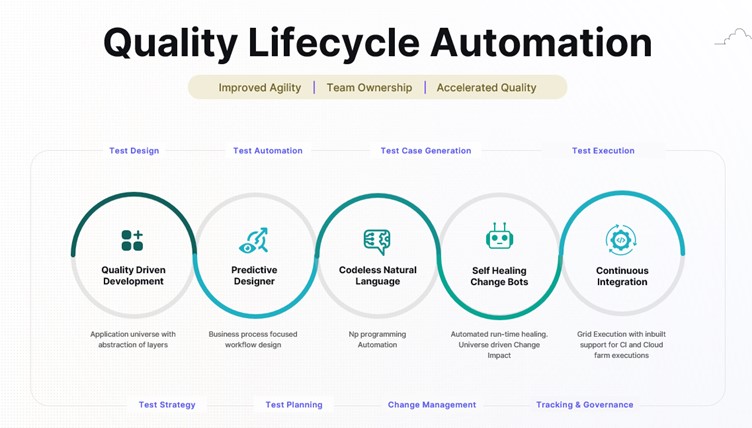
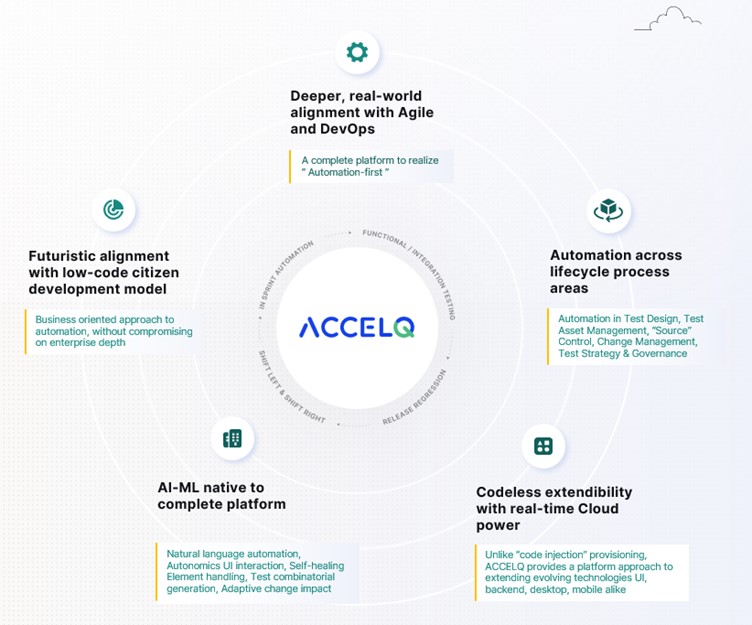
As an intelligent, cloud-based mobile test automation platform, ACCELQ enables seamless multi-channel automation across the mobile tech stack. The tool takes a revolutionary approach to business assurance in a multi-packaged app environment. It allows for codeless mobile test automation that handles real-world complexities and presents a unified view of the quality lifecycle.

ACCELQ is a market leader in test automation and test management. Its automation flow recorder is coupled with a powerful Natural Language no-code editor. It can execute test automation across different mobile OSs and is agnostic of development frameworks. In addition, the tool’s design-first approach with inbuilt modularity means there is no need for custom frameworks.

  • Codeless: ACCELQ’s codeless capabilities allow teams to write and run test cases with zero setup and no coding. It enables testers to automate without the need for programming skills.
  • AI-powered: Being a true no-code mobile test automation platform, ACCELQ’s AI-powered capabilities automate and execute tests across different OSs and devices. The tool’s advanced mobile object handling capabilities eliminate test flakiness.
  • Lifecycle automation: ACCELQ allows for mobile test automation across the lifecycle of mobile apps. Using ACCELQ, teams can easily set up, design, develop, execute, and track mobile test automation.
  • Unified flow: ACCELQ offers full-blown version control, branching, and merging capabilities, all in one unified collaborative cloud platform. Teams can use ACCELQ to enable mobile, web, API, backend, and full-stack automation in the same unified flow.
  • Cross-device: ACCELQ’s Integrated Device Cloud Labs allow for seamless cross-device testing using a simple Plug & Play model.
  • High coverage: ACCELQ’s app universe and analytic-based algorithms drive automated test planning, ensuring coverage.
  • Actionable reports: ACCELQ offers dynamic live results views with actionable reports to trigger reruns. Email notifications that fit into the process allow for quick and effective decision-making.
  • Seamless support: The tool offers seamless support across popular mobile dev frameworks, including Android, iOS, React, Ionic, and Apache Cordova.
  • Robust and sustainable: The ACCELQ platform is robust and sustainable and offers automation capabilities that are significantly low on maintenance.
  • Self-healing: The tool’s self-healing element identification drastically enhances the quality and reliability of tests.
  • Low maintenance: Referential integrity across test assets hugely reduces maintenance and upkeep.

The Way Forward

If you want to meet the expectations of the constantly growing mobile user base, it’s time to take mobile testing more seriously. Embark on the mobile test automation journey today to make your tests more reliable and predictable and your apps more functional and secure.

Author

Nishan Joseph, VP-Sales Engineering,
ACCELQ

Nishan is a highly accomplished and dynamic leader who has been working in the technology space for over a decade. He is known for his ability to build strong partnerships with long-term strategic goals. Nishan leads the Sales Engineering division, while also overseeing some of the larger global Strategic Accounts for the company.

ACCELQ is an EXPO Exhibitor at EuroSTAR 2023, join us in Antwerp.

Filed Under: Test Automation Tagged With: 2023, EuroSTAR Conference, Test Automation

Why Do Testers Need CI/CD Systems?

April 19, 2023 by Lauren Payne

Thanks to JetBrains for providing us with this blog post.

This post was originally published on the JetBrains Qodana Blog.

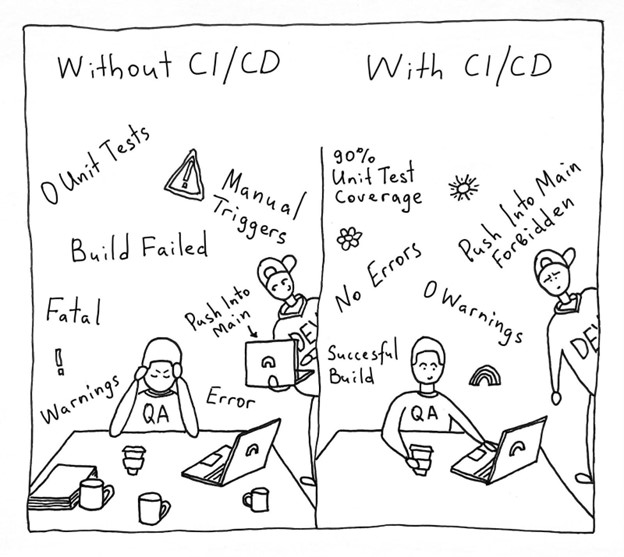
Competency in the TestOps field is now just as much an essential requirement for QA engineers as the ability to write automated tests. This is because of the ongoing development of CI/CD tools and the increasing number of QA engineers who work with pipelines (or the sequence of stages in the CI/CD pipeline) and implement their own.

So why is CI/CD such an excellent tool for quality control? Let’s find out!

Running Tests Automatically

Automated tests haven’t been run locally in what feels like ages. These days, CI/CD pipelines run tests automatically as one of their primary functions.

Pipeline configuration can be assigned to DevOps. But then we will be a long way from making use of the CI/CD tool’s second function: quality control, or more precisely, “quality gates”.

Quality Control Using Quality Gates

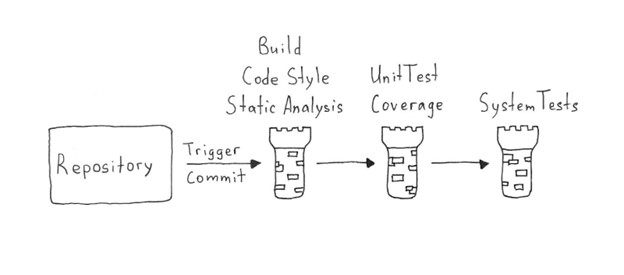
But what are quality gates? Let’s say the product code is like a castle. Every day, developers write new code – which could weaken the foundations of our castle or even poke holes in it if we are really unlucky. The purpose of a QA engineer is to test each feature and reduce the likelihood of bugs finding their way into product code. Lack of automation in the QA process could cause QA engineers to lose sleep, since there is nobody to watch over all the various metrics – especially at dangerous times, like Friday evenings when everyone wants to leave work and is hurrying to finish everything. An ill-fated merge at that moment can cause plenty of unwanted problems down the line.

This problem can be solved by building-in quality checks.

Each check deals with a different important metric. If the code doesn’t pass a check, the gates close, and the feature is not allowed to enter. A feature will only be merged into the product when it has passed all the checks and potential bugs have been fixed.

What Quality Checks can be Included in the CI/CD Pipeline?

We need to put together a list of checks to ensure that the process is as automated as possible. They can be sequenced in a “fail first” order. A feature must pass all the checks to get through the pipeline successfully. The initial checks ensure the app is capable of working: build, code style check, and static analysis.

“Build” speaks for itself: if the app fails to build, the feature does not progress. It is important to incorporate a code style check into your CI/CD pipeline to ensure the code meets unified requirements, as doing so allows you to avoid wasting time on this kind of bug during code reviews.

Static analysis is an essential tool for judging code quality. It can point out a vast number of critical errors that lead to bugs and decrease the number of routine and repetitive tasks for the QA team. Afterwards, developers should fix the detected issues and hand the code over for the testing stage.

We then continue with stage-two checks: unit tests with coverage analysis and coverage quality control, as well as integration and systems tests. Next, we review detailed reports of the results to make sure nothing was missed. At this stage, we may also perform a range of non-functional tests to check performance, convenience, security, and screenshot tests.

When developing a pipeline, we need to pay attention to 2 competing requirements:

  1. The pipeline must guarantee the best possible feature quality in light of your needs.
  2. Time spent running the pipeline should not slow down your workflow. It should generally take no more than 20 minutes.

Examples of Tools to Incorporate in Quality Checks

Code Style Highlighting

A code style is a set of rules that should be followed in every line of code in a project, from alignment rules to rules like “never use global variables”.

You might be wondering what style has to do with testers. The answer is a lot. A style check provides several benefits for QA experts, not to mention the rest of the team:

  1. A unified style helps developers work with the code and gives them more time to implement new features and fix bugs.
  2. A unified style allows you to dispense with manual code checks and use a CI/CD tool to run the checks instead.

Large companies usually have their own style guides that can be used as examples. For instance, Airbnb has a JavaScript style guide, and Google maintains several guides. You can even write your own, should you wish.

The choice of tools for code checking depends on the language. You can find a suitable tool on GitHub or find out which tools other teams use. Linters use bodies of rules and highlight code that fails to abide by them. Some examples include ktlint for Kotlin or checkstyle for Java.

Static Code Analysis

Static code analysis is a method of debugging by examining source code without executing a program. There are many different static code analyzers on the market.

We’ll now look at a platform we’re developing ourselves – Qodana. The significant advantage of this code analyzer is that it includes a number of inspections that are available in JetBrains development environments when writing code.
Many of you probably use an IDE-driven approach, where the IDE helps you write code and points out bugs such as suboptimal code usage, NullPointerExceptions, and duplicates.

But unfortunately, you can never be sure all the critical problems found by the IDE were fixed before the commit. However, you can ensure that the issues will be addressed by incorporating Qodana into your CI/CD pipeline.

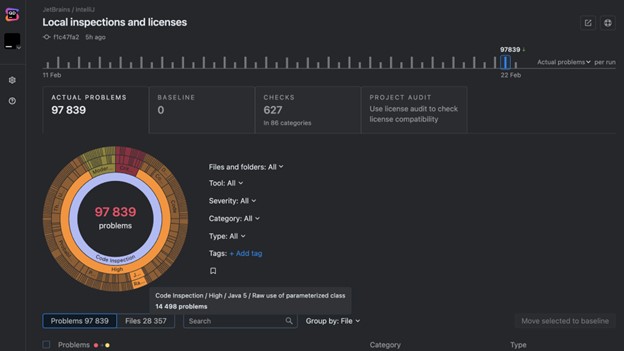
Qodana, the latest addition to the family of products from JetBrains, is a cutting-edge static analysis platform designed to help developers and QA engineers improve their code quality, making it more efficient, maintainable, and bug-free. Its static analysis engine is the only solution on the market that brings native JetBrains IDE code inspections to any CI/CD pipeline. The platform provides an overview of project quality and lets you set quality targets, track progress, and automate routine tasks like code reviews.

Interactive inspection report in the Qodana code quality platform.

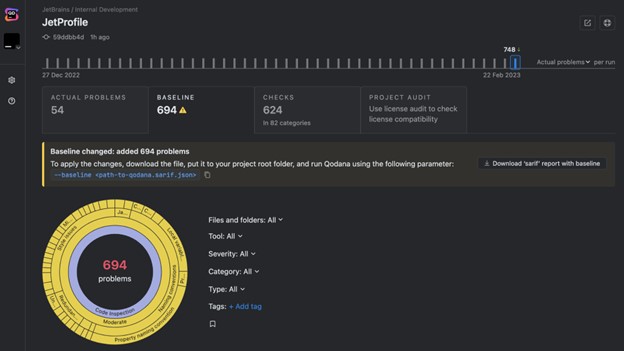
If you can’t fix everything at once, you can select critical problems, add them to the baseline, and gradually work your way through the technical debt. This allows you to avoid slowing down the development process while keeping the problems that have been found under control.

The updated baseline in the Qodana code quality platform.

Test Coverage

Test coverage is a metric that helps you understand how well your code has been covered by your tests (generally unit tests).

Here, you need to define the minimum coverage percentage you want to support. The code won’t be able to go live until it has been covered sufficiently by the tests. The minimum percentage is established empirically, but you should remember that even 100% coverage may not completely save your code from bugs. According to this article from Atlassian, 80% is a good figure to aim for.

Different coverage analyzers are available for other languages, such as Jacoco for Java, Istanbul for JavaScript, or Coverage.py for Python. You can build all these analyzers into your CI/CD pipeline and track the metrics with ease.

Shaping the Release Process

In addition to automatically running tests and ensuring particular code quality requirements are satisfied, the CI/CD tool lets testers organize the release process.

The release process can be complex and depend on many different manual actions. It is often a completely manual process: the artifact is created by a developer, then passed to the testers for checks, and finally comes to the person who knows how to roll it out for the go-live. Once again, there are a lot of potential choke points here. For instance, one of those people could fall ill or go on vacation.

An effective release process will look different for each team, but it will generally include the following steps:

  1. Each change in the Git branch triggers a build of the app.
  2. The build undergoes quality checks and does not become part of the main branch until it passes all the checks successfully.
  3. A release candidate is taken from the release branch or the main branch: this fixes the version and guarantees that nothing will go live unless it has been tested and has not been changed afterwards. This helps with tracking releases and all the changes they include. In addition, storing artifacts of the stable version makes it possible to revert to them quickly in the event of an unsuccessful release.
  4. The release candidate is tested and undergoes final checks.
  5. The release candidate goes live. This may be either a manual or automated pipeline launch, if the release candidate passed all the checks at the preceding stage. The choice between an automatic release process and a manual one will depend on how frequent and important the releases are, as well as the preferences among team members and the convenience of the rollout.

Any CI/CD system allows you to set up this type of process, which should be convenient for the whole team, including the testing team.

Given the factors outlined above, we believe following these basic rules will help ensure an easy and efficient release process:

  • Artifacts must be ready for download and testing, ideally stored in one place.
  • As many checks and tests as possible must be automated.
  • All complex operations with builds should be as automated as possible.
  • All builds that will go live should be recorded and remain available for a certain period after release. This will help if you need to investigate errors in the production version, reproduce bugs, or just track the history.

We would also like to remind you that if quality metrics are not controlled automatically and are not actionable, they are useless, as there’s no way to guarantee that these metrics will be adhered to.

Implement pipelines, automate processes, and use static code analysis!

Your Qodana team

Author

Alexandra Psheborovskaya, QA Lead and Product Manager at JetBrains

JetBrains is a global software company that creates professional software development tools and advanced collaboration solutions trusted by more than 12.8 million users from 220 counties and territories. Since 2000, JetBrains has built a catalog of 34 products, including PyCharm, IntelliJ IDEA, ReSharper, PhpStorm, WebStorm, Rider, YouTrack, Kotlin, and Space, a new integrated team environment.

Qodana is the code quality platform from JetBrains. It provides a project overview and lets developers and QA engineers set up quality gates, enforce project-wide and company-wide coding guidelines, better plan refactoring projects, and perform holistic license audits. Qodana’s static analysis engine enriches CI/CD pipelines with all of the smart features of JetBrains IDEs, supports 60+ languages and technologies, and allows analysis of unlimited lines of code.

JetBrains is an EXPO Platinum partner at EuroSTAR 2023, join us in Antwerp

Filed Under: DevOps, Test Automation, Uncategorized Tagged With: 2023, EuroSTAR Conference, Test Automation

Trends Software Testers Should Watch In 2023

April 12, 2023 by Lauren Payne

Thanks to Mabl for providing us with this blog post.

The digital experience has become a core aspect of the enterprise, forever linked to customer experience and business outcomes. Customers are online more than ever before, and enterprises have to offer reliable, high-quality capabilities that facilitate engaging and inclusive digital experiences. To exceed this elevated bar in 2023, software test teams should be aware of the trends in DevOps, cloud migration, and digital transformation that will continue to be enabled by strong quality practices.

DevOps Adoption Continues to Grow

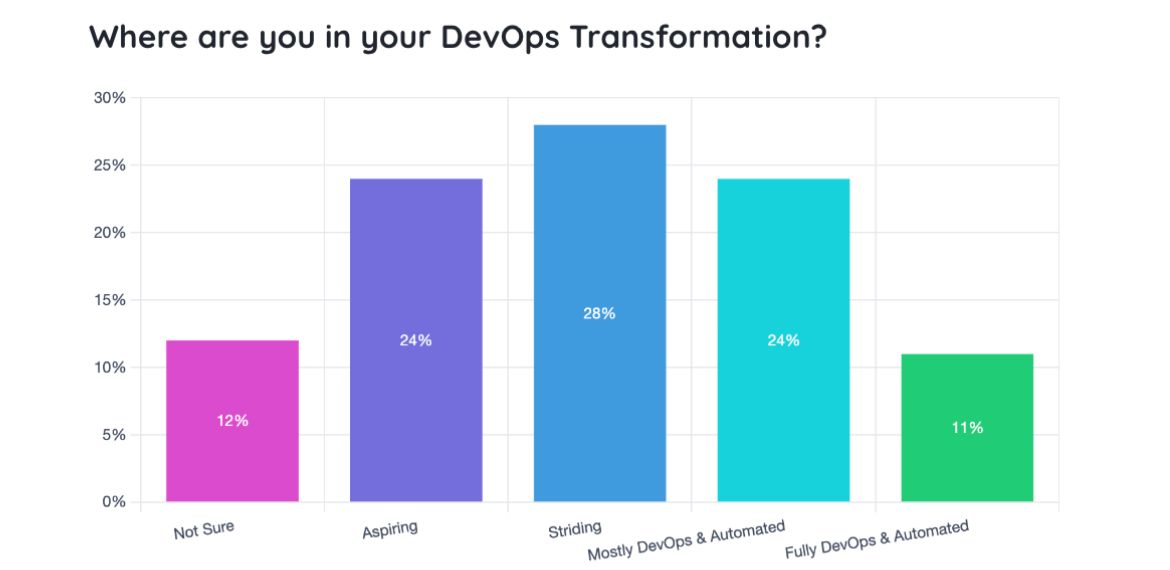
DevOps redefines how teams, processes, and technology are aligned within an enterprise to make software development faster and more collaborative through automation. According to the 2022 Testing in DevOps Report, enterprises of all sizes are pursuing full DevOps adoption with automated workflow pipelines. Embracing DevOps practices successfully requires a continuous view of quality, which requires elevated, automated testing.

DevOps pays off. Google’s 2022 Accelerate State of DevOps Report reveals that high-performing software teams are more likely to embrace DevOps practices like version control (33%), continuous integration (39%), and continuous delivery (46%).

Teams leveraging these practices are quickly maturing in a way that improves overall product velocity, and overall application quality as well. Mature organizations where quality is at the center of their DevOps transformation will achieve these DORA metrics faster while delighting customers with the frequent delivery of new battle-tested features.

Adoption of Cloud Technologies is Accelerating

With the massive shift to cloud-based architecture, software testers must be mindful of controlling quality throughout the migration. Often, the migration to the cloud goes together with DevOps adoption. As development cycles increase, QA teams should investigate cloud testing solutions to quickly scale up test execution – without the limitations of managing on-premise infrastructure.

More Reliance on APIs

Enterprises are becoming more connected and integrated – all possible via APIs. As with cloud computing, this makes the infrastructure more dynamic. It also presents the problem of having to contend with the quality of third-party APIs that may not be properly updated and secure and determining how it will affect the status and quality of the enterprise’s applications. Prioritizing quality with continuous API testing for integrated services allows test teams to detect issues before they affect customers.

Digital Transformation Initiatives are Increasing

Digital transformation remains a top priority for enterprises. In fact, according to one survey, 94% of CFOs recognize the need to maintain or accelerate the already-intense pace of transformation incited by the pandemic. To continue the digital transformation momentum, quality must become a foundation of software development and delivery.

To help enable digital transformation, QA teams can embed quality throughout the software development lifecycle while finetuning processes and QA support. Outside of ensuring the functional correctness of your application, QA teams can start embedding end-to-end, performance, and accessibility tests in the pipeline as well. This way, you confidently deliver better experiences for customers throughout your organization’s transformation.

Ensure Great CX with Low-code Test Automation

Quality is the differentiating factor among competing organizations. Software QA teams have the opportunity to transform technologies, develop new processes, and contribute to excellent customer experiences if they are successful in building a culture of quality in their organization during transformational times.

Once you’ve built a culture of quality and set up the right team and processes, QA leaders need the right tools to execute. These transformations are enabled by intelligent, low-code test automation like mabl. Mabl allows anyone, regardless of coding experience, to create, execute, and maintain tests, integrate those tests into your development pipeline, and share insights into the holistic quality of your application back to the entire software team.

Mabl helps teams scale their testing with 90% less effort, giving QA teams time back to grow test coverage and focus on testing activities that positively impact the customer experience.

Author

Leah Pemberton

Director, Marketing at Mabl

Leah is the Director of Marketing at  Mabl, writing frequently about quality engineering and building a culture of quality.

 Mabl is an EXPO Gold partner at EuroSTAR 2023, join us in Antwerp

Filed Under: DevOps, Software Testing, Test Automation Tagged With: 2023, DevOps, EuroSTAR Conference

ChatGPT for Automated Testing: From Conversation to Code

April 5, 2023 by Lauren Payne

Thanks to SauceLabs for providing us with this blog post.

You’ve probably heard the buzz about what ChatGPT can accomplish but what testing opportunities are there for developers?

You’ve probably heard of ChatGPT, the most recent advance in Natural Language Processing that is taking the internet by storm with over one million users in just five days!

Released only a few weeks ago, the free AI chatbot’s overnight popularity is due to its ability to answer and explain concepts plainly, or perform complex tasks such as writing an article or telling a joke. For web and mobile app developers, there are broad implications for automated testing, since ChatGPT can write test cases in a wide range of frameworks and languages. Let’s explore the possibilities.

What is ChatGPT?

Created by OpenAI, ChatGPT is a large language model that was fine-tuned by supervised and reinforcement learning on large datasets. Using algorithms, ChatGPT analyzes the data to find patterns that help it understand natural language and how words are used in context. It is a dialogue-based model, which means that it is designed for a back and forth chat-like interaction. You can ask ChatGPT to say whatever you want that the system doesn’t consider offensive.

ChatGPT can generate creative and on-topic responses, often providing details on why it generates a specific response. It can also remember its previous responses to have a (mostly) coherent conversation. ChatGPT has been asked to generate everything from answers to questions on soil physics to writing folk songs about beer!

ChatGPT and Automated Testing

One of the most interesting features of ChatGPT to those of us in the software space is that it can generate properly formatted and relevant code based on a simple natural language request. It can generate code in many languages and can employ numerous built-in packages across those languages. So, the natural question is, can ChatGPT be used to generate code for automated testing?

The answer at this point is, “Yes, sort of.” ChatGPT can write Selenium in multiple languages, as demonstrated by Sauce Labs’ own Nikolay Advolodkin in his video, ChatGPT Can Code Better Automation Than Me.

But being able to write code that looks accurate is just the beginning. In an ideal world, one would provide ChatGPT with a description of the test to generate, it would know all the details about the version of the website one is testing, and it would generate perfect, executable code that needs no modifications. ChatGPT currently can’t do that. What it can do is still quite impressive though.

Let’s start with a use case for ChatGPT, not to completely replace testing engineers, but instead as a new low-coding method.

What is Low-Code Testing?

Low-code development allows people to write code with little to no coding experience, using drag-and-drop development platforms or plain English. Low-code testing solutions lower barriers to writing test code by making it easier to scale development organizations. Since tests can be written without a technical skillset, low-code is simpler for teams to write test automation code, reducing test debt.

ChatGPT can be viewed as a powerful low-code tool for writing test cases. ChatGPT accepts natural language as input, so users can write in their natural cadence and still be understood, unlike template-based models which often rely on particular language structures or key phrases. As we will show, ChatGPT does a remarkable job of generating test automation scripts, classes, and functions.

A Language for Low-Code: Cucumber

While ChatGPT can generate many languages and libraries, its sweet spot is its ability to generate Cucumber code. Cucumber is a testing framework that uses behavior-driven development. Scenarios are written in plain English, with some key terms like “Given,” “When,” and “Then” in a feature file. Then, in step definitions, these natural language phrases are associated with code.

Test maintenance is one of Cucumber’s benefits since Cucumber scenarios combine the natural language intent of a test with the automation code which implements it. This lets testers who aren’t as familiar with test code understand the linkage between test intent (in natural language) and test code. This leans into ChatGPT’s strength of generating natural language with associated source code.

ChatGPT and Cucumber Test Case Example

Now let’s see what ChatGPT can do.

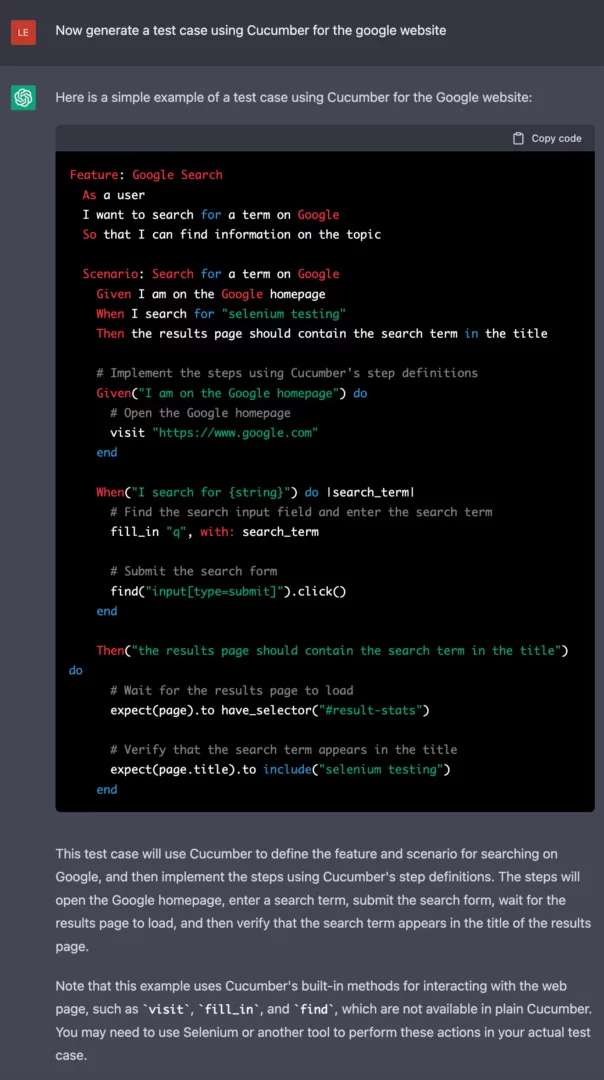
As you can see in the following example, ChatGPT’s ability to generate code is quite impressive. With a simple prompt, it can generate the scenario and the step definitions used by Cucumber all at once. It even knows the different components Cucumber needs to run without being explicitly told.

Cucumber Example

The prompt is vague about what to test on the website, but ChatGPT still generates a script to test one of the main features of the Google website, its search functionality. In this example, it even correctly identifies the name of the search bar for Google, “q.”

A General and Manageable Script

While this is a good example of ChatGPT’s ability to write code in general, not all websites are as ubiquitous as Google. Its accuracy in predicting the identifier “q” does not indicate it will always be correct. And, from testing ChatGPT, we know that if it doesn’t know an accurate element locator, it will make one up.

Going through the generated code and finding and replacing all element locators is tedious, but the problem can be made much easier by separating the code about the page itself from the test cases. We do this by using a page object model. Using a page object model also allows us to update the code if element locators or the structure of the app changes between tests, improving the maintainability of the testing script.

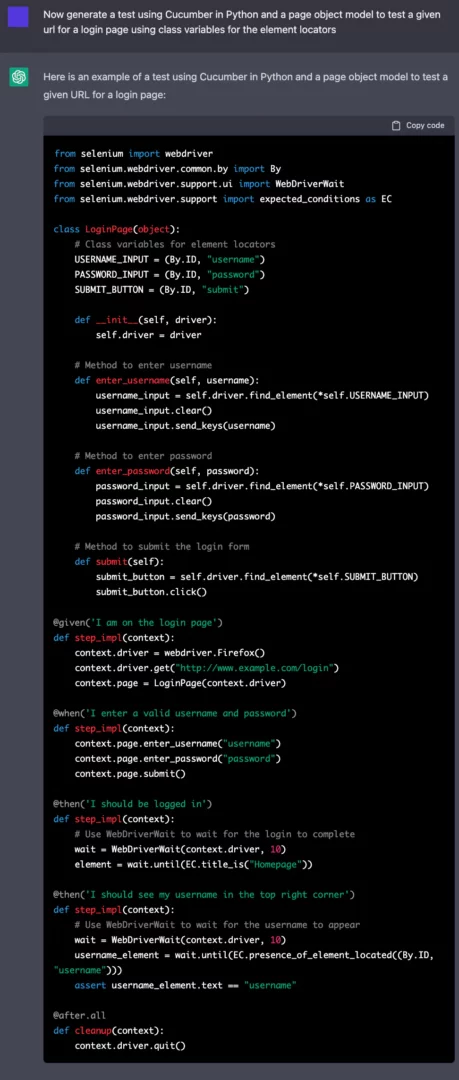
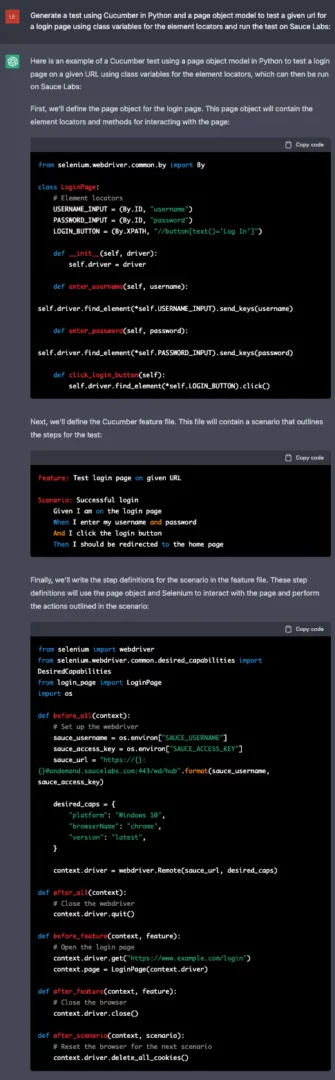
In the following example using Cucumber in Python, we generate a generic test for a login page of a website and instruct ChatGPT to use a page object model and class variables for the element locators.

More specific ChatGPT cucumber python example

ChatGPT correctly generated the aptly named LoginPage object which represents the element locators as class variables and has methods for the common functionalities on login pages, such as entering one’s username. The step definitions, at the bottom of the example, use the methods in the LoginPage to interact with the website.

Now, using the page model object and the step definitions, it seems as though a user could either automate (with ChatGPT) or manually write scenarios to test the website and have working test code! But, will it actually work as-is?

Using ChatGPT to Change and Fix Code

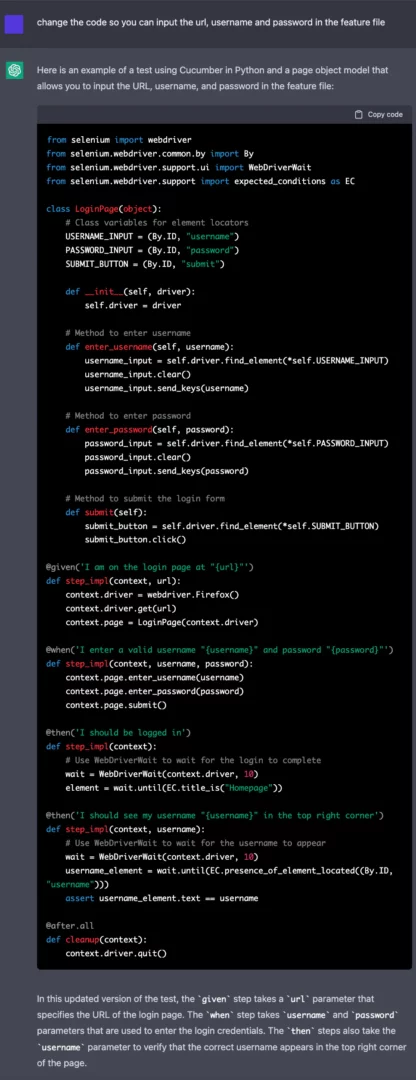
If you look closely you can see all the input values for the test, such as the URL, username, and password, are all hard-coded into the step implementation. It is unlikely that the website you are testing will be “http://www.example.com/login” and that a working username and password combination will be “username” and “password” respectively. And these values do not need to be hard-coded, Cucumber can take variables from the feature file in the scenarios.

But what if you don’t know how this is formatted or don’t want to spend the time to update all the code? Well, you can ask ChatGPT to fix it for you.

ChatGPT code change request

By requesting ChatGPT to update the previously generated code, we can fix the problem. The updated step implementations read in the values that we requested instead of hard coding the most likely incorrect values. That is one of the remarkable features of ChatGPT: the conversational nature of the model allows you to tell the system exactly what you want to change in the code, and it is quite good at listening to and executing your requests.

ChatGPT and Sauce Labs

ChatGPT can generate test scripts that are compatible with Sauce Labs. Since running your script on Sauce Labs requires completely updating how the test is launched using Selenium, having ChatGPT write an accurate startup method could be vital to a user without much coding experience. By just adding “and run the test on Sauce Labs” to the prompt we can generate a script that includes an accurate method to start the test.

Start ChatGPT Test on Sauce Labs

The third code block includes the code to start testing using Sauce Labs. ChatGPT uses the correct URL, passes the necessary capabilities, and uses the correct driver method to start the test. While it arbitrarily decides which platform, browserName, and version to use, these are easily updated either manually or by telling ChatGPT to update these features. It is that easy to run a test generated by ChatGPT on Sauce Labs!

The Downsides of ChatGPT for Automated Testing

While ChatGPT has a lot of potential to be a low-code solution for automated testing, it still has issues. Users need some understanding of the app under test and the coding language and packages being used when generating code since the system often needs to be told to correct issues. ChatGPT does not run the code itself and therefore has no way to know if the code generated is truly runnable. One recurring issue is that the Xpaths or IDs need to be manually updated to accurately locate the correct element, as ChatGPT not only does not know these identifiers, it will fill in random identifiers so that the output code is as complete as possible.

Also, we found the model does not know what methods have been deprecated. It repeatedly used the “find_element_by_*” method to locate elements on the screen, even though that method is no longer functional. Simply asking ChatGPT to update the code with the correct method is a reliable way to correct the problem, but it does require the ability to recognize what the issue is.

Another problem with the above code is the step description does not always accurately reflect what is being tested in the script. For example, the step “I should see my username “{username}” is in the top right corner” uses the method “expected_conditions.presence_of_element_located(),” which only checks to make sure that the element is present on the DOM of the page, not that it is located in a particular region of the screen.

Finally, ChatGPT will assume some common page structures in its test code. The previous examples have both the username and password entered on the same page before submitting, but some websites have you first input the username, then click a button like “Next” and then input the password. A user can use ChatGPT’s dialogic nature to correct issues such as these, but, again, one must be able to recognize they are an issue to request an updated corrected version.

Conclusions

ChatGPT is a very powerful natural language model with enormous potential. What it can do is significant and it likely will lead the way in low-code testing solutions to many problems. It has the potential to do that for testing, but one still needs to have a reasonable understanding of both the language being used and the app under test to make use of ChatGPT as it is. But we shouldn’t underestimate its potential: ChatGPT is truly impressive code generation that wasn’t possible with previous natural language generation models.

If you want to learn more about ChatGPT and test automation, there are additional videos on the topic available, such as AI writes automation test code for any tool – OpenAI’s ChatGPT, AI writes Development Code/Unit/Integration/Mutant Tests – OpenAI’s ChatGPT and How ChatGPT Impacts Automation, Performance, and Security Testing.

Ready to start your automated testing journey? Sign up for a SauceLabs free trial today.

Author

Lena Reed, Senior Data Scientist, SauceLabs

Lena Reed is a Senior Data Scientist at Sauce Labs. She has a PhD in Computer Science from University of California, Santa Cruz, where she studied Natural Language Processing and Natural Language Generation. She likes learning and testing new technologies to see how prompt engineering can affect the results being generated. She also has experience generating and cleaning datasets, such as natural language inputs used to train models, and enjoys getting into the data to see what can be automatically improved to create the best training sets for models. During her time at Sauce Labs she has learned and worked on multiple areas of testing, such as Appium and model-based testing and is very interested in automatic test generation via large language models.

SauceLabs is an EXPO Gold partner at EuroSTAR 2023, join us in Antwerp

Filed Under: Test Automation, Uncategorized Tagged With: 2023, EuroSTAR Conference

Choosing the best Test Automation Tool for your QA Team

March 29, 2023 by Lauren Payne

Thanks to Leapwork for providing us with this blog post.

In this short article we’re going to cover how QA teams can set themselves up for success with test automation and test management that fosters collaboration.

But first, what causes these issues within QA, and how does test automation come into the picture?

Test automation has typically been a very siloed operation. The solutions that we’ve been relying on until now are typically code-based.

And here-in lies the problems with code-based solutions:

  1. They are adopted by a small group of people. People who normally have a developer-type profile. This makes automated testing unusable to those who need it – product owners, test managers, ITOps, and business analysts. Collaboration is hindered.
  2. Developers (as we know too well) are expensive to hire and difficult to find. We need developers to spend their time where they create the most value for the business – developing features, and fixing issues that arise during testing.
  3. The maintenance it takes to keep these automated tests running is immense. Take Selenium as an example which requires more time to maintain than is spent testing. This simply isn’t scalable. And it creates another collaboration blocker.
  4. It can take anywhere between 6-12 months to learn a code-based tool. If there is only one person (we’ve discovered that this is quite often the case) building and maintaining these tests, what happens if they’re on holiday? Or sick? Or quit? If a test breaks, there’s no one to catch regressions or run tests. No one to quickly pick up the build and maintenance of said tests. You can’t meet your deadlines. And the business can’t push out releases or customizations quickly. Progress is put on pause.

What can you do to avoid these bottlenecks?

For starters, test automation doesn’t have to be code-based. In fact, test automation shouldn’t require a tester to code at all.

Testing isn’t a domain that’s specific to developers. It’s a task that’s carried out by an entire profile of people. By that logic, test automation should also be accessible to the people who are testing – business users and analysts (aka. User acceptance testers), test managers, and product owners.

And lastly, test automation shouldn’t require more maintenance than the time you spend testing.

A visual automation framework can help you overcome these challenges.

What exactly is a visual automation framework?

Well, instead of using code to describe test cases or processes, tests are built in a way that people find easy to understand – as simple as cobbling lego blocks together. 

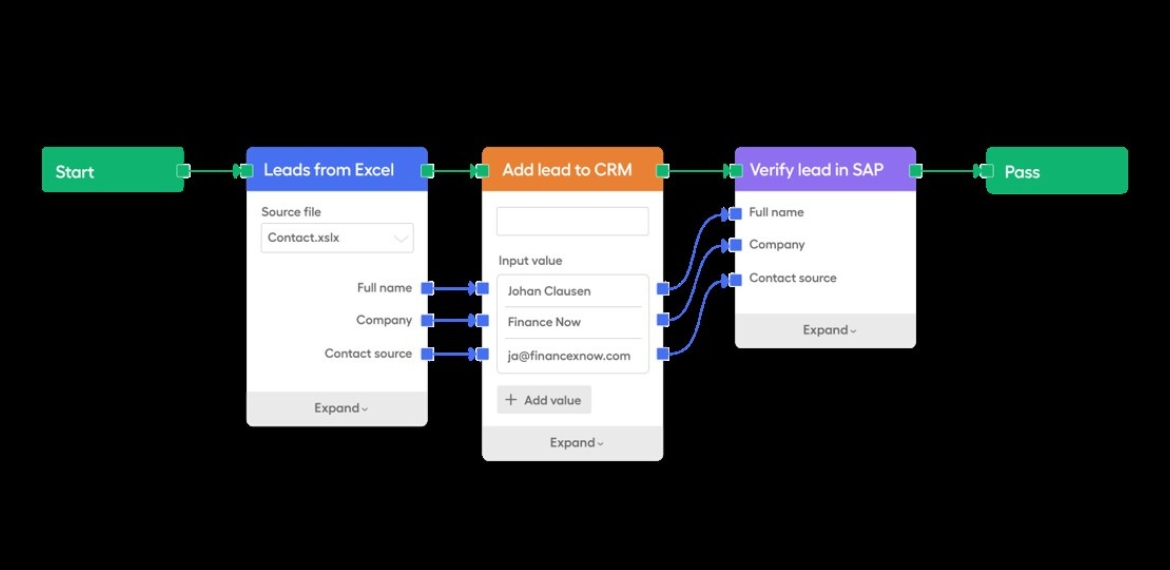
In the image below, you can see an example of what a visual automation framework looks like. A series of blocks that enable any tester to build automation in minutes, and an entire team can learn, build and maintain in a month.

Leapwork automation framework process

Seeing this picture for the first time, it probably won’t capture your imagination right away. But this approach to automation means that you can close the skills gap between developers and testers. You’re enabling anyone with the tester profile to build and collaborate on/with(?) automation.

And, you can keep maintenance to a minimum. You don’t need to comb through lines and lines of code to ensure that a test is functional.

The outcome? Your life becomes a whole lot easier. New features, customizations and products are released much faster.

As a result, there is more room for collaboration between developers and testers during the development lifecycle for the work that you find valuable. And for the work that brings value to the organization.

If you want to learn more about why visual automation frameworks are key for collaboration, and how they can foster a future of faster releases, visit our solutions page on test automation.

Author

Anna Thorsen Automation Expert

Anna Thorsen, Automation Expert at Leapwork

Anna Thorsen is an automation expert and writer and covers a range of topics on test automation. These topics range from tackling technical debt, getting the best return on investment from test automation, and assessing your testing maturity so you can build an efficient QA function.

 Leapwork is an EXPO Gold partner at EuroSTAR 2023, join us in Antwerp

Filed Under: Quality Assurance, Test Automation Tagged With: 2023, EuroSTAR Conference

10 Points to Help You Choose the Right Test Automation Tool

March 24, 2023 by Lauren Payne

Thanks to Testsigma for providing us with this blog post.

Making a decision to start test automation is easy but choosing a right test automation tool is not. There are teams that are spending a lot on hiring new manual testing resources but find it hard to invest in automation. The reasons could be many.

Sometimes, teams spend a lot of time exploring tools and get so overwhelmed with the information out there that they give up on the idea of automation altogether. Other times, choose a generic tool, start with automation but then, never get past the first few test cases.

In this article, we have put together some points that will help such teams navigate their search for the right test automation tool.

Points to Select the Right Test Automation Tool

1. Project Requirements:

There is no point in looking for a solution when you don’t know the problem. So, before you start exploring the various tools and technologies available in the market for test automation, you need to list down your project requirements and the problems you are looking to solve.

The list, in general, should answer the below questions:

  • Type of application that needs to be tested: It could be web, mobile, API or a desktop application.
  • Platforms that need to be tested: If yours is a desktop application, list down the operating systems that should be tested. If yours is a mobile application, then list down the supported mobile operating systems. If yours is a web application, then list down the supported browsers.
  • Language your application is built in: This can help if you are planning to use a programming language for automation.
  • Need for cross-browser testing/cross-device testing: If yours is a web application or a mobile application then you will, most probably, need this.

In addition, you could also add requirements that you deem important.

2. Team Skills / Learning Curve:

When selecting a tool for automation there could be 2 types of tools:

  • A codeless test automation tool
  • An automation tool that requires coding

If yours is a team that already has people that are skilled in some programming language then you can think of using an automation tool in that programming language. Or, if you plan to hire skilled people for automation then you don’t need to consider this point.

But, if you are planning to have an automation tool that will not need you to look for people with the required skillset, going for codeless automation tools will be a good idea. These tools allow the automation of test cases without the need for knowing a programming language.

Check this guide to know about Codeless Testing in detail.

3. Budget:

This is a very important aspect of choosing the correct automation tool. You might easily say that you will want a free tool because you don’t want to spend on automation if you can avoid it.

But, you also need to consider that the amount of time being spent on automation, the number of people working on the tool and the machines being used for automation also constitute the amount you spend on automation. So, consider below points before deciding the budget:

  • Cost of human resources being used for automation: If there is a tool that does not need you to hire new resources especially for automation, consider it a saving.
  • Time spent on learning the tool: If there is a tool that has a low learning curve, that is an indirect saving in the cost you might have spent in terms of the time the resources spend on learning the tool. Or hiring resources that are skilled in that particular tool.
  • Time being spent on automation: If there is a tool that makes it easy to create and maintain test cases, thereby saving time, consider it a saving in cost.
  • Cost of infrastructure: Talking about cloud and hosting, you can go for an ideal PHP hosting that gives an amazing managed hosting experience.

4. Ease of Test Case Creation and Maintenance:

Not every tool is made to handle all kinds of scenarios. So, to make sure that your chosen tool meets your needs, try automating a few test cases of your application to know if the tool suits your needs. That could be done with the trial version of a tool if your search has narrowed down to premium tools.

Also, to avoid spending more time in test case maintenance as compared to test case creation, make sure to choose a tool that fits your budget including the maintenance costs. There are tools that have the ability to self-heal the test cases in case of minor changes in the application.

Such tools help to reduce the cost of test case maintenance. Also, it helps if the tool supports pause and resume of test case execution for a better debugging experience.

5. Reusability:

To avoid writing the same code multiple times in multiple test cases and to avoid duplication of efforts, look for tools that allow the reuse of already created test steps in different test cases and projects.

6. Data-driven Testing:

If yours is an application that needs testing for a variety of data at multiple interfaces, it is important to choose a tool that supports data-driven testing.

7. Reporting:

Test case creation and test case execution would be useless if the reports were not useful so do go through all the features in the reporting supported by a tool. Few of them would be:

  • Screenshots for failed steps
  • Video for test execution
  • Stack trace for the error
  • A clear indication of failed test cases/steps
  • Time taken for execution of test steps and test cases is reported

8. Support for Collaboration:

If you are doing automation of a project for a client, the client will want to review the quality of automated test cases.

It will also be beneficial if other non-technical members of the team are able to automate/review the test cases. So, in such scenarios, look for tools that make collaboration with the management and clients easy.

9. Support for Tools for Integration:

If there are some process improvement or CI/CD tools that you already use or plan on using, make sure that you chose a tool that integrates with them.

10. Training and 24×7 Support:

Consider a scenario – you started using a tool for automation, and after automating about 10 test cases successfully, you got stuck on the 11th test case; you don’t know how to resolve the problem. You have looked at all possible forums but you don’t have a solution in sight. If you want to save the time, use a tool that has 24×7 support to resolve any problems you encounter.

Conclusion

Sometimes, teams decide to create their own test automation frameworks because they cannot find a right test automation tool that fit their testing requirements.

At the moment, there really are multiple types of test automation frameworks and tools available in the market that support automation on a varied variety of applications and are still being improved.

So, do go through the above points and spend some time looking at available test automation tools before thinking of implementing a framework on your own.

At the end, I would like you tell you about a test automation tool Testsigma. It is a cloud-based test automation tool that lets you automate test cases just in simple English – no coding required. In addition, you can automate your test cases for web as well as mobile apps at the same place. Do check it out if it meets your needs.

Frequently Asked Questions

How to Choose Automation Tool?
To choose the right test automation tool, you have to ensure it’s capable, powerful, flexible, and up to the mark for your project requirements. By saying capable, powerful, and flexible, your selected tool should be capable enough to manage all the test cases and test data smoothly. It should also be flexible enough to integrate with other third-party tools to extend and customize the functionality and make testing even easier.

Which Tool is Mostly Used for Automation Testing?
There is an abundance of testing tools available in the market that can be divided into two categories. The first one is the no code low code test automation tool which requires little or no knowledge of programming to perform any type of test automation.

What are the Criteria for Selecting a Test Automation Tool for Your Project?
Criteria to select a test automation tool are the following:

  • Capable- It should be able to manage the project test cases and test data efficiently.
  • Flexibility- It should be able to integrate with other third-party tools to extend the functionality tool.
  • Cost-effective- It should come into your project budget.
  • Learning curve- Learning to use the tool should not be challenging for your other team members.

Is Selenium the Best Testing Tool?
If you are from a developer background, then Selenium is a free and open-source tool project that provides various tools, resources, and libraries to make test automation easy for everyone.

When should We Choose Automation Testing?
When you required speed and accuracy at the same time, you should go for automation testing instead of manual testing, automation testing enables your team to do more in less time by providing the features like test cases to manage the project all test cases, test data management to manage the project test data, test labs to run the test case in the combinations of operating systems and browsers, etc.

Author

Shruti Sharma Testsigma writer and content marketer

Shruti Sharma

Shruti is a writer and a content marketer with more than 10 years of experience in testing and test automation, and has been associated with Testsigma since about 3 years. She loves to read, learn, and write in detail about testing, test automation and tools. In addition, she also writes fiction. One cause she deeply cares about is mental health and psychology.

Testsigma is an EXPO Gold partner at EuroSTAR 2023, join us in Antwerp


Filed Under: Test Automation Tagged With: 2023, EuroSTAR Conference, Test Automation

  • « Previous Page
  • Page 1
  • Page 2
  • Page 3
  • Page 4
  • Page 5
  • Page 6
  • Next Page »
  • Code of Conduct
  • Privacy Policy
  • T&C
  • Media Partners
  • Contact Us

part of the