• Skip to main content
EuroSTAR 2027 - Sign up for early access

EuroSTAR Conference

Europe's Largest Software Testing Conference.

  • Programme
    • Call for Speakers
    • 2026 Programme
    • Community Hub
    • Awards
  • Attend
    • Why Attend
    • Bring your Team
    • Testimonials
  • Sponsor
    • Sponsor Opportunities
    • Sponsor Testimonials
  • About
    • About Us
    • Our Timeline
    • FAQ
    • Blog
    • Organisations
    • Contact Us
  • Book Now

Test Automation

How to Implement Software Test Automation: The QA Leader’s Guide

April 16, 2024 by Lauren Payne

When it comes to developing software, testing is not just a phase; it is a mission-critical function. Each line of code written demands meticulous scrutiny to ensure the end product meets user expectations.

Modern software has become far more complex than ever before. Today’s users expect more features and capabilities across multiple devices. There is increased demand for intuitive interfaces, real-time updates, and flawless performance — all necessitating exhaustive testing.

The need for a more efficient approach is apparent. Automation offers a beacon of hope for quality assurance (QA) leaders striving to optimize their processes.

QA Leaders: Today’s Automation Champions

Over the past decade, the role of the quality assurance (QA) leader has undergone a profound transformation. They have become the vanguards of automation, with the responsibility to steer their teams towards a more efficient and impactful testing process. This shift is not just a response to industry trends; it is a strategic move driven by the escalating complexity of modern software.

Of course, while automation enhances efficiency, it does not replace the critical role of human QA professionals. In fact, testing jobs in the US alone are predicted to increase by 25% in the next decade. Testers’ unique ability to think creatively, design complex test scenarios, and apply domain knowledge ensures that QA professionals will always play a key role in maintaining the overall quality of software products.

The Automation Advantage

When software development is moving at breakneck speed, with top companies deploying software multiple times per day, automation is the key to keeping up with the pace of innovation. Here are just some of the reasons why automation is so important for software testing:

  1. Speed and efficiency
  2. Consistency in performance
  3. Reusability of test scripts
  4. Improved test coverage
  5. Early detection of defects
  6. Resource savings
  7. Parallel testing
  8. Continuous testing

Automation in software testing is not just a trend, but a necessity.

Download the 30-60-90 day plan for qa leaders

Overcoming Common Implementation Hurdles

Despite the clear benefits of automation, there is still hesitation for some organizations to take the leap and automate their testing. This reluctance often stems from misconceptions about complexity and resource requirements.

Busting Complexity Myths

Contrary to popular belief, implementing test automation doesn’t require testers to be seasoned programmers. In fact, there’s an array of low-code and no-code tools specifically designed to empower testers to create effective test scripts without delving into complex coding.

The key lies in understanding that automation is not a barrier but a gateway to enhanced testing capabilities.

Unlocking the Door to Stakeholder Support

Another common hurdle for QA leaders is gaining stakeholder support for automation initiatives. Stakeholders often overlook the value of investing in software testing. However, research shows that organizations can achieve a net present value (NPV) of $4.69 million and an impressive return on investment (ROI) of 162% by leveraging the right automation tool.

When implemented thoughtfully, QA leaders can showcase improved efficiency, reduce time-to-market, and see tangible returns on investment within 9 months.

A Roadmap to Automation Success

Implementing automation need not be an arduous journey. When executed with precision, automation brings about transformative results. QA leaders can spearhead this transformation by focusing on three key aspects:

1. Accessible Automation Tools:

  • Explore user-friendly tools that require minimal coding expertise.
  • Leverage low code/no code platforms to empower testers without extensive programming backgrounds.
  • Opt for tools that offer UI testing capabilities, streamlining the process for non-technical team members.

2. Training and Support:

  • Invest in training programs to upskill the existing team on automation tools.
  • Provide continuous support and mentorship to ease the transition from manual to automated testing.
  • Foster a collaborative environment where knowledge sharing is encouraged.

3. Strategic Planning and Evaluation:

  • Develop a comprehensive 30-60-90 day plan outlining automation milestones.
  • Regularly evaluate progress and make necessary adjustments to ensure alignment with organizational goals.
  • Showcase tangible results and ROI metrics within the 90-day timeframe to secure future investment.

The Path Forward

For those intrigued by the prospect of transforming their testing processes, the eBook, A 30-60-90-Day Plan for QA Leaders, serves as a comprehensive guide. Your automation plan awaits, offering a blueprint for success in the world of test automation.

Author

Anna McCowan – Software Marketing Engineer

Anna McCowan is a software marketing manager at Keysight Technologies who joined the company as a technician in the wafer lab. Anna brings a wealth of technical knowledge from her bachelor’s degree in physics from Sonoma State University. She is a published technical writer who is passionate about educating others on the remarkable innovations in software technology, always striving to bring light to the advances in her field.

Keysight is an EXPO Gold Sponsor at EuroSTAR 2024, join us in Stockholm
Filed Under: Software Testing, Test Automation Tagged With: 2024, Expo

Power Up Your Test Automation Practices With AI: Unlock Key Use Cases

April 9, 2024 by Lauren Payne

With the rapid pace of development cycles and the complexity of modern software systems, manual testing alone often can’t meet the demands of quality assurance. This is where test automation comes into play, offering efficiency, accuracy, and scalability. 

However, even with automation, challenges can still arise, such as maintaining test scripts, handling dynamic user interfaces, and detecting subtle defects. Enter AI, a game-changer poised to revolutionize test automation.

By infusing AI and ML into test automation, testers can build better automations faster through supercharged productivity, as well as improve accuracy and time-to-value through combining Generative AI and Specialized AI. Plus, testers can unlock new use cases by building AI-powered automations. 

So, what are some of the top uses for AI and ML in testing that can supercharge your application testing practices?

Deploy an agent that performs testing fully autonomously

An AI-powered agent can seamlessly tackle the challenge of finding critical problems in your applications, as it can interact with an application constantly. Then, the agent can build a model of your application, discover relevant functionality, and find bugs related to performance, stability, and usability. An agent can also aid in creating a resilient object repository while navigating through a target application, gathering reusable controls for future test case development. The potential of AI doesn’t stop there—the agent can then continuously verify and refresh controls within an object repository, enabling self-healing and maintaining automated tests. 

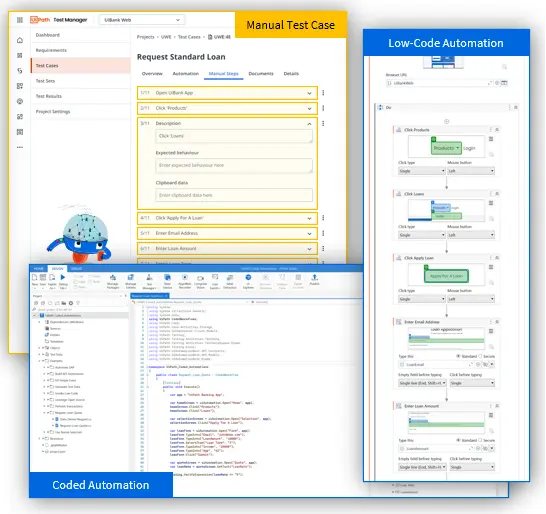
Generate automated low-code and coded tests from step-by-step manual tests

Have manual tests that you want to convert to automated tests? With the power of AI, you can accelerate automation by generating automated low-code and coded tests from manual tests, as well as leverage a flexible automation framework to ensure the resilience of your automated tests. And remember the object repository that your AI-fuelled agent assisted with creating? Equipped with this object repository, you can use AI to consider and smartly reuse any kind of object, such as buttons, tables, and fields.

Create purposeful and complex test data

With AI-infused large language models, you can supercharge your data through enhanced synthetic test data generation for manual and automated test cases. Using AI also enables you to create meaningful test data faster, allowing you to handle intricate data dependencies across multiple test data dimensions.

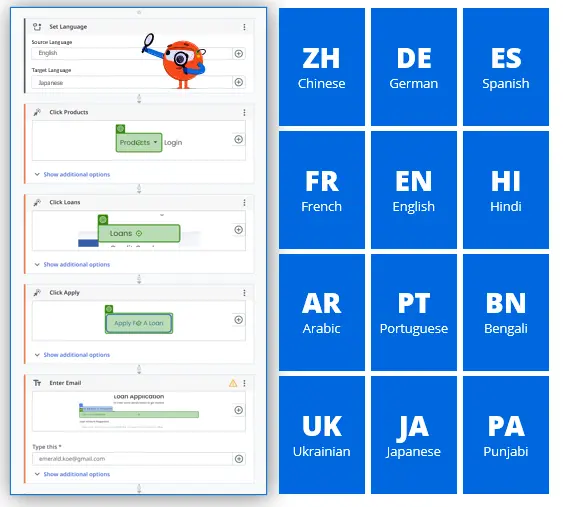
Streamline automated localization testing by leveraging semantic translation

By integrating AI into your test automation practices, you can leverage semantic automation and translation to remove the need for creating separate test cases for each language. The result? Maximized efficiency through seamless automated localization testing. Plus, you can run your automated test cases in different languages, allowing you to expand and scale your testing capabilities globally.

Overall, there’s unlimited potential for AI to supercharge continuous testing across the entire lifecycle—from defining stories, to designing tests, to automating and executing tests, to analyzing results.

UiPath Test Suite for AI-powered test automation

UiPath Test Suite, the resilient testing solution powered by the UiPath Business Automation Platform, offers production-grade, AI-fueled, low-code, no-code, and coding tools so you can automate testing for any technology while still managing testing your way. Later this year, you’ll be able to unlock AI-infused use cases for test automation, such as test generation, coded automations, and test insights, with Autopilot for Test Suite.

Author


Sophie Gustafson, Product Marketing Manager, UiPath Test Suite

Sophie Gustafson has worked at UiPath for two years and is currently a product marketing manager for Test Suite. Sophie has previous experience working in the consulting and tech industries, specializing in content strategy, writing, and marketing.

UiPath is an EXPO Platinum Partner at EuroSTAR 2024, join us in Stockholm.

Filed Under: EuroSTAR Conference, EuroSTAR Expo, Platinum, Sponsor, Test Automation Tagged With: 2024, EuroSTAR Conference, Expo, Test Automation

No-code Test Automation: What it Actually Means

March 26, 2024 by Lauren Payne

No-code test automation solutions are supposed to ease build and maintenance. But does no-code actually equate to an easier and lower maintenance test automation? Well, the short answer is – it’s complicated. We’ll go into more detail below. 

In this short article, we’re going to explain:

1.    What no-code test automation actually means

2.    How to assess no-code test automation vendors

3.    The test automation fallacy

4.    True no-code test automation

What no-code test automation actually means

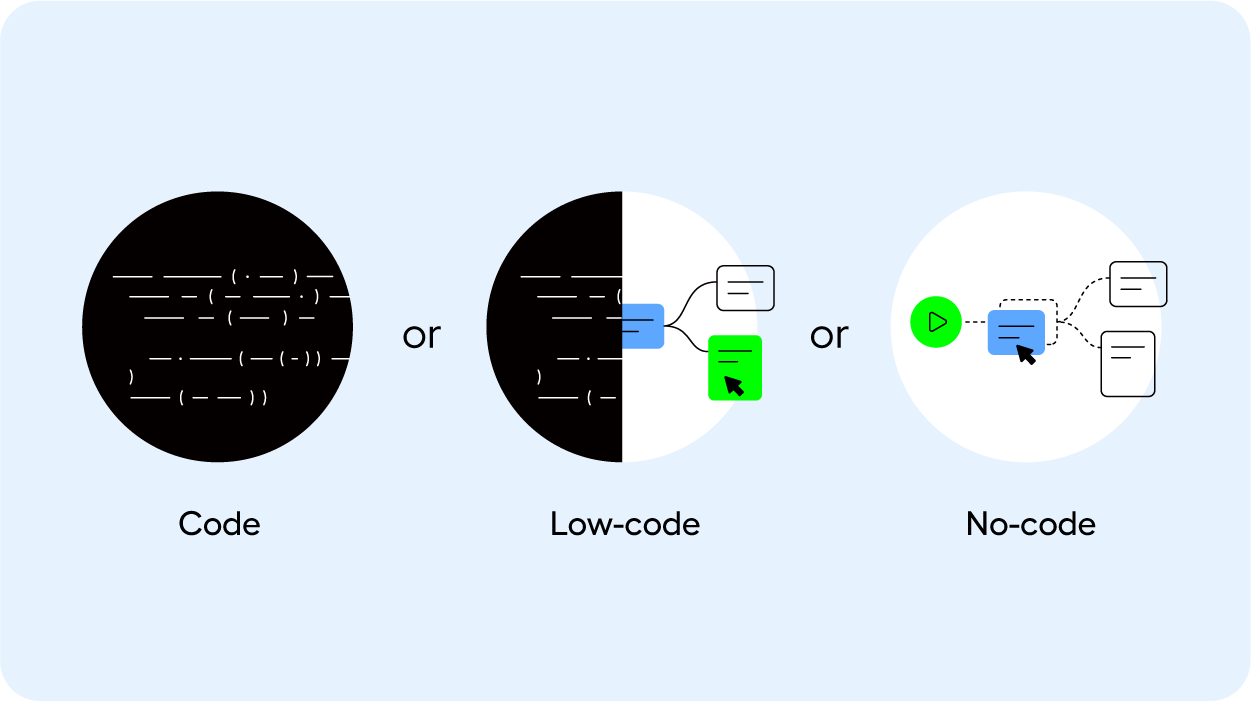
To be no-code, a solution or test automation vendor doesn’t require a user to use a programming language to build an automated test. This makes test automation accessible to the people responsible for QA.  While the underlying solution is built on top of a programming language, the user will never have to interact with code. At least, that’s how it’s supposed to be. What is sold as an easy, no-code, scalable solution is often just a thin layer of UI based on top of a complex machine.

“No-code” and “low-code” are often used interchangeably as well. While in fact, they’re very different once you take a closer look. Low-code solutions do require developers, making them difficult to scale and maintain. 

And so the meaning of no-code has transformed and morphed into something that is no longer no-code So how can you assess whether a test automation vendor is actually no-code?

How to assess no-code test automation solutions

When you’re on the hunt for a test automation vendor, this is your time to put their solution to the test. 

Beyond the technology, process, and organizational fit, have the vendor show you how the solution performs on test cases that are notoriously complex for your business. 

Do they require coded workarounds to get the test case to work? Or can a business user or QA team member handle the build and maintenance of the test cases, without requiring developers? And when something breaks, how easy is it to find the root cause?

This is where you can understand whether no-code actually means no-code. 

We detail all the steps that you need to consider when you’re on the hunt for a test automation vendor in this checklist – you’ll be equipped to assess a vendor on their process, technology, and organizational fit, their ease of use and maintenance, training, and support. 

The test automation fallacy 

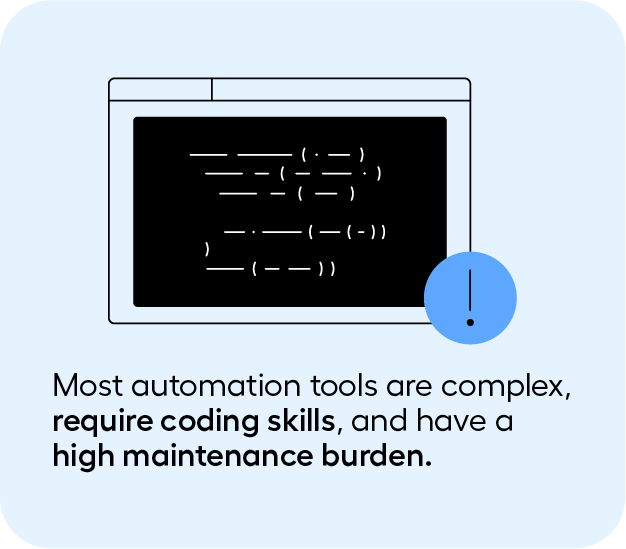
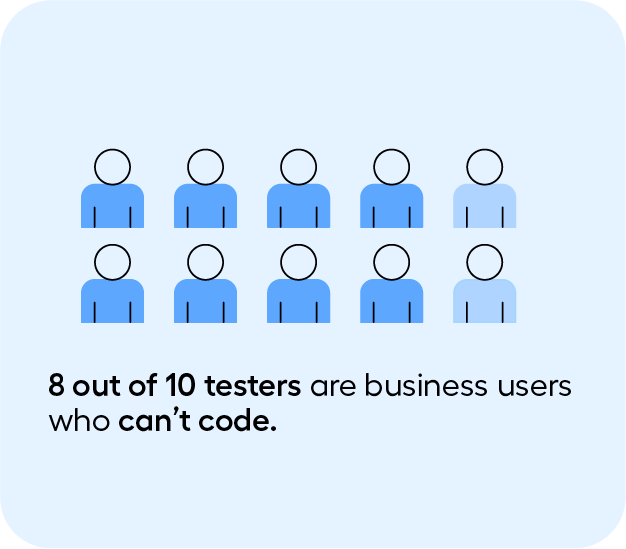
Automation tools are complex and many of them require coding skills. If you’re searching for no-code test automation, you’ll undoubtedly know that. Because 8 out of 10 testers are business users who can’t code​. 

And because of this previous experience, many have internalized three things:

1.    Test automation always has a steep learning curve – regardless of whether or not they’re no-code. 

2.    Test automation maintenance is always impossibly high

3.    Scaling test automation is not possible

But what if we told you that’s not the case. 

What if there actually was a solution that:

1.    Is easy to use, and can bring value to an organization in just 30 days. 

2.    That maintenance can be manageable, without having to waste valuable resources

3.    And that test automation can be scaled

Introducing Leapwork: a visual test automation platform

Leapwork is a visual test automation solution that uses a visual language, rather than code. This approach makes the upskilling, build, and maintenance of test automation much simpler, and democratizes test automation. This means testers, QA and business users can use test automation, without requiring developers. 

Users can design their test cases through building blocks, rather than having to use code. This approach works even for your most complex end-to-end test cases. 

Read the full article on Leapwork.

Author


Maria Homann 

Having worked for 4+ years at the forefront of the QA field to understand the pains of implementing testing solutions for enterprises, her writing focuses on guiding QA teams through the process of improving testing practices and building out strategies that will help them gain efficiencies in the short and long term.

Leapwork. is an EXPO Gold Sponsor at EuroSTAR 2024, join us in Stockholm.

Filed Under: Sponsor, Test Automation Tagged With: 2024, EuroSTAR Conference, Expo, Test Automation

Myth vs. Reality: 10 AI Use Cases in Test Automation Today

March 5, 2024 by Lauren Payne

For decades, the sci-fi dream of simply speaking to your device and having it perform tasks for you seemed far-fetched. In the realm of test automation and quality assurance, this dream is inching closer to reality. With the evolution of generative AI, we’re prompted to explore what’s truly feasible. Embedding AI into your quality engineering processes becomes imperative as IT infrastructures become increasingly complex and integrated, spanning multiple applications across business processes. AI can help alleviate the daunting tasks of knowing what to test, how to test it, creating relevant tests, and deciding what type of testing to conduct, boosting productivity and business efficiency.

But what’s fact and what’s fiction? The rapid evolution of AI makes it hard to predict its capabilities accurately. Nevertheless, we’ve investigated the top ten key AI use cases in test automation, distinguishing between today’s realities and tomorrow’s aspirations.

1. Automatic Test Case Generation

Reality: AI can generate test cases by analyzing user stories along with requirements, code, and design documents, including application data and user interactions. For instance, large language models (LLMs) can interpret and analyze textual requirements to extract key information and identify potential test scenarios. This can be used with static and dynamic code analysis to identify areas in the code that present potential vulnerabilities requiring thorough testing. Integrating both requirement and code analysis can help generate potential manual test cases that cover a broad set of functionalities in the application.

Myth: But here’s the caveat: many tools on the market that enable automated test case generation create manual tests. They are not automated. To create fully automated, executable test cases is a use case that remains a myth and still requires further proof. Additionally, incomplete, ambiguous, or inconsistent requirements may not always generate the right set of tests, and this requires further development. Test cases may not always cover edge cases or highly complex scenarios, nor are they able to cover completely new applications. Analysing application and user interaction data may not always be possible. As a result, human testers will always be required to check the completeness and accuracy of the test suites to consider all possible scenarios.

2. Autonomous Testing

Reality: Autonomous testing automates the automation. Say what? Imagine inputting a prompt into an AI model like “test that a person below the age of 18 is not eligible for insurance.” The AI would then navigate the entire application, locate all relevant elements, enter the correct data, and test the scenario for you. This represents a completely hands-off approach, akin to Forrester’s level 5 autonomous state.

Myth: But are we there yet? Not quite, though remarkable technologies are bridging the gap. The limitation of Large Language Models (LLMs) is their focus on text comprehension, often struggling with application interaction. For those following the latest in AI, Rabbit has released a new AI mobile phone named r1 that uses Large Action Models (LAMs). LAMs are designed to close this interaction gap. In the realm of test automation, we’re not fully there. Is it all just hype? It’s hard to say definitively, but the potential of these hybrid LAM approaches, which execute actions more in tune with human intent, certainly hints at a promising future.

3. Automated Test Case Design

Reality: AI is revolutionising test case design by introducing sophisticated methods to optimise testing processes. AI algorithms can identify and prioritise test cases that cover the most significant risks. By analyzing application data and user interactions, the AI can determine which areas are more prone to defects or have higher business impact. AI can also identify key business scenarios by analysing usage patterns and business logic to auto-generate test cases that are more aligned with real-world user behaviors and cover critical business functionalities. Additionally, AI tools can assign weights to different test scenarios based on their frequency of use and importance. This helps in creating a balanced test suite that ensures the most crucial aspects of the application are thoroughly tested.

Myth: However, AI cannot yet fully automate the decision-making process in test suite optimisation without human oversight. The complexity of certain test scenarios still requires human judgment. Moreover, AI algorithms are unable to auto-generate test case designs for new applications, especially those with highly integrated end-to-end flows that span across multiple applications. This capability remains underdeveloped and, for now, is unrealised.

4. Testing AI Itself

Reality: As we increasingly embed AI capabilities into products, the question evolves from “how to test AI?” to “how to test AI, gen AI, and applications infused with both?” AI introduces a myriad of challenges, including trust issues stemming from potential problems like hallucinations, factuality issues, and explainability concerns. Gen AI, being a non-deterministic system, produces different and unpredictable outputs. Untested AI capabilities and AI-infused applications can lead to multiple issues, such as biased systems with discriminatory outputs, failure to identify high-risk elements, erroneous test data and design, misguided analytics, and more.

The extent of these challenges is evident. In 2022, there were 110 AI-related legal cases in the US, according to the AI Index Report 2023. The number of AI incidents and controversies has increased 26-fold since 2021. Moreover, only 20% of companies have risk policies in place for Gen AI use, as per McKinsey research in 2023.

Myth: Testing scaled AI systems, particularly Gen AI systems, is unexplored territory. Are we there yet? While various approaches and methodologies exist for testing more traditional neural network systems, we still lack comprehensive tools for testing Gen AI systems effectively.

AI Realities in Test Automation Today

The use cases that follow are already fully achievable with current test automation technologies.

5. Risk AI

It’s a significant challenge for testers today to manage hundreds or thousands of test cases without clear priorities in an Agile environment. When applications change, it raises critical questions: Where does the risk lie? What should we test or prioritize based on these changes? Fortunately, risk AI, also known as smart impact analysis, offers a solution. It inspects changes in the application or its landscape, including custom code, integration, and security. This process identifies the most at-risk elements where testing should be focused. Employing risk AI leads to substantial efficiency gains in testing. It narrows the testing scope, saving considerable time and costs, all while significantly reducing the risk associated with software releases.

6. Self-Healing

By identifying changes in elements at both the code and UI layer, AI-powered tools can auto-heal broken tests after each execution. This allows teams to stabilize test automation while reducing time and costs on maintenance. Want to learn more about how Tricentis Tosca supports self-healing for Oracle Fusion and Salesforce Lightning and Classic? Watch this webinar.

7. Mobile AI

Through convolutional neural networks, mobile AI technology can help testers understand and analyze mobile interfaces to detect issues in audio, video, image quality, and object steering. This capability helps provide AI-powered analytics on performance and user experience with trend analysis across different devices and locations, helping to detect mobile errors rapidly in real time. Tricentis Device Cloud offers a mobile AI engine that can help you speed up mobile delivery. Learn more here.

8. Visual Testing

Visual testing helps to find cosmetic bugs in your applications that could negatively impact the user experience. The AI works to validate the size, position, and color scheme of visual elements by comparing a baseline screenshot of an application against a future execution. If a visual error is detected, testers can reject or accept the change. This helps improve the user experience of an app by detecting visual bugs that otherwise cannot be discovered by functional testing tools that query the DOM.

9. Test Data Generation

Test data generation using AI involves creating synthetic data that can be used for software testing. By using machine learning and natural language processing, you can produce dynamic, secure, and adaptable data that closely mimics real-world scenarios. AI achieves this by learning patterns and characteristics from actual data and then generating new, non-sensitive data that maintains the statistical properties and structure of the original dataset, ensuring that it’s realistic and useful for testing purposes.

10. Test Suite Optimisation

AI algorithms can analyze historical test data to identify flaky tests, unused tests, redundant or ineffective tests, tests not linked to requirements, or untested requirements. Based on this analysis, you can easily identify weak spots or areas for optimization in your test case portfolio. This helps streamline your test suite for efficiency and coverage, while ensuring that the most relevant and high-impact tests are executed, reducing testing time and resources.

What about AI’s role in performance testing, accessibility testing, end-to-end testing, service virtualization, API testing, unit testing, and compatibility testing, among others? We’ve only just scraped the surface and begun to explore the extensive range of use cases and capabilities that AI potentially offers today. Looking ahead, AI’s role is set to expand even further, significantly boosting QA productivity in the future.

As AI continues to evolve, offering tremendous benefits in efficiency, coverage, and accuracy, it’s important to stay cognizant of its current limitations. AI does not yet replace the need for skilled human testers, particularly in complex or nuanced scenarios. AI still lacks the human understanding needed to ensure full software quality. Developing true enterprise end-to-end testing spanning multiple applications across web, desktop, mobile, SAP, Salesforce, and more requires a great deal of human thinking and human ingenuity, including the capability to detect errors. The future of test automation lies in a balanced collaboration between AI-driven technologies and human expertise.

Want to discover more about Tricentis AI solutions and how they can cater to your unique use cases? Explore our innovative offerings.

Tricentis offers next-generation AI test automation tools to help accelerate your app modernisation, enhance productivity, and drive your business forward with greater efficiency and superior quality.

Author

Simona Domazetoska – Senior Product Marketing Manager, Tricentis

Tricentis is an EXPO Gold Sponsor at EuroSTAR 2024, join us in Stockholm
Filed Under: EuroSTAR Conference, Gold, Sponsor, Test Automation, Uncategorized Tagged With: 2024, Expo, software testing tools, Test Automation

Test Automation Strategy – Everything You Need To Know

August 14, 2023 by Lauren Payne

Thanks to Solwit for providing us with this blog post.

Is it possible to implement test automation without a specific plan? What should a well-prepared strategy entail? In this interview, Michal Zaczynski, Software Testing Domain Expert, talks about the pros and cons of test automation and the benefits it can bring to businesses.

What are the short-term and long-term business benefits of automated software testing?

Business benefits can only be weighed by considering test automation, technology, and tools used in creating the product. Software testing always brings profits.

For a simple website without complex business logic, created using a popular platform, we can find out the results of automated tests even within a few hours using commercial automation tools. On the other hand, in the case of more complex test items and the multitude of automation tools or customized frameworks used, this time will significantly expand – even to 2-3 months.

Despite this, it is worth noting that this is not time wasted for business. The time saved by automated testing can be used to perform other, more complex tasks.

Among the most substantial long-term benefits is quick feedback on the quality of an application, the ability to test more often, releasing manual testers’ time resources, so they can focus on areas that still need to be tested, or the ability to repeat automated tests. All this leads to a significantly improved testing process and, ultimately, a higher quality product, assuming that the reported defects are remedied.

Is test automation required for all software projects, or are there situations where it is not?

No, it is not required, and there is no business case for doing so in many cases. This is particularly true for short-term projects, where automation can take longer than product development. Another example would include strictly hardware-related projects requiring manual actions, e.g., replacing a chip, rewiring expansion cards, etc. In this situation, the cost of setting up automated software testing equipment might be too high compared to the benefits. A project focused only on the graphical part of the application (UI), which changes.

Are there some criteria (maturity or otherwise) a company/project should meet to take advantage of software test automation?

That’s definitely an in-depth business analysis and defining realistic goals based on this that we would like to accomplish through software test automation.

Is an automation testing strategy always necessary, or can we do without it, and if so, why?

The test automation strategy should include, among other things:

  • defining the scope of automation and the level of testing,
  • defining the framework and tools for automation,
  • identifying test environments,
  • creating the tests themselves and running them.

It seems impossible to complete test automation by skipping any of the above steps. Even if you run a project that is very similar to the one already implemented, using the same technologies and resources, you still analyze the development possibilities subconsciously.

It is worthwhile to keep in mind that not having a strategy can also be a strategy.

What features should companies consider when designing an automation testing strategy?

These features are due to the steps included in the automation testing strategy, as defined in the earlier question. These are:

  •  Test type and level.
  •  The test team’s resources and skills.
  •  The desired features of the framework and automation tools (how they will be run).
  •  The purpose of test automation.

How do you know your automation testing strategy is actually effective?

A strategy is appropriate when it achieves defined objectives with an acceptable ROI. In light of these two pieces of information, we can say without a doubt that the automation path chosen is the right one.

What best practices or trends are you witnessing in the software testing automation field?

The context of recent trends suggests that many tools are adopting AI and taking a codeless approach to capture the market. Although they haven’t yet dominated the market, they are certainly growing in popularity. Their high license costs hinder their use, often linked to the number of automated tests created. It would also be worth mentioning the Playwright framework (open source), something the testing community has been hearing more and more about.

Many good practices exist, but they can all be combined into one – treat test automation like any other development project, following the same principles. This approach eliminates the need to re-solve old and familiar problems when developing applications or writing automated tests.

If you are seeking a technology partner to test your software, get in touch with us! We have successfully completed many projects that required the execution of automated tests, the choice of the right type of tests, the selection of the right tools, or creating them from scratch. We will be more than happy to tell you how to get it done. Set up a free consultation!

Author

Michał Zaczyński – Software Testing Domain Expert

Michał Zaczyński – has been with Solwit for over ten years. He’s a flesh and blood tester – his experience includes Quality Assurance activities, work with IEEE/ISO standards, and supervision of test projects. In his view, a competent specialist combines practical experience with theoretical understanding, seasoned with a dash of “that something” one must possess.

Solwit is an EXPO Exhibitor at EuroSTAR 2023, join us in Antwerp

Filed Under: Test Automation Tagged With: 2023, EuroSTAR Conference

Smarter Test Automation

August 9, 2023 by Lauren Payne

Thanks to Anne Kramer, Global CSM at Smartesting for providing us with this blog post.

Why did the smart tester refuse to use manual testing methods? Because they didn’t want to be called “dumb testers”!

This joke created by ChatGPT sums up well the prevailing spirit in software testing. To reach the goals, which are better products, cheaper tests and faster delivery, most organizations rely on test automation. But is this smart?

Yes, it is. However, it’s anything but smart to drive very fast with your eyes closed and that’s exactly what happens in many cases. People are automating come hell or high water, without really questioning how useful the tests actually are. In the end, automated tests can be repeated ad infinitum, and we are surprised that they still miss numerous defects. We are on the racetrack, but we are going in circles.

Similar to a car trip, test automation also needs a plan where to go. Test automation requires smart test design.

Shift Left!

A commonly accepted way to strengthen QA in general and test design in particular is Shift-Left Testing. Today, testing early and often is generally considered as being a good way to reduce risks, costs and to improve quality. The earliest possible time to consider testing is at the beginning of development, when requirements are defined.

This is how Acceptance Test-Driven Development (ATDD) came up. Test scenarios serve as specification by example and replace detailed requirements descriptions. Behavior-Driven Development goes one step further and facilitates automation through the semi-formal Gherkin syntax. The user story’s acceptance criteria are directly described through acceptance test scenarios.

Visual ATDD

But acceptance testing is far more than just acceptance of individual user stories. Functional system testing should verify that the system under test can be used in a larger context. It is important to check entire workflows, thus covering several user stories in a row. Here, the semi-formal Gherkin syntax reaches its limits. Long scenarios are difficult to understand and even more difficult to keep up-to-date.

To solve the problem, we have to design our system tests incrementally, following a test-driven, top-down approach. To keep the overview and to cope with complexity, visual representations are extremely helpful. If we add to that the principles of Model-Based Testing (MBT), we get Visual ATDD, a lean and agile version of MBT.

Yest® by Smartesting

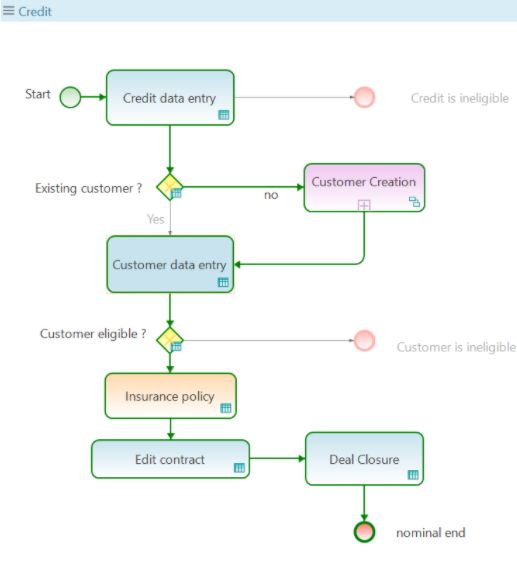
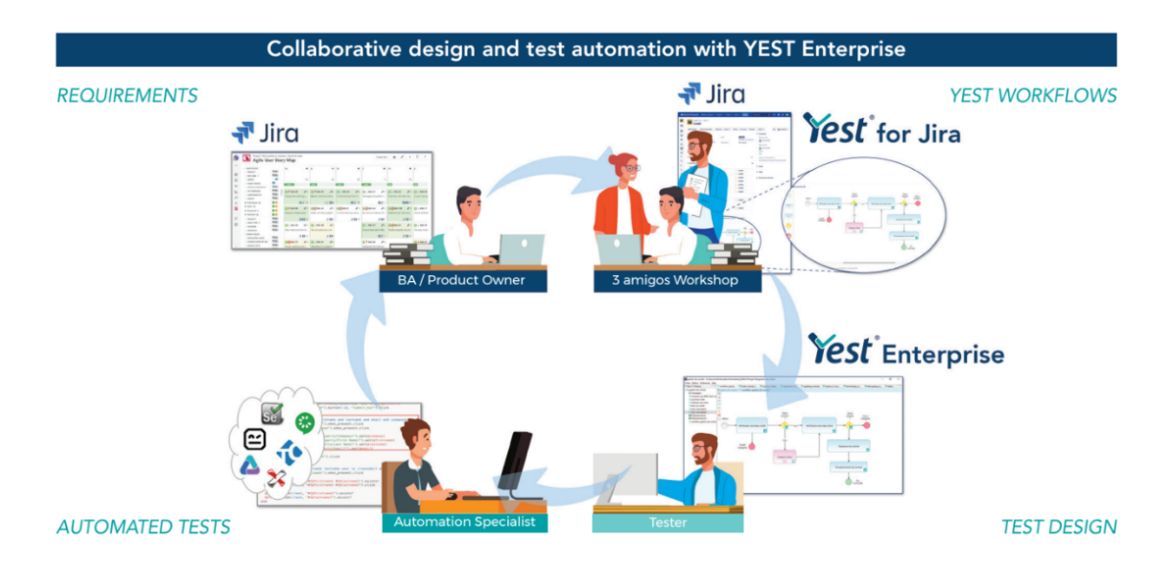
In Visual ATDD, system and end-to-end (E2E) tests are specified graphically and grow incrementally from sprint to sprint. With Yest®, Smartesting’s visual test design tool, you may also add the business rules in tables linked to the graphical workflows. Yest® then generates manual or automated tests and publishes them into the test tool of your choice. A large number of accelerators facilitate the maintenance of existing tests to keep them compliant with potentially modified workflows.

Shift Right!

But shift-left is not the only way to smarter test automation. Since the beginnings of Agile, the wheel has continued to spin. The DevOps idea came up and with it the maxim “Shift-Right”. Why should we stop testing with delivery? Let us perform tests and evaluate quality under real world conditions. Continuous deployment pushes this concept to the extreme. Once a new feature passes the quality gate composed of automated regression tests, it is released, but it may be rolled back immediately if problems are observed in the field.

Testing in production has many advantages. By monitoring an application in its users’ hands, we can quickly discover errors, bugs, and performance issues and fix them before they cause any more damage to our customer’s satisfaction. We can also test two versions of the design of a feature to see which one works better for our users (A/B testing) or even learn how our users appropriate our application.

Usage-Centric Testing

Usage-centric Testing complements the shift-left approach by using the knowledge of user’s behavior to design more accurate tests. In particular, it allows us to define targeted regression test suites covering relevant usage scenarios from end to end – targeted, because they cover what really users actually do.

In fact, when writing acceptance tests, we test how we think our users are going to interact with a new feature. In best cases, the feature has been designed in the most user-centered way possible. But even so, our end-users are… human beings. And as human beings, their behavior is not predictable and they tend to appropriate our products in ways we weren’t expecting. For example, we never expected smartphone owners to use their expensive high-tech device as a flashlight. If we never validate our assumptions, we take the risk of keeping irrelevant E2E tests that we still have to run and maintain

Gravity by Smartesting

Gravity is Smartesting’s solution usage-centric testing platform. It collects anonymized usage data from web applications and analyzes them using machine learning techniques. The software detects patterns in users’ behavior and compares test coverage of those patterns obtained in the development environment against product usage. In the end, it allows you to generate automated regression tests using Cypress. Thus, you obtain a regression test suite which perfectly reflects the actual usage of your application.

Perform the Split!

Shift-left or shift-right is not an either/or decision. They are two sides of the same coin. Both aim at creating smart tests; SMART in the sense of the well-known acronym for five quality characteristics: Specific, Measurable, Attainable, Relevant and Timely.
With Yest® you obtain few, but highly relevant tests that specifically cover the workflows and business rules you collectively wish to check. Traceability and coverage indicators provide quantitative measures of how good your tests are. Thanks to the numerous accelerators, the tests may be specified incrementally and sprint goals are attained. Shared in Jira and, on top of that visual, the graphical workflows represent a first validation of the expressed requirements. You get timely feedback from all kinds of stakeholders.


Gravity, on the other hand, concentrates specifically on the relevance of E2E tests. It hardens your regression tests by using information from productive systems. In a DevOps approach, Gravity allows you to monitor usages and to detect deviations timely. It also measures the coverage of real-world usages through the existing test suites and generates relevant automated test scripts to increase this coverage to achieve right testing.

YEST® is a visual-based tool for designing and automating functional tests in Agile.
By accelerating the production of business-relevant tests, YEST® significantly and measurably reduces the costs of creating and maintaining manual and automated test cases (30% for design and 50% for maintenance).


The free YEST® for Jira add-on allows teams to share and capitalize on their functional knowledge via graphs and forms the basis for collaboration between business teams, QA teams and software developers. Interested? Contact us for a demo.

Gravity helps Agile/DevOps teams to deliver high quality software faster.
Dedicated insights and AI will enable them to design and dimension their E2E test suites to efficiently cover the real application use in production. You can try Gravity for free at https://www.gravity-testing.com/

Author

Anne Kramer, Global CSM – Smartesting Solutions & Services, Germany

Anne is an expert in test design approaches based on visual representations and works as Global Customer Success Manager at Smartesting.

Smartesting is an EXPO Exhibitor at EuroSTAR 2023, join us in Antwerp

Filed Under: Test Automation

Orchestrated Testing Within Continuous Delivery

August 7, 2023 by Lauren Payne

Thanks to Sixsentix for providing us with this blog post.

Over the last few years, the market has put great effort into delivering solutions as fast as possible. The software has transitioned from having a supportive role in business to becoming a crucial part of the business itself. For instance, e-banking platforms have enabled clients to complete the job on their own. For many companies, this meant building new layers of software applications on top of the previous system of record, like CRMs or ERPs.

So, what’s the motivation behind this? Firstly, they are trying to differentiate themselves from the competition with faster and more flexible solutions. Secondly, they are disrupting the market with new innovative solutions. To go back to the banking example, many financial institutions are nowadays creating new brands (companies, applications, services, etc.) to target new segments of the market or even to create new niche markets.

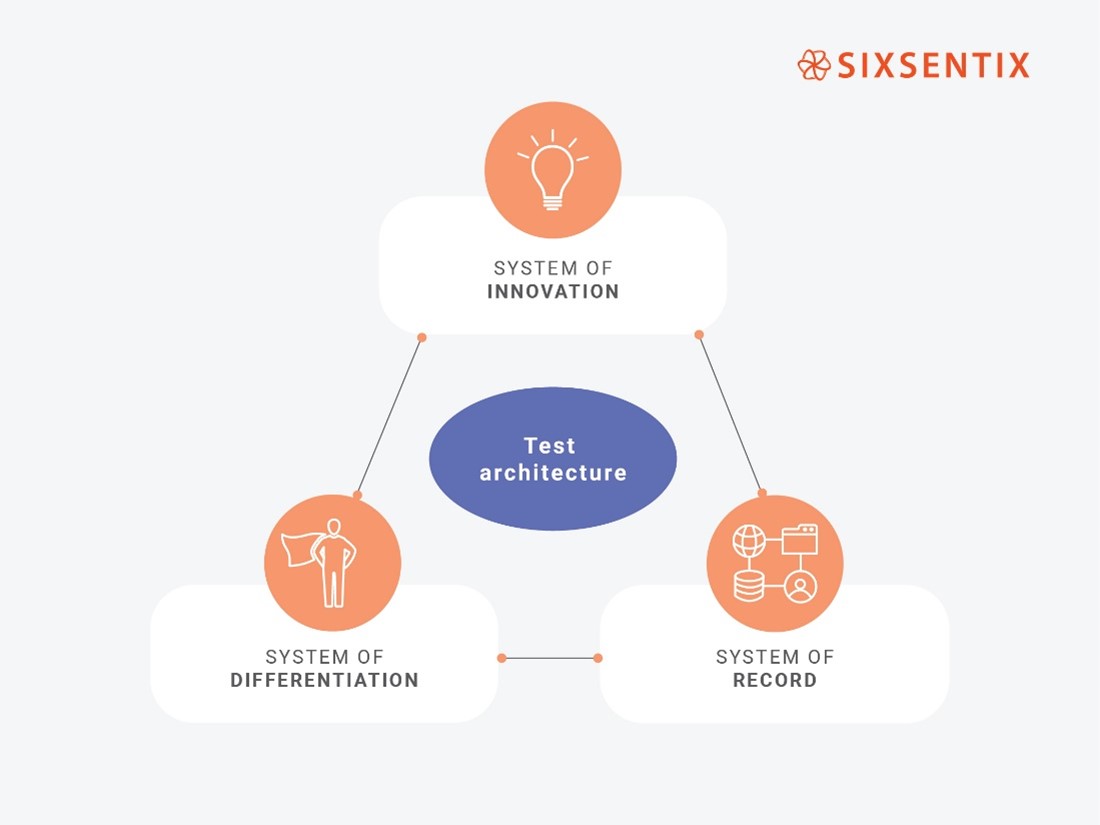
The Problem: Excessive focus on the system of innovation (and disregard for other systems)

On the one hand, utilizing the systems of records to create a new service can be challenging to facilitate a quality release in a short period of time. For example, systems of record can be heavily impacted by regulatory mandates or using legacy technologies with old software architecture patterns.

Then, companies have rolled out the Agile Delivery Frameworks used in the systems of innovation, expecting to have the same outcome. But is this really possible? Are all the organizations able to become the next Spotify? In our experience, it’s not so easy. There are some serious challenges that need to be overcome:

  • The systems coexist, but some of our clients do not even notice that.
  • The same Agile Delivery framework does not suit all the systems, even in the same company or organization.
Source: Ketut Subiyanto

The Solution: Orchestrating testing between all systems

On the other hand, a new app can be done overnight within system innovation. Thus, time constraints, as well as the level of dependencies, are crucial attributes for a faster release among the three system platforms.

So, what do we do? Should we slow down the innovation to onboard the systems of differentiation and record onto our model? Definitely not!

Sixsentix’s approach is to use QA and specially the test architecture discipline as the orchestrator between systems. The main purpose of test architecture is to prepare the systems of differentiation and record to keep up with the pace of the system of innovation or even increase it! Our client portfolio consists of mid-sized and large companies from diverse business domains with one thing in common – most of them have developed new systems of differentiation and innovation very quickly. Here are some of the crucial lessons we’ve learned so far:

  • Risk-based testing brings two main benefits when testing applications within the system of record. On one side, it plays the role of guardian of quality for the system of record. On the other side, it helps the system of innovation to get faster evidence and, consequently, make early decisions whether to release to production or not.
  • Each system needs a different type of testing strategy, and each test strategy must consider the coexistence with the other systems. One testing strategy (i.e., approach, infrastructure, tooling) does not fit all the systems.
Source: Sixsentix’s adaptation of Gartner’s PACE Layered Application Strategy 

The Sixsentix Way: Using test architecture service to bridge the gaps

To further illustrate these ideas, let us consider the situation at one of our client companies, where we identified a lot of dependencies between the system of innovation (i.e., mobile apps) and the system of record (i.e., core business CRM).

  • Before implementing our test architecture service, we spotted the following symptoms:
  • Overload of delivery backlogs
  • Dependencies between agile teams consumed almost all the development capacity
  • Delivery objectives (time to market) could not be accomplished
  • Detection of side-effects in production environment
  • Huge effort on consolidating test evidence for audit-relevant systems

But after implementing the service, we could observe a number of improvements:

  • Quality Assurance supports faster releases with risk-based testing
  • Test automation degree was massively improved, allowing Continuous Testing
  • Audit-relevant test evidence is delivered efficiently thanks to methodological test coverage
  • Throughout business-facing testing, the dependencies are better understood and therefore the backlogs of all three systems are better aligned and prioritized
  • On an organizational level, shift-left has been enabled
Source: Envato

This perspective on frequent SDLC challenges is the result of Sixsentix experience, by consulting and operationalizing QA solutions at large scale organizations. If you wish to find out more about how test architecture can help bridge gaps between the three systems, find us at the Sixsentix booth. We look forward to discussing this topic and exchanging ideas about QA and software testing with you at the EuroStar conference!

Author

Sixsentix

Sixsentix is a leading provider of Software Testing Services, QA Visual Analytics and Reporting, helping enterprises to accelerate their Software Delivery. Our unique risk-based Testing and QACube ALM Reporting and Dashboards, provide business with unprecedented quality and transparency across Software Delivery projects for faster time-to-market. Sixsentix customers include the largest banks, financial services, insurance, telecom providers and others. Sixsentix Onsite, and Nearshore (SWAT) services deliver optimized testing outcomes at significantly lower costs and help customers with scalability to keep pace with digitalization.

Sixsentix is an EXPO Exhibitor at EuroSTAR 2023, join us in Antwerp.

Filed Under: Test Automation, Uncategorized Tagged With: EuroSTAR Conference

No-Code & Low-Code: The Inclusive and Effective Way to Test Automation

July 31, 2023 by Lauren Payne

Thanks to Maveryx for providing us with this blog post.

The field of software testing has seen significant happenings in recent years, with the emergence of new testing methodologies, tools, and techniques. One of the most relevant trends in automated testing is codeless (no-code and low-code) testing, which enables users without or with low programming skills to create and execute automated tests without writing a single line of code.

Automated testing has traditionally been highly technical, requiring specialized skills and expertise in programming languages and testing frameworks. Unfortunately, there need to be more testers to do this job. For this reason, we assisted in the progress of the codeless testing, where non-technical (business) users can participate in the testing process.

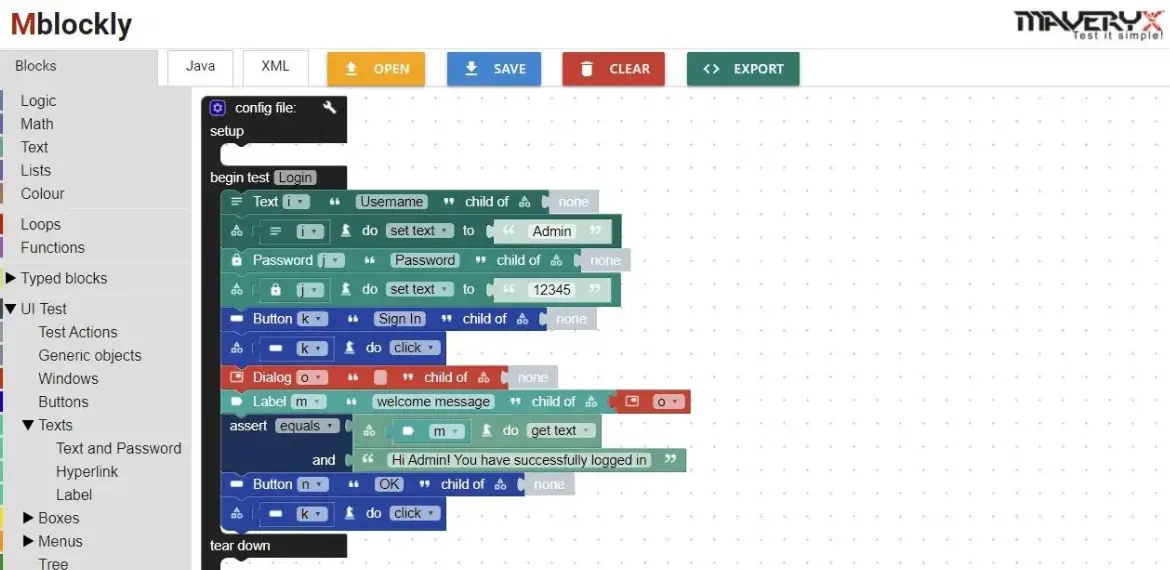
Low-code testing typically provides users with a visual interface that enables them to generate automated test scripts by dragging and dropping components (test code snippets).

Fig. 1: Low-Code IDE

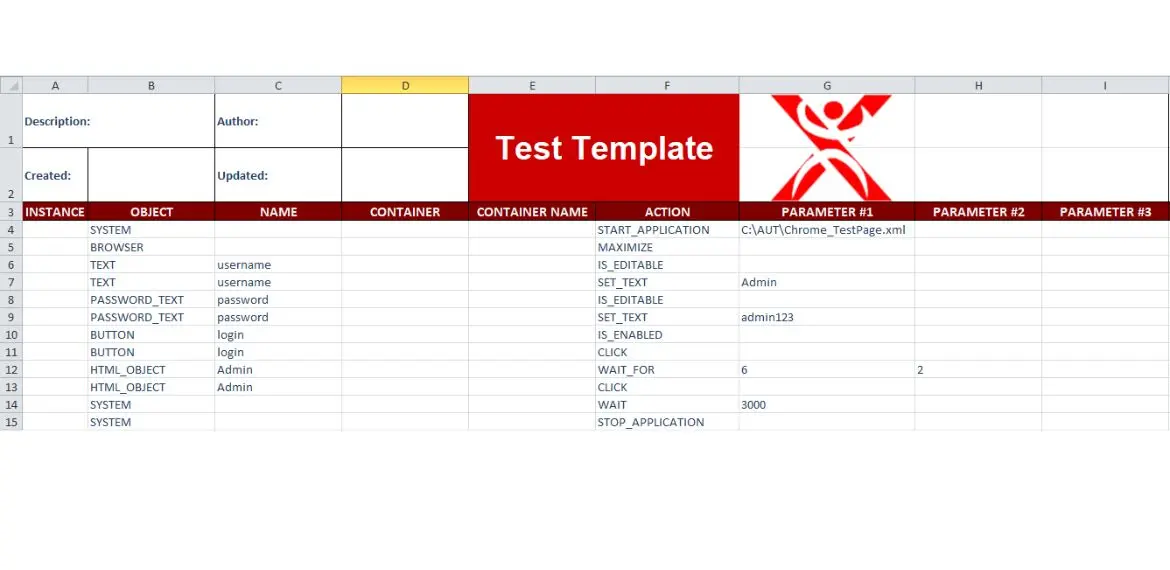
No-code testing tools provide users with predefined keywords that enable them to create tests using natural language, like writing a document.

Fig. 2: No-Code by Keywords in Excel

So, what are the benefits of a codeless approach to automated testing?

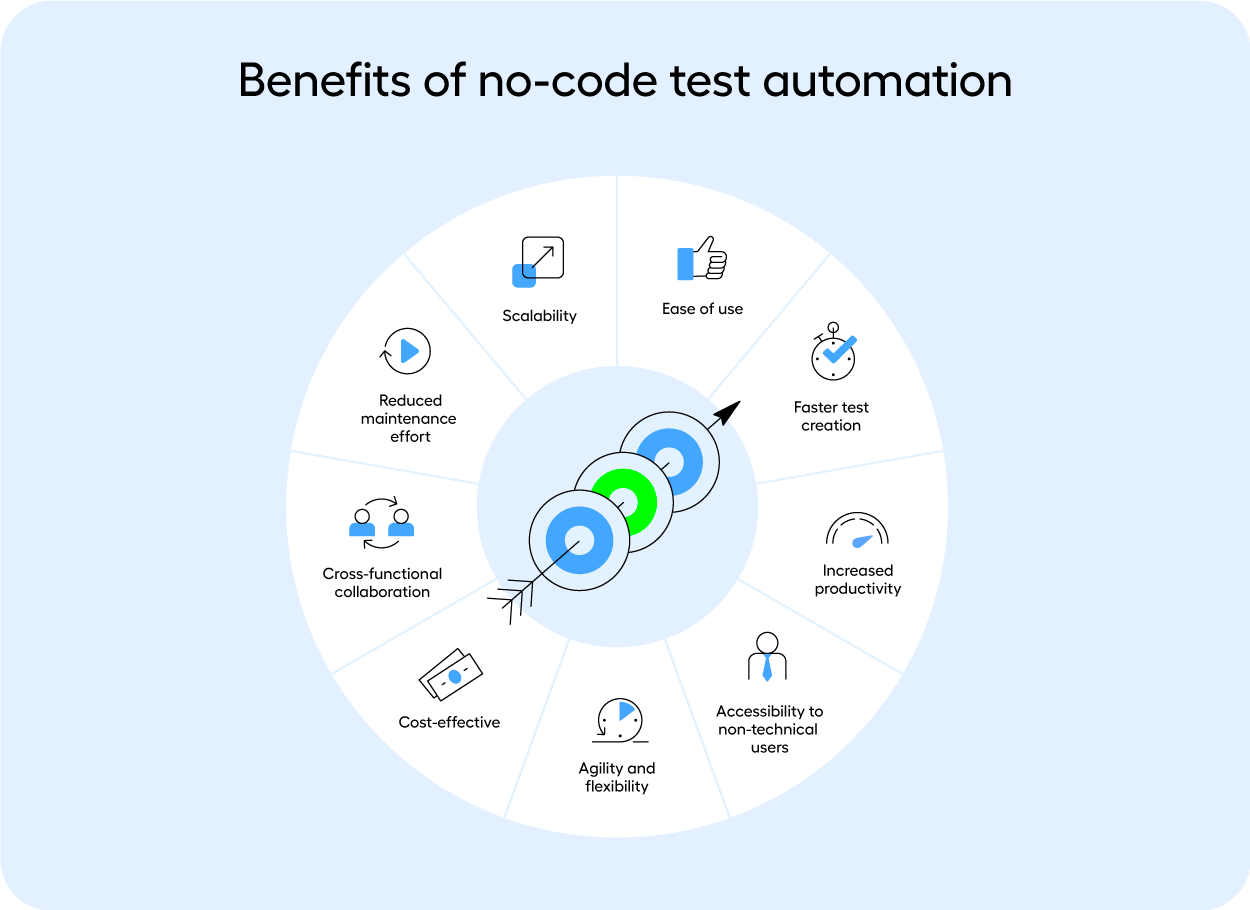
Productivity: no-code and low-code testing enable users to create tests quickly and easily, in most cases, without writing a single line of code. These increase productivity and reduce the time and effort required to develop the tests.

Reduced costs: no-code and low-code testing eliminate the need for specialized testing resources, such as expert testers or programmers, which can significantly reduce the costs associated with software testing. Also, they significantly reduce the time to create tests; saving time means saving money.

Faster time-to-market: more people involved in software testing and more (automated) tests enables organizations to test their software quickly, reducing time-to-market and increasing the speed of delivery.

Extensive functional coverage: codeless testing allows organizations to write more tests faster, thus improving their test coverage and enabling more frequent and extensive testing, which can help identify defects and issues earlier in the development process.

Easier maintenance: codeless testing, but more in particular no-code testing, makes it easier to maintain tests over time, with users able to update and modify tests using natural language without the need for coding expertise or specific technologies.

Easier collaboration: in particular, no-code testing tools enable teams to collaborate more effectively, with non-technical team members able to contribute to the testing process without requiring specialized skills or the knowledge of a specific technology. Also, no-code testing allows non-technical stakeholders to participate in the testing process, enabling a broader range of users to contribute to software testing.

Combining a codeless approach with intelligent object recognition at runtime technology (without GUI maps, object/image repositories, code instrumentations, recorded actions, and so on) can further boost test automation.


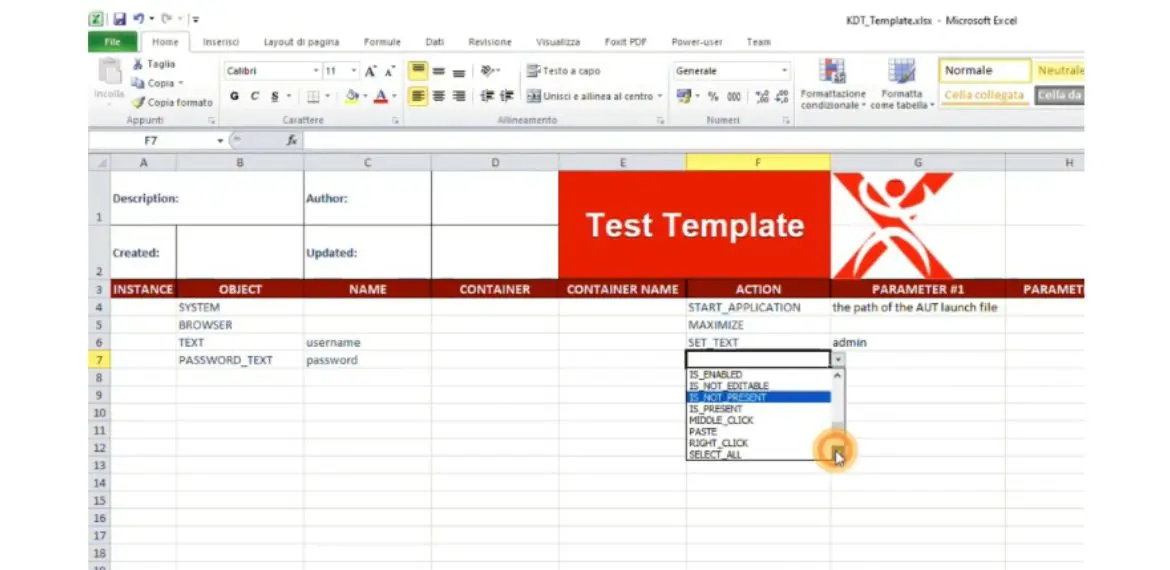
For example, the Maveryx Test Automation Framework offers both codeless test creation and runtime inspection. Users can create No-code automated tests by Keywords. For example, everyone using Excel can participate in test automation.

Fig. 3: No-Code test creation

Also, this framework provides low-code blocks programming IDE, supporting testing through the drag-and-drop of visual blocks.

Author

Alfonso-Nocella-Maveryx

Alfonso Nocella Co-founder and Sr. Software Engineer at Maveryx,

Alfonso led the design and development of some core components of the Maveryx automated testing tool. He collaborated in some astrophysics IT research projects with the University of Napoli Federico II and the Italian national astrophysics research institute (INAF). Over the decades, Alfonso worked on many industrial and research projects in different business fields and partnerships. Also, he was a speaker at several conferences and universities.

Today, Alfonso supports critical QA projects of some Maveryx customers in the defense and public health fields. Besides, he is a test automation trainer, and he takes care of the communication and the technical marketing of Maveryx.

Maveryx is an EXPO Exhibitor at EuroSTAR 2023, join us in Antwerp

Filed Under: Test Automation Tagged With: 2023, EuroSTAR Conference

  • « Previous Page
  • Page 1
  • Page 2
  • Page 3
  • Page 4
  • …
  • Page 6
  • Next Page »
  • Code of Conduct
  • Privacy Policy
  • T&C
  • Media Partners
  • Contact Us

part of the