• Skip to main content
EuroSTAR 2027 - Sign up for early access

EuroSTAR Conference

Europe's Largest Software Testing Conference.

  • Programme
    • Call for Speakers
    • 2026 Programme
    • Community Hub
    • Awards
  • Attend
    • Why Attend
    • Bring your Team
    • Testimonials
  • Sponsor
    • Sponsor Opportunities
    • Sponsor Testimonials
  • About
    • About Us
    • Our Timeline
    • FAQ
    • Blog
    • Organisations
    • Contact Us
  • Book Now

Leadership

What is the European Accessibility Act?

June 19, 2023 by Lauren Payne

Thanks to Applause for providing us with this blog post.

June 28, 2022 was the deadline for EU member states to adopt the European Accessibility Act (EAA) requirements into law. What does the act mean for your business? Here is everything you need to know to prepare your business for the June 2025 compliance deadline and design truly accessible digital products.

Why a European Accessibility Act?

The European Accessibility Act is a new directive that establishes a common set of accessibility rules for software, digital services and hardware sold or used in the EU. In doing so, the act aims to remove barriers created by divergent accessibility rules in the EU member states and improve the functioning of the internal market for accessible products and services.

How does the European Accessibility Act differ from WCAG?

The Web Content Accessibility Guidelines (WGAC) are the main point of reference on accessibility best practices for European companies. However, they have no legal standing and are not enforced. The European Accessibility Act, on the other hand, is legally binding.

By making accessibility enforceable by law, Europe is catching up with countries like the US, where accessibility legislation has been around for a while. In the past, the EU has required public-sector apps and websites to adhere to accessibility requirements under the EU Web Accessibility Directive, but the The European Accessibility Act is the first time private-sector companies have faced accessibility legislation.

What does the European Accessibility Act say?

While WCAG and the European Accessibility Act differ from an accessibility standpoint, they share many of the same foundational principles. In alignment with WCAG, the European Accessibility Act builds on four key accessibility best practices known by the acronym POUR: to be accessible, content must be perceivable, operable, understandable and robust. In other words, people with disabilities must be able to make out key content elements, be able to use and navigate user interfaces, understand what they are seeing and reliably use assistive technologies like screen readers.

However, the European Accessibility Act itself does not provide any technical accessibility standards. This means that it is up to each member state to decide how they will achieve the aims of the directive.

Which people and products are covered by the EU Accessibility Act?

Both people with disabilities and the elderly come under the scope of the European Accessibility Act. The requirements apply to key products and services that need to be accessible for these groups to participate equally in society:

  • Computers and operating systems
  • ATMs, ticketing and check-in machines
  • Smartphones
  • TV equipment related to digital television services
  • Telephone services and related equipment
  • Access to audio-visual media services such as television broadcast and related consumer equipment
  • Services related to air, bus, rail and waterborne passenger transport
  • Banking services
  • e-Books
  • E-commerce

While the European Accessibility Act aims to reduce barriers for people with disabilities, it benefits all EU citizens. The European Commission provides the following examples: “people trying to hear travelling information in noisy environments like train stations, or trying to get money from ATMs on a sunny day, or employees working with enlarged documents to avoid eye strain will also greatly benefit from further accessibility.” The legislation will also help people with temporary disabilities; for example, someone with a broken arm or carrying a baby who needs to be able to operate a mobile app with one hand.

How long do companies have to comply with the European Accessibility Act and how long does it take to prepare?

Companies have until June 28, 2025 to comply with the European Accessibility Act. While this may sound like a long time, the reality is that companies need to start preparing now. The three-year timeframe was not chosen arbitrarily; it speaks to the expected complexity involved in implementing the new requirements. By way of comparison, when the EU adopted the General Data Protection regulation (GDPR), companies were only given two years to prepare — and everyone remembers how complex that turned out to be. Come the deadline to comply with GDPR, 80% of businesses were still not compliant and 27% had not even started. Those who did not comply by the deadline were subject to steep fines.

Which companies are impacted by the European Accessibility Act?

Like GDPR, the European Accessibility Act will have a global impact. Companies creating software, digital services and hardware that are sold or used in the EU must comply with the EAA regardless of where they are based. Under a phenomenon known as the Brussels Effect, many companies outside of the EU will find themselves adopting the European Accessibility Act’s requirements in order to continue doing business with Europe.

There are some exceptions. The European Accessibility Act does not apply to businesses with fewer than 10 employees and an annual turnover of less than two million euros, for whom implementing the legislation would cause undue burden. There are also very specific exceptions, such as for archived content.

What is the penalty for noncompliance with the European Accessibility Act?

Each individual EU member state is responsible for enforcing the European Accessibility Act, which means that they can decide the penalties. However, they must enforce noncompliance in a way that is “effective, proportionate, and dissuasive” and consumers must be able to report infringements to a court or the enforcing body in that country.

It is also worth making clear that fines are not the only penalties companies will face by not complying with the European Accessibility Act (or any other accessibility legislation, for that matter). Around 87 million people in the EU are affected by some kind of disability, which means that companies that do not provide accessible digital products are excluding nearly one fifth of potential customers. Companies that prioritise accessibility also build better products, because accessible products are easier to navigate and use, making them more attractive to all users.

How can I prepare for the European Accessibility Act?

Until the directive is implemented into EU member states’ respective national laws, it is unclear what compliance will look like in detail. However, many pieces of accessibility legislation worldwide take inspiration from WCAG, and while the European Accessibility Act doesn’t directly name WCAG as a standard, its accessibility requirements for digital products are based on the same POUR accessibility principles. Therefore, companies that strive for WCAG compliance will likely find that they already achieved many of the European Accessibility Act’s requirements.

Indeed, companies that take accessibility seriously because it is the right thing to do often comply with many legislative requirements by default. The European Accessibility Act is by no means revolutionary in its approach to digital accessibility — it is simply enforcing a set of best practices that any company with an accessibility lead has most likely covered or is in the process of implementing.

It is also worth noting, however, that just because a digital product is accessible by legal definition does not mean that it is inclusive by design; i.e. works as well as it could for people with disabilities. Even if a company ensures individual components meet accessibility requirements, when they put the components together into a user flow, they can fail to provide a good user experience for people with disabilities. Often, this is because developers with good intentions design for compliance without a complete understanding of people with disabilities’ needs.

Many companies do not realise there is a difference between digital accessibility (the ability of a digital product to be easily navigated by people with disabilities, often measured by WCAG) and inclusive design (a human-centric approach to design as part of developing digital products that considers a wider spectrum of aspects affecting a person’s ability to use them). Companies that produce the most inclusive digital products involve people with disabilities in all phases of the SDLC, from market research and design to development and testing.

To understand better how can the digital space understand these realities and address the accessibility needs of more – ideally all – people, join our session on Designing & Testing for the Billion Voices.

Author

Julia Zacharias, Senior Vice President EMEA Customer Operations

As SVP of Customer Operations at Applause, Julia is responsible for EMEA’s Solution Delivery, Testing Services and Community Management functions. In addition, she leads the European part of the global Accessibility Testing Offer and supports customers in the holistic quality assurance of their digital products and services.

Before joining Applause, Julia worked as a project portfolio manager and management consultant, e.g. at Kearney, and is a Certified Program Consultant for SAFe (Scaled Agile).

Applause is an EXPO Exhibitor at EuroSTAR 2023, join us in Antwerp.
Filed Under: Leadership, Risk Tagged With: 2023, EuroSTAR Conference

Preventing Burnout While Working in the Tech Industry

March 31, 2021 by Fiona Nic Dhonnacha

‘Preventing Burnout While Working in the Tech Industry’ is a talk given by Raj Subrameyer at EuroSTAR Online 2020. Raj is an international speaker, author, and tech career coach. He helps people in the industry find their dream job, and become successful leaders.

Now, Raj has put together his tried and tested strategies in a blog post – packed with information to help you prevent burnout in work (and in life); including tips, tricks, and tools he’s used on himself and his coaching clients.

Here’s Raj’s talk from the conference:

Where it started

Growing up, I was a shy and introverted kid. I was also average – in everything from academics, to sports, to dating. So, I put a lot of pressure on myself to emulate the overachievers around me – I wanted to be recognised, and for other people to see me as worthy. My biggest fear was being ignored.

When I started my career, I made a vow to myself: I would be famous, a recognised name. So I said ‘yes’ to every opportunity that came my way, and put in a lot of hard work. I tried to push myself out of my comfort zone constantly, in order to get the recognition that I wanted. What happened? Well, I got the fame, money and credibility I desired. Life was good.

Burnout

Then, in June 2018, something happened: one night, I suddenly blacked out while I was going to the bathroom. The next thing I knew, I was in the ER, undergoing lots of tests. The diagnosis?  Severe anxiety, depression, dehydration, and burnout.

Burnout is a serious issue, and it’s attributed to a lot of mental and physical health issues. About 60% of people in tech have burnout on some level – but they just don’t realize it.

Let’s ensure this doesn’t happen to you. I am sharing strategies to help you prevent burnout, including tips, tricks, and tools I’ve used on myself and the clients I coach, who are leaders in the tech industry.

Trust me, these things work! So let’s start your transformation process…

Pick up a book

There are two books which were instrumental for me at the start of my journey to productivity and mindfulness.

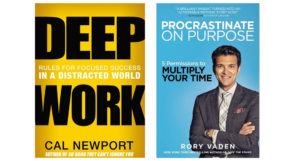
Deep work by Cal Newport

Deep work is focused time block sessions on cognitively demanding tasks, without any interruption. Research has found that we check our emails 30 times per hour, and it takes us, on average, 23 minutes and 15 seconds to regain concentration after this kind of interruption. That’s why doing deep work is really important in order to be highly productive. If you want to know more about my deep work process, check out my blog, 72-Hour ‘Deep Work’ Week.

Procrastinate on Purpose by Rory Vaden

Everyone talks about time management, but no one talks about self-management. The thing is, you cannot manage time, because time moves no matter what you do. The one thing you can manage is how you prioritize your work and tasks within a given time. The system I have in place to prioritize tasks is the focus funnel, which is detailed in this book. It’s been very influential in my transformation process.

Pick a task, and ask 3 questions.

  1. Can it be eliminated?
  2. If it can’t be eliminated, can it be automated?
  3. If it can’t be automated, can I delegate it to someone else?

If all three of these answers don’t work, then you have to make a decision on whether to do that task later on, or work on the task right now, because that’s the highest priority task.

This is a good decision-making system because it incorporates priority dilution, which means that you are focusing on the lower priority task compared to the higher priority ones.

Then, you have priority concentrate – where you’re trying to concentrate on the most important task at that moment right now.

Hack your week

You can implement planning hacks and mindfulness hacks in your daily life to help increase your productivity significantly. Have you ever had an overwhelmingly huge to do list? I was always overwhelmed with my to do list, because it always had around 30 tasks on it. But there’s only so much time in a day, and you need to know where to start and what to focus on. So I came up with a system – a daily and weekly planning routine.

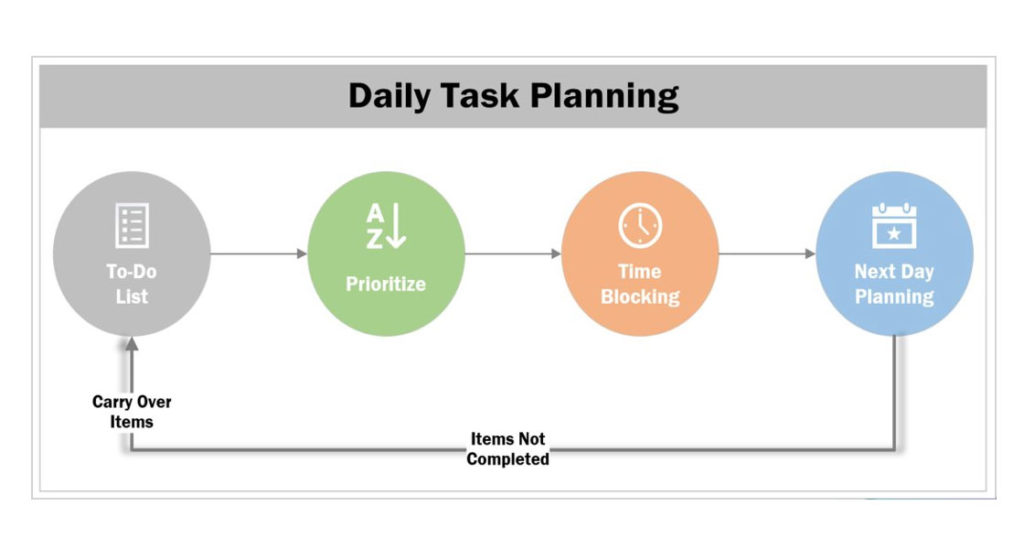
Daily planning routine

Every day, I spend 5-10 minutes coming up with a to-do list of different things I want to accomplish that day.

I then prioritize my to-do list from 1-10 in order of importance. My motto is to finish 3 top things every day. I started blocking my calendar to do focus work on these priority tasks. When the time comes, my mind does not need to think about what task I have to do, because it’s already there in the agenda.

At the end of the day, I spend 5- 10 minutes reviewing what I’ve accomplished that day. What I haven’t done gets carried over to the next day. That’s a simple way you can prioritize your work on a daily basis.

Weekly planning routine

I run my own business, and as part of my job, I have five tasks to do, no matter what: learning, reading, content creation, career coaching, and speaking. I already know how much time I have to invest in each of these buckets.

I spend about half an hour every Sunday on my weekly planning routine, and then schedule time blocks throughout the week, for example 2 time blocks for learning and reading, 4 for content creation, 8 for career coaching.

These buckets will be different for you, but make sure you are spending time in every priority task.

Meetings, meetings, meetings

Meetings are one of the most unproductive things you can do at work.

  • on average, 92% of the people in meetings multitask.
  • $219 billion dollars per year is spent on unproductive meetings.
  • 72% of the meetings which happen in the world are unproductive.

I highly recommend a Ted Talk on unproductive meeting from David Grady, How to save the world (or at least yourself) from bad meetings to get more insights on unproductive meetings.

Unproductive meetings suck the time, effort and life out of people and the company. So how do we prevent this from happening?

Pizza, anyone?

Amazon implements what’s called the Two Pizza Rule: no meeting should be longer than it would take to eat two boxes of pizza, which would be enough for approximately eight people. Printouts are given to attendees beforehand, and the first 20 minutes of a meeting is spent going over information before the meeting begins. This is a great way to ensure meetings run as productively as possible.

Another way to help avoid unproductive meetings is to ask yourself, do you really need that meeting? Could it be solved just by talking to someone via chat or email, or a phone call?

Try to avoid having more than 7-8 people in your meeting. If you have 15 to 20 people in attendance, it’s not a meeting, it’s a conference. You need to have a clear agenda, and ensure everyone comes prepared for the meeting, and then start and finish on time. The most important thing to ensure an effective meeting is to follow up on the action items, and make sure they’re completed.

Remote meetings

Have you ever joined a meeting remotely, where nobody announces who is in attendance? Or had to endure the slurping of coffee, munching, rustling, and other office noises? It might sound trivial, but if you’re wearing noise-cancelling headphones, then you know what I’m talking about.

People often start presenting something for people in the room, without sharing their screen for the remote attendees. There are also many little conversations happening in the room throughout the meeting – very annoying for the person who’s attending remotely.

How do we solve these problems? There are some simple steps you can employ: Announce who is there in the room. Have a webcam to project the room to remote attendees. Make sure to keep conversations to a minimum, and be cognizant about the different sounds which people make. The mute button can be very effective here!

Get good at email

Every year, close to 219 billion emails are sent. Research shows that by end of 2021, that number is going to increase to 316 billion emails per year. There are going to be around 4.1 billion email users by the end of 2021. The way we use email is going to be really, really important for companies, especially if you’re working in high-performance teams.

Here are some effective email strategies:

  • Ensure there’s a clear subject line
  • Don’t write long emails – just have three to four bullet point hitting on the main topic. When you have five or six paragraphs in an email, it’s hard to get your point across to people. One rule which I follow is that your email should fit within a 11-13 inch laptop screen. If it’s more than that, then you have to sharpen it.
  • Emails with more than two email threads are a red flag, because that’s the sign that you have to pick up the phone and talk to the person directly, or do something else instead of continuously emailing the person.

Set reminders for everything

I work on multiple projects, including writing, work, consulting, and coaching work. So how do I manage all these things? Reminders. Set reminders for yourself, and make use of project management tools like Trello and Asana, to help send you reminders and make sure you follow up on different tasks.

Mindfulness

Mindfulness can be an immense help in productivity. Research has found that the human mind can concentrate for an average of 45 minutes to an hour. If it’s more than that, you start losing focus. The mind also has to refocus for 5-10 minutes before you start a new task.

So throughout your work day, you need to practice focus and de-focus. Make sure you take breaks, and do something to reset your mind after every 1 hour time block. I take 5 minutes to do push-ups!

Find your appy place

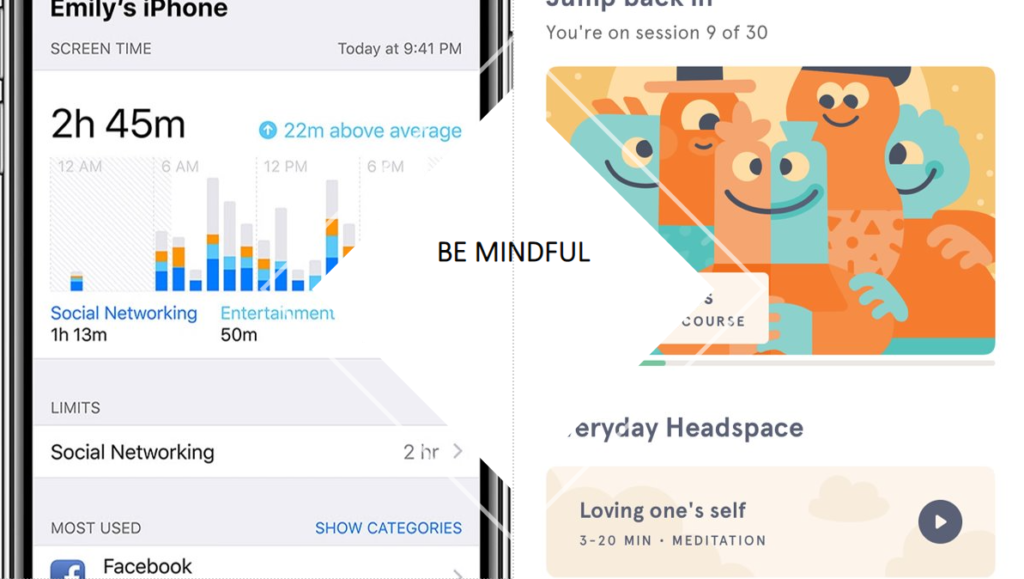
On your lunch break, try to go for a walk, watch TV, read, listen to podcasts, or just sit in silence! You need to recharge your mind properly. Studies find that on average, we spend 4 hours per day checking our smartphones. That amounts to 20 hours per day in a 40-hour work week.

Try out meditation apps like Headspace to take breaks between work, whether it’s one minute, 10, or 20 minute sessions.  Make sure your phone is on ‘Do Not Disturb’ during focus work. You could also create a playlist specifically for doing creative work.

Join a community

When I started off in my career, I found it really hard to find groups of like-minded people who wanted to discuss the same things as me – career advancement, leadership, motivation. So I created my own private Facebook group called Skyrocket your Career. This now has over 150 people, and all our testers and developers who want to share resources can learn from each other. If you want to be part of our community, check it out, because we’d love to welcome you!

Start living!

To quote Confucius, “we all have two lives. The second one starts when we realize we have only one.” So make sure you follow some of these hacks, implement them in your life, and see what works for you. That’s when the real transformation happens – and that’s how you can prevent burnout.

Even more resources:

Skyrocket Your Career

EuroSTAR Conference takes place online, September 28-30th. The 2021 programme will be released very soon – sign up to be the first to hear all the details.

Raj Subrameyer

Author: Raj Subrameyer

Raj Subrameyer actively contributes thought leadership and enrichment to the software community through conference talks, contributed articles, blogs, and YouTube videos; where he shares his experiences in development, testing, leadership and productivity. Contact Raj on LinkedIn  or Get career advice

Filed Under: EuroSTAR Conference, Leadership, People Tagged With: EuroSTAR Conference

  • Code of Conduct
  • Privacy Policy
  • T&C
  • Media Partners
  • Contact Us

part of the