• Skip to main content
Year End Offer: Save 30% + Teams Save Up to an Extra 25%!

EuroSTAR Conference

Europe's Largest Quality Engineering Conference

  • Programme
    • Programme Committee
    • 2025 Programme
    • Community Hub
    • Awards
    • Social Events
    • Volunteer
  • Attend
    • Location
    • Highlights
    • Get Approval
    • Why Attend
    • Bring your Team
    • Testimonials
    • 2025 Photos
  • Sponsor
    • Sponsor Opportunities
    • Sponsor Testimonials
  • About
    • About Us
    • Our Timeline
    • FAQ
    • Blog
    • Organisations
    • Contact Us
  • Book Now

Test Automation

Is test automation a first-class citizen of your development pipeline?

January 18, 2023 by Lauren Payne

Thanks to Karate Labs for providing us with this blog post.

A key point that many teams fail to ponder: “Is test-automation a first-class citizen of your development pipeline?”

This is the second part of a series of articles covering the finer aspects of test automation in detail. Read the first part here: The Test Automation Capability Map.

What happens when Developer Experience is not prioritized? Does this situation (see picture below) look familiar where you use a separate tool and workflow for authoring test-automation artifacts?
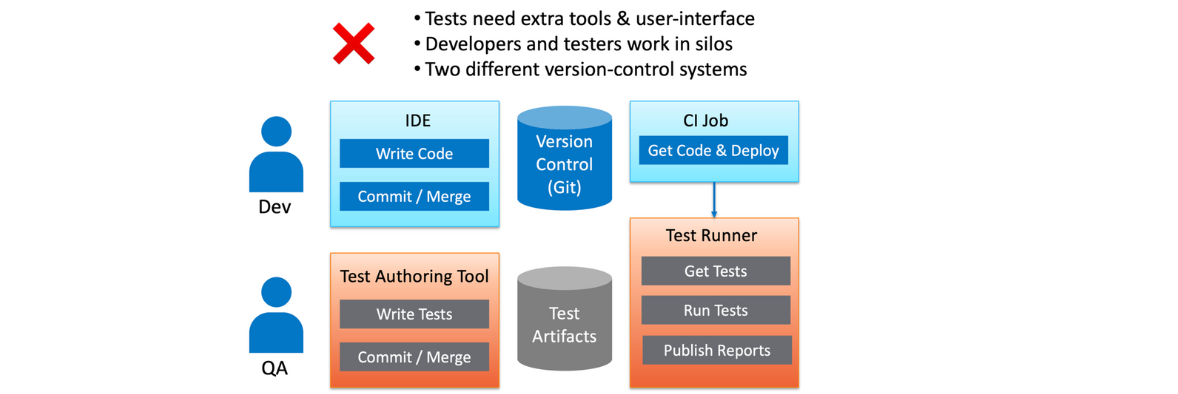

Let us zoom in on three of the Test-Automation capabilities which fall under the category of Developer Experience.

IDE Support

The development team spends the most time within their IDE of choice (e.g., IntelliJ, Visual Studio Code etc.). If test-automation requires a completely different tool, user-interface, and workflow, this has several implications for your team:

  • Switching between tools takes developers out of their “flow state.”
  • Developers are less likely to run tests before checking-in or merging code. This leads to an inefficient feedback loop, where failures are detected only when tests are run later.
  • Developers are less likely to contribute and maintain tests. This results in dysfunctional teams where developers “chuck things over the fence” to the “QA team”. It is very common to find developers and QA teams operating in silos where bugs that “escape” to production result in finger-pointing and blame-games.

Self-Hosted or On-Prem

An aspect often overlooked is whether any sensitive data is leaving your safe-zone and coming to rest beyond your organization’s security perimeter or firewall. If you use a SaaS tool that is not self-hosted, this typically is the case.

Even though integration and end-to-end testing environments should ideally use fake or synthetic data, there will be cases where “production-like” data will be needed to simulate real business-scenarios. Many teams extract a “cut” of production data for a staging environment with some data-masking or sanitizing applied. Equally or more important than test-data is test-configuration, such as database-secrets, authentication-tokens, and passwords.

Given that a lot of teams operate in the public-cloud even for pre-production environments (e.g., AWS, Azure and GCP) it is even more important that the greatest care is taken to protect not just your test-data, but the configuration and locations and URLs of test-servers and other infrastructure. So, the critical question you should ask – Are my tests being stored in somebody else’s cloud?

Version Control, History, and Diffs

Self-hosted or not, the situation worsens if your test-automation artifacts are being managed in a separate tool or repository. The implications of having tests in a separate tool and workflow are understated, but significant

  • You will lose the ability to eyeball the changes in your tests, side-by-side with the corresponding changes to code.
  • There is less pressure (or no “forcing function”) to add or edit tests when code-changes are made. This discipline can make the difference between a high-performing team or one that lacks confidence to ship as often as needed.
  • Tests are the best documentation of “what the system does.” When you cannot see the history of changes to tests side-by-side with the code commit history, you lose a valuable chunk of documentation, and you are left with an incomplete picture of how the software evolved.
  • Your Continuous Integration job becomes more complex at the point where tests must be run. Instead of getting code and tests in one atomic “checkout” or “git clone” operation, you are forced to perform an extra step to download the tests from somewhere. Keep in mind that you also need to ensure that the version of the tests corresponds to what is being tested.

In addition, if you are using a tool with a “no-code” UI to author tests, it is quite likely that you lose the basic ability to see diffs and history even just for your tests. Some tool vendors have ended up having to build version-control into their user-experience, re-inventing what comes naturally to teams that use Git to collaborate.

Some things are best expressed as code. At the end of the day, everyone agrees that code-diffs are a superior Developer Experience.

To summarize, for your test-automation to be a first-class citizen of your development pipeline you need to use a tool that integrates into the team’s IDE of choice and stays close to the code being tested. The result of that is shown below.
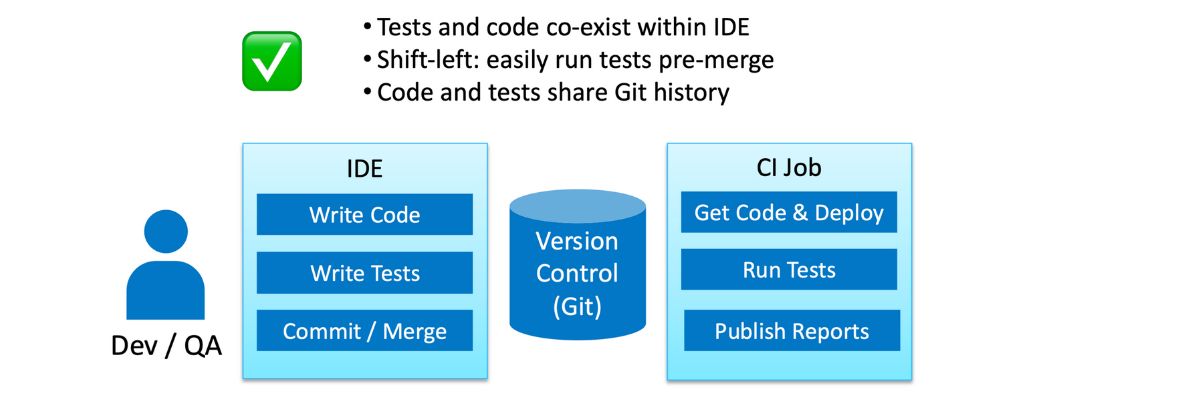
An interesting observation is that: this is exactly the developer experience you expect for unit-tests!


So which kind of team do you want to be in?
Happy Testing!

Author

Peter Thomas Co-founder & CTO Karate Labs

Peter Thomas, Co-founder & CTO, Karate Labs

Peter is recognized as one of the world’s top experts in test automation. He brings 25 years of industry experience from which he has been in open source for the last 18 years. He has worked at Yahoo and Intuit. As part of the API platform leadership at Intuit, Peter created “Karate” the open-source solution unifying API, UI & Performance testing. Peter was one of only 15 chosen by GitHub for a grant in India 2021. He co-founded Karate Labs Inc in Nov’21 to accelerate the adoption of Karate with the mission of making test automation fun and collaborative. Karate Labs is a Y Combinator backed company.

Karate Labs is a Platinum Partner at EuroSTAR 2023. Join us at Antwerp Zoo June 13-16, in a 4 day celebration of testing. Learn from 68 expert speakers and connect with your peers at Europe’s Best Testing Event. Book your tickets by Jan 31 and save 15% or book your team and save up to 40%.
Filed Under: Development, Test Automation Tagged With: 2023, Test Automation

The test automation capability map

December 14, 2022 by Lauren Payne

Thanks to Karate Labs for providing us with this blog post.

Test Automation is serious business. With teams under pressure to ship more often for competitive advantage, ensuring the best-quality end-user experience is key.

The choice of a test-automation tool can make the difference between a team that has high velocity – or one that lacks confidence to release.

We have seen many teams that have made the mistake of writing an in-house test-automation framework. I have personally experienced the pain of developers who have inherited tests in such a framework multiple times.

Unfortunately, teams continue to write their own framework for many reasons. One is that development skills are valued more than domain-knowledge or knowledge about the end-user. Creating a test-framework “from scratch” is over-hyped, fueled by a multitude of influencers and bloggers.

A reason that few like to talk about is that it is easier to write some code instead of thinking through what it takes to actually test a given piece of software. You would have seen cases where a team spends months building a test-framework, only for a new team to come along and promptly decide that a re-write is required.

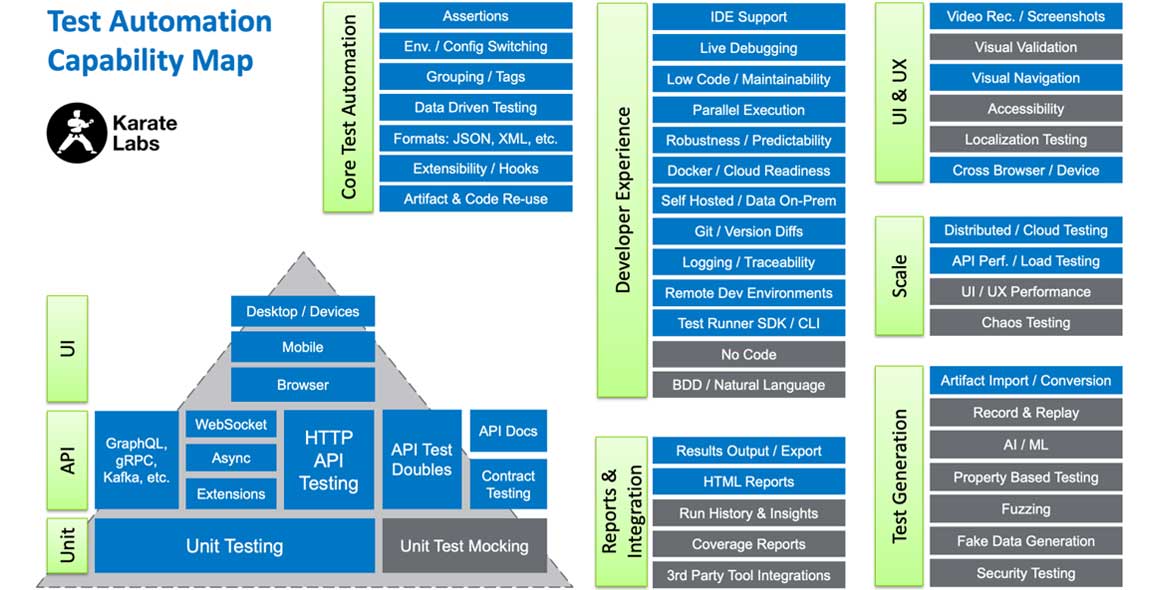
To help teams make the right choice, we have created this graphic to emphasize a few points. It can be used as a handy reference to compare test-automation tools and discuss the relative importance of the capabilities for your specific team.

Please pass this on to those who are responsible for driving standards and evaluating tools in your enterprise.

test automation capability map

To summarize:

  • Test Automation requires a large set of fundamental capabilities. Are you sure you can implement all these in-house, or would you be better-off using an industry standard solution?

  • Does the tool pay attention to Developer Experience? Keep in mind that tests must be maintained for as long as your systems are in production.

  • Does the tool bring developers and QA closer together or force them into different user-interfaces and workflows?

  • Can your tests be version-controlled just like your code? To be specific, can you see the history and the “diffs” between previous versions?

  • Is your test data within your firewall or going into “somebody else’s cloud”?

  • Is it easy to simulate end-user-flows and the core capabilities (your reason to exist) of your business?

  • Is there a mature community of users or someone that you can reach out to for support?

  • How useful is the documentation? Does it go into detail? Are there enough examples?

  • How easy is it for someone new to the tool to start using it productively?

The list of capabilities in the graphic is a result of many iterations and discussions. Do let us know if any test-aspect is missing, or if you have any other feedback!

And by the way, the boxes in blue are things that Karate does today.

Happy Testing!

Author

Peter Thomas Co-founder & CTO Karate Labs

Peter Thomas, Co-founder & CTO, Karate Labs

Peter is recognized as one of the world’s top experts in test automation. He brings 25 years of industry experience from which he has been in open source for the last 18 years. He has worked at Yahoo and Intuit. As part of the API platform leadership at Intuit, Peter created “Karate” the open-source solution unifying API, UI & Performance testing. Peter was one of only 15 chosen by GitHub for a grant in India 2021. He co-founded Karate Labs Inc in Nov’21 to accelerate the adoption of Karate with the mission of making test automation fun and collaborative. Karate Labs is a Y Combinator backed company.

Karate Labs is a Platinum Partner at EuroSTAR 2023. Join us at Antwerp Zoo June 13-16 in a 4 day celebration of testing. Learn from 65 expert speakers and connect with your peers at Europe’s Best Testing Event. Book your tickets by Dec 31 and save 20% or book your team and save up to 45%.

Filed Under: Test Automation, Uncategorized Tagged With: 2023, Test Automation

Say hello to AutomationSTAR

July 7, 2022 by Fiona Nic Dhonnacha

We’ve been bringing the software testing community together from all over Europe since 1993, to learn and connect, and actively work to improve and elevate the art of software testing. We’re always looking for ways to help the community, and we’re thrilled to announce our newest event, AutomationSTAR – a brand new conference all about automation in testing. The event takes place in Munich, October 17-18.

AutomationSTAR is a 2-day conference for software testers and test automation engineers, with English and German talks. This is where the future of test automation will be shaped. Learn from 25+ thought leaders, automation experts, and rule breakers, who will share ideas, and start conversations around automation in software testing.

Community is at the heart of AutomationSTAR, and this is a space to share different experiences, discuss the problems and issues you face, and find solutions together.

Learn from test automation experts

The AutomationSTAR speakers are the sharpest minds in test automation, and will share their expertise and knowledge through visionary keynotes, track talks, workshops, and half day tutorials. You’ll learn from real-life experiences, triumphs and successes, and walk away with new ideas to help YOU with challenges in your testing.

Talks will cover different levels of automation in testing, including methodologies such as DevOps, new technologies like AI, and lots more.

Whether you are new to coding, building a test automation project from scratch, or interested in codeless tools, AutomationSTAR is where you’ll find the answers. Our expert speakers are bringing you answers, to help you accelerate your delivery, get future ready, and achieve your goals.

So, get ready to skyrocket your test automation projects – check out the programme and join us in Munich.

view programme

Filed Under: EuroSTAR Conference, Test Automation Tagged With: 2023

How to automate functional UI testing using the I-A-C pattern

March 28, 2022 by Fiona Nic Dhonnacha

This article was provided by Alfonso Nocella, Co-founder and Sr. Software Engineer at Maveryx.

Automated Functional UI Testing

We generally used to consider Functional UI Testing the most critical type of testing because, first of all, an application must do WHAT it is supposed to do. And indeed, it verifies that an application works as expected through its user interface.

Or, if you prefer, according to Glenford Myers, Functional UI testing means to verify the software through its UI with the intent of finding errors (i.e., “find discrepancies” between the program and its specification).

Given these points, Functional UI testing verifies, from the end user’s perspective (through the user interface), that the software behaves according to its functional requirements specification without knowing the internal logic and implementation (black-box). In simple words, Functional UI testing verifies an application in the same way an end-user would.

Also, Functional UI tests are effective because they go “end-to-end” from the UI layer. Indeed, end-to-end means testing all the different parts of an application from the beginning (the user interface) to end (the underlying services, the database connectivity, etc.).

From the automation point of view, Functional UI tests imitate users’ actions such as clicking on a control, entering text, scrolling a page, and so on by also comparing the actual outputs with the expected outcomes.
With this in mind, in automated Functional UI scripts, working with user interface elements, a tester should always use this pattern:

  1. IDENTIFY: locating the elements to use
  2. ACT: performing the requested (test) actions
  3. CHECK: comparing expected results vs. actual results

In fact, this pattern recurs continuously in an automated test script.
This paper will explain how to write automated Functional UI tests using this pattern.

The I-A-C pattern

In an automated Functional UI script, each test “step” consists of two parts: “action” and “checkpoint.” An “action” is an interaction between the test tool and the UI object-to-test. An example of action is clicking a button or entering a text into a text field.
Besides, an action consists of a “target”, a UI object-to-test, and a “command”, a test action to perform (e.g., “click”, “type”, …). A command may have inputs (e.g., type “some text”) or not (e.g., “click”).

A “checkpoint” compares the actual outcome from the application under test and the expected one. For example, the predicted result could be that typed text is in the text field.

Hence, writing an automated Functional UI script, a tester shall:

  1. (uniquely) IDENTIFY the UI object-to-test
  2. set the test ACTion to perform
  3. CHECK that expected results and actual results match
    All this is what we call the I-A-C pattern.

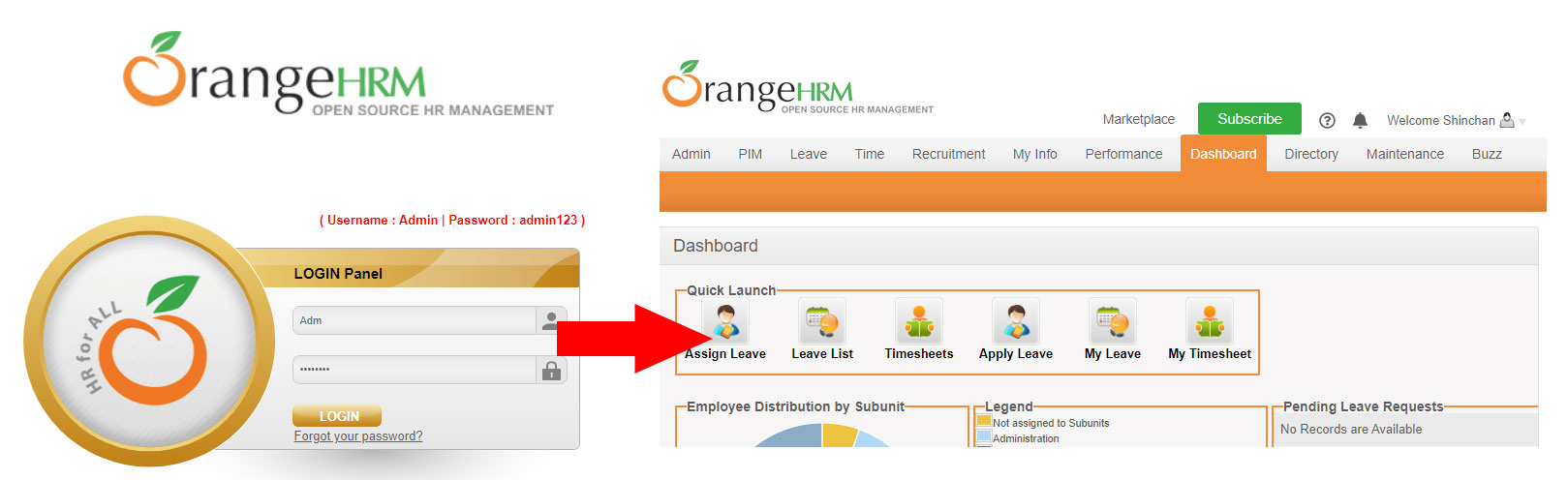
For this article, we will use the login system of the OrangeHRM demo software. (See Figure 1).

Learn how to automate functional UI testing using the I-A-C pattern, and create more effective automated tests.
Figure 1 – OrangeHRM login sample

Test case design

First of all, let’s start designing the test case.
On a login system, a tester wants to insert valid credentials (username and password), and after clicking on the login button, she automatically wants to log in.

Schematically:

  • Enter a valid username
  • Type a valid password
  • Click the login button
  • Check user is successfully logged in

Let’s automate this test case by using the I-A-C pattern.

IDENTIFY the UI object-to-tests

The first step is to locate the test objects.
So, in the OrangeHRM login test case (Figure 2)

  1. username text field
  2. password text field
  3. login button
Learn how to automate functional UI testing using the I-A-C pattern, and create more effective automated tests.
Figure 2 – the UI elements to use to log in

Selenium and Selenium-based tools use “Locators.” Basically, a locator enables testers to identify the web element to interact with.
Selenium offers several different methods like by className, cssSelector, id, name, XPath, etc.

WebElement usrName = driver.findElement(By.id(“txtUsername”));
WebElement password = driver.findElement(By.name(“txtPassword”));
WebElement login = driver.findElement(By.xpath(“/html/body/div[1]/div/div[3]/div[2]/div[2]/form/div[5]/input”));

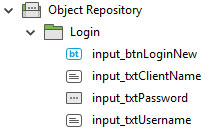
Other tools use “pre-recorded” GUI Maps (or Object Repositories) to locate objects.
A GUI Map represents an abstraction of the structure of the user interface. Hence, it contains the logical names and physical descriptions of the UI objects to test.

For example, a tool based on this technology reads an object’s description in the pre-recorded GUI map (Figure 3) and then looks for an object with the same properties in the tested application.

Figure 3 – a GUI map

Other tools like Maveryx do not use any locator or map: the UI elements to test can be described into the test scripts as they simply appear in the application (on-screen).

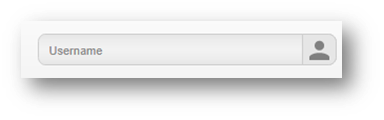
In this example, the username text field is identified by its placeholder “Username” (Figure 4).

//the Username text field
GuiText usrName = new GuiText(“Username”);

Figure 4 – the username text field

Also, the password text field can be identified by its placeholder “Password” (Figure 5).

//the Password text field
GuiPasswordText password = new GuiPasswordText(“Password”);

Figure 5 – the password text field

The same applies to the login button, which can be identified by its caption “Login” (Figure 6):

//click Login button

GuiButton login = new GuiButton(“LOGIN”);

Figure 6 – the login push button

So, the test objects defined in the test script are identified directly at runtime without using any pre-recorded GUI Map.

ACT on the UI object-to-tests

Once the test objects are located, a tester wants to perform the relevant test ACTions on them, such as clicking on a widget, typing some text, selecting an item in a drop-down list, etc.
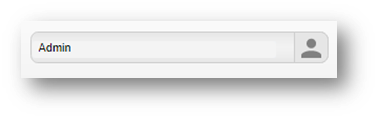
In our example, we would enter some text into the username and password fields and click on the login button.

For instance, to execute these actions with Maveryx, a tester can use setText() and click() methods:

//the username
String username = “Admin”;

//the Username text field
GuiText usrName = new GuiText(“Username”);

//set the username
usrName.setText(username);

//click Login button
GuiButton login = new GuiButton(“LOGIN”);
login.click();

Obviously, the same goes for Selenium or other tools.

CHECK the results

Now that the test interacts with a GUI object, it’s time to verify that the expected output is produced.

Assertions are the best tools to verify that the expected test results match the actual results. They are assumptions on the application under test that must always be true. If any assertion fails, the test will fail. Similarly, if all assertions pass, the test will pass.
Hence, assertions help testers to quickly check if the application under test behaves as expected or not.
For example, if you write a method that calculates the sum of two numbers (e.g., 3 + 5), you might assert that the sum is correct (= 8).

Each assertion contains a boolean expression that you believe will be true when executed. The experience proved that assertions are one of the quickest and most effective ways to detect and correct bugs.

There are several assertions libraries like JUnit, Hamcrest, AssertJ, etc.
For instance, JUnit provides assertEquals() and assertNotEquals() methods to compare the equality and inequality of values. So, the assertion passes when values are equal; otherwise, it fails and throws an AssertionError.

The first parameter passed to the assertEquals method corresponds to the expected value, and the second parameter is the actual value.
In functional UI testing checkpoints include:

  • values checking: a string is entered, a message is displayed, a drop-down contains a list of items, a web element has a given property, etc.
  • property checking: a UI object is enabled, is editable, focused, etc.
  • presence checking: a UI object is present or not in the current user interface

Our example will check if the username and password text field contain the entered search key.

//the username
String username = “Admin”;
//check that the username has been correctly inserted
assertEquals(username /* expected /, usrName.getText() / actual */);

//the password
String pwd = “admin123”;
//check that the password has been correctly inserted
assertEquals(pwd /* expected /, password.getText() / actual */);

If we would check that the “login” button is enabled, we can use: assertTrue(login.isEnabled() /* actual status */);

We could also check the URL of the landing page after logging in
//the Dashboard page URL
String dashboardURL = “https://opensource-demo.orangehrmlive.com/index.php/dashboard”;
//check the Dashboard page URL
assertEquals(dashboardURL, new GuiBrowser().getCurrentPageUrl());

Another way to check that an application behaves correctly is to verify that a UI object is present or not.
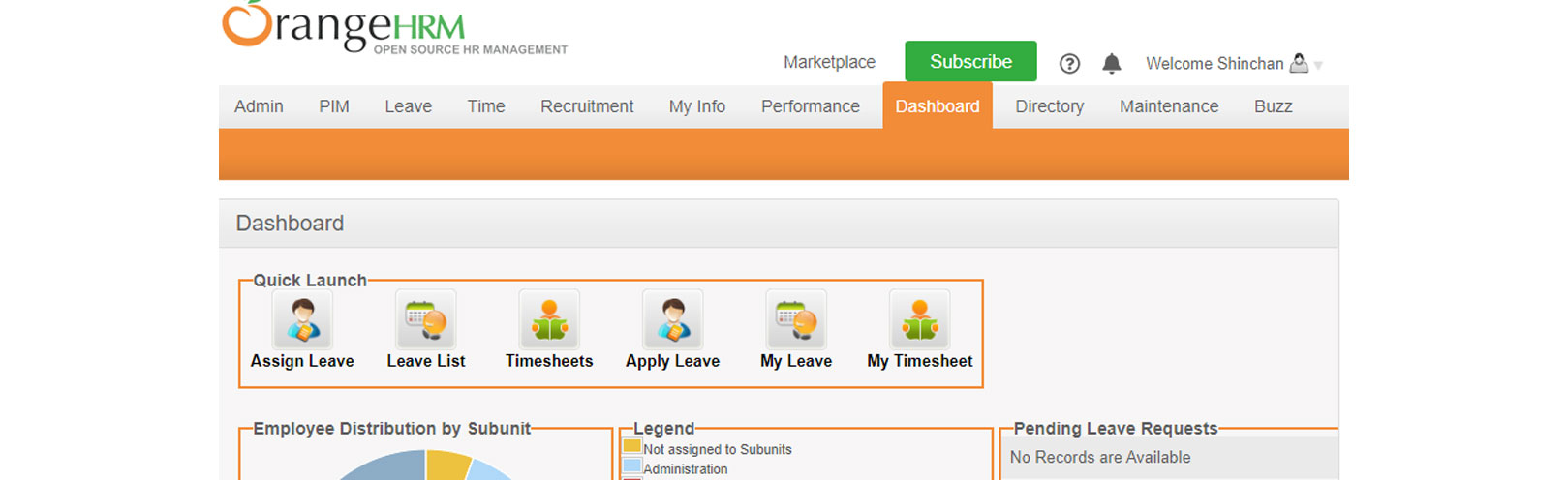
We can also verify that the “Welcome” message popped up to check the successful login (Figure 7). For this purpose, testers can use the waitForObject() method:

//check that the “Welcome Shinchan” is present
new GuiHtmlElement(“Welcome Shinchan”).waitForObject(5, 1);

Learn how to automate functional UI testing using the I-A-C pattern, and create more effective automated tests.
Figure 7 – the welcome message

The waitForObject() function waits until the given object exists. It returns if successful or raises a (catchable) ObjectNotFoundException exception on failure, i.e., if the function times out and the UI object is not displayed. By this approach, you can use this method to check if an object exists (i.e., is shown) or not.

Conclusion

Functional UI testing is essential because it verifies that an application does what it is supposed to do through its user interface, as the end-user would. Also, it allows testing an application end-to-end from the start (the UI layer) to end (services, DB, etc.).
From the automation point of view, Functional UI scripts consist of two main blocks: UI interactions and assertions.
UI interactions consist of firstly identifying the UI objects to test and then acting on them.
On the other hand, assertions allow comparing expected results from specifications to actual results from the application-under-test.

A tester should keep in mind the I-A-C pattern to write good automated Functional UI tests:

  1. IDENTIFY the UI object-to-test;
  2. ACTing on it;
  3. CHECK that expected outcomes and actual outcomes match.

In conclusion, this pattern allows creating more effective automated tests, ensuring maximum test flow control and at least more readable and maintainable scripts.

Maveryx is exhibiting at EuroSTAR 2022. It’s our first in-person event in 2 years – and it’s going to be a massive celebration of testing! Learn from 70 testing experts, and connect with your peers at Europe’s best testing event. Get your ticket now – book by April 22nd and save 10% on individual tickets; up to 35% on group bundles. See you in Copenhagen.

Author

Alfonso Nocella

Co-founder and Sr. Software Engineer at Maveryx, Alfonso led the design and development of some core components of the Maveryx automated testing tool. He collaborated in some astrophysics IT research projects with the University of Napoli Federico II and the Italian national astrophysics research institute (INAF). Over the decades, Alfonso worked on many industrial and research projects in different business fields and partnerships. Also, he was a speaker at several conferences and universities.

Today, Alfonso supports critical QA projects of some Maveryx customers in the defense and public health fields. Besides, he is a test automation trainer, and he takes care of the communication and the technical marketing of Maveryx.

Filed Under: EuroSTAR Conference, Test Automation

7 Automation Sessions to Improve your Test Automation Skills

October 21, 2021 by Ronan Healy

The EuroSTAR Huddle Deep Dive is just around the corner. Taking place from 1-4 November, this live event will take a deep dive into all aspects of test automation. If you are an automation engineer and want to improve your automation skills, the Deep Dive week is the event you should be attending. Let’s have a look at what is happening.

Big Data and Flaky Tests

Adam Sandman & Denis Markovtsev are at the cutting edge of test automation. They plan to showcase their novel use of Big data in test automation. This event will explain how big data was utilised by Adam and Denis to examine and reduce test flakiness. Part of a research project, this talk will showcase their approach of analysing 500 websites by downloading their DOM trees and performing data analysis to see how best practices developed in theory will work in practices with these sites. 

What is Cypress?

What is Cypress? That is a question many of you might have some answer to. Cypress is becoming a popular tool in automation but what does it do? Marie Drake will discus Cypress as a tool is and look at the importance of visual testing and how to integrate visual testing plugins to Cypress.

Making use of Low Code Automation

Paul Grossman has many years of experience in automation. He is a fan of low code automation and so makes a great person to discuss the uses of low code automation. If you have thought about applying low code tools this talk will fill you in on its uses. Paul will explain how you can utilise low code automation and showcase its use with some demo’s too.

Learning From Mistakes in Automation

What are the common mistakes made in test automation? Corina Pip is here to describe and share her advice on the common mistakes in test automation from her experience in the field. This will be a great talk to learn the common pitfalls in automation that we end up in. The Dos and Don’ts of Automation will offer some real world experiences of when automation turns out to be not as useful as you might have hoped!

API Testing

API have become a bigger part of our everyday life. This means a bigger requirement for testing API’s. Julia Pottinger will discuss API automation and in particular Scenarios to consider when doing API Automation. Learn about the world of API’s where to get started, and how to start the process of testing API’s.

Ask Me Anything

Dorothy Graham has over 30 years in the software testing industry much of that focusing on automation. In this live event she will reflect of the week of live events, where automation is going but more importantly will answer your questions on test automation.

Testing the Tests

The week concludes with a well renowned test automation expert: Bas Dijkstra. Bas will ask and answer the question: Who Tests the Tests? In this lively session he will share how you can make quality control for your automated tests part of your testing and development process. He will also introduce the technique of mutation testing and how you might use it for checking the quality of your automated tests.

So seven talks that can only excite you about the new skills and takeaways that you could learn from these sessions. Remember to sign up here.

Filed Under: Test Automation Tagged With: EuroSTAR Conference, Test Automation

Why Invest in Quality?

August 11, 2021 by Fiona Nic Dhonnacha

When everyone talks about digital acceleration and how the pandemic came to boost digital transformation in organizations, we all realize that part of the “secret” to respond to this context is the speed with which companies are/were able to reinvent themselves and to adapt business models to the digital world.

The pressure on IT departments has increased, application development and the introduction of new solutions and technologies as well. And it is in this scenario that talking about Quality – Quality Assurance and Quality Management – makes even more sense. These are issues that business decision-makers and managers should be aware of. Talking about Quality, Quality Assurance, software testing, it cannot be just an IT theme, it is a theme that impacts the entire organization, different stakeholders, customers, in short, the business.

Some facts that demonstrate it

– According to Forrester, 25% of users abandon a web or mobile application after a delay of just 3 seconds. 3 seconds is an eternity in customer perspective, who quickly leaves the Site or application … and looks for alternatives.

– According to the IBM System Science Institute, the correction of a critical incident in Production has a cost 10x higher than it would be in the final testing phase, and 100x higher than the design phase. These costs are only incurred in IT processes, that is, without adding the possible impacts on the business, which often result in tangible and intangible losses on unaffordable scales.

– And the most “impressive” data… 50% of most organizations’ IT effort and budget are spent on maintenance tasks, due to problems related to poor performance, errors, or problems with their applications (internal or external), according to us says techrepublic.com.

Have you calculated the direct costs, the intangible impact, and the reputational and commercial damage that this type of incident can cause in your business?

Implementing an efficient Quality Management strategy is essential to minimize this impact, with proven data that guarantees, from the start, significant increases in customer satisfaction, for example, when they have an excellent online experience with your brand and applications or your company’s website; reduction of releases and versions of the developed application; significant reduction in critical incidents, increasing levels of user confidence (internal or external) in the reliability of the systems and even the information they generate or the significant reduction in time-to-market, not to mention the effective cost reduction, related to maintenance, carrying out redundant tests or other types of inefficiencies related to their systems and applications.

Test Automation

Automation is one of the top companies’ priorities nowadays and is one of the biggest trends in the technology industry. Some even speak of Hyper Automation to describe the central role that automation will play in the organizations of the future. Also, in Quality, the automation of software tests is already a reality. All, or almost all, the large companies that have applications and systems critical to their business, are looking to automation as a way of reducing effort, reducing the performance of manual tests, optimizing resources, and, above all, reducing application development times and associated costs.

Despite the obvious gains that Test automation represents, it should not, however, be a “miraculous” solution in the context of quality and should be implemented gradually and always considering an important KPI – ROI (Return on investment). Automation costs must be taken into account, and it is very important to estimate the balance between effort-investment benefits of implementing an automation solution. It is necessary to consider the effort and frequency of development of the application in question, its criticality to the business, the support/maintenance it will require, and the test tasks that are carried out manually.

In short, it is increasingly important for organizations to adopt a Quality Strategy, to guarantee a faster arrival to their target audience, with reliable technological solutions – ensuring its functionality and a good customer experience. Failure to achieve this goal is nowadays penalizing for most organizations, and the short/medium term will simply be decisive in their ability to survive in a market increasingly eager for adequate solutions and made available at the right times.

Noesis is exhibiting at EuroSTAR 2021 Online. Looking to learn more on test automation? Check out the EuroSTAR 2021 programme, and join us September 28-30th.

Author

Eduardo Amaral, Quality Management Director at Noesis

Quality Management Director at Noesis – Portuguese QM Services Market Leader, Eduardo worked as analyst/developer, project manager, program manager and service delivery manager. He has a background and certifications in several areas, including quality assurance, project/program management, process management and product management. Over the last 21+ years, Eduardo has been involved in a variety of software project development lifecycles and solutions integration, at high levels of complexity and customer experience exposure, performed in some of the major national and international companies, from different business areas – Industry, Banking, Insurance, Telco, Retail, etc.

Filed Under: EuroSTAR Conference, Test Automation

COVID-19: Automation as a Solution

July 21, 2021 by Fiona Nic Dhonnacha

The pandemic we lived in the past year has not only accelerated the transition to automated processes but is also leveraging investments that drive change and protect organizations in scenarios like the current one.

All sectors are feeling the effects of the pandemic today. In recent weeks, the discussion on the economic and productive impact of companies has deepened, which will naturally be felt in the present and future. One thing we can be sure of, the pandemic will bring profound changes in the corporate fabric, not only negative but opportunities to improve methodologies and processes. Some have already given COVID-19 responsibility for speeding up the digital transformation process, at least in organizations with the process under development or at an early stage. With employees at home, many companies have drastically reduced their productivity, this being a moment of reflection. It is in this reflection that the opportunities and the vision to succeed in the future arise.

Automation is one of the first areas to take a step forward in companies’ evolution. The economic and productivity challenges we face today can be partly solved by automating routines, processes, and actions.

Today, and even more in the future, organizations need cost-effective and robust processes on the path to sustainable digital transformation. Human resources are often assigned to tasks and routine activities. The diversity of interfaces and different degrees of complexities leads to an increased probability of error in key organizational processes. Using robotic software to perform these routine tasks, rather than humans, makes it possible to execute the processes remotely, in turn ensuring business continuity.

Automation should not be seen as a threat. It should be seen by decision-makers as a tool that ensures productivity, not only by automatism itself and by decreasing the probability of errors, but because it allows allocating human resources to other tasks that may be more priority for the organization.

At Noesis, as a result of our industry and the automation of our processes, today we are 100% operational, ensuring a quick and efficient response to our customers. We believe that at least up to 30% of organizations’ tasks can be automated through Robotic Process Automation (RPA). We are talking about multiple activities, from generating an automatic response to an email to implementing thousands of bots, each programmed to complete a specific task, based on the state of the art technologies based on Machine Learning and Artificial Intelligence.

As a basis for the automation of RPA processes, Noesis uses its background with more than 10 years of experience in the field of test automation, being at this moment of Lockdown an excellent weapon to combat the errors of the applications that support, not only our day-to-day work but the applications that support the economy, allowing the uninterrupted provision of online services.

For this reason, and because we need the services and applications on the web to remain available, Noesis also actively participates in detecting bottlenecks of availability through the execution of load tests and safety tests, in a preventive way. In this way, we have received more and more orders in these areas, with the primary objective of reducing our customers’ costs, by detecting errors much earlier in the software development cycle, be they functional, availability, or security errors.

The future is a little more uncertain today, but the challenges are the same and we will continue to be ready to find solutions.

Noesis is exhibiting at EuroSTAR 2021 Online. Check out the EuroSTAR 2021 programme, and join us September 28-30th.

Author

Tiago Honorato, DevOps & Automation Senior Manager at Noesis

Tiago has 10+ years of experience in SW Development and Frameworks creation and design. He is currently Senior Manager at Noesis in the automation area, and is responsible for managing test automation projects for Noesis clients. He is creator, and responsible for, an innovative solution that became a Noesis product.

Filed Under: Test Automation Tagged With: Test Automation

First Steps to Approach Test Automation

June 11, 2021 by Fiona Nic Dhonnacha

Test automation is a top priority for today’s companies. All, or almost, are betting on this aspect to reduce the effort of carrying out manual tests, avoiding the turnover of people in the projects, motivating employees, and saving time in the commercialization of products and services. But before jumping into the automation topic, several key aspects must be considered to fulfill the goal we establish.

The first thing to do is to analyze those three important areas need to be included in any test automation process: tools, test environment, and scope; although it is not necessary to do it in this order, because they are related.

Tools

The first step is to consider which tool meets our needs. The important thing is to analyze our needs and observe the types of validation, architecture, and tools that allow us to build, manage and report the automation project. The process of selecting an automation tool for web or mobile is not the same if we are thinking of an SAP system. Therefore, in this case, it is necessary to take a more specific approach concerning technical support and tools that suit the type of system chosen.

Test Environments

We need software, licenses, and infrastructure, in addition to a log of executions and parameterization. Therefore, it is necessary to define the test data management strategy and the requirements for continuous testing. In many cases, it is important to keep in mind that to get these sandboxes up and running, we need a lot of data. This is an aspect that cannot be ignored.

Scope

In terms of reach, what we must evaluate is what we want to automate. The initial assessment should aim to define which business processes we are going to automate. To do this, we must identify what kind of applications we have, the repetitive tasks and what we want to automate. Likewise, we have to define at what level we will implement test automation.

With these three fundamentals well established, we can observe some additional steps, such as the identification of the pilot application, the definition of small validation steps, which must be carried out step by step to manage expectations properly, and the automation criteria, which are used to identify the stability of the application in a test state. In this sense, we have to be sure of what will be used and evaluate the application’s life cycles; if it will be used for a long time, if it is obsolete or if the test time is acceptable.

Return On Investment

Last but not least, we must look at ROI (Return On Investment), taking into account both automation costs, with the remaining costs that we will have. The important thing here is to estimate the break-even point for the development, support/maintenance effort, and the tasks that must be performed manually. We will find the balance when we reach approximately 80% profit (considering the use of automation) and 20% effort (that would be the total amount to automate 100% of the reach).

In this sense, each organization must define the levels of automation that it will implement, and its level of scales, starting from 0 that corresponds to having no automation, and gradually going through levels 1 to 4. The first level corresponds to a basic level; the second at a more productive level, where we already have a roadmap, defined objectives, and KPIs; the third with a more consolidated automation framework, in which we already work on processes and not just on applications; and a fourth, and last, more advanced, in which we have already introduced artificial intelligence. These levels give a priority reference to guide us and the ideal is to have a detailed scale of priorities. Thus, as we increase coverage by 60-80%, investment starts to decrease. This is an important aspect to consider before starting.

Ultimately, it is important to focus on the future uses of test automation, based on good market practices, as well as how to get the ROI we want to achieve and good ways to measure it.

Noesis are exhibiting at EuroSTAR 2021 Online. Looking to learn more on test automation? Check out the EuroSTAR 2021 programme, and join us September 28-30th.

Author

Eduardo Amaral, Quality Management Director at Noesis

Quality Management Director at Noesis – Portuguese QM Services Market Leader, Eduardo worked as analyst/developer, project manager, program manager and service delivery manager. He has a background and certifications in several areas, including quality assurance, project/program management, process management and product management. Over the last 21+ years, Eduardo has been involved in a variety of software project development lifecycles and solutions integration, at high levels of complexity and customer experience exposure, performed in some of the major national and international companies, from different business areas – Industry, Banking, Insurance, Telco, Retail, etc.

Filed Under: EuroSTAR Conference, Test Automation Tagged With: software testing tools, Test Automation

  • « Previous Page
  • Page 1
  • Page 2
  • Page 3
  • Page 4
  • Page 5
  • Page 6
  • Next Page »
  • Code of Conduct
  • Privacy Policy
  • T&C
  • Media Partners
  • Contact Us