• Skip to main content
Year End Offer: Save 30% + Teams Save Up to an Extra 25%!

EuroSTAR Conference

Europe's Largest Quality Engineering Conference

  • Programme
    • Programme Committee
    • 2025 Programme
    • 2025 Speakers
    • Community Hub
    • Awards
    • Social Events
    • Volunteer
  • Attend
    • Location
    • Highlights
    • Get Approval
    • Why Attend
    • Bring your Team
    • Testimonials
    • 2025 Photos
  • Sponsor
    • Sponsor Opportunities
    • Sponsor Testimonials
  • About
    • About Us
    • Our Timeline
    • FAQ
    • Blog
    • Organisations
    • Contact Us
  • Book Now

Test Automation

Is test automation a first-class citizen of your development pipeline?

January 18, 2023 by Lauren Payne

Thanks to Karate Labs for providing us with this blog post.

A key point that many teams fail to ponder: “Is test-automation a first-class citizen of your development pipeline?”

This is the second part of a series of articles covering the finer aspects of test automation in detail. Read the first part here: The Test Automation Capability Map.

What happens when Developer Experience is not prioritized? Does this situation (see picture below) look familiar where you use a separate tool and workflow for authoring test-automation artifacts?
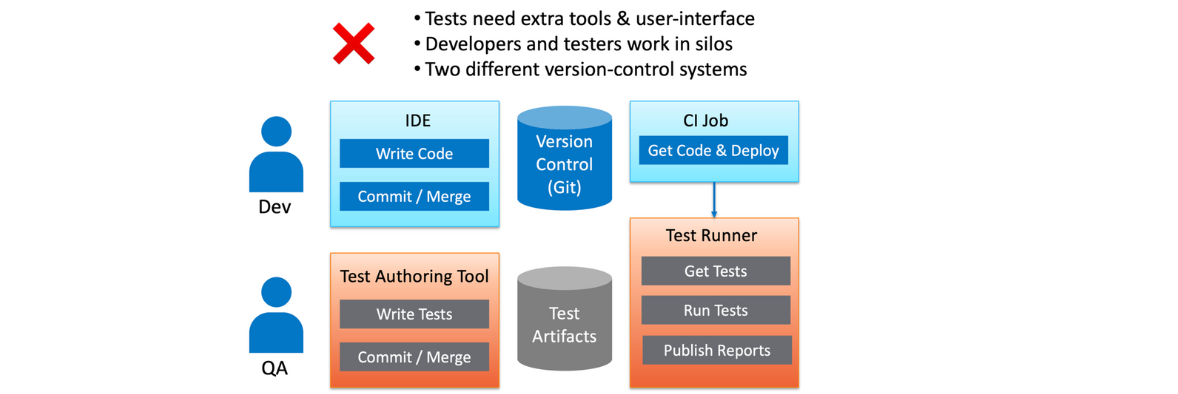

Let us zoom in on three of the Test-Automation capabilities which fall under the category of Developer Experience.

IDE Support

The development team spends the most time within their IDE of choice (e.g., IntelliJ, Visual Studio Code etc.). If test-automation requires a completely different tool, user-interface, and workflow, this has several implications for your team:

  • Switching between tools takes developers out of their “flow state.”
  • Developers are less likely to run tests before checking-in or merging code. This leads to an inefficient feedback loop, where failures are detected only when tests are run later.
  • Developers are less likely to contribute and maintain tests. This results in dysfunctional teams where developers “chuck things over the fence” to the “QA team”. It is very common to find developers and QA teams operating in silos where bugs that “escape” to production result in finger-pointing and blame-games.

Self-Hosted or On-Prem

An aspect often overlooked is whether any sensitive data is leaving your safe-zone and coming to rest beyond your organization’s security perimeter or firewall. If you use a SaaS tool that is not self-hosted, this typically is the case.

Even though integration and end-to-end testing environments should ideally use fake or synthetic data, there will be cases where “production-like” data will be needed to simulate real business-scenarios. Many teams extract a “cut” of production data for a staging environment with some data-masking or sanitizing applied. Equally or more important than test-data is test-configuration, such as database-secrets, authentication-tokens, and passwords.

Given that a lot of teams operate in the public-cloud even for pre-production environments (e.g., AWS, Azure and GCP) it is even more important that the greatest care is taken to protect not just your test-data, but the configuration and locations and URLs of test-servers and other infrastructure. So, the critical question you should ask – Are my tests being stored in somebody else’s cloud?

Version Control, History, and Diffs

Self-hosted or not, the situation worsens if your test-automation artifacts are being managed in a separate tool or repository. The implications of having tests in a separate tool and workflow are understated, but significant

  • You will lose the ability to eyeball the changes in your tests, side-by-side with the corresponding changes to code.
  • There is less pressure (or no “forcing function”) to add or edit tests when code-changes are made. This discipline can make the difference between a high-performing team or one that lacks confidence to ship as often as needed.
  • Tests are the best documentation of “what the system does.” When you cannot see the history of changes to tests side-by-side with the code commit history, you lose a valuable chunk of documentation, and you are left with an incomplete picture of how the software evolved.
  • Your Continuous Integration job becomes more complex at the point where tests must be run. Instead of getting code and tests in one atomic “checkout” or “git clone” operation, you are forced to perform an extra step to download the tests from somewhere. Keep in mind that you also need to ensure that the version of the tests corresponds to what is being tested.

In addition, if you are using a tool with a “no-code” UI to author tests, it is quite likely that you lose the basic ability to see diffs and history even just for your tests. Some tool vendors have ended up having to build version-control into their user-experience, re-inventing what comes naturally to teams that use Git to collaborate.

Some things are best expressed as code. At the end of the day, everyone agrees that code-diffs are a superior Developer Experience.

To summarize, for your test-automation to be a first-class citizen of your development pipeline you need to use a tool that integrates into the team’s IDE of choice and stays close to the code being tested. The result of that is shown below.
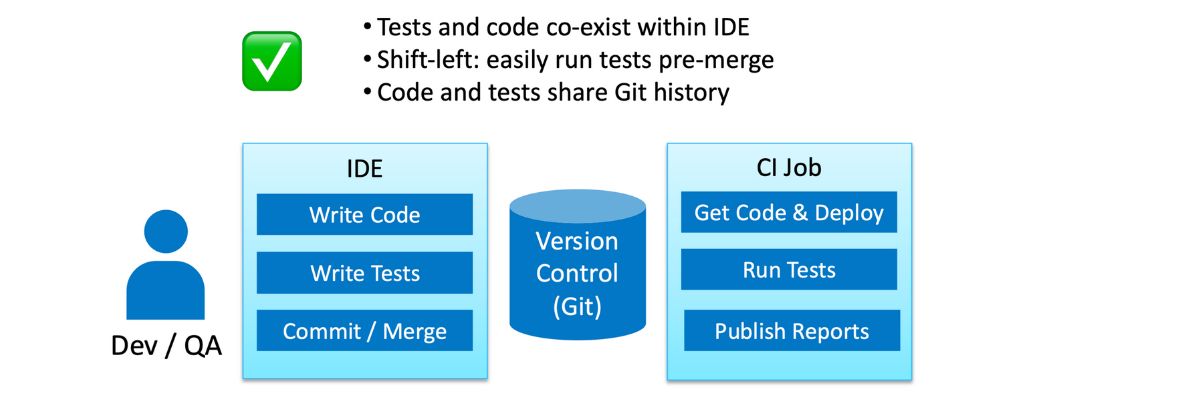
An interesting observation is that: this is exactly the developer experience you expect for unit-tests!


So which kind of team do you want to be in?
Happy Testing!

Author

Peter Thomas Co-founder & CTO Karate Labs

Peter Thomas, Co-founder & CTO, Karate Labs

Peter is recognized as one of the world’s top experts in test automation. He brings 25 years of industry experience from which he has been in open source for the last 18 years. He has worked at Yahoo and Intuit. As part of the API platform leadership at Intuit, Peter created “Karate” the open-source solution unifying API, UI & Performance testing. Peter was one of only 15 chosen by GitHub for a grant in India 2021. He co-founded Karate Labs Inc in Nov’21 to accelerate the adoption of Karate with the mission of making test automation fun and collaborative. Karate Labs is a Y Combinator backed company.

Karate Labs is a Platinum Partner at EuroSTAR 2023. Join us at Antwerp Zoo June 13-16, in a 4 day celebration of testing. Learn from 68 expert speakers and connect with your peers at Europe’s Best Testing Event. Book your tickets by Jan 31 and save 15% or book your team and save up to 40%.

Filed Under: Development, Test Automation Tagged With: 2023, Test Automation

The test automation capability map

December 14, 2022 by Lauren Payne

Thanks to Karate Labs for providing us with this blog post.

Test Automation is serious business. With teams under pressure to ship more often for competitive advantage, ensuring the best-quality end-user experience is key.

The choice of a test-automation tool can make the difference between a team that has high velocity – or one that lacks confidence to release.

We have seen many teams that have made the mistake of writing an in-house test-automation framework. I have personally experienced the pain of developers who have inherited tests in such a framework multiple times.

Unfortunately, teams continue to write their own framework for many reasons. One is that development skills are valued more than domain-knowledge or knowledge about the end-user. Creating a test-framework “from scratch” is over-hyped, fueled by a multitude of influencers and bloggers.

A reason that few like to talk about is that it is easier to write some code instead of thinking through what it takes to actually test a given piece of software. You would have seen cases where a team spends months building a test-framework, only for a new team to come along and promptly decide that a re-write is required.

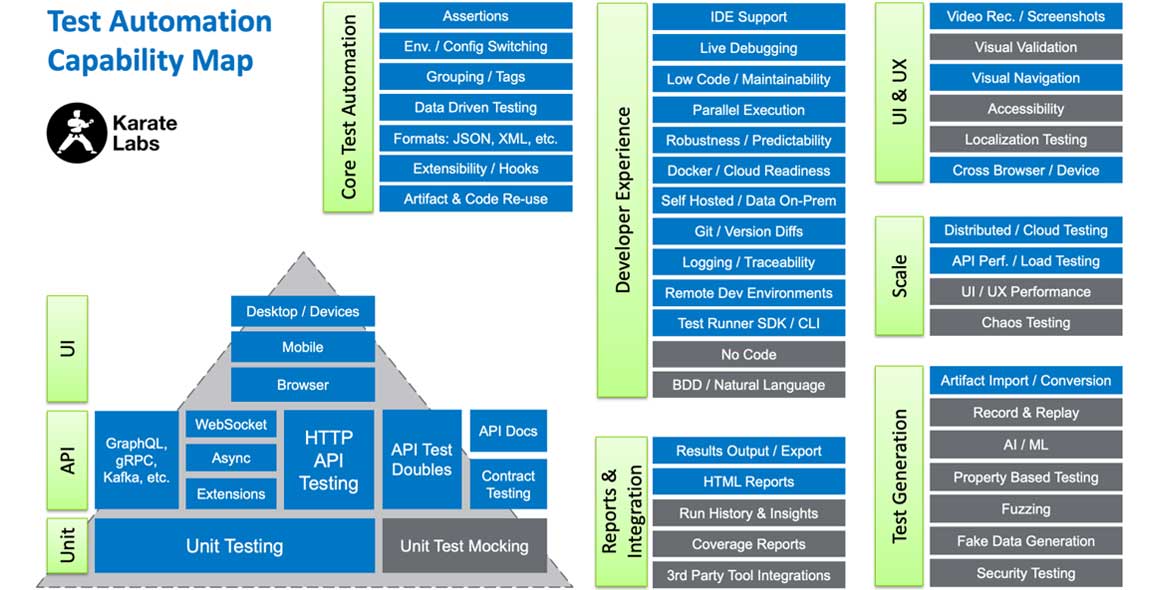
To help teams make the right choice, we have created this graphic to emphasize a few points. It can be used as a handy reference to compare test-automation tools and discuss the relative importance of the capabilities for your specific team.

Please pass this on to those who are responsible for driving standards and evaluating tools in your enterprise.

test automation capability map

To summarize:

  • Test Automation requires a large set of fundamental capabilities. Are you sure you can implement all these in-house, or would you be better-off using an industry standard solution?

  • Does the tool pay attention to Developer Experience? Keep in mind that tests must be maintained for as long as your systems are in production.

  • Does the tool bring developers and QA closer together or force them into different user-interfaces and workflows?

  • Can your tests be version-controlled just like your code? To be specific, can you see the history and the “diffs” between previous versions?

  • Is your test data within your firewall or going into “somebody else’s cloud”?

  • Is it easy to simulate end-user-flows and the core capabilities (your reason to exist) of your business?

  • Is there a mature community of users or someone that you can reach out to for support?

  • How useful is the documentation? Does it go into detail? Are there enough examples?

  • How easy is it for someone new to the tool to start using it productively?

The list of capabilities in the graphic is a result of many iterations and discussions. Do let us know if any test-aspect is missing, or if you have any other feedback!

And by the way, the boxes in blue are things that Karate does today.

Happy Testing!

Author

Peter Thomas Co-founder & CTO Karate Labs

Peter Thomas, Co-founder & CTO, Karate Labs

Peter is recognized as one of the world’s top experts in test automation. He brings 25 years of industry experience from which he has been in open source for the last 18 years. He has worked at Yahoo and Intuit. As part of the API platform leadership at Intuit, Peter created “Karate” the open-source solution unifying API, UI & Performance testing. Peter was one of only 15 chosen by GitHub for a grant in India 2021. He co-founded Karate Labs Inc in Nov’21 to accelerate the adoption of Karate with the mission of making test automation fun and collaborative. Karate Labs is a Y Combinator backed company.

Karate Labs is a Platinum Partner at EuroSTAR 2023. Join us at Antwerp Zoo June 13-16 in a 4 day celebration of testing. Learn from 65 expert speakers and connect with your peers at Europe’s Best Testing Event. Book your tickets by Dec 31 and save 20% or book your team and save up to 45%.

Filed Under: Test Automation, Uncategorized Tagged With: 2023, Test Automation

7 Automation Sessions to Improve your Test Automation Skills

October 21, 2021 by Ronan Healy

The EuroSTAR Huddle Deep Dive is just around the corner. Taking place from 1-4 November, this live event will take a deep dive into all aspects of test automation. If you are an automation engineer and want to improve your automation skills, the Deep Dive week is the event you should be attending. Let’s have a look at what is happening.

Big Data and Flaky Tests

Adam Sandman & Denis Markovtsev are at the cutting edge of test automation. They plan to showcase their novel use of Big data in test automation. This event will explain how big data was utilised by Adam and Denis to examine and reduce test flakiness. Part of a research project, this talk will showcase their approach of analysing 500 websites by downloading their DOM trees and performing data analysis to see how best practices developed in theory will work in practices with these sites. 

What is Cypress?

What is Cypress? That is a question many of you might have some answer to. Cypress is becoming a popular tool in automation but what does it do? Marie Drake will discus Cypress as a tool is and look at the importance of visual testing and how to integrate visual testing plugins to Cypress.

Making use of Low Code Automation

Paul Grossman has many years of experience in automation. He is a fan of low code automation and so makes a great person to discuss the uses of low code automation. If you have thought about applying low code tools this talk will fill you in on its uses. Paul will explain how you can utilise low code automation and showcase its use with some demo’s too.

Learning From Mistakes in Automation

What are the common mistakes made in test automation? Corina Pip is here to describe and share her advice on the common mistakes in test automation from her experience in the field. This will be a great talk to learn the common pitfalls in automation that we end up in. The Dos and Don’ts of Automation will offer some real world experiences of when automation turns out to be not as useful as you might have hoped!

API Testing

API have become a bigger part of our everyday life. This means a bigger requirement for testing API’s. Julia Pottinger will discuss API automation and in particular Scenarios to consider when doing API Automation. Learn about the world of API’s where to get started, and how to start the process of testing API’s.

Ask Me Anything

Dorothy Graham has over 30 years in the software testing industry much of that focusing on automation. In this live event she will reflect of the week of live events, where automation is going but more importantly will answer your questions on test automation.

Testing the Tests

The week concludes with a well renowned test automation expert: Bas Dijkstra. Bas will ask and answer the question: Who Tests the Tests? In this lively session he will share how you can make quality control for your automated tests part of your testing and development process. He will also introduce the technique of mutation testing and how you might use it for checking the quality of your automated tests.

So seven talks that can only excite you about the new skills and takeaways that you could learn from these sessions. Remember to sign up here.

Filed Under: Test Automation Tagged With: EuroSTAR Conference, Test Automation

COVID-19: Automation as a Solution

July 21, 2021 by Fiona Nic Dhonnacha

The pandemic we lived in the past year has not only accelerated the transition to automated processes but is also leveraging investments that drive change and protect organizations in scenarios like the current one.

All sectors are feeling the effects of the pandemic today. In recent weeks, the discussion on the economic and productive impact of companies has deepened, which will naturally be felt in the present and future. One thing we can be sure of, the pandemic will bring profound changes in the corporate fabric, not only negative but opportunities to improve methodologies and processes. Some have already given COVID-19 responsibility for speeding up the digital transformation process, at least in organizations with the process under development or at an early stage. With employees at home, many companies have drastically reduced their productivity, this being a moment of reflection. It is in this reflection that the opportunities and the vision to succeed in the future arise.

Automation is one of the first areas to take a step forward in companies’ evolution. The economic and productivity challenges we face today can be partly solved by automating routines, processes, and actions.

Today, and even more in the future, organizations need cost-effective and robust processes on the path to sustainable digital transformation. Human resources are often assigned to tasks and routine activities. The diversity of interfaces and different degrees of complexities leads to an increased probability of error in key organizational processes. Using robotic software to perform these routine tasks, rather than humans, makes it possible to execute the processes remotely, in turn ensuring business continuity.

Automation should not be seen as a threat. It should be seen by decision-makers as a tool that ensures productivity, not only by automatism itself and by decreasing the probability of errors, but because it allows allocating human resources to other tasks that may be more priority for the organization.

At Noesis, as a result of our industry and the automation of our processes, today we are 100% operational, ensuring a quick and efficient response to our customers. We believe that at least up to 30% of organizations’ tasks can be automated through Robotic Process Automation (RPA). We are talking about multiple activities, from generating an automatic response to an email to implementing thousands of bots, each programmed to complete a specific task, based on the state of the art technologies based on Machine Learning and Artificial Intelligence.

As a basis for the automation of RPA processes, Noesis uses its background with more than 10 years of experience in the field of test automation, being at this moment of Lockdown an excellent weapon to combat the errors of the applications that support, not only our day-to-day work but the applications that support the economy, allowing the uninterrupted provision of online services.

For this reason, and because we need the services and applications on the web to remain available, Noesis also actively participates in detecting bottlenecks of availability through the execution of load tests and safety tests, in a preventive way. In this way, we have received more and more orders in these areas, with the primary objective of reducing our customers’ costs, by detecting errors much earlier in the software development cycle, be they functional, availability, or security errors.

The future is a little more uncertain today, but the challenges are the same and we will continue to be ready to find solutions.

Noesis is exhibiting at EuroSTAR 2021 Online. Check out the EuroSTAR 2021 programme, and join us September 28-30th.

Author

Tiago Honorato, DevOps & Automation Senior Manager at Noesis

Tiago has 10+ years of experience in SW Development and Frameworks creation and design. He is currently Senior Manager at Noesis in the automation area, and is responsible for managing test automation projects for Noesis clients. He is creator, and responsible for, an innovative solution that became a Noesis product.

Filed Under: Test Automation Tagged With: Test Automation

First Steps to Approach Test Automation

June 11, 2021 by Fiona Nic Dhonnacha

Test automation is a top priority for today’s companies. All, or almost, are betting on this aspect to reduce the effort of carrying out manual tests, avoiding the turnover of people in the projects, motivating employees, and saving time in the commercialization of products and services. But before jumping into the automation topic, several key aspects must be considered to fulfill the goal we establish.

The first thing to do is to analyze those three important areas need to be included in any test automation process: tools, test environment, and scope; although it is not necessary to do it in this order, because they are related.

Tools

The first step is to consider which tool meets our needs. The important thing is to analyze our needs and observe the types of validation, architecture, and tools that allow us to build, manage and report the automation project. The process of selecting an automation tool for web or mobile is not the same if we are thinking of an SAP system. Therefore, in this case, it is necessary to take a more specific approach concerning technical support and tools that suit the type of system chosen.

Test Environments

We need software, licenses, and infrastructure, in addition to a log of executions and parameterization. Therefore, it is necessary to define the test data management strategy and the requirements for continuous testing. In many cases, it is important to keep in mind that to get these sandboxes up and running, we need a lot of data. This is an aspect that cannot be ignored.

Scope

In terms of reach, what we must evaluate is what we want to automate. The initial assessment should aim to define which business processes we are going to automate. To do this, we must identify what kind of applications we have, the repetitive tasks and what we want to automate. Likewise, we have to define at what level we will implement test automation.

With these three fundamentals well established, we can observe some additional steps, such as the identification of the pilot application, the definition of small validation steps, which must be carried out step by step to manage expectations properly, and the automation criteria, which are used to identify the stability of the application in a test state. In this sense, we have to be sure of what will be used and evaluate the application’s life cycles; if it will be used for a long time, if it is obsolete or if the test time is acceptable.

Return On Investment

Last but not least, we must look at ROI (Return On Investment), taking into account both automation costs, with the remaining costs that we will have. The important thing here is to estimate the break-even point for the development, support/maintenance effort, and the tasks that must be performed manually. We will find the balance when we reach approximately 80% profit (considering the use of automation) and 20% effort (that would be the total amount to automate 100% of the reach).

In this sense, each organization must define the levels of automation that it will implement, and its level of scales, starting from 0 that corresponds to having no automation, and gradually going through levels 1 to 4. The first level corresponds to a basic level; the second at a more productive level, where we already have a roadmap, defined objectives, and KPIs; the third with a more consolidated automation framework, in which we already work on processes and not just on applications; and a fourth, and last, more advanced, in which we have already introduced artificial intelligence. These levels give a priority reference to guide us and the ideal is to have a detailed scale of priorities. Thus, as we increase coverage by 60-80%, investment starts to decrease. This is an important aspect to consider before starting.

Ultimately, it is important to focus on the future uses of test automation, based on good market practices, as well as how to get the ROI we want to achieve and good ways to measure it.

Noesis are exhibiting at EuroSTAR 2021 Online. Looking to learn more on test automation? Check out the EuroSTAR 2021 programme, and join us September 28-30th.

Author

Eduardo Amaral, Quality Management Director at Noesis

Quality Management Director at Noesis – Portuguese QM Services Market Leader, Eduardo worked as analyst/developer, project manager, program manager and service delivery manager. He has a background and certifications in several areas, including quality assurance, project/program management, process management and product management. Over the last 21+ years, Eduardo has been involved in a variety of software project development lifecycles and solutions integration, at high levels of complexity and customer experience exposure, performed in some of the major national and international companies, from different business areas – Industry, Banking, Insurance, Telco, Retail, etc.

Filed Under: EuroSTAR Conference, Test Automation Tagged With: software testing tools, Test Automation

The Ultimate Guide to getting started with Test Automation

September 24, 2020 by Fiona Nic Dhonnacha

Introduction

Getting started with test automation can seem daunting. How do you know where to start and what to focus on? We’re getting actionable and concrete advice from a Selenium enthusiast and UI testing whiz Diego Molina at Sauce Labs:

“I currently work as a software engineer at Sauce Labs. I co-created Zalenium, and help maintain the most used docker-selenium images. But it might be helpful to share with you some background on my personal testing story. I too was once just getting started with automation, and hopefully my experience can help you do the same.”

Step 1. Getting Started with test Automation – understand the benefits

Years ago, after getting my degree in computer science, I got a job as a developer. At that time, testing was primarily done by end users—we would hand over spreadsheets with all the test cases. Later, I got a job as an automation engineer where I wrote tests for every single use case. I started doing UI automation with Selenium and took the same approach, again writing tests for every use case.

At the time, I didn’t think about whether that was the right approach or not. But then I noticed a problem. My test suite went from taking 20 minutes to run to upwards of 60-70 minutes! Uh-oh. Could it be too many tests? Or did I just need to tune the infrastructure?

I ended up building my own infrastructure and scaled it up. I was able to improve the performance of the tests back down to 15-20 minutes. So then, of course, I thought the best idea would be to—you guessed it—add yet more tests. I started writing tests for every use case again.

It’s a vicious cycle! After a few rounds of this, I realized I was not tackling the problem the right way, and that automation was the key to solving it.

Why Automate?


Test automation team working together around a table

Simply put, automation gives you the opportunity to spend less time on repetitive tasks and move on to solving bigger challenges, hopefully ones that are more fun.

Also, there is a trend in the software industry: getting software out the door faster and faster. We are finding ways to speed up our releases more and more, and in order to keep up, we have to automate.


I’ll cover 5 specific areas that will help you jumpstart test automation and get the most out of it in 5 easy steps

  • Team Setup: I’ll give advice on how to handle various team setups and ensure great communication, whether the testing team is integrated with the dev team or stands alone.
  • Testing Framework: I’ll discuss why to use a framework, talk about what features a framework should have—and why you should consider open source.
  • Test The Right Thing: We can’t automate everything. Creating and maintaining automated tests takes time, so I’ll help you think critically about what to automate.
  • When To Run Tests: I’ll discuss the evolution of testing and how to use automation to move your organization forward toward Continuous Testing.
  • Get People to Join You: In the final installment, I’ll offer advice on how to motivate yourself, your entire team, and your company to invest in automation (and discuss the risks of not doing so).


Team Setup


When testers are on a separate team to developers

Choose a programming language such as Ruby or Python that has an easy setup and low barrier to entry. In fact, according to the 2019 Stack Overflow survey, Python has recently proven to be one of the most popular languages. But what’s more important than programming language? One word: communication. You have to communicate regularly with the product owner and with the development team in order to test effectively.

Here are some specific action items to facilitate this communication:

  • Get access to the story/task/feature definitions to create tests.
  • Get business context from the product owner to prioritize testing activities.
  • Get as much information as possible about the tech stack, system architecture, etc.

Also, be in sync with the dev team. Go step by step as you’re implementing the first automated tests. Work together to agree on a working pace and define a bug report flow.

When testers and developers are on the same team

This can look one of two ways: either the testers and developers have separate, defined roles (QA/Dev), or each team members serves both functions as part of their role. It really helps when one or more team members are responsible to guide the team in testing.

In this scenario, it also helps when application code and test code use the same programming language, as it really leverages team collaboration. Also, when you’re testing, take advantage of the good practices used in the software development lifecycle. Keep test code in the same repository as the app code. This simplifies the flow required to write tests for features that are not yet in production.

The bottom line is that you should look at test automation as a software project… because it is!

Key Takeaways

  • Invest time looking for a test framework that helps the team move faster. I will cover this in more detail in my next post, but this can be a huge time saver and make everyone more efficient.
  • Make test design and implementation a team task. This cannot just be one person’s job: testing and quality need to be a part of the overall team culture.
  • Document how tests are structured.Keep records of configuration as well as how to run, add and remove tests.
  • Pair program and do code reviews.When you’re adding new tests, it’s really helpful to pair up with a teammate to check each other’s code and think through each other’s approach.
  • Continuously evaluate if the existing test cases deliver enough value. We always want to be sure that we are testing the right thing and getting the results we need. Constantly evaluate and make sure this is happening!


How the team setup should evolve over time

No matter what your team setup looks like, there’s always room to evolve over time to get better and better. The goal is constant improvement, moving toward more efficient practices to let automated testing do the heavy lifting for you.

Of course, there will always be room for manual testing. However, the focus on it will change: manual testing will be used strategically for debugging and exploratory testing, instead of dominating your testing landscape.

Step 3. Testing Framework

What is a testing framework and why should you have one?

A framework isn’t just one thing. It’s a union of different things—guidelines, coding standards, good practices, tools and libraries—that work together to make us faster and more efficient. An effective test framework can lower maintenance costs, improve code reusability, help us focus on writing tests instead of writing boilerplate code before coding tests, and more. The point is that a single/library tool will hardly cover all my testing needs, but putting together a few testing tools and libraries that work in harmony will help me get there. When I say “framework,” that’s what I’m talking about.

From my perspective, there are three reasons to use a framework:

  • Reduce maintenance costs– a framework simplifies sharing common functionality that’s needed across the team.
  • Be faster– we can make changes by only changing things in one place when we have a single testing framework.
  • Be reactive– we can bootstrap code to write tests, and this is embedded in the framework. When we are creating new test cases, we can get to implementation much faster.

What features should your framework have?

The below list is a guideline, not necessarily a set blueprint—and there may be additional things to consider given your individual situation.

  • Assertions on actions
  • Initialization and cleanup
  • Data modelling/mocking configuration
  • Site modelling abstractions
  • Wrappers and helpers
  • API usage
  • Built-in reporting or easy to plug in
  • future ready features
  • Speed
  • Debugging features
  • Cross Browser
  • Simulators-Emulators/Real Devices


It’s also important that you take into account whether the framework you’re considering is future-ready. Does it change and adapt to trends, which will enable you to evolve appropriately?  For example, will it allow the dev team to switch JavaScript frameworks?

Consider this scenario. If your web app is written in Angular, but the team decides for some reason to change it to React, will your framework allow you to start testing the React app without too much additional work?

Another good example why you need a “future ready” framework could be a situation where the team starts out only needing to write tests for a web application, but after some time has passed, they develop a mobile app that needs to be tested via Appium as well.

“An effective test framework should be able to support/leverage the team to write tests for the mobile app without the need of going through all the hassle of setting everything up from scratch.”

How to build your testing framework

Two words: open source. “But Diego,” you may say, “Why should I use open source tools to create a testing framework?” Simply put, it’s because you don’t need to reinvent the wheel! You may think you’re the only person who has encountered a particular testing problem, but I assure you that isn’t true. Many other people have likely experienced the same issue and have created and shared open source tools and resources in the community that can solve your challenge.

So how do we choose open source tools? First, you’ll be guided by the programming language you’re using. Also, check GitHub to see how many stars and forks, as well as how active the project is. Are people replying and does the community appear active? Is there solid documentation? Often when a project fails, it’s because it lacks good documentation. Conversely, good documentation can really help you get started easily.

Also, choosing an open source tool should really be an effort of the entire team. Everyone should be involved putting in their own concepts and ideas. First do you your research, and then do a proof of concept. Try out an open source tool with your team to determine if it’s a good fit for you.

Step 4. How to Test the Right Things

Software tester working at selenium workdesk


We know automation is important, so now we need to determine which tests to automate. But if automation is so valuable, shouldn’t we automate everything? As great as that sounds, the answer is a definite no. The fact is that automation takes time. It takes time to implement and it takes time to maintain, so we have to think critically about what to automate.

I believe you should prioritize automating tests that have high value for you, the team, and your organization as a whole. For example, if you’re testing an online shopping site, the checkout process may hold the highest value for your organization simply because of the revenue potential.

How do you identify what you do want to test?

The first step is to identify the main application flows that must always work. Ask yourself a few key questions:

  • How bad is it if this feature/behaviour breaks?
  • How much value does the test have?
  • How big is the risk that mitigates?


Using our example of an online shopping site, we might decide that the following application flows are the most critical:


  • Users can login
  • Users can register their accounts
  • Product images display correctly
  • Items can be added to the shopping cart
  • Payment can be collected


It’s important to know that you don’t need to write hundreds of tests to have your website tested! As in the example above, we can start with five prioritized tests for now, and then use analytics and user traffic data to help you evaluate the answers and determine the browsers, versions, and operating systems to test.

Putting a test into practice

Ultimately, using our example, we could have 5 tests executed in different browser, version, and operating system combinations, which then would give us around 200 test executions.

To put this into practice, you might look at the data and determine that the majority of your site users are using Chrome, Firefox and Safari.

Then, you can look further to determine the browser versions that are used most often, and then do the same for OS and device.

Based on our research thus far, we have identified our key application flows that will give us the most value. These will give us security knowing that testing these lowers the risk of something going wrong. Also, by looking at the analytics, we’ve decided to test on:

  • Three different browsers (Chrome, Firefox, Safari)
  • Two different OS (Windows, OS X)
  • Three different screen resolutions
  • Seven different browser versions (Chrome 71-74, Firefox 64-65, Safari 12)

This gives us the assurance that we are automating the highest value tests on the platforms being used most often.

Now that we know WHAT to automate, let’s turn to a few best practices for making your automated tests successful. Here are five best practices.

  • Focus on reusability and maintainability. Avoid code duplication across tests and helper classes/methods.
  • Every test must be autonomous. Tests can run in any order without depending on each other!
  • Write tests and code only for the current requirements. Avoid complex designs that consider potential future use cases.
  • Get familiar with software design patterns. They can benefit automation testing as well.
  • Base your work on testing plans and/or strategies, not on tools. Don’t choose a tool and then look for ways to use it. Start with your strategy and plan, and only then should you consider the tools that can help.

Step 5. Where—and when—to run tests

The answer to these questions will really depend on which stage of testing you’re in.

Waterfall

Waterfall is the legacy that we are hopefully moving away from. For example, if you’re in waterfall, you may be doing a lot of manual testing. In this scenario, everyone may be working together towards a major release, possibly doing joint bug-hunting sessions together to prepare. In this situation you’re likely doing local testing on desktops, and it’s common to have shared testing environments. Due to the nature of manual testing, you just won’t have time to test more often.

Fast Waterfall

If you’re in fast waterfall, OK—that’s a good start when moving from manual testing to automation. It allows for a safe environment to learn how to automate and do proof of concepts for different approaches. Fast waterfall is where automation begins. Here, we start enabling testing to happen more often, perhaps one or more times per day. Tests are triggered manually and often combined with manual testing that takes place during the pre-release phase. We need to learn how our tests are evolving and working properly. In this scenario, we may still be testing locally or you may have built your own grid, and you may begin to dabble in cloud-based testing.

Continuous Integration 

Once you move to Continuous Integration, automation dominates. With CI, all high-value tests are automated, everyone can execute them, they are part of the CI pipeline and give fast feedback. This is the true benefit of automation. Manual testing will still happen, but will be used more often for debugging or exploratory testing. A cloud infrastructure is vital for success at this stage, because maintaining your own test grid is difficult and expensive—and you need comprehensive browser and operating system coverage.

Continuous Delivery 

With CD, the development process is fully automated. All teams should be able to do testing and development. Manual is used for exploratory testing only. Tests are also used to validate production deployments. When are you running tests? All the time: pre-commit, commit, after merge/pull requests, after merging, release, etc.

The result is that automated tests are fully resilient and trustworthy, and can be used in all environments. Again, at this stage, you should be trusting a cloud-based testing platform to ensure you can be confident in the tests across multiple browsers, devices and operating systems.

Conclusion

Now you’re ready to jump-start your test automation! If you want to learn even more about test automation, check out our EuroSTAR Online programme.

——————————————————————————————–

Diego MolinaAuthor: Diego Molina, Software Engineer at Sauce Labs
Diego is part of the live testing team at Sauce, helping users get the most out of their manual and exploratory testing. He is part of the Sauce Labs Open Source Program Office, helping other Saucers get started with open source. Diego has put in a great deal of time working on the Selenium project, especially in improving the documentation and expanding into different languages so people across cultures can use Selenium to simplify and enhance their continuous testing efforts.  Diego runs the Continuous Testing Meetup Berlin, a group that provides an environment for local testers to share knowledge and participate in the community.

Filed Under: Test Automation Tagged With: Test Automation

3 Layer Approach to Maintainable Test Automation

October 30, 2019 by Fiona Nic Dhonnacha

Testers worldwide are faced with similar issues and challenges in their test automation journey. The most common issues teams face pertaining to test automation are that scripts are brittle, fail too often and require a lot of maintenance.

This mostly happens because we are scripting everything at the same level, and when something changes at business level or at a UI level or at the data level, we end up going to the same script every time and trying to alter it.

So, what does it take to be in sync and achieve maintainable test automation?

  1. Less Work to be Done: We need to reduce time of creation and try to offload it to machine instead of manual scripting. This is where a robust tool with good recorder, object spy and authoring capabilities can help.
  2. More Hands to Help: We need to focus on getting more stakeholders and people involved and participate in the process, by contributing in some way to the overall process of test automation.

We can make this happen by understanding the different layers of test automation and how to separate them.

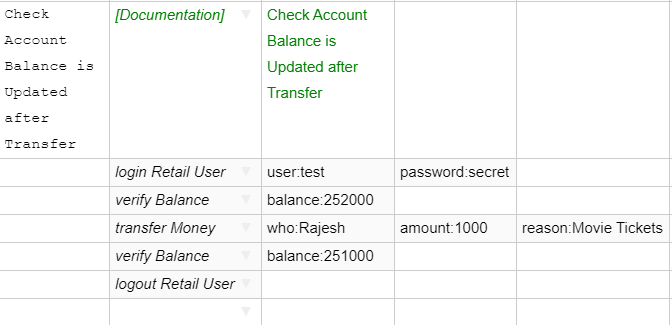
Maintainable test automation: Let’s consider the case of a user transferring money to another person and see how these layers help.

Layer 1: Business Layer

  • This layer expresses business intent.
  • It is agnostic of the UI or the web application itself, testing tool and interaction code, for example: Create User, Approve User, Login User etc.
  • This layer will change only if business logic itself changes. So, it survives across UI implementations (web or mobile or desktop), and survives architectural changes.
  • In this layer we can talk in the language of the business, without assuming anything about the UI, tool or code.

In Sahi Pro, this layer is implemented as Scenario files. This is a csv file which can be edited in our Editor or via MS Excel. A sample scenario looks like this:

Sahi Pro test automation graphic explaining a business layer scenario


Notice how the business layer does not assume anything about the user interface. It does not matter if this is on a web application or on a mobile app.

Also, each of the steps in this business flow will correspond to functions or methods implemented separately.

Layer 2: Implementation Layer

This layer implements the business keywords specified in the previous layer

  • Understands interactions between different actions performed on UI
  • Library file with implementation of keywords used in Business Layer
  • Will change if interaction flow changes


Sahi pro graphic explaining test automation functionsNote the name of the method corresponds to the relevant step in the scenario file, the number of arguments and their values are also picked from the provided scenario, while the actual code for the step is implemented inside the method.
 

Layer 3: Accessor Repository Layer

This is the layer where we store every element’s locator and accessors.

  • This is the Central repository of all elements in the automation code
  • This changes when a particular element changes in the application UI (for example, due to HTML/Javascript changes in web interfaces)

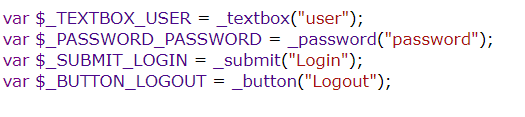
Sahi Pro graphic explaining test automation functionAs you see now, the business layer will be where you will define the flows and actions for every use case. This is high level and mostly worded in natural language. So, eventually your business team as well as manual testers will be able to write the scenario files easily.



The implementation layer is where you take each action and define the methods containing steps to perform that action. This is easily doable using any automation tool. With Sahi Pro, you can use record and playback as well as write your own using simple java script. These functions are stored in library files. These will change only if the flow or sequence of steps changes. These functions are not hard coded with your object ids, so they will not change even if an object’s locator changes. The locators are all in the Accessor Repository layer.

The Object locators are saved in Accessor Repository (AR) files.

In Sahi Pro, you can create an AR automatically as you record your script, and you can also have a single AR for multiple scenarios and scripts. This AR is the place you need to go and edit the object locator if anything changes.

Conclusion

  • Automation code is most useful when there is a lot of change planned in your application
    • Acts as a safety net and guideline
    • Automation code should not be thrown away when application technology changes
  • Building the right layers and strictly following them helps in minimal maintenance efforts and long-lived useful automation scripts


Find out more about maintainable test automation at the EuroSTAR Conference, Nov 11-15. Book your tickets now!

——————————————————————————————–

Author: Nishi Grover Garg – Product Evangelist and Head of Trainings, Sahi Pro

Nishi Grover Garg - Product Evangelist and Head of Trainings, Sahi Pro

Nishi is a corporate trainer, an agile enthusiast and a keen tester at heart! With 11+ years of industry experience in Agile environment, she has worked in various roles as a hands-on tester, automation developer, a freelance consulting trainer and currently works with Sahi Pro as the Evangelist and Trainings Head. Nishi is passionate about training, organizing testing community events and meetups, and has trained hundreds of professionals and teams on agile, test automation, QA bootcamps and DevOps courses.

Nishi is also a writer on technical topics of interest in the industry and has numerous articles published at numerous popular forums and her own blog testwithnishi.com where she writes about the latest topics in Agile and Testing domains. Connect with her at @testwithnishi


Filed Under: Test Automation Tagged With: Test Automation

How to Improve the Test Data Management Process with Data Simulation

July 10, 2019 by Fiona Nic Dhonnacha

Good test data is hard to come by. Learn how to use data simulation to improve the test data management process and save valuable time normally spent waiting for test data.

Good test data is hard to come by, and test teams are often left waiting for test data to be produced for them. According to a recent survey from Sogeti, up to 60% of application development and testing time is devoted to data-related tasks, and many project overruns are due to inefficiencies in test data provisioning. In general, up to 20% of the average software development lifecycle is lost waiting for data! 

To improve this process, testing teams can use service virtualization to augment traditional test data extraction. With this method of data simulation, testers can quickly build meaningful test data by capturing realistic test data from interactions between components in their existing system (real and virtualized), and building data models that can be shared and controlled directly by testing teams.

How do you benefit from data simulation?

The process is as follows:

  1. Define monitors: Monitors are proxies that intercept and record the data traffic between users and servers.
  2. Capture: Test data is captured by monitors and recorded from existing testing via functional, performance and security testing already in place by the development team. The application under test likely has dependencies on various types of services such as databases, legacy mainframe systems and many others. As test automation is executed the transactions and data between the application and services is recorded by the monitors and stored in the virtual service repository.
  3. Create: The captured transactions and data are sent to the service virtualization engine to create simulated virtualized services with associated test data.
  4. Deploy: The created services are stored and deployed to a virtual service repository allowing for later consumption.
  5. Manage: Orchestration of these virtualized service is required to make service virtualization work in a
    CI/CD workflow.
  6. Consume: Test data management and integrated orchestration of these virtual services means automated API and service-level testing is robust, easily repeatable and easier.

How does it work in practice?

A good example might be replacing a reliance on a shared database by swapping it with a virtual service. This allows for parallel and independent testing, that would otherwise conflict. With data simulation, testers can generate, subset, mask, and create individual customized test data for their needs.

By replacing shared dependencies such as databases, service virtualization removes the needs for the infrastructure and complexity required to host the database environment. In turn, this means isolated test suites and the ability to cover extreme and corner cases. Although the virtualized dependencies are not the “real thing,” some actions (e.g. an insert and update operation on a database) add some complexity to virtualization.

After capturing transactions and data, there is full control over the contents of the data from within the data manager. In addition, a model is abstracted automatically from the data based on database extraction or through the interactions observed during the recordings. This create model, as illustrated below, allows for better understanding of the data structure and relationships. This understanding is key to the next steps of masking, generating, and subsetting.

Quickly getting secure, real data for testing

Test data is hard to procure and a risk to manage. A solution based on secure, real data capture provides the best way to get the data you need, as fast as you need it. Service virtualization helps teams capture this data earlier in the development process, to be easily used for testing. With this modern approach to test data management, testers can securely store and manage test data, customize data sets for their needs, reduce the risk and liability of using production data, and reduce overall project risk and costs. For more information, you can download the free whitepaper: Tired of waiting for test data? Here’s the solution to your test data management headaches.

Chris Colosimo is a Product Manager, with expertise in SDLC acceleration through automation. Chris strategizes product development and deployment of Parasoft’s Continuous Testing solutions (Parasoft SOAtest, Virtualize and Continuous Testing Platform). Being a service virtualization and API testing subject matter expert and focusing on the concept of Continuous testing at speed, he works with developers and testers to discover constraints, evolve process, and facilitate the change management required to adopt agile and DevOps principals throughout an organization. Keen to share his knowledge and vast experience he frequently writes blogs and can be followed on Linkedin.

Filed Under: EuroSTAR Conference Tagged With: software testing conference, software testing tools, Test Automation

  • « Previous Page
  • Page 1
  • Page 2
  • Page 3
  • Next Page »
  • Code of Conduct
  • Privacy Policy
  • T&C
  • Media Partners
  • Contact Us