• Skip to main content
EuroSTAR 2027 - Sign up for early access

EuroSTAR Conference

Europe's Largest Software Testing Conference.

  • Programme
    • Call for Speakers
    • 2026 Programme
    • Community Hub
    • Awards
  • Attend
    • Why Attend
    • Bring your Team
    • Testimonials
  • Sponsor
    • Sponsor Opportunities
    • Sponsor Testimonials
  • About
    • About Us
    • Our Timeline
    • FAQ
    • Blog
    • Organisations
    • Contact Us
  • Book Now

software testing conference

How to run any number of UI tests on each PR

May 12, 2025 by Aishling Warde

If you are reading this article, likely, you’ve already recognized the value of incorporating UI tests for every pull request in your development process. In short, it’s the single way to be confident that your main branch is ready for release anytime. Releasing excellent and stable versions is crucial in the mobile world, where a user fully manages an app update process, unlike the backend world. If you are a newcomer to the topic of UI Tests for Android, please explore my previous article or Alex Bykov’s talk, where you will find all details and explanations.

While beneficial, running UI tests on each PR introduces significant challenges for the underlying Infrastructure. As a result, almost every team that attempts to implement UI tests for each PR encounters difficulties, often making the same mistakes and investing considerable time and resources in the process. In this article, I will delve into the specific requirements of the Infrastructure needed for running UI tests on PRs and discuss the solutions available in the market. By comprehensively understanding the infrastructure challenges and available explanations, development teams can better navigate the complexities of implementing UI tests for each PR, ultimately saving time and resources.

UI Test Infrastructure

First, let’s define the term “UI Test Infrastructure.” “UI Test Infrastructure” is the thing that allows running the UI tests. On each PR. Any number of tests. From a user’s (Software Engineering and QA Teams) perspective, it looks like I send a command to execute a bunch of tests and receive a report. It’s all. It must be simple for those who use it. But it is complex for those who build and support the solution. So, our final goal is to build this Infrastructure somehow using internal or external solutions and resources.


Okay, now let’s refresh our memory about the entire picture of the UI Test process with some updates that appeared last time.
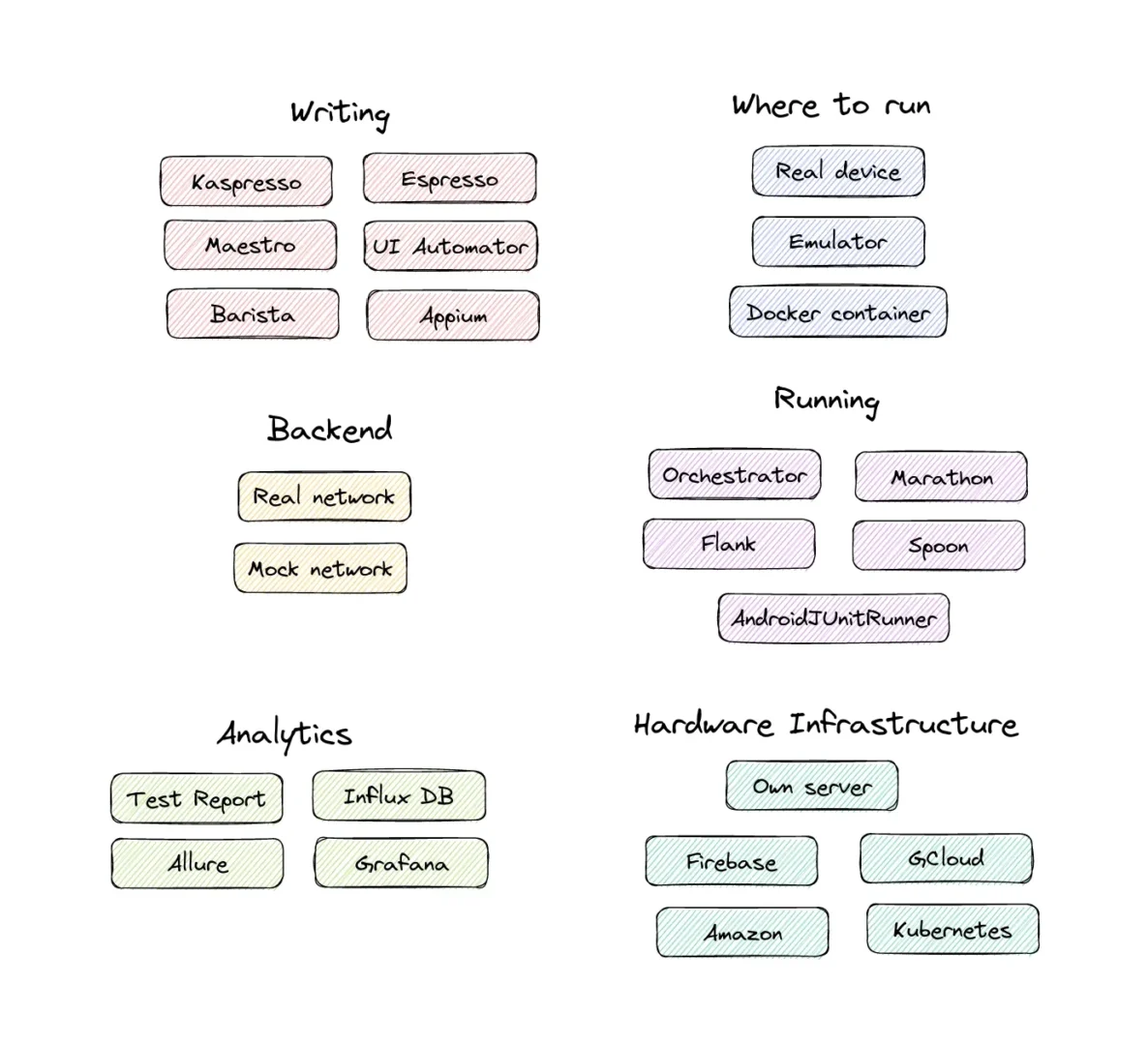
You see a lot of details in the puzzle. Now, have a look at where “UI Test Infrastructure” is presented.
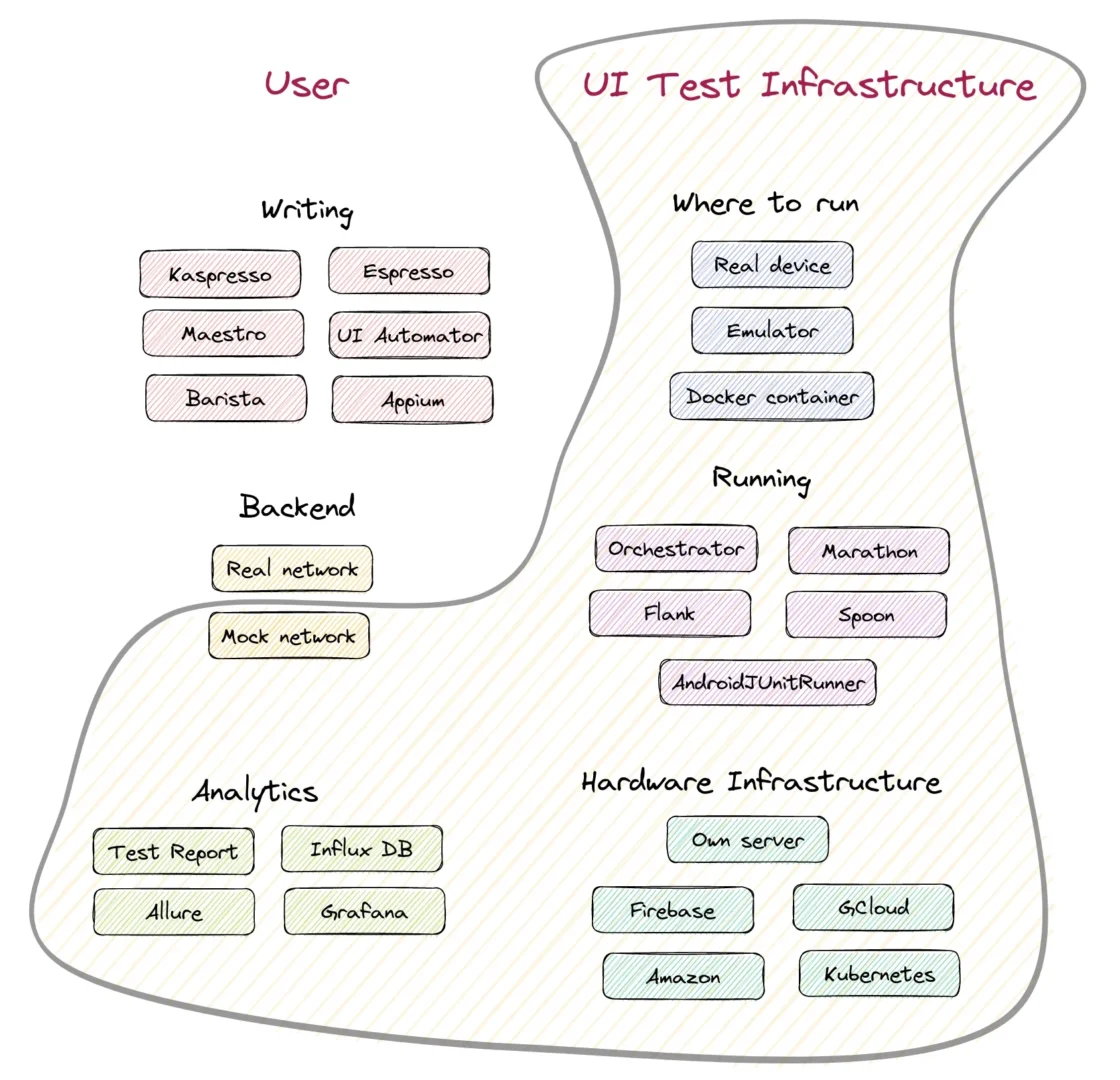
“UI Test Infrastructure” covers an extensive set of various things. Writing and Backend parts stay on the User side because only the user (developer or SDET) can create tests now. Therefore, writing is out of the scope of this article. An excellent comparison of all writing tools is described in the articles Where to write Android UI tests (Part 1) and Where to write Android UI tests (Part 2) (except Maestro, which appeared after publishing). The backend stuff regarding testing against real or mock networks will be partly touched on later. But I need to mention that Mock Network at scale becomes the responsibility of UI Test Infrastructure too.

Requirements

Before delving into the complexities of building this infrastructure, I recommend to begin with a clear set of requirements and expectations. These will serve as a roadmap to guide you through the intricate process of constructing the infrastructure. Also, it is important to remember that the main users of UI Test Infrastructure are developers, SDETs (Software Development Engineers in Test), and QA. As such, our focus should be optimizing their working experience and ensuring a comfortable and efficient environment for these professionals.

Have a look at the image below.
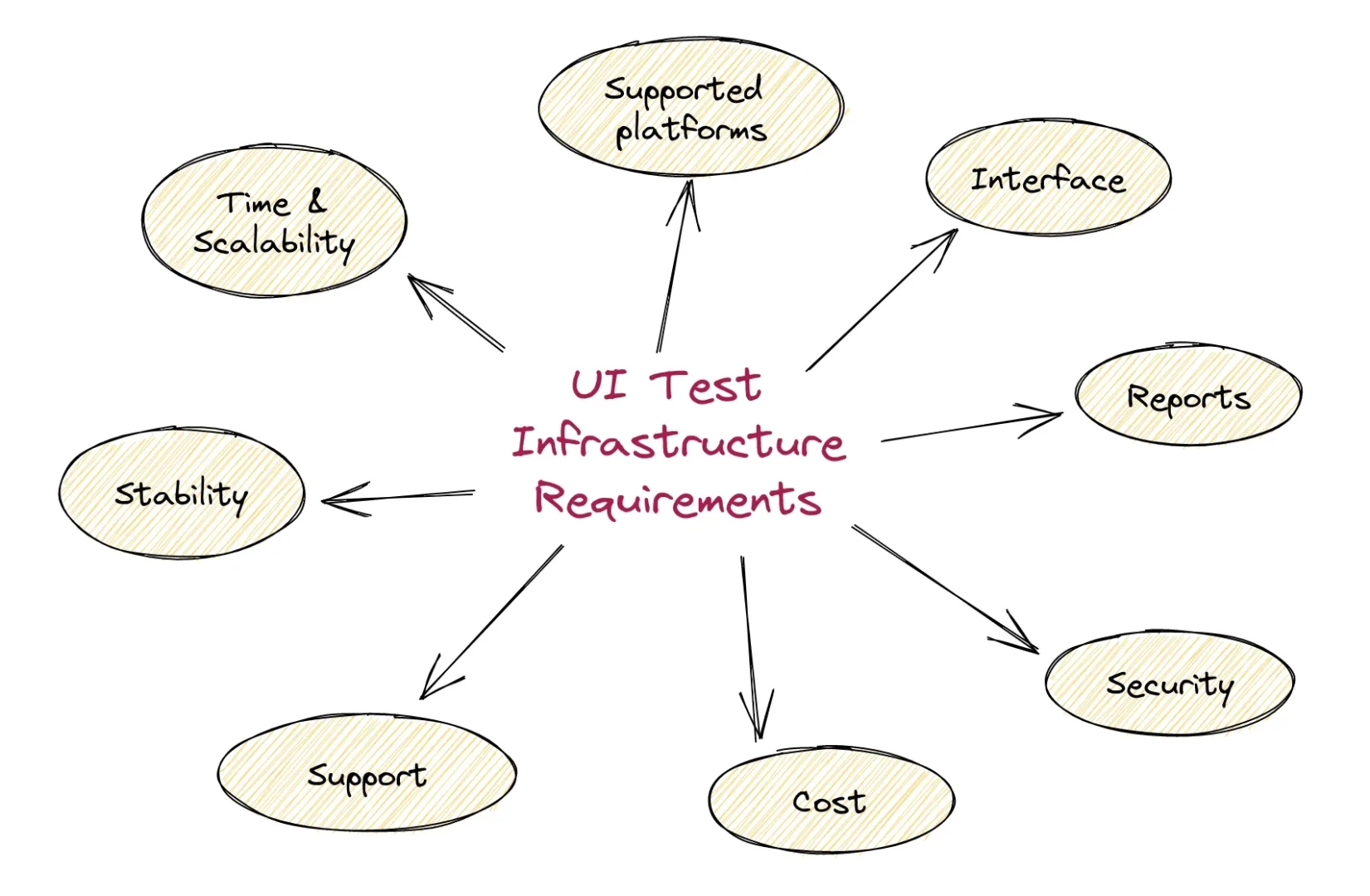
Now, let’s consider point by point.

Supported platforms

In Android development, there are two primary platforms for creating UI tests:

  1. The native platform, where developers utilize tools exclusively provided by Google, such as Espresso and UI Automator. Solutions like Kaspresso, Barista and etc., are built on top of Espresso and UI Automator.
  2. Appium, an open-source, cross-platform testing framework.

Interface

Next, a fundamental expectation is the ease of integration with existing CI/CD systems through plugins and the ability to utilize the infrastructure from the command line interface (CLI). The plugin and CLI should offer at least the flexibility to filter tests for execution and select the desired devices.

On top of this basic functionality, different verification modes should be supported, i.e. fast runs vs verifying a fix for flakiness. More details about these terms will be provided later.

Reports

At the end of a run, a user expects to see reports that contain at least the following information:

  • the final result: passed or failed
  • number of executed, successful, failed and ignored tests
  • information about failed tests like stack trace, device logs, and video
  • some analytics, like the percentage of failed tests, including retries

Stability

Stability is a comprehensive term encompassing various aspects of UI testing. A test may be unstable (or flaky) due to numerous reasons, such as poorly written tests, an unstable backend or an unreliable network if the test depends on a real backend, feature flags, an improperly set up or unstable device (e.g., a Google service updating or unturned-off animation), framework instability (Espresso, UI Automator, and Appium are known to have their quirks), or internal issues with the test infrastructure caused by factors such as high load or crashes in one of the internal services.

Have a glance at the image below to summarize the possible reasons for failures:
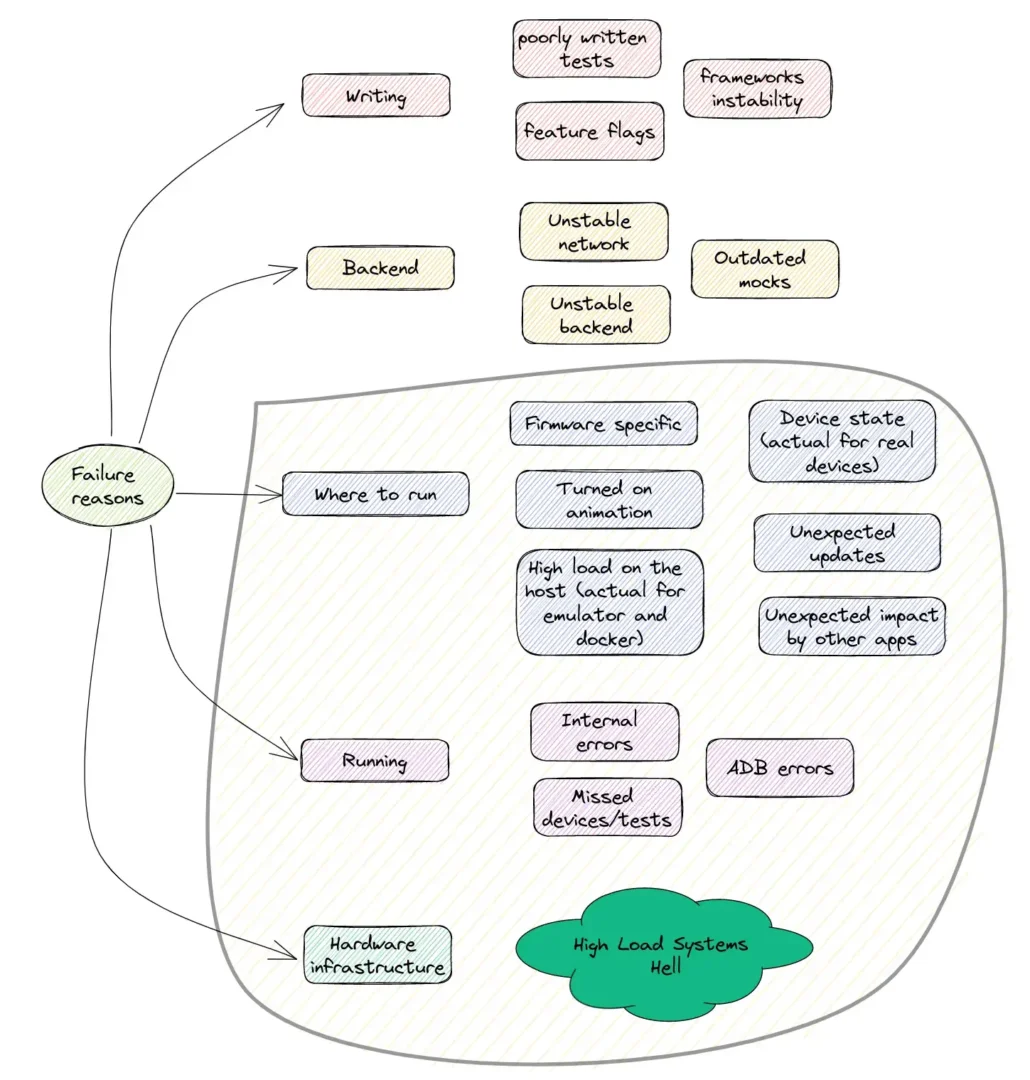
When selecting an infrastructure, we expect full stability or, at the very least, quick recovery that does not impact the overall results and time. The UI Test Infrastructure should cover areas “Where to run”, “Running”, and “Hardware infrastructure”.

Over time, the number of UI tests tends to grow, and with it, the emergence of flaky tests. A flaky test is a test that works most of the time correctly but occasionally fails due to peculiar reasons. Unfortunately, flaky tests are an inescapable reality in UI testing. While it is crucial to investigate the causes, it is not great to block a pull request due to a single occasionally failed UI test. Therefore, as a user of UI test infrastructure, I expect a straightforward and integrated retry mechanism to be available.

Time and Scalability

Test suite execution time is a critical factor for all UI test infrastructures. To better understand this, let’s first examine the elements that influence execution time:
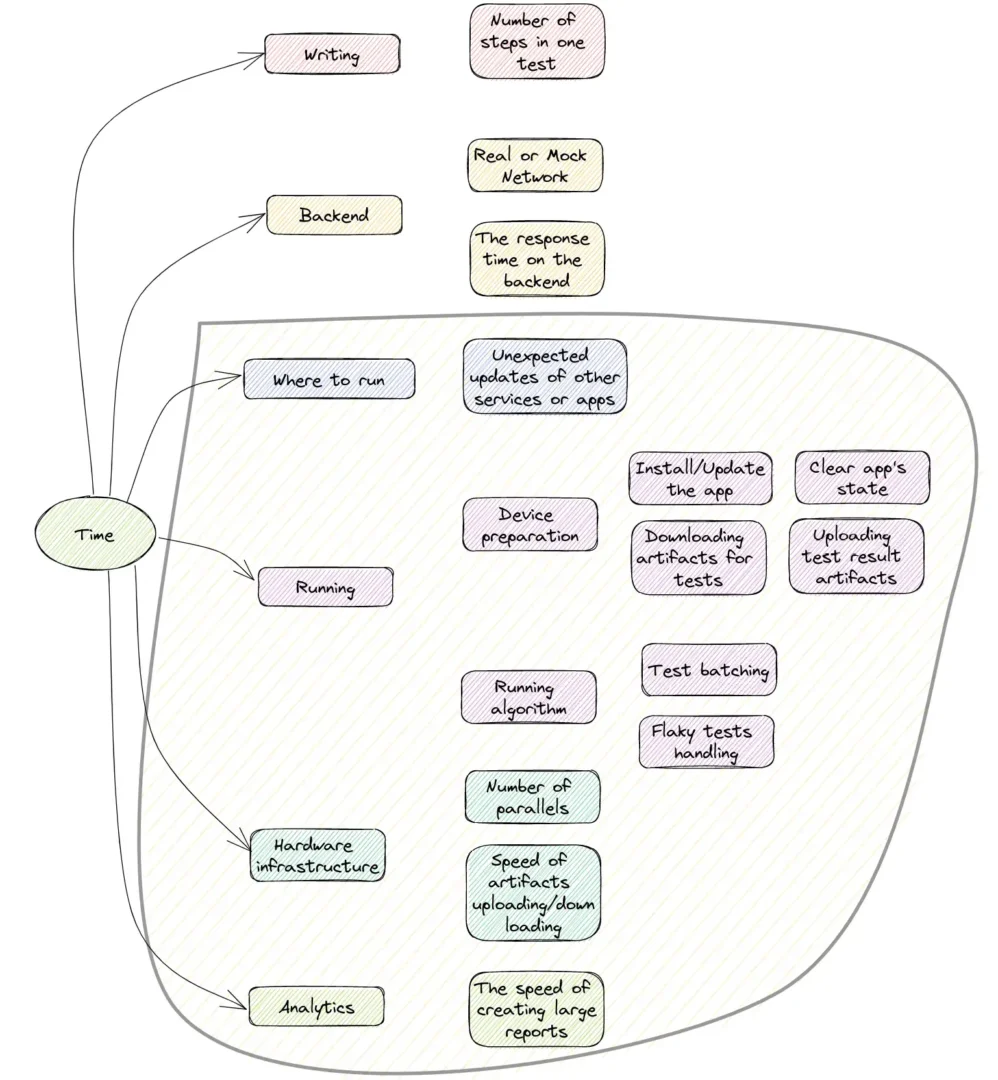
These factors can be divided into two groups: those that depend on the user’s tests and those related to the infrastructure.

Various strategies can be employed to reduce test execution time. One widely-used approach is to focus on specific functionality within a single test by mocking the backend and avoiding repetitive actions such as logging in.

Regarding infrastructure, the test execution algorithm plays a vital role in determining the time required. For instance, consider a test run with a suboptimal batching strategy:

Alternatively, examine a test run with a non-optimal retry policy:
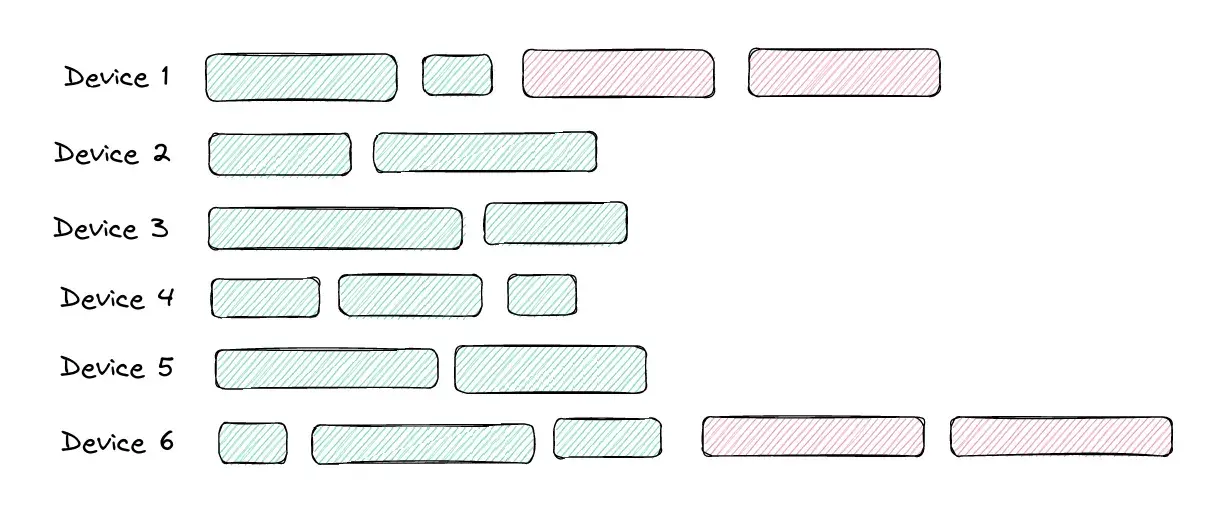
In my recent study, which included over 30 interviews with various development teams, I found that most teams are willing to wait 15 minutes for a UI test run on a pull request. This suggests that even with numerous developers and UI tests, not optimally written tests, concurrent PR runs, or flaky tests, all PRs should be completed within this 15-minute window.

However, it’s a common scenario that PR waiting times can extend from 15 minutes to several hours when the infrastructure is under heavy load, often resulting in rejections due to timeouts. This highlights the importance of optimizing the system to handle such situations efficiently. That’s why I’ve included “Scalability” in the title.

Security

Security protects the test environment, data, and application from unauthorized access, tampering, or malicious activities.

Some critical aspects of security in an Android UI testing infrastructure include:

  • Authentication and authorization: Ensure only authorized users can access the testing environment, data, and resources.
  • Data protection: Safeguard sensitive information, including test data and user credentials, using encryption in transit and at rest. Implement proper data storage and disposal practices to prevent data leaks.
  • Network security: Secure the communication between testing devices, servers, and other infrastructure components.

Cost

I would emphasize the two main aspects:

  • The price model and utilization of paid resources. Generally, there are the following price models: pay for a parallel and pay for a minute. However, choosing and using the appropriate price model wisely is a separate big topic.
  • The second aspect is the internal UI Test Infrastructure algorithms and solutions that allow spending less money running the same test suite. One of the possible optimizations is described above (better batching and handling of flaky tests).

You can find more details about cost price models and specific examples in the article titled “I Want to Run Any Number of Android UI Tests on Each PR: Cost, Part II.”

Support

Last on this list, but certainly not least in terms of importance, is Support. Many teams prioritize not just the service itself but also the quality of support provided. Factors such as prompt responses, a willingness to help, and the ability to save time for the team are highly valued. Additionally, prioritizing features based on client needs and preferences further enhances the overall support experience. Open-sourcing portions of Infrastructure is often highly appreciated by clients, as it fosters trust in the solutions provided and enables them to better understand the underlying mechanics.

Available Cloud Solutions on the market

As an engineer, you have the option to create your own infrastructure that meets all of the above requirements. However, it’s clear that this task can be challenging and complex. Therefore, let’s explore cloud solutions that offer ready-made options.

There are the following Cloud solutions:

  • Marathon Cloud
  • Firebase Test Lab
  • BrowserStack
  • emulator.wtf
  • SauceLabs
  • AWS Device Farm
  • Perfecto Mobile
  • LambdaTest

Please review the articles below, where I have thoroughly examined each solution based on the aforementioned requirements.

  • I want to run any number of Android UI tests on each PR. Existing solutions (BrowserStack, Firebase Test Lab). Part III
  • I want to run any number of Android UI tests on each PR. Existing solutions (SauceLabs, AWS Device Farm, LambdaTest, Perfecto Mobile). Part IV
  • I want to run any number of Android UI tests on each PR. Existing solutions. Part V

Conclusion

In this article, I examined the concept of UI Test Infrastructure and described the essential criteria for selecting or constructing it. As you might have observed, developing an Infrastructure that fulfills all of the aforementioned requirements and addresses potential issues can be quite complex and challenging. Therefore, I emphasized the existing Cloud Solutions that provide ready-made alternatives.

Author

Prashant Mohan

Evgenii Matsiuk, co-founder at MarathonLabs, co-author of Kaspresso, Android Google Developer Expert.

Testwise were exhibitors in EuroSTAR 2025. Join us at EuroSTAR Conference in Oslo 15-18 June 2026.

Filed Under: Test Automation Tagged With: software testing conference

How Gen AI is Empowering Testers to Work Smarter, Not Harder

May 5, 2025 by Aishling Warde

With software becoming more complex and release cycles getting shorter, traditional testing methods are struggling to keep up. That’s where Generative AI (Gen AI) comes in. Instead of spending hours writing test cases or fixing broken scripts, teams can now use AI-powered tools to create tests, adapt to changes, and catch issues earlier—all with less manual effort.

Gartner predicts more than 80% of enterprises will have used generative AI APIs or deployed generative AI-enabled applications by 2026.

But this isn’t about replacing testers. It’s about making their lives easier, helping them focus on what matters: building faster software. Let’s look at how AI-driven testing is changing the game and what it means for QA teams today.

The Problems with Traditional QA

QA testing has long been a challenge for software development teams. While manual testing provides detailed human insight, it is slow, labor-intensive, and prone to human error. Although automated testing helps speed things up, it comes with its own set of issues, particularly in terms of script maintenance and adaptability.

  • Time-consuming test creation and execution – Writing test cases from scratch is slow and requires significant effort. Running tests across different environments and devices adds further delays.
  • Frequent script failures – Automated test scripts often break when applications undergo minor UI or functionality changes, leading to high maintenance efforts.
  • Lack of scalability – As applications grow in complexity, maintaining comprehensive test coverage becomes difficult. Manual testing struggles to scale, and automated testing requires extensive upkeep.
  • Reactive bug detection – Traditional testing often identifies defects late in the development cycle, leading to costly fixes and delays.
  • High operational costs – The need for large QA teams, expensive testing tools, and ongoing maintenance increases the overall cost of software development.
  • Limited test coverage – Manual and traditional automation approaches often miss edge cases or complex user interactions, increasing the risk of undetected bugs in production.

How Gen AI Transforms QA Testing

The limitations of traditional testing often result in slower development cycles, higher costs, and an increased likelihood of defects reaching end users. To stay competitive, organizations need smarter, more adaptive testing solutions—this is where Gen AI makes a difference.

  • Automated Test Generation
    Gen AI can analyze user stories, requirements, and past test data to automatically create test cases. This reduces the time testers spend writing scripts and ensures comprehensive test coverage. AI-generated tests can even include edge cases that might be overlooked manually.
  • Self-Healing Test Scripts
    One of the biggest pain points in automated testing is script maintenance. When an application’s UI changes, traditional automation scripts break. AI-powered tools detect these changes and automatically update test scripts, minimizing manual intervention.
  • Smarter Defect Detection
    AI doesn’t just run tests—it learns from past failures. By analyzing historical test data, Gen AI can predict where bugs are likely to occur, helping teams focus their efforts on high-risk areas. This means catching issues before they reach production.
  • Natural Language Test Execution
    With AI-based test agents that understand Natural Language Processing (NLP), testers can write test cases in plain English instead of coding them. The AI converts these descriptions into automated test scripts, making test automation more accessible to non-technical team members.
  • Faster Regression Testing
    Automating regression testing is crucial for agile teams. Gen AI enables continuous testing by quickly running thousands of test cases, providing real-time insights and reducing release cycles.

The Future of AI in Software Testing

AI-driven testing is evolving rapidly, and its adoption is expected to grow significantly in the coming years. According to market.us, the global AI in software testing market size is expected to be worth around USD 10.6 Billion by 2033, from USD 1.9 Billion in 2023, growing at a CAGR of 18.70% during the forecast period from 2024 to 2033.

Here’s what we can expect in the future:

  • More advanced AI-powered test agents – AI test bots with enhanced NLP capabilities will allow even non-technical users to create and execute automated tests with minimal effort.
  • AI-driven predictive testing – AI will analyze historical defects, system logs, and code changes to anticipate where bugs are likely to occur, allowing teams to focus their testing efforts more effectively.
  • Increased adoption of self-healing tests – Self-healing scripts can automatically adapt to UI changes, minimizing the need for maintenance efforts and manual intervention..
  • Seamless AI integration with DevOps pipelines – AI-driven testing will become a standard component of CI/CD workflows, accelerating software releases while maintaining high quality.
  • Hyperautomation in QA – Combining AI with robotic process automation (RPA) and machine learning will create highly efficient, fully automated testing ecosystems.
    As AI continues to improve, software testing will become more autonomous, intelligent, and efficient. Testers will shift their focus from repetitive execution to strategic decision-making, ensuring that AI complements human expertise rather than replacing it.

Gen AI Isn’t Here to Replace Testers—It’s Here to Empower Them

One of the biggest concerns surrounding AI-driven testing is the fear of job displacement. However, the reality is quite the opposite. AI is designed to amplify human capabilities, not replace them. Testers play a critical role in quality assurance, and AI is simply a tool to help them work smarter.

Instead of spending hours on repetitive test execution and debugging broken scripts, testers can now focus on exploratory testing, usability evaluation, and strategic test design. AI helps remove bottlenecks, speeds up the testing process, and allows teams to shift their efforts toward more valuable tasks.
Testers are no longer just bug finders; they are quality enablers. AI allows them to do more in less time, ensuring that software is not only functional but also user-friendly, accessible, and secure.

The Next Step in AI-Powered Testing

For teams looking to embrace AI-driven testing, tools like Kane AI offer a game-changing approach. As the world’s first AI-native QA Agent-as-a-Service platform, Kane AI simplifies test generation, automation, and debugging through natural language. By integrating seamlessly with existing workflows, it helps teams create resilient, scalable tests with minimal manual effort—empowering testers to focus on quality rather than maintenance.

The future of testing belongs to teams that adopt AI as a collaborative partner, leveraging its strengths while focusing on delivering high-quality and user-centric software. As Karim Lakhani said: “AI won’t replace you. But someone using AI will.” The key is to adapt, innovate, and lead with AI—because the future of testing isn’t just automated, it’s intelligent.

Author

Mudit Singh

VP of Growth & Product, LambdaTest


LambdaTest were Exhibitors in EuroSTAR 2025. Join us at EuroSTAR Conference in Oslo 15-18 June 2026.

Filed Under: Test Automation Tagged With: software testing conference

Your biggest load testing challenge is adoption—this is where your ROI comes from

April 28, 2025 by Aishling Warde

Load testing is not a technical challenge. It’s not about having the right methodology. At least, not at first. The real challenge? Adoption.

Even if you have the best expertise, you won’t see a major ROI unless enough people in your organization are committed to performance testing.

Adoption beats everything else

Think of load testing like preparing for a marathon. Which training plan would you trust more?

  • Option 1: Intensive training on your own, two weeks before the race.
  • Option 2: Small, consistent team training runs, six months in advance.

Of course, the second option wins. Yet, many organizations fail to spread adoption of load testing because they get stuck on:

  • Lack of time
  • Lack of skills
  • Lack of awareness
  • Lack of prioritization
  • Lack of budget

And if you’ve ever tried to solve these one by one, you already know: it doesn’t work. Because adoption is not a tactical problem—it’s a cultural shift.

3 key moves to drive load testing adoption

To turn load testing into a company-wide practice, focus on three steps:

  1. Shift left: Make it possible to test at any time
  2. Scale vertically: Start small, but build reusable components
  3. Scale horizontally: Make load testing everyone’s job

Let’s dive in.

Step 1: Shift left—make it possible to test anytime

Here’s a hard truth: Load testing is no one’s full-time job.
That means it’s usually the first thing to get cut when deadlines are tight.
The best way to fight this? Make it possible to test at any time, not just at the end of a project. This is what’s called “shift left”—running tests early in development, not just before release.

When choosing a load testing tool, ask yourself:

  • Does it integrate well into our CI/CD pipeline? (Jenkins, GitLab, CircleCI, Travis CI, Azure DevOps, etc.)
  • Does it connect with our project management tools? (Jira, etc.)
  • Does it work inside our development tools? (IDEs, build tools, etc.)

Don’t worry about perfect testing environments yet. Your first goal is simply making testing easy and accessible—the rest will follow.

Step 2: Scale vertically—start small, but build reusable components

A common mistake in load testing is trying to do everything at once:

  • 100% coverage
  • Anonymized production data
  • A testing environment identical to production
  • Simulating massive traffic spikes from day 1;

These sound great on paper, but in reality: they are expensive, they take months to implement, and they may not even be necessary.

Instead, start small but smart:

  • Focus on key areas first: some parts of your app are more critical than others.
  • Accept partial coverage: sometimes limited tests give you 90% of the insights.

Prioritize real bottlenecks: fox example, recreating MFA login in a test suite can take weeks. Is that really where your performance bottleneck is?

Once you’ve secured an early ROI, focus on long-term success. The key? Reusability.

When teams can reuse components, load testing adoption skyrockets:

  • Developers onboard faster
  • Tests require less maintenance
  • Others will create reusable components as well and help you craft more and more complex tests

Load-test-as-code can help here. Storing tests in version control enables reusability, collaboration and scalability. At this stage, you’re close to full adoption—but not quite there yet. For that, you need the final step.

Step 3: Scale horizontally—make load testing everyone’s job

To spread adoption, you need a structured push to ensure all teams experience load testing at every level, for a limited time.

Here’s how you can kickstart company-wide adoption:

  • Tie your first load testing campaign to a business event to convince your top management to make it a priority: Black Friday, cloud migration, new product launch, etc.
  • Create internal SLAs for all your development teams: define clear ownership across teams.
  • Hold regular performance meetings: make people talk to each other throughout the whole process.
  • Share high-level reports → Help leadership understand the business impact of performance and think about long-term business requirements regarding performance.

Once you achieve this, you made it! Load testing is now everyone’s job. Years after years, your organization will fine-tune its performance strategy, with more and more stakeholders, more and more requirements, and more and more impacts!

How Gatling helps you scale horizontally

At Gatling, we’ve spent years refining strategies to help organizations expand adoption across all teams. Here are three key ways we tackle this challenge:

Speaking the developer’s language

If you want developers to adopt load testing, it has to feel natural.

That’s why Gatling evolved from Scala-only to a polyglot solution—supporting Java, Kotlin, JavaScript, and TypeScript.

Lowering the entry barrier with no-code

A no-code approach allows testers, product managers, and non-technical teams to create tests fast.

But no-code should never create silos—it should be a stepping stone to more advanced testing. This is why our no-code builder is also a code generator.

Bridging the gap between functional & load testing

Instead of reinventing the wheel, we asked: how can teams reuse functional tests for load testing?

That’s why we introduced Postman collections as load testing scenarios—allowing teams to repurpose existing functional API tests instantly.

Final thoughts: The key to load testing ROI is adoption

Load testing success isn’t about tools or methodology—it’s about adoption.

When you shift left, build reusable components, and make testing everyone’s job, you create a culture of performance—where load testing isn’t just a last-minute checkbox, but a strategic advantage.

Because once adoption happens, the ROI comes naturally.

Learn more about Gatling

Author

Paul-Henri Pillet

CEO & Co-founder of Gatling, the open-source load testing solution. Together with my business partner, Stéphane Landelle (creator of Gatling OSS), we built a business and tech duo to help organizations scale their applications—so they can scale their business. Today, Gatling supports 300,000 organizations running load tests daily across 100+ countries.


Gatling were Exhibitors in EuroSTAR 2025. Join us at EuroSTAR Conference in Oslo 15-18 June 2026.
Filed Under: Performance Testing Tagged With: EuroSTAR Conference, software testing conference

Scaling Human Evaluation of AI-Infused Applications

April 22, 2025 by Aishling Warde

It seems like everyone in the quality engineering community is talking about AI. After all, advances generative AI have been rapidly transforming our tools, frameworks, platforms, processes, and ways of working. AI-assisted software lifecycle activities are becoming more widespread and generally accepted.

However, while everyone has been busy applying AI to testing, myself and the team at Test IO have been focused on harnessing the collective intelligence of humans to validate and verify several different types of AI systems. Our approach is currently being utilized to test some of the most sophisticated AI models, assistants, co-pilots and agents at scale.

This article shares our approach to testing what we refer to as AI-infused applications. It describes the grand challenge with testing these types of applications and then discusses the need for human evaluation. After outlining a number of practical techniques, it provides some lessons learned on how to effectively scale the human evaluation of AI/ML.

AI-Infused Applications (AIIA)

Just as with any application, there are many different ways that an AI-based system can be implemented. The particular method used generally depends on the problem being solved, desired capabilities, and any constraints on its development and operation.

Some common approaches to developing AI systems are:

  • Rules-Based AI. Encodes domain expertise into conditional (if-then-else) statements, heuristics, or expert systems.
  • Classical Machine Learning. Training a supervised or unsupervised learning model from scratch using structured datasets and algorithms like random forests, support vector machines, or gradient boosting.
  • Integrating a Pre-Trained Model. Leverages APIs from providers like OpenAI, Google, Anthropic, or Hugging Face to integrate an AI-powered component into an application with minimal development effort.
  • Retrieval Augmented Generation. Combines LLMs with a vector search database to fetch relevant information before generating a response.
  • Fine-Tuning a Pre-Trained Model. Uses transfer learning to adapt a pre-trained model to a specialized dataset to improve the performance of specific tasks.
  • Agent or Multi-Agent Based AI. Builds autonomous agents using an LLM backend, goal-setting mechanisms, and tools for action execution, e.g., APIs, databases, browser automation. These types of systems may include reinforcement learning (RL) or emergent behavior to allow multiple AI agents to interaction, collaborate, or compete in an environment.
  • AI-Orchestrated Workflows. Integrates multiple AI components using workflow orchestration tools such as LangChain, Haystack, or Airflow).

Each of these approaches have trade-offs in terms of accuracy, efficiency, cost, interpretability, among others. However, regardless of the approach used, as long as an application leverages AI or ML models or services as part of their logic, we consider it to be an AI-infused application.

Grand Testing Challenge

The rapid pace of growth in the AI space makes it particularly difficult to keep track of all of the different ways these types of systems can be implemented. However, irrespective of the development method, AI-infused applications present a grand challenge for software testing practitioners primarily due to their highly dynamic nature.

Dynamism

AI-infused applications exhibit different levels of dynamism depending on their purpose and capabilities. For example, there are dynamic aspects of predictive, adaptive, and generative AI systems which make them unpredictable, non-deterministic and, as a result, very difficult to test.

  • Predictive AI analyzes historical data to identify patterns and make forecasts about future events or outcomes. These types of systems evolve with data. In other words, the accuracy of predictions depends on continuously updated data and therefore, as new data arrives, retraining or fine-tuning the model helps improve its forecasts. Some predictive systems like stock trading algorithms process real-time data streams, modifying forecasts as conditions change.
  • Adaptive AI continuously learns from new experiences and environmental changes to modify its behavior and improve performance over time. Unlike traditional models, it evolves without requiring explicit reprogramming. For example, self-learning chatbots will personalize their responses over time. Systems like these are context aware and dynamically adjust based on real-world conditions. Adaptive AI can autonomously tweak its internal models and strategies to improve accuracy and efficiency over extended use.
  • Generative AI creates new content such as text, images, code, and music based on learned patterns from vast datasets. The same user prompts sent to a model can generate different responses. Generative models can refine outputs based on user feedback, style preferences, leading to evolving content quality. Model knowledge can be augmented with external sources via retrieval augmented generation, making the overall system highly flexible.

Adequately testing AI systems may involve a combination of pre- and post release testing, continuous monitoring, automated pipelines, adversarial testing, and human evaluation. These approaches help address quality challenges with AI systems including model drift, bias, fairness, uncertainty, output-variability, explainability, hallucinations, and more.

The Importance of Human Evaluation

While automated testing methods for AI systems help to monitor performance, human evaluation is essential to ensure AI aligns with real-world expectations. Here’s why human evaluation is critical and some techniques that can be applied in practice.

Why It Matters

In classical ML systems, automated accuracy metrics such as F1 scores don’t necessarily capture the real-world impact of predictions. Bias and fairness issues often require domain experts to identify potential harms and when it comes to explainability, although some tools provide insights, human judgement is generally needed to interpret them meaningfully. If an AI-infused application is going to interact directly with users, the system must be assessed for user experience and usability.

Adaptive AI systems can potentially start optimizing on the wrong objectives. For example, a common problem with recommendation systems is that they tend to reinforce their own biases. Here’s how:

  • Recommendation system suggests content based on past user behavior.
  • User engages more with that types of content (e.g., specific movie genres, political articles)
  • System interprets this as a strong preference, leading it to narrow future recommendations to similar content.
  • Over time, diversity in recommendations decreases and users are less likely to be exposed to alternative perspectives.

Lastly, AI-generated content is often ambiguous, misleading, or biased, requiring human judgement to assess quality. Automated checks like toxicity filters generally can’t fully capture nuances like sarcasm, cultural sensitivities, and ethical concerns.

Practical Techniques

  • User-Centric Testing. Real users provide feedback on how well AI adapts to changing needs and preferences.
  • Fact-Checking Panels. Subject matter experts verify AI-generated claims for accuracy and credibility.
  • Bias and Harm Assessment. Diverse human reviewers assess content for potential ethical issues and unintended harm.
  • Human Scoring and Annotation. Evaluators rate AI outputs on quality criteria such as coherence, creativity, appropriateness, practicality, among others.

Effectively Scaling Human Evaluation of AIIAs

Over the past 14 months, the team at Test IO has been diligently focused on human evaluation of AI-infused applications for a variety of large enterprise clients. The AI-infused applications under test range from independent chat and voice bots, to code and cloud assistants integrated into software development environments and cloud platforms. So how do you make human evaluation scalable, structured, and reliable? Here are some of the key lessons we’ve learned along the way.

Establish Clear Evaluation Criteria

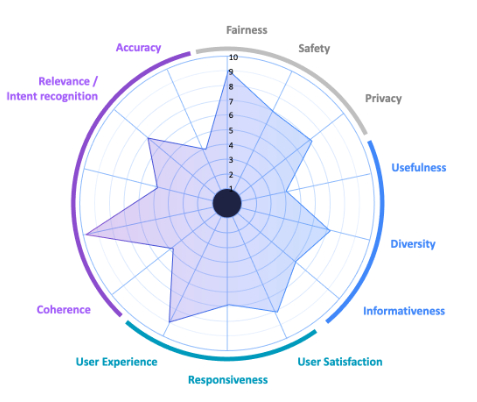
This involves defining structured rubrics for human reviewers to ensure consistency. Figure 1 shows a sample deliverable including a cross-section of quality criteria.

Figure 1: Quality Criteria Example Showing the Results of Human Evaluation of AIIAs

Leverage Internal and External Communities

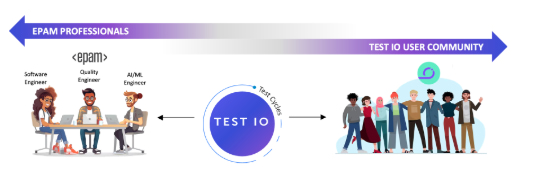
Diverse human expertise may be crowdsourced internally from your own pool of people, or externally via user testing communities. As shown in Figure 2, we capture a diverse set of perspectives by using the Test IO crowdsourcing platform to run test cycles using internal employees or external freelancers, or a combination of the two.

Figure 2: Access to Diverse Set of Human Evaluators including Internal Experts and External Freelancers

Combine Human and AI Judges

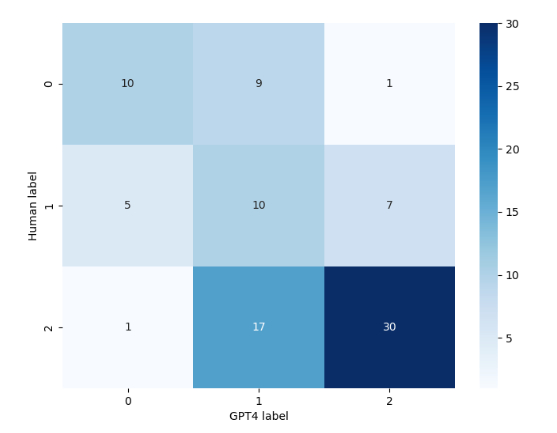
Automated tools or, for example, another LLM can be used for initial screening, followed by human reviewers for deeper analysis. Not only can this technique be applied to accelerate the evaluation activities, but it also facilitates comparing human versus automated evaluation. The confusion matrix in Figure 3 illustrates the correlation between human ground truths and labels generated by GPT4. Such an artifact can be used to indicate cases where the LLM assigns “irrelevant” to something that the human assigned as highly relevant, and vice-versa.

Figure 3: Confusion Matrix of Human Scores versus LLM Scores

Continuously Incorporate Human Feedback

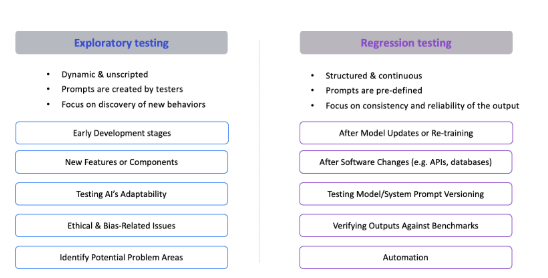
Crowd-sourced human evaluation of AI-infused applications is applicable to several dimensions of testing. Test cycles can be exploratory, focusing on the early stages of app development or on new features. When issues are discovered, user feedback can be fed back into the model via approaches like reinforcement learning from human feedback. After the given model is updated or re-trained, test cycles can be executed as a form of regression using humans, automated tools, or a combination of both. Figure 4 provides a side-by-side comparison of these two general modes of conducting AIIA testing at scale using crowd sourcing.

Figure 4: Crowd-Sourced Exploratory Testing and Regression Testing of AIIA

Conclusion

For now, AI systems are too complex and dynamic to be tested solely through automation. Human evaluation is indispensable for detecting biases, verifying real-world applicability, and ensuring an ethical and engaging user experience. By integrating structured human oversight and deploying it using a scalable outcome-based model, we can look towards a future where AI systems are not only technically robust, but also aligned with societal values and user expectations.

Author

Tariq King, CEO and Head of Test IO

Tariq King is a recognized thought-leader in software testing, engineering, DevOps, and AI/ML. He is currently the CEO and Head of Test IO, an EPAM company. Tariq has over fifteen years’ professional experience in the software industry, and has formerly held positions including VP of Product-Services, Chief Scientist, Head of Quality, Quality Engineering Director, Software Engineering Manager, and Principal Architect. He holds Ph.D. and M.S. degrees in Computer Science from Florida International University, and a B.S. in Computer Science from Florida Tech. He has published over 40 research articles in peer-reviewed IEEE and ACM journals, conferences, and workshops, and has written book chapters and technical reports for Springer, O’Reilly, Capgemini, Sogeti, IGI Global, and more. Tariq has been an international keynote speaker and trainer at leading software conferences in industry and academia, and serves on multiple conference boards and program committees.

Outside of work, Tariq is an electric car enthusiast who enjoys playing video games and traveling the world with his wife and kids.


EPAM were Exhibitors in EuroSTAR 2025. Join us at EuroSTAR Conference in Oslo 15-18 June 2026.
Filed Under: Software Testing Tagged With: software testing conference

Agentic Automation in Testing: Smarter Workflows, Faster Results

April 7, 2025 by Aishling Warde

In modern software development, outdated QA processes often struggle to keep up with the necessity for reliability, accuracy, scalability, and speed. Manual testing is tedious and too slow, while rigid automated test frameworks demand constant maintenance. This is where Agentic Automation gained prominence. Agentic AI is revolutionizing QA with AI-driven, self-adapting workflows that autonomously analyse, learn, and optimize test processes.

This shift towards Agentic Automation guarantees smart decisions, higher test efficiency, optimized test execution, and smooth incorporation with modern CI/CD pipelines.

As companies push for seamless digital experiences and faster release cycles, embracing Agentic Process Automation is no longer a choice—it’s a requirement. Let us discover how this innovative approach revolutionizes QA with smarter, quicker test execution.

What is Agentic Automation in Testing?

Agentic Automation denotes a quantum leap from traditional automation testing. Unlike conventional test frameworks that depend on manual oversight and predefined scripts, Agentic AI test works autonomously, making intelligent decisions based on actual data.

Unlike deterministic automation that strictly follows predefined workflows such as RPA (Robotic Process Automation), Agentic Automation leverages modern ML (machine learning) algorithms and LLMs (Large language models) to scrutinize patterns, adapt to growing test environments and smartly optimize test strategies.

Crucial Traits of Agentic Automation:

  • Self-Healing Testing Scripts – Self-heals broken tests caused by code or User Interface (UI) changes.
  • Self-Learning & Adaptive Tests – Agentic process Automation continuously refines test cases based on past implementation results.
  • Predictive Error Detection – Detects potential glitches before they impact production.
  • Continuous Optimization – Enhances test performance using data-driven insights.
  • Autonomous Test Implementation – Executes testing strategically through risk-based prioritization.

How Agentic Automation Drives Smarter, Faster Testing Workflows?

Agentic Automation is revolutionizing quality assurance (QA) by applying Agentic Process Automation, Agentic AI, and Agentic Workflows to deliver self-healing, self-learning, autonomous test systems. This transition helps businesses minimize human effort, increase the pace of test execution, and improve the entire software quality.

  1. AI-Centric Self-Healing for Reliable Automated Testing

One of the major challenges in traditional automation testing is test maintenance. Slight modifications or code updates can disrupt automated scripts, demanding persistent manual fixes. Agentic Automation addresses this issue with self-healing capabilities. AI detects UI or application logic changes and dynamically updates test scripts, ensuring seamless execution and improved reliability.

  1. Intelligent Test Prioritization for Speed & Productivity

Test cases differ in significance. Rather than executing every single test indiscriminately, Agentic Process Automation intelligently prioritizes them using past failures, risk assessment, and impact analysis. This confirms critical functionalities are tested first, accelerating feedback loops and reducing delays.

  1. Predictive Analytics for Early Error Identification

Traditional testing is reactive—errors are identified and fixed after implementation. Agentic Automation transforms this method using predictive analytics to find potential failures early in the SDLC. By scrutinizing previous test data and production logs, AI can forecast defect-prone areas, enabling QA teams to take proactive measures.

  1. Smooth Cross-Platform & Cross-Browser Tests

Guaranteeing software compatibility across various settings—such as Safari, MS Edge, Chrome, and mobile devices—is a daunting challenge. Agentic Automation optimizes cross-browser tests by intelligently choosing the most effective test configurations, ensuring thorough coverage while eliminating redundant executions.

  1. Incorporation with CI/CD Pipelines for Continuous Tests

Modern DevOps practices demand smooth CI/CD incorporation. Agentic process Automation impeccably incorporates tools such as Azure DevOps, GitHub Actions, GitLab, and Jenkins, allowing continuous testing at every development phase. This enables speedy deployments, mitigates risk, and improves the software delivery pipeline.

Why Businesses Need to Adopt Agentic Automation Now?

Gartner has named Agentic AI one of the top technology trends for the year 2025. By 2028, 33% of enterprise software will integrate Agentic AI and around 15 percent of day-to-day work decisions will be made autonomously. This significant move denotes a fundamental change in how enterprises operate—moving towards automation that thinks, accepts, and progresses in real-time.

Image Source

Businesses that embrace Agentic AI can also experience the following:

  • 80% reduction in test maintenance efforts through AI-powered self-healing.
  • Lower defect escape rates through advanced predictive defect identification.
  • Better scalability and test coverage across multiple devices and platforms.

With rising demand for higher software quality and faster releases, companies that overlook Agentic process Automation may fall behind in speed, agility, and quality.

ACCELQ Autopilot – AI-Driven Agentic Automation at Hyper speed

ACCELQ’s Autopilot represents a sophisticated implementation of generative AI in test automation that goes beyond basic script generation. It offers an interconnected suite of AI capabilities that work together to transform how teams create, maintain, and scale their test automation.

At its core, Autopilot combines multiple intelligent features that address the fundamental challenges in test automation:

  • Scenario Discovery and Test Step Generator
    • Automatically creates comprehensive test scenarios and detailed test steps from – simple business descriptions.
    • Understands both UI and API testing needs.
  • AI Designer for Modularity
    • Intelligently structures test into reusable components.
    • Ensures tests are built as maintainable assets rather than isolated scripts.
  • Test Case Generator
    • Creates diverse test combinations that cover various business scenarios.
    • Automatically populates relevant test data while maintaining logical relationships.
  • Logic Insights
    • Provides contextual understanding and optimization suggestions.
    • Embeds test architecture expertise into the tool.
  • Autonomous Healing
    • Automatically adapts to application changes, even handling complex modifications like element type changes.
    • Provides AI-augmented troubleshooting support.

What makes this offering particularly noteworthy is how these features work together cohesively – from initial test creation through maintenance and optimization – while keeping the interface intuitive for both technical and non-technical users. It’s smarter than it sounds — the system knows much about what makes a good test. It forcibly applies best practices requiring years of experience to do manually around things like reusability, maintainability, and reliability.

Though the immediate focus of this multi-pronged approach to integrating AI at the core of test automation is about faster test creation, this offering also promisingly tackles longer-term challenges such as test maintenance, scalability, and adaption to change, making it one of the strongest candidates for enterprises keen on rolling out sustainable AI-powered test automation at scale.

By removing the old bottlenecks associated with script maintenance and test flakiness, Autopilot allows test automation to be a development enabler instead of a maintenance burden. With its deep integration of generative AI, businesses can achieve continuous testing with minimal manual intervention, accelerating release cycles while maintaining high-quality standards.

Final Thoughts

As organizations progressively adopt agile methodologies, Agentic AI emerges as a boon, fostering smarter, faster, and more adaptive software development. By embracing Agentic Automation, companies can optimize workflows, accelerate test execution, reduce costs, and stay competitive. Those who hesitate risk disorganization, delays, and falling behind in an ever-growing landscape.

To stay ahead, businesses must embrace Agentic Process Automation and shift towards AI-centric, adaptive test strategies. The future of QA is proactive, intelligent, and self-sustaining —the time to embrace it is now.

What’s holding you back? Step into the future of test automation now! Connect with our experts now and supercharge your test workflows.

Author

Geosley Andrades, Sr. Director, Product Evangelist at ACCELQ

Geosley is a Test Automation Enthusiast and Community builder at ACCELQ. Geosley helps ACCELQ with innovative solutions to transform test automation to be simpler, more reliable, and sustainable for the real world. He is also involved in actively shaping ACCELQ’s vision, immersing himself in comprehensive competitive analysis, industry analyst relationships, and pioneering research endeavours.


ACCELQ were Exhibitors at EuroSTAR 2025. Join us at EuroSTAR Conference in Oslo 15-18 June 2026.
Filed Under: Big Data, EuroSTAR Expo Tagged With: software testing conference

Embracing Sustainability in Software Projects at LBG

March 24, 2025 by Aishling Warde

Over the past 12-18 months, we’ve been on an exciting journey at Lloyds Banking Group (LBG), striving to make our software projects more sustainable. It’s been a rewarding experience, and I’m pleased to share some of the key steps we’ve taken to reduce our environmental impact.

Understanding the Problem

When people think about sustainability in IT, they often overlook the software development lifecycle (SDLC). But the truth is, there’s a lot of waste in the SDLC that can be reduced. At LBG, we decided to tackle this head-on by identifying and eliminating wasteful processes in our software projects. For example, we found that our route to live (RTL) environments have a larger carbon footprint than our production systems, yet when we think of carbon emissions and wasteful processes it’s always the production environments that attract our attention.

Setting Clear Targets

We started by aligning our engineering teams with the group’s operational sustainability targets. Our company goals include achieving net-zero emissions by 2030, halving energy use by 2030, reducing travel emissions, waste and water usage and powering all of our properties with 100% renewable energy.

Green Testing ‘Yes Check’

One of the key initiatives that we’ve adopted is the Green Testing ‘Yes Check’. This originated at NatWest Group and we have adapted it to improve sustainability in our test environments. The ‘Yes Check’ encourages sustainable practices in software testing by providing a structured approach to identify and address areas where improvements can be made. By measuring a team’s performance against agreed benchmarks, based on a series of simple “yes or no” questions, we can identify the areas where improvements can be made.

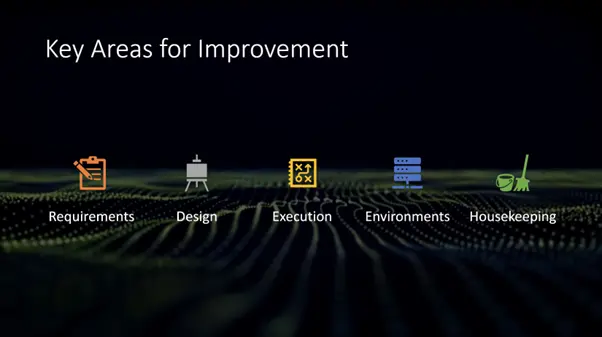
Five key areas for improvement are: Requirements, Test Design, Test Execution, Test Environments, and Housekeeping. Each team is asked a series of questions in each of these categories and a score is calculated to determine compliance with recommended standards. Repeating the benchmarking process every six months helps teams to assess their testing processes, identify wasteful practices, and implement changes that lead to more sustainable outcomes. This approach not only helps reduce the environmental impact of software testing but also promotes a culture of continuous improvement and awareness of sustainability issues within LBG.

Using Dashboards

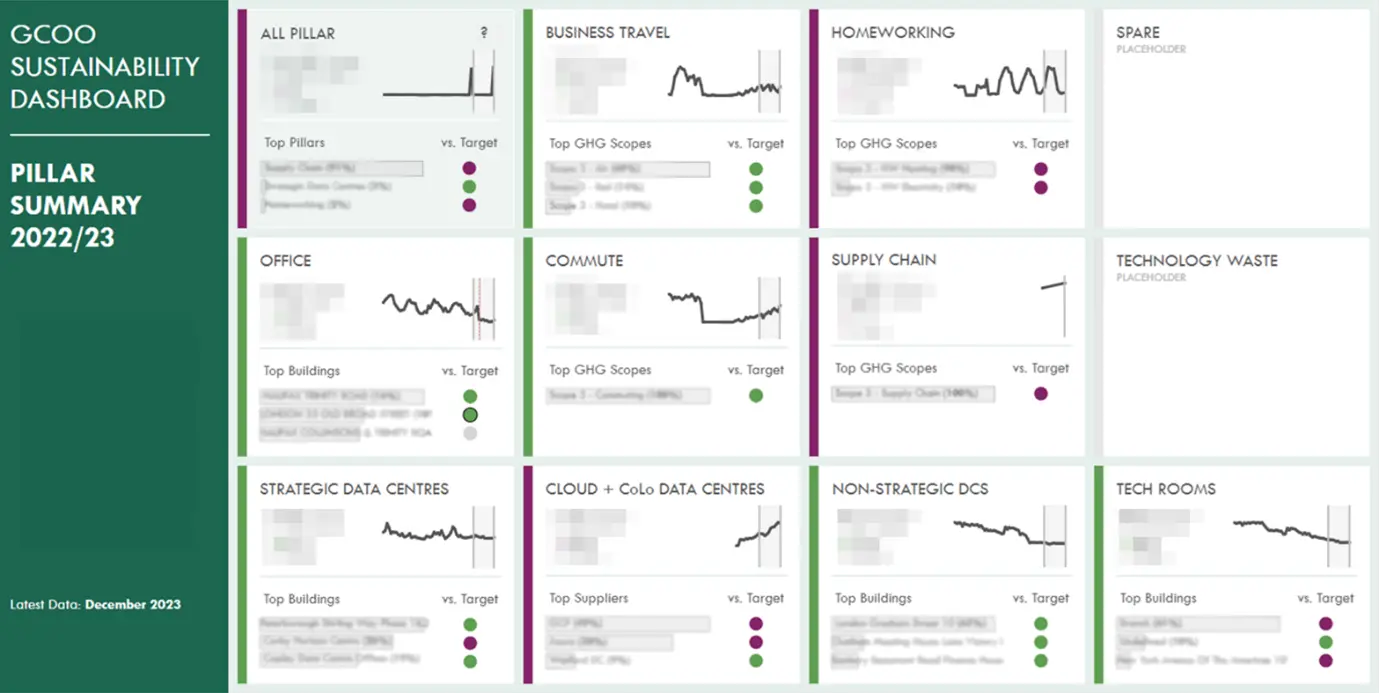
We make extensive use of dashboards to monitor our progress. Our GCOO Sustainability Dashboard, for example, helped us track various sustainability metrics across different categories such as office, business travel, homeworking, commute, supply chain, technology waste and data centres.

We’ve also developed carbon dashboards to monitor and manage our carbon footprint for business applications in real-time. These dashboards provide detailed insights into our carbon footprint on a “per-application” basis, allowing us to make informed decisions to reduce our carbon footprint. Some teams have set themselves carbon targets for their applications and strive to reduce emissions in every software release.

Education and Awareness

Building awareness is a crucial aspect of our strategy. We highlighted the unsustainable nature of software testing and emphasised the importance of communities in building awareness. We used various online communities and presentations to spread the word. We encourage our engineers to discuss sustainability throughout the SDLC. We use “standards and guardrails”, carbon dashboards and the Green IT survey to encourage engineers to think about sustainability throughout each project lifecycle. Teams are encouraged to change incrementally, ensuring that every small change contributes to our overall goal.

Looking Ahead

Our journey towards sustainability in software projects is ongoing, but we’ve made significant progress over the last 12-18 months. By focusing on reducing waste in the SDLC, setting clear targets, using innovative tools like our carbon dashboards and building awareness, we’re making a real difference.

Author

Richard Bishop

Richard is an experienced software tester with over 20 years’ experience in performance testing and test management. In his roles at Lloyds Banking Group, Richard advises, and mentors quality engineers and developers and his goal is to help them to get the most from then bank’s investments in software testing and test management tools.


Lloyds Banking were Gold Partners in EuroSTAR 2025. Join us at EuroSTAR Conference in Oslo 15-18 June 2026.
Filed Under: Development, Gold Tagged With: EuroSTAR Conference, software testing conference

How GenAI is Shaping the Future of Software Testing

March 12, 2025 by Aishling Warde

As software development accelerates, Quality Assurance teams are facing unprecedented pressure to deliver both speed and quality. Despite exponential innovation in software development over the past couple of decades, QA teams still seem to be grappling with the fact that testing is not happening at the same speed development happens. A recent Testsigma webinar surveying 300 QA professionals revealed that 57% consider time management—building, executing, and maintaining tests—their biggest challenge.

The Challenges Holding Us Back

Modern QA teams face several persistent challenges that slow down testing processes:


Slow Testing Cycles
Testing remains bottlenecked by manual-heavy processes and an overemphasis on building perfect automation frameworks. This traditional approach cannot match the speed of modern development cycles.


High Maintenance Overhead
Traditional test automation requires constant script updates, which create significant maintenance costs and technical debt and divert resources from actual testing activities.


Insufficient Test Coverage
Human-defined test cases often fail to anticipate all edge cases, leading to undetected defects. This limitation becomes more pronounced as software complexity increases.

Why Do These Challenges Exist?

A couple of key factors contribute to this misalignment:

  • Manual testing—Don’t get me wrong—manual testing is not a bad word at all, as some vendors make it out to be. One can never hope to have 100% automation and anyone claiming that is a snake oil salesperson. But, having said that, automation is one of the best things that has happened to the software testing world. The idea is to use automation as a tool to solve everyday tasks at scale.
  • Automation as the silver bullet – This is not too unrelated to the above point, that automation is being considered the one solution to all of software testing problems. The industry’s push toward automation has had unexpected consequences. Many skilled testers were forced to become programmers or rely heavily on development teams for test automation. This shift often came at the expense of core testing competencies: domain knowledge and user behavior understanding.

The lure of code-driven testing

The world has come long since the first line of code was written. It has truly overhauled our world, and the possibilities it has brought about are endless. While code has revolutionized our world, the heavy focus on code-driven automation has overshadowed essential testing skills. The industry has drifted away from business-driven and user-behavior-driven testing approaches.

The shift to business-driven testing

A promising trend we are observing at Testsigma is the shift to business-driven testing and technology usage as a means to an end. With the advent of codeless technologies and GenAI, it is becoming increasingly easy for software testing teams to automate without having to build a test automation framework that takes months, and without writing code to actually script test cases. This allows testers to focus on their core strengths: domain expertise and user understanding.

GenAI-powered testing

Generative AI, combined with truly codeless test automation, offers new possibilities for rapid testing without coding requirements. Powerful tools like Testsigma Copilot allow testers to:

  • Focus on core understanding of the business and user, and not necessarily on learning the technology used to build frameworks.
  • Use prompt engineering to provide business context, to make the testing itself better
  • Guide AI systems to think from a user’s perspective, and use AI to uncover edge cases that might otherwise get missed

While using GenAI to generate test cases and test scenarios seems to win half the battle, the magic lies in codelessly being able to automate them as well. And that’s where truly codeless test automation platforms like Testsigma help, as one can perform end-to-end test automation at scale without writing a single word of code. With agentic execution, the deal gets sweeter as AI optimizes for the right test cases to be executed, and across the right resources, while self-healing tests to account for any changes that might have been shipped.

Pitfalls in GenAI-driven test automation

It is crucial to remember that, just like any piece of technology, GenAI is a tool. And as the saying goes, a fool with a tool is still a fool. The ones that are able to get the tool to work for them are the ones that win. Mastering the tool itself is not the goal, but how to make it work for the business is.

The other risk in GenAI-driven test automation is that the quality completely relies on the inputs we provide. Again, this is a golden opportunity for software testers, as it forces us to think like users, which is the basic trait of any software tester anyway.

Looking ahead

The future of software testing lies not in writing more automation scripts, but in leveraging AI to handle complexity while humans focus on customer needs and business value. This shift represents an opportunity for software testing teams to:

  • Return to business-centric and customer-centric testing approaches
  • Reduce technical barriers to effectively democratize testing and make the industry inclusive
  • Enable faster, smarter, and more comprehensive quality assurance, to empower software engineering teams to release quality software with confidence!

As software complexity continues to grow, the industry must embrace solutions that streamline testing while keeping quality control in the hands of those who best understand the product and its users.

Author

Narain Muralidharan

Narain Muralidharan is the Director of Product Marketing at Testsigma. Prior to Testsigma, Narain has led various marketing teams at SaaS unicorns like BrowserStack and Freshworks.

Testsigma were Gold Partners in EuroSTAR 2025. Join us at EuroSTAR Conference in Oslo 15-18 June 2026.
Filed Under: EuroSTAR Conference, Software Testing Tagged With: EuroSTAR Conference, software testing conference

How to overcome common challenges in Exploratory Testing

February 20, 2024 by Lauren Payne

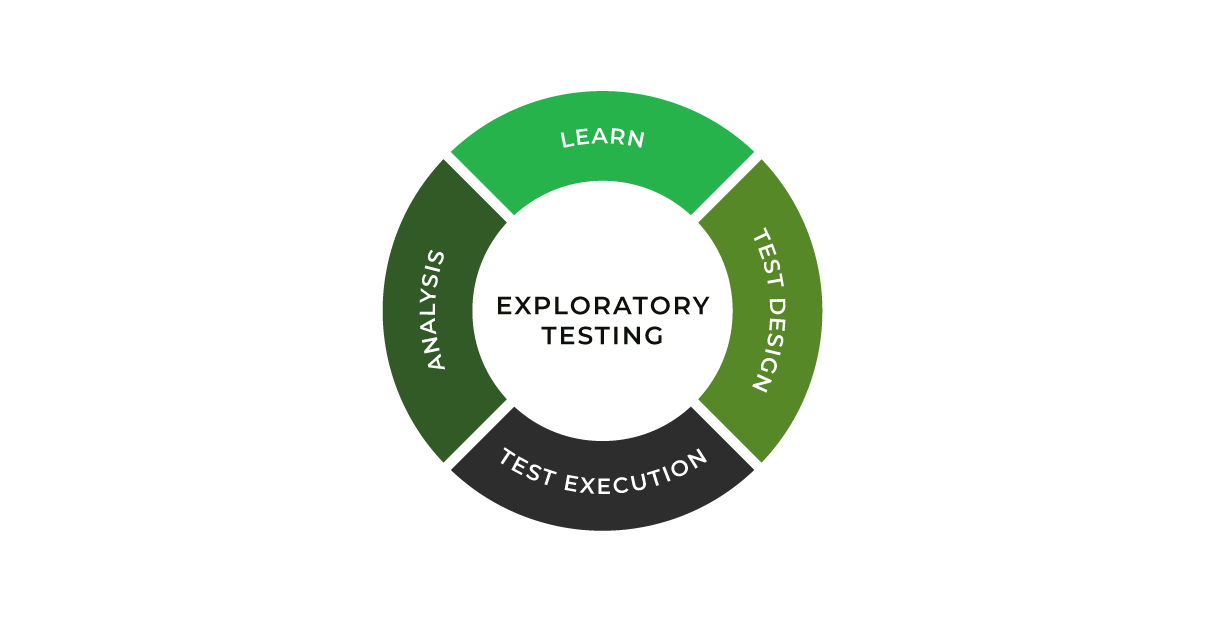
Exploratory testing involves testing system behaviour under various scenarios, with a predefined goal but no predefined tests. This focus on discovering the unknown makes exploratory testing both powerful and challenging.

“Exploratory testing is a systematic approach for discovering risks using rigorous analysis techniques coupled with testing heuristics.”

-Elisabeth Hendrickson

Although exploratory testing (ET) is not a new concept, its significance has increased exponentially in the dynamic field of software development. With its simultaneous learning, test design, and execution processes, ET represents a shift from the traditional, script-based testing methodologies. This approach is particularly beneficial in handling the complexities and unpredictabilities of modern software projects. It prepares testers to actively engage with the software, uncovering potential issues that scripted tests might overlook.

In exploratory testing, catching bugs is an adventure – a journey through the unknown aspects of software, where each test can reveal new insights. In the Agile world with rapid development cycles, exploratory testing stands out as a dynamic and responsive testing strategy, essential for ensuring software quality in a fast-paced environment.

Despite its advantages, exploratory testing has challenges that can interfere with its effectiveness. Testers often encounter hurdles in planning and adapting to newly discovered information, managing frequent context switches, maintaining comprehensive documentation, and effectively measuring the success of their testing efforts. Addressing these challenges is crucial for harnessing the full potential of ET. This blog will explore these common challenges and discuss how the Xray Exploratory App provides innovative solutions, enhancing the exploratory testing process and enabling testers to deliver high-quality results efficiently.

How to overcome challenges with Xray Exploratory App

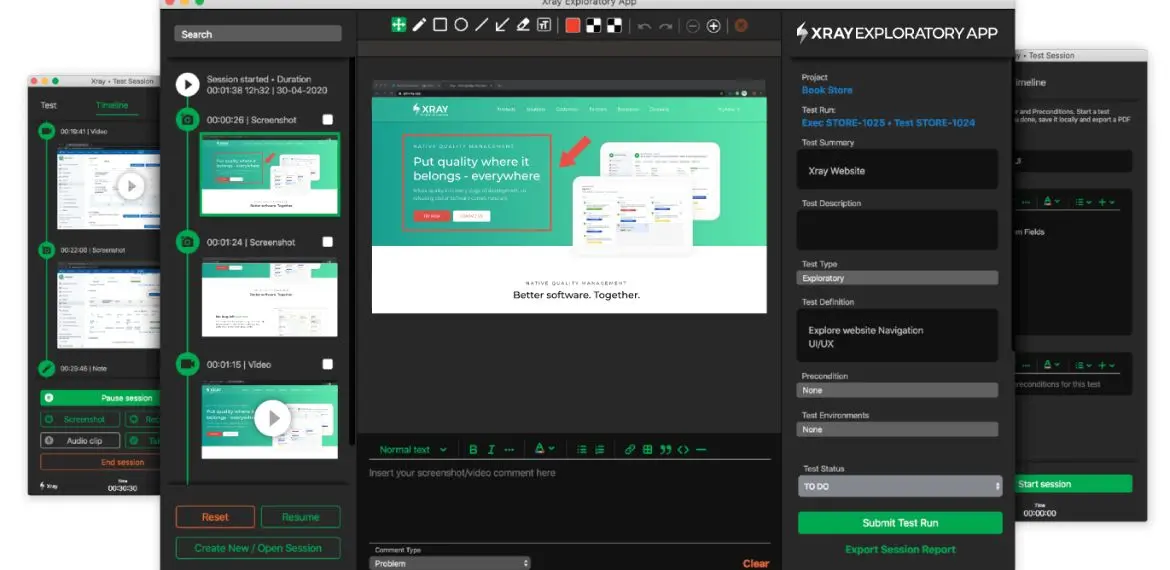
The Xray Exploratory App proves to be a vital resource for successfully navigating these challenges. The tool supports the unique factors of exploratory testing, empowering testers to optimize their testing strategies while maintaining the flexibility and adaptability that exploratory testing demands. 

Planning and Learning

One of the primary challenges in exploratory testing is the balance between planning and learning. While ET is less structured than traditional testing, it still requires a level of planning to be effective. Xray Exploratory App facilitates one of the measures to counter this challenge and optimize your ET adoption –  session-based test management (SBTM). 

Testers must continuously learn from the software they are testing and adapt their approach accordingly. This requires understanding the project’s goals and the ability to quickly assimilate new information and apply it to testing strategies. One of the elements that helps with gaining the skills and experience is the structure of knowledge sharing. For example, if charters are handled as Jira stories, you get a centralized storage (a library of templates, of sorts) that has good examples which help educate any team member about the system and previous ET efforts.

Context Switching

Testers in an exploratory setting often deal with context switches. They must juggle different aspects of the software, switch between various tasks, and respond to new findings in real-time. Managing these switches efficiently is crucial to maintain focus and avoid overlooking critical issues. Beyond common techniques like Pomodoro, you can leverage two key features of Xray Exploratory App – saving sessions locally and editing the detailed Timeline with all your findings.

Proper Documentation

Unlike scripted testing, where documentation is predefined, exploratory testing requires testers to document their findings as they explore. This can be challenging as it requires a balance between detailed documentation and the fluid nature of exploratory testing. Testers need to capture enough information to provide context and enable replication of failure and future test repeatability without getting bogged down in excessive detail.

Xray Exploratory App addresses this challenge with the easily created chronological history of not just text notes but also screenshots, videos, and issues/defects created in Jira during the session (which accelerates the feedback loop).

Reporting and Measuring Success

Another significant challenge in exploratory testing is effectively reporting and measuring success. Traditional testing metrics often do not apply to ET, as its dynamic nature does not lend itself easily to quantitative measurement. Defining meaningful metrics to capture the essence of exploratory testing’s success is crucial for validating its effectiveness and value within the broader testing strategy. In many cases, such definitions would be very company-specific.

The good news – the seamless integration between Xray Exploratory App and Xray/Jira allows you to leverage centralized test management features, such as real-time reporting on several possible metrics (e.g. number of defects, elapsed time). That improves visibility and allows to clearly determine the status of not only exploratory testing, but all testing activities.

For instance, if we want to track defects/issues resulting from exploratory testing, we can see them linked to the test issue in Jira/Xray, which will then allow us to check them in the Traceability report. 

Overall, these challenges, though daunting, are manageable. With the right approach and tools, testers can navigate the complexities of exploratory testing, turning these challenges into opportunities for delivering insightful and thorough software testing.

Future outlook of Exploratory Testing

Exploratory Testing is becoming more acknowledged as an indispensable part of the testing strategy, especially given the limitations of conventional scripted testing. The ability of ET to adapt and respond to the complexities and nuances of modern software development is exceptional. As we look towards the future, several key trends are emerging that are set to shape the landscape of exploratory testing.

Artificial Intelligence (AI)

AI has the potential to significantly transform exploratory testing by automating certain aspects of ideation and, more so, data analysis processes. Leveraging AI in software testing in the correct way can enhance the tester’s capabilities, enabling them to focus on more complex testing scenarios and extract deeper insights from test data. AI can assist in identifying patterns and predicting potential problem areas, making ET more efficient and effective.

Integrations with other tools

The future of exploratory testing will see greater integration with various development, testing, and business analysis tools. This compatibility will streamline the testing process, enabling seamless data flow and communication across platforms. One of the pain points this trend will aim to address is losing time in writing automation scripts as a result of ET. Such integrations will enhance the overall efficiency of the testing process, allowing testers to leverage a wider range of tools and resources during their exploratory sessions more easily.

Enhanced collaboration

As software development becomes more collaborative, exploratory testing also adapts to facilitate better teamwork. Tools like the Xray Exploratory App incorporate features that promote collaboration among testers and between testers and other stakeholders. This collaborative approach ensures a more comprehensive understanding and coverage of the software, leading to better testing outcomes.

Compliance and reporting

Exploratory testing is being used more and more in ensuring compliance, areas like Non-Functional Requirements testing (security and performance), to help find more convoluted flaws and bottlenecks in intricate software systems. The trend is not surprising as the cost of compliance is increasing, both from the customer and the regulatory perspective. 

With the increasing emphasis on compliance and accountability in software development, exploratory testing has to evolve to provide more robust reporting and documentation capabilities. The ability to generate detailed and meaningful reports is essential, and tools like Xray are focusing on enhancing these aspects to meet the growing compliance demands.

The Xray Exploratory App is at the forefront of these changes, continually adapting and evolving to meet the future demands of exploratory testing.

Chart new heights in testing with Xray Exploratory Testing App

Exploratory Testing has become indispensable in our increasingly sophisticated and customer-centric digital landscape. Its importance has expanded across various sectors, including e-commerce, healthcare, and finance, highlighting the universal need for high-quality software experiences. The unique approach of ET, with its focus on discovering the unknown through rigorous analysis and testing heuristics, positions it as a key strategy in addressing the complexities of modern software systems.

The Xray Exploratory App stands out as a vital resource in harnessing the full potential of exploratory testing. The tool enhances the testing process by addressing the everyday challenges of planning, context switching, documentation, and reporting. It enables testers to navigate the intricacies of ET with greater efficiency and effectiveness, ensuring comprehensive coverage and insightful test results.

Explore the capabilities of the Xray Exploratory App and see firsthand how it transforms the exploratory testing experience. Dive into the world of enhanced software testing with Xray and discover the difference it can make in delivering superior software quality.

Author


Ivan Filippov
, Solution Architect for Xray.

Ivan is passionate about test design, collaboration, and process improvement.

Xray is an EXPO Platinum partner at EuroSTAR 2024, join us in Stockholm.

Filed Under: Exploratory Testing, Platinum, Software Testing, Sponsor, Uncategorized Tagged With: 2024, EuroSTAR Conference, Expo, software testing conference, software testing tools

  • Page 1
  • Page 2
  • Page 3
  • Next Page »
  • Code of Conduct
  • Privacy Policy
  • T&C
  • Media Partners
  • Contact Us

part of the