• Skip to main content
EuroSTAR 2027 - Sign up for early access

EuroSTAR Conference

Europe's Largest Software Testing Conference.

  • Programme
    • EuroSTAR Global Series
    • Call for Speakers
    • 2026 Programme
    • Community Hub
    • Awards
  • Attend
    • Why Attend
    • 2026 Photos
    • Bring your Team
    • Testimonials
  • Sponsor
    • Sponsor Opportunities
    • Sponsor Testimonials
  • About
    • About Us
    • Our Timeline
    • FAQ
    • Blog
    • Organisations
    • Contact Us
  • Book Now

EuroSTAR Conference

EuroSTAR 2020 – A Sketchnoter’s Summary Part I

November 20, 2020 by Suzanne Meade

The year 2020 brings a lot of challenges to everybody. To the EuroSTAR Conference team as well. They were having the challenge of finding a solution of how to let the 2020 conference edition take place. The team came up with an online version which made it possible to attend the conference from all over the world. More than 800 attendees joined the conference. But a conference doesn’t only mean great speakers, informative talks and useful tutorials – it also means networking with attendees and speakers, visiting the Test Clinic, doing a softbox testing, join product demos of the sponsors at the expo and much more. The conference team managed to bring all those parts online. So apart from the tutorials and the conference talks, there were also Ask Me Anything sessions with the speakers, Lean Coffee sessions, informative sessions about topics like diversity, wellbeing and career advance, Yoga sessions and product demos. It was possible to visit the expo during the whole conference to meet the sponsors and learn about their products. And what was another highlight to meet fellow testers: there was the possibility to do SpeedMeets.

Nevertheless, of course the tutorials and the talks are very important for making a conference a success. And I wouldn’t be the official sketchnotes reporter of the EuroSTAR Conference 2020 if I wouldn’t share my sketchnotes with you. So I will tell you more about the tutorials and the talks I have attended by sharing my sketchnotes with you.

Day 1 – Tutorial Day

For the tutorial day, 7 half-day tutorials have been chosen by the program committee. When I heard that the tutorials will still take place, although the conference takes place online, I was really happy. For me, as an introvert, it is not very easy to join a tutorial on-site. Being in the comfort of my own home, it was an amazing chance for me to take part in two tutorials, which I would have to mentally prepare for a lot if they would take place offline.

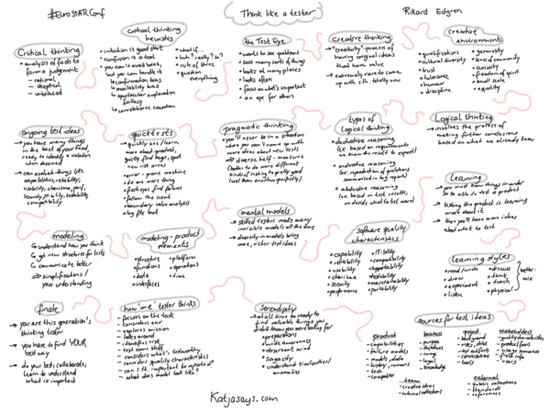
So the first tutorial that I have attended was “Think like a tester” by Rikard Edgren (who by the way won the award for the best tutorial). The attendees learned a lot about different types of thinking and how that can help us testers in our daily life.


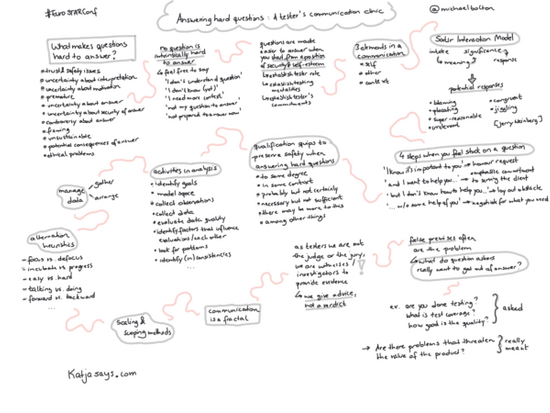
The second tutorial that I’ve attended was “Answering hard questions: A tester’s communication clinic” by Michael Bolton. In this tutorial the attendees have learned a lot about what makes questions hard to answer and tips on how to answer them/deal with them anyway.

Day 2

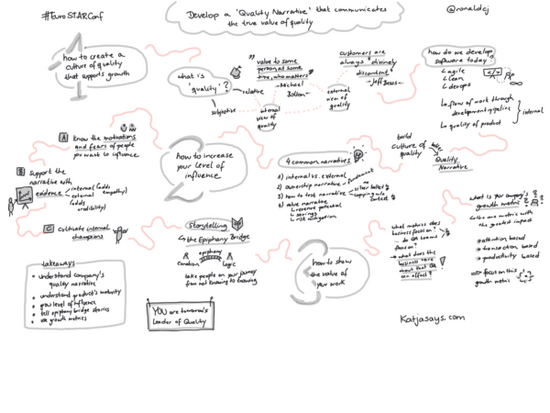
The second day has started with the Keynote “Develop a quality narrative that communicates the true value of quality” held by Ronald Cummings-John. Ronald was talking about how to create a culture of quality that supports growth, how to increase your level of influence and how to show the value of your work.

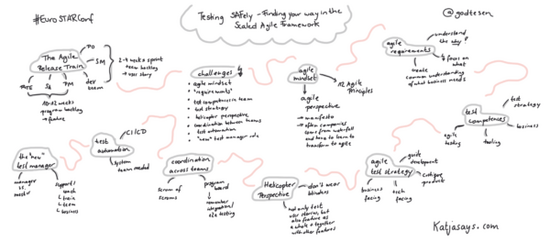
The next talk was “Testing SAFely – Finding your way in the Scaled Agile Framework” held by Gitte Ottosen. It posed a number of questions such as what is the Agile release train? What are the challenges that might occur? And how to overcome these challenges.

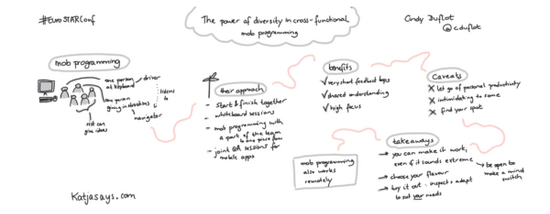
Following Gitte’s talk was the session “The power of diversity in cross-functional mob programming” by Cindy Duflot. Mob programming is a way of collaboration that gets more and more common. Look at the sketchnote to find out about benefits, caveats and learnings.


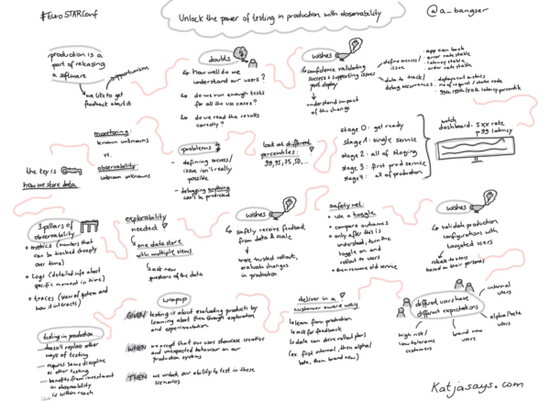
Then it was already time for the mid-day keynote. Abby Bangser‘s topic was “Unlock the power of testing in production with observability“. Abby had three wishes:

  • having confidence about validating success and supporting users post-deployment
  • safely receiving feedback from data and scale
  • validate production configurations with targeted users

And that’s how testing in production and observability have helped her:

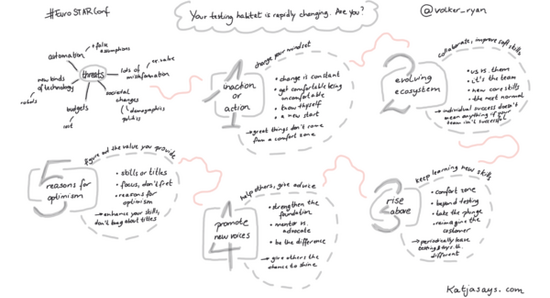
The (testing) world is rapidly changing and that was also the topic of Ryan Volker‘s talk: “Your testing habitat is rapidly changing. Are you?” There are a lot of threats nowadays which can affect the job of a tester. So Ryan had 5 ideas on how to deal with those threats: inaction or action, evolving ecosystem, rise above, promote new voices and reasons for optimism.

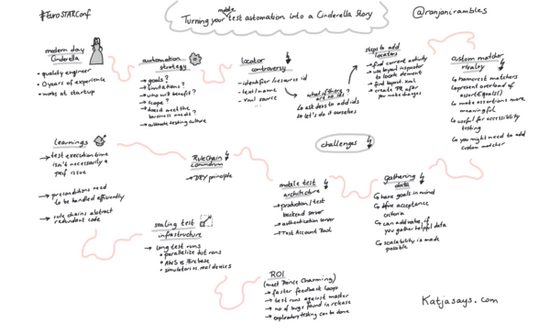
Mobile test automation can be really challenging. Niranjani Manoharan gave a talk about “Turning your mobile test automation into a Cinderella story” in which she was talking about the challenges you might encounter on your journey and how to tackle them.


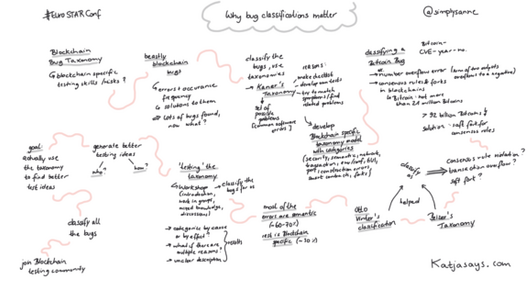
Sanne Visser is the RisingSTAR Winner 2018. This year she was talking about blockchain and “Why bug classifications matter“. Find out more about the relevant taxonomies and how to test them by having a look at the sketchnote:


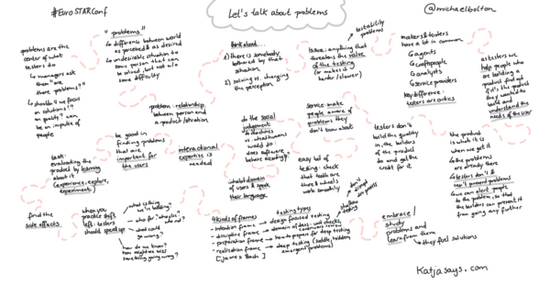
“Let’s talk about problems” is a very fitting title for the last talk of the first day was a keynote by Michael Bolton, which was more or less a conversation between him and Zeger van Hese. What is a problem? And why are testers good at finding them? When they find them – what will they do with these findings? And how can testers find problems better?

At the end of the day there was a Trivia Night in which the attendees could attend and show their knowledge about different topics, not just testing-related topics. I didn’t stay until the end but from the chat messages it seems that it has been a fun evening.

About The Author

Profile PhotoKatja Budnikov is a software tester and sketch noter from Northern Germany. Katja is passionate about software testing and sketch noting! She loves attending events like EuroSTAR and sharing her experience and learnings with others on her blog Katjasays.com. Katja first started sketchnoting in 2016. First analogue with pen and paper and now digitally with an iPad and Apple Pencil.

In her work life Katja started out in online marketing, then specialized in search engine optimisation and is now a quality assurance specialist in both manual and automated software testing. Away from work Katja loves photography, especially taking photos of nature, including many of her dog Auri, a young Australian Shepherd, who is super cute and fun to take photos of. She loves to spend time with her dog and partner, going out for walks, traveling and eating cake at a nearby coffee shop with a beautiful garden.
Filed Under: EuroSTAR Conference

Rik Marselis: My Experience at a EuroSTAR online conference

October 14, 2020 by Fiona Nic Dhonnacha

Rik Marselis: My Experience at a EuroSTAR online conference

Curious about what’s coming up at EuroSTAR 2020 Online? How it all works? How you’ll connect with people on a virtual platform? We asked our programme chair Rik Marselis to tell us his experience from the Test & Quality Summit, a EuroSTAR-organised conference we held in September. 

Here’s what Rik had to say: 

The Test & Quality Summit was the first time I used the Hopin online conference platform (where EuroSTAR will also take place) – and it was a very positive experience. 

I have become quite accustomed to working from my home office and have done my fair share of video meetings and online webinars. 

But this kind of online conference platform has so many more features to offer.  

Starting with navigation: the menu bar makes it easy to visit all the different ‘areas’ of the conference – the main stage, sessions (bonus talks), expo, and networking.  

The main stage is of course where the programmed presentations are broadcast. But to get the real ‘conference feeling’, the other items on the menu are also important. 

For example, the expo where the exhibitors had their virtual booths. I visited several of these booths: some featured product presentations, while I had good conversations with others using the built-in video-calling facility. In one conversation in particular, a few of us came together, which resulted in a meaningful exchange of views and ideas. 

A feature that I really liked was the Speed Meeting. This is where you click to meet a random person to chat with. I just clicked the button to indicate that I was open to a meeting, and then I was connected to a random attendee. 

To my – and her – surprise, the first random connection was with someone I’ve known for many years: Dorothy Graham. So, the 3 minutes for this speed meeting was far too short, but it was very nice to chat to her! 

I also spoke to attendees that had watched my keynote presentation and wanted to know more. One person had a concrete practical problem in his job, and we were able to talk about a possible solution. 

Luckily, the platform offers a variety of opportunities to contact people, so if the 3 minutes of the speed meeting is too short, we could just enter another room and connect via a 1:1 video chat feature! 

At the Test & Quality Summit there were no parallel presentations, but there will be at EuroSTAR Online. Which means even more engagement and access to lots more sessions and talks. 

I was pleasantly surprised by the direct interaction I had with attendees during my speaker presentation. Everybody can ask questions in the chat feature, and since my presentation was recorded to assure the quality, I could answer questions by text throughout, as well as coming on live for the official Q&A, which gave a whole new dimension to the interactivity of the conference. 

There were lots of ways the platform captured the community feeling of a live conference. For example, the table quiz at the end of the day, the way you could virtually walk to the reception desk to ask questions about the programme, the organization, or whatever else you have a query on; and how you could travel from room to room. 

All in all, the online conference was a great experience, and now I’m really looking forward to EuroSTAR Online in November: to enjoy the community feeling, and exchange ideas and knowledge about our fantastic quality & testing profession. 

Rik is the Programme Chair of EuroSTAR 2020 Online this November. Together with his committee Mette Bruhn-Pedersen, Marta Firlej and Zeger Van Hese, they have created a full line-up of incredible speakers giving insights on all the topics you care about, including agile, DevOps, automation, test management, and lots more. 


Filed Under: EuroSTAR Conference, Virtual Conference

Introduction to Exploratory Testing

October 12, 2020 by Fiona Nic Dhonnacha

Exploratory Testing

Although test automation is the biggest trend in software testing right now, only focusing your strategy on automation isn’t going to guarantee you a fool-proof QA process.

By diversifying your testing strategy with different methods, you’ll be able to cover more ground (i.e. untested code)  and more unexpected discrepancies to your code and product.

Exploratory Testing should be a part of your testing strategy because it will test the effectiveness of your existing tests, discover code discrepancies, and alleviate bottlenecks where bugs hide the most.

In this post, QA Software Engineer, Pekka Pönkänen, tells us how he effectively performs Exploratory Testing and his advice on making the most of your sessions.


Why Exploratory Testing is important

In 2018 I walked the length of Japan, and one of my goals for the trip was to explore the country and its rich culture. During the trip, I decided to walk in different routes other than just following Google Maps, and as a result of that I had many exciting adventures. Undoubtedly, without having the curiosity to explore, I would have missed many unique places and interesting conversations with locals.

I firmly believe that in order to find new ways of seeing and experiencing the world,  you need to be brave and curious about the unknown. The same goes for software testing. Always following the same paths, or tests, will get you expected results. On the contrary, if you go on an exploratory session of your application, you’ll be amazed to discover just how many bugs could be hiding or how much you can improve the functionality for the user.

If you want to try Exploratory Testing yourself, consider this your starting point.

What exactly is Exploratory Testing?

The term “Exploratory Testing” means that you are exploring the application and how it performs after different actions.

To truly understand the concept, it is essential to dig deeper into the roots of the terminology. The term “Exploratory Testing” was introduced in 1984 by Cem Kaner.

“Exploratory software testing is a style of software testing that emphasizes the personal freedom and responsibility of the individual tester to continually optimize the value of her work…”

James Bach’s 2003 paper, “Exploratory Testing Explained”

Through exploratory testing, your goal is to find out how a specific area of an application is working while using your skillset to provide valuable feedback to your team. You want to find the nastiest bugs under the hood and make sure that nothing critical or dangerous can happen in the app.

Preparing for Exploratory Testing

Before starting the testing run itself, it’s good to have tools to write down ideas, bugs, and defects. Personally, I like classic pen and paper and bug-tracking software to write down thoughts and plans for the future. During the run, you will see application logs, automation ideas, new approaches for new testing runs, and bugs that need to be fixed. Having good software that captures images, videos, and notes can be very helpful in centralizing your findings and sharing your insights with your team.

Keep in mind that your notes do not need to be the most delicate piece of art. What’s important is that you can gather a small story around it for your teammates or stakeholders after the session. I have heard very successful use cases with testers doing mind mapping during exploratory testing. Having this visual aid in the process can be valuable to build off of your ideas and create themes.

Identify your goal

The first thing to get started in exploratory testing is to define what to test. It can be a known bottleneck, possible risk, new feature, or an area which has a lot of bugs.

As a software tester, you may know the places to look, and the development team can define the areas which need more attention. When planning the testing, remember not to make it broad so that you don’t lose focus. Here are a few examples to get you started:

What to do:

  • Explore catalog page with a screen reader to verify page accessibility
  • Explore login process with iOS gestures to verify that functionality is accessible

These tasks can be timeboxed and can be done in one session and short enough to be focused.

On the other hand, you don’t want to choose a task that has too many options or paths to follow. The best way is to keep it simple and focus on smaller tasks.

What not to do:

  • Explore all possible mobile security issues to the system to discover any security-related threat

Once you’ve identified your goal and prepared your tools, here are the steps you can follow to complete an Exploratory Testing session:

1. Prep your session

After selecting an area to explore, design the test session. Once you know what to explore, you’ll get a flood of ideas about how to test different aspects — make sure to keep track of everything that comes to mind so you have a solid plan before you start testing. Write down your mission and prepare the notes about the way you want to proceed.

2. Setup the testing environment

Check that you have all credentials and access to enter the testing environment. Testing is pleasurable when you can focus on the testing itself, and when you don’t need to worry about usernames or unreachable servers.

3. Timebox and execute

Depending on the task, open the suitable logs, and monitor tools to log your actions during testing. Application logs are crucial to provide valuable information when things go wrong. While executing, keep your objective in mind, write notes, be systematic, collect info, gather ideas for the next sessions, and most importantly learn and explore your product.

Exploratory testing is more of a mindset than a framework

Exploratory testing is in fact a skill which is developing all the time while your skillset as a tester is evolving. The beauty of testing is that you never get bored of it because there is always room for improvement. Be curious about the application, try different approaches to execute testing, learn about your software, and share the knowledge.

At the end of the day, software development is a team sport!

Inform others about the state, risks, and any other concerns. Share your mind map as well as any evidence that you collected like videos, images and notes. You don’t have to have all of the answers, but sharing them with your team will also help others discover themes and insights which you wouldn’t have known otherwise.

——————————————————————————————–

Author: Pekka Pönkänen

Xray Contributing Writer | QA Engineer

Filed Under: EuroSTAR Conference, Exploratory Testing, Virtual Conference

6 strategies for building AI-based software

October 1, 2020 by Fiona Nic Dhonnacha

Building AI-based software

Developing software that incorporates artificial intelligence (AI) can be unpredictable, and you need a unique set of knowledge and skills to code, test, and make sense of the data. What’s more, tuning the system can take time, and the decisions AI-based software makes can sometimes be difficult to explain.

My organization specializes in developing software test automation tools that help users develop tests that run on different platforms, such as desktop computers and mobile devices. We wanted to make it even easier to write and run these tests, and avoid having to customize the test for each platform.

Our research led to adopt natural-language processing, which allows users of our software to describe a test using simple English, and computer vision with optical character recognition to identify the objects on a screen.

Here are the lessons we learned that you can apply as you incorporate AI concepts into your products.

Make data an integral part of planning

An artificial neural network (ANN) is a layered structure of algorithms designed to use data to make intelligent decisions without human intervention. We incorporated an ANN in our system, fed it with hundreds of thousands of data samples, and let it do its magic to make informed decisions.

In a system that’s heavily based on data, planning is essential. We had to address:

  • What data we needed to train the model
  • How to acquire, clean and classify that data
  • How to obtain additional data from customers

This required expanding the role of the product management team, which traditionally focuses on the features and capabilities of the product, to include overseeing the data-related aspects of the system. That included defining the scope of the data, the acceptance criteria for the data, and how data was to be used within our AI models.

Lesson learned: Data must be front and center of everything your team does, and your product managers must become familiar with the AI techniques your team is using in order to ensure consistency and reliable outcomes.

Decouple the AI model from your product

Developing and tuning an AI model can take a long time. If your application is tied closely to the model, you can only progress at the speed of the model’s development.

The AI model should be decoupled from the rest of the system and treated as a separate pipeline. This allows each piece of the system to progress at its own pace, and you can apply updates to the AI model independently. This has two key benefits:

  • You can develop and test your main product independently of the model, giving you fast feedback on product features unrelated to the AI portion of the product, and you can continue developing and training the AI model without being impeded by unrelated issues, such as a code change to the main product that breaks the build and holds everyone up until it’s resolved.
  • You can release your main product and the AI model at different cadences. This is particularly significant for users of our on-premises product, since they can install the product once and apply subsequent updates to the AI model without going through an extensive upgrade process. Given that the nature of AI models is to continuously learn, adapt, and improve, this is an important capability that allows our users to stay on the cutting edge of AI without having to wait for updates to the entire product.

Designing the system correctly to allow the AI model to be developed and deployed separately is a crucial capability that you should tackle early. Our release timeline now consists of two parallel timelines; one for the product, and one for the AI model updates.

Create cross-functional, multi-disciplinary teams

After we decoupled the AI model from the main product, our teams could develop and test it independently. But we also needed to test the system as a whole, with all of the components deployed and working together. For effective end-to-end testing, you need expertise in both AI and software testing.

We created cross-functional teams that included software engineers, data scientists, data analysts, testers, architects, and the product manager. This gave us the best of both worlds—we have experts in designing and developing AI models working alongside our software engineering and software testing specialists. In this way we can leverage the knowledge and experience of the entire team to develop, test, and deliver each component independently, as well as test the entire system holistically.

This approach has helped to cross-pollinate specialized knowledge across the team, so that our developers and testers have come to understand AI better, and our AI experts have learned to become better developers and testers.

Understand that explaining results in an AI system can be challenging

We like to think of our deep learning system as a black box that knows how to think and make decisions, but sometimes it makes decisions we weren’t expecting. When a regular software system does something unexpected, you can debug it. It might take time, but you’ll figure it out. But in an AI system, it’s almost impossible to determine the combinations and sequences of data and logic that led to a decision.

Lesson learned: The most efficient way to influence a model’s decisions is through supervised trial and error, coupled with guidance from the AI experts who understand how the model works, and who can guide the learning and tuning process toward more accurate results.

Expect longer cycle times when building the product

Traditional software products compile quickly—even large enterprise software products complete a build in no more than a few hours.

AI models are different. Training a neural net first involves gathering data samples, and then cleaning and tagging the data, which can take days, depending on the quantity and quality of the data you need. Only then can you start the training process, which can take several days for each training cycle. In our case, it takes about three days on a machine with a powerful processor to train just one model.

This is a major motivation for splitting the AI model out from the rest of the product, reducing dependencies and making it a separate and independent pipeline, as discussed above.

Retrain your AI models with customer data

It’s impossible to achieve 100% accuracy and zero defects in an autonomous, continuously improving, self-learning system. We train our AI models extensively in our own labs, but when the model is exposed to the customers’ environment, it has to make decisions about something it may not have seen before. The most effective way to tune the system so that it makes the best decisions is to augment the model’s training data with the customer’s data.

We work with our customers to improve the accuracy of our systems in their environments by obtaining their approval to use their data to retrain and optimize our models. This helps the model make better decisions, and creates better outcomes for our customers.

Apply these strategies to your own AI development

The software industry is undergoing an AI revolution, and vendors are adding new AI capabilities to their products every day. My organization has made significant adjustments to the way we develop and deliver software, and we have restructured our teams to include experts in AI—something you’ll need to do as well. We also work more closely than ever with our customers to learn from their environments and improve their outcomes.

AI development might be challenging, but it’s worthwhile. If you’re joining the AI revolution, make sure you apply these strategies to your software development process to get the most out of it for your team, your product, and your users.

This story was originally published on TechBeacon.

Want to know more about AI and how to apply it to your software testing? Check out EuroSTAR Online – we’ve got a programme packed with all of the topics you care about.

                                                 ——————————————————————————————–

Jecky Toledo, esearch and Development Director at Micro FocusAuthor: Jecky Toledo, R&D Director, Micro Focus, Functional Testing

As Research and Development Director at Micro Focus, Jecky Toledo leads the groups responsible for the company’s functional testing and mobile testing portfolios. He has 20 years’ experience building and managing development teams using various methodologies, practices and delivery methods. Most recently, he has been leveraging the power of artificial intelligence and the transformation that AI-based systems bring to the entire software development lifecycle. Jecky trains in martial arts in his spare time, and is a father of three.

Filed Under: EuroSTAR Conference, EuroSTAR Expo, Virtual Conference

Achieving Rapid Test Automation: a case study

September 25, 2020 by Fiona Nic Dhonnacha

Learn how ArisGlobal achieved rapid test automation using Sahi Pro web test automation tool

How ArisGlobal achieved rapid test automation using Sahi Pro web test automation tool

Who is ArisGlobal?

ArisGlobal is a global provider of R&D software solutions and consultancy services, serving life sciences companies in the management of their clinical trial, safety and regulatory information.

Currently, more than 200 life sciences companies and CROs around the world rely on ArisGlobal, including top pharmas, biotechs and devices, CROs and regulatory agencies: ArisGlobal an established market leader in every ICH region.

They provide leading solutions for adverse event reporting, regulatory tracking and e-Clinical. 32 of the top 50 pharmas rely on ArisGlobal solutions.

The Challenges

ArisGlobal started test automation with one of the leading commercial tools. Due to limitations in supporting automation for their products, they moved to an in-house test automation framework based on Watij and Selenium.

Existing testing tool had no record and play  back feature. Secondly, there were no available relative APIs.

Thirdly, complex conditional automation could not be automated as the tool used did not support scripting.

Lastly, maintaining an object repository was mandatory. This was a major effort for maintenance.

The Solution

Based on business requirement for rapid test automation, ArisGlobal decided to use Sahi Pro. The record and playback feature, along with the keyword and data driven test support in Sahi Pro, was used by ArisGlobal to its advantage.

ArisGlobal used Sahi Pro for functional testing including testing of speci_c functionality for ArisGlobal products. ArisGlobal also used Sahi Pro for integration testing and user acceptance testing. The web technologies that were used included:

JSP | JSF | HTML | HTML5 | ExtJS | .NET

Benefits

ArisGlobal achieved the following benefits while using Sahi Pro Web Test Automation tool.

  • The record and play back feature reduced the time required for testing scenarios which require repetitive manual tests
  • Data driven test support in Sahi Pro helped reduce testing cycles with multiple test data sets,thus improving the test coverage.
  • Extensive APIs along with support for native JavaScript helped automate actions on any application, irrespective of the underlying technology.
  • Positional Relation APIs help automate controls even without specific unique identifiers.
  • Reduction of time by 70% for multiple report generation for one of the products.
“Sahi Pro provides a one stop solution to most of our test automation requirements. It’s innovative feature of smart combination of record-playback along key-word generation for key-word driven tests and datadriven tests and suite executions makes it a unique test automation tool to meet the demand for rapid automation.”

Dr. Kailash K P Chanduka (PhD), Head- Testing Shared Services, Aris Global Software Pvt. Ltd.

About Sahi Pro

Sahi was born as an open source product in 2005 with specific focus on automation of emerging web 2.0 technologies but as a tool geared towards testers. With consistent work over the past years, Sahi has grown to be a powerful but easy-to-use tool for testers, handling with ease most complexities presented by modern web, mobile and desktop applications.

Want to learn more about Sahi Pro? They will be exhibiting at EuroSTAR Online in November.

Find out more about the EuroSTAR programme here.

Filed Under: EuroSTAR Conference, Test Automation

3 reasons to book your early bird ticket now

September 25, 2020 by Fiona Nic Dhonnacha

We’re getting ready for a high-energy, jam-packed,  3-day online celebration of testing this November: with 6 keynotes, 9 half-day tutorials, & 40 track sessions, plus lots of community networking.

You’re getting hands-on learning, problem solving with your peers, and juicy insights to get your creativity flowing – and if you can’t join us on the day, it’s all on demand after.

Right now, you can save €150 and secure your place at EuroSTAR Online. But hurry, our offer is closing in just a few days!

GET EARLY BIRD TICKETS


Here are 3 reasons you can’t miss it.

EuroSTAR Conference keynote speakers

The Speakers

Our keynote speakers are leaders in their field, and they’re bringing their expertise to the topics you care most about, including agile, DevOps, automation, functional testing, quality improvement, and lots more.

Jason Arbon shares real-world examples demonstrating the limitations and pain of some AI approaches. Michael Bolton will help you ask those tough questions in testing. Join Abby Bangser for examples and explanations on leveraging the dynamic duo of observability and testing in production.

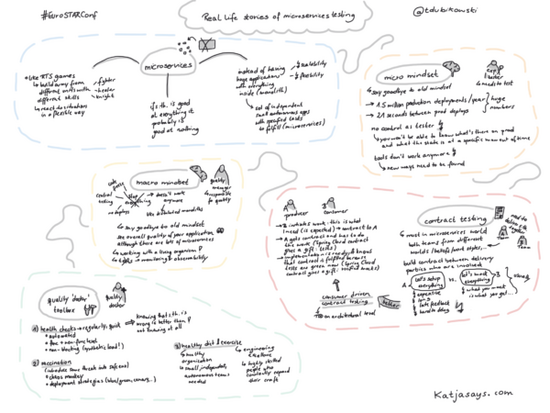
Learn more about about common testing challenges while moving to cloud-based, microservice architecture with Tomasz Dubikowski. Learn how to develop a quality narrative that communicates the true value of your quality team throughout the company with Ronald Cummings-John.

The Learning


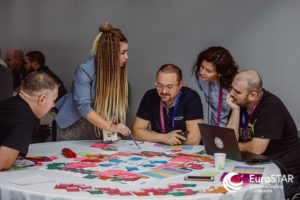
Team working together at a EuroSTAR Conference tutorial

With expert speakers, hands-on workshops and tutorials, you’ll absorb infinite and invaluable knowledge from many of the world’s brightest minds. Tutorials this year include Addressing Real Life Agile Testing Challenges with Fran O Hara, technical web testing with Alan Richardson, a strategic testing masterclass from Fiona Charles, and lots more. You’ll be back at your desk filled with actionable ideas to apply to your work. Check out our programme here!

Don’t worry, we’ve still got your Huddle favourites, re-imagined for an online platform: take part in our TestLab by completing  challenges, exercises and games; and solve all your testing problems at our dedicated Test Clinic.

The Community


Team working together at a EuroSTAR conference tutorialWe’re thrilled to be gathering the global testing community online this year – which means it’s easier than ever to chat with your peers – people who share the same problems as you, even on the other side of the world.



Say hello to new friends: connect 1:1 on video chat, try speed meeting, community networking, and jump into conversations from around the globe!

GET EARLY BIRD TICKETS

Filed Under: EuroSTAR Conference, Virtual Conference

Sing with your Community

September 25, 2020 by Ronan Healy

Sing with your Community

Open to Singers of All Levels

What better way to connect with your community than by coming together to sing in a virtual choir? Yes you read that correctly, the EuroSTAR Community Choir is coming soon to a screen near you!

This year, when we all need it most, we invited the testing community to come together & sing in a virtual choir, led by an experienced Choir Master who is well versed in virtual rehearsals.

We had our first virtual rehearsal on Sept. 23rd, and it’s fair to say everyone was beaming with ear-to-ear smiles after a fantastic evening!

You will bey surprised about how easy and causal it is, and not as scary as you might have anticipated! You couldn’t hear everyone else singing, so there was nothing to be self-conscious about. Sean, the choir Master is absolutely fantastic and has a video to explain the easy process involved.

Do you want to hear the good news? 😀

You can still take part, and we can send you the recording of the first rehearsal so you can see what it was like.

So come on, sign up today and we’ll send you all the music, lyrics and how to guides. It’s going to be amazing!

Sign me up for the EuroSTAR Community Choir

Never Sung Before?

Everyone can sing and a choir is about the mix of voices and harmonies over individual abilities so why not give it a go and surprise yourself? We’ve an incredible choir master who is well versed at bringing the best out of people, even in a virtual setting.

What’s Involved?

  1. Register your interest HERE.
  2. Join for 3 x 1 hour rehearsals – 23rd Sept, 30th Sept & 7th Oct @ 19.30 BST
  3. Record the chosen song as a group

You’ll be amazed at what a community can achieve in just three rehearsals!

Sony Music Australia hello yeah thumbs up guy GIF

Filed Under: EuroSTAR Conference Tagged With: EuroSTAR Conference

“Dear Younger Me…” Letters from the community

September 23, 2020 by Fiona Nic Dhonnacha

It’s hard to believe, but this year we’ll celebrate the 28th edition of the EuroSTAR Software Testing Conference. Since 1993 we’ve gathered testers from all over Europe to connect, learn and test.

Every year, we got a little bigger – and now we’re thrilled to celebrate 28 years of the testing community coming together in an inclusive space, to share knowledge, support each other, and grow. We couldn’t do it without you!

There has been such incredible community spirit, shaped and nurtured by every single tester and quality professional that has been part of this wonderful journey. To mark our 28th anniversary, we have invited many of those instrumental in the creation and ongoing development of our community to write an open letter to their 28-year-old selves.

“The year is 1983, and it is a long time ago – 37 years. I remember how frustrated you were a few years earlier, trying to figure out how your working life should be.”  (Anne Mette)

Each letter is a unique personal reflection, and pens what the writer deems most important to tell their 28-year-old-self – and to remind their younger self what is worth fighting for! Topics range from advice on navigating career decisions and challenges to personal adventures and triumphs.

We’ve got sage advice our programme chair Rik Marselis, Anne Mette describes her eye-opening first time at EuroSTAR, Dorothy Graham highlights the importance of taking opportunities, and more!

Check out our series below. What would you say to your 28-year-old self?


Dorothy Graham – 1st EuroSTAR Programme Chair                     Rik Marselis – 2020 EuroSTAR Programme Chair


Shmuel Gershon – EuroSTAR speaker and 2016 Programme Chair        Anne Mette Hass – 11th European Testing Excellence Award Winner


Join the global Testing Community at EuroSTAR Online

Once you’re suitably inspired after reading, it’s time to check out our EuroSTAR programme. We’ve taken the entire programme online this year – so we’re going global.

Join us anywhere, on any device. It’s 3 days of learning, networking, testing – with lots of opportunities to connect, meet your fellow testers from around the world and make new friends.


EuroSTAR is going online

Filed Under: EuroSTAR Conference Tagged With: Community Huddle, EuroSTAR Conference

  • « Previous Page
  • Page 1
  • …
  • Page 7
  • Page 8
  • Page 9
  • Page 10
  • Page 11
  • …
  • Page 16
  • Next Page »
  • Code of Conduct
  • Privacy Policy
  • T&C
  • Media Partners
  • Contact Us

part of the