• Skip to main content
Year End Offer: Save 30% + Teams Save Up to an Extra 25%!

EuroSTAR Conference

Europe's Largest Quality Engineering Conference

  • Programme
    • Programme Committee
    • 2025 Programme
    • Community Hub
    • Awards
    • Social Events
    • Volunteer
  • Attend
    • Location
    • Highlights
    • Get Approval
    • Why Attend
    • Bring your Team
    • Testimonials
    • 2025 Photos
  • Sponsor
    • Sponsor Opportunities
    • Sponsor Testimonials
  • About
    • About Us
    • Our Timeline
    • FAQ
    • Blog
    • Organisations
    • Contact Us
  • Book Now

Gold

How to choose between manual or automated testing for your software

March 19, 2024 by Lauren Payne

Testing software is the process of measuring a program against its design to find out if it behaves as intended. It’s performed in order to ensure that the developed app or system meets requirements and to enable further development of the product.

In the realm of software development, automated testing has become indispensable. Whilst it may require an initial investment, over time, it can more than repay the upfront cost. Manual testing offers advantages and disadvantages, such as being more prone to error yet providing insight into your visuals. Ultimately, it all comes down to what your project requires and the resources you have.

What is manual testing?

Manual testing is a type of application testing where QA or software engineers are tasked to execute test cases manually without using any automation tools. In this process, the testers utilize their own experience, knowledge, and technical skills to perform testing on the application or software in development. It’s done to find bugs and any issues in the software or application and ensure that it works properly once it goes live.

In contrast to automated testing, which can be left to run on its own, manual testing necessitates close involvement from QA engineers in all phases, from test case preparation through actual test execution.

Manual software testing with Test Center

Test Center, one of the tools in the Qt Quality Assurance Tools portfolio, provides a streamlined system for managing manual testing results, providing an overview of these alongside the automated test results. Additionally, there’s a test management section where the manual testing procedures and documentation can be set up and managed.

It has a split screen design where the left is for creating and managing the test hierarchy and includes making test suites, test cases, features, and scenarios. Meanwhile, the right pane is where changes to the test case or scenario’s description and prerequisites are made. It is also utilized to design and administer each part of a test.

What is automation testing?

Automation testing is the use of software tools and scripts to automate testing efforts. A tester will have to write test scripts that instruct the computer to perform a series of actions, such as checking for bugs or performing tasks on the target platform (e.g., mobile app or website). It helps to improve test coverage by enabling the running of more test cases than manual testing allows, and in less time.

Users with experience in scripting are needed. Tools like Selenium, QTP, UFT, and Squish are used for automation. Squish supports a number of non-proprietary programming languages, including Python, JavaScript, Ruby, Perl, and Tcl, thus, knowledge of them is advantageous.

Automated software testing with Squish

With Squish, you can automate your GUI testing across cross-platform desktop, mobile, embedded, and online apps and is usable on different development platforms. It simplifies what is typically a laborious and error-prone process – testing the user interface of today’s new and evolving apps.

Squish supports functional regression testing and automated GUI functional testing. It also helps you to automatically test your application in different environments, simulating users’ actions in a controlled and repeatable manner.

It includes: 

  • Full support for all leading GUI interfaces
  • Complete compatibility for various platforms (PCs, smartphones, web, and embedded platforms)
  • Test script recording
  • Robust and trustworthy object identification and verification techniques
  • Independent of visual appearance or screenshots
  • Efficient integrated development environment (IDE)
  • A large selection of widely used scripting languages for test scripting
  • Full support for behavior-driven development (BDD)
  • Full control with command line tools
  • Support for integrating test management with CI-Systems

Choosing manual or automated testing – Pros & Cons

There are a number of factors to consider when choosing between the two. For one, the biggest challenge facing software developers is the deadline. If the completion date is missed, then the company could lose customers. There is also an issue with budgets, as automated testing will require setup and maintenance.

Both solutions offer advantages and disadvantages, so you will need to examine them based on your needs. Here’s a closer look:

Manual testing

Pros:

  • Costs less than automated testing to initiate
  • Gives room for human perception, which helps provide insights into user experiences
  • Can provide valuable human feedback on your visuals (such as the colors, fonts, sizes, contrast, and button sizes used)
  • More efficient when test cases only need to be run once or twice
  • Small modifications can be applied quickly without having to be coded
  • Best for exploratory, usability, and ad-hoc testing

Cons:

  • Can be time-consuming and labor-intensive for QA engineers or testers
  • There is a possibility of human error
  • Cannot be reused – repetitiveness can lead to the work being quite tiring and dull for QA engineers or testers
  • Scales poorly as more manual testers would be needed for larger and more sophisticated applications

Automated testing 

Pros:

  • Works faster since it doesn’t rest or sleep
  • Has the ability to find more defects
  • Good for repetitive test cases
  • Can run multiple tests simultaneously
  • Increases the breadth of coverage compared to manual
  • Can be recorded and reused for similar test cases
  • Best for regression, performance, load, and highly repetitive functional test cases
  • Larger projects may require more manpower, but still less than manual testing as only new test scripts need to be written

Cons:

  • Exploratory testing is not possible
  • Needs to be coded
  • Unable to take human factors into account so it is unable to provide user experience feedback
  • Small modifications will have to be coded which can take time
  • Initial test setup and the required maintenance can be expensive

In most instances, automated testing provides advantages, but all technology has limits. When creating anything to enhance the consumer experience, human judgement and intuition provided by manual testing can make a difference.

Deciding on whether automated or manual testing is better for your organisation will largely depend on the number of test cases you need to run, the frequency of repeated tests, and the budget of your team. 

Ideally, your organisation should incorporate both as they each have their own merits. There are many instances where manual testing is still necessary and where automated testing could be more efficient. Either way, these two software testing methods are both important assets.

Read more about quality assurance from our comprehensive guide here: The complete guide to quality assurance in software development

Author


Sebastian Polzin, Product Marketing Manager,
Qt Quality Assurance

The Qt Company is an EXPO Gold Sponsor at EuroSTAR 2024, join us in Stockholm.
Filed Under: Gold, Software Testing, Sponsor Tagged With: 2024, EuroSTAR Conference, Expo

Data Testing VS Application Testing

March 12, 2024 by Lauren Payne

Introduction

This blog will explore the critical distinctions between application testing vs data testing, common mistakes with data testing, and reveal the consequences of neglecting it.  

Testing is a critical step for any software development project. Web applications, or mobile apps are tested to ensure proper functionality of the UI. But what about data-centric projects such as data warehouses, ETL, data migration, and big data lakes? Such systems involve massive amounts of data, have long running processes, and unlike applications, they lack screens. In such projects how does testing work? 

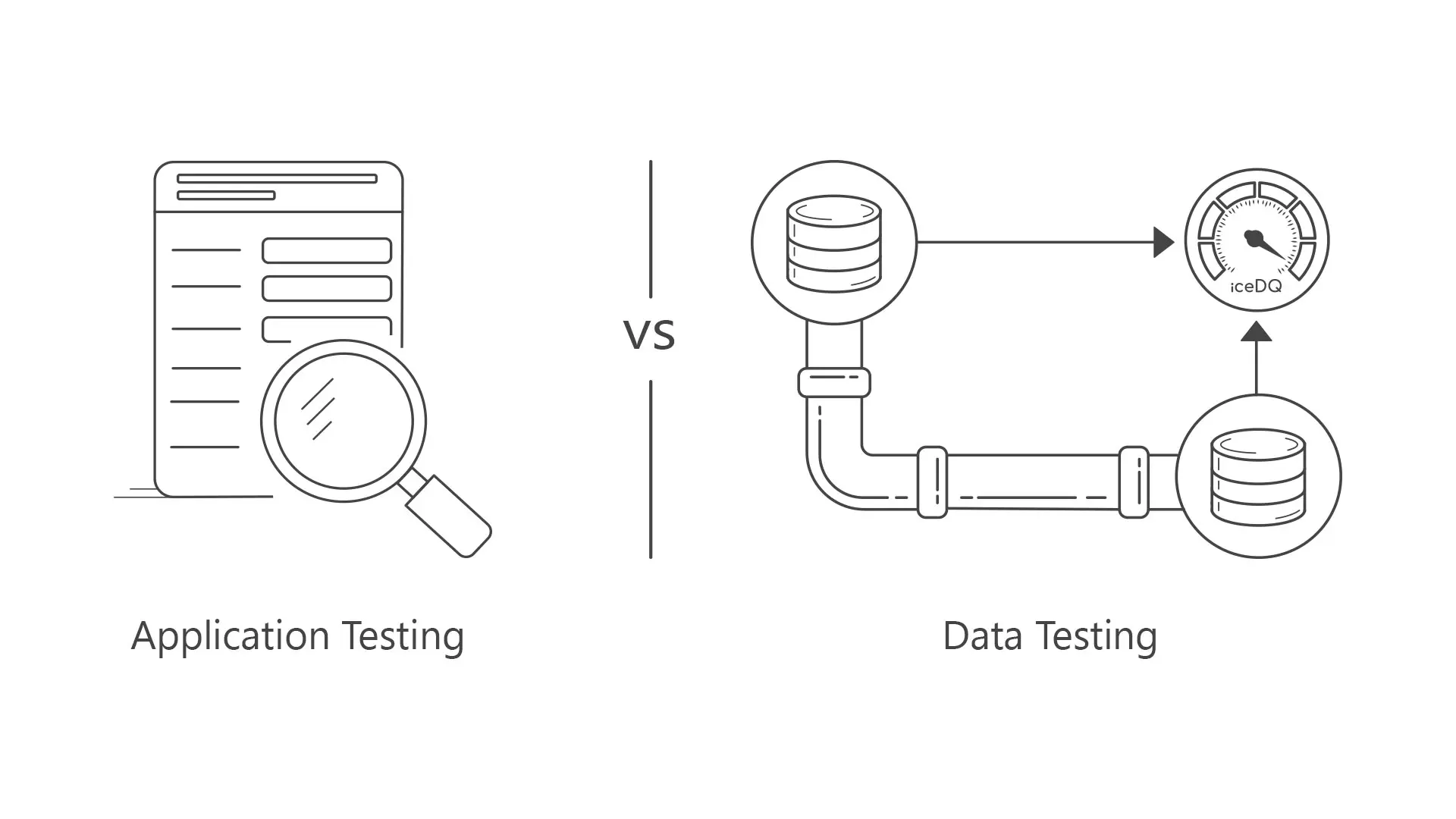
Data Testing vs Application Testing 

At a high-level data testing and application testing both share a common goal of ensuring functionality of a system, however on a closer look, it reveals that they have very distinct focuses and methodologies. Here is a quick list of differences for your reference. 

Project Types:  

  • Application testing spans a wide spectrum of web apps and mobile apps.  
  • On the other hand, data testing zeroes in on projects like data migration, Data pipelines, data warehouses. 

Testing Objective and Focus: 

  • Application Testing addresses everything from user interface intricacies to scripting, APIs, functions, and code integrity.  
  • For data testing, the emphasis is on ETL/data processes, process orchestration, and unique attention to data integrity sets it apart as a specialized discipline.  

Data Volume: 

  • Application Testing spans various dimensions, one of them being data. But in the scope of application testing data involvement is extremely limited to a few records created by a transaction. 
  • Data testing however, puts a spotlight on the critical nuances of data. The contrast is stark: compared to application testing, data testing involves millions and billions of records. 

Certification: 

  • In application testing the certification focus is on code integrity. 
  • Data testing is essentially designed to certify data integrity. 

Expected vs. Actual: 

  • Application testing compares the actual behavior of user interfaces and scripts vs expected. 
  • Data testing navigates the complex terrain of data integrity, migration accuracy, and the nuances of big data. 

Performance Testing: 

  • In application testing the focus is on the speed at which the UI or the underlying functions respond to a request. It is in the realms of microseconds. On the other hand, performance testing for Data is in minutes and hours. 
  • For data testing the performance is usually calculated by rows processed per second. It is usually computed in the time required to read data, transport data, process data and load data in a target database. The loading time is further calculated in terms of update, insert, and delete speed. 

Employee Skillsets: 

  • Both processes demand a skill set that combines technical acumen and a deep understanding of the tools at play. Application Testing requires proficiency in user interface testing, scripting, and tools like Selenium/JMeter. Application testing requires understanding screen behavior, and utilizing tools tailored to the unique challenges presented by data. 
  • In contrast, data testing necessitates expertise in handling data sources and target data, SQL, Data Models, and Reference data. Proficiency in scripting and code-level understanding is essential for application testing, while data testing demands a command over SQL for effective data manipulation and validation. 

Testing Tools: 

  • Application testing often employs tools like Selenium and JMeter. 
  • Data testing leverages specialized tools like iceDQ for comprehensive data quality assurance. 

Top Data Testing Mistakes

At the heart of the issue lies a fundamental misunderstanding – the perception that application testing and data testing can be treated interchangeably. 

  1. Ignore Data Testing: Organizations often neglect data testing. A QA professional with an application background does not understand data testing, while the data engineers are not classically trained in testing.  
  1. Lack of Dedicated Data Testing Team: The lack of a dedicated team will result in knowledge gaps. Dedicated teams is essential to properly train and acquire proficiency.  
  1. Application Testers for Data Testing: Just because someone is skilled in application testing does not mean that the person will have the know-how of data testing.
  1.  Manual Data Testing: Automation has become the mantra for efficiency in software testing, but this mantra is often focused more on application testing. Automated UI tests and functional checks take centre stage, leaving data testing to be more of a manual process. The absence of automation in data testing not only hampers efficiency but also introduces the risk of human error. 
  1. Data Sampling: In the absence of automation, organizations resort to manual data testing, a daunting task when faced with millions of records. Manual testing becomes a mammoth task to undertake, prone to errors, inconsistencies, and a significant drain on resources. The sheer volume of data makes it humanly impossible to ensure comprehensive testing, forcing the testing team to resort to testing sample data rather than the entire dataset. 
  1. Misuse of application testing tools for data testing: While tools like Selenium and JMeter excel in UI and functionality checks, testing data pipelines demands specialized tools. The mismatch not only results in inefficiencies but also fails to address the unique challenges posed by data-centric projects. 
  1. Low /No Budget for Data Testing: Organizations, in pursuit of flawless user experiences, often channel a significant portion of resources towards application testing tools and frameworks.  Meanwhile, data testing, which operates in the complex terrains of data migration testing, ETL testing, data warehouse testing, database migration testing and BI report testing is left with a fraction of the QA budget. 
  1. In-house Scripts or Frameworks: Some organizations realize the distinct nature of data testing and attempt to build in-house frameworks. However, this approach often has more disadvantages than advantages. In-house frameworks, while tailored to specific needs, may lack the scalability required for projects dealing with millions of records and complex data structures. The inefficiencies in this approach become apparent with the growth in data volumes and complexity.  

Consequences of Ignoring Data Testing 

  1. Cost and Time overruns 
  1. Complete failure of projects 
  1. Data Quality issues in Production 
  1. Compliance and regulatory risks 
  1. Reputation Risks 

Conclusion

To summarize the difference, while Application Testing and data testing share the overarching goal of ensuring the robustness of a system, they operate in distinct realms. Application Testing spans the broader landscape of application functionality, whereas data testing homes in on the intricate dance of data within the system. Understanding and appreciating these differences is crucial for organizations aiming to fortify their digital transformation.  

Recognizing the critical distinctions between application testing and data testing is the first step towards comprehensive Quality Assurance. Organizations must recalibrate their approach, acknowledging the unique requirements of data testing and allocating resources, budgets, and automation efforts accordingly.  

Embracing specialized tools like iceDQ which is a low code-no code solution for testing your data-centric projects is key to building software that stands the test of both user experiences and data integrity. 

For more details please visit our blog: https://bit.ly/3SWpgYs 

Author

Sandesh Gawande is the CTO at iCEDQ (Torana Inc.) and a serial entrepreneur.

Since 1996, Sandesh has been designing products and doing data engineering. He has developed and trademarked a framework for data integration – ETL Interface Architecture®. He consulted various Insurance, Banking, and Healthcare. He realized, while companies were investing millions of dollars in their data projects, they were not testing their data pipelines. This caused project delays, huge labor costs, and expensive production fixes. Herein lies the genesis of the iCEDQ platform.

iCEDQ is an EXPO Gold Sponsor at EuroSTAR 2024, join us in Stockholm


Filed Under: Application Testing, EuroSTAR Expo, Gold Tagged With: 2024, EuroSTAR Conference, Expo

Myth vs. Reality: 10 AI Use Cases in Test Automation Today

March 5, 2024 by Lauren Payne

For decades, the sci-fi dream of simply speaking to your device and having it perform tasks for you seemed far-fetched. In the realm of test automation and quality assurance, this dream is inching closer to reality. With the evolution of generative AI, we’re prompted to explore what’s truly feasible. Embedding AI into your quality engineering processes becomes imperative as IT infrastructures become increasingly complex and integrated, spanning multiple applications across business processes. AI can help alleviate the daunting tasks of knowing what to test, how to test it, creating relevant tests, and deciding what type of testing to conduct, boosting productivity and business efficiency.

But what’s fact and what’s fiction? The rapid evolution of AI makes it hard to predict its capabilities accurately. Nevertheless, we’ve investigated the top ten key AI use cases in test automation, distinguishing between today’s realities and tomorrow’s aspirations.

1. Automatic Test Case Generation

Reality: AI can generate test cases by analyzing user stories along with requirements, code, and design documents, including application data and user interactions. For instance, large language models (LLMs) can interpret and analyze textual requirements to extract key information and identify potential test scenarios. This can be used with static and dynamic code analysis to identify areas in the code that present potential vulnerabilities requiring thorough testing. Integrating both requirement and code analysis can help generate potential manual test cases that cover a broad set of functionalities in the application.

Myth: But here’s the caveat: many tools on the market that enable automated test case generation create manual tests. They are not automated. To create fully automated, executable test cases is a use case that remains a myth and still requires further proof. Additionally, incomplete, ambiguous, or inconsistent requirements may not always generate the right set of tests, and this requires further development. Test cases may not always cover edge cases or highly complex scenarios, nor are they able to cover completely new applications. Analysing application and user interaction data may not always be possible. As a result, human testers will always be required to check the completeness and accuracy of the test suites to consider all possible scenarios.

2. Autonomous Testing

Reality: Autonomous testing automates the automation. Say what? Imagine inputting a prompt into an AI model like “test that a person below the age of 18 is not eligible for insurance.” The AI would then navigate the entire application, locate all relevant elements, enter the correct data, and test the scenario for you. This represents a completely hands-off approach, akin to Forrester’s level 5 autonomous state.

Myth: But are we there yet? Not quite, though remarkable technologies are bridging the gap. The limitation of Large Language Models (LLMs) is their focus on text comprehension, often struggling with application interaction. For those following the latest in AI, Rabbit has released a new AI mobile phone named r1 that uses Large Action Models (LAMs). LAMs are designed to close this interaction gap. In the realm of test automation, we’re not fully there. Is it all just hype? It’s hard to say definitively, but the potential of these hybrid LAM approaches, which execute actions more in tune with human intent, certainly hints at a promising future.

3. Automated Test Case Design

Reality: AI is revolutionising test case design by introducing sophisticated methods to optimise testing processes. AI algorithms can identify and prioritise test cases that cover the most significant risks. By analyzing application data and user interactions, the AI can determine which areas are more prone to defects or have higher business impact. AI can also identify key business scenarios by analysing usage patterns and business logic to auto-generate test cases that are more aligned with real-world user behaviors and cover critical business functionalities. Additionally, AI tools can assign weights to different test scenarios based on their frequency of use and importance. This helps in creating a balanced test suite that ensures the most crucial aspects of the application are thoroughly tested.

Myth: However, AI cannot yet fully automate the decision-making process in test suite optimisation without human oversight. The complexity of certain test scenarios still requires human judgment. Moreover, AI algorithms are unable to auto-generate test case designs for new applications, especially those with highly integrated end-to-end flows that span across multiple applications. This capability remains underdeveloped and, for now, is unrealised.

4. Testing AI Itself

Reality: As we increasingly embed AI capabilities into products, the question evolves from “how to test AI?” to “how to test AI, gen AI, and applications infused with both?” AI introduces a myriad of challenges, including trust issues stemming from potential problems like hallucinations, factuality issues, and explainability concerns. Gen AI, being a non-deterministic system, produces different and unpredictable outputs. Untested AI capabilities and AI-infused applications can lead to multiple issues, such as biased systems with discriminatory outputs, failure to identify high-risk elements, erroneous test data and design, misguided analytics, and more.

The extent of these challenges is evident. In 2022, there were 110 AI-related legal cases in the US, according to the AI Index Report 2023. The number of AI incidents and controversies has increased 26-fold since 2021. Moreover, only 20% of companies have risk policies in place for Gen AI use, as per McKinsey research in 2023.

Myth: Testing scaled AI systems, particularly Gen AI systems, is unexplored territory. Are we there yet? While various approaches and methodologies exist for testing more traditional neural network systems, we still lack comprehensive tools for testing Gen AI systems effectively.

AI Realities in Test Automation Today

The use cases that follow are already fully achievable with current test automation technologies.

5. Risk AI

It’s a significant challenge for testers today to manage hundreds or thousands of test cases without clear priorities in an Agile environment. When applications change, it raises critical questions: Where does the risk lie? What should we test or prioritize based on these changes? Fortunately, risk AI, also known as smart impact analysis, offers a solution. It inspects changes in the application or its landscape, including custom code, integration, and security. This process identifies the most at-risk elements where testing should be focused. Employing risk AI leads to substantial efficiency gains in testing. It narrows the testing scope, saving considerable time and costs, all while significantly reducing the risk associated with software releases.

6. Self-Healing

By identifying changes in elements at both the code and UI layer, AI-powered tools can auto-heal broken tests after each execution. This allows teams to stabilize test automation while reducing time and costs on maintenance. Want to learn more about how Tricentis Tosca supports self-healing for Oracle Fusion and Salesforce Lightning and Classic? Watch this webinar.

7. Mobile AI

Through convolutional neural networks, mobile AI technology can help testers understand and analyze mobile interfaces to detect issues in audio, video, image quality, and object steering. This capability helps provide AI-powered analytics on performance and user experience with trend analysis across different devices and locations, helping to detect mobile errors rapidly in real time. Tricentis Device Cloud offers a mobile AI engine that can help you speed up mobile delivery. Learn more here.

8. Visual Testing

Visual testing helps to find cosmetic bugs in your applications that could negatively impact the user experience. The AI works to validate the size, position, and color scheme of visual elements by comparing a baseline screenshot of an application against a future execution. If a visual error is detected, testers can reject or accept the change. This helps improve the user experience of an app by detecting visual bugs that otherwise cannot be discovered by functional testing tools that query the DOM.

9. Test Data Generation

Test data generation using AI involves creating synthetic data that can be used for software testing. By using machine learning and natural language processing, you can produce dynamic, secure, and adaptable data that closely mimics real-world scenarios. AI achieves this by learning patterns and characteristics from actual data and then generating new, non-sensitive data that maintains the statistical properties and structure of the original dataset, ensuring that it’s realistic and useful for testing purposes.

10. Test Suite Optimisation

AI algorithms can analyze historical test data to identify flaky tests, unused tests, redundant or ineffective tests, tests not linked to requirements, or untested requirements. Based on this analysis, you can easily identify weak spots or areas for optimization in your test case portfolio. This helps streamline your test suite for efficiency and coverage, while ensuring that the most relevant and high-impact tests are executed, reducing testing time and resources.

What about AI’s role in performance testing, accessibility testing, end-to-end testing, service virtualization, API testing, unit testing, and compatibility testing, among others? We’ve only just scraped the surface and begun to explore the extensive range of use cases and capabilities that AI potentially offers today. Looking ahead, AI’s role is set to expand even further, significantly boosting QA productivity in the future.

As AI continues to evolve, offering tremendous benefits in efficiency, coverage, and accuracy, it’s important to stay cognizant of its current limitations. AI does not yet replace the need for skilled human testers, particularly in complex or nuanced scenarios. AI still lacks the human understanding needed to ensure full software quality. Developing true enterprise end-to-end testing spanning multiple applications across web, desktop, mobile, SAP, Salesforce, and more requires a great deal of human thinking and human ingenuity, including the capability to detect errors. The future of test automation lies in a balanced collaboration between AI-driven technologies and human expertise.

Want to discover more about Tricentis AI solutions and how they can cater to your unique use cases? Explore our innovative offerings.

Tricentis offers next-generation AI test automation tools to help accelerate your app modernisation, enhance productivity, and drive your business forward with greater efficiency and superior quality.

Author

Simona Domazetoska – Senior Product Marketing Manager, Tricentis

Tricentis is an EXPO Gold Sponsor at EuroSTAR 2024, join us in Stockholm

Filed Under: EuroSTAR Conference, Gold, Sponsor, Test Automation, Uncategorized Tagged With: 2024, Expo, software testing tools, Test Automation

Software Testing In Regulated Industries

February 27, 2024 by Lauren Payne

In today’s landscape of digital adoption and the rapid growth of software technologies, many domains leveraging technology are within regulated industries. However, with the introduction of more technology comes the need for more software—and more software testing. This article will touch on the unique attributes, challenges, and considerations of software testing within these regulated domains.

Defining “regulated” industries

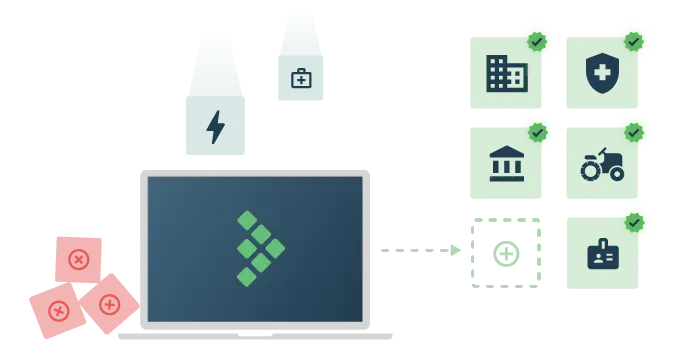
While many industries have specific guidelines and domain nuances, we will refer to “regulated” industries as those that are governed by overarching regulatory compliance standards or laws. 

These governance standards in most cases impact the depth, agility, and overall Software Development Lifecycle (SDLC) on how these standards are developed into requirements and then validated.

Below is a sampling of some of these domains:

  • Healthcare
  • Manufacturing
  • Banking/Finance
  • Energy
  • Telecommunications
  • Transportation
  • Agriculture
  • Life sciences 

Unique requirements

Common characteristics that teams will likely encounter when analyzing the software quality/testing requirements in these environments include:

  • Implementation of data privacy restriction laws (like HIPAA)
  • Detailed audit history/logging of detailed system actions
  • Disaster recovery and overall data retention (like HITRUST)
  • High standards for traceability and auditing “readiness”
  • Government compliance and/or oversight (like the Food and Drug Administration / FDA)

These common regulatory requirements are critical for planning and executing testing and establishing a quality of recording artifacts essential to supporting auditing and traceability.

Testing considerations & planning

Many testers and their teams are now being proactive in using paradigms such as shift-left to get early engagement during the SDLC. As part of early requirements planning through development and testing, specialized considerations should be taken within these regulated industries.

Requirements & traceability

  • The use of a centralized test repository for both manual and automation test results is critical
  • Tests and requirements should be tightly coupled and documented
  • Product owners and stakeholders should be engaged in user acceptance testing and demos to ensure compliance
  • Test management platforms should be fully integrated with a requirement tracking  platform, such as Jira

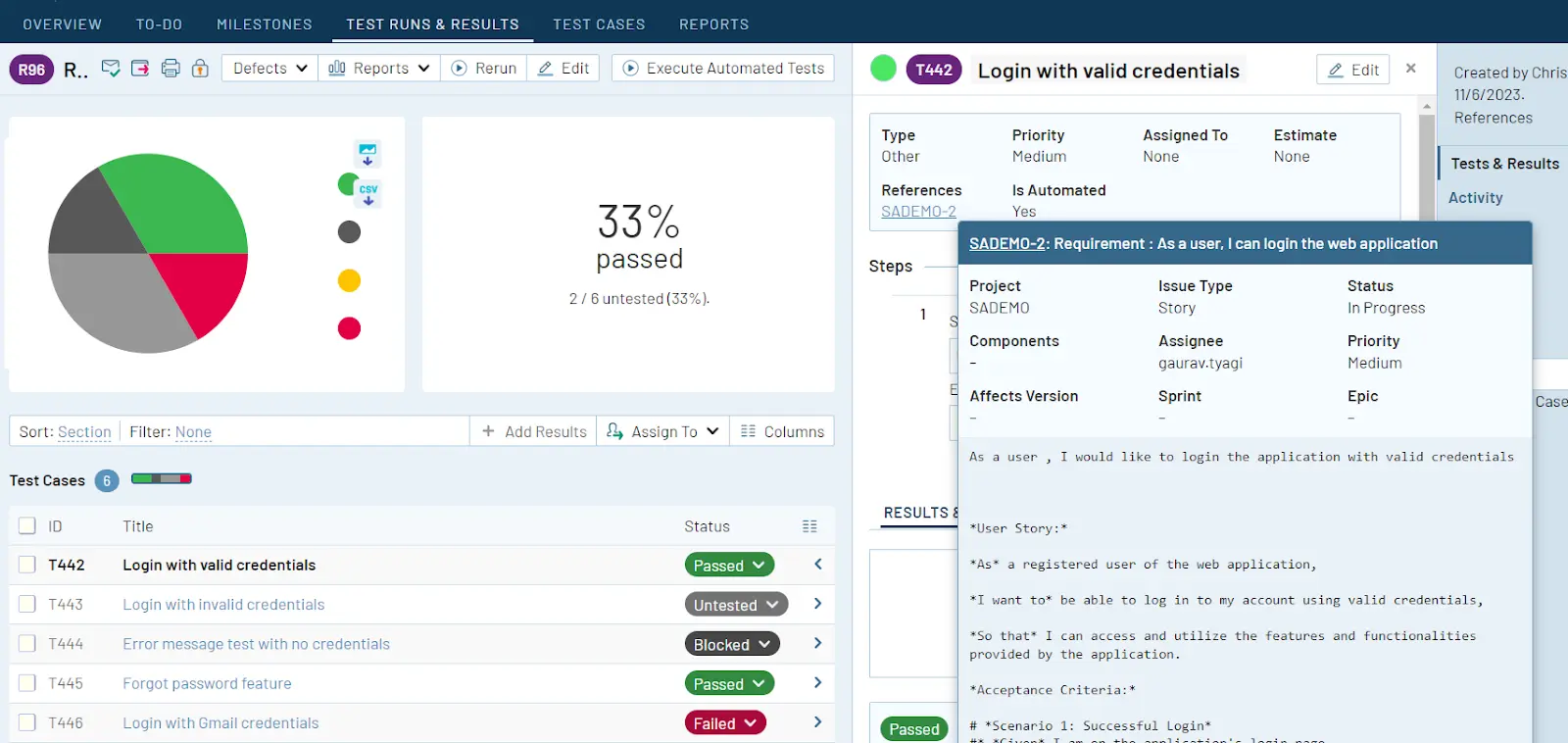
Image: The TestRail Jira integration is compatible with compliance regulations and flexible enough to integrate with any workflow, achieving a balance between functionality and integration.

Once teams have solidified a process for defining and managing requirements and traceability, it becomes imperative to ensure that the quality of test records is not only accessible but also restricted to those who require it. 

This controlled access is crucial, particularly in auditing situations, where the accuracy and reliability of test records may play a critical role. This approach for access controls is commonly referred to as the “least privilege” principle.

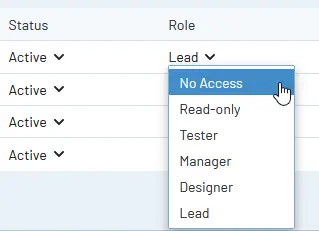
Image: With TestRail Enterprise role-based access controls, you can delegate access and administration privileges on a project-by-project basis

Test record access controls

  • Limit test management record access to the minimum required for team members
  • Ensure only current active team members have test record access
  • Implement a culture of peer reviews and approval to promote quality and accurate tests

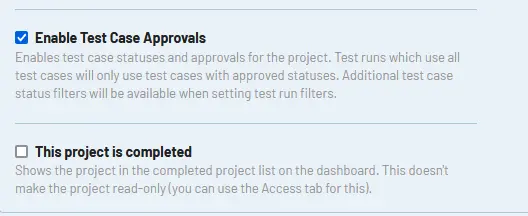
Image: TestRail Enterprise teams can implement a test case approval process that ensures test cases meet organizational standards.

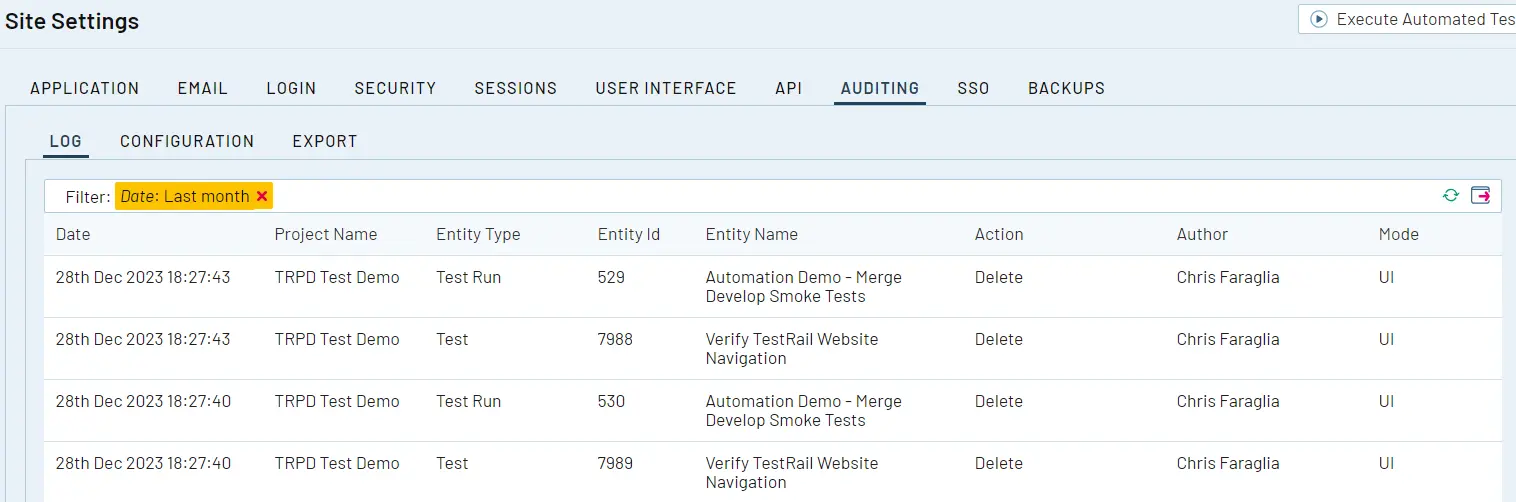
As test cases and test runs are created manually or using test automation integrations like the TestRail CLI, it is important to maintain persistent audit logging of these activities. Within regulated industries, audit requirements and “sampling” may require investigation of the history and completeness of a given test that was created and executed against a requirement.

Image: TestRail Enterprise’s audit logging system helps administrators track changes across the various entities within their TestRail instance. With audit logging enabled administrators can track every entity in their installation.

Audit history

It’s important to maintain a log that allows viewing of historical data on test case creation and execution. This supports audit readiness for requirements validation traceability.

Lastly, as teams focus on the development, testing, and delivery of software, we have to be mindful of disaster recovery and data retention of the artifacts we create. 

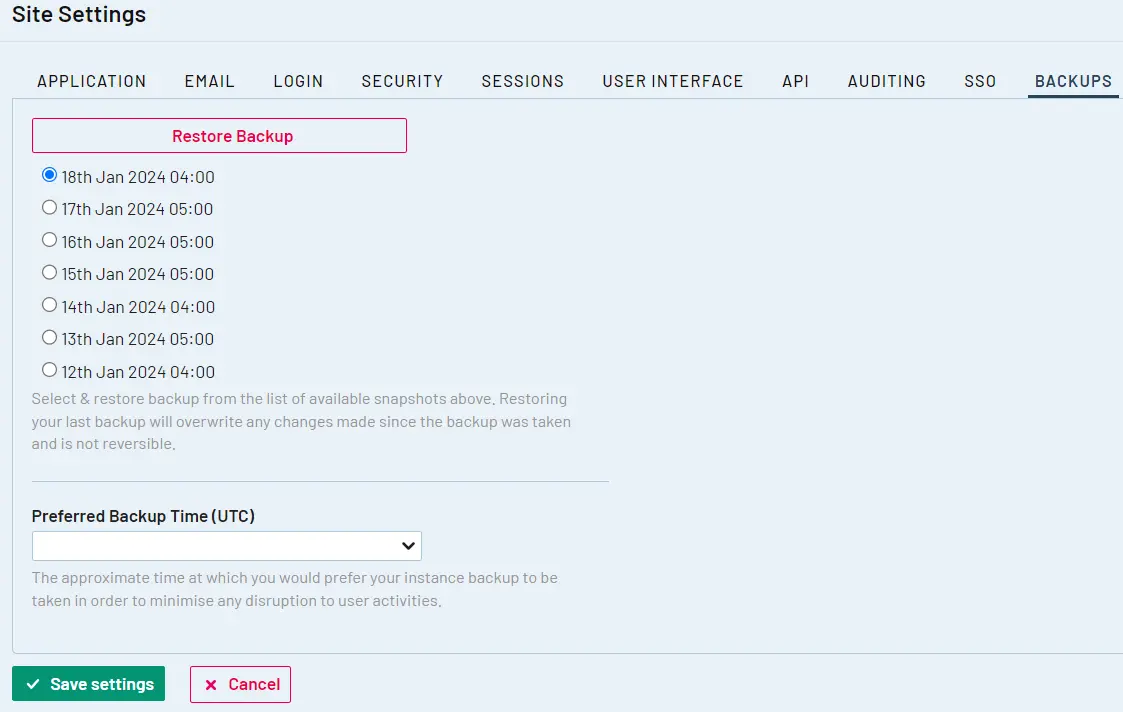
In the same thought process as disaster recovery of a given system under test, the quality of records for testing and release must persist to support compliance requirements and audits. Although centralized test management platforms with integrated restore capabilities are preferred, various tools and processes can be used to achieve this.

Image: TestRail Enterprise’s configurable backup and restore administration features enable administrators to specify a preferred backup time window, see when the last backup was completed, and restore the last backup taken.

Self-assessments & internal auditing

For all teams that are iterating on engineering, testing, and overall SDLC improvements, it’s important to dedicate time to perform self-assessments. 

Self-assessments in the context of software testing and quality in regulated environments can be a highly effective tool for identifying process gaps and shortcomings. 

Self-assessment/audit evaluation criteria

Examples of critical areas to include in your self-assessments or audit readiness exercises include:

  • Having full traceability via linkage of all tests to the corresponding requirements​ artifact (such as a Jira issue or defect)
  • Tests that have been planned and executed are linked to a given release event/designation
  • Failed tests for a given release or sprint are linked to a defect artifact (such as a Jira defect)

Once a self-assessment or internal audit is performed, ensure that the team collects actionable information such as improvements to requirements traceability or more detailed disaster recovery documentation that can be used to improve the overall SDLC with a focus on core compliance best practices and standards.

Bottom line

Additional considerations and requirements must be made across the SDLC when operating teams within regulated industries. The early inclusion of these additional requirements with all team members is critical to ensuring compliance and overall success in audits and other regulatory assessments. 

Key Takeaways

  • Focus on traceability, ensure linkage of tests to requirements
  • More focus on security and access controls testing
  • Centralize all test artifacts in a repository with backups/data retention
  • Plan and execute disaster recovery validation

Watch the Testing In Regulated Industries webinar on the TestRail Youtube channel for more information on the unique challenges and characteristics of software testing in regulated industries!

Author


Chris Faraglia
, Solution Architect and testing advocate for TestRail.

Chris has 15+ years of enterprise software development, integration and testing experience spanning domains of nuclear power generation and healthcare IT. His specific areas of interests include but are not limited to test management/quality assurance within regulated industries, test data management and automation integrations.

TestRail is an EXPO Gold Sponsor at EuroSTAR 2024, join us in Stockholm.

Filed Under: Gold, Software Testing, Sponsor, Uncategorized Tagged With: 2024, EuroSTAR Conference, Expo

Unlocking Success: Top 7 Trends for Attracting Visitors to Your EXPO Booth in 2024 

January 25, 2024 by Lauren Payne

As we stride into 2024, the landscape of software testing continues to evolve as the EuroSTAR and AutomationSTAR conferences continue to grow, demanding innovative strategies to stand out in the crowd. Here are the top seven trends for 2024 that will redefine how you attract visitors to your booth at Europe’s largest testing software testing conferences this June: 

Clare’s 7 Top Trends To Follow:

1. Interactive Booth Experiences: Engage your audience with interactive experiences. From live product demos to hands-on testing challenges, creating a dynamic and participatory environment at your booth will draw inquisitive minds. 

2. Virtual and Augmented Reality (VR/AR): Embrace the future with VR/AR experiences. Let visitors immerse themselves in solutions your product or service can achieve through virtual or augmented reality, providing a memorable and futuristic encounter. 

3. Killer Swag: Elevate your EXPO booth experience by offering killer swag that not only grabs attention but also leaves a lasting impression. Unique, high-quality swag items act as powerful magnets, drawing attendees to your booth. From trendy wearables to functional gadgets, thoughtful swag creates buzz, fosters engagement, and serves as a tangible reminder of your brand. In a sea of booths, having killer swag sets you apart, turning curious passersby into enthusiastic visitors and potential long-term connections. 

4. Networking Hubs: Transform your booth into a networking hub. Provide comfortable seating, charging stations, and conducive spaces for impromptu meetings. Networking hubs create an inviting atmosphere that encourages meaningful conversations. 

5. Gamification for Engagement: Infuse an element of fun into your booth with gamification. Create interactive games or challenges related to software testing concepts. Attendees love the opportunity to learn while having a good time. Get involved in the annual EXPO prize-giving and display your AMAZING prize on your booth over the 3 days to attract attention and collect leads via the sign up. 

6. Short Demo Sessions: Elevate your booth’s presence by hosting 3–5-minute demo sessions during the networking breaks. Conduct brief, impactful presentations on emerging trends, best practices, or case studies about your products and services. Position your booth as a knowledge hub within the conference. 

7. Social Media Integration: Leverage the power of social media to amplify your booth’s visibility. Follow and use the event-specific hashtags #esconfs and encourage attendees to share their experiences online, and host live Q&A sessions. Utilise social media platforms to foster engagement before, during, and after the conference. 

Embracing these trends ensures your booth becomes a magnetic destination withing the EuroSTAR EXPO, attracting a diverse audience of software testing professionals. Stay ahead of the curve, make lasting impressions, and turn visitors into valuable connections at EuroSTAR in 2024. 

For more information on how EuroSTAR can help you achieve your business goals, check out the EuroSTAR 2024 EXPO brochure or book a call with me.

Clare Burke

EXPO Team, EuroSTAR Conferences

With years of experience and a passion for all things EuroSTAR, Clare has been a driving force behind the success of our EXPO. She’s the wizard behind the EXPO scenes, connecting with exhibitors, soaking up the latest trends, and forging relationships that make the EuroSTAR EXPO a vibrant hub of knowledge and innovation. 

t: +353 91 416 001 
e: clare@eurostarconferences.com 

Filed Under: EuroSTAR Conference, EuroSTAR Expo, Gold, Platinum, Sponsor Tagged With: EuroSTAR Conference, Expo

  • « Previous Page
  • Page 1
  • Page 2
  • Code of Conduct
  • Privacy Policy
  • T&C
  • Media Partners
  • Contact Us