• Skip to main content
EuroSTAR 2027 - Sign up for early access

EuroSTAR Conference

Europe's Largest Software Testing Conference.

  • Programme
    • Call for Speakers
    • 2026 Programme
    • Community Hub
    • Awards
  • Attend
    • Why Attend
    • Bring your Team
    • Testimonials
  • Sponsor
    • Sponsor Opportunities
    • Sponsor Testimonials
  • About
    • About Us
    • Our Timeline
    • FAQ
    • Blog
    • Organisations
    • Contact Us
  • Book Now

Expo

From Oxymoron to Reality: How to Execute Manual Tests Automatically with AI 

March 2, 2026 by Lauren Payne

How does the automatic execution of manual tests speed up test cycles? 

On the surface, “automatic execution of manual tests” sounds like an oxymoron. The industry has always operated on a binary: manual means a human tester; automatic means a script, a framework, and an automation engineer. For decades, “manual” has been synonymous with human intervention. 

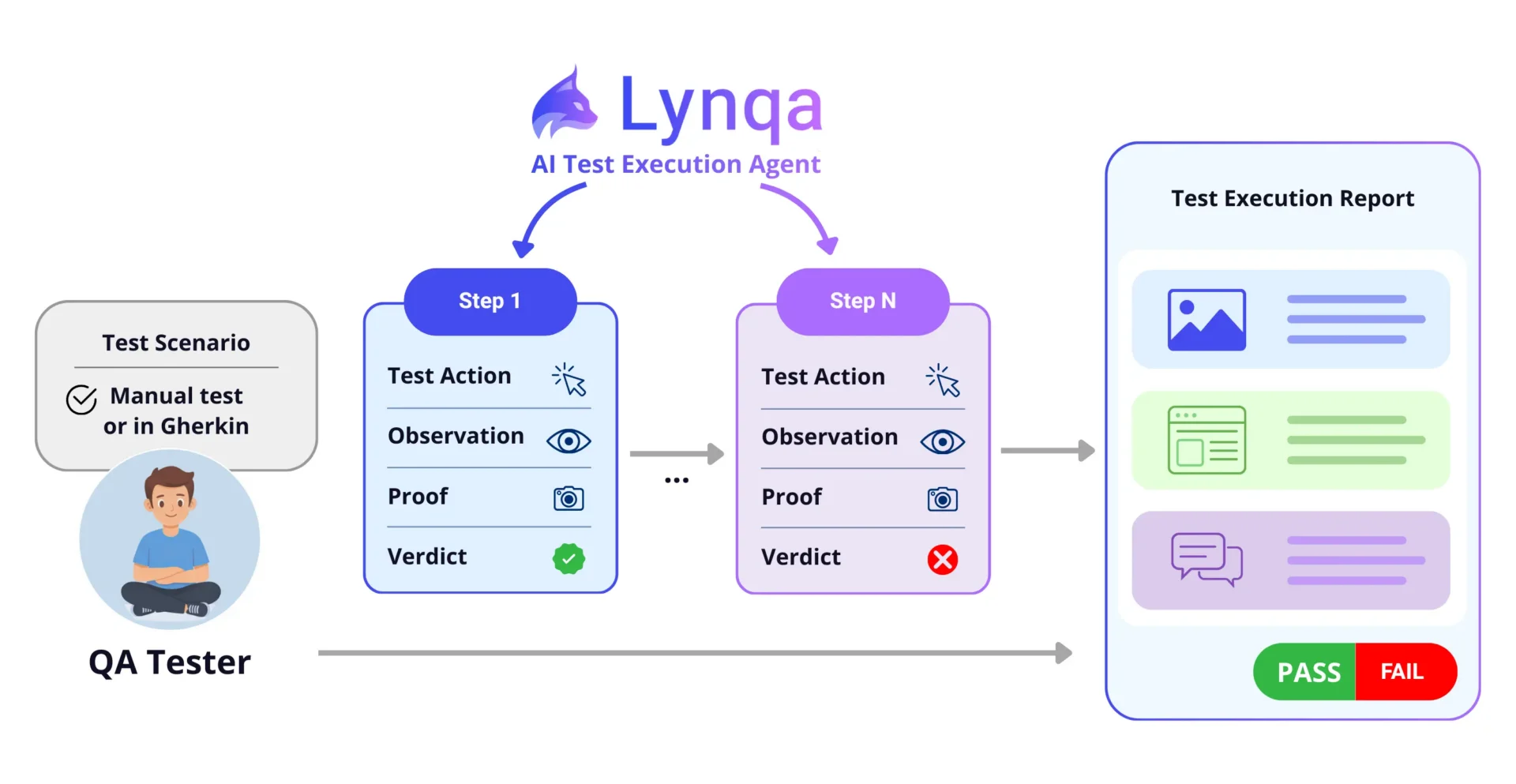
But agentic AI is turning this contradiction into a practical capability. At the heart of this shift is Lynqa, an AI agent designed to run manual tests directly on the GUI. It understands test procedures, navigates the application interface, verifies results, and delivers a detailed execution report without a single line of automation code. 
The Sprint Bottleneck: Why “Manual” Needs a Boost 

Every QA team knows the pattern: as the sprint nears completion, the volume of manual checks piles up, testers are stretched thin, and feedback to developers slows to a crawl. This is the “Manual Testing Debt.” 

The usual responses, hiring more testers or rushing to automate new features, rarely work within a single sprint. Traditional test automation simply takes too long to develop alongside the feature it’s meant to validate. 

This is where GUI AI agents change the game.  

What Are GUI AI Agents? 

GUI AI agents interact with software by visually interpreting screen interfaces and operating a virtual mouse and keyboard. Instead of relying on backend APIs, these AI agents execute complex digital workflows exactly as a human user would: 

  1. GUI-Based Actions: It interacts with the graphical interface exactly as a human would, opening browsers, scrolling through menus, filling in fields, and navigating complex clients such as ERP systems. 
  1. Visual Perception: It monitors progress by analyzing the screen at each step, identifying the areas affected by an action or verification. 

The Feedback Loop: Thought and Action 
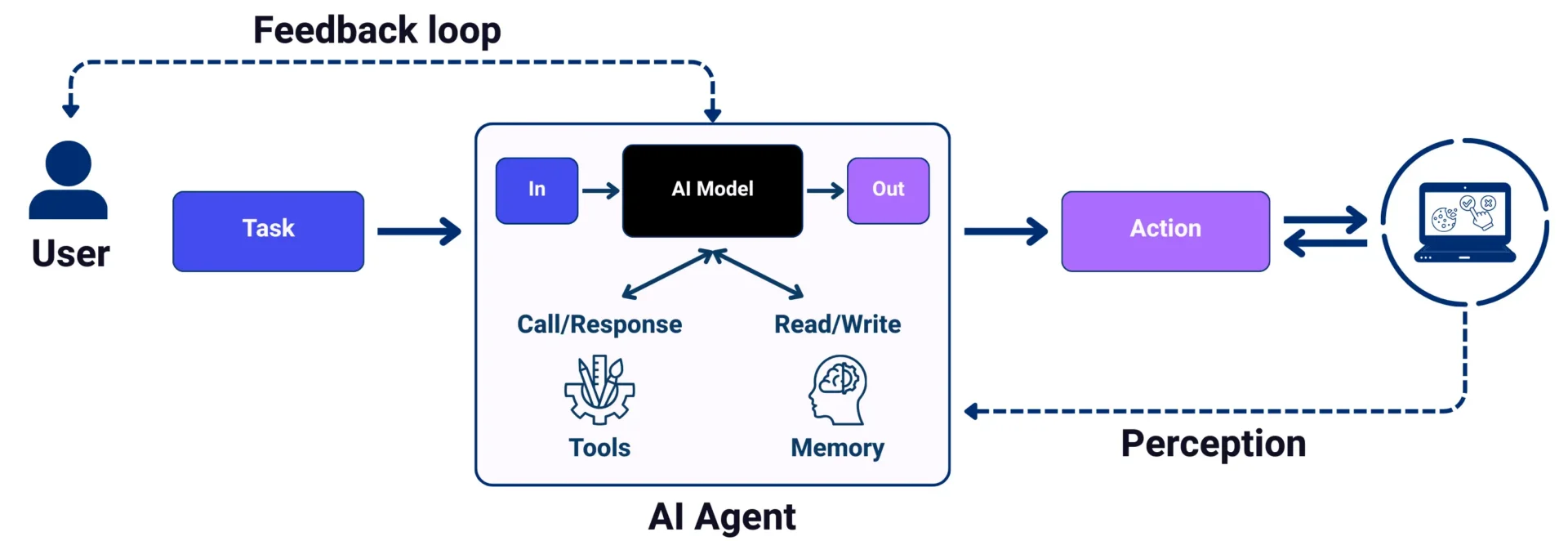
The agent operates in a continuous feedback loop that combines reasoning with action: 

  • Interpretation: It reads the test steps and builds a logical action plan. 
  • Perception: It analyzes the current screen to decide which interaction (click, type, drag) to perform. 
  • Monitoring: After every action, it checks the UI state to verify the expected result. 
  • Communication: If the agent encounters an ambiguity or a high-risk step, it pauses to ask the user for clarification before proceeding. 

This means the agent doesn’t blindly follow a script; it reacts to the application’s actual behaviour. 

Lynqa: Agentic AI Inside Your Test Management Tool

While general-purpose AI agents are appearing in consumer chatbots, Lynqa for Jira is purpose-built for the testing ecosystem. By integrating directly into Jira/Xray, it transforms how teams handle manual workloads within a sprint. 
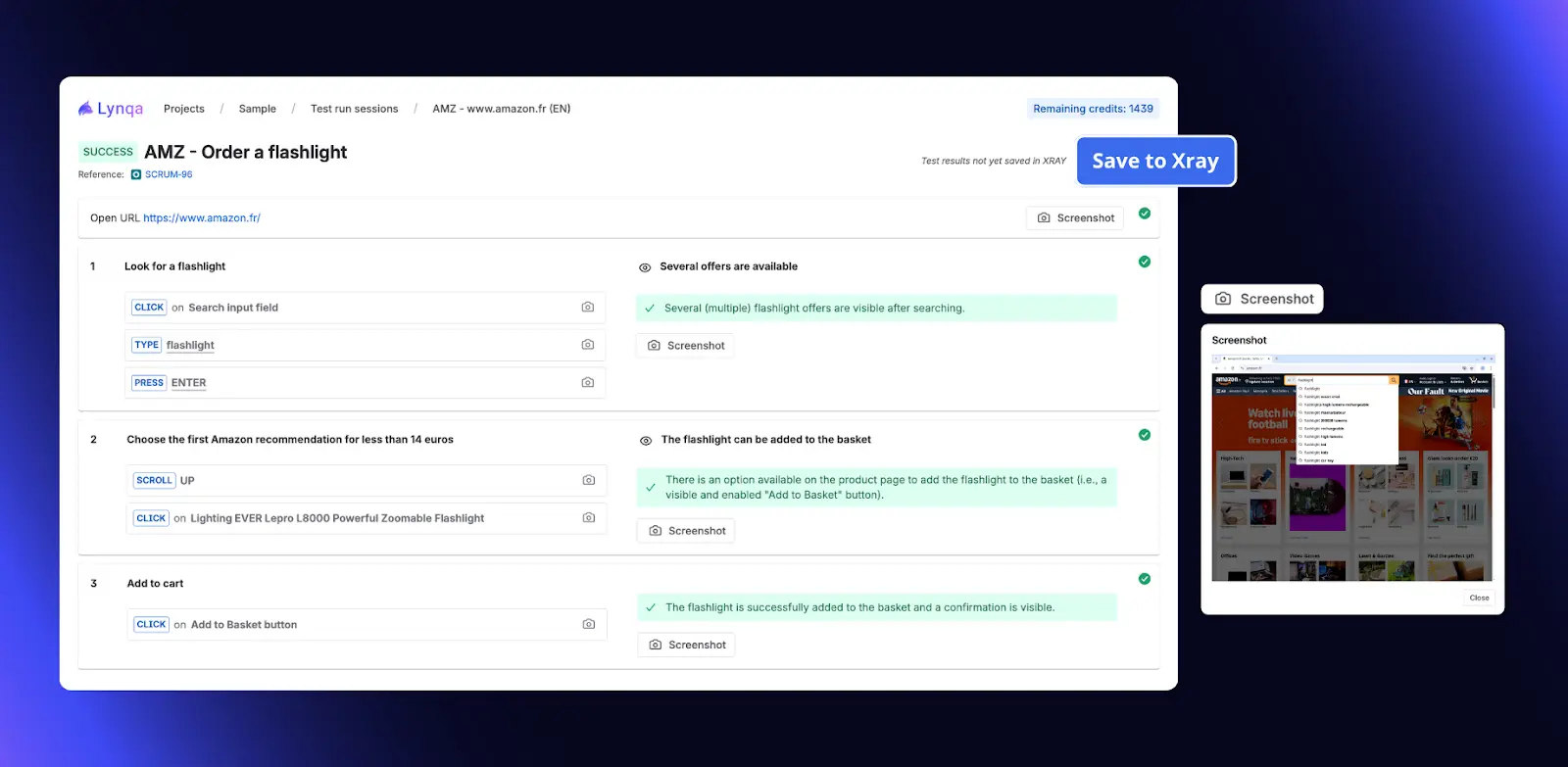
How it speeds up the cycle: 

  • Zero Scripting Overhead: If you have a written test case or a clearly defined User Story, the agent can execute it immediately, without waiting for an automation engineer. This enables “Day 1” testing of new features. 
  • Adaptive Execution: When a button moves, a CSS class is renamed, or a color shifts, traditional automation breaks. The AI agent sees the “Submit” button regardless of underlying code changes, removing the maintenance tax that halts progress. 
  • Analysis-Ready Reporting: The agent doesn’t just return “Pass” or “Fail.” It provides step-by-step screenshots and a detailed failure analysis, giving testers actionable information immediately. 

Start your experience with Lynqa today! We offer 10 free credits upon installation, or you can book a demo with our team. Find more information here.  

A Collaborative Future: The QA “Tribe” 

At EuroSTAR, we talk about “finding your tribe” and sharing the passion for quality. AI agents aren’t here to replace human testers; they’re here to empower the tribe. 

The most effective teams use agents like Lynqa as extra hands. While the agent handles repetitive GUI-level checks and initial failure analysis, human testers reclaim time for the work that matters most: exploratory testing, risk analysis, and strategic quality coaching for the development team. 

The tester’s role evolves from executor of steps to orchestrator of agents. As we look toward the 2026 EuroSTAR Conference, the question is no longer whether manual tests can be automated; it’s how quickly your team can leverage agentic AI to keep pace with modern delivery. 

Author

Bruno Legeard,  Smartesting

Bruno Legeard heads up the AI Lab at Smartesting (publisher of Lynqa). An expert in AI for software testing, he is one of the authors of the ISTQB CT-GenAI certification “Testing with Generative AI.” 

Meet the Lynqa team at the Smartesting booth during the EuroSTAR 2026 Conference to see agentic testing in action! 

Smartesting are Exhibitors at EuroSTAR 2026. Join us at EuroSTAR Conference in Oslo 15-18 June 2026
Filed Under: EuroSTAR Expo Tagged With: 2026, EuroSTAR Conference, Expo

Autonomous Testing with AI: Separating Hype from Real-World Value

February 25, 2026 by Lauren Payne

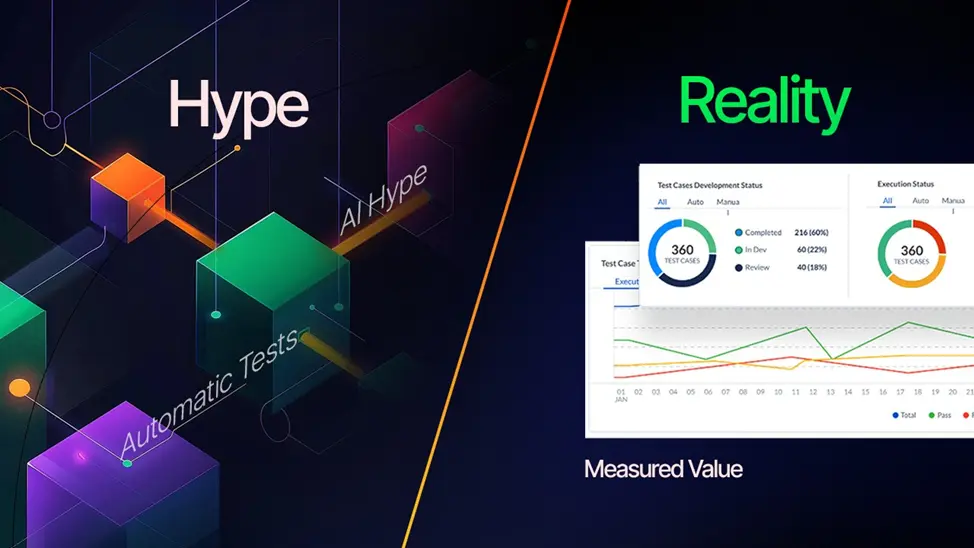
Autonomous testing is one of those phrases everyone nods at, but few people can clearly explain. Slide decks talk about systems that write their own tests, fix failures automatically, and keep pipelines green without anyone watching. Somewhere along the way, teams start wondering if they are falling behind simply because they don’t have “autonomy” yet.

Most of that anxiety comes from hype, not reality. The real question isn’t whether testing can become autonomous. It’s where autonomy actually helps teams do better work, and where it quietly introduces new risks.

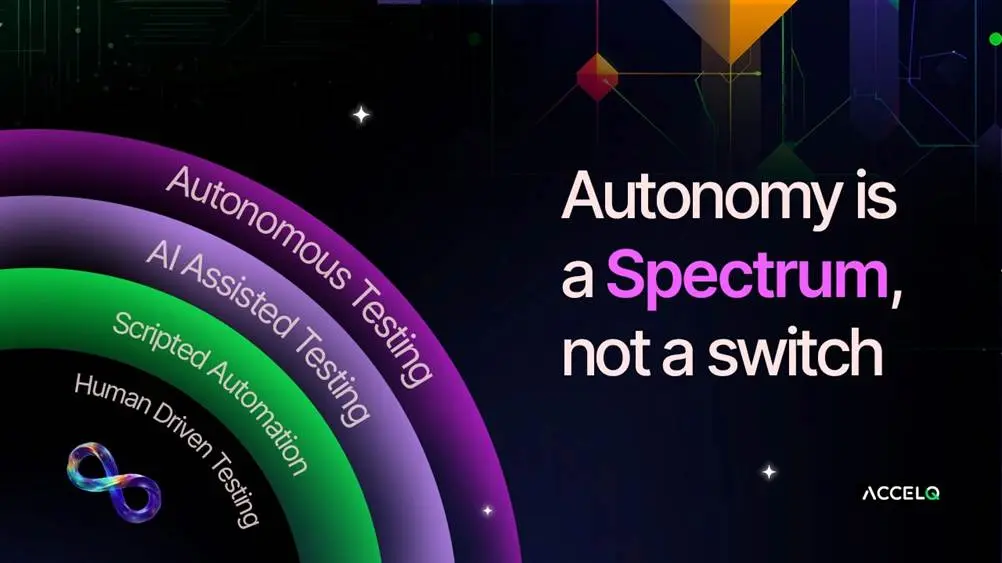
Autonomy is a spectrum, not a switch

Testing doesn’t suddenly flip from human-driven to autonomous. It evolves in layers.

Most teams start with automation that focuses on execution. Scripts run faster than humans, but people still decide what gets tested, how coverage is shaped, and whether results can be trusted. This is familiar territory.

AI assistance adds another layer. Test creation speeds up, failures are grouped instead of dumped into long reports and maintenance effort drops. These gains are real, but they are still reactive. Humans remain firmly in control.

Autonomy begins only when a system can take on limited decision-making, within boundaries defined by the team. Not creative judgment, but practical judgment. Deciding which tests are relevant for a specific change. Flagging failures that look like noise rather than regressions. Noticing flows that are becoming so fragile they can no longer be trusted. This is usually where expectations and reality part ways. What is sold as autonomy often turns out to be faster automation with a new label.

Why Hype Breaks Down in Real Environments?

Autonomous testing struggles when context is missing.

AI does not understand business importance on its own. It cannot tell which workflow carries regulatory exposure or which release is under executive scrutiny. Without that context, decisions become statistical guesses rather than informed choices.

Self-healing is another frequent weak spot. Updating locators can keep tests running, but it can also hide changes in behavior that actually matter. Pipelines look stable while confidence quietly erodes.

A green pipeline is comforting. A trustworthy pipeline is far more valuable. Autonomy that masks risk does more harm than good.

Where AI Genuinely Helps?

Used well, AI shines at recognizing patterns humans don’t have time to see.

It can connect failure signatures across pipelines and environments. It can reveal tests that only break under specific data conditions. It can point out entire suites that consume time without improving coverage. It can highlight areas where manual testing consistently finds issues automation misses.

This doesn’t replace testers. It sharpens their judgment.

One of the most underrated benefits of AI-assisted testing is how it changes team discussions. Less time is spent arguing about flaky failures. More time is spent talking about system behavior and risk. For many teams, that shift alone justifies the investment.

Autonomy Needs Boundaries to be Trusted

The most effective autonomous testing systems are deliberately limited.

They don’t decide what quality means; teams do.

They don’t invent test strategies. They optimize what already exists.

They don’t operate silently. They explain their reasoning.

Explainability is non-negotiable. If a system skips tests or classifies failures without showing why, teams will override it every time. Accuracy matters, but transparency is what builds trust.

Autonomy is adopted when people understand not just the outcome, but the reasoning behind it.

From Scripts to Systems

Traditional automation treats tests as isolated scripts. Autonomous testing treats them as parts of a larger system.

That system understands dependencies between services, data, environments, and user flows. It recognizes that a login failure ripples across dozens of downstream tests. It understands that a configuration change in one region shouldn’t invalidate results everywhere else.

This shift is subtle, but important. Autonomy works not because AI is smarter than humans, but because it can track complexity humans can’t reasonably keep in their heads.

This way of thinking is increasingly reflected in how enterprise platforms are being designed. At ACCELQ, autonomy is treated less as an end state and more as a support system for decision-making at scale. The emphasis is on observing system behavior, correlating signals across pipelines, and making change easier to understand rather than hiding it behind execution.

Capabilities such as adaptive test generation, intelligent handling of change, and agent-style execution through ACCELQ Autopilot are used to reduce noise and maintenance while keeping teams firmly in control of intent and strategy. Autonomy, in this model, is not about removing oversight. It is about making complex testing environments more transparent as systems evolve.

How Teams Should Evaluate Autonomy Today?

A simple way to cut through autonomous testing claims is to ask a few uncomfortable questions. What decisions does the system make without human input? What signals drive those decisions? How does it behave when signals conflict? And how easy is it to override decisions and learn from them?

Vague answers usually point to cosmetic autonomy.

Real autonomy shows up quietly. Fewer late-night reruns. Fewer ignored failures. Fewer production surprises. It reduces friction without asking for attention.

The Future is Assistive, Not Absent

The strongest testing organizations aren’t trying to remove human judgment. They are trying to protect it.

AI is well-suited to repetition, correlation, and scale. Humans are better at intent, ethics, and trade-offs. Autonomous testing works when it creates space for thinking, not when it pretends thinking is no longer needed.

The real value isn’t in replacing testers. It’s in freeing them from work that hides risk instead of revealing it.

That’s the point where autonomy stops being a promise and starts being useful.

Author

Geosley Andrades, Senior Director,  ACCELQ

Geosley is a Senior Director, Product Evangelist and Community Builder at ACCELQ, leading global AI-driven, no-code test automation initiatives alongside product strategy and go-to-market programs. With nearly 18 years of cross-industry experience, he helps enterprises rethink how software quality is built, validated, and scaled for real-world impact. A strong advocate for intelligent, autonomous testing at enterprise scale, Geosley actively shapes ACCELQ’s vision through competitive analysis, analyst engagement, and forward-looking research—driving simpler, more reliable, and sustainable automation for modern digital ecosystems.

ACCELQ are Exhibitors at EuroSTAR 2026. Join us at EuroSTAR Conference in Oslo 15-18 June 2026

Filed Under: EuroSTAR Expo Tagged With: 2026, EuroSTAR Conference, Expo

How Agentic AI is Transforming Software Delivery Lifecycles 

February 10, 2026 by Lauren Payne

Software delivery has always been a balancing act between speed, quality, and risk. As enterprises adopt cloud-native architectures, DevOps, and continuous delivery models, that balance is becoming harder to maintain. Traditional automation and AI tools help — but they still rely heavily on human direction. 

Agentic AI introduces goal-driven intelligence into the software delivery lifecycle (SDLC), enabling systems to adapt, recommend, and act within defined enterprise guardrails. Rather than replacing human decision-making, agentic AI augments teams with continuous intelligence and policy-aware automation. The result is faster releases, higher quality software, and delivery pipelines that continuously optimize themselves. 

In this blog, we explore what agentic AI is, how it applies to software delivery, and why it represents the next evolution of enterprise DevOps. 

What is Agentic AI in Software Delivery? 

Agentic AI refers to artificial intelligence systems designed to act autonomously in pursuit of defined goals, rather than simply responding to prompts or executing predefined rules. 

In the context of software delivery, agentic AI systems can 

  •  Analyze delivery data across tools and teams. 
  • Make context-aware recommendations and trigger actions with minimal manual intervention, while remaining aligned to enterprise policies and approval models. 
  • Take coordinated action across the SDLC (planning, testing, release, operations) by leveraging a unified platform that connects delivery data, workflows, and governance in one system of record.
  • Learn and adapt based on outcomes. 

Unlike traditional AI, which primarily assists humans with insights or recommendations, agentic AI acts as an intelligent participant in the delivery process. 

The Role of Agentic AI Across The Software Delivery Lifecycle 

Agentic AI doesn’t replace DevOps teams — it augments them by operating continuously across every phase of delivery. 

Planning and Prioritization 

Agentic AI can analyze backlogs, historical delivery data, and business objectives to recommend optimal sprint scope, identify high-risk dependencies, and dynamically reprioritize work based on changing conditions. Instead of static planning cycles, teams gain adaptive planning intelligence that evolves in real time. 

Development and Build Automation 

During development, agentic AI agents can 

  • Detect code patterns linked to future defects. 
  • Optimize build pipelines based on performance trends. 
  • Flag architectural risks earlier in the process. 

This proactive intelligence reduces downstream rework and accelerates time to value. 

Continuous Testing and Quality Management 

Testing is where agentic AI delivers some of its greatest impact. AI agents can can intelligently prioritize and optimize test execution based on code changes, historical risk patterns, and release context—reducing redundancy while increasing confidence in release readiness. This leads to faster feedback loops and higher confidence in release readiness. 

Deployment and Release Optimization 

Agentic AI enables smarter, safer deployments by selecting optimal deployment windows, monitoring live performance and user impact, and detecting performance or reliability thresholds in real time and initiating guided remediation workflows. The result is a more resilient release process with fewer disruptions. 

Post-Release Learning and Optimization 

Unlike traditional automation, agentic AI continues learning after release by analyzing: 

  •  Customer feedback 
  • Production incidents
  • Delivery performance metrics

Those insights feed back into planning and execution, creating a continuously optimizing delivery lifecycle—where insights from production, quality, and delivery performance feed back into planning and execution with full transparency. 

Why Agentic AI Matters For Enterprise DevOps Teams 

Enterprise DevOps environments are complex — multiple tools, distributed teams, hybrid architectures, and competing priorities. Research from Google’s DORA team has consistently shown that high-performing DevOps organizations deploy software more frequently, recover faster from incidents, and maintain higher reliability than their peers. As delivery complexity increases, agentic AI helps teams manage that complexity at scale by enabling autonomous decision-making across the software delivery lifecycle. 

Google’s DORA research shows that high performance in deployment frequency, lead time, failure rate, and restoration time strongly correlates with effective DevOps strategies. 

Key benefits include: 

  •  Faster delivery cycles through autonomous decision-making 
  • Improved quality with predictive defect detection 
  • Reduced operational risk via real-time monitoring and response 
  • Lower cognitive load on teams, freeing humans to focus on innovation 

Rather than replacing human expertise, agentic AI allows teams to operate at a higher strategic level. 

How Agentic AI Fits into The Modern Software Delivery Stack 

Agentic AI works best when embedded within an integrated, enterprise-grade software delivery platform that connects planning, development, testing, and operations data. 

A unified platform enables AI agents to see the full delivery value stream, correlate signals across tools, and take informed, context-aware actions. This is where modern, AI-enabled delivery platforms play a critical role. 

Real-World Use Cases of Agentic AI in Software Delivery 

Organizations adopting agentic AI are already seeing tangible results, including: 

  • Automatically identifying release risks before production 
  • Reducing test execution time while improving coverage
  • Accelerating recovery from incidents without manual intervention
  • Optimizing delivery flow across large, distributed teams  

These outcomes are especially valuable for enterprises managing mission-critical applications and frequent releases. 

The Future of Software Delivery is Autonomous and Intelligent 

As software delivery continues to accelerate, static automation and manual oversight will no longer be enough. Agentic AI represents the next step forward — enabling delivery systems that think, act, and improve continuously. 

For organizations looking to improve speed, quality, and resilience at scale, agentic AI isn’t a future concept — it’s a competitive necessity. 

By combining agentic AI with an integrated software delivery platform, enterprises can unlock a new level of delivery performance and innovation. 

Deliver Software Faster—With Intelligence Built in 

OpenText brings agentic AI to software delivery by connecting planning, development, testing, and operations into a single intelligent platform. See how autonomous insights and actions can help your teams deliver higher-quality software at speed. 

For more information about the OpenText Core Software Delivery Platform, Visit us at EuroSTAR 2026 on Stand 5 or click here. 

Author

Gabriel Martinez, Director of DevOps Product Marketing, OpenText 

Gabe’s enthusiasm for tech is only matched by his passion for marketing it. With a 15-year sprint through DevOps, Cloud Management, and Application Security, he’s played a key role at Broadcom/VMware, CloudBees, Electric Cloud, and CA Technologies. Currently, Gabe is the Director of Product Marketing for ADM and DevOps at OpenText, leveraging storytelling and strategy with creativity and data-driven precision to orchestrate growth and innovation. 

OpenText are Exhibitors in this years’ EuroSTAR Conference EXPO. Join us in Oslo 15-18 June 2026.

Filed Under: EuroSTAR Expo Tagged With: 2026, EuroSTAR Conference, Expo

Oslo, Norway Travel Tips: Where to Stay, Eat & Explore 

January 30, 2026 by Lauren Payne

EuroSTAR 2026 is heading north and we’re bringing the magic of Europe’s biggest testing EXPO to stunning Norway! From 15–18 June, we’ll take over Nova Spektrum in Lillestrøm, just minutes from vibrant Oslo.  

Whether you’re joining us to learn, network, or showcase your tools, make the most of your trip with this quick guide on where to stay, what to eat, and how to explore Oslo while you’re here.

Where to Stay – Stay Close or Soak Up the City 

  • Steps from the Venue: Book a hotel in Lillestrøm for the easiest mornings – just a short stroll to Nova Spektrum and back to your room after a busy day. 
  • City Adventure: Stay in downtown Oslo to enjoy the buzz of the capital. With trains running frequently, you’ll be at the venue in 12 minutes, plus you’ll have nightlife, shopping, and cultural sights on your doorstep. 

💡 Tip: June is peak season in Norway – secure your hotel early for the best rates and availability.

Where to Eat – Flavours You’ll Love in Oslo 

Norway’s food scene is fresh, simple, and full of flavour. During your stay, treat yourself to: 

  • Taste Tradition: Smoked salmon, shrimp sandwiches, Norwegian meatballs, and the famous sweet Brunost (brown cheese). 
  • Dine by the Fjord: Enjoy fresh seafood and stunning views at waterfront restaurants – perfect for a relaxing dinner or team night out. 
  • Foodie Hotspots: Head to Grünerløkka for artisan coffee, cool cafés, and street food vibes, or visit Mathallen Food Hall to sample Norwegian cheeses, cured meats, and global street eats under one roof. 

💡 Tip: Oslo’s restaurants are popular in summer – book your evening meals early to guarantee a table. 

Explore Oslo – Adventure Beyond the EXPO 

If you’re arriving early or staying longer, take time to experience the best of Oslo: 

  • Oslo Fjord Cruises: Relax on a boat ride and take in panoramic views of the city and islands. 
  • Oslo Opera House: Walk on its iconic sloped roof for unbeatable sunsets and cityscapes. 
  • Vigeland Sculpture Park: Stroll through this vast outdoor gallery featuring 200+ sculptures. 
  • Viking Ship Museum: Step back in time and see beautifully preserved Viking ships and artifacts. 

💡 Tip: Oslo is compact and easy to explore. Grab a day pass for unlimited rides on trams, buses, and ferries, an easy way to see it all. 

Weather in June – Sunshine with a Nordic Breeze

 June is the perfect month to visit Norway. Expect long, bright days with temperatures around 19–20°C and cooler evenings near 9°C. Light rain is possible, so pack a lightweight jacket and comfy layers to stay prepared. 

Quick Essentials – Know Before You Go 

  • 📍 Venue: Nova Spektrum, Lillestrøm 
  • 🗓️ Dates: 15–18 June 2026 
  • 🚆 Transport: 12-minute train ride from Oslo Central Station 
  • 💬 Language: English is widely spoken 
  • 💰 Currency: Norwegian krone (NOK) 
  • 🎒 Packing: Layers + light rain jacket + comfortable shoes for exploring 

Pack your bags, bring your curiosity, and join us for four unforgettable days in Norway of learning, networking, and showcasing the future of testing. Let’s make EuroSTAR 2026 your most impactful event yet.

👉 Book your stand today!

Author

Clare Burke

EXPO Team, EuroSTAR Conferences
With years of experience and a passion for all things EuroSTAR, Clare has been a driving force behind the success of our EXPO. She’s the wizard behind the EXPO scenes, connecting with exhibitors, soaking up the latest trends, and forging relationships that make the EuroSTAR EXPO a vibrant hub of knowledge and innovation.


t: +353 91 416 001
e: clare@eurostarconferences.com

Filed Under: EuroSTAR Expo, Uncategorized Tagged With: 2026, EuroSTAR Conference, Expo

Are You Really Agile? Self-Asses If Your QA Team Is Truly Agile

March 31, 2025 by Aishling Warde

Adopting Agile practices doesn’t automatically mean your QA team is working in an Agile way. Many teams follow the structure of Agile like sprints and retrospectives, but still struggle to fully embrace Agile principles. True agility in QA is about flexibility, continuous improvement, and deep collaboration to ensure quality at every stage of development.

Many teams find themselves wondering: Are we really Agile, or just following a checklist of Agile rituals? That’s the exact question explored in our ebook, “Are You Really Agile? A Practical Guide for QA Teams.”

In this article, we’ll explore key insights from the ebook to help you assess your QA team’s Agile maturity and share practical strategies to strengthen your processes.

Signs That You’re Not Truly Agile

These are the most common indicators that suggest your team is not Agile:

1.Inflexible Processes
Agile is meant to be iterative, yet some QA teams still rely on rigid, step-by-step workflows that don’t leave room for adaptation. If your testing approach isn’t flexible enough to accommodate changing requirements, it may be limiting your agility.

2.Communication Silos
Agile emphasizes ongoing collaboration, but if QA and development teams rarely interact outside of sprint reviews or retrospectives, valuable discussions may be missed. Continuous alignment is key to delivering high-quality software efficiently.

3.Lack of Continuous Feedback
In Agile, testing and feedback should happen throughout the sprint, not just toward the end. If your team is catching defects late in the cycle rather than identifying issues early, your process might be more reactive than proactive.

4.Testing as a Separate Phase
Testing should be seamlessly integrated into development, not treated as a final step before release. If QA still operates as a standalone phase rather than being part of the sprint’s workflow, it’s a sign that your team hasn’t fully embraced Agile testing.

Take This Self-Assessment to Know If You Are Truly Agile!

To help you evaluate how Agile your QA processes really are, we’ve designed a straightforward self-assessment questionnaire. It allows you to analyze your workflows, collaboration, and testing practices to see where your team stands on the Agile spectrum.

How it works: Rate your team on a scale from 1 to 5, with 1 meaning “Never” and 5 meaning “Always.”

CategoryAssessment QuestionScore (1-5)
Flexibility in ProcessesDo your QA and development processes allow frequent changes?
Are test cases and schedules adaptable as features change?
Early Involvement of QA (Shift-Left Testing)Is QA involved from the beginning, refining user stories?
Are test cases planned in parallel with feature development?
Collaboration Between QA and DevelopersDo QA and developers work closely together during sprints?
Is there ongoing communication between QA and developers?
Continuous Feedback LoopsAre feedback loops frequent during the sprint?
Is feedback (and bugs) from the testing team assessed and addressed quickly?
Automation in TestingDo you generate automation for the stories being developed during the sprint (vs automated on later sprints)?
Are automated tests run for each significant code change?
Test Case Reusability and MaintenanceIs your test library modular and easy to maintain?
Are automated tests regularly updated?
Defect Management and PrioritizationAre defects prioritized and resolved within the sprint?
Are there clear criteria for classifying defects?
Continuous Improvement and RetrospectivesAre QA processes included in sprint retrospectives?
Are metrics used to drive continuous improvement?

After completing the self-assessment, review your total score to understand where your team stands in Agile maturity:

  • 35 – 40: Your QA team is highly Agile, effectively embracing flexibility, collaboration, and continuous improvement.
  • 25 – 34: You’re heading in the right direction, but there’s room to improve. Identify lower-scoring areas and apply the strategies in this guide to strengthen your Agile approach.
  • 15 – 24: While some Agile practices are in place, there are noticeable gaps in your QA processes. It’s time to rethink your approach to collaboration, feedback loops, and integrating testing throughout the sprint.
  • Below 15: Your team may be Agile in name only. Consider revisiting Agile fundamentals and restructuring your QA processes to align with core Agile principles.

3 Key Strategies to Maximize QA Efficiency in Agile

  1. Shift-Left Testing

A core Agile principle is embedding QA early in the development process. However, many teams still follow outdated habits, treating testing as an afterthought rather than an integral part of the sprint. This delay often results in defects being discovered late, leading to costly rework, missed deadlines, and misaligned expectations.

Best Practice: Establish a continuous feedback loop between product owners, developers, and QA from the initial requirement discussions. Ensuring clear acceptance criteria and well-defined testable requirements helps prevent last-minute surprises.

Practical Tip 1: Use tools like mind maps or flow diagrams to visualize user journeys, dependencies, and potential risks during requirement gathering. This helps teams proactively identify edge cases and improve test coverage.

Practical Tip 2: Implement Behavior-Driven Development (BDD) to foster collaboration between QA, developers, and product owners. Writing test scenarios in plain language ensures shared understanding and helps translate requirements directly into test cases.

  1. Defect Management & Resolution

In Agile, defects should be handled as they arise, not postponed to future sprints. Without a structured defect management process, teams risk becoming overwhelmed, delaying essential fixes, or failing to address critical issues in time. Effective defect management is all about prioritization. Not every defect requires immediate attention, so it’s important to classify and address issues based on their impact.

Best Practice: Hold regular triage meetings to review, prioritize, and assign defects. This process ensures that the most critical issues are addressed first while maintaining transparency around defect resolution. A well-defined triage system keeps teams focused on resolving blockers before handling lower-priority fixes.

Practical Tip: Use a defect-tracking tool to maintain full visibility into defect status and ownership. Set up automated notifications for high-priority issues to ensure they are addressed immediately and don’t get lost in the backlog.

  1. Post-Sprint Retrospectives

A sprint’s conclusion is a great chance to reflect, improve, and refine processes. Retrospectives play a key role in Agile, offering teams the opportunity to analyze what worked well, what didn’t, and how to enhance efficiency in future sprints. QA is often overlooked in retrospectives, with discussions focusing primarily on development progress and sprint goals. But reviewing testing metrics such as defect resolution times, test coverage, and testing bottlenecks, can provide valuable insights into areas that need improvement.

Best Practice: Make testing a core part of sprint retrospectives. Review key QA metrics, including defect trends, risk assessment, and testing efficiency. Encourage all team members to share their insights on refining QA processes for the next sprint.

Practical Tip: Track and analyze sprint metrics to drive improvements. If defect resolution times were longer than expected, identify the root cause and adjust workflows. If test coverage was insufficient, explore ways to improve automation or optimize manual testing to focus on critical areas.

Take Your Agile QA to the Next Level

In this article, we outlined some key Agile strategies like Shift-Left Testing, Defect Management and Resolution, and Post-Sprint Retrospectives, which are essential for QA teams looking to optimize efficiency and improve collaboration. But these are just a few ways..

In the complete ebook, “Are You Really Agile? A Practical Guide for QA Teams,” you’ll find even more actionable insights and strategies designed to maximize QA impact in an Agile environment. From test execution to reporting, this guide is filled with practical recommendations to help you align your QA processes with true Agile principles.

Author

PractiTest exhibitors at EuroSTAR

PractiTest

PractiTest is an end-to-end SaaS test management platform that centralizes all your QA work, processes, teams, and tools into one platform to bridge silos, unify communication, and enable one source of truth across your organization.

With PractiTest you can make informed data-driven decisions based on end-to-end visibility provided by customizable reports, real-time dashboards, and dynamic filter views. Improve team productivity; reuse testing elements to eliminate repetitive tasks, plan work based on AI-generated insights, and enable your team to focus on what really matters.

PractiTest helps you align your testing operation with business goals, and deliver better products faster.


PractiTest WERE Exhibitors in EuroSTAR 2025. Join us at EuroSTAR Conference in Oslo 15-18 June 2026.

Filed Under: Agile, EuroSTAR Expo Tagged With: EuroSTAR Conference, Expo

Integrate Xray Enterprise with Popular CI/CD Tools for Automated Testing

March 7, 2025 by Aishling Warde

Continuous integration and continuous delivery (CI/CD) have become essential for delivering high-quality software at speed – automating testing processes ensures that new code changes are thoroughly validated before reaching production. However, managing these automated tests across multiple CI/CD tools can be challenging.

This blog post explores how Xray Enterprise can be seamlessly integrated with popular CI/CD tools to enhance your automated testing workflows. The tool offers powerful capabilities to help you automate test management, track results, and ensure the reliability of your software releases. Let’s dive into it!

Why CI/CD

CI/CD is a set of practices and tools that automate and speed up software development, testing, and deployment. Continuous Integration (CI) automatically merges code changes into a shared repository multiple times a day, ensuring early and frequent testing. Continuous Delivery (CD) takes this further and automates the process even more, deploying every change that passes all pipeline stages directly to end users.

Benefits of CI/CD Integrations:

  • Faster, more efficient development cycles: automated testing and deployment pipelines accelerate the release of new features and updates, freeing up developer time;
  • Quality engineering: immediate detection of issues, ensuring high-quality code and reducing bugs;
  • Consistent delivery: automation ensures that deployments are consistent across different environments, minimizing the risk of human error.

Xray Enterprise: Enhance Efficiency of CI/CD Pipelines

It is important to have visibility into your test results as they directly impact the status of your requirements. To achieve this, you must link your tests with requirements and report automated test results from your CI/CD environment, ensuring you can evaluate requirement coverage at any moment.

Xray Enterprise allows you to manage manual and automated tests in the same way, making it an ideal tool for teams that require consistent test management across different types of testing

To maximize the benefits of automated testing, you can integrate Xray Enterprise with CI/CD tools for:

  • Improved synergy: trigger tests from a Jira-native test management tool and/or import the results back via a CI/CD task;
  • Result consolidation: collect and track test results directly within Xray Enterprise;
  • Robust reporting: generate reports on test results, coverage, and trends, aiding in decision-making and continuous improvement.

Let’s explore the process of integrating Xray Enterprise with popular CI/CD tools in more detail!

Part 1 – Launch execution from Xray Enterprise

This part is optional (i.e. you can still launch the execution from the CI/CD platform itself and only consider Part 2) but crucial if you’re looking to expand test automation triggers to more teams and even non-technical users.

The common workflow involves:

  1. Test execution: the tests are executed, the report is generated in the format supported by Xray with the appropriate attributes;
  2. Importing results to Xray: the results report is imported into Xray.

RJT allows you to configure and launch remote jobs in various CI/CD tools directly from Xray Enterprise, enabling you to execute specific actions such as validating changes, deployments, or running automated tests without leaving the Xray interface.

Benefits of Remote Job Triggering

  • Improved efficiency: streamline testing workflows by managing and triggering jobs directly from Xray;
  • Centralized control: manage and monitor all testing activities from a single interface;
  • Flexible integration: adapt the process to the CI/CD tool of your choice.

You can integrate Xray Enterprise with CI/CD tools like Jenkins, Bamboo, GitHub, GitLab, and Azure DevOps to trigger remote jobs from Xray entities such as Test Plans, Test Executions, and Test issues, including viewing logs, job status, and results.

Taking a closer look at the Jenkins example

Jenkins is supported by Xray through the “Xray for JIRA Jenkins Plugin” plugin and REST API, enhancing the functionality by providing tasks that facilitate actions like importing test results.

Prerequisites include Jenkins server setup, Xray Enterprise for Jira installed and configured, and necessary permissions on both sides.

In this example we will define a job in Jenkins and invoke it from Xray. This job will execute the Playwright tests and generate a JUnit report.

First, you will need to complete the configuration, which would look like this on the Xray Enterprise side:

Next, you will find the corresponding trigger option on one of the Xray entities, for example, a Test Plan.

Lastly, we need to send those results back to Xray for full visibility.

For complete examples, make sure you check the following resources:

  • Remote Jobs Triggering (Server + DC)
  • Remote Jobs Triggering (Cloud)

Part 2 – Prepare the report and import the results to Xray

For the avoidance of doubt, this part is not limited to Xray Enterprise – regardless of where you launch the execution from, you can import the results to Xray and enjoy the test management benefits we mentioned earlier.

The common workflow involves:

  1. Test execution: the tests are executed, the report is generated in the format supported by Xray with the appropriate attributes;
  2. Importing results to Xray: the results report is imported into Xray.
    A. If the corresponding Test issues do not exist, they will be created automatically by Xray.
    B. Otherwise, the existing Test issues and, if you choose so, Test Executions will be updated.

In addition to JUnit, TestNG, and NUnit, Xray supports other popular frameworks and report formats, including:

  • Robot Framework;
  • Behave;
  • xUnit;
  • Ranorex;
  • Xamarin.

XML is the most popular overall format, but JSON is also supported in Cloud.

For the import, you can utilize specialized plugin support (e.g. “Xray – Results Import Task” from our plugin for Jenkins) or command line methods. We have more dedicated integration instructions for tools like CircleCI, Travis CI, TeamCity. Please check the following resources:

  • Xray Integrations (Server + DC)
  • Xray Integrations (Cloud)

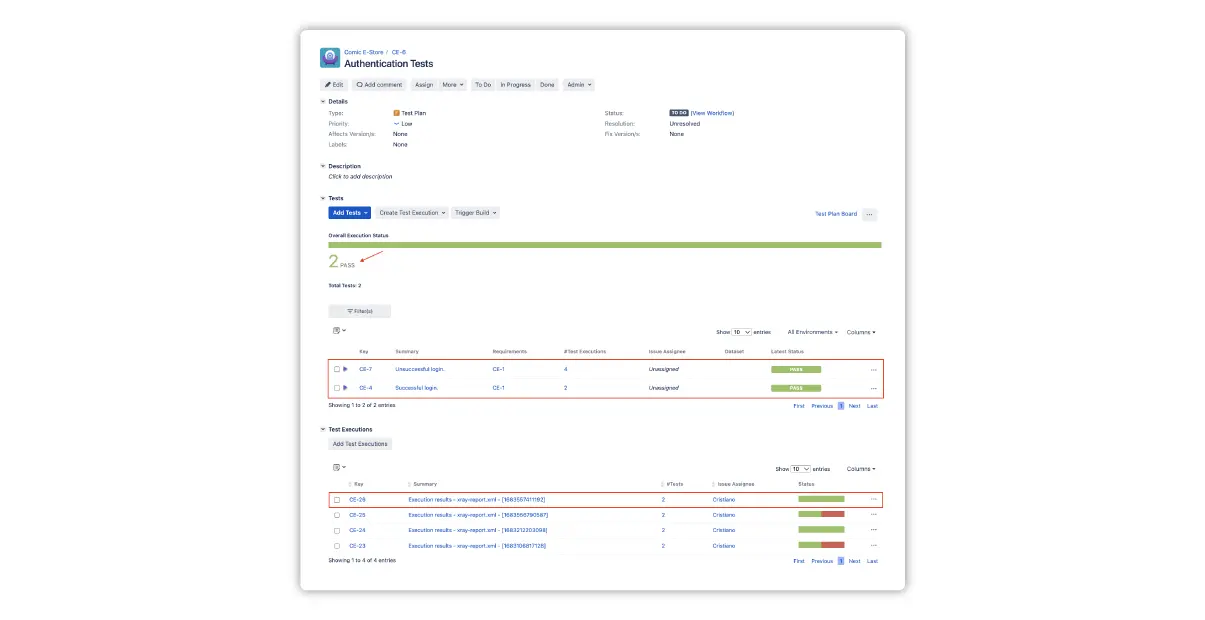
Once the import finishes, we can review the specific execution results and the overall status on the, e.g., Test Plan issue (the screenshot corresponds to the RJT example from part 1, where we also added the “XrayImportBuilder” step to the Jenkins pipeline definition).

Tips for Smoother Implementation

In this section, we have collected useful pieces of advice from across our extensive documentation. If you prefer a more structured learning approach, we encourage you to check the “Test Automation with Xray” course in our Academy.

Generic vs Cucumber tests

you can make an informed decision about which one works best for you.

First, Generic Tests in Xray serve as an unstructured abstraction layer, allowing to report on the execution results without enforcing specific constraints on how the tests are implemented on the Xray side. It is often used when only Part 2 is implemented as the popular default for Test issues automatically created after the report import.

The Generic Test Definition field is used to provide additional identification details, such as the class and method that implements the test code or the automated script file name.

Second, Gherkin, primarily used in Behavior-Driven Development (BDD), is a language for writing test scenarios in a way that is understandable by all stakeholders, including non-technical ones. The corresponding issue type on the Xray side is “Cucumber Tests”.

Xray’s comprehensive support for Cucumber tests includes the following capabilities:

  • Creation and editing: supports Scenario, Scenario Outline, and Background entities;
  • Automated steps library: Centralized management and refactoring of Gherkin steps;
  • Bulk import/update: handles .feature files using the REST API or CI plugins;
  • Export: allows exporting of .feature files containing Scenarios and Backgrounds through the UI, REST API, or CI plugins.Tests”.

There are several nuances when it comes to utilizing the Cucumber tests in your CI/CD process. For more information, please see the following articles:

  • Testing in BDD with Gherkin based frameworks (Server + DC)
  • Testing in BDD with Gherkin based frameworks (Cloud)

Cloud vs Data Center CI/CD integration differences

Depending on your Xray deployment, you need to pay attention to the corresponding API documentation and the overall import process, which is why we provide the reference links in pairs.

For instance, Cloud requires you to first obtain the token, then proceed with the import call, whereas you can do the import straightaway in the Data Center. Also, make sure to leverage the documentation specifically for your API version of choice (1 or 2). Check the following resources:

  • REST API (Server + DC)
  • REST API (Cloud)

Report Customizations

Depending on your automated framework/report format and the import method, you may be able to add custom attributes that further enhance the synergy between the CI/CD tools and Xray. For instance, you can link the results to a requirement and a test plan automatically during the import, rather than manually after the fact. Check the following resources:

  • Testing web applications using Selenium and Junit5 in Java (Server + DC)
  • Testing web applications using Selenium and Junit5 in Java (Cloud)

Also, please keep in mind that the API endpoints on the Xray side can be different depending on the report format.

Please refer to the tutorials we linked above to learn about the specific options for your tools of choice.

Elevate your game

The efficient approach of automated testing and the speed of CI/CD implementation ensures that any new code integrates smoothly with the existing codebase, maintaining the overall quality and functionality of the software.

Xray Enterprise is a leading enterprise test management tool that seamlessly integrates with Jira, offering a solution for managing both automated and manual tests in a centralized manner. With support for various testing methodologies and integration with multiple CI/CD tools, Xray Enterprise stands out for leveraging these capabilities. It results in comprehensive test coverages, accurate results, and your ability to manage your test cases and test plans with unmatched efficiency.

Author

Ivan Filippov

Ivan Filippov is a Solution Architect for Xray. He is passionate about test design, collaboration, and process improvement.

Xray were Platinum Partners in EuroSTAR 2025. Join us at EuroSTAR Conference in Oslo 15-18 June 2026.

Filed Under: EuroSTAR Expo Tagged With: EuroSTAR Conference, Expo, software testing tools

Thought you couldn’t automate that? Think again.

March 5, 2025 by Aishling Warde

As testers looking to increase automated coverage, we often encounter parts of the user journey – such as when an email notification, SMS alert, or multi-factor authentication workflow is involved – that on the surface appear difficult or outright impossible to automate. This leads to reliance on manual testing, which can be time-consuming and prone to human error, affecting the speed of your testing process or likelihood of regression.

However, with the right tools, even complex test scenarios can be automated effectively, improving test coverage and accelerating release cycles. Let’s dive into some common challenges and how they can be tackled with automation.

Transactional emails or SMS alerts

If you’re responsible for testing a modern customer experience, for example a hotel booking system, the emails or SMS messages sent by that system are as critical to the user experience as the screens with which a user interacts.

Whilst it’s possible to pull together a solution reliant on a public email service like Gmail, or self-host and maintain an open-source solution. You’ve got better things to be spending your time on! Most now solve this by integrating a managed service like Mailosaur to access email testing functionality, and international phone numbers for SMS, to capture and perform assertions against every message a product sends.

Mailosaur facilitated easy email testing, streamlined QA automation … and provided crucial support for evergreen projects.” – Manager of Software Quality Engineering at Domino’s.

Authentication workflows

Whether you’re responsible for a fintech application, healthcare portal, or a secure ecommerce platform, you’ll almost certainly be responsible for securing access to key areas of your product. That means the introduction of anything from email verification on signup, password reset workflows, and the increasingly essential two-step verification processes.

Sure, if you’re a ‘one-man band’ you can use your own phone to set up 2FA/MFA at least, but not only does that not work for automation, it also falls apart as soon as you’re working at any kind of scale – whether that’s more QAs around you, or a product that supports sending SMS messages in more than one country.

Things have moved on, and there are now solutions that not only give businesses access to phone numbers internationally, but there are also solutions that can mimic apps like LastPass and Google Authenticator to test “auth app” functionality. Here’s a snippet showing how this is done using our platform:

// Get a one-time password (OTP) from an SMS 
const sms = await mailosaur.messages.get(inboxId, { 
  sentTo: ‘123456789’ // phone number 
}); 
 
console.log(sms.text.codes[0].value); // e.g. “654321” 
  
// Get a one-time password (OTP) from a ‘security device’ 
const currentOtp = await mailosaur.devices.otp(sharedSecret); 
console.log(currentOtp.code);  // e.g. “123456” 

Email rendering bugs and blind spots

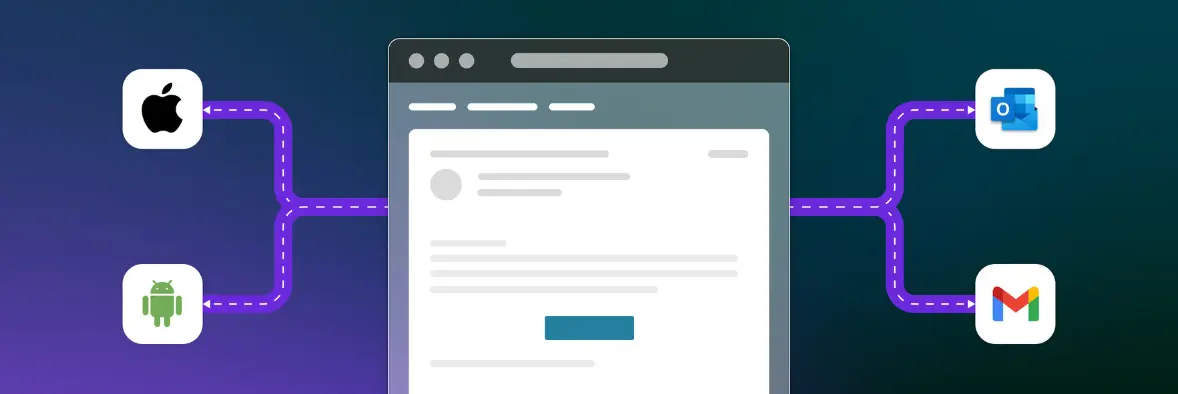
The way an email looks to your customer can differ wildly, depending on which email client they are using. While it might look perfect to you on Gmail or the latest edition of Outlook on Windows, there are a ton of email clients outside your organization.
With Mailosaur’s email preview functionality, you can instantly see how your email will look for any recipient, no matter what email client they use, so there are no nasty surprises.

Come and see us at EuroSTAR 2025!

We required a solution that could provide multiple servers, allow us to generate test email addresses, and support extensive email testing. Additionally, the ability to automate and perform high volumes of email testing daily was critical to our operations’’ – Sr. Director, Quality Engineering at Malwarebytes.

Automating traditionally difficult test scenarios is easier than you think, with the right tools, those “impossible” tests become straightforward and we’re here to show you how at EuroSTAR this June.

Stop by the Mailosaur stand for live demos, practical advice, and a chance to chat with our team about simplifying your toughest tests.

Author

Louise Buckmaster

Digital Marketing at Mailosaur, crafting content and resources for QA testers.

Mailosaur were exhibitors in EuroSTAR 2025. Join us at EuroSTAR Conference in Oslo 15-18 June 2026.

Filed Under: Gold, Uncategorized Tagged With: 2025, EuroSTAR Conference, Expo

The Power of Live Demos: Why 6 Minutes Can Make a Difference

January 30, 2025 by Lauren Payne

At EuroSTAR, we know that engagement is everything. The EuroSTAR Conferences EXPO Hall is a hive of energy, networking, and innovation, making it the perfect place to connect exhibitors and sponsors with software testing and quality engineering professionals. But in a bustling conference environment, how do you ensure your brand stands out? The answer: A Live Demo.

The Impact of a 6-Minute Live Demo

Six minutes may not seem like a lot of time, but in the right hands, it can be a game-changer. A well-executed live demo captivates an audience, sparks meaningful discussions, and showcases your solution’s real-world impact. It’s not just about explaining your product—it’s about demonstrating its value in action.

Here’s why these six minutes can make a difference:

  • Instant Engagement: Live demos create an interactive experience that draws attendees in and keeps them invested in your product or service.
  • Showcase Thought Leadership: Demonstrating your expertise and innovation positions your brand as a leader in software testing and quality engineering.
  • Drive Booth Traffic: A compelling demo generates interest and directs attendees straight to your booth for deeper conversations.
  • Boost Brand Awareness: Stand out from the crowd with a dynamic, hands-on presentation that leaves a lasting impression.

Huge Interest from Attendees

We’ve seen an incredible response from attendees to these Live Demos, with over 150+ participants attending these sessions during the Lunchtime break of the conference. It’s a fantastic opportunity to engage with a highly interested audience in a relaxed, interactive setting.

To add even more excitement, at the end of each demo, we run an attendee prize giveaway organised by the EuroSTAR EXPO team. All you need to focus on is what you wish to present—leave the logistics and incentives to us!

Expanded Access in 2025

Last year, Live Demos were exclusively available with the Platinum packages. This year, we’ve expanded access, allowing all Gold Sponsors to purchase a Live Demo as an exclusive package add-on. This gives more brands the opportunity to leverage this impactful tool and enhance their presence at EuroSTAR.

Whether you’re launching a new product, demonstrating a cutting-edge feature, or showcasing an innovative testing solution, a Live Demo is your opportunity to make an impact. Don’t just tell your audience about your solution—show them why it matters.

Secure Your Slot

According to the Freeman Trends Report 75% of attendees want to make the most of in-person learning with hands-on demos and activities. Incorporating live demos into your event strategy can offer dynamic, interactive experiences that resonate with the EuroSTAR Conference attendees. By showcasing your solutions in action, you not only demonstrate value but also position your brand as a thought leader in the industry.

Live Demo slots are limited, and demand is high. If you’re looking to maximize your exposure at EuroSTAR, this is your chance to shine. Book your Live Demo today and make your six minutes count!

For more details on how to secure your slot, reach out to our team or visit the EuroSTAR Conferences EXPO website.

Let’s make innovation visible—one Live Demo at a time! To find out how you can achieve your marketing goals and more at a EuroSTAR Conferences EXPO, speak with Clare Burke.

Clare Burke

EXPO Team, EuroSTAR Conferences

With years of experience and a passion for all things EuroSTAR, Clare has been a driving force behind the success of our EXPO. She’s the wizard behind the EXPO scenes, connecting with exhibitors, soaking up the latest trends, and forging relationships that make the EuroSTAR EXPO a vibrant hub of knowledge and innovation. 

t: +353 91 416 001 
e: clare@eurostarconferences.com 

Filed Under: EuroSTAR Expo, Uncategorized Tagged With: EuroSTAR Conference, Expo

  • « Previous Page
  • Page 1
  • Page 2
  • Page 3
  • Page 4
  • Page 5
  • …
  • Page 8
  • Next Page »
  • Code of Conduct
  • Privacy Policy
  • T&C
  • Media Partners
  • Contact Us

part of the