• Skip to main content
EuroSTAR 2027 - Sign up for early access

EuroSTAR Conference

Europe's Largest Software Testing Conference.

  • Programme
    • Call for Speakers
    • 2026 Programme
    • Community Hub
    • Awards
  • Attend
    • Why Attend
    • Bring your Team
    • Testimonials
  • Sponsor
    • Sponsor Opportunities
    • Sponsor Testimonials
  • About
    • About Us
    • Our Timeline
    • FAQ
    • Blog
    • Organisations
    • Contact Us
  • Book Now

Uncategorized

What is the role of QA in DevOps?

May 23, 2022 by Fiona Nic Dhonnacha

Thanks to Raj Subrameyer for providing us this blog post on behalf of TestRail:

Organizations are striving toward releasing features faster than ever, to meet growing customer demands and stay relevant in the industry. The market is highly competitive, and teams are looking into lean approaches to deliver high-quality products. Various agile approaches have been adopted to support this effort, and one of them that has gained popularity in recent years is DevOps.

What is DevOps?

Historically, development and testing efforts were viewed as two separate entities. This model proved to have several bottlenecks. Some of which included:

  • Gaps in communication between the groups, leading to defect
  • Incorrect understanding of the implemented features
  • Not having clarity on test coverage
  • No visibility into each other’s work
  • Unnecessary friction due to lack of collaboration
  • Unstable features pushed to QA

And most of all, no one had any idea of how the customers were using the deployed product. They did not communicate directly with the operations team monitoring the application in production, and vital statistics that could further improve the product weren’t gathered. This wasted incalculable amounts of time, effort, and cost for organizations and ultimately led to a delay in releasing the features on time and resulted in a decline in customer satisfaction.

DevOps was introduced to mitigate the above problems and reintroduce the mentality that quality is everyone’s responsibility. The main focus of this approach is to increase collaboration between the developer, tester, and operations teams, so they can work as one single unit to deliver high-quality products.

Role of QA in DevOps

In other agile approaches, the developer is in charge of coding and creating the feature and writing and running unit tests; testers perform automated and manual tests on this feature. DevOps purposefully blurs the lines between these responsibilities, forcing collaboration. The developers start building the mindset of continually checking for errors in their code. The testers increase their responsibilities from validating the application, to ensuring it is deployable at all times. They may even fix code as needed. All these pieces work together to ensure rapid delivery of features. The focus on the customer drives the work of the entire team.

In DevOps, the testing perspective changes from “completed testing on this module” to “what are the business risks that have been mitigated in the release candidate?” They move beyond manual testing and focus on scalable deployments and automation right from the beginning of the development process, standardizing QA environments, and aligning QA tasks with Continuous Testing, and CI/CD pipelines.

A high level of collaboration between developers, testers, and the operations team enables testers to monitor the application in production and use the data to help stakeholders make informed decisions.

How to integrate QA into a DevOps environment?

DevOps does not replace the existing QA process. Instead, it shifts testers’ viewpoint from the traditional way of testing, such as mapping test cases to requirements, executing test cases manually, and reporting defects; to a more agile way of delivering software, where QA is part of a large team instead of being a separate entity. Here are some ways to integrate QA into the DevOps environment:

Re-align team structure

First, organizations should remove the boundaries between developers, QA, and operations teams. This would involve restructuring the existing QA team to align with the DevOps goals.

Teams have to merge into one technical team that focuses on various activities to deliver the features on time. These technical teams have to communicate, collaborate and optimize their efforts to find defects fast and fix them before deployment. Also, testers should get involved early in the development process, starting at the requirements phase (where they can flesh out any ambiguity in requirements) by ensuring the whole team has clarity on how the feature will be developed, tested, deployed, and monitored post-launch. Continuous testing becomes part of everyone’s responsibility.

Automate as much as possible

Secondly, DevOps and automation go hand-in-hand—without one, the other won’t work. This is where smart people and tools can help in bringing shorter and more dependable release cycles. Everything that can be automated should be automated. This may include unit, deployment, integration, smoke, regression, security, and performance tests. Testers play an integral part in the DevOps process by starting automation early in the process, which finds defects sooner rather than later.

Also, for automation to be effective, you should modularize your test suites and run them at various phases of the development process based on the features that have to be tested. Finally, as new features are added to the product, the test suites should be flexible enough to scale according to complexity. This may include the need for additional software, hardware, and skilled resources to support the effort.

Use metrics to track progress

Another important factor determining the success of QA integration into the DevOps process is having metrics that can quantify the value. A survey conducted by Forrester Research found 75 common metrics that DevOps teams use to measure the success of the adoption. Some of them that directly relate to the quality of the products are as follows:

  • Test case coverage
  • Unit test coverage
  • Pass/fail rate
  • Number of tests executed
  • API pass/fail rate
  • Requirements covered by tests
  • Blocked test cases
  • Percentage of automated test cases
  • Successful code builds
  • New defects
  • Critical defects
  • Automated tests prioritized by risks
  • Code coverage
  • Release deadlines
  • Total number of defects discovered in test
  • New API defects found

Using these metrics, stakeholders can make informed decisions about how QA can effectively collaborate with the developers, operations team, and other roles in the project.

Run tests in parallel

Testers run tests in parallel to various activities in the DevOps process. For parallel testing to be effective, QA engineers need to set up standardized test environments and have sufficient hardware and software resources to run many tests as fast as possible. They may also have periodic audits to ensure the testing process is optimized to finish within the software delivery time.

Continuous monitoring

DevOps involves multiple tools, processes, automated tests, and environments. Data is extracted from different stages of the development process and analyzed to ensure the system is performing at the optimum level at all times. Usually, the operations team works with developers and testers to build monitoring and analytics capabilities right into the developed application. It is vital for testers to know how to use tools like Splunk, Kibana, Graphite and Firebase that are used for this purpose to support the operations team.

Have a common set of processes and tools

One of the biggest problems in organizations is each team follows a different process and uses a distinct set of tools to accomplish the same task. When this goes unnoticed, it leads to unnecessary wastage of cost, time, and effort for the organization.

With DevOps, the teams collaboratively have to agree upon a common set of processes and tools everyone will follow. Once decided, each team member will know what process to follow and tools to use at any given time in the development process.

Continuous feedback

Organizations must emphasize the importance of receiving continuous feedback from the team during the implementation. Daily standups, team meetings, retrospective meetings, and planning meetings are great examples of touchpoints to gather feedback. Based on this, teams will modify their approach for the next iteration. This continuous cycle of build->measure->learn (validated learning) helps to improve the DevOps process.
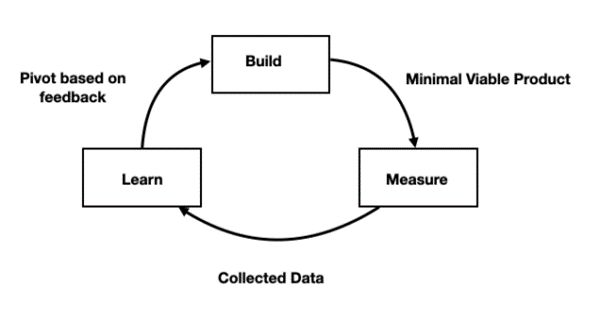
What's the role of QA in DevOps? A diagram of validated learning
Validated learning

Increase visibility into tasks and processes

For a successful DevOps implementation, teams have to collaborate and have visibility into each other’s work. At any instant in time, teams should be able to visually see the progress of the development process. Organizations can use tools and dashboards that highlight vital metrics such as team velocity, defects logged/fixed, number of tests executed, test coverage, and other KPIs important to the team.

Sufficient training

Testers’ skills need to adapt to the DevOps process. It starts by training everyone to do full-stack test automation, which includes writing automated tests such as unit tests, API tests, UI tests, and back-end tests. Manual testing will still be relevant, but the focus will shift from only executing test cases manually to doing more risk-based testing and exploratory testing. This is performed in parallel to automated tests.

Test strategy and test design become even more critical in the DevOps process. Since testers are working along with developers and operation teams, their test strategy will have to include tasks related to QA and areas that cut across development and the operations teams. A good approach to come up with a solid test strategy and design tests is for different roles to work together collaboratively. This helps the team gain a common understanding of what needs to be tested, who will be performing them, and how the tests will be executed.

Finally, to successfully transition into DevOps, organizations should implement three essential processes: continuous testing, integration, and delivery.

The three pillars of DevOps

The main goal of DevOps is to increase collaboration. This is not achievable without having Continuous Testing, Continuous Integration, and Continuous Delivery. Testers play a vital part in each of these processe

1. Continuous testing (CT)

CT is all about testing an application from its early stage and automating tests throughout the lifecycle of the development process. This helps the team to analyze the quality of the product at every stage of the process and enables stakeholders to make informed decisions.

CT also reduces the risk of shipping features that break in production, saving a considerable amount of time, cost, and effort for the company. The key is to test as early as possible and find defects as soon as possible. Here are some things to consider when integrating CT with your current testing process:

a. Have sufficient resources: If testing has to be performed in each stage of the development process, the teams need to have sufficient resources: hardware, software, and skilled engineers. The team collaboratively decides on a test strategy and procures the necessary resources before implementing CT.

b. Align with the Shift-Left paradigm: CT aligns with Shift-Left testing, focusing on starting testing early right from the requirements phase and continuing throughout the development and release process. A part of this alignment is to expose developers and testers to different activities to empower them. For example, a developer would pay more attention to writing better unit tests, and testers can get involved in development activities. This helps to speed up the development cycles and builds cross-functional teams that can adapt to any environment.

c. Identify gaps in the existing test process: Before implementing CT, do an audit of your current test strategy, get a handle on your current test coverage, and the type of testing performed – manual scripted test execution, automated, and exploratory tests. Identify your current bottlenecks, analyze trends in production bugs and figure out how you can mitigate them with CT.

d. Use automation wisely: One of the common problems teams face when implementing CT is trying to automate everything, even if it does not provide value and could prove to be a maintenance nightmare in the long run. For example, automating features with a high state of flux could result in inefficient use of resources as they may spend more time maintaining the test than running them. Use automation when repeating mundane tasks, getting faster feedback on builds, deploying builds to different environments, and performing various kinds of testing that would otherwise be hard to do or consume time when done manually.

e. Have the right automation tools: For effective implementation of CT, teams have to invest in using the right tools for various activities. This could include tools for unit testing, UI testing, API testing, performance testing, security testing, and accessibility testing.

2. Continuous Integration (CI)

CI is a primary DevOps best practice of automating the integration of code changes into a central repository where it builds and runs several times a day. One of the key benefits of implementing CI is detecting errors quickly and locating them more easily. There are various benefits for QA in implementing a CI pipeline:

a. Remove dependency on code check-ins: Any number of people can check in code multiple times a day into the version control system. There is no dependency, and each check-in has timestamps to know who wrote the code exactly and pushed it to a particular branch. This means testers and developers can both write application and automation code and check it into different branches without any interference.

b. Faster feedback: Once the code is checked in, tests automatically run to get quick feedback on the build, so errors can be found quickly and fixed as soon as possible. It enables testers to quickly figure out what the problem is, report it, and take the necessary action to address and fix the defect.

c. Increased collaboration: CI improves overall engineering communication and accountability, enabling greater collaboration between development, testing, and operations in a DevOps team. Pull requests are tied into the CI process, helping to gain visibility into code from other team members. This enables developers and testers to collaborate on feature branches as the feature progresses through the CI pipeline. The automated tests have to follow the same pull request process.

d. Automated regression testing: As part of the CI process, testers configure regression tests to run when the build is deployed to different environments automatically. This ensures the new changes do not break existing functionalities. These tests are set up to run as quickly as possible to get faster feedback on the deployment.

e. Extensive documentation: When automated tests run in every stage of the CI pipeline, extensive logs are generated with timestamps for future reference. This is especially useful for organizations that have to adhere to regulatory compliance. The logs serve as a rich source of information during routine audits to ensure there is no breach of policies and procedures.

3. Continuous Delivery (CD)

One of the integral parts of DevOps is to deliver features rapidly. CD enables this to happen by giving teams the ability to release the application at any instant in time. Beyond making sure your application passes automated tests, it has to have all the configuration necessary to push it into production. CD encompasses everything from ideation to build to readiness to delivery to production.

The role of QA in a CD pipeline is to ensure continuous testing happens throughout the development process. Testers use various tools for smoke testing, regression testing, API testing, UI testing, performance, and security testing. Tools free up their time to do exploratory testing and risk-based testing to mitigate identified risks. Also, having a CI environment ensures automated checks happen in various phases of the build process, giving faster feedback on the quality of the features.

Key tools needed for DevOps implementation

Since DevOps includes continuous testing, integration, deployment, and delivery, many tools have to be used to get quick feedback about the application. Below are some commonly used tools in a DevOps pipeline:

  • Source code repository: Git, Assembla, CloudForce, TFS, Subversion
  • Build server: SonarQube, Jenkins, Artifactory, Travis CI, Circle CI, Kubernetes, Docker
  • Feature flags: Rollout, LaunchDarkly
  • Unit testing: JUnit, Nunit, RSpect, TestNG, Jasmine, Mocha
  • Configuration management: Puppet, Ansible, Salt, Chef
  • Test automation: Selenium, Appium, Watir, Ranorex, Cypress, Espresso
  • Test management: TestRail, Jira, Zephyr, Xray, PractiTest
  • Monitoring tools: Splunk, Kibana, Graphite, Crashlytics
  • Virtual infrastructure: Amazon Web Services, Microsoft Azure, VMware vCloud
  • Non-functional security tests – Mittn, Gauntlt, BDD Security
  • Static analysis security testing tools – Kiuwan, Coverity, Checkmarx, and other paid tools. Open-source options include Reshift, Brakeman, JSHint, NodeJsScan.
  • Security Scanners – Netspaker, Acunetix, Wireshark, Nessus, OWASP ZAP (Open Source)

As you can see, various tools can be used for different purposes in the DevOps pipeline. A good approach to selecting the best tools that work in your project context is by keeping the below factors in mind:

Choose tools that increase collaboration

Almost every tool used in the DevOps pipeline should facilitate effective collaboration between different team members. For example – Version control is a basic necessity in any agile project, including one that follows DevOps. The tool used for this purpose should help in the seamless integration of code, configuration files, scripts, and other artifacts across teams and different systems.

Tools should have open APIs

As technology advances rapidly, new tools come into the picture to solve existing problems. So, teams tend to shift to these tools. Migrating to new frameworks and tools should be assumed normal in teams following a DevOps process.

It is important to use tools that have open APIs so that even if the team migrates to a newer tool, teams can still use the existing scripts by calling the APIs with minimal disruption. Don’t get stuck with a single tool; instead, think about how easily any tool you choose can integrate with other tools through the use of APIs.

Ease of use

A DevOps team consists of people in different roles, including developers, testers, operations teams, business analysts, product managers, project managers, and other stakeholders. Any tool you choose should be able to be used by everyone without a steep learning curve. If a tool becomes too tricky to learn, people get intimidated and stop using them. When collaboration is the key aspect of DevOps it is critical to pay attention to how easy it is to use by people of various technical and domain backgrounds.

QA is an integral part of implementing a robust DevOps strategy. Faster releases and delivery cycles will not happen without a comprehensive QA-DevOps transition plan. The role of QA teams has shifted in the world of DevOps. Instead of individual contributors, they have become QA consultants. Testers will have to shift their mindset from providing traditional testing services to helping deliver quality software by mitigating risks across roles, including the development and operations team. They have more opportunities to teach people about the importance of quality as they will work closely with different roles. There will be no longer a separate QA team; instead, there will be technical teams that combine different roles.

QA teams will be forced to look for new ways to add value which will help to bring out their critical thinking skills. This could mean taking ownership and making some strategic decisions that they may not have done when working in traditional QA teams. There will be more focus on thinking of the software from an end-user perspective and how customers would interact with it daily.

Transitioning to DevOps is not easy, even if you’re already agile. One of the biggest obstacles to DevOps implementation is the process itself. It involves shifting the attitude of not only QA but all roles in a team. This takes a considerable amount of effort, higher standards, and more tools and resources. However, when teams do collaborate and have the right tools in place, organizations can start seeing immediate benefits.

How can TestRail help you optimize testing efforts within your organization? Join our introductory product demo to see how you can leverage TestRail’s core functionalities to improve your software testing processes, increase transparency and collaboration, and build more confidence in releases. Register Now!

TestRail is a Gold Partner at EuroSTAR 2022. It’s our first in-person event in 2 years – and it’s going to be a massive celebration of testing! Learn from 70 testing experts, and connect with your peers at Europe’s best testing event. Get your ticket now.

Author

Raj Subrameyer EuroSTAR Speaker

Raj Subrameyer

Raj Subrameyer is an international keynote speaker, writer, and tech career coach with a rich technical background. In his blog, he posts inspirational news, resources, and updates to help his readers lead a better life.


Filed Under: Uncategorized

Building a test automation strategy [checklist included]

May 18, 2022 by Fiona Nic Dhonnacha

Thanks to Sune Engsig from Leapwork for providing us with this blog post:

How can you get the most out of test automation? While it’s a cornerstone in DevOps, it doesn’t always go to plan. But when implemented correctly, it helps increase the quality of software while containing costs.

Not surprisingly, IT departments everywhere are realizing the importance of having a clearly defined test automation strategy, instead of taking a risk-based approach to testing.

Once the decision has been made to roll out test automation, the next issue presents itself: “How are we actually going to do this? What’s the plan?”

Whether it is regression testing, functional testing, or unit testing, having an overview of your test suite before you get started with a testing tool will help your team considerably.

Where to begin your strategy development?

Putting together a test automation strategy can seem overwhelming. It’s tempting to get stuck right in and put test automation to work. However, for test automation to succeed, it demands careful consideration of your team’s requirements, the time you have available, and the successes and failures of past projects – if any.

For example, if you’re coming from a manual testing background, testing will be slow. This causes QA bottlenecks and results in more human errors and bugs in production. Naturally, your requirement would be to adopt automation that will speed up development, and make availability to increase the scope of testing.

If you’ve used an automation solution that is highly complex, then it could only be used by a few technical test engineers. This prevents those who actually have domain knowledge from using automation. This would mean the requirements for your next project would be a tool that can be used and fully scaled across teams regardless of their technical capabilities.

How to build a test automation strategy

We have created a checklist of the areas to focus on – no matter whether you want to move away from manual testing or optimize your current automation process

You can access the full checklist to get a detailed description of how to create an agile test automation strategy. You’ll be equipped to develop a plan of action to achieve your test automation goals.

Leapwork is a Gold Partner at EuroSTAR 2022. It’s our first in-person event in 2 years – and it’s going to be a massive celebration of testing! Learn from 70 testing experts, and connect with your peers at Europe’s best testing event. Get your ticket now.

Author

Sune Engsig, Chief Evangelist at Leapwork

As Leapwork’s Chief Evangelist, Sune Engsig helps hundreds of organizations deliver business capabilities faster and more efficiently with automation. He has more than 20 years of experience working with business and process development as well as IT architecture for enterprises. In addition, he has extensive project management experience from both government and the telecoms industry. Sune is driven by a mission to find ways for businesses to extend their capabilities with the help of technology.

Filed Under: Uncategorized

EuroSTAR talks for test managers

May 17, 2022 by Fiona Nic Dhonnacha

If you’re a test manager or team lead, we have lots of sessions on the EuroSTAR programme to help you elevate your team and achieve your goals. Join talks and tutorials led by expert speakers and learn how to develop your critical thinking skills and mitigate biases, scale your team successfully, understand the changing role of the test manager, and lots more. Our programme committee chair Graham Freeburn has created a mind map so you can check out the whole programme and filter by topics, roles, and more so that you can find the talks best suited to what you’re looking for – check it out and start planning your EuroSTAR 2022 diary.

get tickets

Developing critical thinking skills for testers | Andrew Brown

Critical thinking skills are essential to testing – but rarely taught. Even the most seasoned tester is vulnerable to biases and thinking traps. In this workshop, Andrew shares the training course he’s developed in his organisation, to show you how to improve your testing by enhancing your critical thinking skills. You’ll explore thinking traps and biases, and learn how to mitigate your vulnerabilities. Take part in exercises and experiments throughout the tutorial, in order to learn more about how your mind works, and how you can think more critically.

Shaping a fast growing team like a bonsai | Seema Prabhu

As your team scales, the nature of challenges will change, Just like a bonsai tree, you can’t leave a team’s growth and shape to chance without a plan. One of the major components that a bonsai represents is that of balance. How can you achieve the right balance in a remote, multicultural team, and achieve your purpose ? Seema Prabhu shares her experience with her team changing shape as they scaled, the lessons learnt, and tools she wished she had during this phase of growth.

Testing software for the next economy | Smita Mishra

Smita Mishra shares what she’s learnt about the next economy, and what technology changes we are seeing across users. How does this impact what testers do? Do we understand the users of these new technologies? Are we ready to meet the needs of our customers of the next technology? Get answers to these questions, and a whole lot more. Let’s learn what the world thinks could be technology risks, and how testers can align better to the new world view. This session will also encourage you to look at your immediate and near future testing strategy, as well as your team construct.

book tickets

UX testing in agile teams | Kimberly Snoyl

UX design takes place prior to the development phase. UX testing, using data, takes place after the product is already built (e.g. using tools like Google Analytics). Kimberly Snoyl will give us her take on UX testing and the possibilities it has during a the development phase. Testing often focuses too much on functionality, instead of ensuring the end user is happy with the product and can use it effectively and efficiently. After this talk you will know what tests you can do, which fit in a sprint, in addition to the functional tests, which will improve the user experience of the product.

How testing is evolving in DevOps | Szilard Szell

Can we be the same testers in a DevOps organization, as in the past? Is that enough if we know test automation, exploratory testing and many aspects of Shift Left; or are there any new aspects, concepts and techniques that a tester should be aware of? Are we able to shape testing with the current competencies, or do we need more? Szliard shares his 20 year journey in testing, process improvement, service design and DevOps, focusing on how testing and quality assurance has evolved, and what the areas a good test professional should be aware of.

Test manager, orchestrator or quality coach? | Gitte Ottosen

Gitte’s session focuses on the changing role of the test manager with the transition to agile. Your work context is under continuous change, so how do you change with it? The role of the test manager is changing – should the role exist any more? For some, the traditional test management role is still 100% relevant but for many of us, the test manager role is transitioning from the traditional test management role to a role focusing on orchestration and quality coaching. This presentation will take you through some of the competences needed to be a good quality orchestrator and quality coach, focusing on both the soft and hard skills which will help you be the best possible support to your team/project/train.

see full programme

Lost in transformation | Michael Bolton

Every day, more and more organizations are taking on “digital transformation”, leaning on software and machinery to perform jobs, make decisions and solve problems. Machines do work that has traditionally been done by humans, or that couldn’t be done by ordinary humans unaided by machinery. Every day, the reach of what machines can do is extended by technological advancements, growing bodies of data and by human ambition. As software changes, our testing has to respond. Michael Bolton shares what you need to address when going through a digital transformation.

Defects don’t kill you; they make you stronger | Rawad Mansour

We already know that zero defect products don’t exist. Defects that are caught in production can be costly to fix, BUT they are the client’s most concrete feedback on quality. Murex decided to accept the challenge and benefit from this feedback to shape their testing. But how can you benefit from clients’ reported defects to strengthen your test suites? Find out how Murex created a new process to get to the root cause, and take actions on the identified gaps. Plus, the ups and downs of the journey, and how they managed to transform a small team initiative into a global objective.

Have you booked your conference tickets yet? Groups save up to 30% so book your team now and join the whole testing community in Copenhagen.

book tickets

Filed Under: Uncategorized

Lowering testing barriers with computer vision-based AI

May 12, 2022 by Fiona Nic Dhonnacha

Thanks to Micro Focus for providing us with this blog post:

The constant surge in digital transformation forces organizations to perform tests on an increasing number of platforms – but still get results as quickly as possible. Manual testing just can’t keep up with the speed of business, so teams turn to test automation. But traditional software testing tools are only effective to a point. Generally, these tools rely on identifying objects on the screen through their internal representation—e.g. coordinates, class name, type, and many other. This method of identifying objects can be very fragile. Even a small change might result in the tool failing to find the object. The drawbacks of these techniques prevent teams from scaling their test automation efforts up to the levels they require.

To that end, the most common test automation challenges include:

  • Relentless test maintenance —tests that rely on unique object properties can be susceptible to breaks, thereby making testers perform regular updates to ensure their tests still run on each supported environment.
  • Test execution time is too long — even if a test set runs without interruption, it can take a significant amount of time to run all the tests to completion.
  • Insufficient test coverage — teams must support an ever-expanding range of platforms, devices, and operating systems, requiring testers to customize the tests for each environment.
  • Test creation fatigue — it takes time to build and design effective tests, with much effort required to uniquely identify on-screen objects that are part of the test.

What our research at Micro Focus revealed was that automated object detection with computer vision is key to lowering these barriers.

Computer vision-based AI for automated object detection

Recognizing objects without knowledge of their internal representation was one key objective when we developed our AI engine. This goal was accomplished by combining AI-based algorithms that accurately and consistently recognize objects regardless of device or environment.

For example, a test step might require clicking the shopping cart icon on a mobile app. The AI engine should be able to locate the shopping cart icon on the current screen without knowing:

  • If the screen is on a mobile device.
  • Whether the device is running Android or iOS.
  • If the screen is a desktop browser.
  • Whether it’s Chrome, Firefox, Edge, or another browser.

The ability to “Click the shopping cart” step should work under any circumstance with an AI engine. At Micro Focus, we have successfully implemented this in the Micro Focus UFT Family of software test automation products, and the AI techniques used in the engine include computer vision through an artificial neural network and optical character recognition.

Defining computer vision

An AI engine understands a screen’s composition and breaks it down into the unique objects that it contains. Additionally, the AI engine knows nothing about the implementation of the object. It treats the object as an image, regardless of the device or platform it comes from. As such, a powerful CV tool is needed and should be supported by an artificial neural network (ANN), a layered structure of algorithms that classify objects. It will train the ANN with many visual objects, resulting in a model that identifies objects it will likely encounter in applications under test (AUT). Thus, when the AI engine is tasked with locating a specific object, it utilizes the model to identify a match in the AUT

In terms of architecture, we implemented the AI engine as a separate module. Rather than restricting it to a specific product, any of our testing products can theoretically use the engine. Our first product that integrated with the AI engine was Micro Focus UFT One, our flagship test automation tool.

Defining OCR-based identification

Our AI engine also leverages OCR to identify text-based objects. These objects may themselves be part of the test, or they could function as a hint to identify the object’s relative location. This capability is useful if an object appears multiple times on a screen. For example, a login screen might have two text boxes, one for the username and one for the password. OCR helps identify which of the edit boxes is which. OCR can also identify a button by its textual caption.

Maturity of test automation based on computer vision

When we rolled out our new computer vision-based testing capabilities, we worked closely with our early adopter customers. We wanted to learn how they were using the technology and to ensure that clients were receiving the greatest value from it. This collaboration helped us discover new use cases and increase the technology’s reach and coverage.

As with any nascent technology, customers reported multiple edge-case scenarios that helped us improve our implementation and refine our model. Over time, we resolved more scenarios and grew the data set we use to train our model. Our algorithms became more capable and reliable. Due to these improvements, these customers now position AI as the preferred test automation mechanism when possible.

Lowering and removing test automation barriers

AI-based test automation reduces the time it takes to build and design tests because objects are identified simply by looking at them. AI algorithms lower skill barriers because they identify most objects and are hidden from the user. Teams can also use the same test without modification on different devices and platforms. They simply procure an appropriate device and run the test on it as-is. And because the algorithm doesn’t rely on an object’s underlying implementation and properties, the test keeps running even if there is a change. If the test’s flow stays the same, the test will continue to run.

The final barrier yet to be removed completely is test execution time. Tests will always take a finite time to run; hence there is a lower limit on the amount of time they take. However, AI-based testing helps teams test earlier and provides robust mechanisms that parallelize and optimize test execution, reducing the wait time for results.

Micro Focus is a Gold Partner at EuroSTAR 2022. It’s our first in-person event in 2 years – and it’s going to be a massive celebration of testing! Learn from 70 testing experts, and connect with your peers at Europe’s best testing event. Get your ticket now.

Filed Under: Uncategorized

EuroSTAR at Night events

May 11, 2022 by Fiona Nic Dhonnacha

EuroSTAR 2022 is taking place in the heart of Copenhagen – a buzzing, contemporary city packed with a rich history, colourful architecture, and lots of things to see and do.

We’re so thrilled to be celebrating 30 years of the EuroSTAR community with the amazing people who have helped shape EuroSTAR into what it is – a community of inspiration, leadership, innovation, and friendship. This is THE largest gathering of software testers in Europe!

It’s going to be an action packed 4 days of learning and networking – and once the talks are over we’ve got lots to do with EuroSTAR at Night networking events. Reconnect at EXPO Community Party, make new friends and lifelong memories at the Gala Awards Night, and lots more.

get conference tickets

EXPO Community Networking Party

Weds 8th June 2022

The EXPO community networking party is an opportunity to get together for an evening of conversation and connections over drinks, followed by a light dinner, and then it’s on to lots of games and prizes! The EXPO Party is sponsored by Keysight Technologies, and it will begin immediately after the last talk of the day. This event is an add-on for attendees, so if you haven’t booked your ticket yet, do it now.

EuroSTAR at Night events - EXPO community networking party

Gala Awards Night

Thurs 9th June 2022

Every year, at the EuroSTAR Awards, we shine a spotlight on the people who have made the biggest contribution to testing. The winners are decided by the community, and this year’s awards include Best Paper, Best Tutorial, the RisingSTAR Award, and the prestigious EuroSTAR Testing Excellence Award. See more about the awards.

EuroSTAR at Night Events - Gala Awards Night

This year the Gala Awards takes places at Wallman’s, with a massive celebration encompassing a show, dinner, and then onto the awards! Enjoy an amazing range of musical interpretations of legendary artists, a heart stopping acrobatics show, followed by a rock finale that kicks off the party on the dance floor. Book your EuroSTAR ticket now to make sure you don’t miss out.

There’s plenty of other networking opportunities outside of the EuroSTAR at Night events. Between the daily networking events, community Huddle area, packed EXPO hall, and bumping into people in between conference sessions, we facilitate exceptional networking opportunities: so you can focus on meeting the people who will help you most. You’ll leave EuroSTAR feeling inspired, with valuable, new connections and a strong network of testers you can call on after the conference.

get tickets

Filed Under: Uncategorized

Why did we build HyperExecute?

May 5, 2022 by Fiona Nic Dhonnacha

Thanks to Mayank Bhola, co-founder and head of product at Lambdatest, for providing this blog post:

Innovation distinguishes between a leader and a follower.“

steve jobs

Testing isn’t an easy job.

Trust us, we know.

Given today’s rapid pace of innovation, it is what distinguishes the best companies from the rest of the pack. Any brand today must offer the best customer experience across all possible types of devices, versions and browsers, and more importantly, at record speeds.

Sadly, testing infrastructure is still lagging behind. There hasn’t really been any noteworthy innovation that has been optimized for speed. Our company has built a cloud-based test execution infrastructure, and one of the constant asks from our customers has been that cloud infrastructure isn’t as fast as a local setup. But, on the other hand, local setups don’t have the features that can be offered on cloud. We knew there had to be an answer to this rather glaring problem.

We thought long and hard about it. We began working on a germ of an idea almost six months ago and after a lot of building, re-building and of course, a lot of back and forth discussions, we finally launched HyperExecute.

HyperExecute is a next-gen smart testing platform to help businesses run end-to-end Selenium tests at the fastest speed possible.

Why HyperExecute?

We had a few thoughts that formed the base on which HyperExecute was conceptualized. They were:

Achieve parity between sophisticated tooling available to developers and testers
Lack of an integrated testing environment
Customers had to compromise on speed when they moved to the cloud and this was not fair.
The goal was to let the users focus on writing test cases and leave the rest to us. Our motto for HyperExecute was—you write tests and let us do the rest. It sounds a bit too simple, but that’s the ultimate aim of the product—make testing really that easy and fast.

In short, HyperExecute brings together the speed of a local setup and the best features of the cloud — speed + best-in-class intelligence + zero maintenance + Autoscaling.

HyperExecute drastically cuts the feedback time for developers by executing tests at hyper speed. The tooling does the heavy lifting instead of testers modifying their code every time.

Wait, so how do we really achieve this?

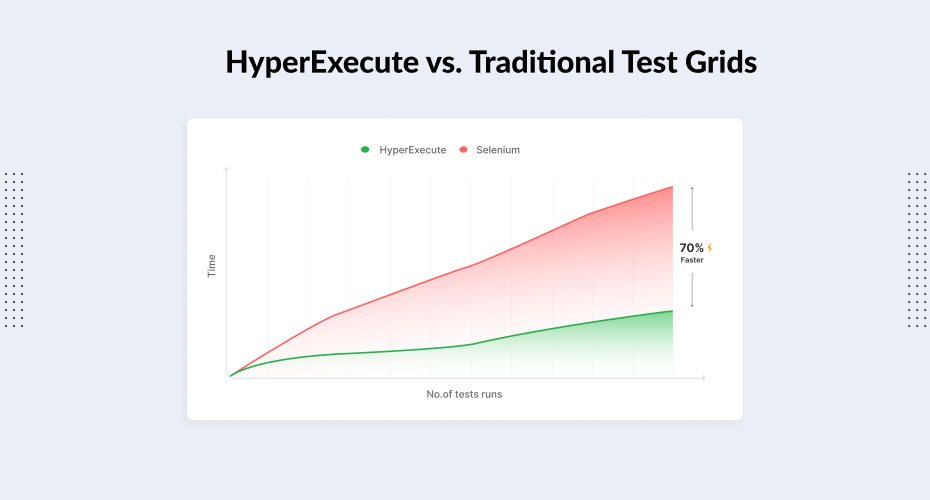
Taking a step back, existing automation testing platforms are inherently slow because of lots of network hops that happen during each test. In the traditional approach, triggered test scenarios are first sent to the Selenium hub, which in turn are scheduled to run on the best-suited Selenium node. This results in unnecessary latency as many network components are involved in the entire process. Also, multiple network hops with separated components result in increased test flakiness, a factor that is a big hindrance to time to market.

HyperExecute unifies all the components into a single execution environment that eliminates these network hops and cuts down on test execution times. This enables businesses to test code and fix issues at a much faster pace and hence achieve an accelerated time to market.

Why are we bullish on HyperExecute?

ITE. That’s why!

Integrated Testing Environment.

HyperExecute provides CI/CD-type native features for testing as well. When there can be an Integrated Development Environment, there certainly must be an Integrated Testing Environment.

It basically means that all the operations that are required to conduct a test should be available at a single place and most of them must be automated.

Let me give you an example of what HyperExecute can do. Let’s say a tester ran 10 tests yesterday and the eighth one failed. So, when this tester tries to run these tests again the next day, HyperExecute will intelligently reorder them. It will run the eighth test first because the tester wants the feedback on that one quickly. S/he isn’t waiting to see the passed tests, pass again. HyperExecute will move it to the top so that you can get the fastest feedback possible. Also, let’s say, if you have 1000 tests and want to run them on 10 virtual machines, we will intelligently group them according to their latest execution times so that the large test cases are distributed evenly.

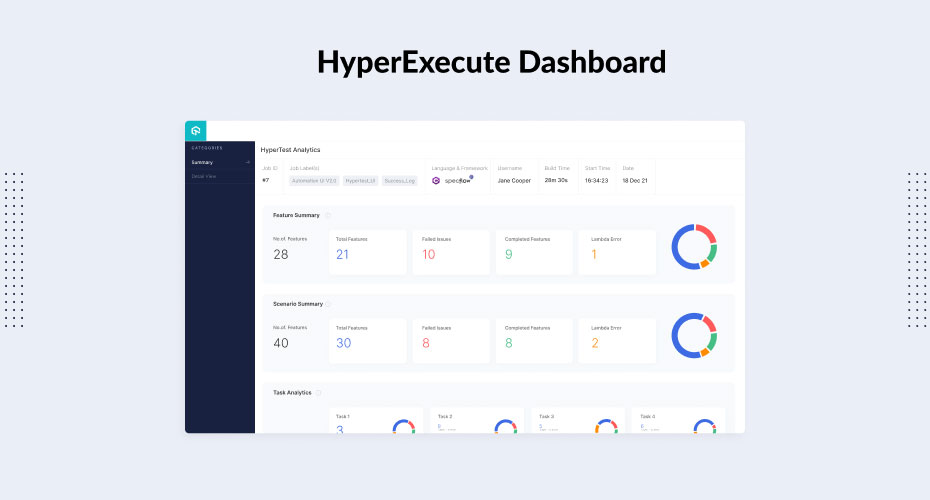
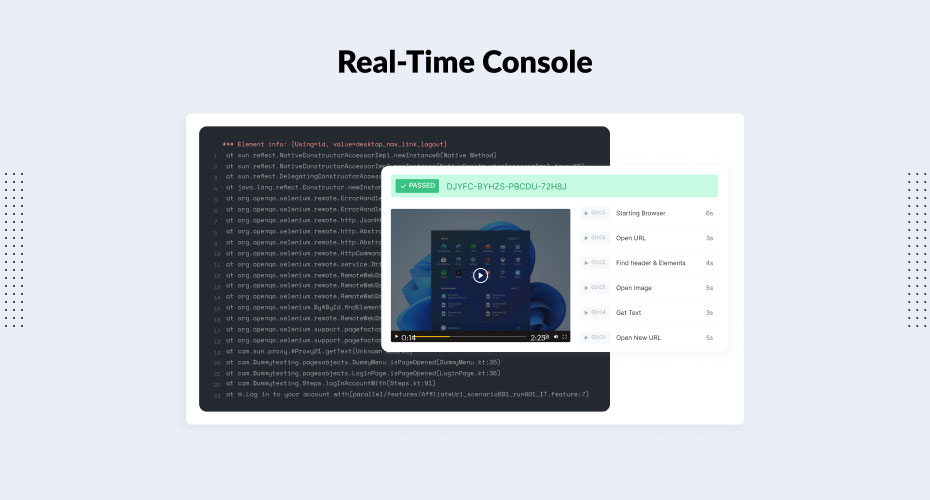
These are just a few examples of what’s possible with HyperExecute. When we were building it, our core product was ready quite early, but we knew that we had to give our customers something more than just the raw power. We packaged it with smart features like real-time console logs for test execution, intelligent grouping of tests to reduce total build time, artifacts management, automatic reporting, and automatic retries on failures.

We wanted to make HyperExecute the best choice for users so much that they’d never need hand holding and explanations, they should just use it and see value instantly.

What’s the path ahead?

We launched HyperExecute a few weeks ago and we are already seeing tremendous response for it. While it supports Selenium today, we want to bring in more frameworks in the days to come. We hope HyperExecute redefines test execution and gives digital brands a smart test orchestration platform that can truly match their speed of innovation!

Lambdatest is a Gold Partner at EuroSTAR 2022. It’s our first in-person event in 2 years – and it’s going to be a massive celebration of testing! Learn from 70 testing experts, and connect with your peers at Europe’s best testing event. Get your ticket now.

Author

Mayank Bhola, co-founder and head of product at Lambdatest

Mayank Bhola is the co-founder and head of product at LambdaTest. Bhola began his career as a software engineer at Zomato. He then moved to PressPlay TV and finally to Juggernaut Books, where he was the head of technology. Bhola joined as the lead architect at LambdaTest in 2018 and moved up the ranks to become a co-founder. He is responsible for the engineering & entire product development at LambdaTest. In his free time, Bhola loves to read non-fiction, discover new Italian food & learn something new.


Filed Under: Uncategorized

6 things you can do in the Huddle Community Area

May 5, 2022 by Fiona Nic Dhonnacha


The Huddle Community Area is located in the heart of the EuroSTAR EXPO hall – and it’s your space to take some time out of your busy conference schedule to relax, chat, and play games. It’s packed with activities and networking events, and run by the friendly Huddle team of volunteers. It’s all about connecting our diverse and international delegates, so the conversation is always flowing here – feel free to join in. You can check out the Huddle Community Area any time during the conference to take a break in between sessions, and make some new friends!

get conference tickets
6 things you can do in the Huddle Community Area - ask questions at the speaker couch sessions

Ask questions at the Speaker Couch Sessions

The learning isn’t just happening inside the sessions at EuroSTAR – we aim to foster knowledge sharing outside of the official talks as well. There’s plenty of opportunity to expand your knowledge in the Huddle Community area: don’t miss our 2022 Speaker Couch Sessions; where you can join some of your favourite speakers at the conference for a chat and coffee. This is your chance to learn and engage more with experts in a relaxed, informal setting.

Chat about testing topics at Huddle Lean Coffee

The Huddle Lean Coffee sessions are a firm favourite with attendees – there’s no set agenda, just get together and bring your favourite topic to the table for discussion. It’s a perfect mix of learning and collaborating with others. We also have the 1st time welcome for anyone who’s joining us for their very first EuroSTAR. Find out how to get the most out of your first conference with EuroSTAR veterans – they have lots of tips!

Share your voice

The community soapbox has always been a key part of EuroSTAR. We want to hear YOUR voice. Take to the Huddle SoapBox for a 3 min talk on a testing topic of your choice. Do you have an idea, a solution, or insights from your personal journey? Maybe you want to talk about diversity in testing, or invite your community to join you on a project – it is up to you! Pick something you are passionate about, and fill in the form here.

Solve problems at the Test Clinic

Solve your software testing problems with the help of onsite test experts. Tell us what you need help on, and our Test ‘Doctors’, who are industry experts with years of testing experience and knowledge, will offer coaching and guidance on ideas and solutions. The EuroSTAR experts will cover all areas of testing, and you can choose between open session or 1:1 consultations. Book your slot now.

Try hands-on testing at Test Lab

This is your opportunity to gain hands-on testing experience on ideas you’ve heard about at the conference. It’s run by testers for testers, and we’ve set up a range of environments and testable systems to help you practice what you’ve learned. It’s an open, friendly atmosphere to include you in conversation and discussion no matter what your level of experience. There will be plenty of testing challenges to get you started.

get conference tickets

Win prizes and play awesome games

Want to challenge your competitive side and win cool prizes? Of course you do! We have plenty of games in the Huddle Area, from puzzles to board games and lots more. We also have plenty of opportunities for you to win some amazing prizes and goodies.

So, now that you know about all the incredible activities you can take part in this year, there’s only thing left to do – get your conference ticket, and start deciding what you want to do in the Huddle Community Area.

Filed Under: Uncategorized

Digitalizing the future of testing

April 27, 2022 by Fiona Nic Dhonnacha

Thanks to Sophie Gustafson and Matt Holitza for sharing the below article on the UiPath Test Suite:

It’s been over 20 years, and not much has changed: testers continue to face the challenge of needing to test more technologies, both faster and more frequently. On top of this, testers must still mostly do their job manually because testing tools haven’t lived up to their promise – automations are fragile and require continuous maintenance.

Yet the modern digital business needs to deliver customer value continuously, rapidly, and with high quality, no matter if the value is delivered via an application, a process automation, or a mobile experience. So how do we revolutionize the state of testing to support and align with the demands of current businesses? It’s obvious – the future of testing is digital.

In less than two years, UiPath Test Suite has been named a leader in Cloud Testing by IDC. How did we make it to the top? We built upon a proven, production-grade automation technology, enabling us to completely disrupt the software testing market. Test Suite is the only testing solution that supports the next-generation ‘Digital Tester’ with production-grade, low-code automation and AI power tools to make testing more precise, efficient, and rewarding.

No matter the testing role, Test Suite helps empower all digital testers, liberate them from their legacy tools, and transform their QA processes.

Empower the digital tester

With its low-code IDE and enhanced capabilities like AI Computer Vision and native support for testing virtually any technology, including Citrix, SAP, mobile, and APIs, Test Suite enables anyone and everyone to automate their processes. Our platform offers the ability to synthetically generate test data for a more seamless test data management experience, as well as enforce test automation standards with rules and definitions.

Digitalizing the future of testing

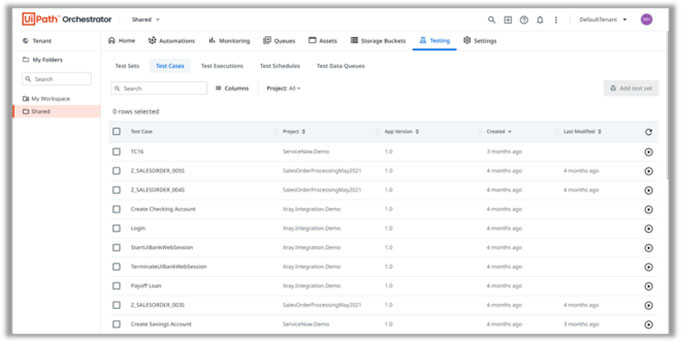
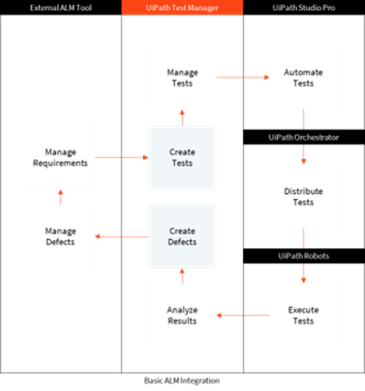
Using UiPath’s Orchestrator as a control center, testers can engage in production-grade continuous test execution through scheduled test sets and CI/CD integrations. And we’ve made automated testing even easier – testers can use our Test Discovery capabilities like Process Mining and Task Mining to target and prioritize specific tests based on actual production usage. Additional digital tools like Test Assistants and Task Capture also aid in eliminating time-intensive, mundane tasks.

Liberate from legacy

Digitalizing the future of testing

If you have existing testing tools or assets, we’ve got you covered – our open platform seamlessly connects into your DevOps toolchain.

With UiPath migration services, you can migrate test management artifacts, and, depending on your technology and other factors such as customizations, you may also have the option to gradually migrate your existing automation assets. You can also choose to have existing tools co-exist

Transform QA

You can say goodbye to tedious QA processes by leveraging our Enterprise Automation platform that allows for sharing and reuse across your cross-functional business. By expanding and scaling your automations, your testing components and objects will improve and become more resilient, transforming the QA process from a cost center to a value contributor.

UiPath is a Gold Partner at EuroSTAR 2022. It’s our first in-person event in 2 years – and it’s going to be a massive celebration of testing! Learn from 70 testing experts, and connect with your peers at Europe’s best testing event. Get your ticket now – book your individual ticket, or book a group and save up to 30%. See you in Copenhagen.

Authors

Sophie Gustafson, Content Strategist, UiPath Test Suite

Sophie Gustafson recently joined UiPath as a Content Strategist on the product marketing team for Test Suite. Sophie has previous experience working in the consulting and tech industries, specializing in content strategy, writing, and marketing.

Matt Holitza, Product Marketing Lead, UiPath Test Suite

Matt Holitza has worked at UiPath for two years and is currently the global Test Suite product marketing lead. Matt spent the first ten years of his career as a manager of a test automation team.

Filed Under: Uncategorized Tagged With: EuroSTAR Conference

  • « Previous Page
  • Page 1
  • …
  • Page 4
  • Page 5
  • Page 6
  • Page 7
  • Page 8
  • Next Page »
  • Code of Conduct
  • Privacy Policy
  • T&C
  • Media Partners
  • Contact Us

part of the