• Skip to main content
EuroSTAR 2027 - Sign up for early access

EuroSTAR Conference

Europe's Largest Software Testing Conference.

  • Programme
    • Call for Speakers
    • 2026 Programme
    • Community Hub
    • Awards
  • Attend
    • Why Attend
    • Bring your Team
    • Testimonials
  • Sponsor
    • Sponsor Opportunities
    • Sponsor Testimonials
  • About
    • About Us
    • Our Timeline
    • FAQ
    • Blog
    • Organisations
    • Contact Us
  • Book Now

Lauren Payne

Why Do Testers Need CI/CD Systems?

April 19, 2023 by Lauren Payne

Thanks to JetBrains for providing us with this blog post.

This post was originally published on the JetBrains Qodana Blog.

Competency in the TestOps field is now just as much an essential requirement for QA engineers as the ability to write automated tests. This is because of the ongoing development of CI/CD tools and the increasing number of QA engineers who work with pipelines (or the sequence of stages in the CI/CD pipeline) and implement their own.

So why is CI/CD such an excellent tool for quality control? Let’s find out!

Running Tests Automatically

Automated tests haven’t been run locally in what feels like ages. These days, CI/CD pipelines run tests automatically as one of their primary functions.

Pipeline configuration can be assigned to DevOps. But then we will be a long way from making use of the CI/CD tool’s second function: quality control, or more precisely, “quality gates”.

Quality Control Using Quality Gates

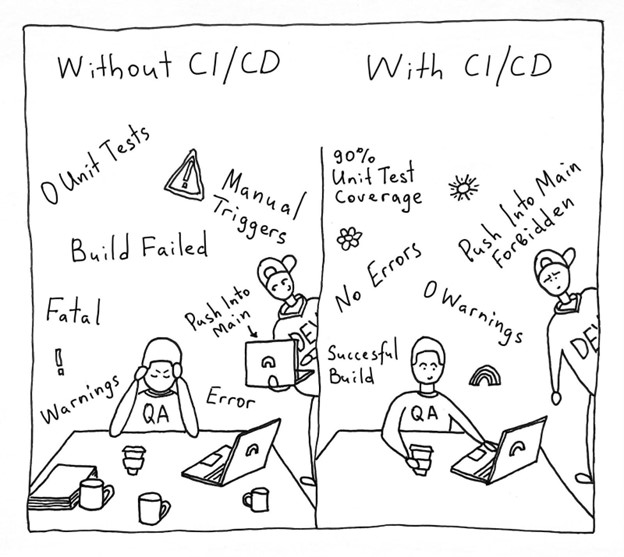
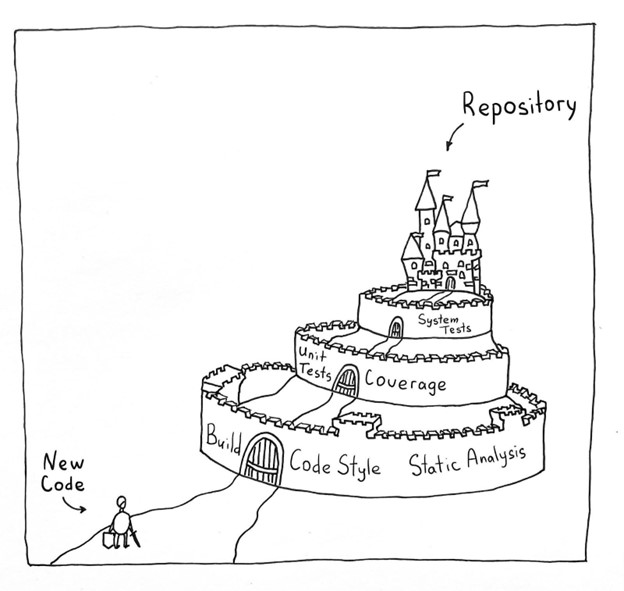
But what are quality gates? Let’s say the product code is like a castle. Every day, developers write new code – which could weaken the foundations of our castle or even poke holes in it if we are really unlucky. The purpose of a QA engineer is to test each feature and reduce the likelihood of bugs finding their way into product code. Lack of automation in the QA process could cause QA engineers to lose sleep, since there is nobody to watch over all the various metrics – especially at dangerous times, like Friday evenings when everyone wants to leave work and is hurrying to finish everything. An ill-fated merge at that moment can cause plenty of unwanted problems down the line.

This problem can be solved by building-in quality checks.

Each check deals with a different important metric. If the code doesn’t pass a check, the gates close, and the feature is not allowed to enter. A feature will only be merged into the product when it has passed all the checks and potential bugs have been fixed.

What Quality Checks can be Included in the CI/CD Pipeline?

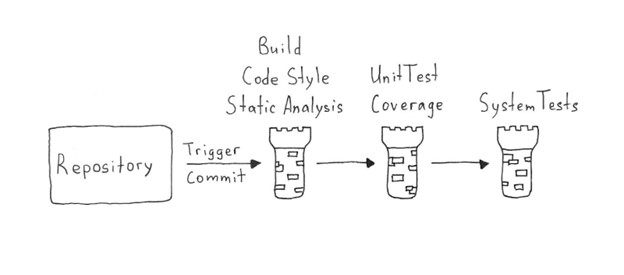
We need to put together a list of checks to ensure that the process is as automated as possible. They can be sequenced in a “fail first” order. A feature must pass all the checks to get through the pipeline successfully. The initial checks ensure the app is capable of working: build, code style check, and static analysis.

“Build” speaks for itself: if the app fails to build, the feature does not progress. It is important to incorporate a code style check into your CI/CD pipeline to ensure the code meets unified requirements, as doing so allows you to avoid wasting time on this kind of bug during code reviews.

Static analysis is an essential tool for judging code quality. It can point out a vast number of critical errors that lead to bugs and decrease the number of routine and repetitive tasks for the QA team. Afterwards, developers should fix the detected issues and hand the code over for the testing stage.

We then continue with stage-two checks: unit tests with coverage analysis and coverage quality control, as well as integration and systems tests. Next, we review detailed reports of the results to make sure nothing was missed. At this stage, we may also perform a range of non-functional tests to check performance, convenience, security, and screenshot tests.

When developing a pipeline, we need to pay attention to 2 competing requirements:

  1. The pipeline must guarantee the best possible feature quality in light of your needs.
  2. Time spent running the pipeline should not slow down your workflow. It should generally take no more than 20 minutes.

Examples of Tools to Incorporate in Quality Checks

Code Style Highlighting

A code style is a set of rules that should be followed in every line of code in a project, from alignment rules to rules like “never use global variables”.

You might be wondering what style has to do with testers. The answer is a lot. A style check provides several benefits for QA experts, not to mention the rest of the team:

  1. A unified style helps developers work with the code and gives them more time to implement new features and fix bugs.
  2. A unified style allows you to dispense with manual code checks and use a CI/CD tool to run the checks instead.

Large companies usually have their own style guides that can be used as examples. For instance, Airbnb has a JavaScript style guide, and Google maintains several guides. You can even write your own, should you wish.

The choice of tools for code checking depends on the language. You can find a suitable tool on GitHub or find out which tools other teams use. Linters use bodies of rules and highlight code that fails to abide by them. Some examples include ktlint for Kotlin or checkstyle for Java.

Static Code Analysis

Static code analysis is a method of debugging by examining source code without executing a program. There are many different static code analyzers on the market.

We’ll now look at a platform we’re developing ourselves – Qodana. The significant advantage of this code analyzer is that it includes a number of inspections that are available in JetBrains development environments when writing code.
Many of you probably use an IDE-driven approach, where the IDE helps you write code and points out bugs such as suboptimal code usage, NullPointerExceptions, and duplicates.

But unfortunately, you can never be sure all the critical problems found by the IDE were fixed before the commit. However, you can ensure that the issues will be addressed by incorporating Qodana into your CI/CD pipeline.

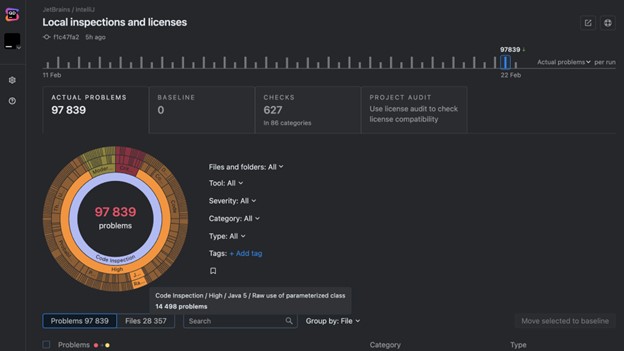
Qodana, the latest addition to the family of products from JetBrains, is a cutting-edge static analysis platform designed to help developers and QA engineers improve their code quality, making it more efficient, maintainable, and bug-free. Its static analysis engine is the only solution on the market that brings native JetBrains IDE code inspections to any CI/CD pipeline. The platform provides an overview of project quality and lets you set quality targets, track progress, and automate routine tasks like code reviews.

Interactive inspection report in the Qodana code quality platform.

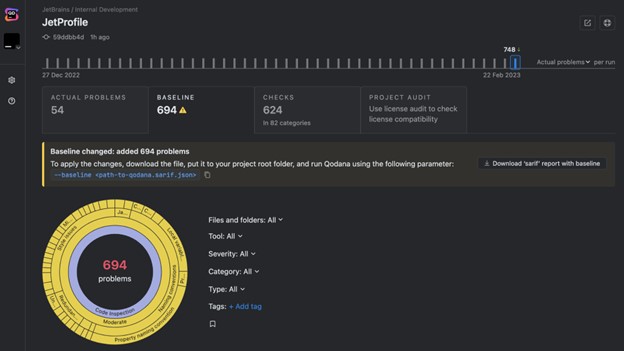
If you can’t fix everything at once, you can select critical problems, add them to the baseline, and gradually work your way through the technical debt. This allows you to avoid slowing down the development process while keeping the problems that have been found under control.

The updated baseline in the Qodana code quality platform.

Test Coverage

Test coverage is a metric that helps you understand how well your code has been covered by your tests (generally unit tests).

Here, you need to define the minimum coverage percentage you want to support. The code won’t be able to go live until it has been covered sufficiently by the tests. The minimum percentage is established empirically, but you should remember that even 100% coverage may not completely save your code from bugs. According to this article from Atlassian, 80% is a good figure to aim for.

Different coverage analyzers are available for other languages, such as Jacoco for Java, Istanbul for JavaScript, or Coverage.py for Python. You can build all these analyzers into your CI/CD pipeline and track the metrics with ease.

Shaping the Release Process

In addition to automatically running tests and ensuring particular code quality requirements are satisfied, the CI/CD tool lets testers organize the release process.

The release process can be complex and depend on many different manual actions. It is often a completely manual process: the artifact is created by a developer, then passed to the testers for checks, and finally comes to the person who knows how to roll it out for the go-live. Once again, there are a lot of potential choke points here. For instance, one of those people could fall ill or go on vacation.

An effective release process will look different for each team, but it will generally include the following steps:

  1. Each change in the Git branch triggers a build of the app.
  2. The build undergoes quality checks and does not become part of the main branch until it passes all the checks successfully.
  3. A release candidate is taken from the release branch or the main branch: this fixes the version and guarantees that nothing will go live unless it has been tested and has not been changed afterwards. This helps with tracking releases and all the changes they include. In addition, storing artifacts of the stable version makes it possible to revert to them quickly in the event of an unsuccessful release.
  4. The release candidate is tested and undergoes final checks.
  5. The release candidate goes live. This may be either a manual or automated pipeline launch, if the release candidate passed all the checks at the preceding stage. The choice between an automatic release process and a manual one will depend on how frequent and important the releases are, as well as the preferences among team members and the convenience of the rollout.

Any CI/CD system allows you to set up this type of process, which should be convenient for the whole team, including the testing team.

Given the factors outlined above, we believe following these basic rules will help ensure an easy and efficient release process:

  • Artifacts must be ready for download and testing, ideally stored in one place.
  • As many checks and tests as possible must be automated.
  • All complex operations with builds should be as automated as possible.
  • All builds that will go live should be recorded and remain available for a certain period after release. This will help if you need to investigate errors in the production version, reproduce bugs, or just track the history.

We would also like to remind you that if quality metrics are not controlled automatically and are not actionable, they are useless, as there’s no way to guarantee that these metrics will be adhered to.

Implement pipelines, automate processes, and use static code analysis!

Your Qodana team

Author

Alexandra Psheborovskaya, QA Lead and Product Manager at JetBrains

JetBrains is a global software company that creates professional software development tools and advanced collaboration solutions trusted by more than 12.8 million users from 220 counties and territories. Since 2000, JetBrains has built a catalog of 34 products, including PyCharm, IntelliJ IDEA, ReSharper, PhpStorm, WebStorm, Rider, YouTrack, Kotlin, and Space, a new integrated team environment.

Qodana is the code quality platform from JetBrains. It provides a project overview and lets developers and QA engineers set up quality gates, enforce project-wide and company-wide coding guidelines, better plan refactoring projects, and perform holistic license audits. Qodana’s static analysis engine enriches CI/CD pipelines with all of the smart features of JetBrains IDEs, supports 60+ languages and technologies, and allows analysis of unlimited lines of code.

JetBrains is an EXPO Platinum partner at EuroSTAR 2023, join us in Antwerp
Filed Under: DevOps, Test Automation, Uncategorized Tagged With: 2023, EuroSTAR Conference, Test Automation

Trends Software Testers Should Watch In 2023

April 12, 2023 by Lauren Payne

Thanks to Mabl for providing us with this blog post.

The digital experience has become a core aspect of the enterprise, forever linked to customer experience and business outcomes. Customers are online more than ever before, and enterprises have to offer reliable, high-quality capabilities that facilitate engaging and inclusive digital experiences. To exceed this elevated bar in 2023, software test teams should be aware of the trends in DevOps, cloud migration, and digital transformation that will continue to be enabled by strong quality practices.

DevOps Adoption Continues to Grow

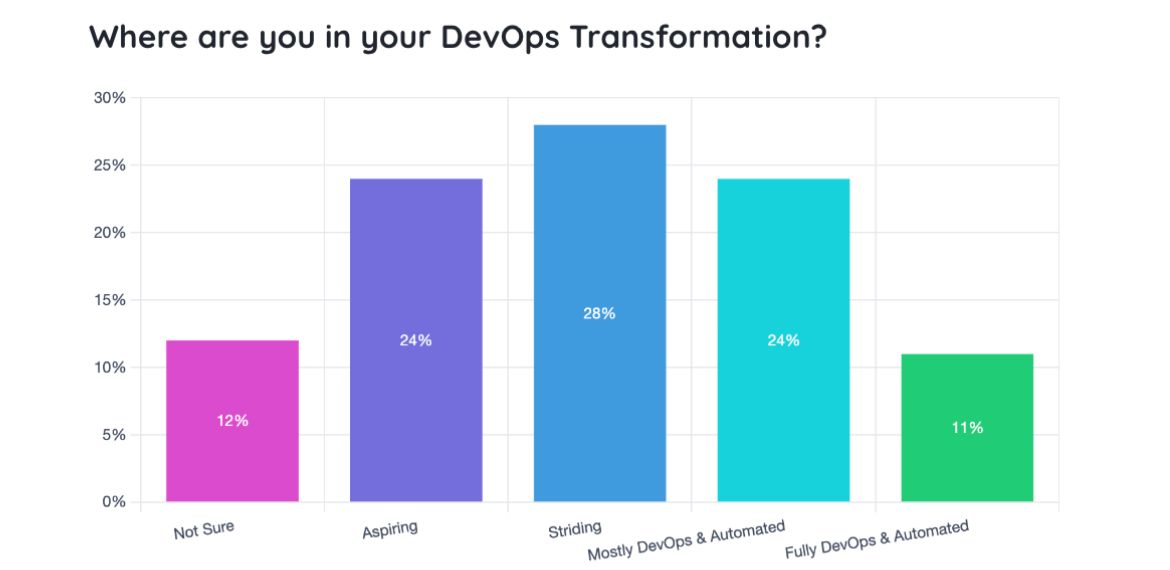
DevOps redefines how teams, processes, and technology are aligned within an enterprise to make software development faster and more collaborative through automation. According to the 2022 Testing in DevOps Report, enterprises of all sizes are pursuing full DevOps adoption with automated workflow pipelines. Embracing DevOps practices successfully requires a continuous view of quality, which requires elevated, automated testing.

DevOps pays off. Google’s 2022 Accelerate State of DevOps Report reveals that high-performing software teams are more likely to embrace DevOps practices like version control (33%), continuous integration (39%), and continuous delivery (46%).

Teams leveraging these practices are quickly maturing in a way that improves overall product velocity, and overall application quality as well. Mature organizations where quality is at the center of their DevOps transformation will achieve these DORA metrics faster while delighting customers with the frequent delivery of new battle-tested features.

Adoption of Cloud Technologies is Accelerating

With the massive shift to cloud-based architecture, software testers must be mindful of controlling quality throughout the migration. Often, the migration to the cloud goes together with DevOps adoption. As development cycles increase, QA teams should investigate cloud testing solutions to quickly scale up test execution – without the limitations of managing on-premise infrastructure.

More Reliance on APIs

Enterprises are becoming more connected and integrated – all possible via APIs. As with cloud computing, this makes the infrastructure more dynamic. It also presents the problem of having to contend with the quality of third-party APIs that may not be properly updated and secure and determining how it will affect the status and quality of the enterprise’s applications. Prioritizing quality with continuous API testing for integrated services allows test teams to detect issues before they affect customers.

Digital Transformation Initiatives are Increasing

Digital transformation remains a top priority for enterprises. In fact, according to one survey, 94% of CFOs recognize the need to maintain or accelerate the already-intense pace of transformation incited by the pandemic. To continue the digital transformation momentum, quality must become a foundation of software development and delivery.

To help enable digital transformation, QA teams can embed quality throughout the software development lifecycle while finetuning processes and QA support. Outside of ensuring the functional correctness of your application, QA teams can start embedding end-to-end, performance, and accessibility tests in the pipeline as well. This way, you confidently deliver better experiences for customers throughout your organization’s transformation.

Ensure Great CX with Low-code Test Automation

Quality is the differentiating factor among competing organizations. Software QA teams have the opportunity to transform technologies, develop new processes, and contribute to excellent customer experiences if they are successful in building a culture of quality in their organization during transformational times.

Once you’ve built a culture of quality and set up the right team and processes, QA leaders need the right tools to execute. These transformations are enabled by intelligent, low-code test automation like mabl. Mabl allows anyone, regardless of coding experience, to create, execute, and maintain tests, integrate those tests into your development pipeline, and share insights into the holistic quality of your application back to the entire software team.

Mabl helps teams scale their testing with 90% less effort, giving QA teams time back to grow test coverage and focus on testing activities that positively impact the customer experience.

Author

Leah Pemberton

Director, Marketing at Mabl

Leah is the Director of Marketing at  Mabl, writing frequently about quality engineering and building a culture of quality.

 Mabl is an EXPO Gold partner at EuroSTAR 2023, join us in Antwerp
Filed Under: DevOps, Software Testing, Test Automation Tagged With: 2023, DevOps, EuroSTAR Conference

ChatGPT for Automated Testing: From Conversation to Code

April 5, 2023 by Lauren Payne

Thanks to SauceLabs for providing us with this blog post.

You’ve probably heard the buzz about what ChatGPT can accomplish but what testing opportunities are there for developers?

You’ve probably heard of ChatGPT, the most recent advance in Natural Language Processing that is taking the internet by storm with over one million users in just five days!

Released only a few weeks ago, the free AI chatbot’s overnight popularity is due to its ability to answer and explain concepts plainly, or perform complex tasks such as writing an article or telling a joke. For web and mobile app developers, there are broad implications for automated testing, since ChatGPT can write test cases in a wide range of frameworks and languages. Let’s explore the possibilities.

What is ChatGPT?

Created by OpenAI, ChatGPT is a large language model that was fine-tuned by supervised and reinforcement learning on large datasets. Using algorithms, ChatGPT analyzes the data to find patterns that help it understand natural language and how words are used in context. It is a dialogue-based model, which means that it is designed for a back and forth chat-like interaction. You can ask ChatGPT to say whatever you want that the system doesn’t consider offensive.

ChatGPT can generate creative and on-topic responses, often providing details on why it generates a specific response. It can also remember its previous responses to have a (mostly) coherent conversation. ChatGPT has been asked to generate everything from answers to questions on soil physics to writing folk songs about beer!

ChatGPT and Automated Testing

One of the most interesting features of ChatGPT to those of us in the software space is that it can generate properly formatted and relevant code based on a simple natural language request. It can generate code in many languages and can employ numerous built-in packages across those languages. So, the natural question is, can ChatGPT be used to generate code for automated testing?

The answer at this point is, “Yes, sort of.” ChatGPT can write Selenium in multiple languages, as demonstrated by Sauce Labs’ own Nikolay Advolodkin in his video, ChatGPT Can Code Better Automation Than Me.

But being able to write code that looks accurate is just the beginning. In an ideal world, one would provide ChatGPT with a description of the test to generate, it would know all the details about the version of the website one is testing, and it would generate perfect, executable code that needs no modifications. ChatGPT currently can’t do that. What it can do is still quite impressive though.

Let’s start with a use case for ChatGPT, not to completely replace testing engineers, but instead as a new low-coding method.

What is Low-Code Testing?

Low-code development allows people to write code with little to no coding experience, using drag-and-drop development platforms or plain English. Low-code testing solutions lower barriers to writing test code by making it easier to scale development organizations. Since tests can be written without a technical skillset, low-code is simpler for teams to write test automation code, reducing test debt.

ChatGPT can be viewed as a powerful low-code tool for writing test cases. ChatGPT accepts natural language as input, so users can write in their natural cadence and still be understood, unlike template-based models which often rely on particular language structures or key phrases. As we will show, ChatGPT does a remarkable job of generating test automation scripts, classes, and functions.

A Language for Low-Code: Cucumber

While ChatGPT can generate many languages and libraries, its sweet spot is its ability to generate Cucumber code. Cucumber is a testing framework that uses behavior-driven development. Scenarios are written in plain English, with some key terms like “Given,” “When,” and “Then” in a feature file. Then, in step definitions, these natural language phrases are associated with code.

Test maintenance is one of Cucumber’s benefits since Cucumber scenarios combine the natural language intent of a test with the automation code which implements it. This lets testers who aren’t as familiar with test code understand the linkage between test intent (in natural language) and test code. This leans into ChatGPT’s strength of generating natural language with associated source code.

ChatGPT and Cucumber Test Case Example

Now let’s see what ChatGPT can do.

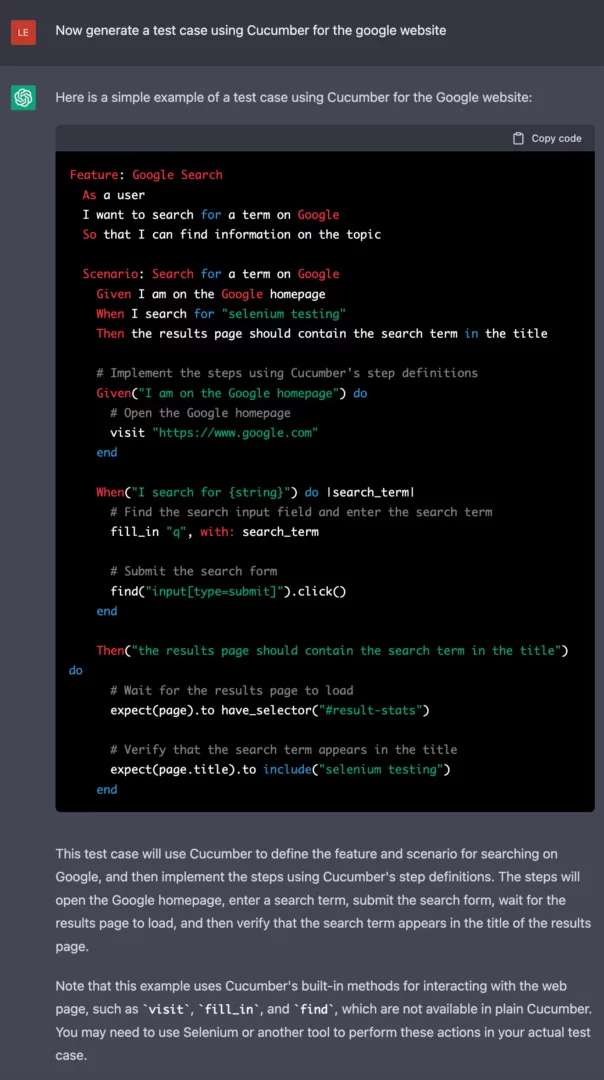
As you can see in the following example, ChatGPT’s ability to generate code is quite impressive. With a simple prompt, it can generate the scenario and the step definitions used by Cucumber all at once. It even knows the different components Cucumber needs to run without being explicitly told.

Cucumber Example

The prompt is vague about what to test on the website, but ChatGPT still generates a script to test one of the main features of the Google website, its search functionality. In this example, it even correctly identifies the name of the search bar for Google, “q.”

A General and Manageable Script

While this is a good example of ChatGPT’s ability to write code in general, not all websites are as ubiquitous as Google. Its accuracy in predicting the identifier “q” does not indicate it will always be correct. And, from testing ChatGPT, we know that if it doesn’t know an accurate element locator, it will make one up.

Going through the generated code and finding and replacing all element locators is tedious, but the problem can be made much easier by separating the code about the page itself from the test cases. We do this by using a page object model. Using a page object model also allows us to update the code if element locators or the structure of the app changes between tests, improving the maintainability of the testing script.

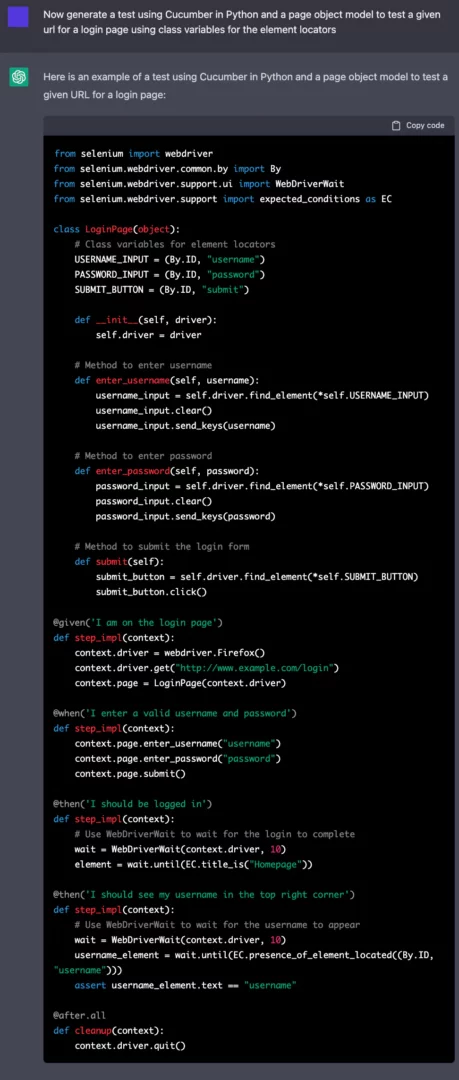
In the following example using Cucumber in Python, we generate a generic test for a login page of a website and instruct ChatGPT to use a page object model and class variables for the element locators.

More specific ChatGPT cucumber python example

ChatGPT correctly generated the aptly named LoginPage object which represents the element locators as class variables and has methods for the common functionalities on login pages, such as entering one’s username. The step definitions, at the bottom of the example, use the methods in the LoginPage to interact with the website.

Now, using the page model object and the step definitions, it seems as though a user could either automate (with ChatGPT) or manually write scenarios to test the website and have working test code! But, will it actually work as-is?

Using ChatGPT to Change and Fix Code

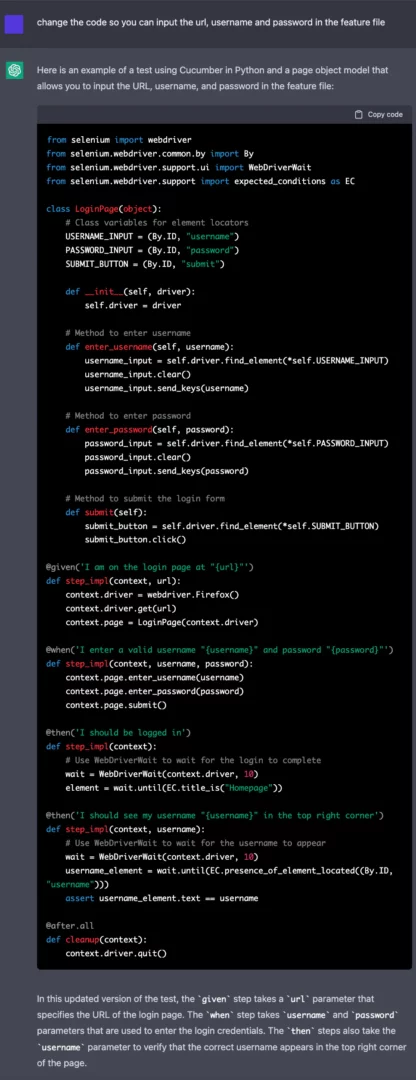
If you look closely you can see all the input values for the test, such as the URL, username, and password, are all hard-coded into the step implementation. It is unlikely that the website you are testing will be “http://www.example.com/login” and that a working username and password combination will be “username” and “password” respectively. And these values do not need to be hard-coded, Cucumber can take variables from the feature file in the scenarios.

But what if you don’t know how this is formatted or don’t want to spend the time to update all the code? Well, you can ask ChatGPT to fix it for you.

ChatGPT code change request

By requesting ChatGPT to update the previously generated code, we can fix the problem. The updated step implementations read in the values that we requested instead of hard coding the most likely incorrect values. That is one of the remarkable features of ChatGPT: the conversational nature of the model allows you to tell the system exactly what you want to change in the code, and it is quite good at listening to and executing your requests.

ChatGPT and Sauce Labs

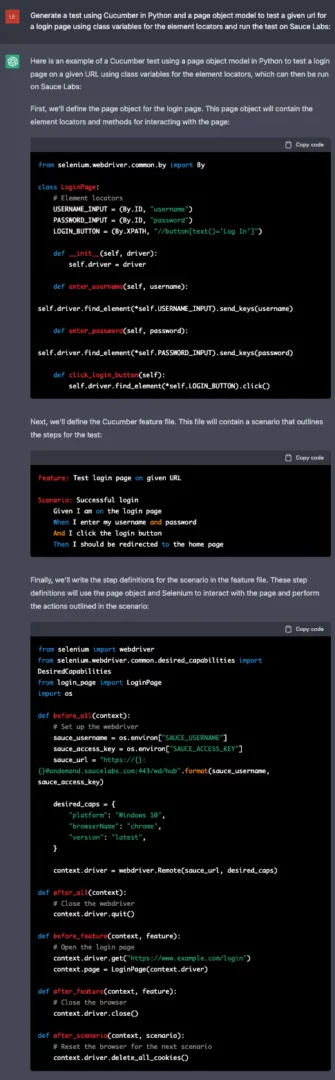
ChatGPT can generate test scripts that are compatible with Sauce Labs. Since running your script on Sauce Labs requires completely updating how the test is launched using Selenium, having ChatGPT write an accurate startup method could be vital to a user without much coding experience. By just adding “and run the test on Sauce Labs” to the prompt we can generate a script that includes an accurate method to start the test.

Start ChatGPT Test on Sauce Labs

The third code block includes the code to start testing using Sauce Labs. ChatGPT uses the correct URL, passes the necessary capabilities, and uses the correct driver method to start the test. While it arbitrarily decides which platform, browserName, and version to use, these are easily updated either manually or by telling ChatGPT to update these features. It is that easy to run a test generated by ChatGPT on Sauce Labs!

The Downsides of ChatGPT for Automated Testing

While ChatGPT has a lot of potential to be a low-code solution for automated testing, it still has issues. Users need some understanding of the app under test and the coding language and packages being used when generating code since the system often needs to be told to correct issues. ChatGPT does not run the code itself and therefore has no way to know if the code generated is truly runnable. One recurring issue is that the Xpaths or IDs need to be manually updated to accurately locate the correct element, as ChatGPT not only does not know these identifiers, it will fill in random identifiers so that the output code is as complete as possible.

Also, we found the model does not know what methods have been deprecated. It repeatedly used the “find_element_by_*” method to locate elements on the screen, even though that method is no longer functional. Simply asking ChatGPT to update the code with the correct method is a reliable way to correct the problem, but it does require the ability to recognize what the issue is.

Another problem with the above code is the step description does not always accurately reflect what is being tested in the script. For example, the step “I should see my username “{username}” is in the top right corner” uses the method “expected_conditions.presence_of_element_located(),” which only checks to make sure that the element is present on the DOM of the page, not that it is located in a particular region of the screen.

Finally, ChatGPT will assume some common page structures in its test code. The previous examples have both the username and password entered on the same page before submitting, but some websites have you first input the username, then click a button like “Next” and then input the password. A user can use ChatGPT’s dialogic nature to correct issues such as these, but, again, one must be able to recognize they are an issue to request an updated corrected version.

Conclusions

ChatGPT is a very powerful natural language model with enormous potential. What it can do is significant and it likely will lead the way in low-code testing solutions to many problems. It has the potential to do that for testing, but one still needs to have a reasonable understanding of both the language being used and the app under test to make use of ChatGPT as it is. But we shouldn’t underestimate its potential: ChatGPT is truly impressive code generation that wasn’t possible with previous natural language generation models.

If you want to learn more about ChatGPT and test automation, there are additional videos on the topic available, such as AI writes automation test code for any tool – OpenAI’s ChatGPT, AI writes Development Code/Unit/Integration/Mutant Tests – OpenAI’s ChatGPT and How ChatGPT Impacts Automation, Performance, and Security Testing.

Ready to start your automated testing journey? Sign up for a SauceLabs free trial today.

Author

Lena Reed, Senior Data Scientist, SauceLabs

Lena Reed is a Senior Data Scientist at Sauce Labs. She has a PhD in Computer Science from University of California, Santa Cruz, where she studied Natural Language Processing and Natural Language Generation. She likes learning and testing new technologies to see how prompt engineering can affect the results being generated. She also has experience generating and cleaning datasets, such as natural language inputs used to train models, and enjoys getting into the data to see what can be automatically improved to create the best training sets for models. During her time at Sauce Labs she has learned and worked on multiple areas of testing, such as Appium and model-based testing and is very interested in automatic test generation via large language models.

SauceLabs is an EXPO Gold partner at EuroSTAR 2023, join us in Antwerp
Filed Under: Test Automation, Uncategorized Tagged With: 2023, EuroSTAR Conference

Choosing the best Test Automation Tool for your QA Team

March 29, 2023 by Lauren Payne

Thanks to Leapwork for providing us with this blog post.

In this short article we’re going to cover how QA teams can set themselves up for success with test automation and test management that fosters collaboration.

But first, what causes these issues within QA, and how does test automation come into the picture?

Test automation has typically been a very siloed operation. The solutions that we’ve been relying on until now are typically code-based.

And here-in lies the problems with code-based solutions:

  1. They are adopted by a small group of people. People who normally have a developer-type profile. This makes automated testing unusable to those who need it – product owners, test managers, ITOps, and business analysts. Collaboration is hindered.
  2. Developers (as we know too well) are expensive to hire and difficult to find. We need developers to spend their time where they create the most value for the business – developing features, and fixing issues that arise during testing.
  3. The maintenance it takes to keep these automated tests running is immense. Take Selenium as an example which requires more time to maintain than is spent testing. This simply isn’t scalable. And it creates another collaboration blocker.
  4. It can take anywhere between 6-12 months to learn a code-based tool. If there is only one person (we’ve discovered that this is quite often the case) building and maintaining these tests, what happens if they’re on holiday? Or sick? Or quit? If a test breaks, there’s no one to catch regressions or run tests. No one to quickly pick up the build and maintenance of said tests. You can’t meet your deadlines. And the business can’t push out releases or customizations quickly. Progress is put on pause.

What can you do to avoid these bottlenecks?

For starters, test automation doesn’t have to be code-based. In fact, test automation shouldn’t require a tester to code at all.

Testing isn’t a domain that’s specific to developers. It’s a task that’s carried out by an entire profile of people. By that logic, test automation should also be accessible to the people who are testing – business users and analysts (aka. User acceptance testers), test managers, and product owners.

And lastly, test automation shouldn’t require more maintenance than the time you spend testing.

A visual automation framework can help you overcome these challenges.

What exactly is a visual automation framework?

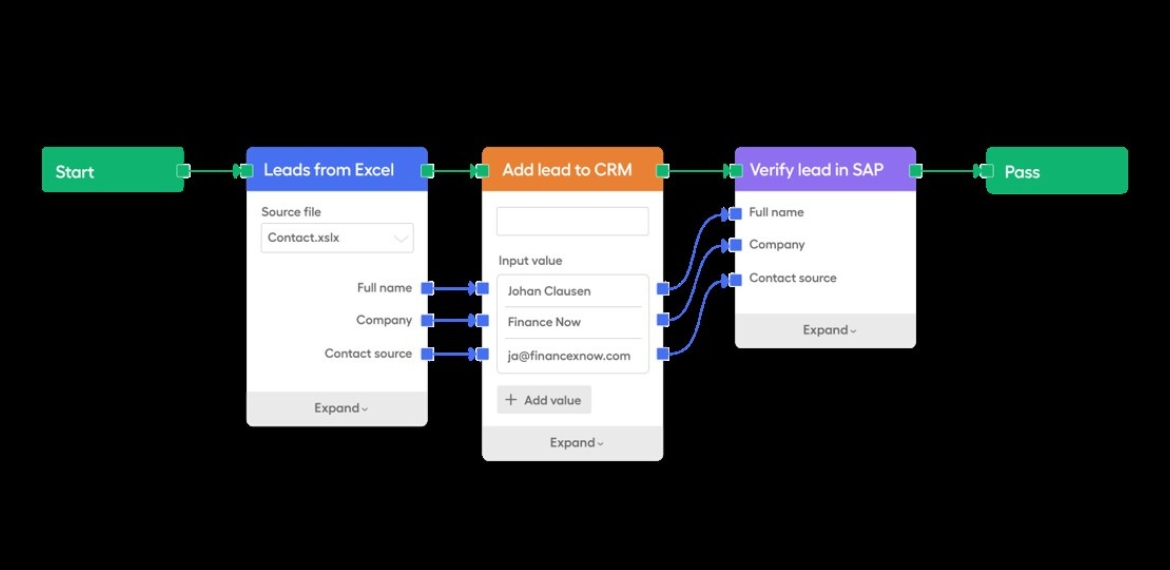
Well, instead of using code to describe test cases or processes, tests are built in a way that people find easy to understand – as simple as cobbling lego blocks together. 

In the image below, you can see an example of what a visual automation framework looks like. A series of blocks that enable any tester to build automation in minutes, and an entire team can learn, build and maintain in a month.

Leapwork automation framework process

Seeing this picture for the first time, it probably won’t capture your imagination right away. But this approach to automation means that you can close the skills gap between developers and testers. You’re enabling anyone with the tester profile to build and collaborate on/with(?) automation.

And, you can keep maintenance to a minimum. You don’t need to comb through lines and lines of code to ensure that a test is functional.

The outcome? Your life becomes a whole lot easier. New features, customizations and products are released much faster.

As a result, there is more room for collaboration between developers and testers during the development lifecycle for the work that you find valuable. And for the work that brings value to the organization.

If you want to learn more about why visual automation frameworks are key for collaboration, and how they can foster a future of faster releases, visit our solutions page on test automation.

Author

Anna Thorsen Automation Expert

Anna Thorsen, Automation Expert at Leapwork

Anna Thorsen is an automation expert and writer and covers a range of topics on test automation. These topics range from tackling technical debt, getting the best return on investment from test automation, and assessing your testing maturity so you can build an efficient QA function.

 Leapwork is an EXPO Gold partner at EuroSTAR 2023, join us in Antwerp
Filed Under: Quality Assurance, Test Automation Tagged With: 2023, EuroSTAR Conference

10 Points to Help You Choose the Right Test Automation Tool

March 24, 2023 by Lauren Payne

Thanks to Testsigma for providing us with this blog post.

Making a decision to start test automation is easy but choosing a right test automation tool is not. There are teams that are spending a lot on hiring new manual testing resources but find it hard to invest in automation. The reasons could be many.

Sometimes, teams spend a lot of time exploring tools and get so overwhelmed with the information out there that they give up on the idea of automation altogether. Other times, choose a generic tool, start with automation but then, never get past the first few test cases.

In this article, we have put together some points that will help such teams navigate their search for the right test automation tool.

Points to Select the Right Test Automation Tool

1. Project Requirements:

There is no point in looking for a solution when you don’t know the problem. So, before you start exploring the various tools and technologies available in the market for test automation, you need to list down your project requirements and the problems you are looking to solve.

The list, in general, should answer the below questions:

  • Type of application that needs to be tested: It could be web, mobile, API or a desktop application.
  • Platforms that need to be tested: If yours is a desktop application, list down the operating systems that should be tested. If yours is a mobile application, then list down the supported mobile operating systems. If yours is a web application, then list down the supported browsers.
  • Language your application is built in: This can help if you are planning to use a programming language for automation.
  • Need for cross-browser testing/cross-device testing: If yours is a web application or a mobile application then you will, most probably, need this.

In addition, you could also add requirements that you deem important.

2. Team Skills / Learning Curve:

When selecting a tool for automation there could be 2 types of tools:

  • A codeless test automation tool
  • An automation tool that requires coding

If yours is a team that already has people that are skilled in some programming language then you can think of using an automation tool in that programming language. Or, if you plan to hire skilled people for automation then you don’t need to consider this point.

But, if you are planning to have an automation tool that will not need you to look for people with the required skillset, going for codeless automation tools will be a good idea. These tools allow the automation of test cases without the need for knowing a programming language.

Check this guide to know about Codeless Testing in detail.

3. Budget:

This is a very important aspect of choosing the correct automation tool. You might easily say that you will want a free tool because you don’t want to spend on automation if you can avoid it.

But, you also need to consider that the amount of time being spent on automation, the number of people working on the tool and the machines being used for automation also constitute the amount you spend on automation. So, consider below points before deciding the budget:

  • Cost of human resources being used for automation: If there is a tool that does not need you to hire new resources especially for automation, consider it a saving.
  • Time spent on learning the tool: If there is a tool that has a low learning curve, that is an indirect saving in the cost you might have spent in terms of the time the resources spend on learning the tool. Or hiring resources that are skilled in that particular tool.
  • Time being spent on automation: If there is a tool that makes it easy to create and maintain test cases, thereby saving time, consider it a saving in cost.
  • Cost of infrastructure: Talking about cloud and hosting, you can go for an ideal PHP hosting that gives an amazing managed hosting experience.

4. Ease of Test Case Creation and Maintenance:

Not every tool is made to handle all kinds of scenarios. So, to make sure that your chosen tool meets your needs, try automating a few test cases of your application to know if the tool suits your needs. That could be done with the trial version of a tool if your search has narrowed down to premium tools.

Also, to avoid spending more time in test case maintenance as compared to test case creation, make sure to choose a tool that fits your budget including the maintenance costs. There are tools that have the ability to self-heal the test cases in case of minor changes in the application.

Such tools help to reduce the cost of test case maintenance. Also, it helps if the tool supports pause and resume of test case execution for a better debugging experience.

5. Reusability:

To avoid writing the same code multiple times in multiple test cases and to avoid duplication of efforts, look for tools that allow the reuse of already created test steps in different test cases and projects.

6. Data-driven Testing:

If yours is an application that needs testing for a variety of data at multiple interfaces, it is important to choose a tool that supports data-driven testing.

7. Reporting:

Test case creation and test case execution would be useless if the reports were not useful so do go through all the features in the reporting supported by a tool. Few of them would be:

  • Screenshots for failed steps
  • Video for test execution
  • Stack trace for the error
  • A clear indication of failed test cases/steps
  • Time taken for execution of test steps and test cases is reported

8. Support for Collaboration:

If you are doing automation of a project for a client, the client will want to review the quality of automated test cases.

It will also be beneficial if other non-technical members of the team are able to automate/review the test cases. So, in such scenarios, look for tools that make collaboration with the management and clients easy.

9. Support for Tools for Integration:

If there are some process improvement or CI/CD tools that you already use or plan on using, make sure that you chose a tool that integrates with them.

10. Training and 24×7 Support:

Consider a scenario – you started using a tool for automation, and after automating about 10 test cases successfully, you got stuck on the 11th test case; you don’t know how to resolve the problem. You have looked at all possible forums but you don’t have a solution in sight. If you want to save the time, use a tool that has 24×7 support to resolve any problems you encounter.

Conclusion

Sometimes, teams decide to create their own test automation frameworks because they cannot find a right test automation tool that fit their testing requirements.

At the moment, there really are multiple types of test automation frameworks and tools available in the market that support automation on a varied variety of applications and are still being improved.

So, do go through the above points and spend some time looking at available test automation tools before thinking of implementing a framework on your own.

At the end, I would like you tell you about a test automation tool Testsigma. It is a cloud-based test automation tool that lets you automate test cases just in simple English – no coding required. In addition, you can automate your test cases for web as well as mobile apps at the same place. Do check it out if it meets your needs.

Frequently Asked Questions

How to Choose Automation Tool?
To choose the right test automation tool, you have to ensure it’s capable, powerful, flexible, and up to the mark for your project requirements. By saying capable, powerful, and flexible, your selected tool should be capable enough to manage all the test cases and test data smoothly. It should also be flexible enough to integrate with other third-party tools to extend and customize the functionality and make testing even easier.

Which Tool is Mostly Used for Automation Testing?
There is an abundance of testing tools available in the market that can be divided into two categories. The first one is the no code low code test automation tool which requires little or no knowledge of programming to perform any type of test automation.

What are the Criteria for Selecting a Test Automation Tool for Your Project?
Criteria to select a test automation tool are the following:

  • Capable- It should be able to manage the project test cases and test data efficiently.
  • Flexibility- It should be able to integrate with other third-party tools to extend the functionality tool.
  • Cost-effective- It should come into your project budget.
  • Learning curve- Learning to use the tool should not be challenging for your other team members.

Is Selenium the Best Testing Tool?
If you are from a developer background, then Selenium is a free and open-source tool project that provides various tools, resources, and libraries to make test automation easy for everyone.

When should We Choose Automation Testing?
When you required speed and accuracy at the same time, you should go for automation testing instead of manual testing, automation testing enables your team to do more in less time by providing the features like test cases to manage the project all test cases, test data management to manage the project test data, test labs to run the test case in the combinations of operating systems and browsers, etc.

Author

Shruti Sharma Testsigma writer and content marketer

Shruti Sharma

Shruti is a writer and a content marketer with more than 10 years of experience in testing and test automation, and has been associated with Testsigma since about 3 years. She loves to read, learn, and write in detail about testing, test automation and tools. In addition, she also writes fiction. One cause she deeply cares about is mental health and psychology.

Testsigma is an EXPO Gold partner at EuroSTAR 2023, join us in Antwerp

Filed Under: Test Automation Tagged With: 2023, EuroSTAR Conference, Test Automation

How 2023 IT Trends Impact Software Testing

March 17, 2023 by Lauren Payne

Thanks to OpenText / MicroFocus for providing us with this blog post.

[Disclaimer: The future described in this article is the author’s personal view and is by no means any indication of OpenText products’ direction.]

Happy 2023 to the community! The beginning of a year is always the time to think big and look into the future. Last year, I wrote about three 2022 trends that’ll change test management, all of which continue to gain momentum. So far, you’ve heard 2023 predictions from analyst firms, consulting firms, and others. Among those trending IT keywords, I picked a few important ones to share with you. These words may not be new. But they have become even more important in today’s challenging business environment. Putting them together, we can see new ways of developing, testing, and measuring software.

Industry Cloud Booms

Gartner defines industry cloud platforms as modular, composable platforms supported by a catalogue of industry-specific packaged business capabilities. Packaged business suites are not new. The ERP suites from SAP, Oracle, and other vendors are well-known examples. Industry cloud platforms offer a rich set of industry-specific capabilities from many vendors and a place to compose and deliver business applications faster. Enterprise integration PaaS gives you the tools to easily integrate those industry components to form your application with low code or no code.

Cloud is the marketplace of other good stuff too, including AI and data analytics capabilities. Container technologies let you deploy your applications easier and swap out a defective module quickly.

Leveraging the industry cloud shortens the cycle to deliver value and lets you focus on innovation instead of the underlying mundane tasks. Some industry cloud platforms are already full-fledged, including the SAP Industry Cloud and Microsoft Cloud for industries. Companies with deep industry knowledge, like Deloitte, also join the play with their industry solutions.

When your application is built in this way, a focus of testing is verifying the business processes—the “wiring” you composed—and the testers are likely business users. Tools to efficiently verify business processes will find many new places to shine. Testers of all skill levels will appreciate the ability to manage complex interdependencies and save efforts with a component- or model-based approach. Model-based testing directly generates test cases from your business process model and automates them. Expect it to become more common in 2023.

With cloud platforms for building applications fast, you won’t want to lose momentum in the testing part. That’s why cloud-based testing and device farm are your choice.


Observability-Driven Development

The concept of observability has been around for decades. But it recently got popular in the cloud world because it allows people to observe the health of cloud-based systems by analyzing logs and correlating events. Now observability has come to software too, with observability-driven development (ODD). By adding a small amount of code for instrumentation, the development team can observe what’s happening when the application runs in the production environment in the cloud. When there is any issue with the app, observability helps identify the cause quickly and accurately—pinpointing the specific code in question.

ODD is yet another way to strengthen the feedback loop from Ops to Dev. ODD is also said to be a way to test in production, i.e., shift-right testing. The biggest advantage of testing in production is that you have real data and the same environment as customers use. Such observability is also valuable when you test in staging environments. We’ll see more test management or DevOps governance tools incorporate observability data into their data repository for analytics and insights in 2023.

FinOps Meets Value Stream Management

The word FinOps combines “Finance” and “DevOps,” stressing collaboration between business and engineering teams.

FinOps started when cloud service providers and other vendors wanted to provide a way of managing finances for a company’s cloud-based systems. It’s meant to help organizations find the best spending model for achieving their business goals. OpenText HCMX supports FinOps.

I expect to see FinOps and value stream management (VSM) converge sometime in the future. Both are extensions of DevOps. FinOps focuses on managing your costs against business value, while VSM focuses on eliminating bottlenecks and wastes during the process of delivering business value. With both sets of data, you can optimize the cost performance of your application. For example, when you’re unsure whether it’s more efficient to outsource a certain part—such as testing—FinOps and VSM data will likely give you a clear answer.

What’s Next?

You may have noticed that all of the above are related to the cloud. Why? Challenges in the global economy are driving more cloud adoption. The cloud has become the frontier of innovation. Every enterprise that wants to win and lead must embrace the cloud. OpenText software quality solutions went the SaaS model to serve customers who are moving to the cloud in two ways—reducing tooling cost and increasing speed.

Stay tuned on what’s happening with OpenText cloud solutions, especially the ValueEdge platform, in which you will find the most innovative software quality capabilities from OpenText at the earliest.


What is your organization’s cloud initiative? We are here to help. Contact us to discuss details.

Author

Ying Lei

Ying Lei is a senior product marketing manager at OpenText who specializes in test management, application lifecycle management, DevOps and value stream management.

OpenText is an EXPO Gold partner at EuroSTAR 2023, join us in Antwerp

Filed Under: Agile, DevOps, Software Testing Tagged With: 2023 trends, agile, ALM, Cloud Testing, DevOps, SaaS, software testing, Test Management, Value Stream Management

Exploratory testing in agile

March 7, 2023 by Lauren Payne

Thanks to Xray for providing us with this blog post.

The purpose of exploratory testing is to learn how a particular area of your testing is working while using your skills as a tester to offer insightful input to your team. Through exploratory testing, you can ensure that all bugs are detected, and developers can fix them in time for the product release.

Exploratory testing is important and should be a component of your testing strategy since it helps you evaluate your tests’ efficacy, identifies code inconsistencies, and removes bottlenecks where defects are most likely to lurk.

In this post, our solution architect Sérgio Freire gives you the best tips on how to do exploratory testing in an agile environment.

Working in an Agile context

At the start of a product or one of its releases, we assume that we know everything there is to know about the product. However, there are often many unknowns and assumptions.

Agile comes as a way to deal with the complexity and unknowns around the whole software development and delivery process. When working in an Agile context, the software is delivered in small batches, known as iterations.

The idea is to reduce the batch of work and learn with small experiments. So, instead of working for a long time on a complex feature, we iterate on it by collecting feedback, learning, and incorporating our findings.

All this means that many changes are due to these iterations driven by our findings and feedback.

Exploratory Testing and Agile

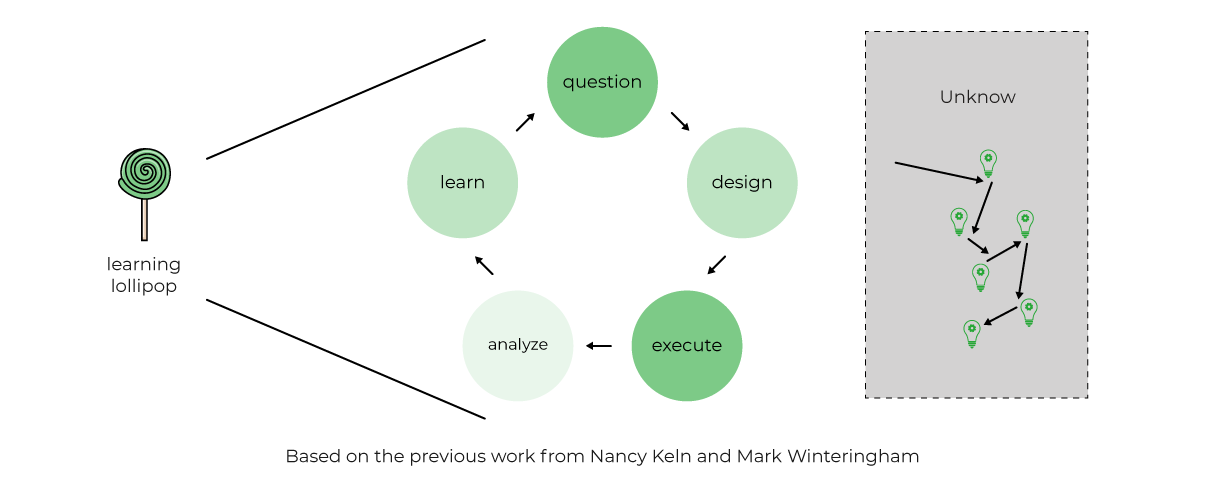
The following model called the “Learning Lollipop model” (created by Sergio Freire), tries to highlight what happens during exploratory testing.

It’s a way to frame exploratory testing where we “taste” our product/product ideas (like tasting a lollipop), starting with questions that will give us ideas for designing testing experiments that we execute and then analyze. From this process, we learn. In turn, that will raise additional questions that will trigger new ideas for test experiments. While we do so, we walk in the unknown lake that contains all possible usages of our product. The more we explore, the more we find.

Using an example, let’s first try to see how these actually work well together. Say we are working in a system with a set of features, aiming to add a new feature using an Agile approach.

From a testing perspective, what we had (i.e., how the system behaved) should be covered by a set of checks, using test automation scripts as much as possible. This will allow us to collect almost immediate feedback from the CI pipeline(s).

We cannot simply retest everything from the past “by hand.” We also know that test automation scripts are fallible because they will always be limited to testing what they’re hardcoded to check; however, they give us a good starting point.

Whenever iterating on a new feature, we know that we don’t know much about it beforehand; that’s why we’re iterating it, after all. Usually, we’re dealing with a rough user story and not an extensive, highly detailed requirement.

Therefore, we need to test our initial ideas for the user story and depict areas/risks we should have in mind. Many questions will come, at the start, during, and after the implementation. All these can become ideas for test charters that we can explore with Exploratory Testing sessions.

Remember that in an Agile context, changes are frequent, and risks also change very dynamically.

Exploratory Testing is a great fit in Agile, as it is extremely flexible and doesn’t require upfront preparation (as happens with manual scripted test cases). It also uses information from previous sessions to drive new testing sessions. Therefore, it adapts to changes as it doesn’t assume a certain state and expected results for the system.

Tips for exploratory testing

Exploratory testing mockups.

Perform exploratory testing sessions on early mockups, internally and with users. This can be quite helpful to optimize flow problems, for example, and highlight the most valuable ones. You can also apply exploratory testing during your design sprints.

Discuss upfront with the team possible charters for your exploratory testing session.

During regular meetings (e.g., standups, planning), discuss with the team the test charters (i.e., the questions you aim to answer during testing). It’s a good moment to talk about risks and have insights from different team members, giving ideas for further exploration.

It’s always a good time to perform an exploratory testing session.

Whether you’re adopting waterfall or Agile, it’s always a good moment to perform some exploratory testing. We will never know everything about our product/system and its context, but we can further improve our understanding by conducting exploratory testing sessions. There are many quality attributes we can look at, for example. Consider aspects that concern your team, users, and business, and use that to drive new sessions. Taking some time to explore is investing in knowledge so that we can then work towards incorporating that feedback and improving our product/system.

Use exploratory testing to highlight ideas for test automation scripts.

Features should come with code, including unit and integration level tests and even system tests if appropriate. Whenever performing exploratory testing, one of the outputs can be ideas for test automation scripts. During exploratory testing, we may find flows, impacts, and edge cases, for example, that, due to their relevance, should be covered by “automated tests.”

This applies to the waterfall and Agile projects and will allow us to improve test coverage addressed by test automation and hopefully gain more time to focus on other tasks (e.g., further exploration, fixing problems, etc.).

Perform exploratory testing on the feature branches or the PRs.

If your team uses feature branches while features are being implemented, you can and should test. This means working with developers to improve the feature iteratively. You may perform an exploratory testing session around a certain risk, quality attribute, or subset of that feature at a given moment. You can also perform a session when the PR is ready for review; if you tested while it was implemented, then this moment will eventually be more of a high-level type of charter.

Perform exploratory testing after merging branches.

Merges sometimes produce unexpected results. Even though the feature branch may (should) include automated tests, there can be unexpected consequences, so scheduling an exploratory testing session can help uncover them.

Involve developers and other roles in exploratory testing.

Besides testers, getting others on board for exploratory testing can provide additional perspective. At the same time, foster a quality centric culture where team members can improve quality from the start in the future.

Pairing with a developer, with the PO, with a designer is a good practice to understand not just the system from different angles but also what different stakeholders expect from it; besides, it’s an excellent mid/long-term investment towards better quality.

Don’t limit exploratory testing to non-regression.

Even whenever automated regression tests may cover existing features, it’s a good practice to perform exploratory testing also for regression testing if you have the opportunity to. Test automation can cover the essentials, but we know many things escape these tests as they will always be limited in number and scope. Looking back at your previous features with your eyes wide open may depict problems added meanwhile and problems that you didn’t have the opportunity to uncover.

Exploratory test your test automation.

Look at your existing test automation and explore it to look for problems (it’s also code, isn’t it?). Look also for problems in scope, concurrency, and relevance. Look at your existing test automation logs, as they may provide valuable information or expose too much or too little information.

Exploratory test using tools to augment testing and gain efficiency.

Tools are used to perform certain tasks with efficiency and consistency. In exploratory testing, tools are used to augment the tester’s capabilities, not to replace the tester. An exploratory tester will easily use tools to facilitate API requests and assist with performance testing. With tools, an exploratory tester can be more efficient and cover quality aspects that otherwise would be hard or even impossible to tackle.

Exploratory test looking for gaps and opportunities to improve the value.

While testing, we look for problems that affect the quality and, therefore, the value as seen by different stakeholders. Testing is about understanding how the system works connected with expectations from all these different stakeholders. In this sense, testing is also about finding opportunities to increase the value. During exploratory testing, and using our knowledge and background, we can depict ways of improving the value of our products. Maybe that can be about framing the feature slightly differently, trying out a new form or interaction.

Bringing some agility with Exploratory Testing to waterfall projects

For organizations working on waterfall-based projects, testing mostly occurs after features have already been implemented. We know that if this happens, then the cost of fixing problems increases considerably.

Usually, there are initial requirements that drive implementation. These highly detailed specifications are not immune to problems; on the contrary: they can be built on top of many assumptions and lack actual user feedback.

We know that requirements, and specifications, in general, are incomplete, ambiguous, sometimes contradictory, and easily get outdated.

As exploratory testers, we can use not only requirements and other documents as the source for our tests; we also understand the context of our product, know about similar products, and know of known heuristics that can help us expose problems through test tracking and reporting. We also have our background that we can use to expose risks and impacts that otherwise could escape traditional testing.

In waterfall projects, we can use Exploratory Testing to help us:

  • Uncover problems, risks, and gaps that we couldn’t predict beforehand as they were not identified in the requirements/specifications.
  • Introduce testing while the feature is being implemented and thus refine it before it’s too late.
  • Complement traditional approaches, such as manual scripted test cases, with exploratory testing to go beyond the obvious and expose problems that we could otherwise miss.

Unleash your testing potential with Exploratory Testing

Exploratory testing promotes innovation instead of scripted testing that is centered around specified test cases and attempting to complete a fixed number of tests per day. Exploratory testing encourages us to act role play as the end-user and detects more realistic bugs.

Exploratory testing is highly helpful in agile environments and has several advantages, as seen above. QA teams can successfully use this testing strategy for their own success in the agile development process by knowing its benefits and using reliable test management software like the Xray Exploratory App.

Author

Sérgio Freire, Head of Solution Architecture & Testing Advocacy at Xray

Sergio Freire is a solution architect and testing advocate, working closely with many teams worldwide from distinct yet highly demanding sectors (Automotive, Health, and Telco among others) to help them achieve great, high-quality, testable products. 

By understanding how organizations work, their needs, context and background, processes and quality can be improved, while development and testing can “merge” towards a common goal: provide the best product that stakeholders need.

Xray is an EXPO Platinum partner at EuroSTAR 2023, join us in Antwerp
Filed Under: Agile, Exploratory Testing Tagged With: 2023, EuroSTAR Conference, exploratory testing, software testing tools

Is test automation a first-class citizen of your development pipeline?

January 18, 2023 by Lauren Payne

Thanks to Karate Labs for providing us with this blog post.

A key point that many teams fail to ponder: “Is test-automation a first-class citizen of your development pipeline?”

This is the second part of a series of articles covering the finer aspects of test automation in detail. Read the first part here: The Test Automation Capability Map.

What happens when Developer Experience is not prioritized? Does this situation (see picture below) look familiar where you use a separate tool and workflow for authoring test-automation artifacts?


Let us zoom in on three of the Test-Automation capabilities which fall under the category of Developer Experience.

IDE Support

The development team spends the most time within their IDE of choice (e.g., IntelliJ, Visual Studio Code etc.). If test-automation requires a completely different tool, user-interface, and workflow, this has several implications for your team:

  • Switching between tools takes developers out of their “flow state.”
  • Developers are less likely to run tests before checking-in or merging code. This leads to an inefficient feedback loop, where failures are detected only when tests are run later.
  • Developers are less likely to contribute and maintain tests. This results in dysfunctional teams where developers “chuck things over the fence” to the “QA team”. It is very common to find developers and QA teams operating in silos where bugs that “escape” to production result in finger-pointing and blame-games.

Self-Hosted or On-Prem

An aspect often overlooked is whether any sensitive data is leaving your safe-zone and coming to rest beyond your organization’s security perimeter or firewall. If you use a SaaS tool that is not self-hosted, this typically is the case.

Even though integration and end-to-end testing environments should ideally use fake or synthetic data, there will be cases where “production-like” data will be needed to simulate real business-scenarios. Many teams extract a “cut” of production data for a staging environment with some data-masking or sanitizing applied. Equally or more important than test-data is test-configuration, such as database-secrets, authentication-tokens, and passwords.

Given that a lot of teams operate in the public-cloud even for pre-production environments (e.g., AWS, Azure and GCP) it is even more important that the greatest care is taken to protect not just your test-data, but the configuration and locations and URLs of test-servers and other infrastructure. So, the critical question you should ask – Are my tests being stored in somebody else’s cloud?

Version Control, History, and Diffs

Self-hosted or not, the situation worsens if your test-automation artifacts are being managed in a separate tool or repository. The implications of having tests in a separate tool and workflow are understated, but significant

  • You will lose the ability to eyeball the changes in your tests, side-by-side with the corresponding changes to code.
  • There is less pressure (or no “forcing function”) to add or edit tests when code-changes are made. This discipline can make the difference between a high-performing team or one that lacks confidence to ship as often as needed.
  • Tests are the best documentation of “what the system does.” When you cannot see the history of changes to tests side-by-side with the code commit history, you lose a valuable chunk of documentation, and you are left with an incomplete picture of how the software evolved.
  • Your Continuous Integration job becomes more complex at the point where tests must be run. Instead of getting code and tests in one atomic “checkout” or “git clone” operation, you are forced to perform an extra step to download the tests from somewhere. Keep in mind that you also need to ensure that the version of the tests corresponds to what is being tested.

In addition, if you are using a tool with a “no-code” UI to author tests, it is quite likely that you lose the basic ability to see diffs and history even just for your tests. Some tool vendors have ended up having to build version-control into their user-experience, re-inventing what comes naturally to teams that use Git to collaborate.

Some things are best expressed as code. At the end of the day, everyone agrees that code-diffs are a superior Developer Experience.

To summarize, for your test-automation to be a first-class citizen of your development pipeline you need to use a tool that integrates into the team’s IDE of choice and stays close to the code being tested. The result of that is shown below.

An interesting observation is that: this is exactly the developer experience you expect for unit-tests!


So which kind of team do you want to be in?
Happy Testing!

Author

Peter Thomas Co-founder & CTO Karate Labs

Peter Thomas, Co-founder & CTO, Karate Labs

Peter is recognized as one of the world’s top experts in test automation. He brings 25 years of industry experience from which he has been in open source for the last 18 years. He has worked at Yahoo and Intuit. As part of the API platform leadership at Intuit, Peter created “Karate” the open-source solution unifying API, UI & Performance testing. Peter was one of only 15 chosen by GitHub for a grant in India 2021. He co-founded Karate Labs Inc in Nov’21 to accelerate the adoption of Karate with the mission of making test automation fun and collaborative. Karate Labs is a Y Combinator backed company.

Karate Labs is a Platinum Partner at EuroSTAR 2023. Join us at Antwerp Zoo June 13-16, in a 4 day celebration of testing. Learn from 68 expert speakers and connect with your peers at Europe’s Best Testing Event. Book your tickets by Jan 31 and save 15% or book your team and save up to 40%.

Filed Under: Development, Test Automation Tagged With: 2023, Test Automation

  • « Previous Page
  • Page 1
  • …
  • Page 9
  • Page 10
  • Page 11
  • Page 12
  • Next Page »
  • Code of Conduct
  • Privacy Policy
  • T&C
  • Media Partners
  • Contact Us

part of the