When you start writing tests for your code, you’ll likely have the feeling – bloody hell, how do I drag this thing into a test? There is code that tests clearly like, and code they don’t. Apart from checking the correctness of our code, tests also give us hints about how to write it. And it’s a good idea to listen.
A test executes your code in the simplest possible setting, independent of the larger system it’s part of. But if the simplest possible setting is how it’s run in our app, and it’s impossible to tease out the individual pieces – that’s a bad sign. If we’re saying – nah, we don’t need tests, all the code is already executed in the app – that’s a sign that we’ve created a large slab that is hard to change and maintain. As Uncle Bob put it:
“another word for testable is decoupled.”
It’s been said plenty of times that good architecture gets us good testability. Let’s come at this idea from another angle: what hints do our tests give about our architecture? We’ve already talked about how tests help prevent creeping code rot – now, we’ll explore this idea in a particular example.
As a side note, we’ll talk mostly about tests that developers write themselves – unit tests, the first line of defense.
Our example is going to be a primitive Python script that checks the user’s IP, determines their region, and tells the current weather in the region (the complete example is available here). We’ll write tests for that code and see how it gets improved in the process. Each major step is in a separate branch.
Step 1: a quick and dirty version
Our first version is bad and untestable.
def local_weather():
    # First, get the IP
    url = "https://api64.ipify.org?format=json"
    response = requests.get(url).json()
    ip_address = response["ip"]

    # Using the IP, determine the city
    url = f"https://ipinfo.io/{ip_address}/json"
    response = requests.get(url).json()
    city = response["city"]

    with open("secrets.json", "r", encoding="utf-8") as file:
        owm_api_key = json.load(file)["openweathermap.org"]

    # Hit up a weather service for weather in that city
    url = (
        "https://api.openweathermap.org/data/2.5/weather?q={0}&"
        "units=metric&lang=ru&appid={1}"
    ).format(city, owm_api_key)
    weather_data = requests.get(url).json()
    temperature = weather_data["main"]["temp"]
    temperature_feels = weather_data["main"]["feels_like"]

    # If past measurements have already been taken, compare them to current results
    has_previous = False
    history = {}
    history_path = Path("history.json")
    if history_path.exists():
        with open(history_path, "r", encoding="utf-8") as file:
            history = json.load(file)
        record = history.get(city)
        if record is not None:
            has_previous = True
            last_date = datetime.fromisoformat(record["when"])
            last_temp = record["temp"]
            last_feels = record["feels"]
            diff = temperature - last_temp
            diff_feels = temperature_feels - last_feels

    # Write down the current result if enough time has passed
    now = datetime.now()
    if not has_previous or (now - last_date) > timedelta(hours=6):
        record = {
            "when": datetime.now().isoformat(),
            "temp": temperature,
            "feels": temperature_feels
        }
        history[city] = record
        with open(history_path, "w", encoding="utf-8") as file:
            json.dump(history, file)

    # Print the result
    msg = (
        f"Temperature in {city}: {temperature:.0f} °C\n"
        f"Feels like {temperature_feels:.0f} °C"
    )
    if has_previous:
        formatted_date = last_date.strftime("%c")
        msg += (
            f"\nLast measurement taken on {formatted_date}\n"
            f"Difference since then: {diff:.0f} (feels {diff_feels:.0f})"
        )
    print(msg)


if __name__ == "__main__":
local_weather()Let’s not get into why this is bad code; instead, let’s ask ourselves: how would we test it? Well, right now, we can only write an E2E test:
def test_local_weather(capsys: pytest.CaptureFixture):
    local_weather()

    assert re.match(
        (
            r"^Temperature in .*: -?\d+ °C\n"
            r"Feels like -?\d+ °C\n"
            r"Last measurement taken on .*\n"
            r"Difference since then: -?\d+ \(feels -?\d+\)$"
        ),
        capsys.readouterr().out
)This executes most of our code once – so far, so good. But testing is not just about achieving good line coverage. Instead of thinking about lines, it’s better to think about behavior – what systems the code manipulates and what [the use cases are].
So here’s what our code does:
– it calls some external services for data;
– it does some read/write operations to store that data and retrieve previous measurements;
– it generates a message based on the data;
– it shows the message to the user.
But right now, we can’t test any of those things separately because they are all stuffed into one function.

In other words, it will be tough to test the different execution paths of our code. For instance, we might want to know what happens if the city provider returns nothing. Even if we’ve dealt with this case in our code (which we haven’t), we’d need to test what happens when the value of city is None. Currently, doing that isn’t easy.
– You could physically travel to a place that the service we use doesn’t recognize – and, while fun, this is not a viable long-term testing strategy.
– You could use a mock. Python’s requests-mock library lets you make it so that requests doesn’t make an actual request but returns whatever you told it to return.
While the second solution is less cumbersome than moving to a different city, it’s still problematic because it messes with global states. For instance, we wouldn’t be able to execute our tests in parallel (since each changes the behavior of the same requests module).
If we want to make code more testable, we first need to break it down into separate functions according to area of responsibility (I/O, app logic, etc.).
Step 2: Creating separate functions
Our main job at this stage is to determine areas of responsibility. Does a piece of code implement the application logic, or some form of IO – web, file, or console? Here’s how we break it down:
# IO logic: save history of measurements
class DatetimeJSONEncoder(json.JSONEncoder):
    def default(self, o: Any) -> Any:
        if isinstance(o, datetime):
            return o.isoformat()
        elif is_dataclass(o):
            return asdict(o)
        return super().default(o)


def get_my_ip() -> str:
    # IO: load IP from HTTP service
    url = "https://api64.ipify.org?format=json"
    response = requests.get(url).json()
    return response["ip"]


def get_city_by_ip(ip_address: str) -> str:
    # IO: load city by IP from HTTP service
    url = f"https://ipinfo.io/{ip_address}/json"
    response = requests.get(url).json()
    return response["city"]


def measure_temperature(city: str) -> Measurement:
    # IO: Load API key from file
    with open("secrets.json", "r", encoding="utf-8") as file:
        owm_api_key = json.load(file)["openweathermap.org"]

    # IO: load measurement from weather service
    url = (
        "https://api.openweathermap.org/data/2.5/weather?q={0}&"
        "units=metric&lang=ru&appid={1}"
    ).format(city, owm_api_key)
    weather_data = requests.get(url).json()
temperature = weather_data["main"]["temp"]
    temperature_feels = weather_data["main"]["feels_like"]
    return Measurement(
        city=city,
        when=datetime.now(),
        temp=temperature,
        feels=temperature_feels
    )


def load_history() -> History:
    # IO: load history from file
    history_path = Path("history.json")
    if history_path.exists():
        with open(history_path, "r", encoding="utf-8") as file:
            history_by_city = json.load(file)
            return {
                city: HistoryCityEntry(
                    when=datetime.fromisoformat(record["when"]),
                    temp=record["temp"],
                    feels=record["feels"]
                ) for city, record in history_by_city.items()
            }
    return {}


def get_temp_diff(history: History, measurement: Measurement) -> TemperatureDiff|None:
    # App logic: calculate temperature difference
    entry = history.get(measurement.city)
    if entry is not None:
        return TemperatureDiff(
            when=entry.when,
            temp=measurement.temp - entry.temp,
            feels=measurement.feels - entry.feels
        )
def save_measurement(history: History, measurement: Measurement, diff: TemperatureDiff|None):
    # App logic: check if should save the measurement
    if diff is None or (measurement.when - diff.when) > timedelta(hours=6):
        # IO: save new measurement to file
        new_record = HistoryCityEntry(
            when=measurement.when,
            temp=measurement.temp,
            feels=measurement.feels
        )
        history[measurement.city] = new_record
        history_path = Path("history.json")
        with open(history_path, "w", encoding="utf-8") as file:
            json.dump(history, file, cls=DatetimeJSONEncoder)


def print_temperature(measurement: Measurement, diff: TemperatureDiff|None):
    # IO: format and print message to user
    msg = (
        f"Temperature in {measurement.city}: {measurement.temp:.0f} °C\n"
        f"Feels like {measurement.feels:.0f} °C"
    )
    if diff is not None:
        last_measurement_time = diff.when.strftime("%c")
        msg += (
            f"\nLast measurement taken on {last_measurement_time}\n"
            f"Difference since then: {diff.temp:.0f} (feels {diff.feels:.0f})"
        )
    print(msg)


def local_weather():
    # App logic (Use Case)
    ip_address = get_my_ip() # IO
    city = get_city_by_ip(ip_address) # IO
    measurement = measure_temperature(city) # IO
    history = load_history() # IO
    diff = get_temp_diff(history, measurement) # App
    save_measurement(history, measurement, diff) # App, IO
print_temperature(measurement, diff) # IONotice that we now have a function that represents our use case, the specific scenario in which all the other functions are used: local_weather(). Importantly, this is also part of app logic; it specifies how everything else should work together.
Also note that we’ve introduced dataclasses to make return values of functions less messy: Measurement, HistoryCityEntry, and TemperatureDiff. They can be found in the new [typings module].
As a result of the changes, our code has become more cohesive – all stuff inside one function mostly relates to doing one thing. By the way, the principle we’ve applied here is called the [Single-responsibility principle] (the “S” from [SOLID].
Of course, there’s still room for improvement – e.g., in measure_temperature, we do both file IO (read a secret from disk) and web IO (send a request to a service).
Let’s recap:
– we wanted to have separate tests for things our code does;
– that got us thinking about the responsibilities for different areas of our code;
– by making each piece have just a single responsibility, we’ve made them testable
So, let’s write the tests now.
Tests for step 2
@pytest.mark.slow
def test_city_of_known_ip():
    assert get_city_by_ip("69.193.168.152") == "Astoria"


@pytest.mark.fast
def test_get_temp_diff_unknown_city():
    assert get_temp_diff({}, Measurement(
        city="New York",
        when=datetime.now(),
        temp=10,
        feels=10
    )) is None
A couple of things to note here.
Our app logic and console output execute an order of magnitude faster than IO, and since our functions are somewhat specialized now, we can differentiate between fast and slow tests. Here, we do it with custom pytest marks (pytest.mark.fast) defined in the project’s [config file]. This is useful, but more on it later.
Also, take a look at this test:
@pytest.mark.fast
def test_print_temperature_without_diff(capsys: pytest.CaptureFixture):
    print_temperature(
        Measurement(
            city="My City",
            when=datetime(2023, 1, 1),
            temp=21.4,
            feels=24.5,
        ),
        None
    )

    assert re.match(
        (
            r"^Temperature in .*: -?\d+ °C\n"
            r"Feels like -?\d+ °C$"
        ),
        capsys.readouterr().out
    )
Note that before, we’d have to drag the whole application along if we wanted to check print output, and manipulating output was very cumbersome. Now, we can pass the print_temperature function whatever we like.
Problem: fragility
Our tests for high-level functionality call details of implementations directly. For instance, the E2E test we’ve written in step 1 (test_local_weather) relies on the output being sent to the console. If that detail changes, the test breaks.
This isn’t a problem for a test written specifically for that detail (like test_print_temperature_without_diff [here] – it makes sense we need to change it if the feature has changed.
However, our E2E test wasn’t written to test the print functionality; nor was it written specifically for testing the provider. But if the provider changes, the test breaks.
We might also want to change the implementation of some functions – for instance, break down the measure_temperature() method into two to improve cohesion. A test calling that function would break.
All in all, our tests are fragile. If we want to change our code, we also have to rewrite tests for that code, which means a higher cost of change.
Problem: dependence
This is related to the previous problems. If our tests call the provider directly, then any problem on their end means our tests will crash.
If the IP service is down for a day, then our tests won’t be able to execute any code inside local_weather() that runs after determining IP – and we won’t be able to do anything about it. And if you’ve got a problem with internet connection, none of the tests will run at all, even though the code might be fine.
Problem: can’t test the use case
On the surface – yes, the tests do call local_weather(), which is our use case. But they don’t test that function specifically, they just execute everything there is in the application. Which means it’s difficult to read the results of such a test, it will take you more time to understand where the failure is localized. Test results should be easy to read.
Problem: excessive coverage
One more problem is that with each test run, the web and persistence functions get called twice: by the E2E test from step 1 and by the more targeted tests from step 2.
Excessive coverage isn’t great – for one, the services we’re using count our calls, so we better not make them willy-nilly. Also, if the project continues to grow, our test base will get too slow.
All these problems are related, and to solve them, we need to write a test for our coordinating functions that doesn’t invoke the rest of the code. To do that, we’d need test doubles that could substitute for real web services or writing to the disk. And we’d need a way to control what specific calls our functions make.
Step 3: Decoupling dependencies
To achieve those things, we have to write functions that don’t invoke stuff directly but instead call things passed to them from the outside – i.e., we [inject dependencies].
In our case, we’ll pass functions as variables instead of specifying them directly when calling them. An example of how this is done is presented in [step 3]
def save_measurement(
    save_city: SaveCityFunction, # the IO call is now passed from the outside
    measurement: Measurement,
    diff: TemperatureDiff|None
):
    """
    If enough time has passed since last measurement, save measurement.
    """
    if diff is None or (measurement.when - diff.when) > timedelta(hours=6):
        new_record = HistoryCityEntry(
            when=measurement.when,
            temp=measurement.temp,
            feels=measurement.feels
        )
        save_city(measurement.city, new_record)
Before, in step 2, the save_measurement function contained both app logic (checking if we should perform the save operation) and IO (actually saving). Now, the IO part is injected. Because of this, we now have more cohesion: the function knows nothing about IO, its sole responsibility is your app logic.
Note that the injected part is an abstraction: we’ve created a separate type for it, SaveCityFunction, which can be implemented in multiple ways. Because of this, the code has less coupling. The function does not depend directly on an external function; instead, it relies on an abstraction that can be implemented in many different ways.
This abstraction that we’ve injected into the function means we have inverted dependencies: the execution of high-level app logic no longer depends on particular low-level functions from other modules. Instead, both now only refer to abstractions.
This approach has plenty of benefits:
– reusability and changeability – we can change e. g. the function that provides the IP, and execution will look the same
– resistance to code rot – because the modules are less dependent on each other, changes are more localized, so growing code complexity doesn’t impact the cost of change as much
– and, of course, testability
Importantly, we did it all because we wanted to run our app logic in tests without executing the entire application. In fact, why don’t we write these tests right now?
Tests for step 3
So far, we’ve applied the new approach to save_measurement – so let’s test it. Dependency injection allows us to write a test double that we’re going to use instead of executing actual IO:
@dataclass
class __SaveSpy:
    calls: int = 0
    last_city: str | None = None
    last_entry: HistoryCityEntry | None = None


@pytest.fixture
def save_spy():
    spy = __SaveSpy()
    def __save(city, entry):
        spy.calls += 1
        spy.last_city = city
        spy.last_entry = entry
    yield __save, spy
This double is called a spy; it records any calls made to it, and we can check what it wrote afterward. Now, here’s how we’ve tested save_measurement with that spy:
@pytest.fixture
def measurement():
    yield Measurement(
        city="New York",
        when=datetime(2023, 1, 2, 0, 0, 0),
        temp=8,
        feels=12,
    )

@allure.title("save_measurement should save if no previous measurements exist")
def test_measurement_with_no_diff_saved(save_spy, measurement):
    save, spy = save_spy

    save_measurement(save, measurement, None)

    assert spy.calls == 1
    assert spy.last_city == "New York"
    assert spy.last_entry == HistoryCityEntry(
        when=datetime(2023, 1, 2, 0, 0, 0),
        temp=8,
        feels=12,
    )


@allure.title("save_measurement should not save if a recent measurement exists")
def test_measurement_with_recent_diff_not_saved(save_spy, measurement):
    save, spy = save_spy

    # Less than 6 hours have passed
    save_measurement(save, measurement, TemperatureDiff(
        when=datetime(2023, 1, 1, 20, 0, 0),
        temp=10,
        feels=10,
    ))

    assert not spy.calls


@allure.title("save_measurement should save if enough time has passed since last measurement")
def test_measurement_with_old_diff_saved(save_spy, measurement):
    save, spy = save_spy

    # More than 6 hours have passed
    save_measurement(save, measurement, TemperatureDiff(
        when=datetime(2023, 1, 1, 17, 0, 0),
        temp=-2,
        feels=2,
    ))
 assert spy.calls == 1
    assert spy.last_city == "New York"
    assert spy.last_entry == HistoryCityEntry(
        when=datetime(2023, 1, 2, 0, 0, 0),
        temp=8,
        feels=12,
)Note how much control we’ve got over save_measurement. Before, if we wanted to test how it behaves with or without previous measurements, we’d have to manually delete the file with those measurements – yikes. Now, we can simply use a test double.
There are plenty of other advantages to such tests, but to fully appreciate them, let’s first achieve dependency inversion in our entire code base.
Step 4: A plugin architecture
At this point, our code is completely reborn. Here’s our central module, app_logic:
def get_temp_diff(
    last_measurement: HistoryCityEntry | None,
    new_measurement: Measurement
) -> TemperatureDiff|None:
    if last_measurement is not None:
        return TemperatureDiff(
            when=last_measurement.when,
            temp=new_measurement.temp - last_measurement.temp,
            feels=new_measurement.feels - last_measurement.feels
        )


def save_measurement(
    save_city: SaveCityFunction,
    measurement: Measurement,
    diff: TemperatureDiff|None
):
    if diff is None or (measurement.when - diff.when) > timedelta(hours=6):
        new_record = HistoryCityEntry(
            when=measurement.when,
            temp=measurement.temp,
            feels=measurement.feels
        )
        save_city(measurement.city, new_record) # injected IO


def local_weather(
    get_my_ip: GetIPFunction,
    get_city_by_ip: GetCityFunction,
    measure_temperature: MeasureTemperatureFunction,
    load_last_measurement: LoadCityFunction,
    save_city_measurement: SaveCityFunction,
    show_temperature: ShowTemperatureFunction,
):
    # App logic (Use Case)
    # Low-level dependencies are injected at runtime
    # Initialization logic is in __init__.py now
    # Can be tested with dummies, stubs and spies!

    ip_address = get_my_ip() # injected IO
    city = get_city_by_ip(ip_address) # injected IO
    if city is None:
raise ValueError("Cannot determine the city")
    measurement = measure_temperature(city) # injected IO
    last_measurement = load_last_measurement(city) # injected IO
    diff = get_temp_diff(last_measurement, measurement) # App
    save_measurement(save_city_measurement, measurement, diff) # App (with injected IO)
show_temperature(measurement, diff) # injected IOOur code is like a Lego now. The functions are assembled when the app is initialized (in __init__.py), and the central module just executes them. As a result, none of the low-level code is referenced in the main module, it’s all hidden away in sub-modules [console_io], [file_io], and [web_io]. This is what dependency inversion looks like: the central module only works with abstractions.
The specific functions are passed from elsewhere – in our case, the __init__.py module:
def local_weather(
    get_my_ip=None,
    get_city_by_ip=None,
    measure_temperature=None,
    load_last_measurement=None,
    save_city_measurement=None,
    show_temperature=None,
):
    # Initialization logic
    default_load_last_measurement, default_save_city_measurement =\
        file_io.initialize_history_io()
    return app_logic.local_weather(
        get_my_ip=get_my_ip or web_io.get_my_ip,
        get_city_by_ip=get_city_by_ip or web_io.get_city_by_ip,
        measure_temperature=measure_temperature or web_io.init_temperature_service(
            file_io.load_secret
        ),
        load_last_measurement=load_last_measurement or default_load_last_measurement,
        save_city_measurement=save_city_measurement or default_save_city_measurement,
        show_temperature=show_temperature or console_io.print_temperature,
    )
As a side note, initialization is here done with functions (file_io.initialize_history_io() and web_io.init_temperature_service()). We could just as easily have done the same with, say, a WeatherClient class and created an object of that class. It’s just that the rest of the code was written in a more functional style, so we decided to keep to functions for consistency.
To conclude, we’ve repeatedly applied dependency inversion through dependency injection on every level until the highest, where the functions are assembled. With this architecture, we’ve finally fully decoupled all the different areas of responsibility from each other. Now, every function truly does just one thing, and we can write granular tests for them all.
Tests for step 4
[Here’s the final version] of our test base. There are three separate modules here:
– e2e_test – we only need one E2E test because our use case is really simple. We’ve written that test at step 1.
– plugin_test – those are tests for low-level functions; useful to have, but slow and fragile. We’ve written them at step 2.
– unit_test – that’s where all the hot stuff has been happening.
The last module became possible once we introduced dependency injection. There, we’ve used [all kinds of doubles]:
- dummies – they are simple placeholders
- stubs – they return a hard-coded value
- spies – we’ve talked about them earlier
They allow us a very high level of control over high-level app logic functions. Before, they would only be executed with the rest of our application. Now, we can do something like this:
Exercising our use case
@allure.title("local_weather should use the city that is passed to it")
def test_temperature_of_current_city_is_requested():
    def get_ip_stub(): return "1.2.3.4"
    def get_city_stub(*_): return "New York"
    captured_city = None

    def measure_temperature(city):
        nonlocal captured_city
        captured_city = city
        # Execution of local_weather will stop here
        raise ValueError()

    def dummy(*_): raise NotImplementedError()

    # We don't care about most of local_weather's execution,
    # so we can pass dummies that will never be called
    with pytest.raises(ValueError):
        local_weather(
            get_ip_stub,
            get_city_stub,
            measure_temperature,
            dummy,
            dummy,
            dummy
        )

    assert captured_city == "New York"
We’re testing our use case (the local_weather function), but we’re interested in a very particular aspect of its execution – we want to ensure it uses the correct city. Most of the function is untouched.
Here’s another example of how much control we have now. As you might remember, our use case should only save a new measurement if more than 6 hours have passed since the last measurement.
How do we test that particular piece of behaviour? Before, we’d have to manually delete existing measurements – very clumsy. Now, we do this:
@allure.title("Use case should save measurement if no previous entries exist")
def test_new_measurement_is_saved(measurement, history_city_entry):
    # We don't care about this value:
    def get_ip_stub(): return "Not used"
    # Nor this:
    def get_city_stub(*_): return "Not used"
    # This is the thing we'll check for:
    def measure_temperature(*_): return measurement
    # With this, local_weather will think there is
    # no last measurement on disk:
    def last_measurement_stub(*_): return None

    captured_city = None
    captured_entry = None

    # This spy will see what local_weather tries to
    # write to disk:
    def save_measurement_spy(city, entry):
        nonlocal captured_city
        nonlocal captured_entry
        captured_city = city
        captured_entry = entry

    def show_temperature_stub(*_): pass

    local_weather(
        get_ip_stub,
        get_city_stub,
        measure_temperature,
        last_measurement_stub,
        save_measurement_spy,
        show_temperature_stub,
    )

    assert captured_city == "New York"
    assert captured_entry == history_city_entry
We can control the execution flow for local_weather() to make it think there’s nothing on disk without actually reading anything. Of course, it’s also possible to test for opposite behavior – again, without any IO (this is done in test_recent_measurement_is_not_saved()). These and other tests check all the steps of our use case, and with that, we’ve covered all possible execution paths.
A test base with low coupling
The test base we’ve built has immense benefits.
Execution speed
Because our code has low coupling and our tests are granular, we can separate the fast and slow tests. In pytest, if you’ve created the custom “fast” and “slow” marks as we’ve discussed above, you can run the fast ones with a console command:
pytest tests -m "fast"Alternatively, you could do a [selective run from Allure Testops] – pytest custom marks are automatically converted into Allure tags, so you can select tests by the “fast” tag.
The fast tests are mainly from the unit_test module – it has the “fast” mark applied globally to the entire module. How can we be sure that everything there is fast?
Because everything in that module is decoupled, you can unplug your computer from the internet, and it will run just fine. Here’s how quick the unit tests are compared to those that have to deal with external resources:
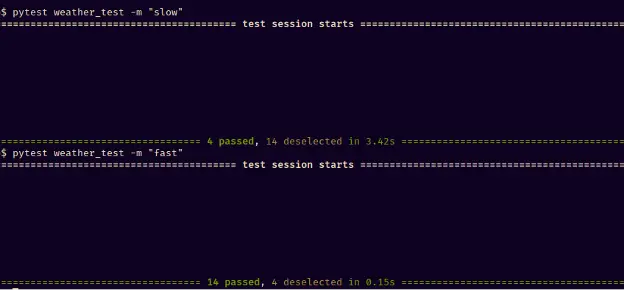
We can easily run these fast tests every time we make a change, so if there is a bug, we’ll know it’s in the code we’ve written since the recent test run.
Longevity
Another benefit to those quick tests we’ve just made is longevity. Unfortunately, throwing away unit tests is something you’ll inevitably have to do. In our case, thanks to interface segregation and dependency injection, we’re testing a small abstract plug point and not technical implementation details. Such tests are likely to survive longer.
Taking the user’s point of view
Any test, no matter what level, forces you to look at your code from the outside, see how it might be taken out of the context where it was created to be used somewhere else.
With low-level tests, you extract yourself from the local context, but you’re still elbow-deep in code. However, if you’re testing an API, you’re taking the view of a user (even if that user is future you or another programmer). In an ideal world, a test always imitates a user.
A public API that doesn’t depend on implementation details is a contract, a promise to the user – here’s a handle, it won’t change (within reason). If tests are tied to this API (as our unit tests are), writing them makes you view your code through that contract. You get a better idea of how to structure your application. And if the API is clunky and uncomfortable to use, you’ll see that, too.
Looking into the future
The fact that tests force you to consider different usage scenarios also means tests allow you to peek into the future of your code’s evolution.
Let’s compare step 4 (inverted dependencies) with step 2 (where we’ve just hidden stuff into functions). The major improvement was decoupling, with its many benefits, including lower cost of change.
But at first sight, step 2 is simpler, and in Python, simple is better than complex, right? Without tests, the benefits of dependency inversion in our code would only become apparent if we tried to add more stuff to the application.
Why would they become apparent? Because we’d get more use cases and need to add other features. That would both expose us to code rot and make us think. We’d see the cost of change. Well, writing tests forces you to consider different use cases here and now.
This is why the structure we’ve used to benefit our tests turns out to be super convenient when we need to introduce other changes into code. To show that, let’s try to change our city provider and output.
Step 4 (continued): Changing without modifying
New city provider
First, we’ll need to write a new function that will call our new provider:
def get_city_by_ip(ip: str):
    """Get user's city based on their IP"""

    url = f"https://geolocation-db.com/json/{ip}?position=true"
    response = requests.get(url).json()
return response["city"]Then, we’ll have to call local_weather() (our use case) with that new function in __main__.py:
local_weather(get_city_by_ip=weather_geolocationdb.get_city_by_ip)Literally just one line. As much as possible, we should add new code, not rewrite what already exists. This is such a great design principle that it got its own name, the open/closed principle.
We were led to that principle because we wanted a test to run our app logic independently of the low-level functions. As a result, our city provider has become a technical detail that can be exchanged at will.
Also, remember that these changes don’t affect anything in our test base. We can add a new test for the new provider, but the existing test base runs unchanged because we’re adding, not modifying.
New output
Now, let’s change how we show users the weather. At first, we did it with a simple print() call. Then, to make app logic testable, we had to replace that with a function passed as a variable. It might seem like an unnecessary complication we’ve introduced just for the sake of testability. But what if we add a simple UI and display the message there?

It’s a primitive Tkinter UI; you can [take a look at the code here], but the implementation doesn’t matter much right now, it’s just a technical detail. The important thing is: what do we have to change in our app logic? Literally nothing at all. Our app is just run from a different place (the Tkinter module) and with a new function for output:
def local_weather():
    weather.local_weather(
        show_temperature=show_temperature
    )
This is triggered by a Tkinter button.
It’s important to understand that how we launch our application’s main logic is also a technical detail; it doesn’t matter that it’s at the top of the stack. From the point of view of architecture, it’s periphery. So, again, we’re extending, not modifying.
Conclusion
Testability and SOLID
Alright, enough fiddling with the code. What have we learned? Throughout this example, we’ve been on a loop:
- we want to write tests
- but we can’t because something is messy in the code
- so we rewrite it
- and get many more benefits than just testability
We wanted to make our code easier to test, and the SOLID principles helped us here. In particular:
- Applying the single responsibility principle allowed us to run different behaviors separately, in isolation from the rest of the code.
- Dependency inversion allowed us to substitute expensive calls with doubles and get a lightning-fast test base.
- The open/closed principle was an outcome of the previous principles, and it meant that we could add new functionality without changing anything in our existing tests.
- It’s no big surprise why people writing about SOLID mention testability so much: after all, the SOLID principles [were formulated by the man who was a major figure in Test-Driven Development].
But TDD is a somewhat controversial topic, and we won’t get into it here. We aren’t advocating for writing tests before writing code (though if you do – that’s awesome). As long as you do write tests and listen to testers in your team – your code will be better. Beyond having fewer bugs, it will be better structured.

Devs need to take part in quality assurance; if the QA department just quietly does its own thing, its efficiency is greatly reduced. As a matter of fact, it has been measured that
Tests give hints on how well-structured your code is
Let’s clarify causation here: we’re not saying that testability is at the core of good design. It’s the other way round; following engineering best practices has good testability as one of many benefits.
What we’re saying is writing tests gets you thinking about those practices. Tests make you look at your code from the outside. They make you ponder its changeability and reusability – which you then achieve through best engineering practices. Tests give you hints about improving the coupling and cohesion of your code. If you want to know how well-structured your code is, writing tests is a good, well, test.
Authors

Artem Eroshenko, CPO and
Co-Founder Qameta Software

Maksim Stepanov, Software Developer Qameta Software

Mikhail Lankin, Content Writer Qameta Software
Allure Report is an Exhibitor at EuroSTAR 2024, join us in Stockholm