• Skip to main content
Year End Offer: Save 30% + Teams Save Up to an Extra 25%!

EuroSTAR Conference

Europe's Largest Quality Engineering Conference

  • Programme
    • Programme Committee
    • 2025 Programme
    • 2025 Speakers
    • Community Hub
    • Awards
    • Social Events
    • Volunteer
  • Attend
    • Location
    • Highlights
    • Get Approval
    • Why Attend
    • Bring your Team
    • Testimonials
    • 2025 Photos
  • Sponsor
    • Sponsor Opportunities
    • Sponsor Testimonials
  • About
    • About Us
    • Our Timeline
    • FAQ
    • Blog
    • Organisations
    • Contact Us
  • Book Now

Test Automation

How accessibility testing tools use AI to ship quality products faster

May 19, 2025 by Aishling Warde

Accessibility testing is essential for compliance with regulations such as the European Accessibility Act (EAA). The EAA becomes a national law in all 27 EU Member States on June 28, 2025, and businesses need to be prepared. While failure to meet this deadline can result in severe penalties, achieving compliance is ultimately about much more than just avoiding fines. It’s about expanding your market share, enhancing your brand reputation, and building high quality products for everyone, including people with disabilities.

This is why testing is so essential. By putting an effective and efficient testing approach in place, you can quickly identify and fix accessibility issues early and ensure you’re building the highest quality products for all people. The question is, how do you integrate comprehensive accessibility testing while maintaining velocity and keeping costs down?

It’s a challenging question. Fortunately, there’s a clear answer.

In this post, we’ll explore an approach called “shift left“, which refers to addressing accessibility issues earlier in the software development lifecycle—during development and QA—as opposed to later in production or after a product has been released, at which point the work becomes slower, costlier, and the risk of customers having a poor experience goes up exponentially. We’ll also examine how AI and automation can accelerate velocity while elevating quality.

The benefits of automated and AI-guided testing

Getting and staying compliant in a strategic and cost-effective way means prioritizing efficiency. It’s about doing the work early and accurately, avoiding re-work, and getting high-quality products out the door faster.

This is where advanced automation can have an outsize impact. By using automated and AI-guided testing, dev and QA teams can find and fix over 80% of conformance issues—without needing special accessibility knowledge!

The efficiency gains are immediate. Your teams can find more issues more quickly and address them earlier, saving both time and money, freeing them up to focus on more complex concerns, and consistently delivering the highest quality products.

Human-centric AI and automation in digital accessibility

As valuable and effective as AI and automated testing can be, human insight and expertise are still required. Automation doesn’t remove humans from the work; it enables humans to do their best work. And rather than replacing accessibility expertise, AI amplifies and scales it.

By leveraging what AI makes possible, we can empower dev and QA teams to accelerate velocity while maintaining quality. Recent updates from Deque, for example, introduce AI-driven capabilities that address the toughest accessibility challenges—increasing test coverage, reducing manual work, and making accessibility testing faster and easier than ever.

Saving time with tools for every part of the software development lifecycle

A comprehensive suite of accessibility testing tools that brings together automated testing and AI-guided testing can help your development and QA teams shift left and identify and fix accessibility issues early, with the highest levels of efficiency, and without the high false positive rates that hamper other solutions.

False positives—testing results that inaccurately flag issues that aren’t actually issues—waste your team’s time, and it’s why Deque is committed to zero false positives—because efficiency and accuracy matter.

It’s why our customers choose Deque and why developers and QA professionals prefer our tools. Because we help businesses become and stay accessible in the fastest and most cost-effective ways possible while delivering high-quality products and services for everyone. When it comes to digital accessibility, the proactive approach is the right approach.

Want to learn more? If you’re at EuroSTAR 2025, come see us about a free demo at Stand 34! You can also visit our website to request a free trial.

Author

Derrin Evers

Derrin Evers is a Senior Solution Consultant at Deque Europe. Derrin’s background and experience spans from design to development, small agencies to large enterprises, and public sector to private business from North America to Europe. With the professional goal to promote positive change within software development through digital accessibility, Derrin helps Deque customers discover, plan, and realize their potential through strategic and technical support across the software development lifecycle.

Deque are exhibitors in this years’ EuroSTAR Conference EXPO. Join us in Edinburgh 3-6 June 2025.

Filed Under: Application Testing Tagged With: Test Automation

The Role of “Digital Tester” in Quality Engineering

April 16, 2025 by Aishling Warde

In today’s world, there is a profound transformation happening in how we compete, create and capture value. With the speed at which technologies like Generative AI and Agentic AI are adopted widely, the whole relationship between humans and machines is getting redefined.

Quality engineering is no exception to this. Adoption of AI into the testing tools, Development and Testing of AI applications and development is on the rise with so many new tools and strategies emerging daily.

Enterprises are competing in the way they are running their entire quality engineering operation. Your competitor is running their QE operations with a team of one-third the size of yours without compromising the scale and accuracy. In fact, they are growing twice as fast as yours. How?

While most enterprises are still deploying likes of ChatGPT for generating content and creating chatbots, very few are fundamentally reimagining the quality engineering with AI. They are deploying the “Digital Tester”. These digital testers are nothing, but the digital teammate or digital colleague implemented using Agentic AI.

While these digital colleagues can drive quality engineering at incredible speed and scale, they also have their own unique characteristics and limitations. Understanding these characteristics not only guides us in terms of what tasks to delegate to these agents but also build a strong relationship that maximize the potential of both human and machines.

While these digital testers are evolving themselves from simple automation tools to the complex autonomous agents, it is very important to select the right digital tester depending on the various factors e.g. your use cases, technical complexity, implementation costs etc. It is very similar to onboarding a new team member and integrating him into your existing team.

Although it looks like a very simple choice, i.e. selecting the complex autonomous digital tester to reduce manual dependency and improve speed, it is a wise decision to opt for a digital tester which supports the entire continuum from automation to autonomy. This will allow flexibility so that we can use the different digital tester skills below as per the testing needs.

  • Predictable and consistent behavior of digital testers with pre-defined rules; No learning and adaptation
  • Digital tester leveraging LLMs for constraint awareness, but behavior is validated against predefined rules
  • Digital tester with reasoning and action; Mult-step workflows are broken down into smaller actionable paths
  • Digital tester’s Reasoning and action combined with RAG for external knowledge sources
  • Integrate Digital tester with multiple tools for leveraging APIs and other software
  • Self-reflecting /analyzing Digital tester using feedback loops
  • Digital tester recalls relevant past experiences, preferences & uses this context for Reasoning
  • Digital testers actively manipulate and control digital/physical environments in real time
  • Digital testers improve themselves over time, learning from interactions, adapting to new environments, evolving

In its simplest terms, the testing needs of any enterprise can be broadly categorized into “What”, “How” and “When” of a software feature and Digital testers with the above skills can help us in all these aspects. AI assisted testing for “What” part of the testing e.g. AI pattern recognition helping the testers to know which parts of the application are likely problematic based on the analysis of the past test cases and historical data. AI powered testing for “How” part of the testing e.g. Self-Healing with AI ensuring the test cases remain valid when changes occur without manual intervention. And AI agents for testing for “When” part of the testing e.g. Self-learning AI with ability to spot unusual behaviour in the application by learning from each test cases they execute or independently exploring the application to discover unexpected issues.

Another most important consideration while selecting the Digital tester is deployment of the digital tester to test AI/ML systems. As AI and ML become more prevalent in our lives, it’s crucial to ensure these systems are thoroughly tested to work as intended.
While selecting your digital tester, make sure that the digital tester can overcome the challenges like being non-Deterministic, Lack of adequate and accurate training data, testing for bias, Interpretability and Sustained Testing and supports the critical aspects of AI systems testing like data curation & validation, algorithm testing, performance and security Testing and regulatory compliance e.g. compliance towards the country’s AI act.

Summing Up

The rise of AI and Generative AI marks one of the most transformative shifts in our lives. Over the past decade, advancements in machine learning, deep learning and neural networks have driven artificial intelligence theoretical concepts into real worlds applications. This evolution has revolutionized quality engineering, where AI became an integral part of the traditional testing platforms and tools. These platforms no longer remained only tools, but they have evolved into a complete Digital Tester which can be part of your Quality Engineering team and work in collaboration with the humans to deliver an exceptional result. As businesses increasingly use AI to construct systems and applications, these Digital Testers are now in turn made to test the AI applications.

The AI testing approaches, procedures and platforms will continue to evolve and improve over the next few years, eventually approaching the maturity and standardization of Digital Testers in the quality engineering landscape.

Authors

Keval Hutheesing, Chief Executive Officer, Cygnet.One

Keval Hutheesing, Chief Executive Officer of Cygnet.One, spearheads the organization’s strategic evolution toward scalable, high-performance technology solutions with quality engineering at its core. His visionary leadership integrates quality throughout the development lifecycle—driving automation, compliance, and operational excellence.
Keval positions quality engineering as the strategic foundation that accelerates business outcomes, ensuring consistent delivery, proactive risk mitigation, and exceptional customer experiences. Through his implementation of a comprehensive quality framework, he propels Cygnet.One’s transformation into a sophisticated platform-driven ecosystem where excellence is intrinsically woven into every aspect of operations.


Shivangi Dubey – AVP & Head of Quality Engineering, Cygnet One

With a rich background steeped in over 15 years of expertise in Quality Engineering and Product Management, Shivangi is a seasoned leader in driving transformative journeys and cost optimization through innovative approaches. She excels in securing new business, executing successful Testing Automation projects, and implementing comprehensive testing strategies.
Renowned for her problem-solving prowess and visionary leadership, she collaborates with customers to expand testing footprints and drive innovation. Experienced in strategic consulting, business development, and process standardization, achieving excellence is her way of life. As the Head of Quality Engineering at Cygnet.One, she brings a stellar track record and an unwavering commitment to excellence.

Cygnet One are Exhibitors in this years’ EuroSTAR Conference EXPO. Join us in Edinburgh 3-6 June 2025.


Filed Under: Test Automation Tagged With: EuroSTAR Conference, Test Automation

Power Up Your Test Automation Practices With AI: Unlock Key Use Cases

April 9, 2024 by Lauren Payne

With the rapid pace of development cycles and the complexity of modern software systems, manual testing alone often can’t meet the demands of quality assurance. This is where test automation comes into play, offering efficiency, accuracy, and scalability. 

However, even with automation, challenges can still arise, such as maintaining test scripts, handling dynamic user interfaces, and detecting subtle defects. Enter AI, a game-changer poised to revolutionize test automation.

By infusing AI and ML into test automation, testers can build better automations faster through supercharged productivity, as well as improve accuracy and time-to-value through combining Generative AI and Specialized AI. Plus, testers can unlock new use cases by building AI-powered automations. 

So, what are some of the top uses for AI and ML in testing that can supercharge your application testing practices?

Deploy an agent that performs testing fully autonomously

An AI-powered agent can seamlessly tackle the challenge of finding critical problems in your applications, as it can interact with an application constantly. Then, the agent can build a model of your application, discover relevant functionality, and find bugs related to performance, stability, and usability. An agent can also aid in creating a resilient object repository while navigating through a target application, gathering reusable controls for future test case development. The potential of AI doesn’t stop there—the agent can then continuously verify and refresh controls within an object repository, enabling self-healing and maintaining automated tests. 

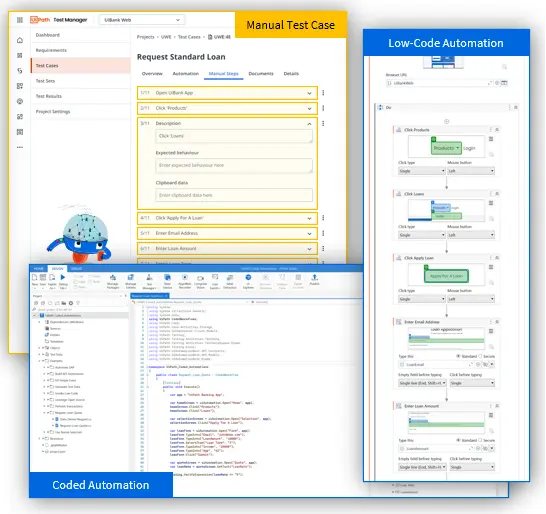
Generate automated low-code and coded tests from step-by-step manual tests

Have manual tests that you want to convert to automated tests? With the power of AI, you can accelerate automation by generating automated low-code and coded tests from manual tests, as well as leverage a flexible automation framework to ensure the resilience of your automated tests. And remember the object repository that your AI-fuelled agent assisted with creating? Equipped with this object repository, you can use AI to consider and smartly reuse any kind of object, such as buttons, tables, and fields.

Create purposeful and complex test data

With AI-infused large language models, you can supercharge your data through enhanced synthetic test data generation for manual and automated test cases. Using AI also enables you to create meaningful test data faster, allowing you to handle intricate data dependencies across multiple test data dimensions.

Streamline automated localization testing by leveraging semantic translation

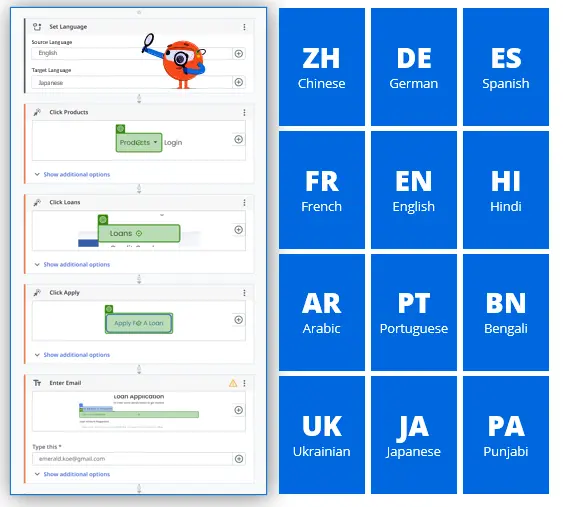
By integrating AI into your test automation practices, you can leverage semantic automation and translation to remove the need for creating separate test cases for each language. The result? Maximized efficiency through seamless automated localization testing. Plus, you can run your automated test cases in different languages, allowing you to expand and scale your testing capabilities globally.

Overall, there’s unlimited potential for AI to supercharge continuous testing across the entire lifecycle—from defining stories, to designing tests, to automating and executing tests, to analyzing results.

UiPath Test Suite for AI-powered test automation

UiPath Test Suite, the resilient testing solution powered by the UiPath Business Automation Platform, offers production-grade, AI-fueled, low-code, no-code, and coding tools so you can automate testing for any technology while still managing testing your way. Later this year, you’ll be able to unlock AI-infused use cases for test automation, such as test generation, coded automations, and test insights, with Autopilot for Test Suite.

Author


Sophie Gustafson, Product Marketing Manager, UiPath Test Suite

Sophie Gustafson has worked at UiPath for two years and is currently a product marketing manager for Test Suite. Sophie has previous experience working in the consulting and tech industries, specializing in content strategy, writing, and marketing.

UiPath is an EXPO Platinum Partner at EuroSTAR 2024, join us in Stockholm.

Filed Under: EuroSTAR Conference, EuroSTAR Expo, Platinum, Sponsor, Test Automation Tagged With: 2024, EuroSTAR Conference, Expo, Test Automation

No-code Test Automation: What it Actually Means

March 26, 2024 by Lauren Payne

No-code test automation solutions are supposed to ease build and maintenance. But does no-code actually equate to an easier and lower maintenance test automation? Well, the short answer is – it’s complicated. We’ll go into more detail below. 

In this short article, we’re going to explain:

1.    What no-code test automation actually means

2.    How to assess no-code test automation vendors

3.    The test automation fallacy

4.    True no-code test automation

What no-code test automation actually means

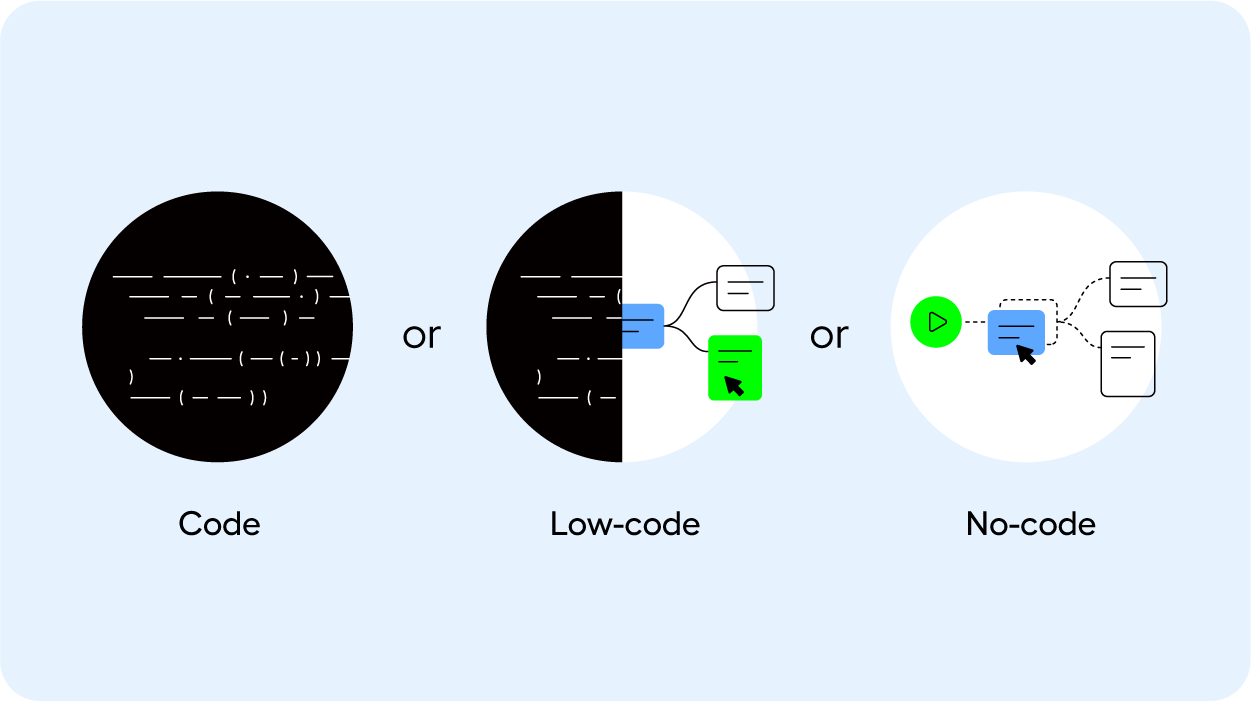
To be no-code, a solution or test automation vendor doesn’t require a user to use a programming language to build an automated test. This makes test automation accessible to the people responsible for QA.  While the underlying solution is built on top of a programming language, the user will never have to interact with code. At least, that’s how it’s supposed to be. What is sold as an easy, no-code, scalable solution is often just a thin layer of UI based on top of a complex machine.

“No-code” and “low-code” are often used interchangeably as well. While in fact, they’re very different once you take a closer look. Low-code solutions do require developers, making them difficult to scale and maintain. 

And so the meaning of no-code has transformed and morphed into something that is no longer no-code So how can you assess whether a test automation vendor is actually no-code?

How to assess no-code test automation solutions

When you’re on the hunt for a test automation vendor, this is your time to put their solution to the test. 

Beyond the technology, process, and organizational fit, have the vendor show you how the solution performs on test cases that are notoriously complex for your business. 

Do they require coded workarounds to get the test case to work? Or can a business user or QA team member handle the build and maintenance of the test cases, without requiring developers? And when something breaks, how easy is it to find the root cause?

This is where you can understand whether no-code actually means no-code. 

We detail all the steps that you need to consider when you’re on the hunt for a test automation vendor in this checklist – you’ll be equipped to assess a vendor on their process, technology, and organizational fit, their ease of use and maintenance, training, and support. 

The test automation fallacy 

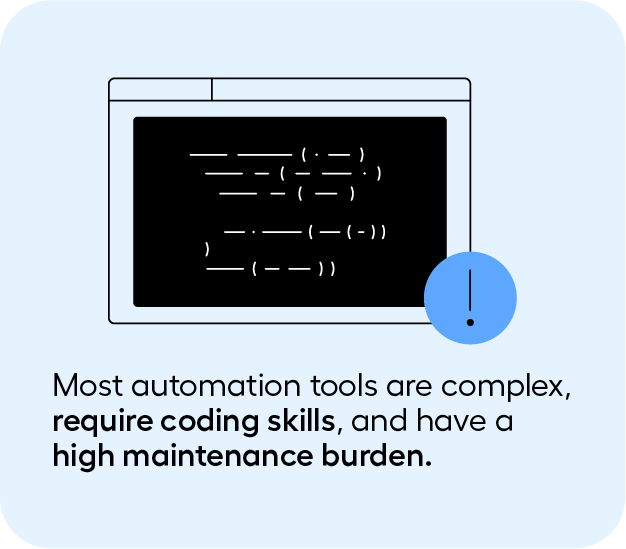
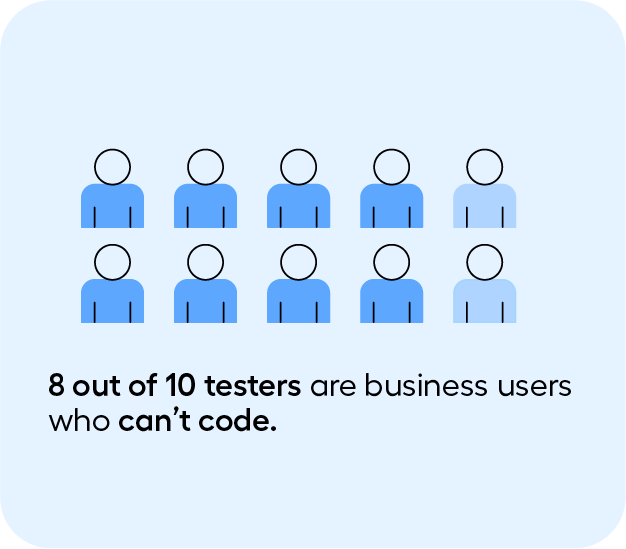
Automation tools are complex and many of them require coding skills. If you’re searching for no-code test automation, you’ll undoubtedly know that. Because 8 out of 10 testers are business users who can’t code​. 

And because of this previous experience, many have internalized three things:

1.    Test automation always has a steep learning curve – regardless of whether or not they’re no-code. 

2.    Test automation maintenance is always impossibly high

3.    Scaling test automation is not possible

But what if we told you that’s not the case. 

What if there actually was a solution that:

1.    Is easy to use, and can bring value to an organization in just 30 days. 

2.    That maintenance can be manageable, without having to waste valuable resources

3.    And that test automation can be scaled

Introducing Leapwork: a visual test automation platform

Leapwork is a visual test automation solution that uses a visual language, rather than code. This approach makes the upskilling, build, and maintenance of test automation much simpler, and democratizes test automation. This means testers, QA and business users can use test automation, without requiring developers. 

Users can design their test cases through building blocks, rather than having to use code. This approach works even for your most complex end-to-end test cases. 

Read the full article on Leapwork.

Author


Maria Homann 

Having worked for 4+ years at the forefront of the QA field to understand the pains of implementing testing solutions for enterprises, her writing focuses on guiding QA teams through the process of improving testing practices and building out strategies that will help them gain efficiencies in the short and long term.

Leapwork. is an EXPO Gold Sponsor at EuroSTAR 2024, join us in Stockholm.

Filed Under: Sponsor, Test Automation Tagged With: 2024, EuroSTAR Conference, Expo, Test Automation

Myth vs. Reality: 10 AI Use Cases in Test Automation Today

March 5, 2024 by Lauren Payne

For decades, the sci-fi dream of simply speaking to your device and having it perform tasks for you seemed far-fetched. In the realm of test automation and quality assurance, this dream is inching closer to reality. With the evolution of generative AI, we’re prompted to explore what’s truly feasible. Embedding AI into your quality engineering processes becomes imperative as IT infrastructures become increasingly complex and integrated, spanning multiple applications across business processes. AI can help alleviate the daunting tasks of knowing what to test, how to test it, creating relevant tests, and deciding what type of testing to conduct, boosting productivity and business efficiency.

But what’s fact and what’s fiction? The rapid evolution of AI makes it hard to predict its capabilities accurately. Nevertheless, we’ve investigated the top ten key AI use cases in test automation, distinguishing between today’s realities and tomorrow’s aspirations.

1. Automatic Test Case Generation

Reality: AI can generate test cases by analyzing user stories along with requirements, code, and design documents, including application data and user interactions. For instance, large language models (LLMs) can interpret and analyze textual requirements to extract key information and identify potential test scenarios. This can be used with static and dynamic code analysis to identify areas in the code that present potential vulnerabilities requiring thorough testing. Integrating both requirement and code analysis can help generate potential manual test cases that cover a broad set of functionalities in the application.

Myth: But here’s the caveat: many tools on the market that enable automated test case generation create manual tests. They are not automated. To create fully automated, executable test cases is a use case that remains a myth and still requires further proof. Additionally, incomplete, ambiguous, or inconsistent requirements may not always generate the right set of tests, and this requires further development. Test cases may not always cover edge cases or highly complex scenarios, nor are they able to cover completely new applications. Analysing application and user interaction data may not always be possible. As a result, human testers will always be required to check the completeness and accuracy of the test suites to consider all possible scenarios.

2. Autonomous Testing

Reality: Autonomous testing automates the automation. Say what? Imagine inputting a prompt into an AI model like “test that a person below the age of 18 is not eligible for insurance.” The AI would then navigate the entire application, locate all relevant elements, enter the correct data, and test the scenario for you. This represents a completely hands-off approach, akin to Forrester’s level 5 autonomous state.

Myth: But are we there yet? Not quite, though remarkable technologies are bridging the gap. The limitation of Large Language Models (LLMs) is their focus on text comprehension, often struggling with application interaction. For those following the latest in AI, Rabbit has released a new AI mobile phone named r1 that uses Large Action Models (LAMs). LAMs are designed to close this interaction gap. In the realm of test automation, we’re not fully there. Is it all just hype? It’s hard to say definitively, but the potential of these hybrid LAM approaches, which execute actions more in tune with human intent, certainly hints at a promising future.

3. Automated Test Case Design

Reality: AI is revolutionising test case design by introducing sophisticated methods to optimise testing processes. AI algorithms can identify and prioritise test cases that cover the most significant risks. By analyzing application data and user interactions, the AI can determine which areas are more prone to defects or have higher business impact. AI can also identify key business scenarios by analysing usage patterns and business logic to auto-generate test cases that are more aligned with real-world user behaviors and cover critical business functionalities. Additionally, AI tools can assign weights to different test scenarios based on their frequency of use and importance. This helps in creating a balanced test suite that ensures the most crucial aspects of the application are thoroughly tested.

Myth: However, AI cannot yet fully automate the decision-making process in test suite optimisation without human oversight. The complexity of certain test scenarios still requires human judgment. Moreover, AI algorithms are unable to auto-generate test case designs for new applications, especially those with highly integrated end-to-end flows that span across multiple applications. This capability remains underdeveloped and, for now, is unrealised.

4. Testing AI Itself

Reality: As we increasingly embed AI capabilities into products, the question evolves from “how to test AI?” to “how to test AI, gen AI, and applications infused with both?” AI introduces a myriad of challenges, including trust issues stemming from potential problems like hallucinations, factuality issues, and explainability concerns. Gen AI, being a non-deterministic system, produces different and unpredictable outputs. Untested AI capabilities and AI-infused applications can lead to multiple issues, such as biased systems with discriminatory outputs, failure to identify high-risk elements, erroneous test data and design, misguided analytics, and more.

The extent of these challenges is evident. In 2022, there were 110 AI-related legal cases in the US, according to the AI Index Report 2023. The number of AI incidents and controversies has increased 26-fold since 2021. Moreover, only 20% of companies have risk policies in place for Gen AI use, as per McKinsey research in 2023.

Myth: Testing scaled AI systems, particularly Gen AI systems, is unexplored territory. Are we there yet? While various approaches and methodologies exist for testing more traditional neural network systems, we still lack comprehensive tools for testing Gen AI systems effectively.

AI Realities in Test Automation Today

The use cases that follow are already fully achievable with current test automation technologies.

5. Risk AI

It’s a significant challenge for testers today to manage hundreds or thousands of test cases without clear priorities in an Agile environment. When applications change, it raises critical questions: Where does the risk lie? What should we test or prioritize based on these changes? Fortunately, risk AI, also known as smart impact analysis, offers a solution. It inspects changes in the application or its landscape, including custom code, integration, and security. This process identifies the most at-risk elements where testing should be focused. Employing risk AI leads to substantial efficiency gains in testing. It narrows the testing scope, saving considerable time and costs, all while significantly reducing the risk associated with software releases.

6. Self-Healing

By identifying changes in elements at both the code and UI layer, AI-powered tools can auto-heal broken tests after each execution. This allows teams to stabilize test automation while reducing time and costs on maintenance. Want to learn more about how Tricentis Tosca supports self-healing for Oracle Fusion and Salesforce Lightning and Classic? Watch this webinar.

7. Mobile AI

Through convolutional neural networks, mobile AI technology can help testers understand and analyze mobile interfaces to detect issues in audio, video, image quality, and object steering. This capability helps provide AI-powered analytics on performance and user experience with trend analysis across different devices and locations, helping to detect mobile errors rapidly in real time. Tricentis Device Cloud offers a mobile AI engine that can help you speed up mobile delivery. Learn more here.

8. Visual Testing

Visual testing helps to find cosmetic bugs in your applications that could negatively impact the user experience. The AI works to validate the size, position, and color scheme of visual elements by comparing a baseline screenshot of an application against a future execution. If a visual error is detected, testers can reject or accept the change. This helps improve the user experience of an app by detecting visual bugs that otherwise cannot be discovered by functional testing tools that query the DOM.

9. Test Data Generation

Test data generation using AI involves creating synthetic data that can be used for software testing. By using machine learning and natural language processing, you can produce dynamic, secure, and adaptable data that closely mimics real-world scenarios. AI achieves this by learning patterns and characteristics from actual data and then generating new, non-sensitive data that maintains the statistical properties and structure of the original dataset, ensuring that it’s realistic and useful for testing purposes.

10. Test Suite Optimisation

AI algorithms can analyze historical test data to identify flaky tests, unused tests, redundant or ineffective tests, tests not linked to requirements, or untested requirements. Based on this analysis, you can easily identify weak spots or areas for optimization in your test case portfolio. This helps streamline your test suite for efficiency and coverage, while ensuring that the most relevant and high-impact tests are executed, reducing testing time and resources.

What about AI’s role in performance testing, accessibility testing, end-to-end testing, service virtualization, API testing, unit testing, and compatibility testing, among others? We’ve only just scraped the surface and begun to explore the extensive range of use cases and capabilities that AI potentially offers today. Looking ahead, AI’s role is set to expand even further, significantly boosting QA productivity in the future.

As AI continues to evolve, offering tremendous benefits in efficiency, coverage, and accuracy, it’s important to stay cognizant of its current limitations. AI does not yet replace the need for skilled human testers, particularly in complex or nuanced scenarios. AI still lacks the human understanding needed to ensure full software quality. Developing true enterprise end-to-end testing spanning multiple applications across web, desktop, mobile, SAP, Salesforce, and more requires a great deal of human thinking and human ingenuity, including the capability to detect errors. The future of test automation lies in a balanced collaboration between AI-driven technologies and human expertise.

Want to discover more about Tricentis AI solutions and how they can cater to your unique use cases? Explore our innovative offerings.

Tricentis offers next-generation AI test automation tools to help accelerate your app modernisation, enhance productivity, and drive your business forward with greater efficiency and superior quality.

Author

Simona Domazetoska – Senior Product Marketing Manager, Tricentis

Tricentis is an EXPO Gold Sponsor at EuroSTAR 2024, join us in Stockholm

Filed Under: EuroSTAR Conference, Gold, Sponsor, Test Automation, Uncategorized Tagged With: 2024, Expo, software testing tools, Test Automation

The A-Z of Mobile Test Automation

June 7, 2023 by Lauren Payne

Thanks to ACCELQ for providing us with this blog post.

Did you know? There are 5.48 billion unique mobile phone users across the globe. That’s almost 68.6% of the world’s population. No doubt, mobile app testing is soaring in popularity.

Mobile App Testing Is the Need of the Hour


About 59.72% of web traffic today comes from mobile phones. Imagine the quality and performance levels today’s teams must meet to cater to this web traffic. A top priority for teams is ensuring each mobile user has a seamless, secure, and satisfying experience every time they pick up the phone.

Crafting and maintaining this top-notch user experience demands rigorous and continuous testing. The right approach to mobile app testing can bring several benefits to the table. It can:

  • Improve user experience and boost retention rates
  • Reduce the frequency and complexity of bugs
  • Bring much-needed stability into mobile apps
  • Test if new features, changes, and enhancements are working properly
  • Boost user ratings and downloads and improve public perception

But Traditional Approaches to Mobile App Testing Are No Longer Scalable

Device fragmentation is at an all-time high. Testing the rich diversity of browsers, devices, and platform versions would require hiring an army of testers. Add to it the unique characteristics of different types of educational, lifestyle, social media, productivity, and gaming apps and the way they are built. For example:

  • Native apps are developed specifically for a single mobile platform such as iOS or Android. Built using the platform’s native programming language and development tool, they are typically faster and more responsive than other types of apps. Since they take advantage of device-specific features such as sensors and Bluetooth, they provide a more interactive UI/UX and have lesser compatibility issues.
  • Web apps are generally developed for mobile devices and accessed via any internet browser on a mobile device. They do not need any storage space and are constantly updated. They dramatically reduce the business costs associated with development and maintenance. They are responsive websites that adapt the user interface to the user’s device.
  • Hybrid apps are developed using web technologies such as HTML and CSS and wrapped in a native container that allows them to run on multiple platforms. Typically, they are easier and faster to develop than native apps but may not be as fast or responsive. However, hybrid apps are ideal in situations where high performance and full device access are not key requirements.

Mobile app testing isn’t just about writing a handful of test cases and running a few tests. Several challenges make testing a nightmare.

Setup

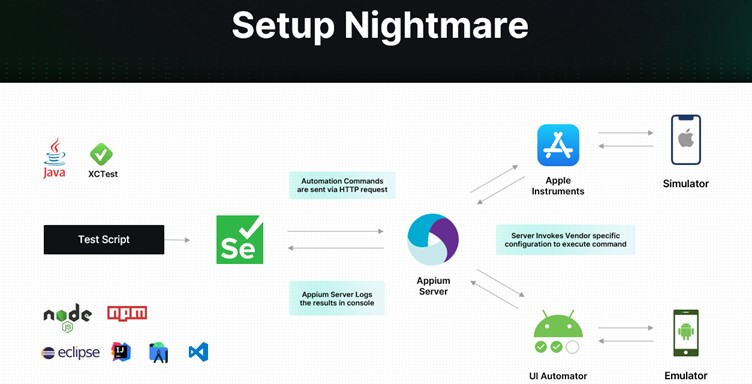
As depicted below, you must first feed your test script to a Selenium tool. Selenium then sends automation commands to an Appium Server, which logs results in a console. The Server also invokes vendor-specific configuration to execute commands via a simulator and an emulator.

Functional

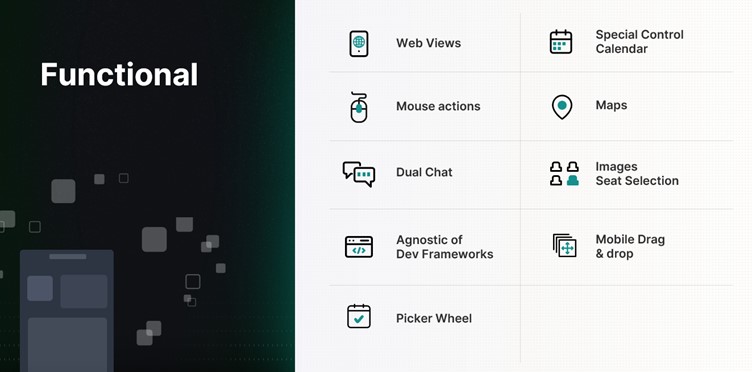
When it comes to functional testing, several aspects of the mobile app have to be continuously and carefully tested — from web views to mouse actions, maps to images.

Miscellaneous

Mobile apps must also be continuously tested for interruptions. Evaluating how the app behaves during low battery, when a notification pops up, or when a call is received is equally important. In addition, it pays to test:

  • User experience during installation/uninstallation
  • UI with all forms of gesture navigation
  • When users don’t have permissions
  • When the network is not available
  • If your app updates correctly from previous versions

Building and maintaining a QA lab is extremely difficult, with varying mobile architectures, app security requirements, and feature demands. Since every mobile app must be tested for functionality, compatibility, usability, performance, security, and localization, it is critical to automate the testing process. Taking the mobile test automation route can open doors to several time, cost, and efficiency benefits.

Investing in the Right Test Automation Framework Is Key

A modern test automation framework can simultaneously test apps on multiple platforms and quicken the feedback cycle. It can maximize test coverage, enable 24/7 text execution, and allow reusability of test cases. It can also pave the way for seamless scalability – regardless of how big the app grows or how large the user base becomes.

But with so many frameworks available in the market today, how do you make the right choice?

  • How do you ensure the framework keeps up with the pace of app changes?
  • How do you efficiently simulate real-world user scenarios?
  • How do you ensure integration with backend systems?
  • How do you handle different types of apps and different types of mobile platforms?
  • How do you ensure continuous testing?

How To Choose the Right Mobile Test Automation Framework

If you want to transform your testing results, here are some things to keep in mind:

  • Identify your testing requirements
  • Evaluate different solutions
  • Consider ease of use and the overall learning curve
  • Look for a solution that is easy to maintain and scale and is extensible
  • Look for a solution that supports different app types and mobile platforms
  • Invest in a Unified Test Automation platform
  • Evaluate the tool’s DevOps – CI/CD integration capabilities
  • Assess reporting and analytics capabilities
  • Consider support features and evaluate community support
  • Take into consideration the cost and feasibility

How ACCELQ Handles Mobile Test Automation

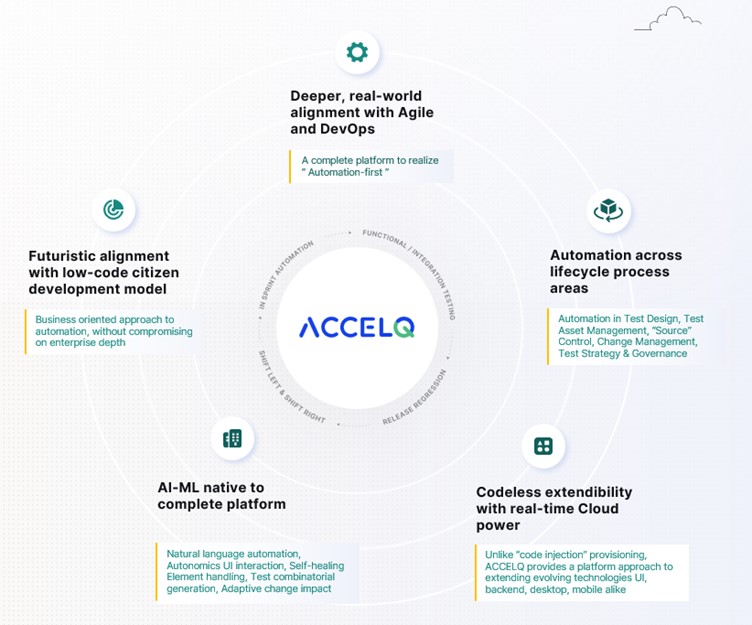
As an intelligent, cloud-based mobile test automation platform, ACCELQ enables seamless multi-channel automation across the mobile tech stack. The tool takes a revolutionary approach to business assurance in a multi-packaged app environment. It allows for codeless mobile test automation that handles real-world complexities and presents a unified view of the quality lifecycle.

ACCELQ is a market leader in test automation and test management. Its automation flow recorder is coupled with a powerful Natural Language no-code editor. It can execute test automation across different mobile OSs and is agnostic of development frameworks. In addition, the tool’s design-first approach with inbuilt modularity means there is no need for custom frameworks.

  • Codeless: ACCELQ’s codeless capabilities allow teams to write and run test cases with zero setup and no coding. It enables testers to automate without the need for programming skills.
  • AI-powered: Being a true no-code mobile test automation platform, ACCELQ’s AI-powered capabilities automate and execute tests across different OSs and devices. The tool’s advanced mobile object handling capabilities eliminate test flakiness.
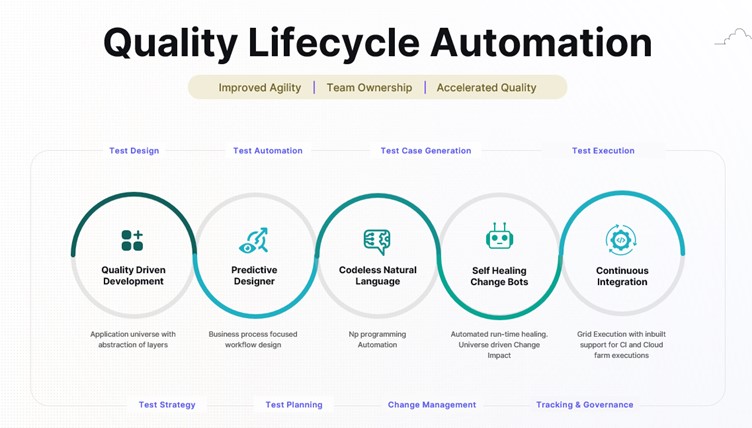
  • Lifecycle automation: ACCELQ allows for mobile test automation across the lifecycle of mobile apps. Using ACCELQ, teams can easily set up, design, develop, execute, and track mobile test automation.
  • Unified flow: ACCELQ offers full-blown version control, branching, and merging capabilities, all in one unified collaborative cloud platform. Teams can use ACCELQ to enable mobile, web, API, backend, and full-stack automation in the same unified flow.
  • Cross-device: ACCELQ’s Integrated Device Cloud Labs allow for seamless cross-device testing using a simple Plug & Play model.
  • High coverage: ACCELQ’s app universe and analytic-based algorithms drive automated test planning, ensuring coverage.
  • Actionable reports: ACCELQ offers dynamic live results views with actionable reports to trigger reruns. Email notifications that fit into the process allow for quick and effective decision-making.
  • Seamless support: The tool offers seamless support across popular mobile dev frameworks, including Android, iOS, React, Ionic, and Apache Cordova.
  • Robust and sustainable: The ACCELQ platform is robust and sustainable and offers automation capabilities that are significantly low on maintenance.
  • Self-healing: The tool’s self-healing element identification drastically enhances the quality and reliability of tests.
  • Low maintenance: Referential integrity across test assets hugely reduces maintenance and upkeep.

The Way Forward

If you want to meet the expectations of the constantly growing mobile user base, it’s time to take mobile testing more seriously. Embark on the mobile test automation journey today to make your tests more reliable and predictable and your apps more functional and secure.

Author

Nishan Joseph, VP-Sales Engineering,
ACCELQ

Nishan is a highly accomplished and dynamic leader who has been working in the technology space for over a decade. He is known for his ability to build strong partnerships with long-term strategic goals. Nishan leads the Sales Engineering division, while also overseeing some of the larger global Strategic Accounts for the company.

ACCELQ is an EXPO Exhibitor at EuroSTAR 2023, join us in Antwerp.

Filed Under: Test Automation Tagged With: 2023, EuroSTAR Conference, Test Automation

Why Do Testers Need CI/CD Systems?

April 19, 2023 by Lauren Payne

Thanks to JetBrains for providing us with this blog post.

This post was originally published on the JetBrains Qodana Blog.

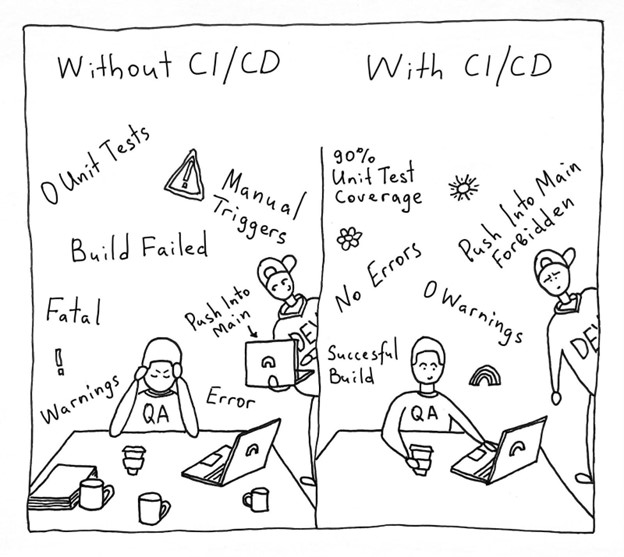
Competency in the TestOps field is now just as much an essential requirement for QA engineers as the ability to write automated tests. This is because of the ongoing development of CI/CD tools and the increasing number of QA engineers who work with pipelines (or the sequence of stages in the CI/CD pipeline) and implement their own.

So why is CI/CD such an excellent tool for quality control? Let’s find out!

Running Tests Automatically

Automated tests haven’t been run locally in what feels like ages. These days, CI/CD pipelines run tests automatically as one of their primary functions.

Pipeline configuration can be assigned to DevOps. But then we will be a long way from making use of the CI/CD tool’s second function: quality control, or more precisely, “quality gates”.

Quality Control Using Quality Gates

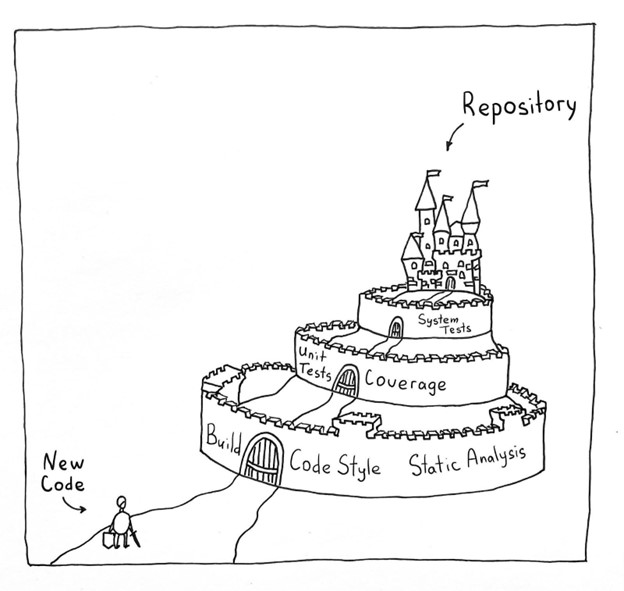
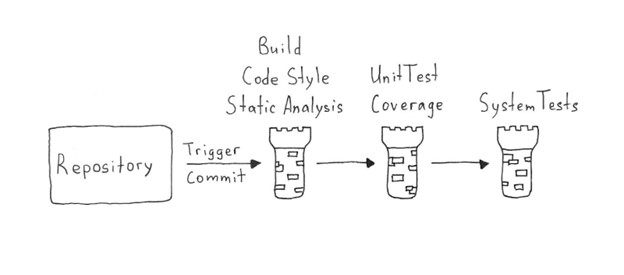
But what are quality gates? Let’s say the product code is like a castle. Every day, developers write new code – which could weaken the foundations of our castle or even poke holes in it if we are really unlucky. The purpose of a QA engineer is to test each feature and reduce the likelihood of bugs finding their way into product code. Lack of automation in the QA process could cause QA engineers to lose sleep, since there is nobody to watch over all the various metrics – especially at dangerous times, like Friday evenings when everyone wants to leave work and is hurrying to finish everything. An ill-fated merge at that moment can cause plenty of unwanted problems down the line.

This problem can be solved by building-in quality checks.

Each check deals with a different important metric. If the code doesn’t pass a check, the gates close, and the feature is not allowed to enter. A feature will only be merged into the product when it has passed all the checks and potential bugs have been fixed.

What Quality Checks can be Included in the CI/CD Pipeline?

We need to put together a list of checks to ensure that the process is as automated as possible. They can be sequenced in a “fail first” order. A feature must pass all the checks to get through the pipeline successfully. The initial checks ensure the app is capable of working: build, code style check, and static analysis.

“Build” speaks for itself: if the app fails to build, the feature does not progress. It is important to incorporate a code style check into your CI/CD pipeline to ensure the code meets unified requirements, as doing so allows you to avoid wasting time on this kind of bug during code reviews.

Static analysis is an essential tool for judging code quality. It can point out a vast number of critical errors that lead to bugs and decrease the number of routine and repetitive tasks for the QA team. Afterwards, developers should fix the detected issues and hand the code over for the testing stage.

We then continue with stage-two checks: unit tests with coverage analysis and coverage quality control, as well as integration and systems tests. Next, we review detailed reports of the results to make sure nothing was missed. At this stage, we may also perform a range of non-functional tests to check performance, convenience, security, and screenshot tests.

When developing a pipeline, we need to pay attention to 2 competing requirements:

  1. The pipeline must guarantee the best possible feature quality in light of your needs.
  2. Time spent running the pipeline should not slow down your workflow. It should generally take no more than 20 minutes.

Examples of Tools to Incorporate in Quality Checks

Code Style Highlighting

A code style is a set of rules that should be followed in every line of code in a project, from alignment rules to rules like “never use global variables”.

You might be wondering what style has to do with testers. The answer is a lot. A style check provides several benefits for QA experts, not to mention the rest of the team:

  1. A unified style helps developers work with the code and gives them more time to implement new features and fix bugs.
  2. A unified style allows you to dispense with manual code checks and use a CI/CD tool to run the checks instead.

Large companies usually have their own style guides that can be used as examples. For instance, Airbnb has a JavaScript style guide, and Google maintains several guides. You can even write your own, should you wish.

The choice of tools for code checking depends on the language. You can find a suitable tool on GitHub or find out which tools other teams use. Linters use bodies of rules and highlight code that fails to abide by them. Some examples include ktlint for Kotlin or checkstyle for Java.

Static Code Analysis

Static code analysis is a method of debugging by examining source code without executing a program. There are many different static code analyzers on the market.

We’ll now look at a platform we’re developing ourselves – Qodana. The significant advantage of this code analyzer is that it includes a number of inspections that are available in JetBrains development environments when writing code.
Many of you probably use an IDE-driven approach, where the IDE helps you write code and points out bugs such as suboptimal code usage, NullPointerExceptions, and duplicates.

But unfortunately, you can never be sure all the critical problems found by the IDE were fixed before the commit. However, you can ensure that the issues will be addressed by incorporating Qodana into your CI/CD pipeline.

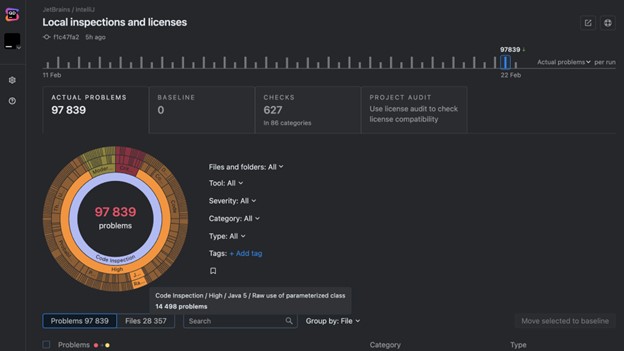
Qodana, the latest addition to the family of products from JetBrains, is a cutting-edge static analysis platform designed to help developers and QA engineers improve their code quality, making it more efficient, maintainable, and bug-free. Its static analysis engine is the only solution on the market that brings native JetBrains IDE code inspections to any CI/CD pipeline. The platform provides an overview of project quality and lets you set quality targets, track progress, and automate routine tasks like code reviews.

Interactive inspection report in the Qodana code quality platform.

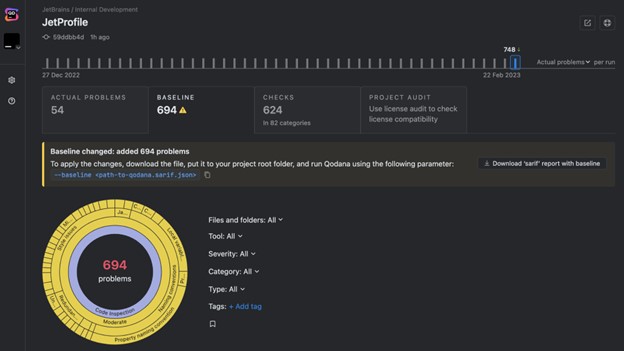
If you can’t fix everything at once, you can select critical problems, add them to the baseline, and gradually work your way through the technical debt. This allows you to avoid slowing down the development process while keeping the problems that have been found under control.

The updated baseline in the Qodana code quality platform.

Test Coverage

Test coverage is a metric that helps you understand how well your code has been covered by your tests (generally unit tests).

Here, you need to define the minimum coverage percentage you want to support. The code won’t be able to go live until it has been covered sufficiently by the tests. The minimum percentage is established empirically, but you should remember that even 100% coverage may not completely save your code from bugs. According to this article from Atlassian, 80% is a good figure to aim for.

Different coverage analyzers are available for other languages, such as Jacoco for Java, Istanbul for JavaScript, or Coverage.py for Python. You can build all these analyzers into your CI/CD pipeline and track the metrics with ease.

Shaping the Release Process

In addition to automatically running tests and ensuring particular code quality requirements are satisfied, the CI/CD tool lets testers organize the release process.

The release process can be complex and depend on many different manual actions. It is often a completely manual process: the artifact is created by a developer, then passed to the testers for checks, and finally comes to the person who knows how to roll it out for the go-live. Once again, there are a lot of potential choke points here. For instance, one of those people could fall ill or go on vacation.

An effective release process will look different for each team, but it will generally include the following steps:

  1. Each change in the Git branch triggers a build of the app.
  2. The build undergoes quality checks and does not become part of the main branch until it passes all the checks successfully.
  3. A release candidate is taken from the release branch or the main branch: this fixes the version and guarantees that nothing will go live unless it has been tested and has not been changed afterwards. This helps with tracking releases and all the changes they include. In addition, storing artifacts of the stable version makes it possible to revert to them quickly in the event of an unsuccessful release.
  4. The release candidate is tested and undergoes final checks.
  5. The release candidate goes live. This may be either a manual or automated pipeline launch, if the release candidate passed all the checks at the preceding stage. The choice between an automatic release process and a manual one will depend on how frequent and important the releases are, as well as the preferences among team members and the convenience of the rollout.

Any CI/CD system allows you to set up this type of process, which should be convenient for the whole team, including the testing team.

Given the factors outlined above, we believe following these basic rules will help ensure an easy and efficient release process:

  • Artifacts must be ready for download and testing, ideally stored in one place.
  • As many checks and tests as possible must be automated.
  • All complex operations with builds should be as automated as possible.
  • All builds that will go live should be recorded and remain available for a certain period after release. This will help if you need to investigate errors in the production version, reproduce bugs, or just track the history.

We would also like to remind you that if quality metrics are not controlled automatically and are not actionable, they are useless, as there’s no way to guarantee that these metrics will be adhered to.

Implement pipelines, automate processes, and use static code analysis!

Your Qodana team

Author

Alexandra Psheborovskaya, QA Lead and Product Manager at JetBrains

JetBrains is a global software company that creates professional software development tools and advanced collaboration solutions trusted by more than 12.8 million users from 220 counties and territories. Since 2000, JetBrains has built a catalog of 34 products, including PyCharm, IntelliJ IDEA, ReSharper, PhpStorm, WebStorm, Rider, YouTrack, Kotlin, and Space, a new integrated team environment.

Qodana is the code quality platform from JetBrains. It provides a project overview and lets developers and QA engineers set up quality gates, enforce project-wide and company-wide coding guidelines, better plan refactoring projects, and perform holistic license audits. Qodana’s static analysis engine enriches CI/CD pipelines with all of the smart features of JetBrains IDEs, supports 60+ languages and technologies, and allows analysis of unlimited lines of code.

JetBrains is an EXPO Platinum partner at EuroSTAR 2023, join us in Antwerp

Filed Under: DevOps, Test Automation, Uncategorized Tagged With: 2023, EuroSTAR Conference, Test Automation

10 Points to Help You Choose the Right Test Automation Tool

March 24, 2023 by Lauren Payne

Thanks to Testsigma for providing us with this blog post.

Making a decision to start test automation is easy but choosing a right test automation tool is not. There are teams that are spending a lot on hiring new manual testing resources but find it hard to invest in automation. The reasons could be many.

Sometimes, teams spend a lot of time exploring tools and get so overwhelmed with the information out there that they give up on the idea of automation altogether. Other times, choose a generic tool, start with automation but then, never get past the first few test cases.

In this article, we have put together some points that will help such teams navigate their search for the right test automation tool.

Points to Select the Right Test Automation Tool

1. Project Requirements:

There is no point in looking for a solution when you don’t know the problem. So, before you start exploring the various tools and technologies available in the market for test automation, you need to list down your project requirements and the problems you are looking to solve.

The list, in general, should answer the below questions:

  • Type of application that needs to be tested: It could be web, mobile, API or a desktop application.
  • Platforms that need to be tested: If yours is a desktop application, list down the operating systems that should be tested. If yours is a mobile application, then list down the supported mobile operating systems. If yours is a web application, then list down the supported browsers.
  • Language your application is built in: This can help if you are planning to use a programming language for automation.
  • Need for cross-browser testing/cross-device testing: If yours is a web application or a mobile application then you will, most probably, need this.

In addition, you could also add requirements that you deem important.

2. Team Skills / Learning Curve:

When selecting a tool for automation there could be 2 types of tools:

  • A codeless test automation tool
  • An automation tool that requires coding

If yours is a team that already has people that are skilled in some programming language then you can think of using an automation tool in that programming language. Or, if you plan to hire skilled people for automation then you don’t need to consider this point.

But, if you are planning to have an automation tool that will not need you to look for people with the required skillset, going for codeless automation tools will be a good idea. These tools allow the automation of test cases without the need for knowing a programming language.

Check this guide to know about Codeless Testing in detail.

3. Budget:

This is a very important aspect of choosing the correct automation tool. You might easily say that you will want a free tool because you don’t want to spend on automation if you can avoid it.

But, you also need to consider that the amount of time being spent on automation, the number of people working on the tool and the machines being used for automation also constitute the amount you spend on automation. So, consider below points before deciding the budget:

  • Cost of human resources being used for automation: If there is a tool that does not need you to hire new resources especially for automation, consider it a saving.
  • Time spent on learning the tool: If there is a tool that has a low learning curve, that is an indirect saving in the cost you might have spent in terms of the time the resources spend on learning the tool. Or hiring resources that are skilled in that particular tool.
  • Time being spent on automation: If there is a tool that makes it easy to create and maintain test cases, thereby saving time, consider it a saving in cost.
  • Cost of infrastructure: Talking about cloud and hosting, you can go for an ideal PHP hosting that gives an amazing managed hosting experience.

4. Ease of Test Case Creation and Maintenance:

Not every tool is made to handle all kinds of scenarios. So, to make sure that your chosen tool meets your needs, try automating a few test cases of your application to know if the tool suits your needs. That could be done with the trial version of a tool if your search has narrowed down to premium tools.

Also, to avoid spending more time in test case maintenance as compared to test case creation, make sure to choose a tool that fits your budget including the maintenance costs. There are tools that have the ability to self-heal the test cases in case of minor changes in the application.

Such tools help to reduce the cost of test case maintenance. Also, it helps if the tool supports pause and resume of test case execution for a better debugging experience.

5. Reusability:

To avoid writing the same code multiple times in multiple test cases and to avoid duplication of efforts, look for tools that allow the reuse of already created test steps in different test cases and projects.

6. Data-driven Testing:

If yours is an application that needs testing for a variety of data at multiple interfaces, it is important to choose a tool that supports data-driven testing.

7. Reporting:

Test case creation and test case execution would be useless if the reports were not useful so do go through all the features in the reporting supported by a tool. Few of them would be:

  • Screenshots for failed steps
  • Video for test execution
  • Stack trace for the error
  • A clear indication of failed test cases/steps
  • Time taken for execution of test steps and test cases is reported

8. Support for Collaboration:

If you are doing automation of a project for a client, the client will want to review the quality of automated test cases.

It will also be beneficial if other non-technical members of the team are able to automate/review the test cases. So, in such scenarios, look for tools that make collaboration with the management and clients easy.

9. Support for Tools for Integration:

If there are some process improvement or CI/CD tools that you already use or plan on using, make sure that you chose a tool that integrates with them.

10. Training and 24×7 Support:

Consider a scenario – you started using a tool for automation, and after automating about 10 test cases successfully, you got stuck on the 11th test case; you don’t know how to resolve the problem. You have looked at all possible forums but you don’t have a solution in sight. If you want to save the time, use a tool that has 24×7 support to resolve any problems you encounter.

Conclusion

Sometimes, teams decide to create their own test automation frameworks because they cannot find a right test automation tool that fit their testing requirements.

At the moment, there really are multiple types of test automation frameworks and tools available in the market that support automation on a varied variety of applications and are still being improved.

So, do go through the above points and spend some time looking at available test automation tools before thinking of implementing a framework on your own.

At the end, I would like you tell you about a test automation tool Testsigma. It is a cloud-based test automation tool that lets you automate test cases just in simple English – no coding required. In addition, you can automate your test cases for web as well as mobile apps at the same place. Do check it out if it meets your needs.

Frequently Asked Questions

How to Choose Automation Tool?
To choose the right test automation tool, you have to ensure it’s capable, powerful, flexible, and up to the mark for your project requirements. By saying capable, powerful, and flexible, your selected tool should be capable enough to manage all the test cases and test data smoothly. It should also be flexible enough to integrate with other third-party tools to extend and customize the functionality and make testing even easier.

Which Tool is Mostly Used for Automation Testing?
There is an abundance of testing tools available in the market that can be divided into two categories. The first one is the no code low code test automation tool which requires little or no knowledge of programming to perform any type of test automation.

What are the Criteria for Selecting a Test Automation Tool for Your Project?
Criteria to select a test automation tool are the following:

  • Capable- It should be able to manage the project test cases and test data efficiently.
  • Flexibility- It should be able to integrate with other third-party tools to extend the functionality tool.
  • Cost-effective- It should come into your project budget.
  • Learning curve- Learning to use the tool should not be challenging for your other team members.

Is Selenium the Best Testing Tool?
If you are from a developer background, then Selenium is a free and open-source tool project that provides various tools, resources, and libraries to make test automation easy for everyone.

When should We Choose Automation Testing?
When you required speed and accuracy at the same time, you should go for automation testing instead of manual testing, automation testing enables your team to do more in less time by providing the features like test cases to manage the project all test cases, test data management to manage the project test data, test labs to run the test case in the combinations of operating systems and browsers, etc.

Author

Shruti Sharma Testsigma writer and content marketer

Shruti Sharma

Shruti is a writer and a content marketer with more than 10 years of experience in testing and test automation, and has been associated with Testsigma since about 3 years. She loves to read, learn, and write in detail about testing, test automation and tools. In addition, she also writes fiction. One cause she deeply cares about is mental health and psychology.

Testsigma is an EXPO Gold partner at EuroSTAR 2023, join us in Antwerp


Filed Under: Test Automation Tagged With: 2023, EuroSTAR Conference, Test Automation

  • Page 1
  • Page 2
  • Page 3
  • Next Page »
  • Code of Conduct
  • Privacy Policy
  • T&C
  • Media Partners
  • Contact Us