• Skip to main content
EuroSTAR 2027 - Sign up for early access

EuroSTAR Conference

Europe's Largest Software Testing Conference.

  • Programme
    • Call for Speakers
    • 2026 Programme
    • Community Hub
    • Awards
  • Attend
    • Why Attend
    • Bring your Team
    • Testimonials
  • Sponsor
    • Sponsor Opportunities
    • Sponsor Testimonials
  • About
    • About Us
    • Our Timeline
    • FAQ
    • Blog
    • Organisations
    • Contact Us
  • Book Now

Fiona Nic Dhonnacha

The EuroSTAR Conference 2021 Programme is Here

May 20, 2021 by Fiona Nic Dhonnacha

The EuroSTAR Conference 2021 programme has dropped, and we’ve got a meteor shower of star speakers ready to spark your testing over 3 days of learning, connecting, and making new friends. Our speakers will share their expertise and help you become the best tester you can be. Start planning your 2021 EuroSTAR diary. 📝

3 days – 50+ countries – 1000+ testers – you

It takes a village

Let’s say hello to the 2021 Programme Committe, who carefully curated our incredible programme: Programme Chair, Fran O’Hara (Ireland), and his committee: Janet Gregory (Canada), Derk-Jan de Grood (Netherlands), Sowmya Ramesh (U.K.) and SzilĂĄrd SzĂ©ll (Finland). They were helped by our community reviewers from all over the world, who gave their time, knowledge, and experience to help create the programme.

Check out some of the incredible topics and speakers we’ve got in store for you.

Keynotes for aha! moments 

EuroSTAR Testing Excellence Award winner Maaret PyhĂ€jĂ€rvi talks about automation, Michiel Boreel discusses digital happiness in the age of customer obsession, while Rob Lambert will take attendees through 10 communication principles to support rapid change. Hear Aprajita Mathur on testing software for DNA Analysis, and Janet Gregory on engagement being a state of mind… 

Tutorials for actionable tactics 

The programme features 14 half-day training tutorials on day one. Get ready for a blast of knowledge from 14 tutorials, covering all the topics that you want to know more about: QA, automation, communication, BDD, testing in the cloud, artificial intelligence, and so much more. The EuroSTAR tutorial trainers are ready to teach you how to improve your testing, and ensure you leave with a toolkit armed with new skills, tactics, tips, and tricks. 

Track talks to make you think 

Choose from 30 sessions on a wide range of testing topics. Gitte Ottosen shows why quality is about value, Peter Collewijn & Hannie van Kooten talk testing AI systems, Andrew Brown delves into the next challenge in software quality, Mili Oruevic discusses the end of the world (it’s not what you think), and SO much more. 

Connections & conversations 

EuroSTAR is a global gathering rooted in community, so of course we have plenty of community sessions on diversity, career advancement, wellness and much, much more. Get your testing challenges solved at the Test Clinic, take part in Lean Coffee, stretch out with yoga, and enjoy non-stop networking opportunities with testers from all over the world.

If you book your ticket before 30th June you unlock 6 headliner talks that you can access right away – so you can start your upskilling journey with us now.

Take the whole team and save up to 30%. Team tickets start at €385 per person, which includes access to all 3 days and post conference on-demand talks.

See you in September!

Filed Under: EuroSTAR Conference, Virtual Conference

Preventing Burnout While Working in the Tech Industry

March 31, 2021 by Fiona Nic Dhonnacha

‘Preventing Burnout While Working in the Tech Industry’ is a talk given by Raj Subrameyer at EuroSTAR Online 2020. Raj is an international speaker, author, and tech career coach. He helps people in the industry find their dream job, and become successful leaders.

Now, Raj has put together his tried and tested strategies in a blog post – packed with information to help you prevent burnout in work (and in life); including tips, tricks, and tools he’s used on himself and his coaching clients.

Here’s Raj’s talk from the conference:

Where it started

Growing up, I was a shy and introverted kid. I was also average – in everything from academics, to sports, to dating. So, I put a lot of pressure on myself to emulate the overachievers around me – I wanted to be recognised, and for other people to see me as worthy. My biggest fear was being ignored.

When I started my career, I made a vow to myself: I would be famous, a recognised name. So I said ‘yes’ to every opportunity that came my way, and put in a lot of hard work. I tried to push myself out of my comfort zone constantly, in order to get the recognition that I wanted. What happened? Well, I got the fame, money and credibility I desired. Life was good.

Burnout

Then, in June 2018, something happened: one night, I suddenly blacked out while I was going to the bathroom. The next thing I knew, I was in the ER, undergoing lots of tests. The diagnosis?  Severe anxiety, depression, dehydration, and burnout.

Burnout is a serious issue, and it’s attributed to a lot of mental and physical health issues. About 60% of people in tech have burnout on some level – but they just don’t realize it.

Let’s ensure this doesn’t happen to you. I am sharing strategies to help you prevent burnout, including tips, tricks, and tools I’ve used on myself and the clients I coach, who are leaders in the tech industry.

Trust me, these things work! So let’s start your transformation process


Pick up a book

There are two books which were instrumental for me at the start of my journey to productivity and mindfulness.

Deep work by Cal Newport

Deep work is focused time block sessions on cognitively demanding tasks, without any interruption. Research has found that we check our emails 30 times per hour, and it takes us, on average, 23 minutes and 15 seconds to regain concentration after this kind of interruption. That’s why doing deep work is really important in order to be highly productive. If you want to know more about my deep work process, check out my blog, 72-Hour ‘Deep Work’ Week.

Procrastinate on Purpose by Rory Vaden

Everyone talks about time management, but no one talks about self-management. The thing is, you cannot manage time, because time moves no matter what you do. The one thing you can manage is how you prioritize your work and tasks within a given time. The system I have in place to prioritize tasks is the focus funnel, which is detailed in this book. It’s been very influential in my transformation process.

Pick a task, and ask 3 questions.

  1. Can it be eliminated?
  2. If it can’t be eliminated, can it be automated?
  3. If it can’t be automated, can I delegate it to someone else?

If all three of these answers don’t work, then you have to make a decision on whether to do that task later on, or work on the task right now, because that’s the highest priority task.

This is a good decision-making system because it incorporates priority dilution, which means that you are focusing on the lower priority task compared to the higher priority ones.

Then, you have priority concentrate – where you’re trying to concentrate on the most important task at that moment right now.

Hack your week

You can implement planning hacks and mindfulness hacks in your daily life to help increase your productivity significantly. Have you ever had an overwhelmingly huge to do list? I was always overwhelmed with my to do list, because it always had around 30 tasks on it. But there’s only so much time in a day, and you need to know where to start and what to focus on. So I came up with a system – a daily and weekly planning routine.

Daily planning routine

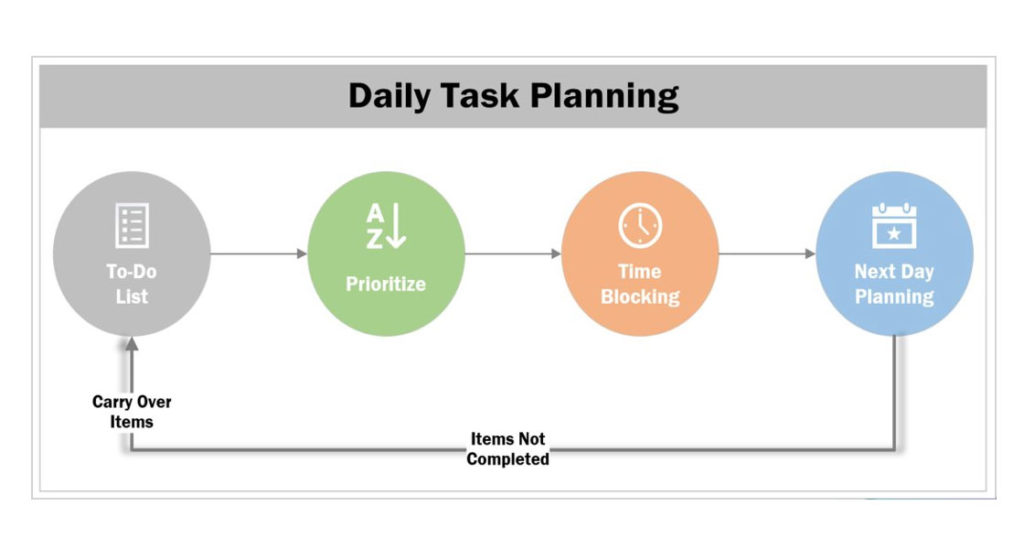
Every day, I spend 5-10 minutes coming up with a to-do list of different things I want to accomplish that day.

I then prioritize my to-do list from 1-10 in order of importance. My motto is to finish 3 top things every day. I started blocking my calendar to do focus work on these priority tasks. When the time comes, my mind does not need to think about what task I have to do, because it’s already there in the agenda.

At the end of the day, I spend 5- 10 minutes reviewing what I’ve accomplished that day. What I haven’t done gets carried over to the next day. That’s a simple way you can prioritize your work on a daily basis.

Weekly planning routine

I run my own business, and as part of my job, I have five tasks to do, no matter what: learning, reading, content creation, career coaching, and speaking. I already know how much time I have to invest in each of these buckets.

I spend about half an hour every Sunday on my weekly planning routine, and then schedule time blocks throughout the week, for example 2 time blocks for learning and reading, 4 for content creation, 8 for career coaching.

These buckets will be different for you, but make sure you are spending time in every priority task.

Meetings, meetings, meetings

Meetings are one of the most unproductive things you can do at work.

  • on average, 92% of the people in meetings multitask.
  • $219 billion dollars per year is spent on unproductive meetings.
  • 72% of the meetings which happen in the world are unproductive.

I highly recommend a Ted Talk on unproductive meeting from David Grady, How to save the world (or at least yourself) from bad meetings to get more insights on unproductive meetings.

Unproductive meetings suck the time, effort and life out of people and the company. So how do we prevent this from happening?

Pizza, anyone?

Amazon implements what’s called the Two Pizza Rule: no meeting should be longer than it would take to eat two boxes of pizza, which would be enough for approximately eight people. Printouts are given to attendees beforehand, and the first 20 minutes of a meeting is spent going over information before the meeting begins. This is a great way to ensure meetings run as productively as possible.

Another way to help avoid unproductive meetings is to ask yourself, do you really need that meeting? Could it be solved just by talking to someone via chat or email, or a phone call?

Try to avoid having more than 7-8 people in your meeting. If you have 15 to 20 people in attendance, it’s not a meeting, it’s a conference. You need to have a clear agenda, and ensure everyone comes prepared for the meeting, and then start and finish on time. The most important thing to ensure an effective meeting is to follow up on the action items, and make sure they’re completed.

Remote meetings

Have you ever joined a meeting remotely, where nobody announces who is in attendance? Or had to endure the slurping of coffee, munching, rustling, and other office noises? It might sound trivial, but if you’re wearing noise-cancelling headphones, then you know what I’m talking about.

People often start presenting something for people in the room, without sharing their screen for the remote attendees. There are also many little conversations happening in the room throughout the meeting – very annoying for the person who’s attending remotely.

How do we solve these problems? There are some simple steps you can employ: Announce who is there in the room. Have a webcam to project the room to remote attendees. Make sure to keep conversations to a minimum, and be cognizant about the different sounds which people make. The mute button can be very effective here!

Get good at email

Every year, close to 219 billion emails are sent. Research shows that by end of 2021, that number is going to increase to 316 billion emails per year. There are going to be around 4.1 billion email users by the end of 2021. The way we use email is going to be really, really important for companies, especially if you’re working in high-performance teams.


Here are some effective email strategies:

  • Ensure there’s a clear subject line
  • Don’t write long emails – just have three to four bullet point hitting on the main topic. When you have five or six paragraphs in an email, it’s hard to get your point across to people. One rule which I follow is that your email should fit within a 11-13 inch laptop screen. If it’s more than that, then you have to sharpen it.
  • Emails with more than two email threads are a red flag, because that’s the sign that you have to pick up the phone and talk to the person directly, or do something else instead of continuously emailing the person.

Set reminders for everything

I work on multiple projects, including writing, work, consulting, and coaching work. So how do I manage all these things? Reminders. Set reminders for yourself, and make use of project management tools like Trello and Asana, to help send you reminders and make sure you follow up on different tasks.

Mindfulness

Mindfulness can be an immense help in productivity. Research has found that the human mind can concentrate for an average of 45 minutes to an hour. If it’s more than that, you start losing focus. The mind also has to refocus for 5-10 minutes before you start a new task.

So throughout your work day, you need to practice focus and de-focus. Make sure you take breaks, and do something to reset your mind after every 1 hour time block. I take 5 minutes to do push-ups!

Find your appy place

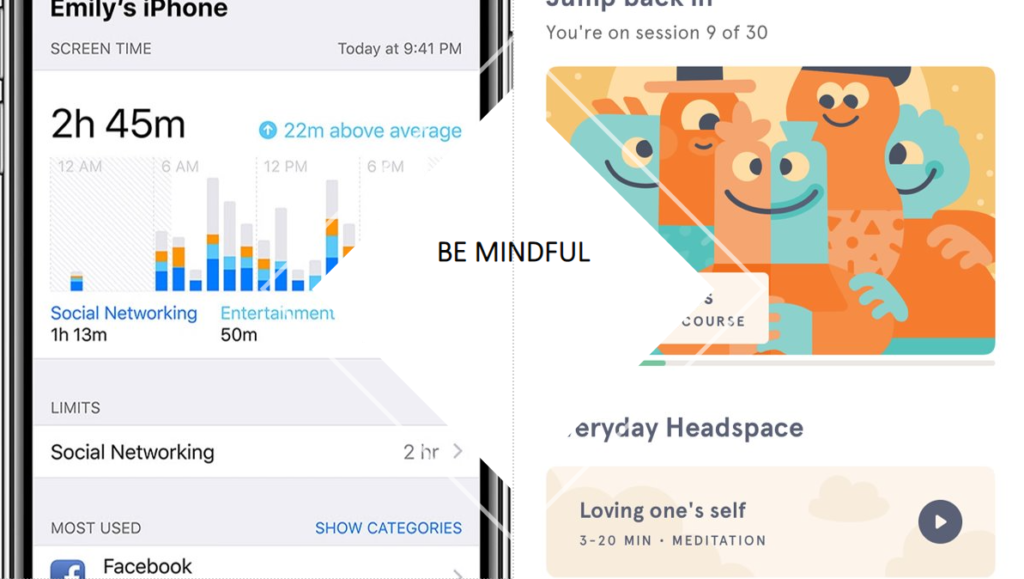
On your lunch break, try to go for a walk, watch TV, read, listen to podcasts, or just sit in silence! You need to recharge your mind properly. Studies find that on average, we spend 4 hours per day checking our smartphones. That amounts to 20 hours per day in a 40-hour work week.

Try out meditation apps like Headspace to take breaks between work, whether it’s one minute, 10, or 20 minute sessions.  Make sure your phone is on ‘Do Not Disturb’ during focus work. You could also create a playlist specifically for doing creative work.

Join a community

When I started off in my career, I found it really hard to find groups of like-minded people who wanted to discuss the same things as me – career advancement, leadership, motivation. So I created my own private Facebook group called Skyrocket your Career. This now has over 150 people, and all our testers and developers who want to share resources can learn from each other. If you want to be part of our community, check it out, because we’d love to welcome you!

Start living!

To quote Confucius, “we all have two lives. The second one starts when we realize we have only one.” So make sure you follow some of these hacks, implement them in your life, and see what works for you. That’s when the real transformation happens – and that’s how you can prevent burnout.

Even more resources:

Skyrocket Your Career

EuroSTAR Conference takes place online, September 28-30th. The 2021 programme will be released very soon – sign up to be the first to hear all the details.

Raj Subrameyer

Author: Raj Subrameyer

Raj Subrameyer actively contributes thought leadership and enrichment to the software community through conference talks, contributed articles, blogs, and YouTube videos; where he shares his experiences in development, testing, leadership and productivity. Contact Raj on LinkedIn  or Get career advice

Filed Under: EuroSTAR Conference, Leadership, People Tagged With: EuroSTAR Conference

How to network at a virtual conference

November 10, 2020 by Fiona Nic Dhonnacha

How to network at a virtual conference

One of the best things about a conference is those impromptu meetings and introductions with new people – standing in a coffee line, an evening event, hangout sessions, or just wandering around the expo.

Think virtual events lack this spontaneity? Think again. Virtual first bumps are the new handshake, and we’ll have lots of them at EuroSTAR Online! Here’s how to make the most of networking opportunities at EuroSTAR.

Let people know you’re attending 

First thing’s first: get the news out there that you’re attending Europe’s #1 test event! This is a great way to attract your peers who are also attending. Share it on your blog, attend our event on LinkedIn, and share across your social media channels. Want to win a prize? Download & share this graphic with the hashtag #EuroSTARConf on LinkedIn or Twitter and the 2 people with the most likes or comments will win €50 Amazon vouchers each.

Establish your goals

You need to be more intentional about networking in a virtual environment – but it’s well worth a little extra effort. A lot of the stress of a live event is gone, such as traveling and rushing to sessions, so it leaves more time for meaningful conversations. Make a list of your networking goals to help you focus your efforts and figure out where and how to invest your time,.

Here’s a couple to start you off:

  • I will introduce myself to at least five new people
  • I will swap my contact details with ten attendees

BUY TICKETS

Get busy on social media

During the conference, use the hashtag #EuroSTARConf on Twitter and Facebook, and post your thoughts on sessions, share screengrabs of your favourite talks or events, and chat with other attendees.

Share your insights in Q&A sessions

Our keynotes and talks are a perfect opportunity for you to get involved in discussions with other attendees. Showcase your expertise by actively engaging with attendees and presenters during our live Q&A sessions. Share your thoughts, ask questions, and get involved.

Try speed meeting

Our speed meet event lets you meet people for a 3 minute chat. Simply enter the speed meeting room and click to start chatting. Exchange details so that you can continue talking in 1:1 video chats on the platform if you run out of time and want to keep chatting – something that happens regularly to our attendees!

Join AMAs with speakers

We have exciting Ask Me Anything sessions with some of the best minds in testing. This is your chance to chat to keynotes Michael Bolton, Abby Bangser, Ronald Cummings-John, and ask them your burning questions!

Last chance to book tickets for EuroSTAR Online

Join the Huddle networking lounge for games and chats

The Huddle area is the beating heart of EuroSTAR: an all-inclusive community space to work together, share knowledge and fulfill your potential. Chat to some of the best testing minds, solve problems, test your security testing skills at our Shadow Bank challenge, play games, or just hang out.

Attend the Test Lab and Test Clinic

Our test doctors Russell and Dorota will be on hand for 1:1 sessions and open clinics to solve all your testing problems. Make an appointment at the test clinic here! Chat with like-minded people who might have the same problem as you – and are just as excited to have a solution. The Test Lab is back with some challenging games – get your thinking caps on! Join us for Dice game, Black stories and lots more.

Set aside the time

This is your time to invest in yourself, and your career. Make sure you’ve blocked off time in your calendar for the whole 3 days, including time after sessions to chat with new connections. Get comfortable and have lots of water, coffee, and snacks on hand, with as little distraction as possible.

Haven’t got your ticket yet? It all kicks off in less than a week! Book your ticket now.

BUY TICKETS

Filed Under: Uncategorized

Pair programming at Codacy and why we do it

October 30, 2020 by Fiona Nic Dhonnacha

Pair programming, also known as pairing or “dynamic duo” model is not a new concept, and it was pioneered by C/C++ guru P.J. Plauger (Scott W. Ambler, Larry Constantine, 2001). This practice consists of two developers working together off of a single screen: one is the driver, who actively codes, whereas the other, the navigator, provides instant feedback.
Once teams focus on making pair programming work and get the dynamics right, they can reap multiple benefits from it.

In this post, we will uncover how all of our Product teams gathered to brainstorm about this technique and the advantages we came up with. It is important to address here, that pairing isn’t necessarily a concept exclusive to developers; anyone can pair, whether you’re in HR, Finance or Marketing, and right now, as remote work is more embedded than ever in our society, this is probably the best time to try it out.

We already had some development teams experimenting with pairing in the past and, as we went fully remote over two months ago, we thought that this concept made even more sense for others to try it out. Acknowledging its strong reputation, we wanted to encourage all the teams in Engineering to also experiment and adopt pairing, and eventually scale it to other departments. At the end of the day, this could be an opportunity for people to keep a connection with each other while working away from the office.

Facing the current “work from home” scenario, we decided then to join teams virtually, starting with the different development teams. Through a workshop format and breakout rooms with random groups of four or five people, we had everyone collaborating, sharing experiences and knowledge around Pairing.

As an outcome, we uncovered some of the benefits of this technique, why we should adopt it, and what makes it work. This was turned into a chapter in our handbook for everyone to refer to when pairing and to serve as a basis for every pairing experience at Codacy, whether in person or remotely.

The positives of pair programming

  • We improve knowledge sharing, effectively helping each other grow
    We are able to shorten the learning period of our codebase and therefore improve the onboarding.
  • We decrease the bus factor
    By constantly working side by side, and being able to proceed with work if one person is unable to work on a given day, this makes us much more resilient as squads and as a company; over time it will be easier to have each other’s backs whenever needed.
  • We make our reviews easier and simpler
    When we pair, we’re discussing and getting real-time feedback on the work that we’re doing. This helps to improve the quality and speed of delivery because we find issues sooner rather than when we request a review.
  • We work in a more focused way
    We already knew reducing the amount of Work in Process (WIP) makes us go faster and be more efficient. When we pair, there are fewer streams of work open in parallel. That means we’re more focused on delivering the most prioritized features and can maintain the workflow.
  • We deliver better work when we do it together
    We’re excited about having cross-functional teams that can deliver a feature from start to finish. Pairing allows us to not just learn from each other, but also to increase the discipline of our practice, and do the right thing together.
  • We get much faster feedback
    With pairing, we’re able to shift left and bring quality sooner rather than later. This brings much higher quality upfront, avoids making mistakes and later fixes, therefore also improving our speed.
  • We increase out teamwork levels
    We go back and forth trying to solve a problem together, which increases empathy levels and improves relationships. This leads to a better understanding of each other, creating cool and fun dynamics between people in the squad.
    Especially when pairing remotely, there’s a higher sense of productivity since we’re helping each other move forward with the challenge at hand.
  • We become better synched
    Since we’re rotating pairs and we’re tackling things together, we inherently become more in sync with each other. Chances of being blocked are reduced and the overall alignment is better.

With the benefits listed, the next step was to understand how we would make it work and get the most out of it, considering the challenges that may arise.

There are a lot of behaviors and practices that contribute to a great pairing experience and that boost the quality and resilience of our squads.

Pre-workshop session

What contributes to a great experience

  • It’s important to define the roles
    It’s useful to have a pre-agreed set of guidelines on the pairing roles: Driver & Navigator. This helps in having a better understanding of the duties of each member, reducing friction and discussions whilst helping to focus on the challenge to be solved.
  • Communicate constantly and use clear, visual language
    Thinking out loud, constantly speaking your thoughts, whether you’re the driver or the navigator, creates a guiding line for the reasoning of the pair and the work being done. It also helps you catch loopholes on your internal reasoning.
  • Remote preparations
    It’s important that you’ve got silent conditions and a good microphone (make sure you test it). Remember that someone else is going to be looking at your screen, so adjust the resolution or font size in order for the other person to see well.
    Visual cues are incredibly important, so make sure cameras are on and you can see each other while screen sharing. Try to keep the distractions for both people at a minimum.
  • Pairing dynamics
    Before starting the pairing session make sure you’re both aware of each other’s schedules. Agree on a time for breaks, and respect those agreements.
    To avoid getting distracted or creating an uneven dynamic, rotate frequently between the driver and the navigator. Set a timer to trigger a rotation at least every 30 minutes. Base your rotation on time, not completion of a task (to prevent never rotating).
  • Be collaborative
    It’s really important to be open for some collaboration, accepting that there are going to be fewer parallel streams of work and a sense of speed decrease. The benefits outweigh these, so keep them in mind because you’ll be triggering feedback earlier and avoid possible rewrites of code.
  • Boost knowledge sharing
    Pairing is an opportunity to help someone become a better professional and also to grow by learning from someone else. This openness to learn and teach is crucial for the pairing dynamic to work.
    It’s also important to note that, in case someone knows way more than its pair, the person with the least knowledge should be encouraged to assume the driver role for longer.
  • Keep your mind open for all ideas
    We all have different opinions. If we feel they are listened to and taken into account, we’ll be more willing to reach a compromise.
  • Rotate pairs frequently (e.g. twice a week)
    Schedule the rotation of the elements of each pair. Make it dependent on time, not on task. If you’re halfway through a task when you’re supposed to rotate, simply choose which member of the pair continues working on it with their new pair colleague. This will also help to boost knowledge sharing and resilience in your squad.
  • Constantly improve, and share key learnings with the team
    Focus on improving pairing over time. Have debrief moments after each pairing session, understanding what can happen to make it a better experience next time. Sharing this helps to build trust in each other and to create better dynamics.
  • Align work with your squad
    It’s relevant to communicate beforehand which tasks will benefit most from pairing and when each person is available for pairing. Use refinements to signal which tasks must be tackled in a pair.
  • If things go wrong
    Ask someone else’s help to ease any conflict that might have occurred. Remember that each person has different needs, personality and working styles, so it’s normal that you need some time, practice, trust and love in order to make the pairing work.

In this session, we fostered a moment where our squads shared their experience and lessons learned with each other, giving us the ability to understand more notably the advantages of pairing. This allowed everyone to increase their ability to pair, or at least encourage them to do it more regularly, knowing they have these guidelines as help, and more importantly, the rest of the organization supporting them.

At the end of the day, by engaging with this technique, development teams can avoid later fixes, reduce bugs, consequently improve speed, and cut the overall cost of programming. We’re already seeing some of these, and as an example, in the last few weeks, we reduced massively the number of new bugs, seeing up to a 75% reduction. Of course, this can be attributed to other factors as well, still, some of the results obtained after we started pairing have been remarkable.

In addition, pairing empowers our team members to grow in a shorter time span while contributing to social interactions. This also contributes to increasing the resiliency and knowledge of our teams and organization: when you pair, you are learning from, discovering with, or teaching someone else.

Having all of our different engineering teams embracing this technique was an achievement and the feedback is very positive. It also impacted our company culture, so much so that our next goal is having all of the other departments in the organization also trying it out, by following these insights we just shared. As we touched upon in the beginning, the truth is, anyone can pair and see benefits from doing it, regardless of the department one is in.

Enjoyed this article? There are tons of learning opportunities at EuroSTAR Online, taking place this month, Nov 17-19. Check out our programme of incredible speakers and book your ticket now!

——————————————————————————————–

Jaime Jorge, CEO and Co-founder of Codacy

Author: Jaime Jorge

I’m CEO and Co-founder of Codacy, an automated code review service that lets developers, teams and companies be more efficient and less frustrated. My background is in software engineering, where I hold a MSc in Software Engineering from Instituto Superior Tecnico. My company has allowed me to have experience in: fundraising, hiring, growth hacking, software engineering, PR, product development, customer development, sales. If you love your craft, contact me. Passionate people always make my day.

Filed Under: Uncategorized

Rik Marselis: My Experience at a EuroSTAR online conference

October 14, 2020 by Fiona Nic Dhonnacha

Rik Marselis: My Experience at a EuroSTAR online conference

Curious about what’s coming up at EuroSTAR 2020 Online? How it all works? How you’ll connect with people on a virtual platform? We asked our programme chair Rik Marselis to tell us his experience from the Test & Quality Summit, a EuroSTAR-organised conference we held in September. 

Here’s what Rik had to say: 

The Test & Quality Summit was the first time I used the Hopin online conference platform (where EuroSTAR will also take place) – and it was a very positive experience. 

I have become quite accustomed to working from my home office and have done my fair share of video meetings and online webinars. 

But this kind of online conference platform has so many more features to offer.  

Starting with navigation: the menu bar makes it easy to visit all the different ‘areas’ of the conference – the main stage, sessions (bonus talks), expo, and networking.  

The main stage is of course where the programmed presentations are broadcast. But to get the real ‘conference feeling’, the other items on the menu are also important. 

For example, the expo where the exhibitors had their virtual booths. I visited several of these booths: some featured product presentations, while I had good conversations with others using the built-in video-calling facility. In one conversation in particular, a few of us came together, which resulted in a meaningful exchange of views and ideas. 

A feature that I really liked was the Speed Meeting. This is where you click to meet a random person to chat with. I just clicked the button to indicate that I was open to a meeting, and then I was connected to a random attendee. 

To my – and her – surprise, the first random connection was with someone I’ve known for many years: Dorothy Graham. So, the 3 minutes for this speed meeting was far too short, but it was very nice to chat to her! 

I also spoke to attendees that had watched my keynote presentation and wanted to know more. One person had a concrete practical problem in his job, and we were able to talk about a possible solution. 

Luckily, the platform offers a variety of opportunities to contact people, so if the 3 minutes of the speed meeting is too short, we could just enter another room and connect via a 1:1 video chat feature! 

At the Test & Quality Summit there were no parallel presentations, but there will be at EuroSTAR Online. Which means even more engagement and access to lots more sessions and talks. 

I was pleasantly surprised by the direct interaction I had with attendees during my speaker presentation. Everybody can ask questions in the chat feature, and since my presentation was recorded to assure the quality, I could answer questions by text throughout, as well as coming on live for the official Q&A, which gave a whole new dimension to the interactivity of the conference. 

There were lots of ways the platform captured the community feeling of a live conference. For example, the table quiz at the end of the day, the way you could virtually walk to the reception desk to ask questions about the programme, the organization, or whatever else you have a query on; and how you could travel from room to room. 

All in all, the online conference was a great experience, and now I’m really looking forward to EuroSTAR Online in November: to enjoy the community feeling, and exchange ideas and knowledge about our fantastic quality & testing profession. 

Rik is the Programme Chair of EuroSTAR 2020 Online this November. Together with his committee Mette Bruhn-Pedersen, Marta Firlej and Zeger Van Hese, they have created a full line-up of incredible speakers giving insights on all the topics you care about, including agile, DevOps, automation, test management, and lots more. 


Filed Under: EuroSTAR Conference, Virtual Conference

Introduction to Exploratory Testing

October 12, 2020 by Fiona Nic Dhonnacha

Exploratory Testing

Although test automation is the biggest trend in software testing right now, only focusing your strategy on automation isn’t going to guarantee you a fool-proof QA process.

By diversifying your testing strategy with different methods, you’ll be able to cover more ground (i.e. untested code)  and more unexpected discrepancies to your code and product.

Exploratory Testing should be a part of your testing strategy because it will test the effectiveness of your existing tests, discover code discrepancies, and alleviate bottlenecks where bugs hide the most.

In this post, QA Software Engineer, Pekka PönkÀnen, tells us how he effectively performs Exploratory Testing and his advice on making the most of your sessions.


Why Exploratory Testing is important

In 2018 I walked the length of Japan, and one of my goals for the trip was to explore the country and its rich culture. During the trip, I decided to walk in different routes other than just following Google Maps, and as a result of that I had many exciting adventures. Undoubtedly, without having the curiosity to explore, I would have missed many unique places and interesting conversations with locals.

I firmly believe that in order to find new ways of seeing and experiencing the world,  you need to be brave and curious about the unknown. The same goes for software testing. Always following the same paths, or tests, will get you expected results. On the contrary, if you go on an exploratory session of your application, you’ll be amazed to discover just how many bugs could be hiding or how much you can improve the functionality for the user.

If you want to try Exploratory Testing yourself, consider this your starting point.

What exactly is Exploratory Testing?

The term “Exploratory Testing” means that you are exploring the application and how it performs after different actions.

To truly understand the concept, it is essential to dig deeper into the roots of the terminology. The term “Exploratory Testing” was introduced in 1984 by Cem Kaner.

“Exploratory software testing is a style of software testing that emphasizes the personal freedom and responsibility of the individual tester to continually optimize the value of her work
”

James Bach’s 2003 paper, “Exploratory Testing Explained”

Through exploratory testing, your goal is to find out how a specific area of an application is working while using your skillset to provide valuable feedback to your team. You want to find the nastiest bugs under the hood and make sure that nothing critical or dangerous can happen in the app.

Preparing for Exploratory Testing

Before starting the testing run itself, it’s good to have tools to write down ideas, bugs, and defects. Personally, I like classic pen and paper and bug-tracking software to write down thoughts and plans for the future. During the run, you will see application logs, automation ideas, new approaches for new testing runs, and bugs that need to be fixed. Having good software that captures images, videos, and notes can be very helpful in centralizing your findings and sharing your insights with your team.

Keep in mind that your notes do not need to be the most delicate piece of art. What’s important is that you can gather a small story around it for your teammates or stakeholders after the session. I have heard very successful use cases with testers doing mind mapping during exploratory testing. Having this visual aid in the process can be valuable to build off of your ideas and create themes.

Identify your goal

The first thing to get started in exploratory testing is to define what to test. It can be a known bottleneck, possible risk, new feature, or an area which has a lot of bugs.

As a software tester, you may know the places to look, and the development team can define the areas which need more attention. When planning the testing, remember not to make it broad so that you don’t lose focus. Here are a few examples to get you started:

What to do:

  • Explore catalog page with a screen reader to verify page accessibility
  • Explore login process with iOS gestures to verify that functionality is accessible

These tasks can be timeboxed and can be done in one session and short enough to be focused.

On the other hand, you don’t want to choose a task that has too many options or paths to follow. The best way is to keep it simple and focus on smaller tasks.

What not to do:

  • Explore all possible mobile security issues to the system to discover any security-related threat

Once you’ve identified your goal and prepared your tools, here are the steps you can follow to complete an Exploratory Testing session:

1. Prep your session

After selecting an area to explore, design the test session. Once you know what to explore, you’ll get a flood of ideas about how to test different aspects — make sure to keep track of everything that comes to mind so you have a solid plan before you start testing. Write down your mission and prepare the notes about the way you want to proceed.

2. Setup the testing environment

Check that you have all credentials and access to enter the testing environment. Testing is pleasurable when you can focus on the testing itself, and when you don’t need to worry about usernames or unreachable servers.

3. Timebox and execute

Depending on the task, open the suitable logs, and monitor tools to log your actions during testing. Application logs are crucial to provide valuable information when things go wrong. While executing, keep your objective in mind, write notes, be systematic, collect info, gather ideas for the next sessions, and most importantly learn and explore your product.

Exploratory testing is more of a mindset than a framework

Exploratory testing is in fact a skill which is developing all the time while your skillset as a tester is evolving. The beauty of testing is that you never get bored of it because there is always room for improvement. Be curious about the application, try different approaches to execute testing, learn about your software, and share the knowledge.

At the end of the day, software development is a team sport!

Inform others about the state, risks, and any other concerns. Share your mind map as well as any evidence that you collected like videos, images and notes. You don’t have to have all of the answers, but sharing them with your team will also help others discover themes and insights which you wouldn’t have known otherwise.

——————————————————————————————–

Author: Pekka PönkÀnen

Xray Contributing Writer | QA Engineer

Filed Under: EuroSTAR Conference, Exploratory Testing, Virtual Conference

6 strategies for building AI-based software

October 1, 2020 by Fiona Nic Dhonnacha

Building AI-based software

Developing software that incorporates artificial intelligence (AI) can be unpredictable, and you need a unique set of knowledge and skills to code, test, and make sense of the data. What’s more, tuning the system can take time, and the decisions AI-based software makes can sometimes be difficult to explain.

My organization specializes in developing software test automation tools that help users develop tests that run on different platforms, such as desktop computers and mobile devices. We wanted to make it even easier to write and run these tests, and avoid having to customize the test for each platform.

Our research led to adopt natural-language processing, which allows users of our software to describe a test using simple English, and computer vision with optical character recognition to identify the objects on a screen.

Here are the lessons we learned that you can apply as you incorporate AI concepts into your products.

Make data an integral part of planning

An artificial neural network (ANN) is a layered structure of algorithms designed to use data to make intelligent decisions without human intervention. We incorporated an ANN in our system, fed it with hundreds of thousands of data samples, and let it do its magic to make informed decisions.

In a system that’s heavily based on data, planning is essential. We had to address:

  • What data we needed to train the model
  • How to acquire, clean and classify that data
  • How to obtain additional data from customers

This required expanding the role of the product management team, which traditionally focuses on the features and capabilities of the product, to include overseeing the data-related aspects of the system. That included defining the scope of the data, the acceptance criteria for the data, and how data was to be used within our AI models.

Lesson learned: Data must be front and center of everything your team does, and your product managers must become familiar with the AI techniques your team is using in order to ensure consistency and reliable outcomes.

Decouple the AI model from your product

Developing and tuning an AI model can take a long time. If your application is tied closely to the model, you can only progress at the speed of the model’s development.

The AI model should be decoupled from the rest of the system and treated as a separate pipeline. This allows each piece of the system to progress at its own pace, and you can apply updates to the AI model independently. This has two key benefits:

  • You can develop and test your main product independently of the model, giving you fast feedback on product features unrelated to the AI portion of the product, and you can continue developing and training the AI model without being impeded by unrelated issues, such as a code change to the main product that breaks the build and holds everyone up until it’s resolved.
  • You can release your main product and the AI model at different cadences. This is particularly significant for users of our on-premises product, since they can install the product once and apply subsequent updates to the AI model without going through an extensive upgrade process. Given that the nature of AI models is to continuously learn, adapt, and improve, this is an important capability that allows our users to stay on the cutting edge of AI without having to wait for updates to the entire product.

Designing the system correctly to allow the AI model to be developed and deployed separately is a crucial capability that you should tackle early. Our release timeline now consists of two parallel timelines; one for the product, and one for the AI model updates.

Create cross-functional, multi-disciplinary teams

After we decoupled the AI model from the main product, our teams could develop and test it independently. But we also needed to test the system as a whole, with all of the components deployed and working together. For effective end-to-end testing, you need expertise in both AI and software testing.

We created cross-functional teams that included software engineers, data scientists, data analysts, testers, architects, and the product manager. This gave us the best of both worlds—we have experts in designing and developing AI models working alongside our software engineering and software testing specialists. In this way we can leverage the knowledge and experience of the entire team to develop, test, and deliver each component independently, as well as test the entire system holistically.

This approach has helped to cross-pollinate specialized knowledge across the team, so that our developers and testers have come to understand AI better, and our AI experts have learned to become better developers and testers.

Understand that explaining results in an AI system can be challenging

We like to think of our deep learning system as a black box that knows how to think and make decisions, but sometimes it makes decisions we weren’t expecting. When a regular software system does something unexpected, you can debug it. It might take time, but you’ll figure it out. But in an AI system, it’s almost impossible to determine the combinations and sequences of data and logic that led to a decision.

Lesson learned: The most efficient way to influence a model’s decisions is through supervised trial and error, coupled with guidance from the AI experts who understand how the model works, and who can guide the learning and tuning process toward more accurate results.

Expect longer cycle times when building the product

Traditional software products compile quickly—even large enterprise software products complete a build in no more than a few hours.

AI models are different. Training a neural net first involves gathering data samples, and then cleaning and tagging the data, which can take days, depending on the quantity and quality of the data you need. Only then can you start the training process, which can take several days for each training cycle. In our case, it takes about three days on a machine with a powerful processor to train just one model.

This is a major motivation for splitting the AI model out from the rest of the product, reducing dependencies and making it a separate and independent pipeline, as discussed above.

Retrain your AI models with customer data

It’s impossible to achieve 100% accuracy and zero defects in an autonomous, continuously improving, self-learning system. We train our AI models extensively in our own labs, but when the model is exposed to the customers’ environment, it has to make decisions about something it may not have seen before. The most effective way to tune the system so that it makes the best decisions is to augment the model’s training data with the customer’s data.

We work with our customers to improve the accuracy of our systems in their environments by obtaining their approval to use their data to retrain and optimize our models. This helps the model make better decisions, and creates better outcomes for our customers.

Apply these strategies to your own AI development

The software industry is undergoing an AI revolution, and vendors are adding new AI capabilities to their products every day. My organization has made significant adjustments to the way we develop and deliver software, and we have restructured our teams to include experts in AI—something you’ll need to do as well. We also work more closely than ever with our customers to learn from their environments and improve their outcomes.

AI development might be challenging, but it’s worthwhile. If you’re joining the AI revolution, make sure you apply these strategies to your software development process to get the most out of it for your team, your product, and your users.

This story was originally published on TechBeacon.

Want to know more about AI and how to apply it to your software testing? Check out EuroSTAR Online – we’ve got a programme packed with all of the topics you care about.

                                                 ——————————————————————————————–

Jecky Toledo, esearch and Development Director at Micro FocusAuthor: Jecky Toledo, R&D Director, Micro Focus, Functional Testing


As Research and Development Director at Micro Focus, Jecky Toledo leads the groups responsible for the company’s functional testing and mobile testing portfolios. He has 20 years’ experience building and managing development teams using various methodologies, practices and delivery methods. Most recently, he has been leveraging the power of artificial intelligence and the transformation that AI-based systems bring to the entire software development lifecycle. Jecky trains in martial arts in his spare time, and is a father of three.

Filed Under: EuroSTAR Conference, EuroSTAR Expo, Virtual Conference

Achieving Rapid Test Automation: a case study

September 25, 2020 by Fiona Nic Dhonnacha

Learn how ArisGlobal achieved rapid test automation using Sahi Pro web test automation tool

How ArisGlobal achieved rapid test automation using Sahi Pro web test automation tool

Who is ArisGlobal?

ArisGlobal is a global provider of R&D software solutions and consultancy services, serving life sciences companies in the management of their clinical trial, safety and regulatory information.

Currently, more than 200 life sciences companies and CROs around the world rely on ArisGlobal, including top pharmas, biotechs and devices, CROs and regulatory agencies: ArisGlobal an established market leader in every ICH region.

They provide leading solutions for adverse event reporting, regulatory tracking and e-Clinical. 32 of the top 50 pharmas rely on ArisGlobal solutions.

The Challenges

ArisGlobal started test automation with one of the leading commercial tools. Due to limitations in supporting automation for their products, they moved to an in-house test automation framework based on Watij and Selenium.

Existing testing tool had no record and play  back feature. Secondly, there were no available relative APIs.

Thirdly, complex conditional automation could not be automated as the tool used did not support scripting.

Lastly, maintaining an object repository was mandatory. This was a major effort for maintenance.

The Solution

Based on business requirement for rapid test automation, ArisGlobal decided to use Sahi Pro. The record and playback feature, along with the keyword and data driven test support in Sahi Pro, was used by ArisGlobal to its advantage.

ArisGlobal used Sahi Pro for functional testing including testing of speci_c functionality for ArisGlobal products. ArisGlobal also used Sahi Pro for integration testing and user acceptance testing. The web technologies that were used included:

JSP | JSF | HTML | HTML5 | ExtJS | .NET

Benefits

ArisGlobal achieved the following benefits while using Sahi Pro Web Test Automation tool.

  • The record and play back feature reduced the time required for testing scenarios which require repetitive manual tests
  • Data driven test support in Sahi Pro helped reduce testing cycles with multiple test data sets,thus improving the test coverage.
  • Extensive APIs along with support for native JavaScript helped automate actions on any application, irrespective of the underlying technology.
  • Positional Relation APIs help automate controls even without specific unique identifiers.
  • Reduction of time by 70% for multiple report generation for one of the products.
“Sahi Pro provides a one stop solution to most of our test automation requirements. It’s innovative feature of smart combination of record-playback along key-word generation for key-word driven tests and datadriven tests and suite executions makes it a unique test automation tool to meet the demand for rapid automation.”

Dr. Kailash K P Chanduka (PhD), Head- Testing Shared Services, Aris Global Software Pvt. Ltd.

About Sahi Pro

Sahi was born as an open source product in 2005 with specific focus on automation of emerging web 2.0 technologies but as a tool geared towards testers. With consistent work over the past years, Sahi has grown to be a powerful but easy-to-use tool for testers, handling with ease most complexities presented by modern web, mobile and desktop applications.

Want to learn more about Sahi Pro? They will be exhibiting at EuroSTAR Online in November.

Find out more about the EuroSTAR programme here.

Filed Under: EuroSTAR Conference, Test Automation

  • « Previous Page
  • Page 1
  • …
  • Page 7
  • Page 8
  • Page 9
  • Page 10
  • Page 11
  • …
  • Page 15
  • Next Page »
  • Code of Conduct
  • Privacy Policy
  • T&C
  • Media Partners
  • Contact Us

part of the