• Skip to main content
Year End Offer: Save 30% + Teams Save Up to an Extra 25%!

EuroSTAR Conference

Europe's Largest Quality Engineering Conference

  • Programme
    • Programme Committee
    • 2025 Programme
    • Community Hub
    • Awards
    • Social Events
    • Volunteer
  • Attend
    • Location
    • Highlights
    • Get Approval
    • Why Attend
    • Bring your Team
    • Testimonials
    • 2025 Photos
  • Sponsor
    • Sponsor Opportunities
    • Sponsor Testimonials
  • About
    • About Us
    • Our Timeline
    • FAQ
    • Blog
    • Organisations
    • Contact Us
  • Book Now

Exploratory Testing

7 Common Test Management Challenges AI Can Solve 

June 5, 2024 by Lauren Payne

Test management is an integral part of software development that ensures that your software meets quality standards, is bug-free, and performs as expected. Unfortunately, there are some challenges in test management systems, causing significant issues while impacting application speed and quality. As software complexity grows, so do the difficulties in managing testing processes efficiently.  To deal with the evolving challenges related to test management and software complexity, artificial intelligence (AI) plays a vital role. AI offers innovative solutions to many of these challenges. In this blog post, we’ll explore seven common test management challenges and how AI can solve them. 

Navigating Key Challenges in Test Management 

Efficient test management, improved productivity, increased ROI, and faster time to market are the things that every organization expects from its test management solutions. There are many aspects that stop companies from achieving the best results from their test management processes. They may experience inadequate test coverage, resulting from a lack of thorough testing across all possible scenarios, compromising the product’s quality and introducing the risk of undetected defects.  

Similarly, inefficient test case prioritization leads to a misallocation of resources, with critical areas receiving insufficient attention. Thereby prolonging testing cycles and delaying time for the market. Moreover, insufficiently realistic test data fails to accurately simulate real-world scenarios, hindering the effectiveness of testing efforts and resulting in potential oversights.   In case of having flaky test cases in test cycles, testers may experience inconsistency and uncertainty in the testing process. It can delay product release and affect ROI. These challenges collectively contribute to inefficient productivity, as valuable time and resources are wasted on ineffective testing methods. Efficiency suffers as testing cycles become prolonged and repetitive due to the need for rework and debugging. Consequently, ROI is impacted negatively as the cost of rectifying defects increases. Plus, the time to market is delayed, leading to missed opportunities and potential revenue loss. It is crucial to address these challenges effectively to optimize productivity, efficiency, ROI, and time to market in the software development lifecycle. Let’s learn how AI-powered solutions can address test management challenges. 

1. Difficulty in Test Case Prioritization 

In simple words, test case prioritization (TCP) refers to arranging test cases based on their significance, functionality, and potential impacts on the software and running them in the correct order. However, prioritizing test cases effectively is a challenging task in test management. With limited time and resources, it’s essential to focus your testing efforts on the most critical areas of an application. 

Test Case Prioritization can help in efficient test management 

Integration of AI in your test management solutions can help you with efficient test case prioritization. It analyzes factors like code changes, historical defect data, and business impact to automatically prioritize test cases. Machine learning algorithms can adapt over time, continuously improving prioritization based on past results and changing project requirements. By leveraging AI for test case prioritization, teams can optimize testing efforts and identify high-risk areas early in the development cycle. 

It helps to Improve efficiency and reduce time to market as resources are allocated more effectively, ensuring that high-risk areas are thoroughly tested early in the development cycle. 

2. Incomplete Test Coverage 

Achieving comprehensive test coverage is essential for identifying potential defects and ensuring the overall quality of the software. In a traditional test management system, when test creation is a manual aspect, you may not have complete test coverage, leaving critical areas untested. This incomplete test coverage is a common challenge in software testing, leaving potential defects undetected. Besides manual issues, many other factors can lead to incomplete test coverage, such as time constraints, resource limitations, or oversight in test case creation. Incomplete test coverage increases the risk of releasing software with undiscovered bugs, which can lead to customer dissatisfaction, costly rework, and damage to the organization’s reputation. 

Comprehensive test coverage can make test management better and improve productivity 

To address the issue of incomplete test coverage, organizations can leverage artificial intelligence (AI) solutions that offer innovative approaches to test case generation, prioritization, and optimization. AI-powered test management tools can analyze application requirements and usage patterns to generate test cases automatically, ensuring comprehensive coverage across various scenarios and edge cases. By using AI for test case generation, teams can enhance the effectiveness of their testing efforts and minimize the risk of overlooking critical functionalities. 

3. Availability of effective Test Data 

Realistic and diverse test data plays a crucial role in effective software testing. It allows testers to simulate real-world scenarios and ensure comprehensive coverage of the application under test. However, generating and managing test data manually can be time-consuming and error prone. Plus, manually generated data may not always represent the diversity of data encountered in production environments. This can lead to insufficient test coverage and potentially overlook critical edge cases and scenarios. 

Availability of effective Test Data improves productivity and reduces time to market  

AI offers innovative solutions to address the challenge of test data availability by automating test data generation, management, and optimization. AI-driven test data generation tools can analyze application requirements and usage patterns to generate synthetic test data automatically. These tools use machine learning algorithms to simulate real-world scenarios, enabling thorough testing without compromising data privacy or security. Apart from synthetic test data generation, AI- AI tools can analyze existing data sources to profile and identify patterns, correlations, and anomalies within the data. Plus, AI-driven test data solutions can easily be integrated with existing testing workflows and tools, allowing testers to easily access and utilize generated test data within their testing environments.  As a result, testers can conduct thorough testing without delays caused by manual data generation, improving productivity and time to market. 

4. Bottlenecks Caused by Flaky Test Cases 

A flaky test case is one that exhibits non-deterministic behavior when executed repeatedly within the same environment, resulting in intermittent results. Flaky test cases can cause delays and inconsistencies in test results and reduce the testing process’s reliability. 

Flaky test case detection can help with efficiency and reduced time to market 

AI-powered tools can analyze test scripts and execution logs to identify and address flakiness automatically. With machine learning algorithms, these testing tools can identify patterns indicative of flaky behavior and suggest corrective actions to ensure consistent and reliable test results. For instance, QMetry’s test management platform allows testers to gain control over flaky tests is identifying them using a “Flaky Score” derived from its execution history. With AI-powered flaky test detection and mitigation processes, testers can minimize disruptions in the testing process and improve the overall reliability of their testing efforts. 

Flaky test detection not only increases efficiency and reduces time to market but also allows testers to focus on productive tasks without being hindered by inconsistent test results. 

5. Unidentified Defects passing on final product

Detecting and resolving defects early in the development process is critical for delivering high-quality software. However, identifying potential defects among thousands of lines of code can be challenging, even for experienced testers. 

Efficient defect detection helps with better test management, faster time to market, and improves ROI 

AI-driven defect detection models can analyze code changes and historical defect data to identify patterns indicative of potential defects. Machine learning algorithms can predict which code changes are most likely to introduce defects, allowing developers and testers to focus their efforts on high-risk areas. By incorporating an AI-powered defect prediction system into their test management processes, testers can proactively address quality issues and minimize the impact of defects on the final product. 

Therefore, AI-powered defect detection can help with better test management, faster time to market, and improved ROI as defects are detected and resolved before they impact the final product. 

6. Managing Test Environment 

Managing test environments with diverse configurations, dependencies, and constraints is a huge challenge for many development testing teams. When testers try to deploy and configure test environments manually, it can lead to inconsistencies, delays, and resource contention. 

Better test environment management can Increase productivity and reduce time to market 

AI-driven test environment management solutions can help testers to manage test environments in a better way. Using infrastructure as code (IaC) and configuration management tools, AI-powered solutions can automate test environment provisioning, configuration, and maintenance. Using machine learning algorithms, AI-driven solutions can optimize resource utilization, predict capacity requirements, and proactively identify potential bottlenecks or failures. By incorporating AI-driven test environment management into workflows, testers can ensure reliable and consistent test environments throughout the software development lifecycle.  It influences increased productivity and reduced time to market as testers can focus on testing activities rather than dealing with manual deployment and configuration of test environments. 

7. Test Result Analysis: 

Test results analysis to identify trends or patterns plays a significant role in improving test coverage and reliability. In case of traditional test management systems, manually reviewing test results and logs is time-consuming and error-prone, especially in large-scale testing environments. 

Efficient test result analysis can improve the efficiency and reliability of testing efforts  

With AI integration, test result analysis becomes easy and more efficient. AI-powered test result analysis tools can aggregate and analyze test results from multiple sources, such as automated tests, manual tests, and performance tests. The application of machine learning algorithms enables these tools to identify correlations between test outcomes, code changes, and environmental factors. These tools can also perform root cause analysis and trend prediction. AI-driven test management tools allow testers to gain valuable insights into their testing processes and make data-driven decisions to improve quality and efficiency. 

Key Takeaway  

Test management can be complex and challenging with traditional methods and tools. However, AI offers innovative solutions to many of its inherent difficulties. AI-powered test management solutions offer technologies like machine learning, predictive analytics, and natural language processing to overcome common test management challenges and improve the efficiency, effectiveness, and reliability of their testing processes. 

From test case prioritization to test environment management, AI-driven solutions have the potential to revolutionize the way software is tested and validated. AI can lead to faster release cycles, higher-quality products, and improved customer satisfaction. As AI continues to advance, its role in test management will only become more significant, empowering organizations to meet the demands of their users and sustain in a competitive software landscape. 

 Modern AI-powered tools like QMetry Test Management for Jira by QMetry can help you to manage all your testing activities through integrated tracking tools (e.g. Jira) and automation frameworks.  

QMetry’s second-offering QMetry Test Management is designed for Agile and DevOps teams.  These products are fully integrated into CI/CD pipelines giving testing teams and leaders full control over testing projects. These tools also manage manual testing seamlessly. 

Both QMetry Test Management and QMetry Test Management for Jira offer scalable, compliant, and secured test management that allows you to deal with different testing challenges. Gen AI offerings of these tools have features like smart search, auto test case generation, and flaky test case detection making your testing super-efficient. These tools have   potential of reducing time to market, improving ROI, and increasing efficiency. 

Want to learn more about these test management products and how they can improve your test management experience? Schedule a call now! 

Author

Deepak Parmar, Global Product Marketing Leader at Qmetry

QMetry is an innovative leader in AI enabled test management and automation products for Agile and DevOps teams that empower enterprises to build, manage, and deploy quality software at speed with confidence. QMetry is revolutionizing testing through AI-driven test authoring, test execution, and quality analytics for agile teams globally. Experience QMetry’s AI – enabled Test Management powered by QMetry Intelligence (Gen AI) delivering quality at speed and scale. It is a powerful, scalable, compliance driven quality orchestration platform that enables quality at speed with improved ROI.” 

QMetry is an exhibitor at EuroSTAR 2024, join us in Stockholm.
 

Filed Under: Exploratory Testing, Uncategorized Tagged With: 2024, EuroSTAR Conference, Expo

How to overcome common challenges in Exploratory Testing

February 20, 2024 by Lauren Payne

Exploratory testing involves testing system behaviour under various scenarios, with a predefined goal but no predefined tests. This focus on discovering the unknown makes exploratory testing both powerful and challenging.

“Exploratory testing is a systematic approach for discovering risks using rigorous analysis techniques coupled with testing heuristics.”

-Elisabeth Hendrickson

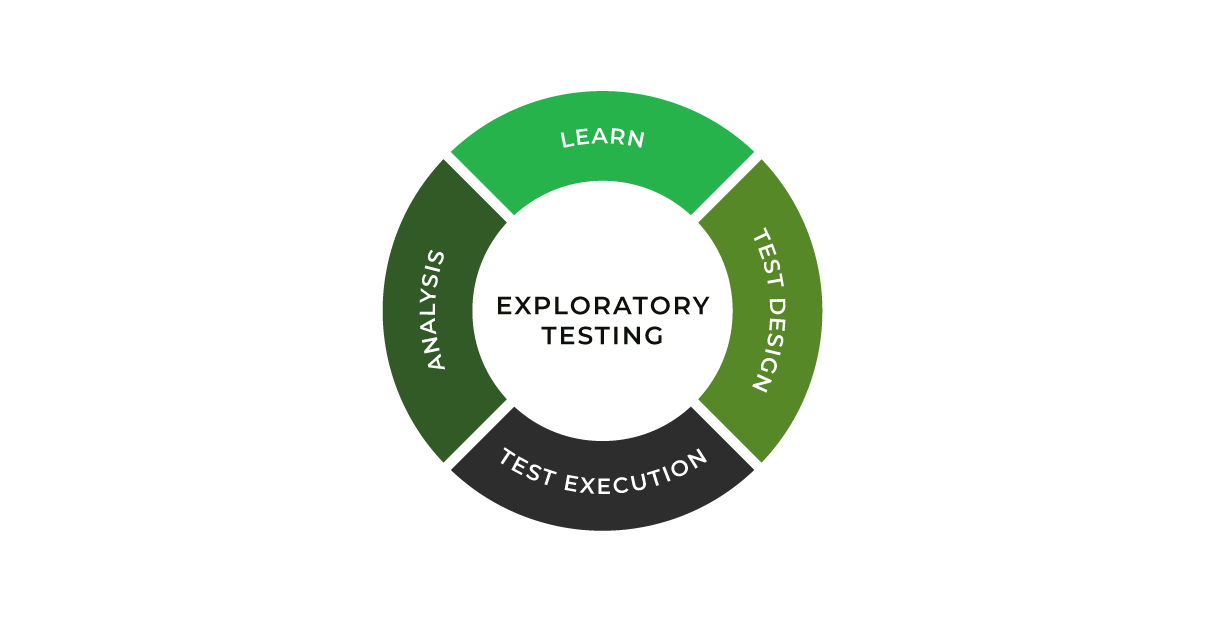
Although exploratory testing (ET) is not a new concept, its significance has increased exponentially in the dynamic field of software development. With its simultaneous learning, test design, and execution processes, ET represents a shift from the traditional, script-based testing methodologies. This approach is particularly beneficial in handling the complexities and unpredictabilities of modern software projects. It prepares testers to actively engage with the software, uncovering potential issues that scripted tests might overlook.

In exploratory testing, catching bugs is an adventure – a journey through the unknown aspects of software, where each test can reveal new insights. In the Agile world with rapid development cycles, exploratory testing stands out as a dynamic and responsive testing strategy, essential for ensuring software quality in a fast-paced environment.

Despite its advantages, exploratory testing has challenges that can interfere with its effectiveness. Testers often encounter hurdles in planning and adapting to newly discovered information, managing frequent context switches, maintaining comprehensive documentation, and effectively measuring the success of their testing efforts. Addressing these challenges is crucial for harnessing the full potential of ET. This blog will explore these common challenges and discuss how the Xray Exploratory App provides innovative solutions, enhancing the exploratory testing process and enabling testers to deliver high-quality results efficiently.

How to overcome challenges with Xray Exploratory App

The Xray Exploratory App proves to be a vital resource for successfully navigating these challenges. The tool supports the unique factors of exploratory testing, empowering testers to optimize their testing strategies while maintaining the flexibility and adaptability that exploratory testing demands. 

Planning and Learning

One of the primary challenges in exploratory testing is the balance between planning and learning. While ET is less structured than traditional testing, it still requires a level of planning to be effective. Xray Exploratory App facilitates one of the measures to counter this challenge and optimize your ET adoption –  session-based test management (SBTM). 

Testers must continuously learn from the software they are testing and adapt their approach accordingly. This requires understanding the project’s goals and the ability to quickly assimilate new information and apply it to testing strategies. One of the elements that helps with gaining the skills and experience is the structure of knowledge sharing. For example, if charters are handled as Jira stories, you get a centralized storage (a library of templates, of sorts) that has good examples which help educate any team member about the system and previous ET efforts.

Context Switching

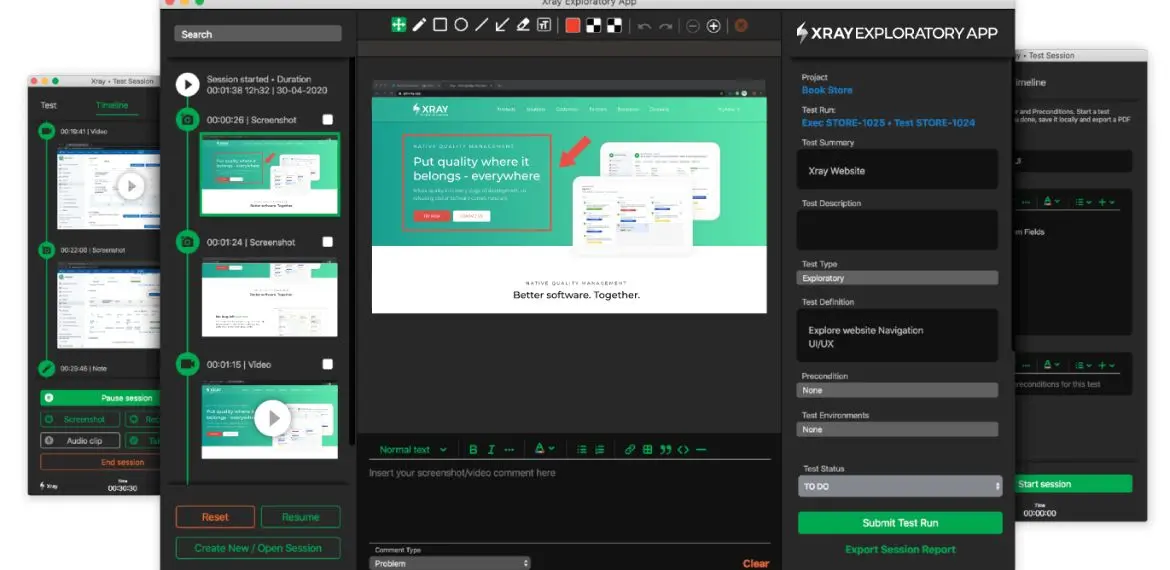
Testers in an exploratory setting often deal with context switches. They must juggle different aspects of the software, switch between various tasks, and respond to new findings in real-time. Managing these switches efficiently is crucial to maintain focus and avoid overlooking critical issues. Beyond common techniques like Pomodoro, you can leverage two key features of Xray Exploratory App – saving sessions locally and editing the detailed Timeline with all your findings.

Proper Documentation

Unlike scripted testing, where documentation is predefined, exploratory testing requires testers to document their findings as they explore. This can be challenging as it requires a balance between detailed documentation and the fluid nature of exploratory testing. Testers need to capture enough information to provide context and enable replication of failure and future test repeatability without getting bogged down in excessive detail.

Xray Exploratory App addresses this challenge with the easily created chronological history of not just text notes but also screenshots, videos, and issues/defects created in Jira during the session (which accelerates the feedback loop).

Reporting and Measuring Success

Another significant challenge in exploratory testing is effectively reporting and measuring success. Traditional testing metrics often do not apply to ET, as its dynamic nature does not lend itself easily to quantitative measurement. Defining meaningful metrics to capture the essence of exploratory testing’s success is crucial for validating its effectiveness and value within the broader testing strategy. In many cases, such definitions would be very company-specific.

The good news – the seamless integration between Xray Exploratory App and Xray/Jira allows you to leverage centralized test management features, such as real-time reporting on several possible metrics (e.g. number of defects, elapsed time). That improves visibility and allows to clearly determine the status of not only exploratory testing, but all testing activities.

For instance, if we want to track defects/issues resulting from exploratory testing, we can see them linked to the test issue in Jira/Xray, which will then allow us to check them in the Traceability report. 

Overall, these challenges, though daunting, are manageable. With the right approach and tools, testers can navigate the complexities of exploratory testing, turning these challenges into opportunities for delivering insightful and thorough software testing.

Future outlook of Exploratory Testing

Exploratory Testing is becoming more acknowledged as an indispensable part of the testing strategy, especially given the limitations of conventional scripted testing. The ability of ET to adapt and respond to the complexities and nuances of modern software development is exceptional. As we look towards the future, several key trends are emerging that are set to shape the landscape of exploratory testing.

Artificial Intelligence (AI)

AI has the potential to significantly transform exploratory testing by automating certain aspects of ideation and, more so, data analysis processes. Leveraging AI in software testing in the correct way can enhance the tester’s capabilities, enabling them to focus on more complex testing scenarios and extract deeper insights from test data. AI can assist in identifying patterns and predicting potential problem areas, making ET more efficient and effective.

Integrations with other tools

The future of exploratory testing will see greater integration with various development, testing, and business analysis tools. This compatibility will streamline the testing process, enabling seamless data flow and communication across platforms. One of the pain points this trend will aim to address is losing time in writing automation scripts as a result of ET. Such integrations will enhance the overall efficiency of the testing process, allowing testers to leverage a wider range of tools and resources during their exploratory sessions more easily.

Enhanced collaboration

As software development becomes more collaborative, exploratory testing also adapts to facilitate better teamwork. Tools like the Xray Exploratory App incorporate features that promote collaboration among testers and between testers and other stakeholders. This collaborative approach ensures a more comprehensive understanding and coverage of the software, leading to better testing outcomes.

Compliance and reporting

Exploratory testing is being used more and more in ensuring compliance, areas like Non-Functional Requirements testing (security and performance), to help find more convoluted flaws and bottlenecks in intricate software systems. The trend is not surprising as the cost of compliance is increasing, both from the customer and the regulatory perspective. 

With the increasing emphasis on compliance and accountability in software development, exploratory testing has to evolve to provide more robust reporting and documentation capabilities. The ability to generate detailed and meaningful reports is essential, and tools like Xray are focusing on enhancing these aspects to meet the growing compliance demands.

The Xray Exploratory App is at the forefront of these changes, continually adapting and evolving to meet the future demands of exploratory testing.

Chart new heights in testing with Xray Exploratory Testing App

Exploratory Testing has become indispensable in our increasingly sophisticated and customer-centric digital landscape. Its importance has expanded across various sectors, including e-commerce, healthcare, and finance, highlighting the universal need for high-quality software experiences. The unique approach of ET, with its focus on discovering the unknown through rigorous analysis and testing heuristics, positions it as a key strategy in addressing the complexities of modern software systems.

The Xray Exploratory App stands out as a vital resource in harnessing the full potential of exploratory testing. The tool enhances the testing process by addressing the everyday challenges of planning, context switching, documentation, and reporting. It enables testers to navigate the intricacies of ET with greater efficiency and effectiveness, ensuring comprehensive coverage and insightful test results.

Explore the capabilities of the Xray Exploratory App and see firsthand how it transforms the exploratory testing experience. Dive into the world of enhanced software testing with Xray and discover the difference it can make in delivering superior software quality.

Author


Ivan Filippov
, Solution Architect for Xray.

Ivan is passionate about test design, collaboration, and process improvement.

Xray is an EXPO Platinum partner at EuroSTAR 2024, join us in Stockholm.
Filed Under: Exploratory Testing, Platinum, Software Testing, Sponsor, Uncategorized Tagged With: 2024, EuroSTAR Conference, Expo, software testing conference, software testing tools

How Functional & Visual Testing Ensures Customer Satisfaction

May 17, 2023 by Lauren Payne

Thanks to SmartBear for providing us with this blog post.

E-commerce businesses lose 35% of their revenue due to poor user experience, according to Amazon Web Services, or about $1.4 trillion annually. On the other hand, UX Planet found that every dollar spent on improving UX/UI will return $10 to $100 – especially for software-as-a-service (SaaS) businesses with sticky business models.

Let’s examine why customer experience matters and how you can leverage functional and visual testing to eliminate errors.

Customer experience is critical to the success of any business – but especially software businesses. Here are some ways to minimize the odds of an error reaching customers and impacting their experience.

Why Customer Experience Matters

The customer experience is essential to the success of any business. For example, if a clothing retailer doesn’t stock the right products or has unhelpful employees, their sales will undoubtedly suffer.

However, customer experience is even more critical in online businesses where competition is fierce. With e-commerce and software-as-a-service giants constantly fine-tuning performance and testing new features, consumers have high expectations for usability, performance, customer service, and feature development velocity.

Just consider some of these statistics:

  • A 0.1-second improvement in site speed leads to an 8.4% increase in e-commerce conversions and a 9.2% increase in average order value. (Deloitte)
  • 70% of customers abandon purchases because of a bad user experience. And 67% of customers claim unpleasant experiences as a reason for churn. (Intechnic)
  • 62% of customers say they share bad experiences with others. (Intechnic)

You can choose from several ways to improve the customer experience, including collecting product feedback, improving website performance, and investing in customer success. For example, many organizations track net promoter scores (NPS) or other metrics to assess customer sentiment and then take action to improve specific business areas.

However, there’s little doubt that errors and exceptions are some of the most egregious factors influencing the customer experience. After all, nobody will trust you if your product doesn’t work correctly. And even the stickiest customers will churn if they experience too many problems.

You can avoid these errors by investing in testing solutions and implementing a few best practices.

Functional Test vs. Visual Testing

Most software businesses use functional tests to ensure that errors don’t impact the customer experience. For example, these tests may attempt to register a new user and check that the user successfully appears in a database. And by automating these tests, it’s easy to ensure that code changes or additions don’t introduce errors in existing code.

While simulators and emulators provide a spot-check, real devices power the most reliable function tests. Cloud-based device farms can help scale tests across different devices, operating systems, and browsers, providing a cheaper and easier alternative to in-house device farms. And you can use tools like Appium to maintain automation.

But, of course, there are limitations to functional tests. For example, functional tests might verify that a sign-in form is working, but a CSS error might render it invisible to some users (e.g., a mistake in a media query). As a result, the functional test would pass with flying colors, but the customer experience would suffer a fatal blow.

The most common way to avoid these problems involves manual testing. For instance, a QA engineer might sign on to a device (or a device cloud instance) and go through common workflows to identify visual errors. But obviously, that’s an expensive and time-consuming process – especially for large applications with many workflows.

Visual testing can help overcome these challenges with the help of artificial intelligence. As part of a test automation process, visual testing tools can automatically take screenshots across various devices and compare the image to historical snapshots to detect changes. Then, your QA team only has to spot-check significant changes.

How BitBar and VisualTest Improve UX

BitBar and VisualTest can help you ensure a robust customer experience by catching functional and visual regressions as part of your test automation process. Using device clouds at their core, they run both functional and visual tests across thousands of real devices to produce the most accurate picture of your application’s status.

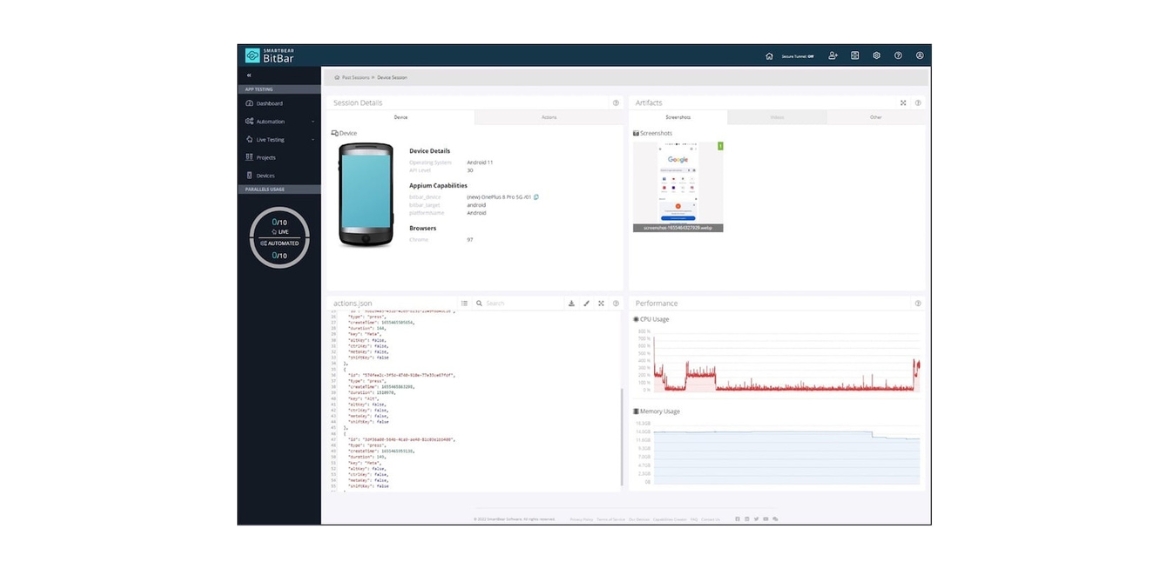
BitBar’s device cloud can help you run automated functional tests in parallel across browsers and devices. For example, you can upload a mobile app and existing Appium tests to BitBar Cloud and execute them on your existing CI/CD using a REST API. Similarly, you can add Selenium test scripts and test web applications in just a few clicks.

BitBar makes it easy to review test sessions across different devices. Source: BitBar

VisualTest adds – you guessed it – visual tests to these capabilities. Using AI technology, the platform quickly confirms that your app looks how you and your customers expect. For example, you can add a short piece of code to your tests to take screenshots with an identifier, and the platform will automatically identify and report visual regressions.

If you find a regression, you can also use BitBar to reproduce the issue on an actual device in the cloud. That way, developers can diagnose problems more quickly without diving into logs or trying to find and configure physical devices. Similarly, QA teams can use BitBar’s devices to conduct other ad hoc tests to confirm fixes or verify functionality.

Best of all, these tools easily integrate into existing CI/CD workflows and your overall development process. You can even combine them with TestComplete to enable non-technical individuals to create robust tests for web and mobile applications. Or, you can use CucumberStudio to enhance your test coverage and generate living documentation.

The Bottom Line

An excellent customer experience is essential to the success of every software business. As a result, it’s a good idea to invest in top-notch testing tools to spot visual and functional errors before they reach customers. BitBar and VisualTest make implementing robust automated functional and visual testing alongside your CI/CD processes easy.

Sign up for a free trial of BitBar and a free trial of VisualTest today!

Author

Jessica Manheimer

Jessica Manheimer is a Product Marketing Manager with SmartBear specializing on UI test products with an explicit focus on BitBar.

Jessica has over 8 years of experience delivering technical solutions to customers and crafting content to support product launches.

SmartBear is an EXPO Gold partner at EuroSTAR 2023, join us in Antwerp

Filed Under: Exploratory Testing Tagged With: 2023, EuroSTAR Conference

Should You Focus on Unit Versus End-to-End Tests?

April 26, 2023 by Lauren Payne

Thanks to Subject7 for providing us with this blog post.

A common question is how much of each type of testing should I do. And to answer how much, how many, or what ratios, we need a way to count and compare types of tests. A small unit test might take a minute or two to write and 10 milliseconds to run; a small end-to-end test might take a half-hour to create and a minute to run. When it takes a tester to create one end-to-end test, a programmer might create several unit tests.

Does that satisfy the pyramid’s requirements of a broad base? Or are we just comparing apples to oranges?

Talking to the people who kicked around the original ideas, we can conclude that the intent was one of focus: The team should focus on the unit tests more than the higher-level tests. In other words, they should build a solid foundation first.

Matrix measurement and output


These ideas are conceptual advice, but they are not very practical. To figure out the ratio, we would need to measure the number of minutes people spend on activities at various levels, then compare high-functioning teams to low-functioning, and then eliminate other independent variables.

However, the reality is that no one does this sort of measurement at the industry scale. In his landmark paper Software Engineering Metrics: What Do They Measure and How Do We Know?, Cem Kaner suggests we have so little agreement on what words mean – is the build maintainer a developer? A tester? What about user experience specialists? Kaner argues that comparisons like figuring out a developer-to-tester ratio make little sense. Even with a survey of every company, the metrics would reflect an average of all the people who responded to the survey. Companies with an external API as a main product would undoubtedly have a different ideal ratio from those that do electronic data interchange (EDI) as a business. Likewise, software as a service (SaaS) companies, like GitHub or Atlassian (who makes Jira), will have a different approach from insurance companies and banks that do data processing.

With that in mind, the question becomes less about the “right” industry-standard number for each type of test or even the right number for your company. Instead, the question is, “should our team be doing more or less of each type of testing?”

Unit tests tend to find low-level, isolated problems and provide incredibly fast feedback to the programmer. Integration and API tests find problems gluing together components, often due to misunderstanding the protocol — how the information is transferred. End-to-end tests exercise the entire system, ensuring the complete flow works for the customer.

Challenges faced by teams.


It is tempting to get the data you need from a Scrum retrospective. But people in Scrum retrospectives tend to focus on a single incident or something that has happened only a few times. We want an objective assessment that looks at what has happened over time, not what people experienced in the past two weeks.

Instead of a retrospective, we suggest looking at bugs found recently. That includes bugs found in testing and later by customers after they escape to production. This evaluation includes quantitative data and qualitative data from reading the bug reports, particularly for impact.

When we’ve done this, we’ve gone back somewhere between a month and six months and pulled the bugs that qualify into a spreadsheet, with a column for the root cause and another for where the defect should have been found. Most recently we’ve just looked at the last hundred bugs. If your team does a “zero-known-bug” policy and doesn’t write them up but fixes them, you might need to write down what you find for two to four weeks.

One team we worked with recently had a great number of user interface bugs that were based on regressions — that is, a change in one piece of the code had unintended consequences in a different area of the code that seemed to be unrelated. It was a mobile application, and the screens used shared code libraries. The changes were visual and mainly concerned with the look and feel of elements like text boxes and combo boxes.

Another team had mobile application problems that showed up mostly when testing with real devices, such as a sticky scroll on an iPhone or changes in screen design that did not render properly when the screen resolution changed for various devices. This was an e-commerce application for a luxury brand, and as it turned out, iOS represented an extremely large percentage of actual dollars spent on checkout.
None of these bugs would have been caught by unit tests. In these cases, the focus clearly needed to shift to more user interface and end-to-end tests.

Another data point comes from looking at how often testers are waiting for a fix, how long that wait is, and if the problem could reasonably have been found by end-to-end tests. Waiting is one of the seven wastes of the Toyota Production System. In software, we tend to “paper over” waiting by having people work on other tasks, but the wait (and delay) is still there. Gathering data for this problem can be as simple as going to the daily standup and getting a list of stories (and bugs) the testers are waiting for, then working backward to see if end-to-end tests would have found those defects or if unit tests could have found them.

Prevention is better than cure.


Bugs that escape production can be a little trickier. In some cases, the team needs additional end-to-end tests. In others, the problem was a lack of creativity and freedom within the testers — “Nobody thought to test that,” or in some cases, “We thought to test that, but the setup was hard, and the programmer said it could never happen.”

The classic question, “Why didn’t QA find that bug?” is really unproductive here. Instead, the questions are “Can this bug reoccur?” and, if so, “How should we shift the test effort to find the defect?”

For one team we worked with, the bugs that escaped to production were relatively unique: a configuration flag was left pointing to test.companyname.com when an API was called, or a database indexer ran for too long and caused all requests from the database to block. These were big problems but relatively rare, best addressed by policy and procedure.

Certainly, a test running on test.companynname.com could never find that problem. In other cases, the issues in production were infrastructure-based and could have been found by making the change in a test environment, then running the end-to-end tests against that environment.

A final question to consider is how many of the crucial defects that are discovered are through exercising the entire system (often regressions), and how many are limited to new feature development. Many new feature bugs would imply the need for better exploratory testing and, perhaps, more unit tests. You would need to dig into the details.

End-to-end and GUI tests provide value when the workflow breaks. If testers spend a great deal of time dead in the water waiting for bug fixes, it’s likely time for more end-to-end testing. On the other hand, we’ve worked with teams where the first build simply did not work at all, and the simplest combination of inputs rendered an error. In that case, focusing on unit tests, or at least programmer-testing might be best.

Starting points to quality testing at speed


Here’s a place to start: Is the code quality on the first build delivered to test “good enough?” If not, then is the problem one of insufficient regression testing? Or do the issues stem from new features?

If the problem is insufficient regression testing, analyze whether the issues could be found by end-to-end testing. Test the login, search, create a new page, and create a profile — errors that block the flow of work might be findable by end-to-end testing. Other problems, like a sticky scroll, might require more engineering work to build better code. If the problem is new feature development, examine whether the programmers should do more unit tests or better check their work before passing it off.
These questions don’t provide a percentage or ratio, but they can help set expectations for change.

On a full delivery team of 10 or more developers, analysts, and testers, the next step will likely take someone half-time to work on the area that needs emphasis. Often programmers feel like they need permission to do more unit tests (or write end-to-end tests themselves), while testers feel like they need permission to beef up the regression-check automation. Insisting on obtaining this permission will slow down the pace of delivery.

Still, if the heavier concentration on unit testing was buggy, and those bugs delayed release, a heavier emphasis on end-to-end testing may result in less back-and-forth and better quality in less total time. Think of this as reducing the big, ugly delays by investing in a little more end-to-end testing. You may even end up going faster. That is a win.

Author

Payam Fard – Co-Founder Subject7

Payam has over 20 years of experience in the software development and process automation industries, spanning both federal and commercial sectors.  During his career, he recognized one of the main challenges of test automation – the mismatch between the technical experience of testing teams and the complex test automation solutions that existed in the market. 

He co-founded Subject7 with the intent of developing a comprehensive test automation solution that would empower business and non-technical users to deliver sophisticated and scalable automation without the need for any programming experience. At Subject7, he has focused on ensuring the success of early customers and evangelizing the benefits of codeless technologies for the test automation industry. 

Prior to Subject7, Payam spent his career developing large-scale business applications for federal agencies, working for SAIC, CSC, Raytheon, and Hughes Network Systems.  He obtained B.S. and M.S. degrees in Computer Science from the University of Maryland and an MBA from The Johns Hopkins University.

Subject7 is an EXPO Gold partner at EuroSTAR 2023, join us in Antwerp

Filed Under: Exploratory Testing Tagged With: 2023, EuroSTAR Conference

Exploratory testing in agile

March 7, 2023 by Lauren Payne

Thanks to Xray for providing us with this blog post.

The purpose of exploratory testing is to learn how a particular area of your testing is working while using your skills as a tester to offer insightful input to your team. Through exploratory testing, you can ensure that all bugs are detected, and developers can fix them in time for the product release.

Exploratory testing is important and should be a component of your testing strategy since it helps you evaluate your tests’ efficacy, identifies code inconsistencies, and removes bottlenecks where defects are most likely to lurk.

In this post, our solution architect Sérgio Freire gives you the best tips on how to do exploratory testing in an agile environment.

Working in an Agile context

At the start of a product or one of its releases, we assume that we know everything there is to know about the product. However, there are often many unknowns and assumptions.

Agile comes as a way to deal with the complexity and unknowns around the whole software development and delivery process. When working in an Agile context, the software is delivered in small batches, known as iterations.

The idea is to reduce the batch of work and learn with small experiments. So, instead of working for a long time on a complex feature, we iterate on it by collecting feedback, learning, and incorporating our findings.

All this means that many changes are due to these iterations driven by our findings and feedback.

Exploratory Testing and Agile

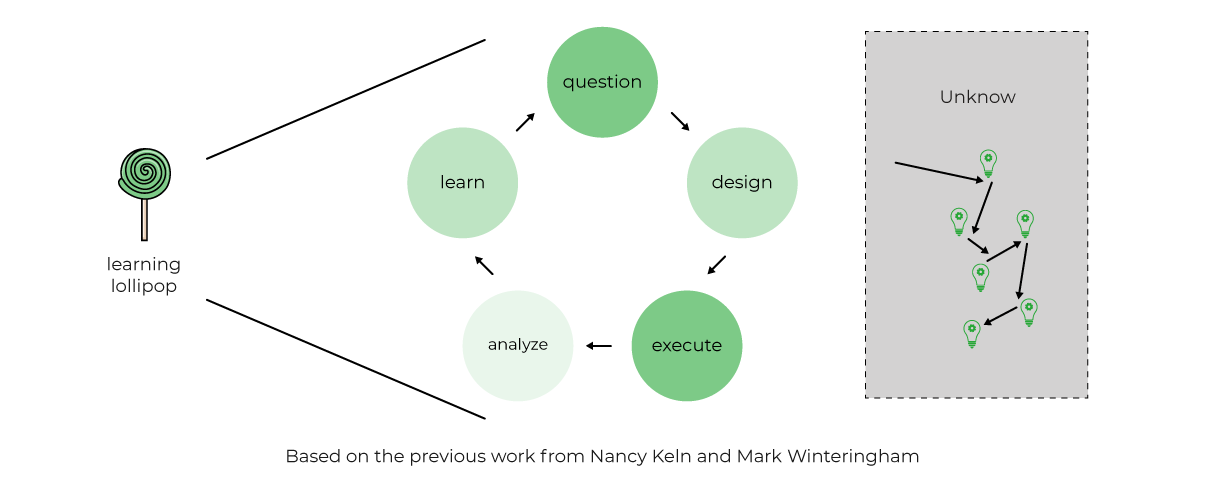
The following model called the “Learning Lollipop model” (created by Sergio Freire), tries to highlight what happens during exploratory testing.

It’s a way to frame exploratory testing where we “taste” our product/product ideas (like tasting a lollipop), starting with questions that will give us ideas for designing testing experiments that we execute and then analyze. From this process, we learn. In turn, that will raise additional questions that will trigger new ideas for test experiments. While we do so, we walk in the unknown lake that contains all possible usages of our product. The more we explore, the more we find.

Using an example, let’s first try to see how these actually work well together. Say we are working in a system with a set of features, aiming to add a new feature using an Agile approach.

From a testing perspective, what we had (i.e., how the system behaved) should be covered by a set of checks, using test automation scripts as much as possible. This will allow us to collect almost immediate feedback from the CI pipeline(s).

We cannot simply retest everything from the past “by hand.” We also know that test automation scripts are fallible because they will always be limited to testing what they’re hardcoded to check; however, they give us a good starting point.

Whenever iterating on a new feature, we know that we don’t know much about it beforehand; that’s why we’re iterating it, after all. Usually, we’re dealing with a rough user story and not an extensive, highly detailed requirement.

Therefore, we need to test our initial ideas for the user story and depict areas/risks we should have in mind. Many questions will come, at the start, during, and after the implementation. All these can become ideas for test charters that we can explore with Exploratory Testing sessions.

Remember that in an Agile context, changes are frequent, and risks also change very dynamically.

Exploratory Testing is a great fit in Agile, as it is extremely flexible and doesn’t require upfront preparation (as happens with manual scripted test cases). It also uses information from previous sessions to drive new testing sessions. Therefore, it adapts to changes as it doesn’t assume a certain state and expected results for the system.

Tips for exploratory testing

Exploratory testing mockups.

Perform exploratory testing sessions on early mockups, internally and with users. This can be quite helpful to optimize flow problems, for example, and highlight the most valuable ones. You can also apply exploratory testing during your design sprints.

Discuss upfront with the team possible charters for your exploratory testing session.

During regular meetings (e.g., standups, planning), discuss with the team the test charters (i.e., the questions you aim to answer during testing). It’s a good moment to talk about risks and have insights from different team members, giving ideas for further exploration.

It’s always a good time to perform an exploratory testing session.

Whether you’re adopting waterfall or Agile, it’s always a good moment to perform some exploratory testing. We will never know everything about our product/system and its context, but we can further improve our understanding by conducting exploratory testing sessions. There are many quality attributes we can look at, for example. Consider aspects that concern your team, users, and business, and use that to drive new sessions. Taking some time to explore is investing in knowledge so that we can then work towards incorporating that feedback and improving our product/system.

Use exploratory testing to highlight ideas for test automation scripts.

Features should come with code, including unit and integration level tests and even system tests if appropriate. Whenever performing exploratory testing, one of the outputs can be ideas for test automation scripts. During exploratory testing, we may find flows, impacts, and edge cases, for example, that, due to their relevance, should be covered by “automated tests.”

This applies to the waterfall and Agile projects and will allow us to improve test coverage addressed by test automation and hopefully gain more time to focus on other tasks (e.g., further exploration, fixing problems, etc.).

Perform exploratory testing on the feature branches or the PRs.

If your team uses feature branches while features are being implemented, you can and should test. This means working with developers to improve the feature iteratively. You may perform an exploratory testing session around a certain risk, quality attribute, or subset of that feature at a given moment. You can also perform a session when the PR is ready for review; if you tested while it was implemented, then this moment will eventually be more of a high-level type of charter.

Perform exploratory testing after merging branches.

Merges sometimes produce unexpected results. Even though the feature branch may (should) include automated tests, there can be unexpected consequences, so scheduling an exploratory testing session can help uncover them.

Involve developers and other roles in exploratory testing.

Besides testers, getting others on board for exploratory testing can provide additional perspective. At the same time, foster a quality centric culture where team members can improve quality from the start in the future.

Pairing with a developer, with the PO, with a designer is a good practice to understand not just the system from different angles but also what different stakeholders expect from it; besides, it’s an excellent mid/long-term investment towards better quality.

Don’t limit exploratory testing to non-regression.

Even whenever automated regression tests may cover existing features, it’s a good practice to perform exploratory testing also for regression testing if you have the opportunity to. Test automation can cover the essentials, but we know many things escape these tests as they will always be limited in number and scope. Looking back at your previous features with your eyes wide open may depict problems added meanwhile and problems that you didn’t have the opportunity to uncover.

Exploratory test your test automation.

Look at your existing test automation and explore it to look for problems (it’s also code, isn’t it?). Look also for problems in scope, concurrency, and relevance. Look at your existing test automation logs, as they may provide valuable information or expose too much or too little information.

Exploratory test using tools to augment testing and gain efficiency.

Tools are used to perform certain tasks with efficiency and consistency. In exploratory testing, tools are used to augment the tester’s capabilities, not to replace the tester. An exploratory tester will easily use tools to facilitate API requests and assist with performance testing. With tools, an exploratory tester can be more efficient and cover quality aspects that otherwise would be hard or even impossible to tackle.

Exploratory test looking for gaps and opportunities to improve the value.

While testing, we look for problems that affect the quality and, therefore, the value as seen by different stakeholders. Testing is about understanding how the system works connected with expectations from all these different stakeholders. In this sense, testing is also about finding opportunities to increase the value. During exploratory testing, and using our knowledge and background, we can depict ways of improving the value of our products. Maybe that can be about framing the feature slightly differently, trying out a new form or interaction.

Bringing some agility with Exploratory Testing to waterfall projects

For organizations working on waterfall-based projects, testing mostly occurs after features have already been implemented. We know that if this happens, then the cost of fixing problems increases considerably.

Usually, there are initial requirements that drive implementation. These highly detailed specifications are not immune to problems; on the contrary: they can be built on top of many assumptions and lack actual user feedback.

We know that requirements, and specifications, in general, are incomplete, ambiguous, sometimes contradictory, and easily get outdated.

As exploratory testers, we can use not only requirements and other documents as the source for our tests; we also understand the context of our product, know about similar products, and know of known heuristics that can help us expose problems through test tracking and reporting. We also have our background that we can use to expose risks and impacts that otherwise could escape traditional testing.

In waterfall projects, we can use Exploratory Testing to help us:

  • Uncover problems, risks, and gaps that we couldn’t predict beforehand as they were not identified in the requirements/specifications.
  • Introduce testing while the feature is being implemented and thus refine it before it’s too late.
  • Complement traditional approaches, such as manual scripted test cases, with exploratory testing to go beyond the obvious and expose problems that we could otherwise miss.

Unleash your testing potential with Exploratory Testing

Exploratory testing promotes innovation instead of scripted testing that is centered around specified test cases and attempting to complete a fixed number of tests per day. Exploratory testing encourages us to act role play as the end-user and detects more realistic bugs.

Exploratory testing is highly helpful in agile environments and has several advantages, as seen above. QA teams can successfully use this testing strategy for their own success in the agile development process by knowing its benefits and using reliable test management software like the Xray Exploratory App.

Author

Sérgio Freire, Head of Solution Architecture & Testing Advocacy at Xray

Sergio Freire is a solution architect and testing advocate, working closely with many teams worldwide from distinct yet highly demanding sectors (Automotive, Health, and Telco among others) to help them achieve great, high-quality, testable products. 

By understanding how organizations work, their needs, context and background, processes and quality can be improved, while development and testing can “merge” towards a common goal: provide the best product that stakeholders need.

Xray is an EXPO Platinum partner at EuroSTAR 2023, join us in Antwerp

Filed Under: Agile, Exploratory Testing Tagged With: 2023, EuroSTAR Conference, exploratory testing, software testing tools

Introduction to Exploratory Testing

October 12, 2020 by Fiona Nic Dhonnacha

Exploratory Testing

Although test automation is the biggest trend in software testing right now, only focusing your strategy on automation isn’t going to guarantee you a fool-proof QA process.

By diversifying your testing strategy with different methods, you’ll be able to cover more ground (i.e. untested code)  and more unexpected discrepancies to your code and product.

Exploratory Testing should be a part of your testing strategy because it will test the effectiveness of your existing tests, discover code discrepancies, and alleviate bottlenecks where bugs hide the most.

In this post, QA Software Engineer, Pekka Pönkänen, tells us how he effectively performs Exploratory Testing and his advice on making the most of your sessions.


Why Exploratory Testing is important

In 2018 I walked the length of Japan, and one of my goals for the trip was to explore the country and its rich culture. During the trip, I decided to walk in different routes other than just following Google Maps, and as a result of that I had many exciting adventures. Undoubtedly, without having the curiosity to explore, I would have missed many unique places and interesting conversations with locals.

I firmly believe that in order to find new ways of seeing and experiencing the world,  you need to be brave and curious about the unknown. The same goes for software testing. Always following the same paths, or tests, will get you expected results. On the contrary, if you go on an exploratory session of your application, you’ll be amazed to discover just how many bugs could be hiding or how much you can improve the functionality for the user.

If you want to try Exploratory Testing yourself, consider this your starting point.

What exactly is Exploratory Testing?

The term “Exploratory Testing” means that you are exploring the application and how it performs after different actions.

To truly understand the concept, it is essential to dig deeper into the roots of the terminology. The term “Exploratory Testing” was introduced in 1984 by Cem Kaner.

“Exploratory software testing is a style of software testing that emphasizes the personal freedom and responsibility of the individual tester to continually optimize the value of her work…”

James Bach’s 2003 paper, “Exploratory Testing Explained”

Through exploratory testing, your goal is to find out how a specific area of an application is working while using your skillset to provide valuable feedback to your team. You want to find the nastiest bugs under the hood and make sure that nothing critical or dangerous can happen in the app.

Preparing for Exploratory Testing

Before starting the testing run itself, it’s good to have tools to write down ideas, bugs, and defects. Personally, I like classic pen and paper and bug-tracking software to write down thoughts and plans for the future. During the run, you will see application logs, automation ideas, new approaches for new testing runs, and bugs that need to be fixed. Having good software that captures images, videos, and notes can be very helpful in centralizing your findings and sharing your insights with your team.

Keep in mind that your notes do not need to be the most delicate piece of art. What’s important is that you can gather a small story around it for your teammates or stakeholders after the session. I have heard very successful use cases with testers doing mind mapping during exploratory testing. Having this visual aid in the process can be valuable to build off of your ideas and create themes.

Identify your goal

The first thing to get started in exploratory testing is to define what to test. It can be a known bottleneck, possible risk, new feature, or an area which has a lot of bugs.

As a software tester, you may know the places to look, and the development team can define the areas which need more attention. When planning the testing, remember not to make it broad so that you don’t lose focus. Here are a few examples to get you started:

What to do:

  • Explore catalog page with a screen reader to verify page accessibility
  • Explore login process with iOS gestures to verify that functionality is accessible

These tasks can be timeboxed and can be done in one session and short enough to be focused.

On the other hand, you don’t want to choose a task that has too many options or paths to follow. The best way is to keep it simple and focus on smaller tasks.

What not to do:

  • Explore all possible mobile security issues to the system to discover any security-related threat

Once you’ve identified your goal and prepared your tools, here are the steps you can follow to complete an Exploratory Testing session:

1. Prep your session

After selecting an area to explore, design the test session. Once you know what to explore, you’ll get a flood of ideas about how to test different aspects — make sure to keep track of everything that comes to mind so you have a solid plan before you start testing. Write down your mission and prepare the notes about the way you want to proceed.

2. Setup the testing environment

Check that you have all credentials and access to enter the testing environment. Testing is pleasurable when you can focus on the testing itself, and when you don’t need to worry about usernames or unreachable servers.

3. Timebox and execute

Depending on the task, open the suitable logs, and monitor tools to log your actions during testing. Application logs are crucial to provide valuable information when things go wrong. While executing, keep your objective in mind, write notes, be systematic, collect info, gather ideas for the next sessions, and most importantly learn and explore your product.

Exploratory testing is more of a mindset than a framework

Exploratory testing is in fact a skill which is developing all the time while your skillset as a tester is evolving. The beauty of testing is that you never get bored of it because there is always room for improvement. Be curious about the application, try different approaches to execute testing, learn about your software, and share the knowledge.

At the end of the day, software development is a team sport!

Inform others about the state, risks, and any other concerns. Share your mind map as well as any evidence that you collected like videos, images and notes. You don’t have to have all of the answers, but sharing them with your team will also help others discover themes and insights which you wouldn’t have known otherwise.

——————————————————————————————–

Author: Pekka Pönkänen

Xray Contributing Writer | QA Engineer

Filed Under: EuroSTAR Conference, Exploratory Testing, Virtual Conference

  • Code of Conduct
  • Privacy Policy
  • T&C
  • Media Partners
  • Contact Us