• Skip to main content
EuroSTAR 2027 - Sign up for early access

EuroSTAR Conference

Europe's Largest Software Testing Conference.

  • Programme
    • Call for Speakers
    • 2026 Programme
    • Community Hub
    • Awards
  • Attend
    • Why Attend
    • Bring your Team
    • Testimonials
  • Sponsor
    • Sponsor Opportunities
    • Sponsor Testimonials
  • About
    • About Us
    • Our Timeline
    • FAQ
    • Blog
    • Organisations
    • Contact Us
  • Book Now

EuroSTAR Conference

What is the European Accessibility Act?

June 19, 2023 by Lauren Payne

Thanks to Applause for providing us with this blog post.

June 28, 2022 was the deadline for EU member states to adopt the European Accessibility Act (EAA) requirements into law. What does the act mean for your business? Here is everything you need to know to prepare your business for the June 2025 compliance deadline and design truly accessible digital products.

Why a European Accessibility Act?

The European Accessibility Act is a new directive that establishes a common set of accessibility rules for software, digital services and hardware sold or used in the EU. In doing so, the act aims to remove barriers created by divergent accessibility rules in the EU member states and improve the functioning of the internal market for accessible products and services.

How does the European Accessibility Act differ from WCAG?

The Web Content Accessibility Guidelines (WGAC) are the main point of reference on accessibility best practices for European companies. However, they have no legal standing and are not enforced. The European Accessibility Act, on the other hand, is legally binding.

By making accessibility enforceable by law, Europe is catching up with countries like the US, where accessibility legislation has been around for a while. In the past, the EU has required public-sector apps and websites to adhere to accessibility requirements under the EU Web Accessibility Directive, but the The European Accessibility Act is the first time private-sector companies have faced accessibility legislation.

What does the European Accessibility Act say?

While WCAG and the European Accessibility Act differ from an accessibility standpoint, they share many of the same foundational principles. In alignment with WCAG, the European Accessibility Act builds on four key accessibility best practices known by the acronym POUR: to be accessible, content must be perceivable, operable, understandable and robust. In other words, people with disabilities must be able to make out key content elements, be able to use and navigate user interfaces, understand what they are seeing and reliably use assistive technologies like screen readers.

However, the European Accessibility Act itself does not provide any technical accessibility standards. This means that it is up to each member state to decide how they will achieve the aims of the directive.

Which people and products are covered by the EU Accessibility Act?

Both people with disabilities and the elderly come under the scope of the European Accessibility Act. The requirements apply to key products and services that need to be accessible for these groups to participate equally in society:

  • Computers and operating systems
  • ATMs, ticketing and check-in machines
  • Smartphones
  • TV equipment related to digital television services
  • Telephone services and related equipment
  • Access to audio-visual media services such as television broadcast and related consumer equipment
  • Services related to air, bus, rail and waterborne passenger transport
  • Banking services
  • e-Books
  • E-commerce

While the European Accessibility Act aims to reduce barriers for people with disabilities, it benefits all EU citizens. The European Commission provides the following examples: “people trying to hear travelling information in noisy environments like train stations, or trying to get money from ATMs on a sunny day, or employees working with enlarged documents to avoid eye strain will also greatly benefit from further accessibility.” The legislation will also help people with temporary disabilities; for example, someone with a broken arm or carrying a baby who needs to be able to operate a mobile app with one hand.

How long do companies have to comply with the European Accessibility Act and how long does it take to prepare?

Companies have until June 28, 2025 to comply with the European Accessibility Act. While this may sound like a long time, the reality is that companies need to start preparing now. The three-year timeframe was not chosen arbitrarily; it speaks to the expected complexity involved in implementing the new requirements. By way of comparison, when the EU adopted the General Data Protection regulation (GDPR), companies were only given two years to prepare — and everyone remembers how complex that turned out to be. Come the deadline to comply with GDPR, 80% of businesses were still not compliant and 27% had not even started. Those who did not comply by the deadline were subject to steep fines.

Which companies are impacted by the European Accessibility Act?

Like GDPR, the European Accessibility Act will have a global impact. Companies creating software, digital services and hardware that are sold or used in the EU must comply with the EAA regardless of where they are based. Under a phenomenon known as the Brussels Effect, many companies outside of the EU will find themselves adopting the European Accessibility Act’s requirements in order to continue doing business with Europe.

There are some exceptions. The European Accessibility Act does not apply to businesses with fewer than 10 employees and an annual turnover of less than two million euros, for whom implementing the legislation would cause undue burden. There are also very specific exceptions, such as for archived content.

What is the penalty for noncompliance with the European Accessibility Act?

Each individual EU member state is responsible for enforcing the European Accessibility Act, which means that they can decide the penalties. However, they must enforce noncompliance in a way that is “effective, proportionate, and dissuasive” and consumers must be able to report infringements to a court or the enforcing body in that country.

It is also worth making clear that fines are not the only penalties companies will face by not complying with the European Accessibility Act (or any other accessibility legislation, for that matter). Around 87 million people in the EU are affected by some kind of disability, which means that companies that do not provide accessible digital products are excluding nearly one fifth of potential customers. Companies that prioritise accessibility also build better products, because accessible products are easier to navigate and use, making them more attractive to all users.

How can I prepare for the European Accessibility Act?

Until the directive is implemented into EU member states’ respective national laws, it is unclear what compliance will look like in detail. However, many pieces of accessibility legislation worldwide take inspiration from WCAG, and while the European Accessibility Act doesn’t directly name WCAG as a standard, its accessibility requirements for digital products are based on the same POUR accessibility principles. Therefore, companies that strive for WCAG compliance will likely find that they already achieved many of the European Accessibility Act’s requirements.

Indeed, companies that take accessibility seriously because it is the right thing to do often comply with many legislative requirements by default. The European Accessibility Act is by no means revolutionary in its approach to digital accessibility — it is simply enforcing a set of best practices that any company with an accessibility lead has most likely covered or is in the process of implementing.

It is also worth noting, however, that just because a digital product is accessible by legal definition does not mean that it is inclusive by design; i.e. works as well as it could for people with disabilities. Even if a company ensures individual components meet accessibility requirements, when they put the components together into a user flow, they can fail to provide a good user experience for people with disabilities. Often, this is because developers with good intentions design for compliance without a complete understanding of people with disabilities’ needs.

Many companies do not realise there is a difference between digital accessibility (the ability of a digital product to be easily navigated by people with disabilities, often measured by WCAG) and inclusive design (a human-centric approach to design as part of developing digital products that considers a wider spectrum of aspects affecting a person’s ability to use them). Companies that produce the most inclusive digital products involve people with disabilities in all phases of the SDLC, from market research and design to development and testing.

To understand better how can the digital space understand these realities and address the accessibility needs of more – ideally all – people, join our session on Designing & Testing for the Billion Voices.

Author

Julia Zacharias, Senior Vice President EMEA Customer Operations

As SVP of Customer Operations at Applause, Julia is responsible for EMEA’s Solution Delivery, Testing Services and Community Management functions. In addition, she leads the European part of the global Accessibility Testing Offer and supports customers in the holistic quality assurance of their digital products and services.

Before joining Applause, Julia worked as a project portfolio manager and management consultant, e.g. at Kearney, and is a Certified Program Consultant for SAFe (Scaled Agile).

Applause is an EXPO Exhibitor at EuroSTAR 2023, join us in Antwerp.

Filed Under: Leadership, Risk Tagged With: 2023, EuroSTAR Conference

The A-Z of Mobile Test Automation

June 7, 2023 by Lauren Payne

Thanks to ACCELQ for providing us with this blog post.

Did you know? There are 5.48 billion unique mobile phone users across the globe. That’s almost 68.6% of the world’s population. No doubt, mobile app testing is soaring in popularity.

Mobile App Testing Is the Need of the Hour


About 59.72% of web traffic today comes from mobile phones. Imagine the quality and performance levels today’s teams must meet to cater to this web traffic. A top priority for teams is ensuring each mobile user has a seamless, secure, and satisfying experience every time they pick up the phone.

Crafting and maintaining this top-notch user experience demands rigorous and continuous testing. The right approach to mobile app testing can bring several benefits to the table. It can:

  • Improve user experience and boost retention rates
  • Reduce the frequency and complexity of bugs
  • Bring much-needed stability into mobile apps
  • Test if new features, changes, and enhancements are working properly
  • Boost user ratings and downloads and improve public perception

But Traditional Approaches to Mobile App Testing Are No Longer Scalable

Device fragmentation is at an all-time high. Testing the rich diversity of browsers, devices, and platform versions would require hiring an army of testers. Add to it the unique characteristics of different types of educational, lifestyle, social media, productivity, and gaming apps and the way they are built. For example:

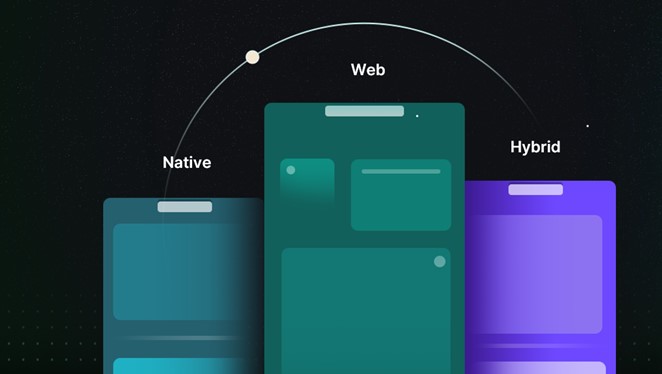
  • Native apps are developed specifically for a single mobile platform such as iOS or Android. Built using the platform’s native programming language and development tool, they are typically faster and more responsive than other types of apps. Since they take advantage of device-specific features such as sensors and Bluetooth, they provide a more interactive UI/UX and have lesser compatibility issues.
  • Web apps are generally developed for mobile devices and accessed via any internet browser on a mobile device. They do not need any storage space and are constantly updated. They dramatically reduce the business costs associated with development and maintenance. They are responsive websites that adapt the user interface to the user’s device.
  • Hybrid apps are developed using web technologies such as HTML and CSS and wrapped in a native container that allows them to run on multiple platforms. Typically, they are easier and faster to develop than native apps but may not be as fast or responsive. However, hybrid apps are ideal in situations where high performance and full device access are not key requirements.

Mobile app testing isn’t just about writing a handful of test cases and running a few tests. Several challenges make testing a nightmare.

Setup

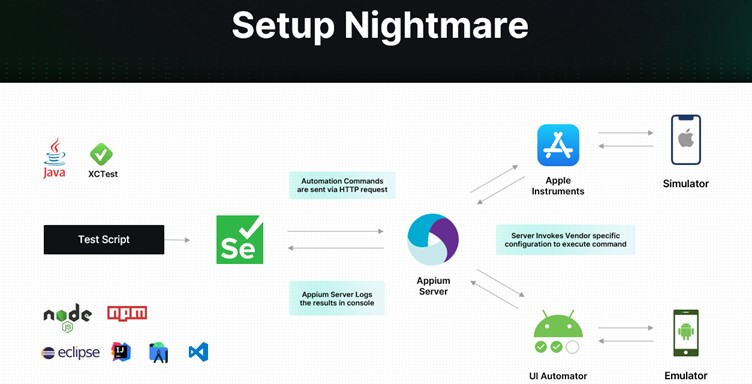
As depicted below, you must first feed your test script to a Selenium tool. Selenium then sends automation commands to an Appium Server, which logs results in a console. The Server also invokes vendor-specific configuration to execute commands via a simulator and an emulator.

Functional

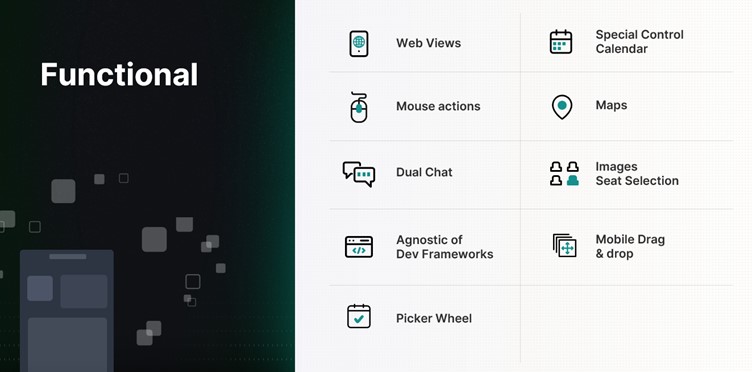
When it comes to functional testing, several aspects of the mobile app have to be continuously and carefully tested — from web views to mouse actions, maps to images.

Miscellaneous

Mobile apps must also be continuously tested for interruptions. Evaluating how the app behaves during low battery, when a notification pops up, or when a call is received is equally important. In addition, it pays to test:

  • User experience during installation/uninstallation
  • UI with all forms of gesture navigation
  • When users don’t have permissions
  • When the network is not available
  • If your app updates correctly from previous versions

Building and maintaining a QA lab is extremely difficult, with varying mobile architectures, app security requirements, and feature demands. Since every mobile app must be tested for functionality, compatibility, usability, performance, security, and localization, it is critical to automate the testing process. Taking the mobile test automation route can open doors to several time, cost, and efficiency benefits.

Investing in the Right Test Automation Framework Is Key

A modern test automation framework can simultaneously test apps on multiple platforms and quicken the feedback cycle. It can maximize test coverage, enable 24/7 text execution, and allow reusability of test cases. It can also pave the way for seamless scalability – regardless of how big the app grows or how large the user base becomes.

But with so many frameworks available in the market today, how do you make the right choice?

  • How do you ensure the framework keeps up with the pace of app changes?
  • How do you efficiently simulate real-world user scenarios?
  • How do you ensure integration with backend systems?
  • How do you handle different types of apps and different types of mobile platforms?
  • How do you ensure continuous testing?

How To Choose the Right Mobile Test Automation Framework

If you want to transform your testing results, here are some things to keep in mind:

  • Identify your testing requirements
  • Evaluate different solutions
  • Consider ease of use and the overall learning curve
  • Look for a solution that is easy to maintain and scale and is extensible
  • Look for a solution that supports different app types and mobile platforms
  • Invest in a Unified Test Automation platform
  • Evaluate the tool’s DevOps – CI/CD integration capabilities
  • Assess reporting and analytics capabilities
  • Consider support features and evaluate community support
  • Take into consideration the cost and feasibility

How ACCELQ Handles Mobile Test Automation

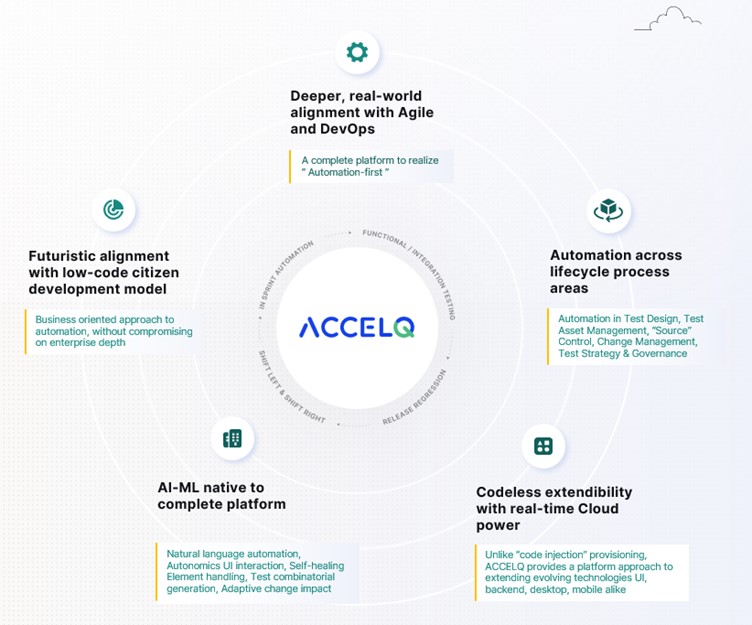
As an intelligent, cloud-based mobile test automation platform, ACCELQ enables seamless multi-channel automation across the mobile tech stack. The tool takes a revolutionary approach to business assurance in a multi-packaged app environment. It allows for codeless mobile test automation that handles real-world complexities and presents a unified view of the quality lifecycle.

ACCELQ is a market leader in test automation and test management. Its automation flow recorder is coupled with a powerful Natural Language no-code editor. It can execute test automation across different mobile OSs and is agnostic of development frameworks. In addition, the tool’s design-first approach with inbuilt modularity means there is no need for custom frameworks.

  • Codeless: ACCELQ’s codeless capabilities allow teams to write and run test cases with zero setup and no coding. It enables testers to automate without the need for programming skills.
  • AI-powered: Being a true no-code mobile test automation platform, ACCELQ’s AI-powered capabilities automate and execute tests across different OSs and devices. The tool’s advanced mobile object handling capabilities eliminate test flakiness.
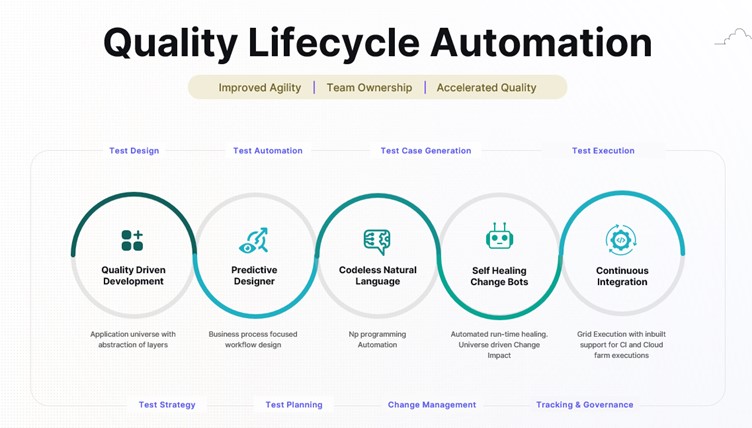
  • Lifecycle automation: ACCELQ allows for mobile test automation across the lifecycle of mobile apps. Using ACCELQ, teams can easily set up, design, develop, execute, and track mobile test automation.
  • Unified flow: ACCELQ offers full-blown version control, branching, and merging capabilities, all in one unified collaborative cloud platform. Teams can use ACCELQ to enable mobile, web, API, backend, and full-stack automation in the same unified flow.
  • Cross-device: ACCELQ’s Integrated Device Cloud Labs allow for seamless cross-device testing using a simple Plug & Play model.
  • High coverage: ACCELQ’s app universe and analytic-based algorithms drive automated test planning, ensuring coverage.
  • Actionable reports: ACCELQ offers dynamic live results views with actionable reports to trigger reruns. Email notifications that fit into the process allow for quick and effective decision-making.
  • Seamless support: The tool offers seamless support across popular mobile dev frameworks, including Android, iOS, React, Ionic, and Apache Cordova.
  • Robust and sustainable: The ACCELQ platform is robust and sustainable and offers automation capabilities that are significantly low on maintenance.
  • Self-healing: The tool’s self-healing element identification drastically enhances the quality and reliability of tests.
  • Low maintenance: Referential integrity across test assets hugely reduces maintenance and upkeep.

The Way Forward

If you want to meet the expectations of the constantly growing mobile user base, it’s time to take mobile testing more seriously. Embark on the mobile test automation journey today to make your tests more reliable and predictable and your apps more functional and secure.

Author

Nishan Joseph, VP-Sales Engineering,
ACCELQ

Nishan is a highly accomplished and dynamic leader who has been working in the technology space for over a decade. He is known for his ability to build strong partnerships with long-term strategic goals. Nishan leads the Sales Engineering division, while also overseeing some of the larger global Strategic Accounts for the company.

ACCELQ is an EXPO Exhibitor at EuroSTAR 2023, join us in Antwerp.

Filed Under: Test Automation Tagged With: 2023, EuroSTAR Conference, Test Automation

Is Behaviour Driven Development (BDD) right for API testing?

June 2, 2023 by Lauren Payne

Thanks to Karate Labs for providing us with this blog post.

The primary goal of BDD can be summarized as follows: to reduce misunderstandings between those who define software requirements and those who implement the software.

The best source for the history and origins of BDD can be found on the Cucumber web site. Cucumber is just one tool that implements an approach to BDD, but it is not the only one. But many teams assume that because they are using Cucumber as a tool – it means that they are successfully “doing BDD”. As the creators of Cucumber themselves have lamented about for years, this is a huge mistake.

Cargo Cult

To be more specific, a very common misconception is that if you use the keywords “Given”, “When” and “Then” in an automated test – it means that the team will magically enjoy the supposed benefits of BDD. This may sound far-fetched, but if you are leading a team that claims to be doing BDD, I recommend that you walk the floor a bit, and ask the lesser-experienced engineers what their understanding is. You may get some interesting insights into how the team is thinking about BDD.

I remember a point very early in my career where I switched to a shiny new unit-testing framework that had things like “given()” and “when()” and “then()” in the syntax. I remember that virtuous feeling of satisfaction. Having just read about this great approach called BDD in some article or blog, I was now part of that exclusive club! I proudly declared to some colleagues that I was doing BDD. It was probably a few years later when I realized how mis-informed I was.

So why am I sharing these somewhat embarrassing memories with you dear reader? I’m really trying to help you avoid the mistakes I made. In an almost mystical way, the notion that “Given When Then” EQUALS BDD is entrenched in the collective consciousness of development teams around the world. Maybe it is because of the numerous bad-takes on BDD in tools, examples, tutorials and blogs that exist. The pressure to do what is “cool” is real. Expecting a tool to “do BDD” is a mistake I have seen teams make – time and time again.

The feeling that badly done BDD evokes in me is the term “Cargo Cult Programming”. If you haven’t heard of the term, this Wikipedia entry explains the rather hilarious origin. “Cargo cult” is a great way to refer to a phenomenon which is all too prevalent in our field. Which is when teams hear about some “best practice”, adopt a bunch of ceremonies without truly understanding the fundamentals, and then stand back expecting to promptly enjoy the rewards and good things that should ensue.

Yeah, that never ends well.

BDD is not for testing code that already exists

Did you know that in its true form, BDD means that you should write your scenarios before a single line of code is written?

You should pause reading for a moment and think deeply about the implications of the above statement.

BDD is mostly about having conversations with your domain experts, business users or product owners on what the software requirements are. BDD also encourages that that discussion should result in “examples” which help in fleshing out the business-rules involved.

Instead of just descriptive text, examples with real data map a lot better to how programmers think about writing code and tease out the edge-cases.

In other words, if your software delivery team is trying to automate tests for an existing system, BDD is not what you should be doing! It doesn’t matter if the system is partially done or not, BDD is just going to slow you down.

There is an argument to be made that BDD results in “executable specifications” and much more readable tests. This is why some teams choose BDD even though they are writing BDD scenarios “after the fact”.

But as we will see below, there are elegant ways to achieve “readable” test reports that serve as documentation of what the system does. You don’t need to formally adopt BDD, and your test-scripts and test-reports will still be readable, even by non-programmers.

BDD for API testing

The end-user or consumer of an API is typically another programmer. Another way to look at this is that APIs are how computers to talk to each other, and expressing what APIs should do – is best done using concepts that are closer to code than natural language.

I have a strong point of view that BDD has very little (and perhaps negative) value for API tests. The big difference between a UI test (human facing) vs an API test (machine facing) is that an API test has a clear “contract” that you are coding to. This contract is best expressed in technical terms (JSON / schema) instead of the deliberate abstraction needed when you do BDD the right way.

For more insights on how API testing is simpler than UI testing, read our free e-book: Navigating the Brave New World of API Testing.

But I want my tests and reports to be readable!

If you are not using BDD, how can you ensure that your API tests are readable? Ideally, your test-reports should:
• serve as documentation of how your APIs work,
• and include examples of how to call them.

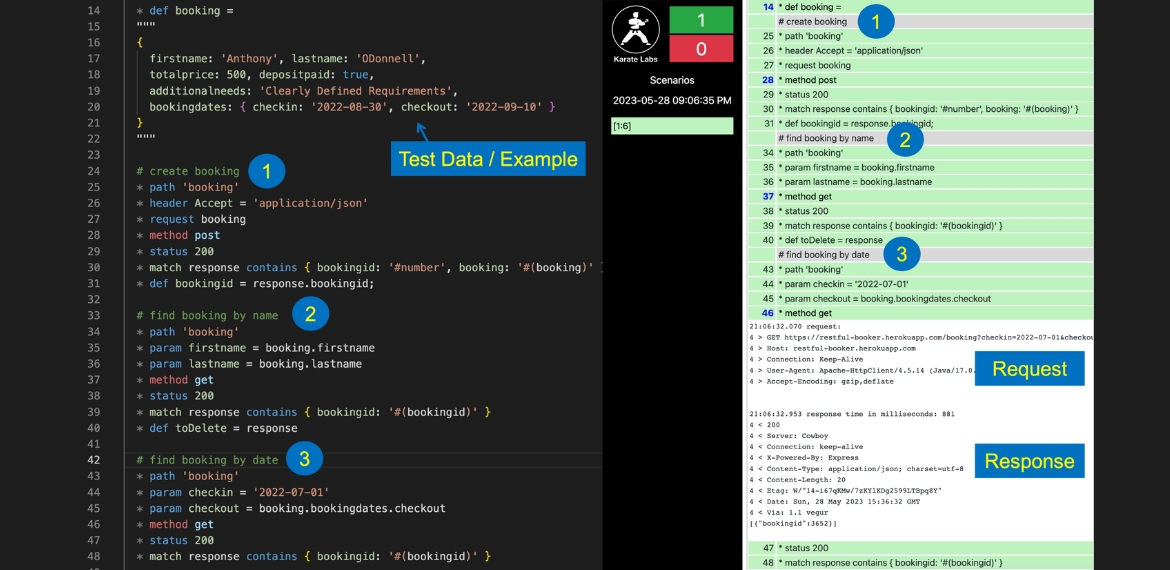
Here is where a mature automation tool that has built-in HTML reporting can add value. Shown below is part of a Karate test that exercises the “Restful-Booker” API playground. This is a realistic simulation of an API that allows the consumer to book a hotel reservation.

The test script is on the left and the test-report on the right. Since there are comments added before each business-operation, the test and test-report provide the best of both worlds: you not only get full-control over the API calls, payload-data and JSON assertions – but you also get a very readable (and hence maintainable) test.

Comments appear clearly in the report, in-line with the API calls that were made. The tests and test-reports can be easily read top-to bottom and give you a good sense on what business functionality is invoked.

Observe how there is a good simulation of an end-user workflow, and you can see response data (e.g. the “bookingid”) “chained” into the next request multiple times.

The test-data (or in BDD terminology, the “example”) for the business scenario can be clearly viewed at the start of the test. JSON happens to be an elegant, human-readable way of concisely expressing scenario data, and Karate takes advantage of this throughout the framework.

For those who are familiar with Cucumber’s “Scenario Outline”, note that Karate also offers you the same human-friendly way of defining Examples in a tabular format. Some teams really like this way of doing data-driven test automation aligned with the BDD concept of examples. All of this can be done without the need to worry about whether a test step has to be prefixed with “Given”, “When” or “Then”.

Look Ma, No Step Definitions!

For teams that have experience with BDD tools, what surprises them the most is that Karate does not require any step-definitions to be implemented behind the scenes. Step-definition “glue code” is known to be one of the “hidden costs” of BDD tools, and Karate eliminates this layer completely. What you see in the test is all that you need to write (or read). The built-in keywords for API testing and JSON assertions take care of most of your API testing needs.

For more insights on how low-code approaches such as Karate compare to BDD, read our free e-book: Navigating the Brave New World of API Testing.

Parting Thoughts

While we focused on whether BDD is appropriate for API testing in this article, it may also help you evaluate if BDD initiatives in your organization are structured correctly, whether the right people in charge, and whether they are delivering the value that you expect.

Get to know more at karatelabs.io

Author

Peter Thomas Co-founder & CTO Karate Labs

Peter Thomas, Co-founder & CTO, Karate Labs

Peter is recognized as one of the world’s top experts in test automation. He brings 25 years of industry experience from which he has been in open source for the last 18 years. He has worked at Yahoo and Intuit. As part of the API platform leadership at Intuit, Peter created “Karate” the open-source solution unifying API, UI & Performance testing. Peter was one of only 15 chosen by GitHub for a grant in India 2021. He co-founded Karate Labs Inc in Nov’21 to accelerate the adoption of Karate with the mission of making test automation fun and collaborative. Karate Labs is a Y Combinator backed company.

Karate Labs is a Platinum Partner at EuroSTAR 2023. Join us at Antwerp Zoo June 13-16, in a 4 day celebration of testing. Learn from 68 expert speakers and connect with your peers at Europe’s Best Testing Event.

Filed Under: Development Tagged With: 2023, EuroSTAR Conference

Efficient Software Testing in 2023: Trends, AI Collaboration and Tools

May 31, 2023 by Lauren Payne

Thanks to JetBrains Aqua for providing us with this blog post.

In the rapidly evolving field of software development, efficient software testing has emerged as a critical component in the quality assurance process. As we navigate through 2023, several prominent trends are shaping the landscape of software testing, with artificial intelligence (AI) taking center stage. We’ll delve into the current state of software testing, focusing on the latest trends, the increasing collaboration with AI, and the most innovative tools.

Test Automation Trends

Being aware of QA trends is critical. By staying up to date on the latest developments and practices in quality assurance, professionals can adapt their approaches to meet evolving industry standards. Based on the World Quality Report by Capgemini & Sogeti, and The State of Testing by PractiTest, popular QA trends currently include:

  • Test Automation: Increasing adoption for efficient and comprehensive testing.
  • Shift-Left and Shift-Right Testing: Early testing and testing in production environments for improved quality.
  • Agile and DevOps Practices: Integrating testing in Agile workflows and embracing DevOps principles.
  • AI and Machine Learning: Utilizing AI/ML for intelligent test automation and predictive analytics.
  • Continuous Testing: Seamless and comprehensive testing throughout the software delivery process.
  • Cloud-Based Testing: Leveraging cloud computing for scalable and cost-effective testing environments.
  • Robotic Process Automation (RPA): Automating repetitive testing tasks and processes to enhance efficiency and accuracy.

QA and AI Collaboration

It’s no secret that AI is transforming our lives, and ChatGPT’s collaboration can automate a substantial portion of QA routines. We’ve compiled a list of helpful prompts to streamline your testing process and save time.

Test Case Generation

Here are some prompts to assist in generating test cases using AI:

  • “Generate test cases for {function_name} considering all possible input scenarios.”
  • “Create a set of boundary test cases for {module_name} to validate edge cases.”
  • “Design test cases to verify the integration of {component_A} and {component_B}.”
  • “Construct test cases for {feature_name} to validate its response under different conditions.”
  • “Produce test cases to assess the performance of {API_name} with varying loads.”
  • “Develop test cases to check the error handling and exceptions in {class_name}.”

Feel free to modify these prompts to better suit your specific testing requirements.

Example
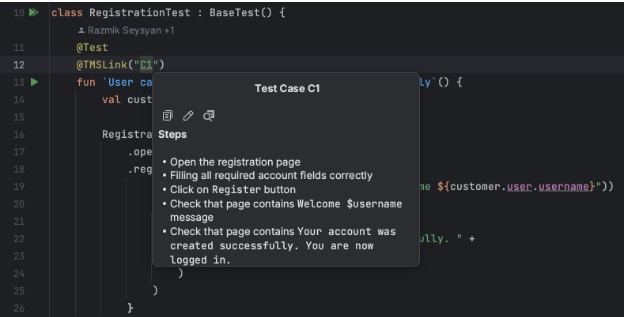
We asked for a test case to be generated for a registration process with specific fields: First Name, Last Name, Address, and City.

AI provided a test case named “User Registration” for the scenario where a user attempts to register with valid inputs for the required fields. The test case includes preconditions, test steps, test data, and the expected result.

Test Code Generation

In the same way, you can create automated tests for web pages and their test scenarios.

To enhance the relevance of the generated code, it is important to leverage your expertise in test automation. We recommend studying the tutorial and using appropriate tools, such as JetBrains Aqua, to write your tests that provide tangible examples of automatically generating UI tests for web pages.

Progressive Tools

Using advanced tools for test automation is essential because they enhance efficiency by streamlining the testing process and providing features like test code generation and code insights. These tools also promote scalability, allowing for the management and execution of many tests as complex software systems grow.

UI Test Automation

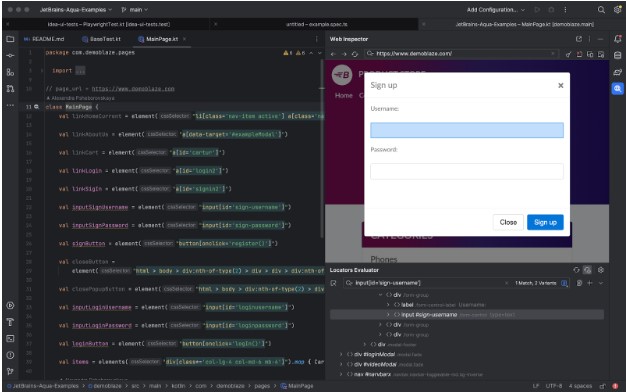
To efficiently explore a web page and identify available locators:

  • Open the desired page.
  • iInteract with the web elements by clicking on them.
  • Add the generated code to your Page Object.

This approach allows for a systematic and effective way of discovering and incorporating locators into your test automation framework.

Code Insights

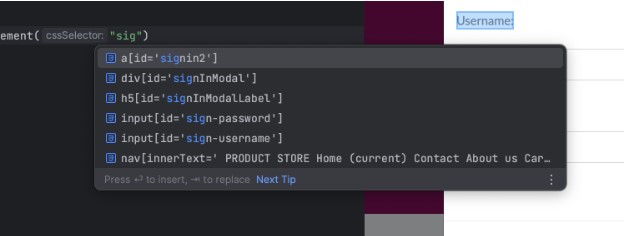
To efficiently search for available locators based on substrings or attributes, you can leverage autocompletion functionality provided by the JetBrains Aqua IDE or plugin.

In cases where you don’t remember the location to which a locator leads, you can navigate seamlessly between the web element and the corresponding source code. This allows you to quickly locate and understand the context of the locator, making it easier to maintain and modify your test automation scripts. This flexibility facilitates efficient troubleshooting and enhances the overall development experience.

Test Case As A Code

The Test Case As A Code approach is valuable for integrating manual testing and test automation. Creating test cases alongside the code enables close collaboration between manual testers and automation engineers. New test cases can be easily attached to their corresponding automation tests and removed once automated. Synchronization between manual and automated tests to ensure consistency and accuracy is a challenge that does not need to be addressed. Additionally, leveraging version control systems (VCS) offers additional benefits such as versioning, collaboration, and traceability, enhancing the overall test development process.

Stay Tuned

The industry’s rapid development is exciting, and we are proud to be a part of this growth. We have created JetBrains Aqua, an IDE specifically designed for test automation. With Aqua, we aim to provide a cutting-edge solution that empowers testers and QA professionals. Stay tuned for more updates as we continue to innovate and contribute to the dynamic test automation field!

Author

Alexandra Psheborovskaya, QA Lead and Product Manager at JetBrains

Alexandra works as a SDET and a Product Manager on the Aqua team at JetBrains. She shares her knowledge with others by mentoring QA colleagues, such as in Women In Tech programs, supporting women in testing as a Women Techmakers Ambassador, hosting a quality podcast, and speaking at professional conferences.

JetBrains is an EXPO Platinum partner at EuroSTAR 2023, join us in Antwerp

Filed Under: Software Testing, Uncategorized Tagged With: 2023, EuroSTAR Conference

Reduce e-waste by using device farms

May 24, 2023 by Lauren Payne

Thanks to 42Gears for providing us with this blog post.

Did you know that around 50 million tonnes of e-waste is generated every year across the globe, and only 20% is recycled through organised and regulated channels? “If e-waste continues to accumulate in the future, it may pose a serious threat to the environment, society, and economy.”

What is e-waste?

E-waste refers to any electrical or electronic equipment that is unwanted, not working, and has been discarded by its owner as waste without the intent of re-use. E-waste includes a wide array of products. As might be expected, screens, monitors, laptops, tablets, smartphones, computers, printers, telephones, and mobile phones can all be e-waste. However, e-waste can also include household or business items that have electrical components with power or battery supply. For example, temperature exchange equipment such as refrigerators, freezers, and air conditioners can become e-waste.

E-waste contains toxic components such as mercury, cadmium, lead, polybrominated flame retardants, lithium, and barium. Unfortunately, these components can be very dangerous to human health. They can adversely affect the respiratory system, lungs, kidneys, and brain.

Trends driving e-waste creation

Perhaps the biggest reason for increased e-waste is new users joining the Internet for the first time. Internet access is expanding worldwide to more people than ever before, driving demand for devices that will eventually become e-waste. According to Internet Growth Statistics, 69% of the world’s population used internet in 2022, and going by the trend, two-thirds of the world’s population will be online by the end of 2023.

Another major culprit is planned obsolescence – the practice of intentionally having devices become outdated so users will need to purchase new ones. Global increases in disposable income mean that many consumers are eager to replace older devices with new ones. Plus, many business apps and services are designed to work best on powerful, recently-made devices. In order to stay up-to-date, companies and workers must purchase new devices and discard old ones. Because of these trends, consumers and businesses are constantly getting rid of older, slower devices, creating e-waste.

What companies are doing to reduce e-waste

It is important that businesses recognize the role they play in generating e-waste. Several major companies have begun taking steps to reduce e-waste, and many others will likely follow suit.

For example, beginning with the 2020’s iPhone 12 line, Apple chose not to include headphones and chargers with its phones. This can help to reduce unnecessary EEE (electrical and electronic equipment), according to Teresa Domenech of University College London’s Institute for Sustainable Resources. Domenech also notes this initiative will also reduce environmental damage because Apple will need to extract fewer primary raw materials, perform less manufacturing, and ship fewer products overall.

Owing to the fact that discarded charges are contributing to 11,000 metric tons of e-waste in Europe annually, European Union Lawmakers have made it mandatory for mobile manufacturers to provide universal chargers.

Another way of reducing e-waste is recycling old electronics. LG’s India subdivision operates a network of 40 recyclers in India. In order to maximize the number of people participating in the program, LG picks up e-waste directly from the user’s home. Between 2017 and 2020, LG collected and recycled almost 100,000 metric tons of e-waste in India.

Of course, many technology enterprises do not manufacture their own devices, so they cannot use these techniques to reduce e-waste. Still, there are other ways to reduce e-waste; for example, investing in device farms. Let’s explore how this works.

How device farms help reduce e-waste

While the impact of e-waste is alarming across the globe, companies are researching new ways to reduce e-waste and prevent health and safety hazards. As a result, many companies have begun implementing new methods and processes that combat the rise of e-waste.

Using a device farm is one of the most innovative ways through which companies can reduce e-waste. Often, companies require large device inventories consisting of multiple devices and multiple versions of the same device for their DevOps and QA teams. Unfortunately, these devices may not be accessible to all the team members; if someone needs to test an app on a device in the office, but that person works remotely, connecting to the device will be a challenge.

However, if these devices are enrolled into a device farm, anyone on DevOps and QA teams can easily access them remotely, no matter where they are located.

This is the key to reducing e-waste with a device farm. By purchasing a single device and connecting it to a device farm, a company can make that device accessible to anyone in the company worldwide. This substantially improves ROI on a given device and removes the need to purchase multiple devices for multiple offices.

Device farms can be of two types – public device farms, or private device farms. Public device farms are third-party platforms that allow businesses to access devices owned by a third party. Companies rent these devices for a particular time slot and pay accordingly.

On the other hand, a private device farm is owned and managed by the company itself. This setup empowers all approved company employees to access enrolled devices at any time from anywhere.

There are a few companies that help organizations to set up a private device farm. 42Gears is one of them. AstroFarm by 42Gears is a great tool that helps organizations to set up their private device farms. AstroFarm offers many benefits, allowing companies to get more value from the devices they already own, making devices available worldwide in real time, and providing global teams with an easier way to coordinate app development. For more information, please refer here.

Summary

E-waste has become a global challenge and needs to be addressed as soon as possible. While the abstract statistics are alarming, the real concerns are the growing environmental and health hazards associated with e-waste.

While consumers should work to reduce the e-waste they generate, enterprises are the biggest contributors to the problem of e-waste. As such, companies need to do their part to reduce e-waste by using better technology, processes, and products. Implementing AstroFarm by 42Gears can help you reduce e-waste by setting up your own device farm and getting the maximum ROI out of each device you purchase.

Author

42Gears

42Gears is a leader in enterprise mobility management, offering cutting-edge solutions designed to transform the digital workplace. Delivered from the cloud and on-premise, 42Gears products support all major mobile and desktop operating systems, enabling IT and DevOps teams to improve frontline workforce productivity as well as the efficiency of software development teams.

42Gears products are used by over 18000 customers across various industries in more than 115 countries and are available for purchase through a global partner network. For more information, please visit https://www.42gears.com

42Gears is an EXPO Gold partner at EuroSTAR 2023, join us in Antwerp

Filed Under: Software Testing Tagged With: 2023, e-waste, EuroSTAR Conference

How Functional & Visual Testing Ensures Customer Satisfaction

May 17, 2023 by Lauren Payne

Thanks to SmartBear for providing us with this blog post.

E-commerce businesses lose 35% of their revenue due to poor user experience, according to Amazon Web Services, or about $1.4 trillion annually. On the other hand, UX Planet found that every dollar spent on improving UX/UI will return $10 to $100 – especially for software-as-a-service (SaaS) businesses with sticky business models.

Let’s examine why customer experience matters and how you can leverage functional and visual testing to eliminate errors.

Customer experience is critical to the success of any business – but especially software businesses. Here are some ways to minimize the odds of an error reaching customers and impacting their experience.

Why Customer Experience Matters

The customer experience is essential to the success of any business. For example, if a clothing retailer doesn’t stock the right products or has unhelpful employees, their sales will undoubtedly suffer.

However, customer experience is even more critical in online businesses where competition is fierce. With e-commerce and software-as-a-service giants constantly fine-tuning performance and testing new features, consumers have high expectations for usability, performance, customer service, and feature development velocity.

Just consider some of these statistics:

  • A 0.1-second improvement in site speed leads to an 8.4% increase in e-commerce conversions and a 9.2% increase in average order value. (Deloitte)
  • 70% of customers abandon purchases because of a bad user experience. And 67% of customers claim unpleasant experiences as a reason for churn. (Intechnic)
  • 62% of customers say they share bad experiences with others. (Intechnic)

You can choose from several ways to improve the customer experience, including collecting product feedback, improving website performance, and investing in customer success. For example, many organizations track net promoter scores (NPS) or other metrics to assess customer sentiment and then take action to improve specific business areas.

However, there’s little doubt that errors and exceptions are some of the most egregious factors influencing the customer experience. After all, nobody will trust you if your product doesn’t work correctly. And even the stickiest customers will churn if they experience too many problems.

You can avoid these errors by investing in testing solutions and implementing a few best practices.

Functional Test vs. Visual Testing

Most software businesses use functional tests to ensure that errors don’t impact the customer experience. For example, these tests may attempt to register a new user and check that the user successfully appears in a database. And by automating these tests, it’s easy to ensure that code changes or additions don’t introduce errors in existing code.

While simulators and emulators provide a spot-check, real devices power the most reliable function tests. Cloud-based device farms can help scale tests across different devices, operating systems, and browsers, providing a cheaper and easier alternative to in-house device farms. And you can use tools like Appium to maintain automation.

But, of course, there are limitations to functional tests. For example, functional tests might verify that a sign-in form is working, but a CSS error might render it invisible to some users (e.g., a mistake in a media query). As a result, the functional test would pass with flying colors, but the customer experience would suffer a fatal blow.

The most common way to avoid these problems involves manual testing. For instance, a QA engineer might sign on to a device (or a device cloud instance) and go through common workflows to identify visual errors. But obviously, that’s an expensive and time-consuming process – especially for large applications with many workflows.

Visual testing can help overcome these challenges with the help of artificial intelligence. As part of a test automation process, visual testing tools can automatically take screenshots across various devices and compare the image to historical snapshots to detect changes. Then, your QA team only has to spot-check significant changes.

How BitBar and VisualTest Improve UX

BitBar and VisualTest can help you ensure a robust customer experience by catching functional and visual regressions as part of your test automation process. Using device clouds at their core, they run both functional and visual tests across thousands of real devices to produce the most accurate picture of your application’s status.

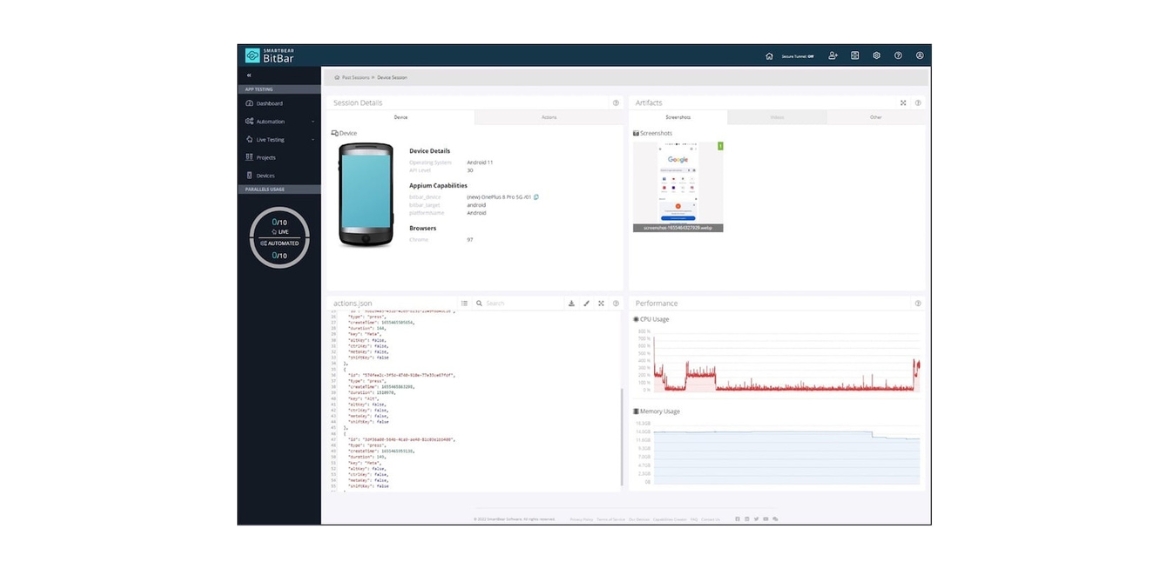
BitBar’s device cloud can help you run automated functional tests in parallel across browsers and devices. For example, you can upload a mobile app and existing Appium tests to BitBar Cloud and execute them on your existing CI/CD using a REST API. Similarly, you can add Selenium test scripts and test web applications in just a few clicks.

BitBar makes it easy to review test sessions across different devices. Source: BitBar

VisualTest adds – you guessed it – visual tests to these capabilities. Using AI technology, the platform quickly confirms that your app looks how you and your customers expect. For example, you can add a short piece of code to your tests to take screenshots with an identifier, and the platform will automatically identify and report visual regressions.

If you find a regression, you can also use BitBar to reproduce the issue on an actual device in the cloud. That way, developers can diagnose problems more quickly without diving into logs or trying to find and configure physical devices. Similarly, QA teams can use BitBar’s devices to conduct other ad hoc tests to confirm fixes or verify functionality.

Best of all, these tools easily integrate into existing CI/CD workflows and your overall development process. You can even combine them with TestComplete to enable non-technical individuals to create robust tests for web and mobile applications. Or, you can use CucumberStudio to enhance your test coverage and generate living documentation.

The Bottom Line

An excellent customer experience is essential to the success of every software business. As a result, it’s a good idea to invest in top-notch testing tools to spot visual and functional errors before they reach customers. BitBar and VisualTest make implementing robust automated functional and visual testing alongside your CI/CD processes easy.

Sign up for a free trial of BitBar and a free trial of VisualTest today!

Author

Jessica Manheimer

Jessica Manheimer is a Product Marketing Manager with SmartBear specializing on UI test products with an explicit focus on BitBar.

Jessica has over 8 years of experience delivering technical solutions to customers and crafting content to support product launches.

SmartBear is an EXPO Gold partner at EuroSTAR 2023, join us in Antwerp

Filed Under: Exploratory Testing Tagged With: 2023, EuroSTAR Conference

World Quality Report 2022-2023: Orchestrating Quality in Agile Organizations

May 10, 2023 by Lauren Payne

Thanks to Sogeti for providing us with this blog post.

With the ongoing evolution of Agile and DevOps addressing the need to release more and release faster, quality assurance plays a vital role at every stage of the release cycle.

In the 14th Edition of the World Quality Report, we see quality in the agile and DevOps environment viewed like an orchestra. Every element of the software development process comes together in harmony to complete the finished piece, like a perfect musical performance where quality is assured.

This is referred to as quality orchestration whereby the teams, skillsets, provisioning, automation practices, service virtualization, and more are viewed – and managed – as a seamless end-to-end whole. Collaboration in this orchestrated agile environment is key. It’s how test and quality engineers ensure their activities deliver the two most important quality objectives for the agile enterprise – excellent customer experience and business outcomes.

Our latest World Quality Report survey found that agile and DevOps were delivering benefit in line with these two objectives at many levels. For example, when asked if they had seen ‘significant’ improvements (i.e., more than 20%) since adopting agile and DevOps, 64% of the survey respondents said they had seen improvement in the area of on-time delivery, 63% in predictability, 62% in reducing the cost of their quality activities, and 61% in customer experience.

Agile Adoption Continues to Grow

This chapter of the WQR also assesses the evolution of agile and DevOps and the tools/approaches used to assure quality. For example, we discover that although the agile implementation of packaged enterprise systems has been slow to take off, with waterfall being the predominant methodology for many years, agile adoption has started to grow. Indeed, 59% of the survey respondents now have a well-implemented agile methodology for quality and testing. Quality is being further assured by a number of different approaches, such as pre-built test case repositories for certifying sprints, which has been adopted by 63% of the survey respondents.

When it comes to enterprise systems, testing isn’t always carried out by quality engineers. Some 62% of surveyed organizations say it is carried out by business SMEs. Nonetheless the skills of quality engineers remain integral to agile teams with 32% of organizations saying quality engineers make up between 26% to 35% of their agile teams, and 28% of organizations saying their agile teams comprise even more quality engineers at between 36% to 45% of the team make-up.

Recommendations for Success

As quality orchestration increases within the software development lifecycle (SDLC), the WQR looks ahead to possible future developments, such as a need for much higher levels of automation and quality as the pace of continuous quality grows. It also makes several recommendations for ensuring agile and DevOps success across the SDLC, such as making quality engineers integral to agile development programs, and blending both technical and business skills within the broader quality engineering skillset.

Get in Touch

If you’d like to hear more about our findings relating to quality orchestration in agile and DevOps, please get in touch with:

Author

Bart Vanparys

Practice Lead, Quality Engineering & Testing, Sogeti

Bart has carried many titles in his 20 year career. He’s been an analyst, tester, quality assurance consultant, test manager, project manager, BI developer, quality manager, change manager, CoE lead, program quality lead.

A constant has been his search for ways to deliver value through IT solutions in a controlled and safe manner. He has gained experience in many domains including testing, quality management, service management, project management and architecture. He believes that a broad background combined with deep specialized expertise in selected domain is essential to be valuable in our industry.

Bart’s specialty is testing and quality engineering. His broad interest is in everything else. Bart graduated as Commercial Engineer (KU Leuven, Belgium) and has worked in IT consultancy since 2000. In 2011, he joined Capgemini Belgium where he took a lead role in building the Sogeti Testing & Quality Management practice. He has performed assignments in public sector (European Commission), finance and retail. He is currently supporting organizations in building testing & quality engineering capabilities.

Sogeti is an EXPO Gold partner at EuroSTAR 2023, join us in Antwerp

Filed Under: Agile, DevOps Tagged With: 2023, EuroSTAR Conference

Unlocking ROI of Testing through Better Software Toolset

May 3, 2023 by Lauren Payne

Thanks to Lambdatest for providing us with this blog post.

Since the global pandemic, companies worldwide have rapidly accelerated their digital transformation initiatives. As more and more consumers are interacting with brands digitally, it has now become a strategic priority for every business to ensure that their digital products and services meet the expectations of their customers. This made testing of these digital products very essential as a negative digital experience will have a direct impact on the revenue stream. According to Forrester, prioritizing CX helps 66% of businesses enhance retention, and 60% of businesses increase customer lifetime value.

Software quality assurance (QA) ensures that your digital products are error-free, which helps in ensuring a positive customer experience, builds trust, and helps maintain brand reputation in the competitive online landscape. Yet, testing may be an expensive and time-consuming operation that drains a company’s resources significantly. Businesses must analyze ROI to effectively manage testing resources, prioritize activities that give the highest return, and identify areas for improvement. Businesses can make informed decisions using data-driven insights. Constant ROI tracking allows them to optimize their results and increase the quality of their digital products, ultimately leading to favorable outcomes.

In this blog post, we will look at why calculating ROI is important, and how a stronger software toolset can assist in unlocking the ROI of testing.

Why is ROI Important for Digital Testing?

ROI is an essential indicator for digital testing since it allows firms to calculate their testing process’s financial advantages and costs. Assessing ROI will enable organizations to make educated decisions about their testing efforts.

Organizations may assess the total return on investment of testing by comparing costs and benefits and making data-driven decisions about where to devote resources, what improvements to make to the testing process, and which initiatives to prioritize by comparing prices and benefits. Measuring ROI identifies which tests and modifications have the most significant impact on the customer experience and business outcomes, allowing companies to improve and enhance the testing process to boost the impact and ROI of future testing efforts.

Monitoring the ROI of digital testing allows firms to justify their time and money while proving to stakeholders the value of their testing program. If ROI analysis demonstrates that testing efforts boosted customer happiness, conversion rates, and revenue, this provides a compelling justification for future testing expenditure. Assessing ROI on digital testing can also aid in performance improvement by demonstrating which testing activities have the greatest influence on customer experience and business outcomes.

As a result, quantifying ROI is critical for businesses trying to enhance their online presence, improve user experience, and boost conversions and revenue through digital testing.

Increase ROI with a better Toolset

1. Test Automation

One of the most important advantages of a software toolset is the ability to automate testing. Test automation can reduce the time and effort required for manual testing, allowing resources to be focused on more important tasks. Automation can also improve testing accuracy by removing human errors and guaranteeing consistent test execution. Companies can achieve faster time-to-market and lower overall testing expenses by lowering the time and effort necessary for testing.

2. Test Infrastructure

Faster time-to-market, improved quality, lower costs, and higher customer satisfaction can all be achieved with better test infrastructure, which can raise ROI. It’s critical to invest in a strong and scalable infrastructure, make use of automated testing technologies, develop a thorough test plan, and have a dedicated testing staff in order to reap these benefits.

3. Test Intelligence and Observability

By identifying problems more quickly, prioritizing defects, doing risk assessments, enhancing testing effectiveness, raising quality, and improving customer happiness, test intelligence and observability can increase ROI. Investing in test intelligence and observability technologies to ensure the testing infrastructure provides real-time insights and data, and having a qualified testing team to continuously monitor the infrastructure are necessary to maximize ROI.

4. Better Test Coverage

A software toolset can also aid in increasing test coverage. Test coverage is the percentage of software code that is covered by tests. The greater the test coverage, the greater the trust in the software’s quality. A toolkit can assist in identifying parts of code that are not covered by tests and making recommendations for new tests to increase coverage. This can aid in ensuring that essential portions of the software are adequately tested, lowering the likelihood of defects or errors in production.

5. Integration with other tools

Integrating a software toolset with other tools is another advantage. Integration with project management solutions like JIRA, for example, can help to speed the testing process by automatically issuing tickets for failing tests. Integrating with version control systems such as Git can aid in the management of test code and the tracking of changes over time. Companies can develop a more effective and streamlined testing process by combining it with other solutions.

How to Calculate the ROI of Digital Testing

To calculate the ROI of digital testing, organizations must follow three key steps:

  1. Establish Objectives: The first stage is to define the testing program’s objectives. Companies should determine the particular objectives they hope to achieve through digital testing. For example, the goal could be to boost conversions, improve user experience, or lower bounce rates.
  2. Determine Costs: The next step is to figure out how much the testing will cost. This includes direct and indirect costs such as software license fees, testing equipment, and employee pay. Organizations should also consider the amount of time and resources needed for each testing activity.
  3. Benefits Assessment: The final phase is to assess the benefits of the testing process. Key metrics like conversion rates, bounce rates, time on site, and customer happiness must be tracked. By weighing the costs and advantages, organizations can determine the overall ROI of their digital testing program.

Formula to Calculate ROI: (Benefits – Costs) / Costs

Organizations can calculate the ROI of their digital testing efforts using this approach. A positive ROI implies that the advantages of the testing process outweigh the disadvantages, whereas a negative ROI suggests that the disadvantages outweigh the benefits.

Benefits of Measuring ROI for Digital Testing

Calculating ROI on digital testing has various advantages for businesses:

  1. Justification of Time and Money: By quantifying ROI, firms may justify to stakeholders the time and money spent on digital testing. ROI analysis enables firms to make informed decisions about where to deploy resources and prioritize efforts. According to Forrester Analytics survey data, 33% of global developers at the manager level or higher consider speeding up cycle time to be a top-three priority; 30% said the same about increasing the automation of software development lifecycle (SDLC) tasks.
  2. Assessing ROI on digital testing allows businesses to understand which testing activities have the most significant influence on customer experience and business outcomes, allowing them to improve the testing process continuously. Gartner predicts that by 2023, 40% of product and platform teams will have cut unexpected downtime by 20% by incorporating AIOps into their DevOps pipelines for automated change risk assessments. By intelligently combining the stack’s functionality, the AIOps platform organizes and integrates domain-specific IT monitoring and management tools. Connecting various tools to the AIOps platform acts as a coordinating layer, serving as the brain.
  3. Future Planning: Measuring ROI helps firms plan for future testing costs and align testing efforts with company goals. By prioritizing high-return activities, companies can allocate resources accordingly. Firms might allocate additional resources to evaluating a feature or capability that has a high ROI. A low ROI may prompt organizations to rethink their approach and either optimize the process or reallocate resources elsewhere. Businesses can guarantee their testing approach is successful and efficient by making data-driven decisions, which improves the quality of their digital products and services and drives positive outcomes.

Conclusion

In conclusion, by automating testing, connecting with other tools, enhancing test coverage, performing performance testing, and conducting security testing, a better software toolset can help unlock the ROI of testing. Companies can increase the quality of their software, lower the chance of defects or errors in production, and achieve a faster time-to-market by investing in a software toolset.

Author

Mudit Singh, Director, Marketing, LambdaTest.

A product and growth expert with 12+ years of experience in building great software products. A part of LambdaTest’s founding team, Mudit Singh has been deep diving into software testing processes working towards the aim of bringing all testing ecosystems to cloud. Mudit currently leads marketing and growth for LambdaTest as Director – Marketing.

Lambdatest is an EXPO Platinum partner at EuroSTAR 2023, join us in Antwerp

Filed Under: Software Testing Tagged With: 2023, EuroSTAR Conference

  • « Previous Page
  • Page 1
  • …
  • Page 10
  • Page 11
  • Page 12
  • Page 13
  • Page 14
  • …
  • Page 19
  • Next Page »
  • Code of Conduct
  • Privacy Policy
  • T&C
  • Media Partners
  • Contact Us

part of the