• Skip to main content
EuroSTAR 2027 - Sign up for early access

EuroSTAR Conference

Europe's Largest Software Testing Conference.

  • Programme
    • Call for Speakers
    • 2026 Programme
    • Community Hub
    • Awards
  • Attend
    • Why Attend
    • Bring your Team
    • Testimonials
  • Sponsor
    • Sponsor Opportunities
    • Sponsor Testimonials
  • About
    • About Us
    • Our Timeline
    • FAQ
    • Blog
    • Organisations
    • Contact Us
  • Book Now

2023

Testing in Agile: A Few Key Points to Consider

June 28, 2023 by Lauren Payne

Thanks to CTG for providing us with this blog post.

What is Agile Testing?

This may come as a surprise, but there really is no such thing as “Agile Testing.” Let’s break this down into two terms: Agile and Testing.

Agile is a development approach that has been widely adopted since the early 2000s, whereas Testing is a process that determines the quality of a software product. The basic principle in software testing is that testing is always context dependent. In other words, you must adapt your process, activities, and objectives in order to align them with your business context.

How Does Testing in Agile Differ From Traditional Approaches?

The main difference between an Agile approach and a more traditional approach with respect to testing lies in the ever-changing, fast-paced, and continuous character of testing.

With Agile, the objective is to deliver value as fast as possible to the stakeholders. Since an Agile approach embraces change, the concept of value itself can change between sprints or iterations.

When traditional approaches are applied, there is always a period between the analysis and test execution phases where developers are performing their magic. During this period, testers review, evaluate and analyze the documentation at hand, trying to prevent any defects from entering the code as well as preparing their test case design.

In an iterative or incremental approach, such as Agile, such a period does not exist. Every member of the Agile team is considered multi-disciplinary and must therefore be able to perform any tasks within the team. It simply does not matter whether it’s analysis, development, or testing. Given the lack of time to prepare test cases upfront, testing becomes less scripted and more explorative.

Finally, due to the circular motion, a lot of the testing work is redundant. In a traditional approach, the code is stable and frozen when testing starts. As a result, a test that passed 4 weeks ago should still pass.

In an Agile approach, requirements, user stories, product backlog items (PBI), may undergo significant changes in between iterations, based on customer feedback. To ensure that new functionalities do not break the existing solution, rigorous regression testing is required within every iteration, lowering the bandwidth for testing new functionalities.

What Skills do Testers Need & What Roles do they Play in Agile Projects?

Whether its an Agile approach or a traditional approach, the skills that testers need are largely identical. We can organize these testing skills into 4 categories:

  • Business or domain knowledge: Understanding the context of the work or project
  • IT knowledge: General understanding of all the other roles and activities
  • Testing knowledge: How to deduct test cases and how to execute them.
  • Soft skills: How to deduct analytical skills, communication skills, empathy, and a critical mindset.

In fact, testers should feel more at home in an Agile team, as they are more in control. Testers can pull work from the backlog when they are ready as opposed to a traditional approach, where work is pushed to them whether they are ready or not.

What is the Best Way To Assess Quality Risks?

When it comes to Agile, collaboration and communication are key. Every requirement contains a risk to the product. By writing and reviewing the requirements together (i.e. collaborative user story writing) with developers, analysts and testers, all stakeholders are made aware of possible risks.

It is important to note that not all risks carry the same weight and mitigating them can occur through different means. Lower-level risks associated with a specific product backlog item (PBI) can be addressed in its acceptance criteria. Product risks on a higher level than a single user story can be mitigated in quality gates such as the definition of ready (DOR) and the definition of done (DOD).

The same principle applies for estimation of time. However, Agile team members do not estimate the time required to perform a certain task. Due to the risk of anchoring, it is better to assess tasks on a PBI level using story points. These fictive, relative, values express the total effort required by the entire team to complete the task. It’s not the sum of analysis, development, and testing in the most favorable circumstances, but rather the team’s evaluation of how much effort the task would require for any given team member to complete.

3 Ways to Enhance your Understanding in Agile Projects

Like anything in life, improving your understanding in Agile projects requires deliberate actions. Here are 3 ways you can enhance your knowledge:

  • Join an Agile team

Practices makes perfect. Joining an Agile team is a great way to gain valuable exposure and experience to Agile principles in order improve one’s understanding and proficiency.

  • Follow Agile trainings

Regardless of your field or profession, learning should never stop. Participating in Agile trainings can allow you to learn more about Agile, which you can then apply in the real world.

  • Read great Agile resources

Finally, it is never a bad idea to pick up any of the great literature about Agile. Perhaps less interactive than the first two suggestions, reading about Agile makes it possible to learn from some of leading Agile specialists.

Interested in expanding your agile skills, experience, or know-how? CTG Academy offers both in-person and online training dedicated to help those working in agile. Discover our agile trainings and take your projects to the next level.

Want to know more on agile? Discover our agile service or contact us!

Author

EuroSTAR 2023 Michaël Pilaeten

Michael Pilaeten , Learning and Development Manager

Breaking the system, helping to rebuild it, and providing advice and guidance on how to avoid problems. That’s me in a nutshell. With 17 years of experience in test consultancy in a variety of environments, I have seen the best (and worst) in software development. In my current role as Learning & Development Manager, I’m responsible for guiding our consultants, partners, and customers on their personal and professional path towards excellence. I’m chair of the ISTQB Agile workgroup and international keynote speaker (United Kingdom, France, Spain, Peru, Russia, Latvia, Denmark, Armenia, Romania, Belgium, Holland, Luxembourg).

CTG is an EXPO exhibitor at EuroSTAR 2023, join us in Antwerp

Filed Under: Agile Tagged With: 2023, EuroSTAR Conference

Did We Do the Right Tests?

June 26, 2023 by Lauren Payne

Experiences with Test Gap Analysis in Practice

Thanks to CQSE for providing us with this blog post.

Most errors occur in code that has been changed lately (e.g., since the last release of a software system) [1,2]. This is of little surprise to practitioners, but how do we ensure that our tests cover all such changes, in order to catch as many of these defects as possible?

Do Tests Cover Code Changes in Practice?

In order to better understand to which degree tests actually cover changes made to a software system, we tracked development and testing activity on an enterprise information system, comprising of about 340k lines of C# code, over a period of 14 months, corresponding to two consecutive releases [1].

Through static code analysis, we determined that for each of these releases, about 15% of the source code were either newly developed or changed. Using a profiler, we recorded the code coverage of all testing activities, including both automated and manual tests. This data showed that approximately half of the changes went into production untested – despite a systematically planned and executed testing process.

To quantify the consequences of untested changes for users of the software, we then reviewed all errors reported in the months following the releases and traced them back to their root causes in the code. We found that changed, untested code contains five times more errors than unchanged code (and also more errors than changed and tested code).

This illustrates that, in practice, untested changes very frequently reach production and that they cause the majority of field errors. We may, thus, systematically improve test quality, if we manage to test changes more reliably.

Why Do Changes Escape Testing?

The amount of untested production code we found in our study actually surprised us, when we originally conducted this study. Therefore, we wanted to understand why this many changes escape testing.

We found that the cause of these untested changes is – to the contrary of what you may assume – not a lack of discipline or commitment on the testers’ part, but rather the fact that it is extremely hard to reliably identify changed code manually, when testing large systems.

Testers often rely on the description of individual issues from their issue tracker (e.g., from Jira or Azure DevOps Boards), in order to decide whether some change has been sufficiently tested. This works well for changes made for functional reasons, because the issues describe how the functionality is supposed to change and it is relatively easy to see which functionality a test covers.

However, there are two reasons why issue trackers are not suitable sources of information in consistently finding changes:

  • First, many changes are technically motivated, for example, clean-up operations or adaptations to new versions of libraries or interfaces to external systems. Respective issue descriptions do not clarify which functional test cases make use of the resulting changes.
  • Second, and more importantly, the issue tracker often simply does not document all important changes, be it because someone forgot or did not find the time to update the issue description or because someone made changes they were not supposed to make, e.g., due to a policy that is currently in place.

Thus, we need a more reliable source to determine what has been changed. Only then, we can reason about whether these changes have been sufficiently tested.

Test Gap Analysis to the Rescue!

Test Gap Analysis is an approach that combines static analysis and dynamic analysis to identify changed-but-untested code.

First, static code analysis compares the current state of the source code of the System under Test to that of the previous release in order to determine new and changed code areas. In doing so, the analysis filters out refactorings, which do not modify the behavior of the source code (e.g., changes to documentation, renaming of methods or moving of code) and, thus, cannot cause new errors. The remaining code changes lead to a change in the behavior of the system.

For the enterprise information system from before, all changes for one of the releases we analyzed are depicted on the following tree map. Each rectangle represents a method in the source code and the size of the rectangle corresponds to the method’s length in lines of source code. We distinguish unchanged methods (gray), from new methods (red) and modified methods (orange).

Figure 1: A treemap showing all changes made to an enterprise information system for a single release. About 15% of the code was added (red) or modified (orange), while the rest remained unchanged (gray).

Second, dynamic analysis captures code coverage (usually through a coverage profiler). The crucial factor here is that all tests are recorded, across all test stages and regardless of whether they are automated or manually executed.

We use the same tree map as above, to visualize the aggregated code coverage at the end of the test phase. This time, we distinguish between methods that were executed by at least one test (green) and methods that were not (gray).

Figure 2: A treemap showing the aggregated code coverage of all tests (manual and automated) performed on an enterprise information system. Methods that were executed by at least one test (green) and methods that were not (gray).

Third, Test Gap Analysis detects untested changes by combining the results of the static and dynamic analyses. Again, we use our tree map to visualize the results, distinguishing methods that remain unchanged (gray) from changed-and-tested methods (green), untested new methods (red) and untested changed methods (orange).

Figure 3: A treemap showing the results of a Test Gap Analysis on an enterprise information system. A large part of the code remained unchanged (gray), while about 15% changed (in color). Of the changes, about half was tested (green), while the other half remained untested (red and orange) – despite a systematically planned and executed testing process.

It is plain to see that whole components containing new or changed code were not executed by even a single test in the testing process. No errors contained in this area can have been found in the tests!

Using Test Gap Analysis

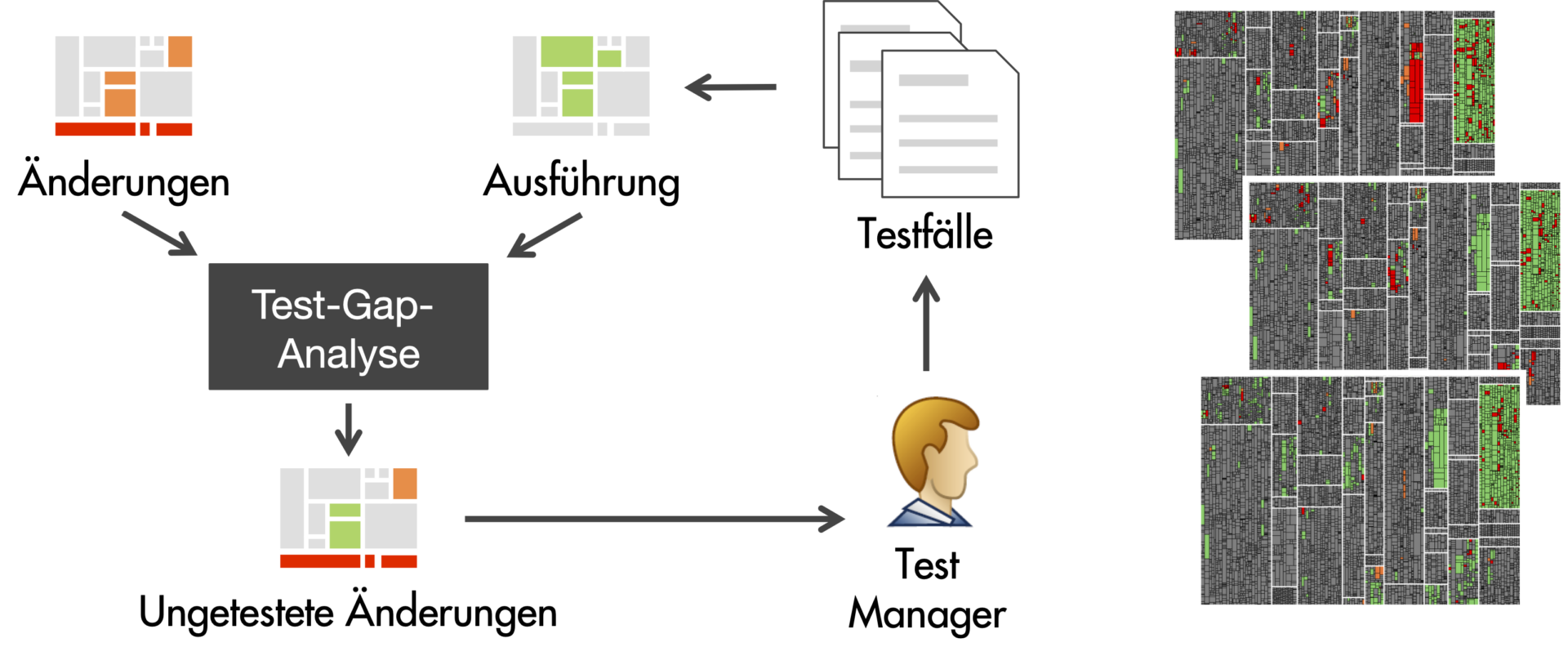
Test Gap Analysis is useful when executed regularly, for example, every night, to gain insights each morning into the executed tests and changes made up until the previous evening. Each day, an updated Test Gap treemap, e.g., on a dashboard, then helps test managers decide whether further test cases are necessary to run through the remaining untested changes. This creates an ongoing feedback loop to steer the testing efforts and make informed decisions.

Figure 4: Test Gap Analysis gives continuous feedback to help test managers steer the testing efforts.

Which Projects Benefit from Test Gap Analysis?

We have used Test Gap Analysis on a wide range of different projects: from enterprise information systems to embedded software, from C/C++ to Java, C#, Python and even SAP ABAP. Factors that affect the complexity of the introduction are, among others:

  • Execution environment. Virtual machines (e.g., Java, C#, ABAP) simplify the collection of test coverage data.
  • Architecture. The test-coverage data for a server-based application has to be collected from fewer machines than that for a fat-client application, for example.
  • Testing process. Clearly defined test phases and environments facilitate planning and monitoring.

Using Test Gap Analysis During Hotfix Testing

The objectives of hotfix tests are to ensure that the fixed error does not re-occur and that no new errors have been introduced. To achieve the latter, we should at least ensure we tested all changes made in the course of the hotfix. Usually, there is very little time to achieve this.

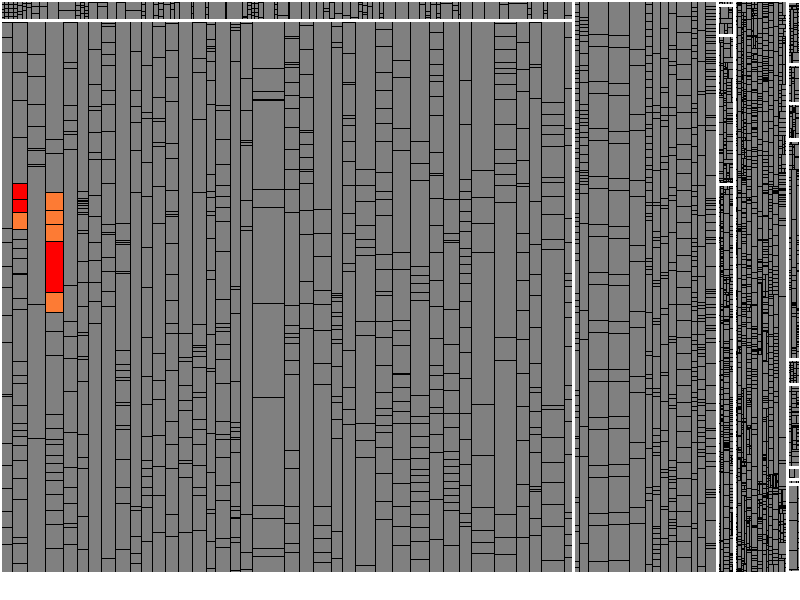
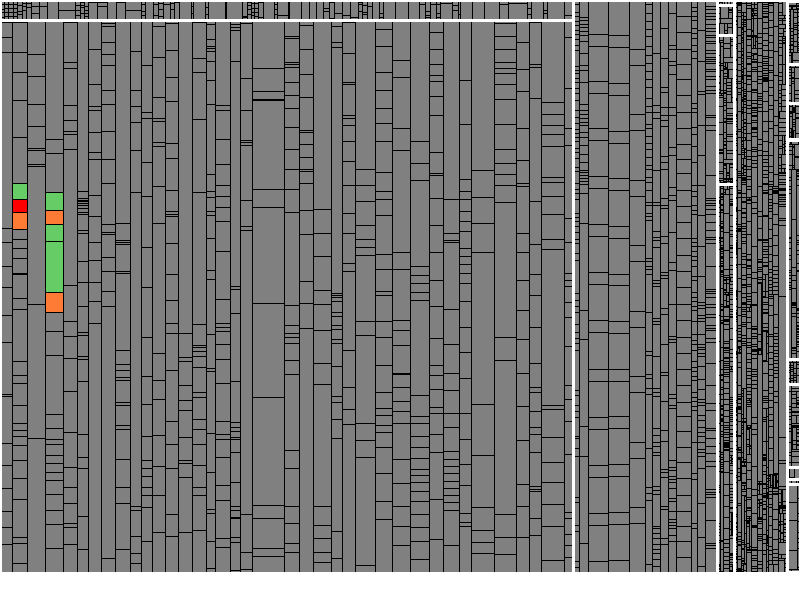
With Test Gap Analysis, we may define the release state (before the hotfix) as the reference version and detect all changes made due to the hotfix (for example, on a dedicated branch). We then determine whether all changes were actually tested during confirmation testing. A Test Gap tree map immediately shows whether there are any untested changes left.

Figure 5a: Changes made during a hotfix (in color).
Figure 5b: Remaining untested changes (orange & red) and tested changes (green).

In our experience, Test Gap Analysis specifically helps avoid new errors that are introduced through hotfix changes.

Using Test Gap Analysis During a Release Test

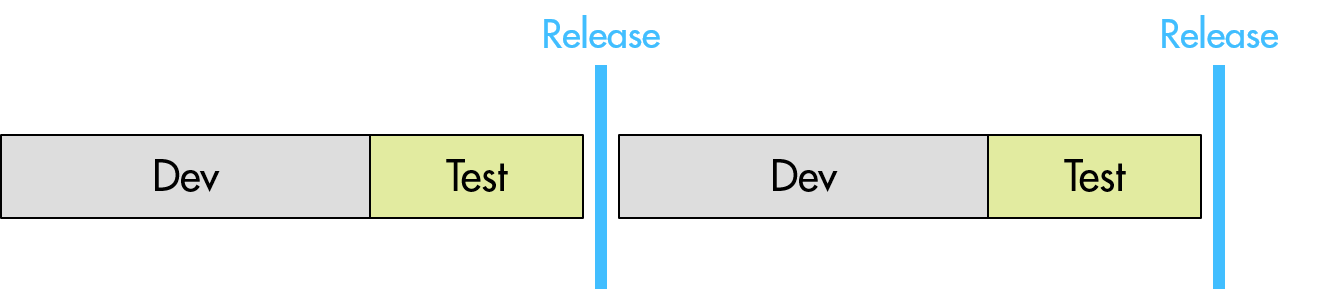
For this scenario, we define a release test as the test phase prior to a major release, which usually involves both testing newly implemented functionality and executing regression tests. Often, this involves different kinds of tests on multiple test stages.

Figure 6: Split of development and release-test phases.

In the introduction to Test Gap Analysis above, we’ve looked at the results of running Test Gap Analysis at the end of a release test of an enterprise information system. These results revealed glaring gaps in the coverage of changes, after a test phase without using Test Gap Analysis to guide the testing efforts.

From that point onwards, Test Gap Analysis became an integral part of the testing process and was executed regularly during subsequent release tests. The following is a snapshot of the Test Gap Analysis during a later release test. It is plain to see that it contains much fewer Test Gaps.

Figure 7a: Test Gaps after a release test without Test Gap Analysis.
Figure 7b: Test Gaps after a release test guided by Test Gap Analysis.

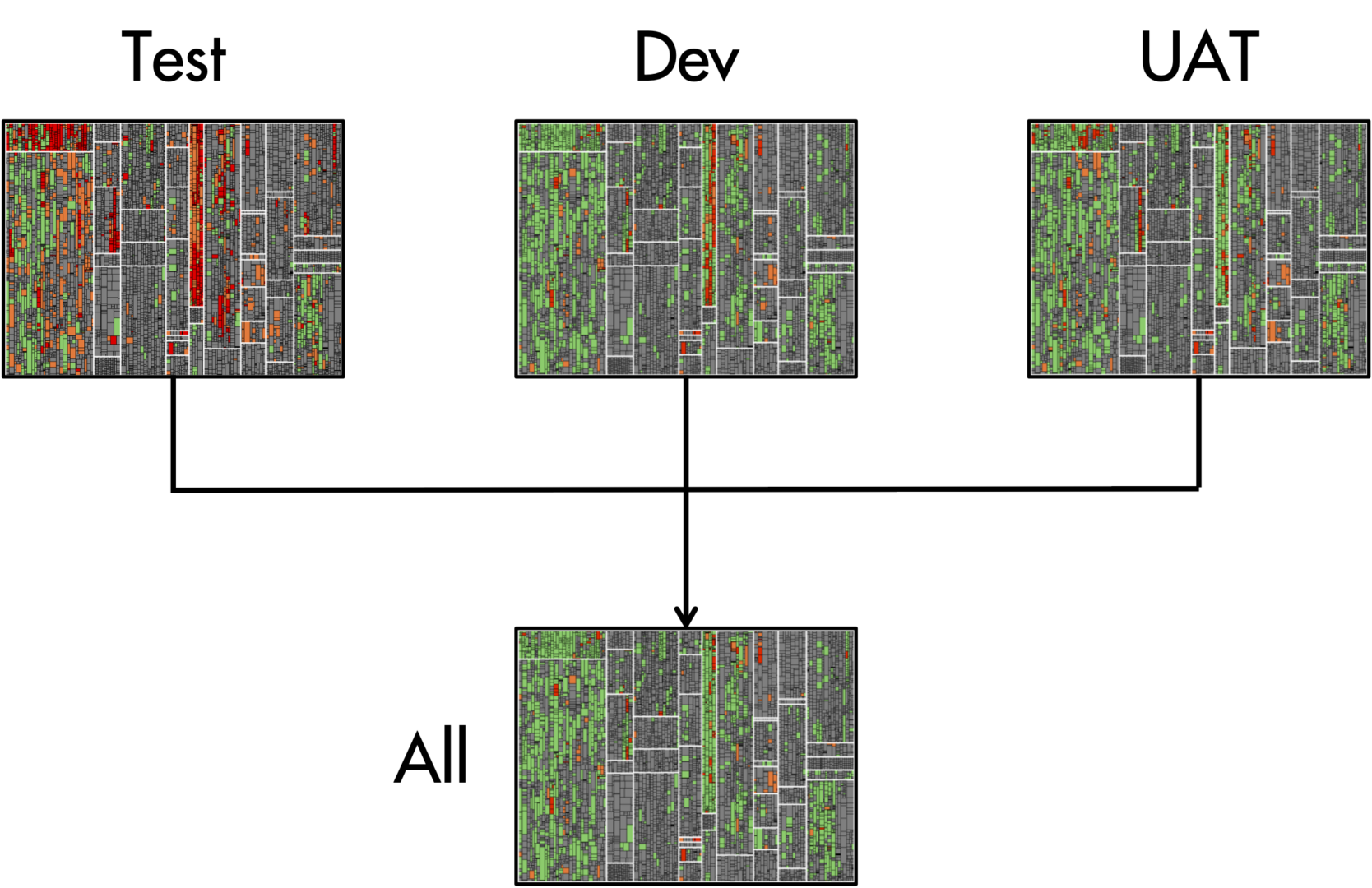
If testing happens in multiple environments simultaneously, we may run Test Gap Analysis for each individual environment separately. And at the same time, we may run Test Gap Analysis globally, to assess our combined testing efforts. The following example illustrates this for a scenario with three test environments:

  • Test is the environment in which testers carry out manual test cases.
  • Dev is the environment where automated test cases are executed.
  • UAT is the User Acceptance Test environment, where end users carry out exploratory tests.
  • All combines the data of all three test environments.
Figure 8: Results of Test Gap Analysis by test environment and aggregated over all environments.

We observed that, in many cases, some Test Gaps are accepted, for example, when the corresponding source code is not yet reachable via the user interface. The goal of using Test Gap Analysis is not to test every single change at all cost. The key is that we can make conscious and well-founded decisions with predictable consequences about what to test.

In our experience, Test Gap Analysis significantly reduces the amount of untested changes that reach production. In a study with one of our customers, we found that this reduces the number of errors in the field by as much as 50%.

Using Test Gap Analysis Alongside Iterative Development

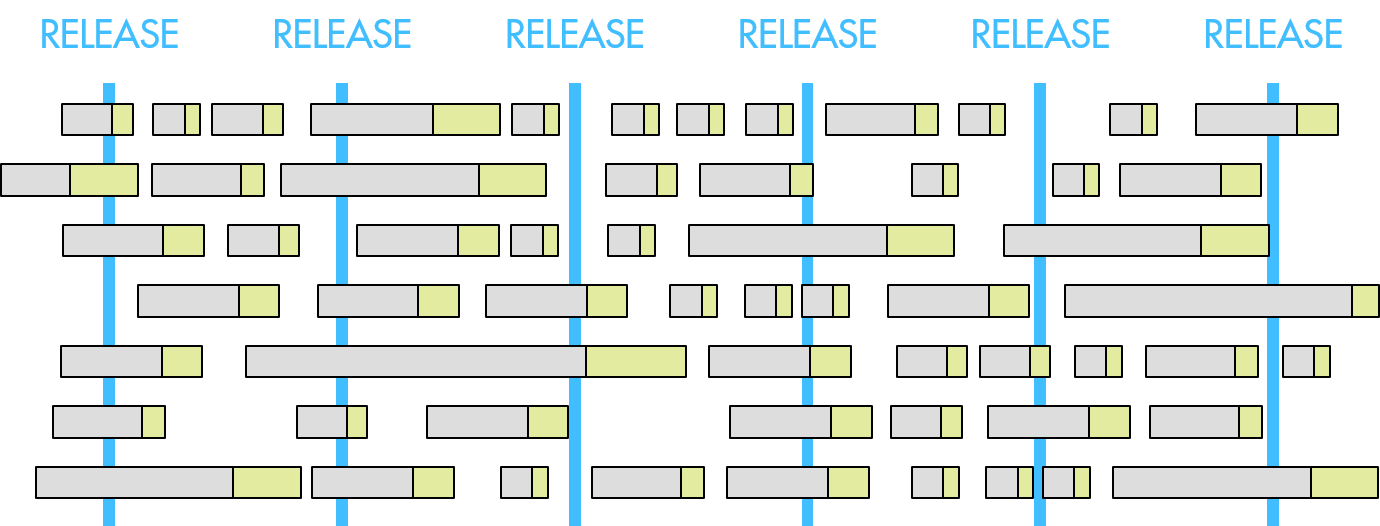
Today, fewer and fewer teams work with dedicated release tests, like in the previous scenario. Instead, issues from their issue trackers move into the focus of test planning, to steer testing efforts alongside iterative development.

In this scenario, testers are responsible to test individual issues in a timely manner after development finishes. As a result, development and testing interleave and dedicated test phases become obsolete or much shorter.

Figure 9: Development and test phases in iterative development processes.

At the same time, it becomes even harder to keep an eye on all changes, because much of the work typically happens in isolation, e.g., on dedicated feature branches, and gets integrated into the release branch only on very short notice. All the more, we need a systematic approach to keep track of which changes have been tested and in which test environments.

Fortunately, we may run Test Gap Analysis also on the changes made in the context of individual issues. All we need to do is single out the changes that happened in the context of any particular issue, which is straightforward, e.g., if all changes happen on a dedicated feature branch or if developers annotate changes with the corresponding issue numbers when committing them to the version control system. Once we grouped the changes by issue, we simply run Test Gap Analysis for each of them.

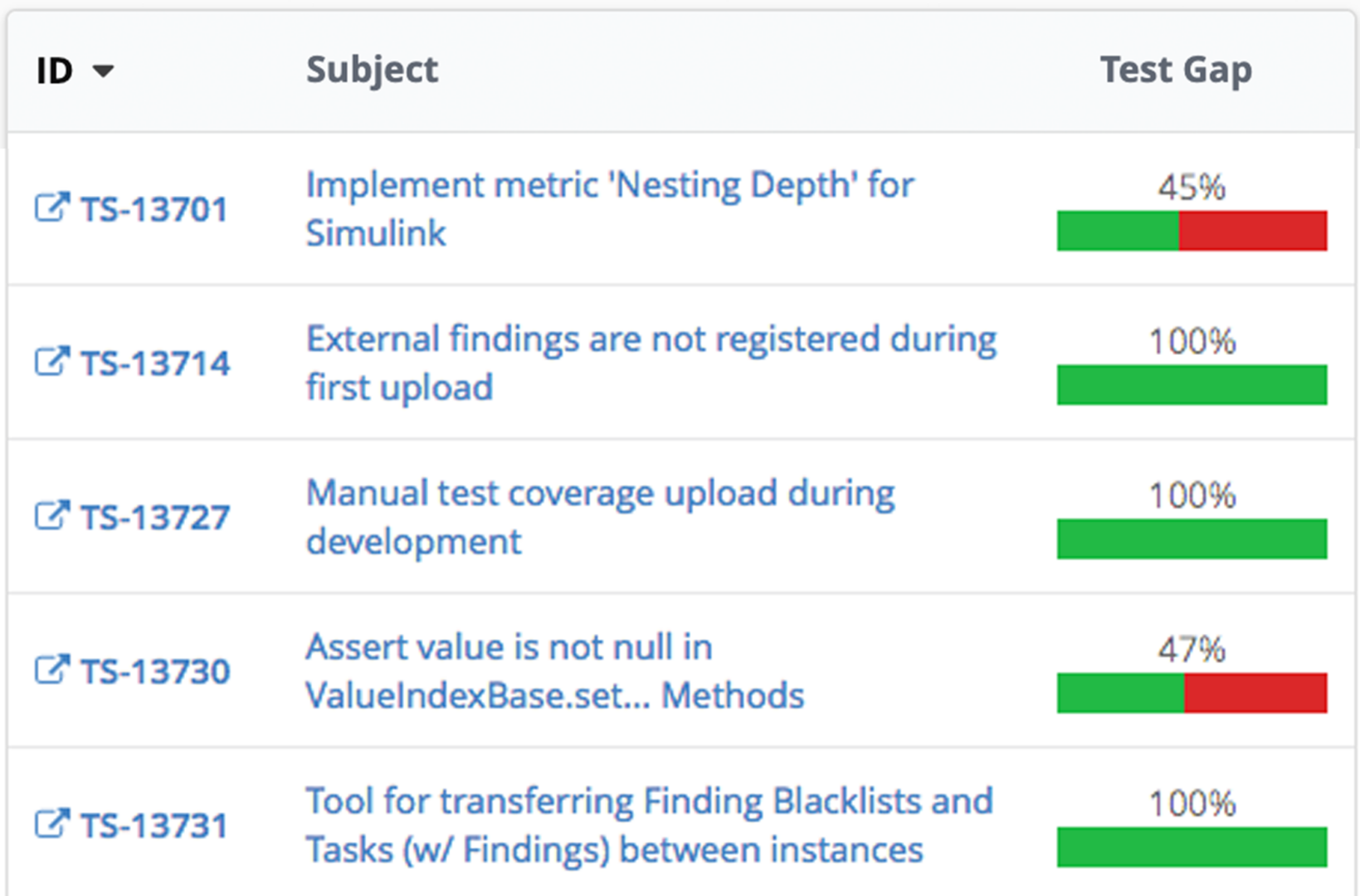
Figure 10: Overview of Issue Test Gaps for the issues in the current development iteration.

Limitations of Test Gap Analysis

Like any analysis method, Test Gap Analysis has its limitations and your knowledge of them is crucial for making the best use of the analysis.

One of the limitations of Test Gap Analysis are changes that are made on the configuration level without changing the code itself. These changes remain hidden from the analysis.

Another limitation of Test Gap Analysis is the significance of processed code. Test Gap Analysis evaluates which code was executed during the test. It cannot figure out how thoroughly the code was tested. This potentially leads to undetected errors despite the analysis depicting the executed code as “green”. This effect increases with the coarseness of the measurement of code coverage. However, the reverse is as simple as it is true: red and orange code was not executed in tests, thus, no contained errors can have been found.

Our experience in practice shows that the gaps brought to light when using Test Gap Analysis are usually so large that we gain substantial insights into weaknesses in the testing process. With respect to these large gaps, the limitations mentioned above are insignificant.

Further Information

Test Gap Analysis may greatly enhance the effectiveness of testing processes. If you would like to learn more about how Test Gap Analysis works in our analysis platform Team scale, the first tool that offered Test Gap Analysis and, to date, the only tool providing Test Gap tree maps, as you have seen them above, check out our website on Test Gap Analysis or join our next workshop on the topic (online & free)!

References

[1] Sebastian Eder, Benedikt Hauptmann, Maximilian Junker, Elmar Juergens, Rudolf Vaas, and Karl-Heinz Prommer. Did we test our changes? assessing alignment between tests and development in practice.
In Proceedings of the Eighth International Workshop on Automation of Software Test (AST’13), 2013.

https://www.cqse.eu/publications/2013-did-we-test-our-changes-assessing-alignment-between-tests-and-development-in-practice.pdf

[2] N. Nagappan, Th. Ball, Use of relative code churn measures to predict system defect density, in: Proc. of the 27. Int. Conf. on Software Engineering (ICSE) 2005

Authors

Dr Elmar Juergen EuroSTAR 2023 Speaker

Dr. Elmar Jürgens

(juergens@cqse.eu) is founder of CQSE GmbH and consultant for software quality. He studied computer science at the Technische Universität München and Universidad Carlos III de Madrid and received a PhD in software engineering.

Dr. Dennis Pagano

(pagano@cqse.eu) is consultant for software and systems engineering at CQSE. He studied computer science at Technische Universität München and received a PhD in software engineering from Technische Universität München. He holds two patents.

Dr. Sven Amann

(amann@cqse.eu) is a consultant of CQSE GmbH for software quality. He studied computer science at the Technische Universität Darmstadt (Germany) and the Pontifícia Universidade Católica do Rio de Janeiro (Brazil). He received his PhD in software technology from Technische Universität Darmstadt.

CQSE is an EXPO exhibitor at EuroSTAR 2023, join us in Antwerp.

Filed Under: Software Testing Tagged With: 2023, EuroSTAR Conference

Why Test Reporting Should be a Top Priority in Your Software Development Process

June 21, 2023 by Lauren Payne

Thanks to b.ignited for providing us with this blog post.

In the world of software development, testing is an essential part of the process. It is through testing that we can ensure that the software being developed is fit for use, meets requirements, and is ready for release. However, there are some situations where test reporting does not reach management, which is a problem. Do you wonder why this might happen? What are the consequences? Because believe me, there are consequences! And most importantly, what can be done to avoid all of this?
To understand the importance of test reporting, it is important to understand what a good test report consists of. The report summarizes the results and findings of a testing process. It provides a comprehensive view of the testing activities, including the objectives, scope, and methodology of the testing, as well as the test cases, test scripts, and test data used. It serves as a formal record of the testing activities and provides stakeholders with a clear understanding of the quality of the product or system being tested. It is an important tool for decision-making, as it can help stakeholders determine whether the product or system is ready for release or further testing is required.

Why does test reporting not reach management?

There are a few reasons why test reporting might not be available to management.
One reason is that the testing team does not have the necessary resources to produce reports. This could be due to a lack of personnel, time or funding. Another reason could be that they do not recognize the value of producing reports. They may believe that their work speaks for itself, and that there is no need to provide additional documentation.


Another reason could be that the development team is focused on meeting deadlines and releasing software quickly. In this case, the testing team may not have enough time to produce reports and meet their other responsibilities.
Or it could be that the team is not aware of the importance of test reporting to management. They may not realize that management needs this information to make informed decisions about the software development process.

What are the consequences of not reporting?

There are several consequences of not reporting test results to management. One of the most significant consequences is that management will not have a clear view of the quality of the software being developed. Without this information, they may make decisions that are not in the best interest of the company. For example: releasing software that has not been adequately tested leads to customer complaints, negative reviews and even legal action.


Another consequence of not reporting is that the testing team may not receive the recognition they deserve for their hard work. When management is not aware of the effort of the testers, they may not appreciate the value of their work, leading to lower morale and decreased job satisfaction.

Not reporting test results can lead to a breakdown in communication between the testers and the other members of the development team. This can make it more difficult to identify and fix bugs, leading to longer development times and higher costs.

How can you avoid not reporting test results?

There are 4 simple steps:

  • The first step is to ensure that the testing team has the necessary resources to produce reports. This might involve hiring additional personnel, providing more time for reporting, or increasing funding for testing activities.
  • The second step is to educate the testers about the importance of test reporting to management. By explaining how this information is used, the testing team will be more motivated to produce reports.
  • The third step is to make sure that reporting is integrated into the software development process. This might involve using automated tools to generate reports or creating templates that make it easy for the testing team to produce reports quickly.
  • And the fourth and final step is to ensure that there is open communication between the testers and the other members of the development team. By sharing test results and collaborating on solutions, the development process can be more efficient and effective.

Test-Automation-as-a-Service: your test reporting solution

At b.ignited, we are convinced that there is yet another solution to ensure that test reporting is always up-to-date, namely using ‘b.ignition’. b.ignition is an in-house developed tool, with an underlying cloud architecture to provide test reporting. Users can log in via a portal and thus view and compare all information of current and historical test results. There is always an overview available of the test results status across projects. If necessary, a new test run can be started from the same portal, and the results are immediately included in the overview. b.ignition is set up in such a way that the customer can choose between a private or a public cloud, depending on the desired data security.

Understanding the value of test reporting

In conclusion, not reporting test results to management can have significant consequences for the software development process. By understanding why this might happen and taking steps to avoid it, you can ensure that the software being developed is of the highest quality and meets the needs of the customer. It is essential to recognize the value of test reporting to management and to make it a priority in the software development process.

Author

Patrick-Van-Ingelgem

Patrick Van Ingelgem, Managing Partner at b.ignited

Founded the company in 2018 after several years of experience in Test automation, -coordination and -management. He motivates his colleagues from b.ignited to always be on top of technology, and strongly believes in the power of knowledge and information. That’s why the topic on Test reporting is so important for him.

 b.ignited is an EXPO Exhibitor at EuroSTAR 2023, join us in Antwerp.

Filed Under: Software Testing Tagged With: 2023, EuroSTAR Conference

What is the European Accessibility Act?

June 19, 2023 by Lauren Payne

Thanks to Applause for providing us with this blog post.

June 28, 2022 was the deadline for EU member states to adopt the European Accessibility Act (EAA) requirements into law. What does the act mean for your business? Here is everything you need to know to prepare your business for the June 2025 compliance deadline and design truly accessible digital products.

Why a European Accessibility Act?

The European Accessibility Act is a new directive that establishes a common set of accessibility rules for software, digital services and hardware sold or used in the EU. In doing so, the act aims to remove barriers created by divergent accessibility rules in the EU member states and improve the functioning of the internal market for accessible products and services.

How does the European Accessibility Act differ from WCAG?

The Web Content Accessibility Guidelines (WGAC) are the main point of reference on accessibility best practices for European companies. However, they have no legal standing and are not enforced. The European Accessibility Act, on the other hand, is legally binding.

By making accessibility enforceable by law, Europe is catching up with countries like the US, where accessibility legislation has been around for a while. In the past, the EU has required public-sector apps and websites to adhere to accessibility requirements under the EU Web Accessibility Directive, but the The European Accessibility Act is the first time private-sector companies have faced accessibility legislation.

What does the European Accessibility Act say?

While WCAG and the European Accessibility Act differ from an accessibility standpoint, they share many of the same foundational principles. In alignment with WCAG, the European Accessibility Act builds on four key accessibility best practices known by the acronym POUR: to be accessible, content must be perceivable, operable, understandable and robust. In other words, people with disabilities must be able to make out key content elements, be able to use and navigate user interfaces, understand what they are seeing and reliably use assistive technologies like screen readers.

However, the European Accessibility Act itself does not provide any technical accessibility standards. This means that it is up to each member state to decide how they will achieve the aims of the directive.

Which people and products are covered by the EU Accessibility Act?

Both people with disabilities and the elderly come under the scope of the European Accessibility Act. The requirements apply to key products and services that need to be accessible for these groups to participate equally in society:

  • Computers and operating systems
  • ATMs, ticketing and check-in machines
  • Smartphones
  • TV equipment related to digital television services
  • Telephone services and related equipment
  • Access to audio-visual media services such as television broadcast and related consumer equipment
  • Services related to air, bus, rail and waterborne passenger transport
  • Banking services
  • e-Books
  • E-commerce

While the European Accessibility Act aims to reduce barriers for people with disabilities, it benefits all EU citizens. The European Commission provides the following examples: “people trying to hear travelling information in noisy environments like train stations, or trying to get money from ATMs on a sunny day, or employees working with enlarged documents to avoid eye strain will also greatly benefit from further accessibility.” The legislation will also help people with temporary disabilities; for example, someone with a broken arm or carrying a baby who needs to be able to operate a mobile app with one hand.

How long do companies have to comply with the European Accessibility Act and how long does it take to prepare?

Companies have until June 28, 2025 to comply with the European Accessibility Act. While this may sound like a long time, the reality is that companies need to start preparing now. The three-year timeframe was not chosen arbitrarily; it speaks to the expected complexity involved in implementing the new requirements. By way of comparison, when the EU adopted the General Data Protection regulation (GDPR), companies were only given two years to prepare — and everyone remembers how complex that turned out to be. Come the deadline to comply with GDPR, 80% of businesses were still not compliant and 27% had not even started. Those who did not comply by the deadline were subject to steep fines.

Which companies are impacted by the European Accessibility Act?

Like GDPR, the European Accessibility Act will have a global impact. Companies creating software, digital services and hardware that are sold or used in the EU must comply with the EAA regardless of where they are based. Under a phenomenon known as the Brussels Effect, many companies outside of the EU will find themselves adopting the European Accessibility Act’s requirements in order to continue doing business with Europe.

There are some exceptions. The European Accessibility Act does not apply to businesses with fewer than 10 employees and an annual turnover of less than two million euros, for whom implementing the legislation would cause undue burden. There are also very specific exceptions, such as for archived content.

What is the penalty for noncompliance with the European Accessibility Act?

Each individual EU member state is responsible for enforcing the European Accessibility Act, which means that they can decide the penalties. However, they must enforce noncompliance in a way that is “effective, proportionate, and dissuasive” and consumers must be able to report infringements to a court or the enforcing body in that country.

It is also worth making clear that fines are not the only penalties companies will face by not complying with the European Accessibility Act (or any other accessibility legislation, for that matter). Around 87 million people in the EU are affected by some kind of disability, which means that companies that do not provide accessible digital products are excluding nearly one fifth of potential customers. Companies that prioritise accessibility also build better products, because accessible products are easier to navigate and use, making them more attractive to all users.

How can I prepare for the European Accessibility Act?

Until the directive is implemented into EU member states’ respective national laws, it is unclear what compliance will look like in detail. However, many pieces of accessibility legislation worldwide take inspiration from WCAG, and while the European Accessibility Act doesn’t directly name WCAG as a standard, its accessibility requirements for digital products are based on the same POUR accessibility principles. Therefore, companies that strive for WCAG compliance will likely find that they already achieved many of the European Accessibility Act’s requirements.

Indeed, companies that take accessibility seriously because it is the right thing to do often comply with many legislative requirements by default. The European Accessibility Act is by no means revolutionary in its approach to digital accessibility — it is simply enforcing a set of best practices that any company with an accessibility lead has most likely covered or is in the process of implementing.

It is also worth noting, however, that just because a digital product is accessible by legal definition does not mean that it is inclusive by design; i.e. works as well as it could for people with disabilities. Even if a company ensures individual components meet accessibility requirements, when they put the components together into a user flow, they can fail to provide a good user experience for people with disabilities. Often, this is because developers with good intentions design for compliance without a complete understanding of people with disabilities’ needs.

Many companies do not realise there is a difference between digital accessibility (the ability of a digital product to be easily navigated by people with disabilities, often measured by WCAG) and inclusive design (a human-centric approach to design as part of developing digital products that considers a wider spectrum of aspects affecting a person’s ability to use them). Companies that produce the most inclusive digital products involve people with disabilities in all phases of the SDLC, from market research and design to development and testing.

To understand better how can the digital space understand these realities and address the accessibility needs of more – ideally all – people, join our session on Designing & Testing for the Billion Voices.

Author

Julia Zacharias, Senior Vice President EMEA Customer Operations

As SVP of Customer Operations at Applause, Julia is responsible for EMEA’s Solution Delivery, Testing Services and Community Management functions. In addition, she leads the European part of the global Accessibility Testing Offer and supports customers in the holistic quality assurance of their digital products and services.

Before joining Applause, Julia worked as a project portfolio manager and management consultant, e.g. at Kearney, and is a Certified Program Consultant for SAFe (Scaled Agile).

Applause is an EXPO Exhibitor at EuroSTAR 2023, join us in Antwerp.

Filed Under: Leadership, Risk Tagged With: 2023, EuroSTAR Conference

The A-Z of Mobile Test Automation

June 7, 2023 by Lauren Payne

Thanks to ACCELQ for providing us with this blog post.

Did you know? There are 5.48 billion unique mobile phone users across the globe. That’s almost 68.6% of the world’s population. No doubt, mobile app testing is soaring in popularity.

Mobile App Testing Is the Need of the Hour


About 59.72% of web traffic today comes from mobile phones. Imagine the quality and performance levels today’s teams must meet to cater to this web traffic. A top priority for teams is ensuring each mobile user has a seamless, secure, and satisfying experience every time they pick up the phone.

Crafting and maintaining this top-notch user experience demands rigorous and continuous testing. The right approach to mobile app testing can bring several benefits to the table. It can:

  • Improve user experience and boost retention rates
  • Reduce the frequency and complexity of bugs
  • Bring much-needed stability into mobile apps
  • Test if new features, changes, and enhancements are working properly
  • Boost user ratings and downloads and improve public perception

But Traditional Approaches to Mobile App Testing Are No Longer Scalable

Device fragmentation is at an all-time high. Testing the rich diversity of browsers, devices, and platform versions would require hiring an army of testers. Add to it the unique characteristics of different types of educational, lifestyle, social media, productivity, and gaming apps and the way they are built. For example:

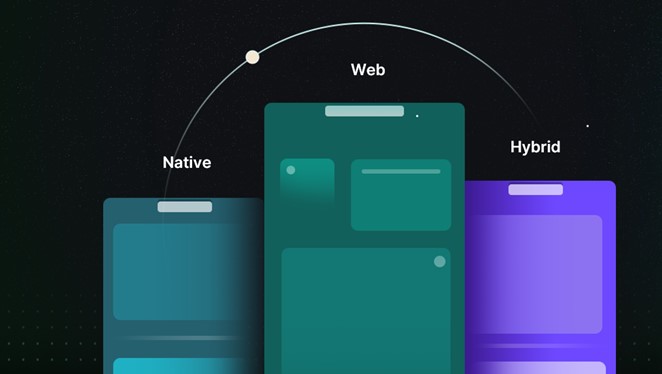
  • Native apps are developed specifically for a single mobile platform such as iOS or Android. Built using the platform’s native programming language and development tool, they are typically faster and more responsive than other types of apps. Since they take advantage of device-specific features such as sensors and Bluetooth, they provide a more interactive UI/UX and have lesser compatibility issues.
  • Web apps are generally developed for mobile devices and accessed via any internet browser on a mobile device. They do not need any storage space and are constantly updated. They dramatically reduce the business costs associated with development and maintenance. They are responsive websites that adapt the user interface to the user’s device.
  • Hybrid apps are developed using web technologies such as HTML and CSS and wrapped in a native container that allows them to run on multiple platforms. Typically, they are easier and faster to develop than native apps but may not be as fast or responsive. However, hybrid apps are ideal in situations where high performance and full device access are not key requirements.

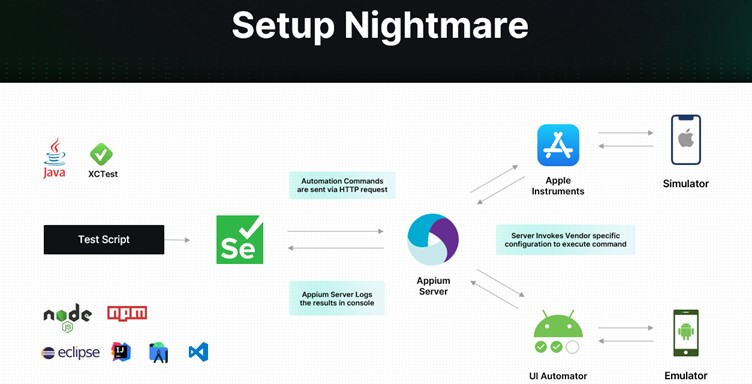
Mobile app testing isn’t just about writing a handful of test cases and running a few tests. Several challenges make testing a nightmare.

Setup

As depicted below, you must first feed your test script to a Selenium tool. Selenium then sends automation commands to an Appium Server, which logs results in a console. The Server also invokes vendor-specific configuration to execute commands via a simulator and an emulator.

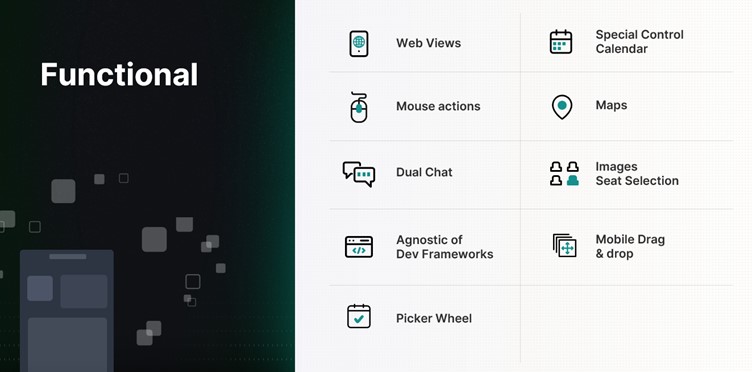
Functional

When it comes to functional testing, several aspects of the mobile app have to be continuously and carefully tested — from web views to mouse actions, maps to images.

Miscellaneous

Mobile apps must also be continuously tested for interruptions. Evaluating how the app behaves during low battery, when a notification pops up, or when a call is received is equally important. In addition, it pays to test:

  • User experience during installation/uninstallation
  • UI with all forms of gesture navigation
  • When users don’t have permissions
  • When the network is not available
  • If your app updates correctly from previous versions

Building and maintaining a QA lab is extremely difficult, with varying mobile architectures, app security requirements, and feature demands. Since every mobile app must be tested for functionality, compatibility, usability, performance, security, and localization, it is critical to automate the testing process. Taking the mobile test automation route can open doors to several time, cost, and efficiency benefits.

Investing in the Right Test Automation Framework Is Key

A modern test automation framework can simultaneously test apps on multiple platforms and quicken the feedback cycle. It can maximize test coverage, enable 24/7 text execution, and allow reusability of test cases. It can also pave the way for seamless scalability – regardless of how big the app grows or how large the user base becomes.

But with so many frameworks available in the market today, how do you make the right choice?

  • How do you ensure the framework keeps up with the pace of app changes?
  • How do you efficiently simulate real-world user scenarios?
  • How do you ensure integration with backend systems?
  • How do you handle different types of apps and different types of mobile platforms?
  • How do you ensure continuous testing?

How To Choose the Right Mobile Test Automation Framework

If you want to transform your testing results, here are some things to keep in mind:

  • Identify your testing requirements
  • Evaluate different solutions
  • Consider ease of use and the overall learning curve
  • Look for a solution that is easy to maintain and scale and is extensible
  • Look for a solution that supports different app types and mobile platforms
  • Invest in a Unified Test Automation platform
  • Evaluate the tool’s DevOps – CI/CD integration capabilities
  • Assess reporting and analytics capabilities
  • Consider support features and evaluate community support
  • Take into consideration the cost and feasibility

How ACCELQ Handles Mobile Test Automation

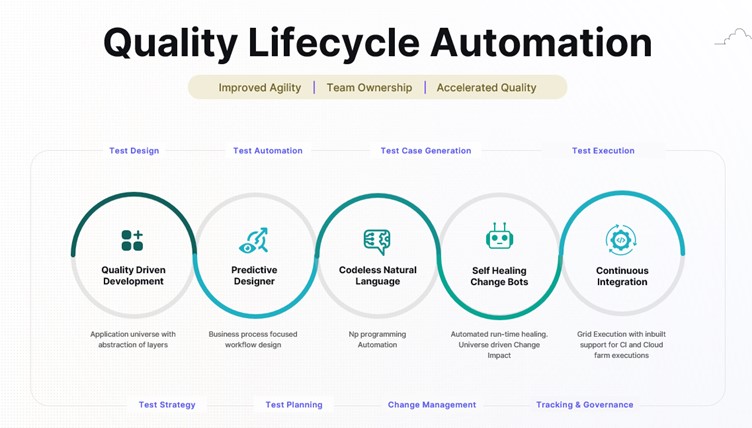
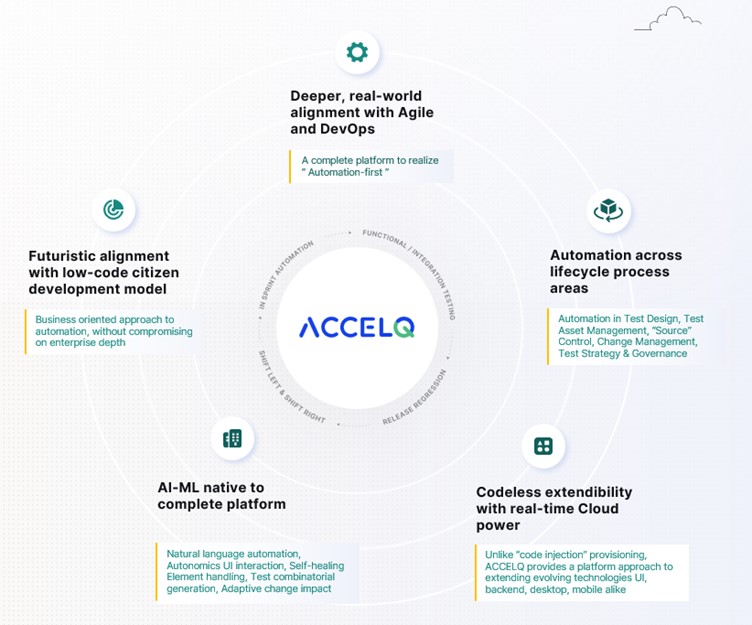
As an intelligent, cloud-based mobile test automation platform, ACCELQ enables seamless multi-channel automation across the mobile tech stack. The tool takes a revolutionary approach to business assurance in a multi-packaged app environment. It allows for codeless mobile test automation that handles real-world complexities and presents a unified view of the quality lifecycle.

ACCELQ is a market leader in test automation and test management. Its automation flow recorder is coupled with a powerful Natural Language no-code editor. It can execute test automation across different mobile OSs and is agnostic of development frameworks. In addition, the tool’s design-first approach with inbuilt modularity means there is no need for custom frameworks.

  • Codeless: ACCELQ’s codeless capabilities allow teams to write and run test cases with zero setup and no coding. It enables testers to automate without the need for programming skills.
  • AI-powered: Being a true no-code mobile test automation platform, ACCELQ’s AI-powered capabilities automate and execute tests across different OSs and devices. The tool’s advanced mobile object handling capabilities eliminate test flakiness.
  • Lifecycle automation: ACCELQ allows for mobile test automation across the lifecycle of mobile apps. Using ACCELQ, teams can easily set up, design, develop, execute, and track mobile test automation.
  • Unified flow: ACCELQ offers full-blown version control, branching, and merging capabilities, all in one unified collaborative cloud platform. Teams can use ACCELQ to enable mobile, web, API, backend, and full-stack automation in the same unified flow.
  • Cross-device: ACCELQ’s Integrated Device Cloud Labs allow for seamless cross-device testing using a simple Plug & Play model.
  • High coverage: ACCELQ’s app universe and analytic-based algorithms drive automated test planning, ensuring coverage.
  • Actionable reports: ACCELQ offers dynamic live results views with actionable reports to trigger reruns. Email notifications that fit into the process allow for quick and effective decision-making.
  • Seamless support: The tool offers seamless support across popular mobile dev frameworks, including Android, iOS, React, Ionic, and Apache Cordova.
  • Robust and sustainable: The ACCELQ platform is robust and sustainable and offers automation capabilities that are significantly low on maintenance.
  • Self-healing: The tool’s self-healing element identification drastically enhances the quality and reliability of tests.
  • Low maintenance: Referential integrity across test assets hugely reduces maintenance and upkeep.

The Way Forward

If you want to meet the expectations of the constantly growing mobile user base, it’s time to take mobile testing more seriously. Embark on the mobile test automation journey today to make your tests more reliable and predictable and your apps more functional and secure.

Author

Nishan Joseph, VP-Sales Engineering,
ACCELQ

Nishan is a highly accomplished and dynamic leader who has been working in the technology space for over a decade. He is known for his ability to build strong partnerships with long-term strategic goals. Nishan leads the Sales Engineering division, while also overseeing some of the larger global Strategic Accounts for the company.

ACCELQ is an EXPO Exhibitor at EuroSTAR 2023, join us in Antwerp.

Filed Under: Test Automation Tagged With: 2023, EuroSTAR Conference, Test Automation

Is Behaviour Driven Development (BDD) right for API testing?

June 2, 2023 by Lauren Payne

Thanks to Karate Labs for providing us with this blog post.

The primary goal of BDD can be summarized as follows: to reduce misunderstandings between those who define software requirements and those who implement the software.

The best source for the history and origins of BDD can be found on the Cucumber web site. Cucumber is just one tool that implements an approach to BDD, but it is not the only one. But many teams assume that because they are using Cucumber as a tool – it means that they are successfully “doing BDD”. As the creators of Cucumber themselves have lamented about for years, this is a huge mistake.

Cargo Cult

To be more specific, a very common misconception is that if you use the keywords “Given”, “When” and “Then” in an automated test – it means that the team will magically enjoy the supposed benefits of BDD. This may sound far-fetched, but if you are leading a team that claims to be doing BDD, I recommend that you walk the floor a bit, and ask the lesser-experienced engineers what their understanding is. You may get some interesting insights into how the team is thinking about BDD.

I remember a point very early in my career where I switched to a shiny new unit-testing framework that had things like “given()” and “when()” and “then()” in the syntax. I remember that virtuous feeling of satisfaction. Having just read about this great approach called BDD in some article or blog, I was now part of that exclusive club! I proudly declared to some colleagues that I was doing BDD. It was probably a few years later when I realized how mis-informed I was.

So why am I sharing these somewhat embarrassing memories with you dear reader? I’m really trying to help you avoid the mistakes I made. In an almost mystical way, the notion that “Given When Then” EQUALS BDD is entrenched in the collective consciousness of development teams around the world. Maybe it is because of the numerous bad-takes on BDD in tools, examples, tutorials and blogs that exist. The pressure to do what is “cool” is real. Expecting a tool to “do BDD” is a mistake I have seen teams make – time and time again.

The feeling that badly done BDD evokes in me is the term “Cargo Cult Programming”. If you haven’t heard of the term, this Wikipedia entry explains the rather hilarious origin. “Cargo cult” is a great way to refer to a phenomenon which is all too prevalent in our field. Which is when teams hear about some “best practice”, adopt a bunch of ceremonies without truly understanding the fundamentals, and then stand back expecting to promptly enjoy the rewards and good things that should ensue.

Yeah, that never ends well.

BDD is not for testing code that already exists

Did you know that in its true form, BDD means that you should write your scenarios before a single line of code is written?

You should pause reading for a moment and think deeply about the implications of the above statement.

BDD is mostly about having conversations with your domain experts, business users or product owners on what the software requirements are. BDD also encourages that that discussion should result in “examples” which help in fleshing out the business-rules involved.

Instead of just descriptive text, examples with real data map a lot better to how programmers think about writing code and tease out the edge-cases.

In other words, if your software delivery team is trying to automate tests for an existing system, BDD is not what you should be doing! It doesn’t matter if the system is partially done or not, BDD is just going to slow you down.

There is an argument to be made that BDD results in “executable specifications” and much more readable tests. This is why some teams choose BDD even though they are writing BDD scenarios “after the fact”.

But as we will see below, there are elegant ways to achieve “readable” test reports that serve as documentation of what the system does. You don’t need to formally adopt BDD, and your test-scripts and test-reports will still be readable, even by non-programmers.

BDD for API testing

The end-user or consumer of an API is typically another programmer. Another way to look at this is that APIs are how computers to talk to each other, and expressing what APIs should do – is best done using concepts that are closer to code than natural language.

I have a strong point of view that BDD has very little (and perhaps negative) value for API tests. The big difference between a UI test (human facing) vs an API test (machine facing) is that an API test has a clear “contract” that you are coding to. This contract is best expressed in technical terms (JSON / schema) instead of the deliberate abstraction needed when you do BDD the right way.

For more insights on how API testing is simpler than UI testing, read our free e-book: Navigating the Brave New World of API Testing.

But I want my tests and reports to be readable!

If you are not using BDD, how can you ensure that your API tests are readable? Ideally, your test-reports should:
• serve as documentation of how your APIs work,
• and include examples of how to call them.

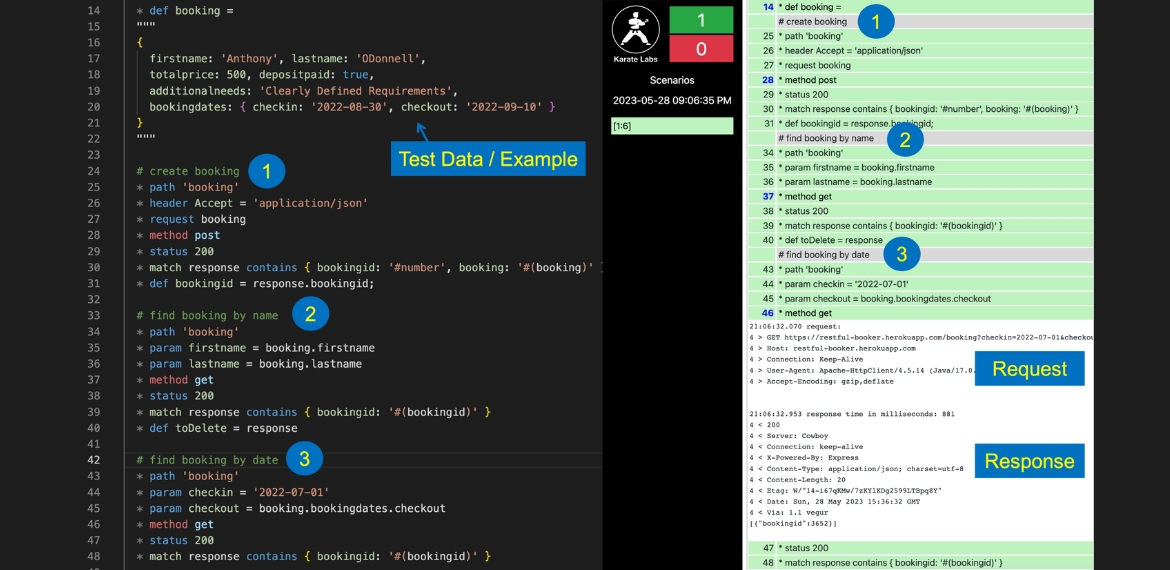
Here is where a mature automation tool that has built-in HTML reporting can add value. Shown below is part of a Karate test that exercises the “Restful-Booker” API playground. This is a realistic simulation of an API that allows the consumer to book a hotel reservation.

The test script is on the left and the test-report on the right. Since there are comments added before each business-operation, the test and test-report provide the best of both worlds: you not only get full-control over the API calls, payload-data and JSON assertions – but you also get a very readable (and hence maintainable) test.

Comments appear clearly in the report, in-line with the API calls that were made. The tests and test-reports can be easily read top-to bottom and give you a good sense on what business functionality is invoked.

Observe how there is a good simulation of an end-user workflow, and you can see response data (e.g. the “bookingid”) “chained” into the next request multiple times.

The test-data (or in BDD terminology, the “example”) for the business scenario can be clearly viewed at the start of the test. JSON happens to be an elegant, human-readable way of concisely expressing scenario data, and Karate takes advantage of this throughout the framework.

For those who are familiar with Cucumber’s “Scenario Outline”, note that Karate also offers you the same human-friendly way of defining Examples in a tabular format. Some teams really like this way of doing data-driven test automation aligned with the BDD concept of examples. All of this can be done without the need to worry about whether a test step has to be prefixed with “Given”, “When” or “Then”.

Look Ma, No Step Definitions!

For teams that have experience with BDD tools, what surprises them the most is that Karate does not require any step-definitions to be implemented behind the scenes. Step-definition “glue code” is known to be one of the “hidden costs” of BDD tools, and Karate eliminates this layer completely. What you see in the test is all that you need to write (or read). The built-in keywords for API testing and JSON assertions take care of most of your API testing needs.

For more insights on how low-code approaches such as Karate compare to BDD, read our free e-book: Navigating the Brave New World of API Testing.

Parting Thoughts

While we focused on whether BDD is appropriate for API testing in this article, it may also help you evaluate if BDD initiatives in your organization are structured correctly, whether the right people in charge, and whether they are delivering the value that you expect.

Get to know more at karatelabs.io

Author

Peter Thomas Co-founder & CTO Karate Labs

Peter Thomas, Co-founder & CTO, Karate Labs

Peter is recognized as one of the world’s top experts in test automation. He brings 25 years of industry experience from which he has been in open source for the last 18 years. He has worked at Yahoo and Intuit. As part of the API platform leadership at Intuit, Peter created “Karate” the open-source solution unifying API, UI & Performance testing. Peter was one of only 15 chosen by GitHub for a grant in India 2021. He co-founded Karate Labs Inc in Nov’21 to accelerate the adoption of Karate with the mission of making test automation fun and collaborative. Karate Labs is a Y Combinator backed company.

Karate Labs is a Platinum Partner at EuroSTAR 2023. Join us at Antwerp Zoo June 13-16, in a 4 day celebration of testing. Learn from 68 expert speakers and connect with your peers at Europe’s Best Testing Event.

Filed Under: Development Tagged With: 2023, EuroSTAR Conference

Efficient Software Testing in 2023: Trends, AI Collaboration and Tools

May 31, 2023 by Lauren Payne

Thanks to JetBrains Aqua for providing us with this blog post.

In the rapidly evolving field of software development, efficient software testing has emerged as a critical component in the quality assurance process. As we navigate through 2023, several prominent trends are shaping the landscape of software testing, with artificial intelligence (AI) taking center stage. We’ll delve into the current state of software testing, focusing on the latest trends, the increasing collaboration with AI, and the most innovative tools.

Test Automation Trends

Being aware of QA trends is critical. By staying up to date on the latest developments and practices in quality assurance, professionals can adapt their approaches to meet evolving industry standards. Based on the World Quality Report by Capgemini & Sogeti, and The State of Testing by PractiTest, popular QA trends currently include:

  • Test Automation: Increasing adoption for efficient and comprehensive testing.
  • Shift-Left and Shift-Right Testing: Early testing and testing in production environments for improved quality.
  • Agile and DevOps Practices: Integrating testing in Agile workflows and embracing DevOps principles.
  • AI and Machine Learning: Utilizing AI/ML for intelligent test automation and predictive analytics.
  • Continuous Testing: Seamless and comprehensive testing throughout the software delivery process.
  • Cloud-Based Testing: Leveraging cloud computing for scalable and cost-effective testing environments.
  • Robotic Process Automation (RPA): Automating repetitive testing tasks and processes to enhance efficiency and accuracy.

QA and AI Collaboration

It’s no secret that AI is transforming our lives, and ChatGPT’s collaboration can automate a substantial portion of QA routines. We’ve compiled a list of helpful prompts to streamline your testing process and save time.

Test Case Generation

Here are some prompts to assist in generating test cases using AI:

  • “Generate test cases for {function_name} considering all possible input scenarios.”
  • “Create a set of boundary test cases for {module_name} to validate edge cases.”
  • “Design test cases to verify the integration of {component_A} and {component_B}.”
  • “Construct test cases for {feature_name} to validate its response under different conditions.”
  • “Produce test cases to assess the performance of {API_name} with varying loads.”
  • “Develop test cases to check the error handling and exceptions in {class_name}.”

Feel free to modify these prompts to better suit your specific testing requirements.

Example
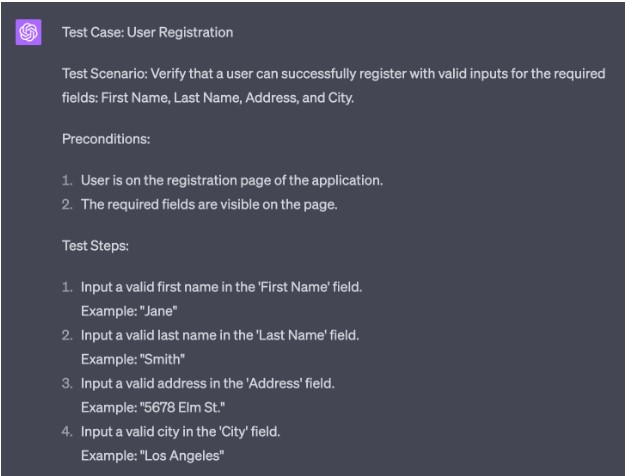
We asked for a test case to be generated for a registration process with specific fields: First Name, Last Name, Address, and City.

AI provided a test case named “User Registration” for the scenario where a user attempts to register with valid inputs for the required fields. The test case includes preconditions, test steps, test data, and the expected result.

Test Code Generation

In the same way, you can create automated tests for web pages and their test scenarios.

To enhance the relevance of the generated code, it is important to leverage your expertise in test automation. We recommend studying the tutorial and using appropriate tools, such as JetBrains Aqua, to write your tests that provide tangible examples of automatically generating UI tests for web pages.

Progressive Tools

Using advanced tools for test automation is essential because they enhance efficiency by streamlining the testing process and providing features like test code generation and code insights. These tools also promote scalability, allowing for the management and execution of many tests as complex software systems grow.

UI Test Automation

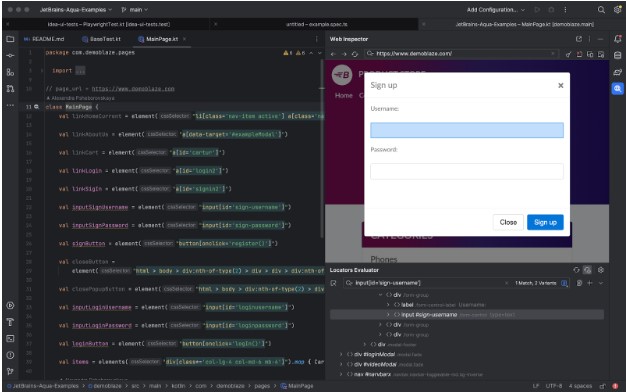
To efficiently explore a web page and identify available locators:

  • Open the desired page.
  • iInteract with the web elements by clicking on them.
  • Add the generated code to your Page Object.

This approach allows for a systematic and effective way of discovering and incorporating locators into your test automation framework.

Code Insights

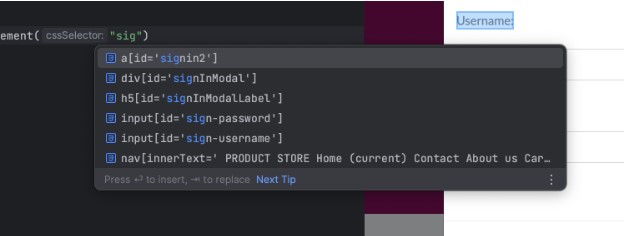
To efficiently search for available locators based on substrings or attributes, you can leverage autocompletion functionality provided by the JetBrains Aqua IDE or plugin.

In cases where you don’t remember the location to which a locator leads, you can navigate seamlessly between the web element and the corresponding source code. This allows you to quickly locate and understand the context of the locator, making it easier to maintain and modify your test automation scripts. This flexibility facilitates efficient troubleshooting and enhances the overall development experience.

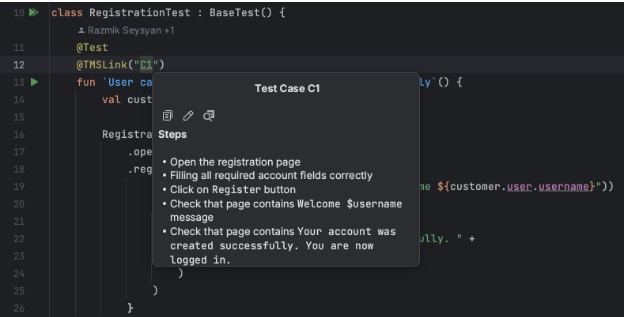
Test Case As A Code

The Test Case As A Code approach is valuable for integrating manual testing and test automation. Creating test cases alongside the code enables close collaboration between manual testers and automation engineers. New test cases can be easily attached to their corresponding automation tests and removed once automated. Synchronization between manual and automated tests to ensure consistency and accuracy is a challenge that does not need to be addressed. Additionally, leveraging version control systems (VCS) offers additional benefits such as versioning, collaboration, and traceability, enhancing the overall test development process.

Stay Tuned

The industry’s rapid development is exciting, and we are proud to be a part of this growth. We have created JetBrains Aqua, an IDE specifically designed for test automation. With Aqua, we aim to provide a cutting-edge solution that empowers testers and QA professionals. Stay tuned for more updates as we continue to innovate and contribute to the dynamic test automation field!

Author

Alexandra Psheborovskaya, QA Lead and Product Manager at JetBrains

Alexandra works as a SDET and a Product Manager on the Aqua team at JetBrains. She shares her knowledge with others by mentoring QA colleagues, such as in Women In Tech programs, supporting women in testing as a Women Techmakers Ambassador, hosting a quality podcast, and speaking at professional conferences.

JetBrains is an EXPO Platinum partner at EuroSTAR 2023, join us in Antwerp

Filed Under: Software Testing, Uncategorized Tagged With: 2023, EuroSTAR Conference

Reduce e-waste by using device farms

May 24, 2023 by Lauren Payne

Thanks to 42Gears for providing us with this blog post.

Did you know that around 50 million tonnes of e-waste is generated every year across the globe, and only 20% is recycled through organised and regulated channels? “If e-waste continues to accumulate in the future, it may pose a serious threat to the environment, society, and economy.”

What is e-waste?

E-waste refers to any electrical or electronic equipment that is unwanted, not working, and has been discarded by its owner as waste without the intent of re-use. E-waste includes a wide array of products. As might be expected, screens, monitors, laptops, tablets, smartphones, computers, printers, telephones, and mobile phones can all be e-waste. However, e-waste can also include household or business items that have electrical components with power or battery supply. For example, temperature exchange equipment such as refrigerators, freezers, and air conditioners can become e-waste.

E-waste contains toxic components such as mercury, cadmium, lead, polybrominated flame retardants, lithium, and barium. Unfortunately, these components can be very dangerous to human health. They can adversely affect the respiratory system, lungs, kidneys, and brain.

Trends driving e-waste creation

Perhaps the biggest reason for increased e-waste is new users joining the Internet for the first time. Internet access is expanding worldwide to more people than ever before, driving demand for devices that will eventually become e-waste. According to Internet Growth Statistics, 69% of the world’s population used internet in 2022, and going by the trend, two-thirds of the world’s population will be online by the end of 2023.

Another major culprit is planned obsolescence – the practice of intentionally having devices become outdated so users will need to purchase new ones. Global increases in disposable income mean that many consumers are eager to replace older devices with new ones. Plus, many business apps and services are designed to work best on powerful, recently-made devices. In order to stay up-to-date, companies and workers must purchase new devices and discard old ones. Because of these trends, consumers and businesses are constantly getting rid of older, slower devices, creating e-waste.

What companies are doing to reduce e-waste

It is important that businesses recognize the role they play in generating e-waste. Several major companies have begun taking steps to reduce e-waste, and many others will likely follow suit.

For example, beginning with the 2020’s iPhone 12 line, Apple chose not to include headphones and chargers with its phones. This can help to reduce unnecessary EEE (electrical and electronic equipment), according to Teresa Domenech of University College London’s Institute for Sustainable Resources. Domenech also notes this initiative will also reduce environmental damage because Apple will need to extract fewer primary raw materials, perform less manufacturing, and ship fewer products overall.

Owing to the fact that discarded charges are contributing to 11,000 metric tons of e-waste in Europe annually, European Union Lawmakers have made it mandatory for mobile manufacturers to provide universal chargers.

Another way of reducing e-waste is recycling old electronics. LG’s India subdivision operates a network of 40 recyclers in India. In order to maximize the number of people participating in the program, LG picks up e-waste directly from the user’s home. Between 2017 and 2020, LG collected and recycled almost 100,000 metric tons of e-waste in India.

Of course, many technology enterprises do not manufacture their own devices, so they cannot use these techniques to reduce e-waste. Still, there are other ways to reduce e-waste; for example, investing in device farms. Let’s explore how this works.

How device farms help reduce e-waste

While the impact of e-waste is alarming across the globe, companies are researching new ways to reduce e-waste and prevent health and safety hazards. As a result, many companies have begun implementing new methods and processes that combat the rise of e-waste.

Using a device farm is one of the most innovative ways through which companies can reduce e-waste. Often, companies require large device inventories consisting of multiple devices and multiple versions of the same device for their DevOps and QA teams. Unfortunately, these devices may not be accessible to all the team members; if someone needs to test an app on a device in the office, but that person works remotely, connecting to the device will be a challenge.

However, if these devices are enrolled into a device farm, anyone on DevOps and QA teams can easily access them remotely, no matter where they are located.

This is the key to reducing e-waste with a device farm. By purchasing a single device and connecting it to a device farm, a company can make that device accessible to anyone in the company worldwide. This substantially improves ROI on a given device and removes the need to purchase multiple devices for multiple offices.

Device farms can be of two types – public device farms, or private device farms. Public device farms are third-party platforms that allow businesses to access devices owned by a third party. Companies rent these devices for a particular time slot and pay accordingly.

On the other hand, a private device farm is owned and managed by the company itself. This setup empowers all approved company employees to access enrolled devices at any time from anywhere.

There are a few companies that help organizations to set up a private device farm. 42Gears is one of them. AstroFarm by 42Gears is a great tool that helps organizations to set up their private device farms. AstroFarm offers many benefits, allowing companies to get more value from the devices they already own, making devices available worldwide in real time, and providing global teams with an easier way to coordinate app development. For more information, please refer here.

Summary

E-waste has become a global challenge and needs to be addressed as soon as possible. While the abstract statistics are alarming, the real concerns are the growing environmental and health hazards associated with e-waste.

While consumers should work to reduce the e-waste they generate, enterprises are the biggest contributors to the problem of e-waste. As such, companies need to do their part to reduce e-waste by using better technology, processes, and products. Implementing AstroFarm by 42Gears can help you reduce e-waste by setting up your own device farm and getting the maximum ROI out of each device you purchase.

Author

42Gears

42Gears is a leader in enterprise mobility management, offering cutting-edge solutions designed to transform the digital workplace. Delivered from the cloud and on-premise, 42Gears products support all major mobile and desktop operating systems, enabling IT and DevOps teams to improve frontline workforce productivity as well as the efficiency of software development teams.

42Gears products are used by over 18000 customers across various industries in more than 115 countries and are available for purchase through a global partner network. For more information, please visit https://www.42gears.com

42Gears is an EXPO Gold partner at EuroSTAR 2023, join us in Antwerp

Filed Under: Software Testing Tagged With: 2023, e-waste, EuroSTAR Conference

  • « Previous Page
  • Page 1
  • Page 2
  • Page 3
  • Page 4
  • Page 5
  • Next Page »
  • Code of Conduct
  • Privacy Policy
  • T&C
  • Media Partners
  • Contact Us

part of the