• Skip to main content
EuroSTAR 2027 - Sign up for early access

EuroSTAR Conference

Europe's Largest Software Testing Conference.

  • Programme
    • EuroSTAR Global Series
    • Call for Speakers
    • 2026 Programme
    • Community Hub
    • Awards
  • Attend
    • Why Attend
    • 2026 Photos
    • Bring your Team
    • Testimonials
  • Sponsor
    • Sponsor Opportunities
    • Sponsor Testimonials
  • About
    • About Us
    • Our Timeline
    • FAQ
    • Blog
    • Organisations
    • Contact Us
  • Book Now

EuroSTAR Conference

30 Fast Facts About Prague

September 26, 2019 by Fiona Nic Dhonnacha

30 Fast Facts About Prague

Prague is many things: it’s centuries of spires, a quirky urban paradise, a glorious patchwork of art & architecture. Of course, it’s also where EuroSTAR Conference 2019 is taking place!


Nov 11 kicks off 4 unforgettable days of learning, testing, and life-changing experiences. Want to know a little more about our host city? Here are 30 fast facts about Prague – we bet some of these will surprise you. Book your tickets now, and we’ll see you there!

PURCHASE CONFERENCE TICKETS

1 An eye for a hand

The Astronomical Clock is struck every hour by moving sculptures of the 12 Apostles parading around from the above window. Legend says clock creator Hanus Carolinum was blinded by the Old Town councilors with a hot poker – so that he could never recreate the clock for another city. Burn.

2 Mind the beard

The Legendary ‘Bearded Man’ or ‘Chin Man’ is one of the oldest public sculptures in Prague, set in a stone embankment beside the famous Charles Bridge. It’s a watermark warning of flooding – if the Vltava River rises to the figure’s beard, it means flooding is imminent and the riverside quarters need to be evacuated.

3 Drunk as a…monk?

Brewing in Prague was first recorded at Prague’s Břevnov Monastery in 993 AD. These crafty monks had a monopoly on beer sales in Prague for many years – the monastery was reopened in 2012 with an onsite restaurant and of course, epic beer.

4 We ale make mistakes

The popular Pilsner beer was invented in Prague in 1842. It was apparently brewed by mistake by a Bavarian brewer trying to make German beer. Groll created the new beer using just barley malt, local Saaz hops, and lager yeast.

5 Dancing on ice

In the heart of the city centre lies central Europe’s largest club, Karlovy Lázně. There’s a dizzying 5 stories of dancefloors, different themes, bars and music for all tastes. The Ice Bar is the star – fully carved from ice, you’re provided with a stylish coat and and hat upon arrival to ensure you stay (relatively) toasty.

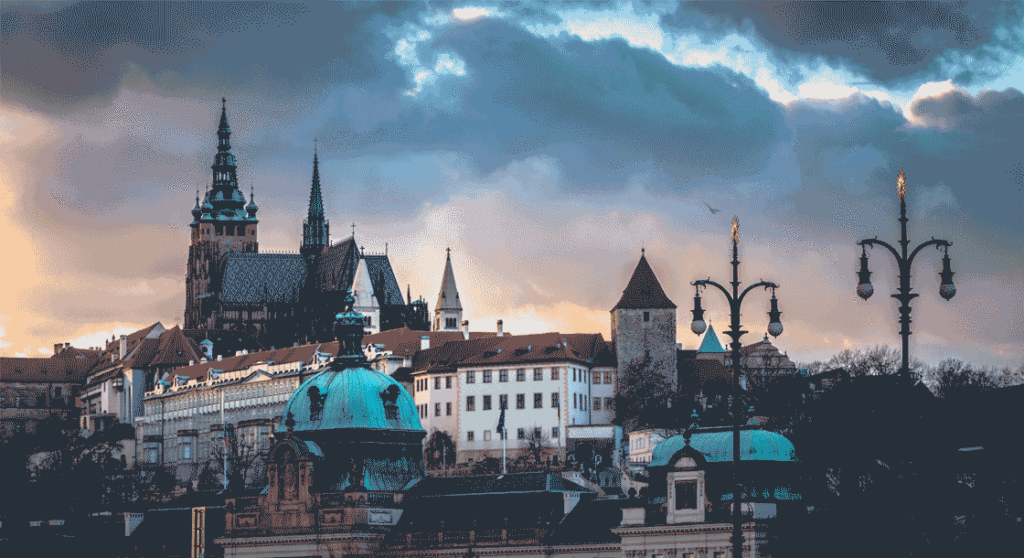
Prague Castle against a dusky sky backdrop

6 King of castles

Prague Castle is the largest castle in the world – and it’s an architectural feat. This 30 metre wide medieval marvel and its 70,000 square metres of land attract almost 2 million visitors every year, and it’s landed a spot in the Guinness Book of World Records.

7 Walk this way

The narrowest street in Prague measured at a mere 50 cm (1.6 ft) – so a traffic light was installed to regulate the flow of people up and down! Blink and you’ll miss it, but if you are near Charles Bridge it’s worth a stroll. Just don’t be tempted to ahem, run a red light.

8 Urban paradise

Just a short tram journey out of the city is a beautiful urban woodland called Divoká Šárka. The area is a pure escape from city life, offering a gorgeous valley that lends itself perfectly for a day out of hiking, swimming, and even golfing.

9 Graffiti lane

There’s an entire graffiti wall devoted to John Lennon in Prague. Initially it was built as the ‘Crying Wall’, and associated with protest lyrics. However, since John Lennon’s death in 1980, it became an outlet for the outpouring of grief and protest against his death

PURCHASE CONFERENCE TICKETS

10 River long

The Vltava is the longest river in the Czech Republic and runs right through Prague. This stunning waterway is also where the EuroSTAR Community Dinner takes place, onboard The Grand Bohemia. Its destined to be a night of great food and gorgeous scenery!

11 Written in the stones

Former Czech king Charles IV laid the first stone of the Charles Bridge at precisely 5.31am on July 9, 1357. The king was so passionate about astrology and numerology that he chose this date because of its written form: 1-3-5-7-9-7-5-3-1 (year, day, month, time).

12 Tower of babies

12 Love it or hate it, the Zizkov Tower is one of Prague’s most striking structures, featuring a dozen gigantic babies crawling on it. Creator Czech artist David Cerny’s specialty is combining the thought-provoking with the utterly bizarre – and this is a must see.

13 We heard it on  the grapevine…

Although they’re famous for their beer, Prague’s warm summers and south facing hillsides means that it boasts some gorgeous wine. The country’s wineries have been making a name for themselves at international wine competitions, notably for their white wine varietals.

14 Good education

The first university to be established in Central Europe is in Prague. The Charles University is also the largest and oldest university in the Czech Republic – and one of the oldest in the world. Founded in 1348, today it’s renowned as a dynamic and prestigious institution of education.

Charles Bridge in Prague

15 Bridge of beheadings

The stunning 719-year-old Charles Bridge has a ghastly past. After the 27 leaders of the anti-Habsburg revolt were executed in June of 1621, 12 of their severed heads were suspended in iron baskets from the towers at each end of the Charles Bridge. According to history the heads remained there for over a decade and the bridge is haunted by their spirits to this day…

16 Cathedral city

St. Vitus Cathedral is the largest – and most important church – in the country. It was built over a rather long timespan of 600 years, and houses treasures ranging from the 14th century mosaic of the last judgement, to the baroque silver tomb of St John of Nepomuk.

17 Cheers!

Prague hosts the Czech Beer Festival (Český pivní festival) every year in May, and it’s the largest beer festival in the Czech Republic. It’s held over 17 days and gives you a chance to discover the best Czech authentic beers and foods – you can try more than 100 different kinds of beers!

18 Lights, camera, Prague

Hollywood films set in Prague include Mission Impossible, xXx, Blade II, Alien vs. Predator, Doom, Chronicles of Narnia, Hellboy, Red Tails, Children of Dune, Dungeons and Dragons and Van Helsing.

19 Something old, something new

Prague is home to Europe’s oldest active synagogue. Built in 1270, the Old New Synagogue (or Altneuschul) is Europe’s oldest working synaguge and one of Prague’s earliest Gothic buildings. It’s located in the historic Jewish quarter of Josefov. and the interior looks pretty much the same as it would have 500 years ago.

20 Fred and Ginger

Prague’s famous Dancing House, with its curved lines and glass tower snuggled against the original building, was inspired by Fred Astaire and Ginger Rogers. This icon of modern architecture is meant to symbolise communism blending into democracy.

PURCHASE CONFERENCE TICKETS

21 Why the long face?

The clock on the Church of the Most Sacred Heart of Our Lord, on Jiřího z Poděbrad square, has the largest clock face in Prague – and one of the largest in Central Europe. Built between 1928 and 1932, it was designed by Slovenian architect Josip Plečnik and has a diameter of 7.6 meters.

22 Look to the west

Though Czech Republic is often considered part of Eastern Europe (at least during the Cold War era), Prague is actually located further west than Vienna in Austria, which is considered part of Western Europe.

23 Wonder Woman

Prague-born Madeleine Albright was the first woman to hold the post of U.S. secretary of state, from 1997 to 2001. Among her achievements was the ratification of the Chemical Weapons Convention and progress toward stability in Eastern and Central Europe.

24 Still standing

The oldest surviving building in Prague is the 11th-century Rotunda of St Martin. The door and frescoes date from a renovation made in around 1880.

25 Cubist curiosity

The world’s only cubist lamp post can be found in Prague. Designed by artist Emil Kralicek, this angular concrete curiosity is conveniently just around the corner from Wenceslas Square. It’s worth a visit to this quirky monument.

26 Charles Square

Charles Square is one of the largest squares in the world and was the largest town square of medieval Europe. It was once known as “The Big Marketplace” (Tržiště velké) or “Cattle Market” (Doytčí trh).

27 Humerus hijinks

Inside the baroque Church of St. James the Greater is a withered human arm dangling by a meat hook – this nasty memento is said to be the arm of a jewel thief, caught trying to steal the jewels from the statue of the Virgin Mary. She gripped his arm in a such a vice that it had to be chopped off.

28 The Metamorphosis

Legendary author Franz Kafka was born in Prague on July 3, 1883, near the Old Town Square, and he’s now buried in the New Jewish Cemetery (Žižkov) on June 11, 1924.

29 Independence Day

Prague was the new capital when Czechslovakia declared independence in 1918. This heralded a new era for two nations which had previously been part of the Austro-Hungarian Empire. Czech Republic continues to celebrate their independence day on October 28th every year.

30 And finally…

The locals drink more beer per capita, than any other country in the world! The total beer consumption per head in the Czech Republic equals approximately 150 liters per year. In other words almost half a liter daily. Expect to sip on some quality beer as part of our EuroSTAR at Night events!

We hope to see you in Prague for this year’s 27th conference – book your tickets now and get ready for an unforgettable 4 days!

PURCHASE CONFERENCE TICKETS


Filed Under: EuroSTAR Conference

How to Sketchnote

September 25, 2019 by Suzanne Meade

Our 2019 EuroSTAR Community Sketchnote Reporter is Katja Budnikov and we have asked her to share some tips on How to Sketchnote. You might be attending the EuroSTAR Conference in Prague and fancy a new way of taking notes to remember all the wonderful learnings you will take away.

There is a jam packed programme at this year’s EuroSTAR Conference so take a look and plan in advance so you know which topics you’ll be benefiting from.

This is a blog from Katja and she would be delighted to hear from you if you’d like to strike up  conversation. Don’t forget to say ‘Hi’ when you meet her in Prague this November.

How to Sketchnote

I often get asked: “How do you do your sketchnotes?“ Therefore I wanted to summarise my experience and help you to get started with sketchnoting.

Why I started to Sketchnote?

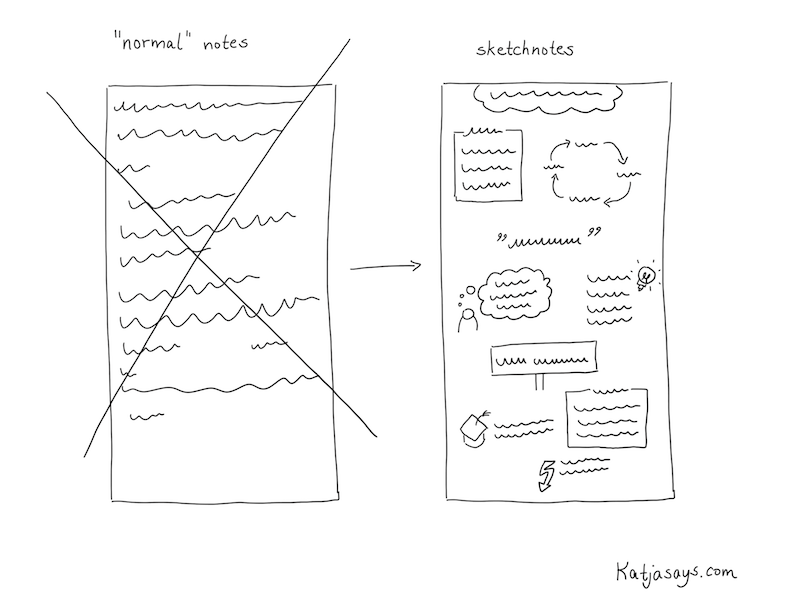
Well, I enjoy attending conferences and meetings. When I’m at an event, I take notes, so that I can remember things better. When I’m back home after a conference, I like to go through my notes and research things I found interesting (like tools, methods, etc.). But I often had the problem, that just writing down “normal“ notes either on my smartphone or with pen and paper wasn’t that effective. It wasn’t really easy to follow what was being said and I tended to write down too much unnecessary information so that I didn’t find the most interesting parts very easily. Also, I was sad that I couldn’t share those handwritten notes with others, as they weren’t really readable or beautiful. So I often transferred them to a document on my computer which I shared with colleagues or other interested people.

How to start sketchnoting

Here and there I saw people that did some sketchnotes or graphic recording at conferences. I thought that’s a cool idea, but I wasn’t sure if I can do that, as I’m not exactly the person who is a great artist. I didn’t think I can draw and that it would be very hard to get as good as those others. However, I really liked the idea of writing things down in a structured, readable way and playing with icons and colors. It is not only beautiful, but it’s also easier to remember stuff if you make it more attractive in a visual way. The other benefit is that you can share those visualizations with others. It is not possible to attend each and every event – there are just too many conferences around the world. So for me, it was always really interesting to follow people or hashtags on Twitter to see what is going on at events I couldn’t attend. Or even to see what other people share about the event I’m attending. With the help of sketchnotes, I was able to share my experience too.

The goal for me was to make my notes more beautiful for me so that I can follow along with my thoughts after returning home a little better. And also I wanted to share it with others so that they could get to know about the content as well. I thought: “If I can help one person to get an idea of what’s going on at an event I attend, that would be really awesome.” Spoiler: I now get a lot of responses for my sketchnotes and people seem to really enjoy that I share my experience in such a structured way.

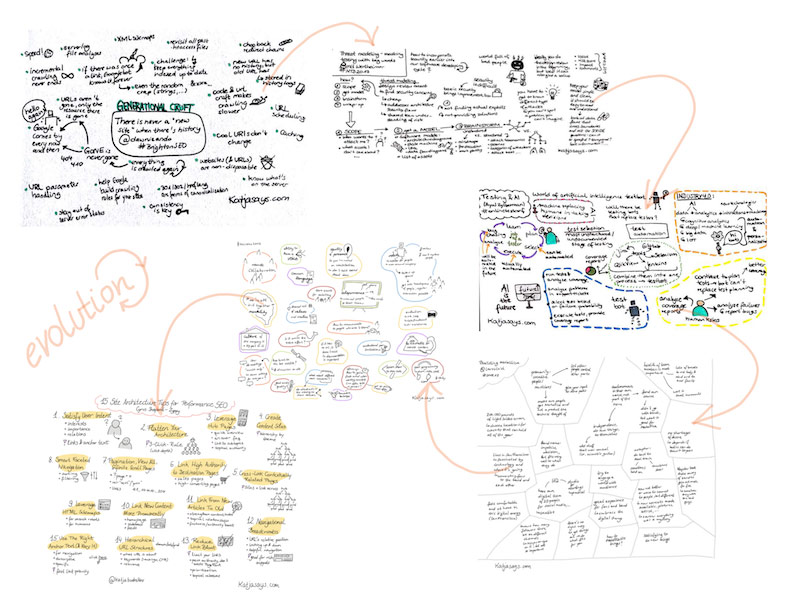
My Evolution of Sketchnoting

In the beginning I bought some notebooks and pens to start doing sketchnotes on paper. In the store, I got overwhelmed by the choice of colors so that I ended up buying almost every color in the store. The notebook I chose had thick pages so that the ink wouldn’t bleed through to the back of the paper and I chose the format A5, as it was easy to carry around and fit in small bags. Everything went well and I liked the feeling of writing and drawing with actual pens on paper, but the problem was the digitalising of the sketchnotes. There are loads of apps to make good pictures and even apps that add a whiteboard background to them to make the sketchnotes easier to read and of a better quality. But still, you have to take a proper picture. Which can be challenging at a conference, as there often isn’t enough light, or if there is light, you have a shadow on your sketchnote from the smartphone. Also, it takes time to take a good picture. You need to have a good underground (like a table, so that the sketchnote lies down in a flat way) or help from a second person and often you need to use a flashlight, which might annoy others around you. Therefore I started dreaming of a possibility to make the sketchnotes on an electronic device so that they are stored digitally from the beginning. This has a huge effect on the quality and you can share them in just some seconds.

I tried different solutions, like smart writing sets that use a pen that has an integrated camera that transfers what you write onto a screen. But they didn’t really satisfy me as not all the strokes I made with the pencil were detected and changing colors was really complicated. A friend of mine had an iPad and an Apple pencil and she allowed me to try to sketch something with it. And what can I say – it was love at first sight. I started saving money and bought an iPad and an Apple pencil for my birthday. Since then I’m doing my sketchnotes digitally. I tried lots of different apps until I chose “Sketches“ by Tayasui. It is very easy to use and has all the functions I need. There are more elaborate apps like Procreate, but those have just too much not needed functionality for me. However, everyone has to choose an app that is most suitable for them.

Evolving your sketchnotes
How to do Sketchnotes
  1. Prepare your schedule of the event
  2. Prepare the sketchnotes before the event
  3. At the event: Find a good spot
  4. Listen carefully, don’t get distracted
  5. Start with writing down text
  6. Add some borders etc. for the structure
  7. Add some icons to the text
  8. Add some colors
  9. Sign the sketchnote, add your handle
  10. Share your sketchnote with others
  11. Enjoy the reactions


Now you know why I started to sketchnote and what tools I use. So let’s come to the interesting part: How do I do my sketchnotes. I share my way of sketchnoting because everybody needs to find their own path.

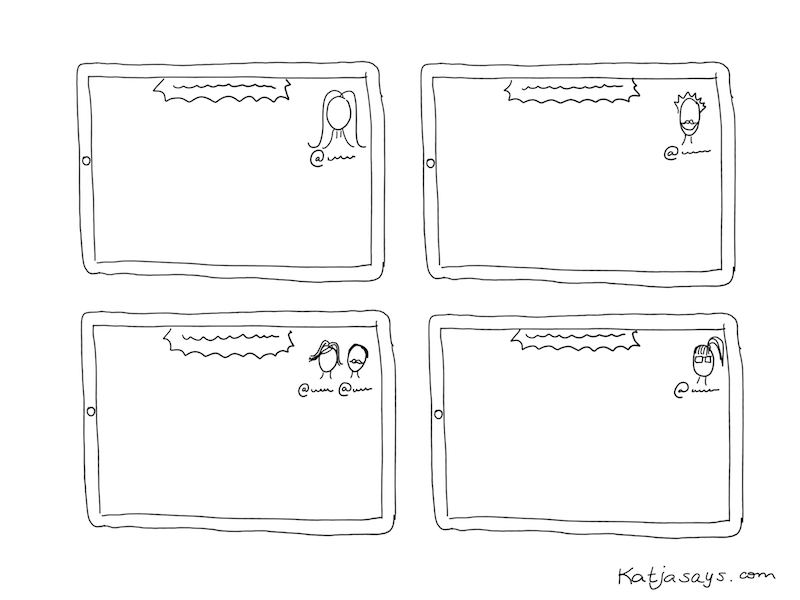
Before I attend a conference, I have a thorough look at the agenda. I choose the talks I want to see and write those down. As I want to share my sketchnotes of the talks on Twitter, I search for the Twitter handles of the speakers and write them down next to the talk name. That helps a lot because after the talk there is usually not enough time to search for the speaker on Twitter (if they don’t mention their handle on their presentation). For the last couple of conferences, I started to draw portraits of the speakers. It’s just something I want to try and what I enjoy more and more. I prepare those portraits in advance. So after choosing the talks I want to attend, I prepare sketchnotes for them. I write down the title of the talk, the Twitter handle of the speaker and sometimes I draw a speaker portrait from the pictures that are on the website of the conference.

How to prepare your sketchnote

Then the day of the conference arrives. In the room, I try to find a spot where I can sit quietly and won’t be interrupted that much. Usually, I like to sit at the end of a row, so that I can get up fast to change rooms and also because at least on one side there’s nobody sitting next to me who might be shaking my chair. The most important part is to have a good look at the presentation screen so that I can see and read everything easily. I have to listen very thoroughly what the speaker is talking about. Usually, in the beginning, there is some time spent on an introduction of the speaker and the speaker’s workplace. I don’t write that down. The challenge is to filter the information that is important and write it down. And at the same time continue to listen what the speaker continues to talk about. In the beginning, this is really hard and you can get the impression that you miss important stuff, but you will get used to it and it will get a little easier. So I’m very focused when listening to a talk. Priority number one is to write down the most important information. I try to think about what somebody needs to read to be able to understand what the talk was about, even if that person wasn’t present. Then, if there is time, I add some small icons to make the sketchnote more attractive visually. In the end, I add colors (sometimes during the talk if there is some time left). My time scope is: Start with a sketchnote the minute the speaker starts talking, finish the sketchnote when the talk is over and share it on Twitter immediately.

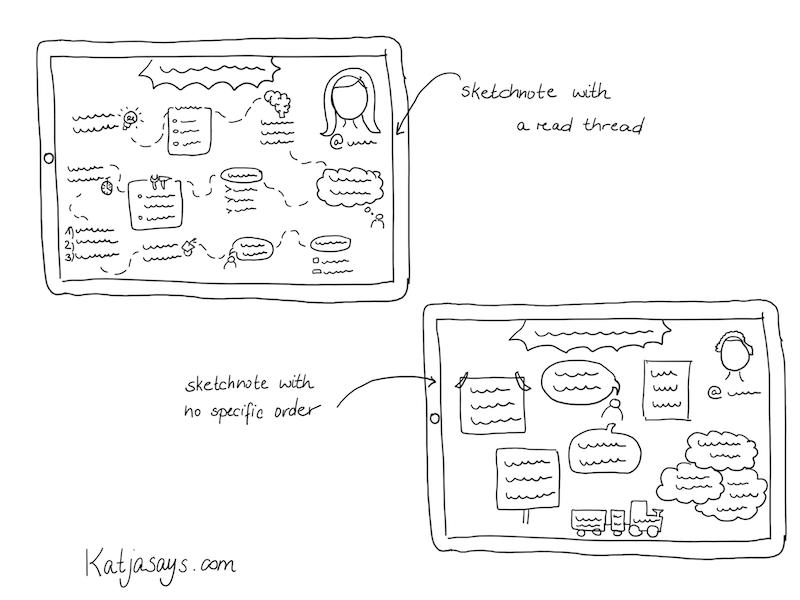
With experience, I got a good routine and now I know better how to fit a talk onto one page and how to structure it in an easy to follow way. But everybody has to find an own style of presenting the information. That can be in terms of icons you use (I have a set of icons I use regularly and I add some new once upon the appearance of new keywords and information), the color scheme (I now tend to use only a few colors to not overwhelm the reader) or the structure. Typically I try to use a red thread so that the reader can follow the information and knows, where the talk started or ended. Some information is written down in borders like boxes or signs or clouds or whatever seems fitting for me. Some talks don’t depend on following an order – then I just use borders or colors to separate the topics from each other. You just need to find a way that is most suitable for you – even if it differs a lot from the sketchnote you have seen others doing. The „typical“ sketchnotes I saw before I started doing some myself where highly visual with a lot of pictures, icons or colors and not so much text. Those are really beautiful but they don’t fulfill what I expect from my sketchnotes. I want them to be understandable for everybody and that, at least in my opinion, requires some more text.

How to organise your sketchnotes
Tips for New Sketchnoters
  1. Do it and overcome your fear
  2. Practice by sketchnoting videos
  3. Do them for yourself
  4. Find your own style
  5. Start small

The most important thing is: Just do it. Overcome your fear of not being good enough and just start doing sketchnotes. Forget the thought of them having to be perfect. Just try it. First, you can start with writing down the information and structure it in a way you are comfortable with. For example by using borders, boxes, different shapes to surround the information and arrows to connect it and to show the order. Then you can try to add some icons every now and then and to work with colors.

To get a little experience, you don’t need to do the sketchnote in public, for example in the middle of a crowd at a conference, but you can start to do sketchnotes of podcasts or recordings.

Forget the thought of somebody not liking your sketchnote. I never saw that somebody said that a sketchnote looks ugly – I always got nice feedback because at least you try to do them and they look much better than „normal“ notes that people make. Do the sketchnotes for yourself and not for somebody. If you share them and you don’t get any reaction – don’t be sad. At least you have some beautiful notes for yourself.

Find your own style. You are not comfortable with drawing portraits? Then don’t do it. You don’t know how to draw specific items? Then don’t draw them. Evolve at your own pace. Start small and try to add more and more things to your sketchnote until you find a format you are comfortable with. When you have found your style, try to use it consistently so that people can recognize your work. Don’t be afraid to experiment.

Find out more about Katja’s on her website Katjasays and you can follow her on twitter for updates.

We hope you will join us at this year’s EuroSTAR Conference where Katja will be sketchnoting. There are a range of tickets available from single day to 4 day. Tutorials always start filling up in September so we recommend booking as soon as possible.

SEE TICKET OPTIONS

Filed Under: EuroSTAR Conference Tagged With: EuroSTAR Conference

Programme Chair Blog: Which day is best for me at EuroSTAR?

September 19, 2019 by Suzanne Meade

Our 2019 Programme Chair, Isabel Evans loves literature and poetry and has been giving her take on the upcoming EuroSTAR Software Testing Conference through the medium of haiku poetry. See more about the beackground and haiku in our earlier Programme Chair blog 

EuroSTAR has been bringing software testers together for 27 years. The conference is led by the testing community, the need for connections and conversations. Each year it is like a homecoming for many of the most influential testers in our industry as they catch up with their EuroSTAR family and also meet new attendees, equally passionate about software quality. There are more than 350 companies attending EuroSTAR each year, many come every year but sometimes the people change. We are always conscious of creating a welcoming space for new attendees and alumni to network and be inspired.

A regular question from new delegates considering their first software testing conference is ‘Which day would be best for me to attend?’. A great question and of course we would say all four days 🙂 .. but .. if you have less time available, we do have single day and 2.5 day ticket options available.

Take a look at the conference programme and see what talks stand out for you. There are lots of topics to choose from and so much to learn from each of the incredible speakers. Isabel Evans is also on hand with some short haiku poems to give you insight in each day at the EuroSTAR Conference.

SEE 2019 PROGRAMME

Why go to the conference on Monday?

Monday – Full day – learn!

Seven tutorials – choose!

Immerse, educate

Why go to the conference on Tuesday?

More Tutorials

Tuesday, and keynotes and talks

A full day learning

Why go to the conference on Wednesday?

Wednesday, so much

To share – talks, workshops, keynotes

Confer, Discuss, Learn

Why go to the conference on Thursday?

On Thursday, we have

Talks, workshops, keynotes. All great!

All day! Join us! Do!

We hope this helps give you an idea of each day and as a added guide we have included a synopsis below.

SEE TICKET OPTIONS

Day by Day Schedule

The EuroSTAR conference programme is jam-packed of exciting talks from expert speakers. There are lots of ‘corridor track’ events and EuroSTAR Extras so stayed tuned for each announcement – Sign up to the EuroSTAR mailing list and don’t miss a thing!

[/vc_column_text][/vc_column][/vc_row][vc_row equal_height=”yes”][vc_column width=”1/4″][vc_column_text]

Mon, 11 Nov.

6 Full Day Tutorials

Sit Down Lunch

Evening Pub Quiz

[/vc_column_text][/vc_column][vc_column width=”1/4″][vc_column_text]

Tue, 12 Nov.

6 Half Day Tutorials

1 Keynote Talk

8 Track Sessions

Lightning Talks

Expo Opens at Lunch

Tester’s Party

Community Dinner

[/vc_column_text][/vc_column][vc_column width=”1/4″][vc_column_text]

Weds, 13 Nov.

2 Keynote Talks

Next Generation Keynotes

16 Track Sessions

2 Workshops

Expo Lunch

Networking Drinks

Awards Night

[/vc_column_text][/vc_column][vc_column width=”1/4″][vc_column_text]

Thu, 14 Nov.

2 Keynote Talks

10 Track Sessions

3 Workshops

Expo Lunch

Prize-Giving

[/vc_column_text][/vc_column][/vc_row][vc_row][vc_column][vc_row_inner][vc_column_inner][vc_column_text]

[/vc_column_text][/vc_column_inner][/vc_row_inner][/vc_column][/vc_row]

Filed Under: EuroSTAR Conference Tagged With: EuroSTAR Conference, speakers

Introducing our Community Sketchnote Reporter

September 10, 2019 by Suzanne Meade

Each year at the EuroSTAR Conference, we welcome members of the community as ‘reporters’ who share their experience with the community on EuroSTAR Huddle and our social channels.

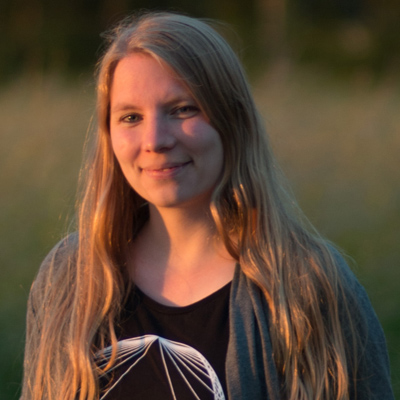
This year we are delighted to welcome Katja Budnikov as one of our Community Reporters. Katja is a sketchnoter from Northern Germany known Katja Budnikov sketchnoterfor her website Katjasays.com where she presents her sketchnotes of conference talks, webinars and articles. She loves attending testing and developer events like EuroSTAR and sharing her experience and learnings with others. That’s why she started with sketchnoting in 2016. First analog with pen and paper, now digitally with an iPad and Apple Pencil.
In her work life she started out in online marketing, then specialised in search engine optimisation and now is a quality assurance specialist who both does manual and automated software testing. Katja is a fan of websites with great quality.

In her day to day life Katja loves photography, especially taking photos of nature, though at the moment most of her pictures taken are from her dog Auri, a young Australian Shepherd, who is super cute and fun to take photos of. Katja loves to spend time with her dog and her partner, going out for walks, traveling and eating cake at a nearby coffee shop with a beautiful garden. Sometimes she is hacking on some projects of her own like a webcam to be able to watch her dog when she is out or automating her home. She recently had a lot of fun furnishing and decorating an apartment that she is renting out to guests, including refurbishing some of the furniture herself.

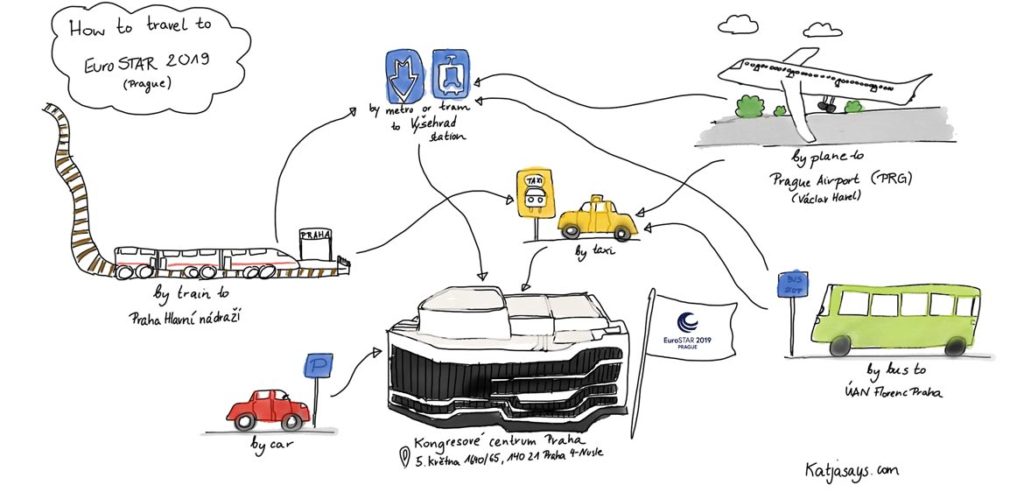
To begin her sketchnoting, Katja is shares how attendees can travel to the EuroSTAR Software Testing Conference in Prague, 11-14 Nov. If you are planning on flying, you will be well served by flight options. Fifty two airlines fly into Václav Havel Airport Prague from 110 destinations in 42 countries. There are lots of rail options too and if you are in central Prague, you can join us at the Prague Congress Centre by hopping on the metro line C (red line) to station “Vyšehrad”, which is right in front of the congress centre.

For Prague accommodation options at delegate rates see the EuroSTAR Hotel Page.

We look forward to welcoming you to the 27th EuroSTAR Software Testing Conference.

Getting to the EuroSTAR Conference


See more of Katja’s sketchnotes on her website Katjasays and you can follow her on twitter for updates.

Filed Under: EuroSTAR Conference, Uncategorized Tagged With: EuroSTAR Conference

20 Skills You Will Learn at EuroSTAR

September 6, 2019 by Fiona Nic Dhonnacha

This year the EuroSTAR conference is bigger and better than ever before! We’ve got a timetable packed with interactive tutorials, hands-on workshops and amazing keynote speakers.  What does that mean for you? More learning, more connections – and lots of new skills.  There are too many to count so below we’ve narrowed it down to top 20 skills you will learn at EuroSTAR:

BUY CONFERENCE TICKETS

1 Develop a super power

We’re about to let you in on a secret. Those who have achieved a work/life balance have a superpower: excellent communication skills. They possess the art of knowing when to be effective and disliked, and when to be liked but less effective. You can learn this superpower too! Get the tools and understanding you need to be an efficient (and beloved) ninja.

2 Solve a chicken-and-egg problem

Question: If you haven’t already found bugs, how do you know where they are going to be? Yes, it  seems obvious to focus where the risk is in order to test efficiently but this leads to more questions. When do you stop testing? How much is enough? It’s a chicken-and-egg problem. This workshop answers all your questions – and more. The trick is to think of risk differently…

3 Learn how to play like a pro(tester)

Play! We all love our downtime – but did you know it can really help your team to build connections, to grow and gain valuable insights? If you want to learn how to teach through play, this tutorial is for you. Games include Mend a Spaceship (broad-bandwidth comms and task urgency), Defuse a Bomb (narrow-bandwidth coms and uneven expertise) and Are We Done Yet (task estimation in a discovery environment).

4 Make test management exciting

The best way to learn is from experience – and this double whammy tutorial is based on direct learnings from two expert speakers in test management. With exercises and discussions to help you understand the topics, you’ll go home with some crafty lesser-known test management topics and learnings. Even better, you can apply them straight away to your organisation!

5 Become ace at agile

Agile is continues, non-sequential – and evolving. Software testing expert Fran O Hara’s tutorial nails key elements and practises you need to know for the most commonly used methods and frameworks in agile. You’ll get solutions to real-world issues, insights on challenges and leave ready to implement agile solutions in your company.

BUY CONFERENCE TICKETS

6 Become a (risk)storm trooper

Having the right strategy in testing is important to stay as effective as you can – but sometimes you can get stuck in a rut. This RiskStorming session will help you focus your test strategy using 3 key questions, and leveraging the power of teamwork to become a deadly (risk)storm trooper!. Tackle real life cases and problems and leave the tutorial with a proposal for your manager.

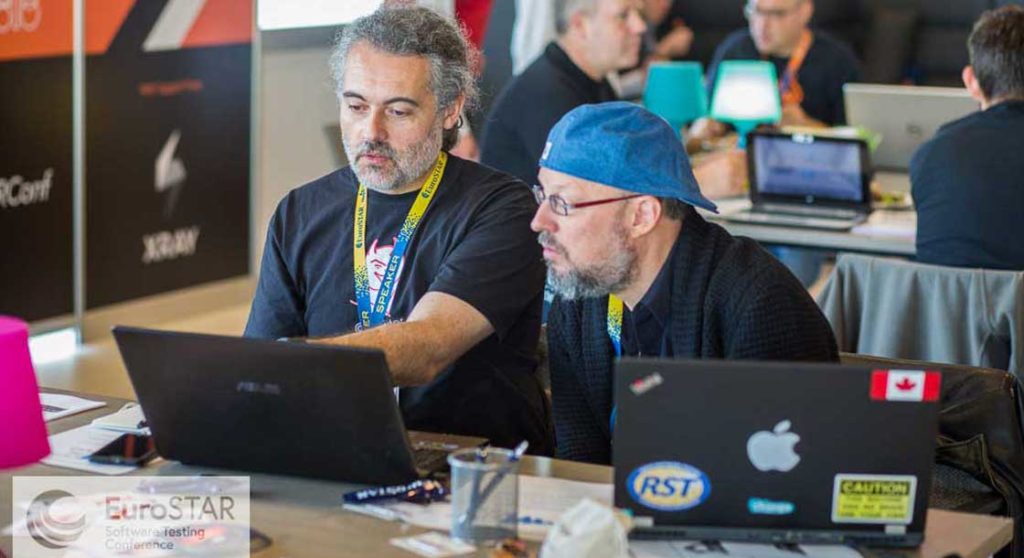
Two people gathered around a laptop working on a project

7 Learn a new way to do UI testing

You know how it goes with UI testing – sometimes your tests pass, and sometimes they fail, without a clear cause. So, this tutorial looks at options beyond Selenium to complete UI testing. Cue Cypress.io, a new kid on the block, based on familiar open source frameworks. Get behind your laptop and experience it firsthand, with guided exercises to write your first test in minutes!

8 Discover a new test design technique

The Process Cycle Test: You may not have heard of it, but this tutorial is dedicated to this elegant, efficient and highly effective technique for testing business processes. The ISTQB world hasn’t picked up on it yet, but after you’ve tried it during the tutorial you’ll see how easy and effective it is! You’ll leave with the test cases for a life-like business process, so you can apply this technique in your work.

9 Improve your writing

Want to know how to write better, more expressive Behaviour Driven Development scenarios? Say hello to new and different writing styles by reviewing prepared scenarios. You’ll also write your own scenarios during this tutorial using Gherkin, the syntax used by Cucumber and SpecFlow. Leave armed with a checklist of tips that you can use the next time you sit down to write a scenario.

10 Elevate your performance testing

Get a first-hand insight into the life of a performance tester. Expert speaker (and EuroSTARConf 2018 Best Tutorial Winner!) Mais Tawfik Ashkar shares her performance testing experience. She also explores performance stories, challenges and solutions in a collaborative learning session. Learn new skills, techniques and strategies that will help you tackle performance testing challenges and grow holistically in your performance engineering approach.

BUY CONFERENCE TICKETS

11 Develop Your BS Detector

Debunk popular myths about what AI is, and what AI will bring in the future with Chris McKillop. AI can be deceptive and as a software tester, your BS detector ensures that your AI systems are valuable, ethical, and successful! You’ll also learn the importance of empathy in testing systems, especially those that make decisions affecting people.

12 Solve an ethical quagmire

Who exactly is watching us, how and why? We are now in the midst of a technological change that the world could not have anticipated – the 4th Industrial Revolution. AI brings brings both power and questions about accountability and liability. Join Fiona Charles in tackling the hard questions about AI and robotics, and get to the truth behind the cost to our privacy.

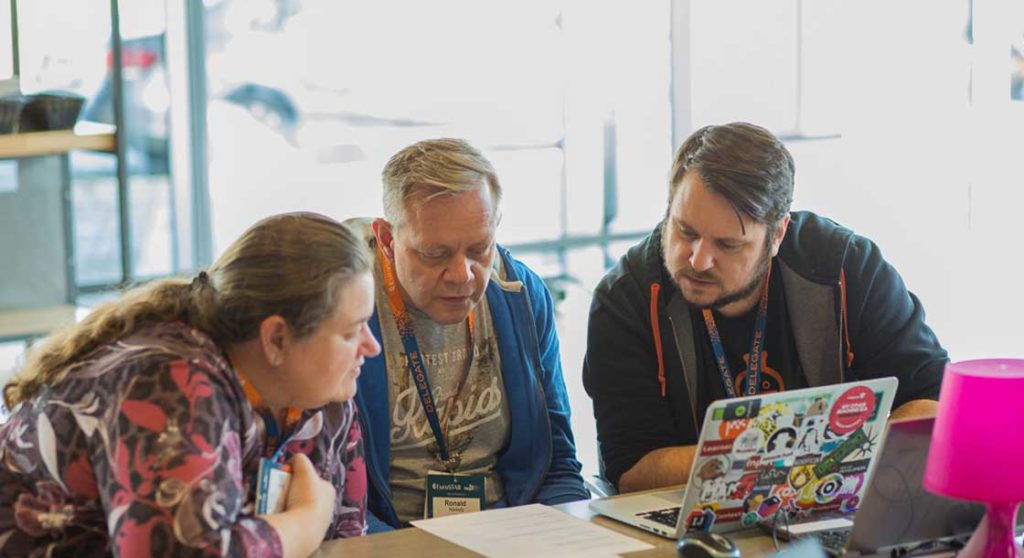
Group at EuroSTAR conference gathered around a laptop learning new skills

13 Learn the best way to test complex systems

Alexandre Bauduin shares his experience leading the complex system testing challenges of a real-time Boeing 777 Flight Simulator. Learn how he overcame the challenges he faced by combining his skills in test design and his expertise as an airline pilot. Afterwards, you will have strategies to organize and prioritize automation and develop regression checking suites for very large mission-critical software systems. You will also be able to report meaningful information to stakeholders.

14 Be the lord of your own rings

Hear about how one of the biggest software projects in the world, Windows 10, built a community of 16.5 million global Windows Insiders! Now, these customers are a vibrant community who are co-creating with Microsoft. Come away from this session with the knowledge to set up your own community and fan club and more importantly, how to co-create with them.

15 Master the art of failing faster – and learning faster

What happens when your working method and processes are turned upside down? Enter “Conceptual Development”, a design-driven, lean development process. Here, it’s important to fail quickly and test with actual users before a single line of code is written. Learn how to approach this new way of thinking and implement it in your software development.

BUY CONFERENCE TICKETS

16 Evolve from tester to specialist

Do you know about the Knowledge Model? Marta Firlej shares the secret to people growth and company stability, the issues around it and how it’s evolved to this day. Learn about the value of the a knowledge/competence model, how to create one, and go from a good software tester to a professional specialist.

17 Become adept at DevOps

Newsflash – QA isn’t dead, it’s evolving to a higher consciousness! QA is crucial for most DevOps implementations to succeed – but DevOps has a dramatic impact on the way we do QA. This session gives you concrete tips on how you can leverage some of the DevOps principles for your job. Get equipped with the necessary changes you need for this new DevOps world!

18 Learn lessons from a start up

Get a firsthand account of what’s it’s like building a company from the ground up from tesena CEO Phil Royston; the skills he needed, and the challenges he faced. Learn how challenges facing testers can be met with the help of professional development PLUS one of the key elements to growing your professional and business career.

19 Become a test data master 

Good test data is hard to get, and unfortunately it’s not unusual to use production data for testing. This causes problems of its own, not least that GDPR (the new EU privacy lay) applies to not only using production data directly. It also applies in almost all situations when test data is based on scrambled or anonymized production data. Here you’ll get inspiration on how to improve test data quality, and learn what it takes to generated high-quality test data from production data in a compliant way.

 20 Rediscover exploratory testing

Exploratory testing often leads to more confusion than clarity. Is exploratory testing an activity? Or is it a style of doing something? Isn’t all testing exploratory? These are questions, and Ingo Philipp will answer them- what exploratory testing is, why to use it, and when to practice it. Bring your curiosity to this hands-on, interactive session. Learn how to use this highly productive approach and put the adventure back into your testing.

BUY CONFERENCE TICKETS

Filed Under: EuroSTAR Conference

How to bring the whole software project right inside your Jira

September 5, 2019 by Fiona Nic Dhonnacha

In general, Jira is considered to be project management software, but not everyone knows that it can also serve as a functional testing tool. While Atlassian suite may not be a dedicated solution for executing tests, it may turn out to be the most convenient for you and your team, if extended with the right app. As testing process is complex and includes the work of many people, including analysts, developers, and testers, it’s important to make the communication between the stakeholders maximally transparent. Performing not only tests but the whole software development in a single place helps each member keep track of all the changes implemented throughout the process. And this is not the only advantage!

The Atlassian product was originally created for bug tracking, therefore it seems to be a smart idea to use it for tests, which in the first place aim at spotting and fixing defects. So, how to implement testing into a software project into Jira? There are three ways of doing that: standalone, with Confluence, or a dedicated testing app.

How to bring the whole software project inside Jira?

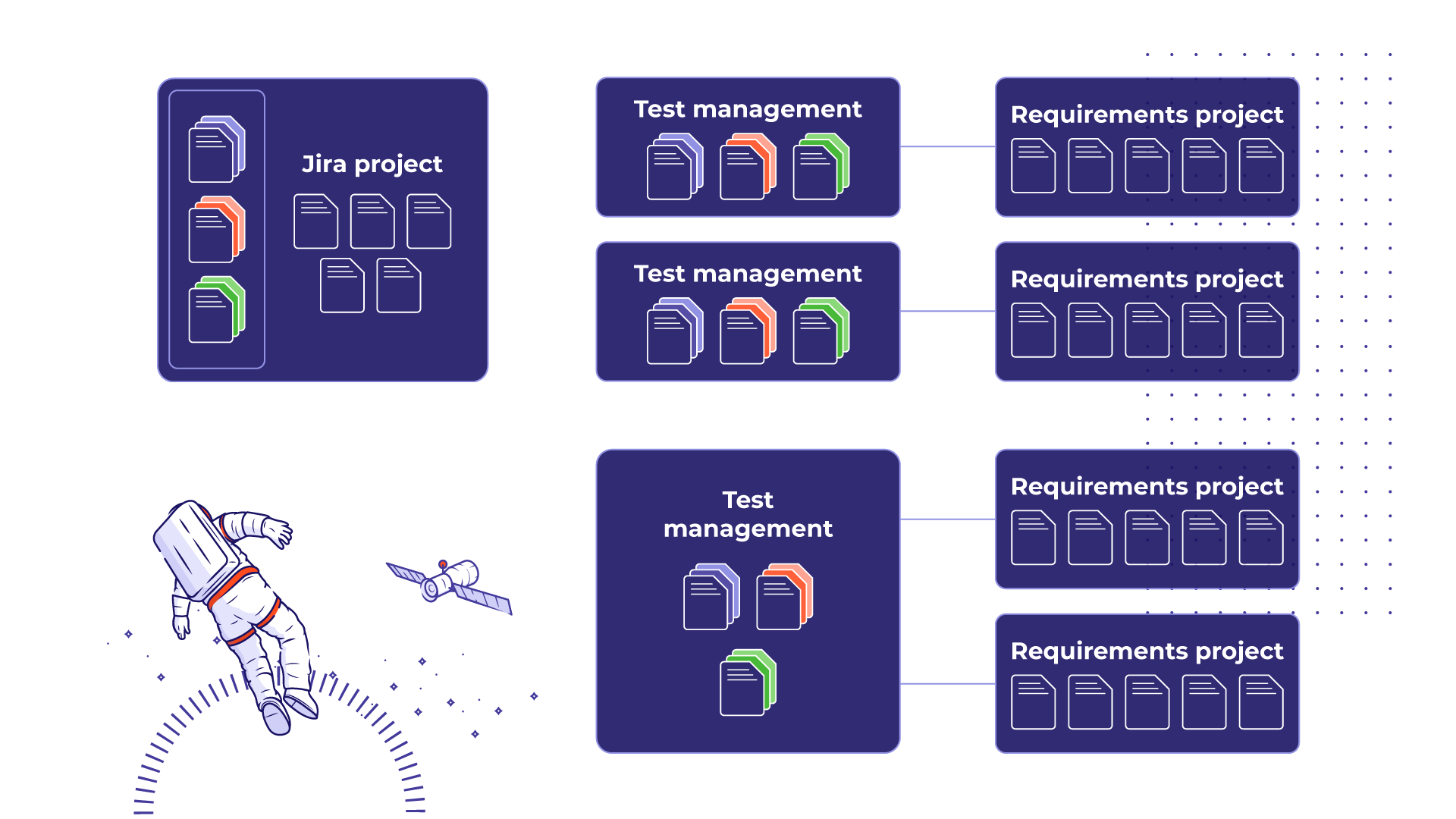
When the process isn’t very complicated, standalone Jira Software might be the right solution, as it allows to manage both requirements and test cases on the elementary level. The team should agree with the Jira Admin on special issue types for requirements and test cases that need to be set up. Jira lets us use tasks and subtasks to build simple structures and seamlessly link the issues between each other. This speeds up relations tracking and makes cooperation between the stakeholders easier.

If the project requires some more space, it’s a good idea to use Confluence. External testing tools often don’t include requirements management, and Confluence permits to precisely describe them. Underestimating this initial phase often cause problems later on, so it’s worth a while to use a special product requirements page in Atlassian software and save time and money in the end.

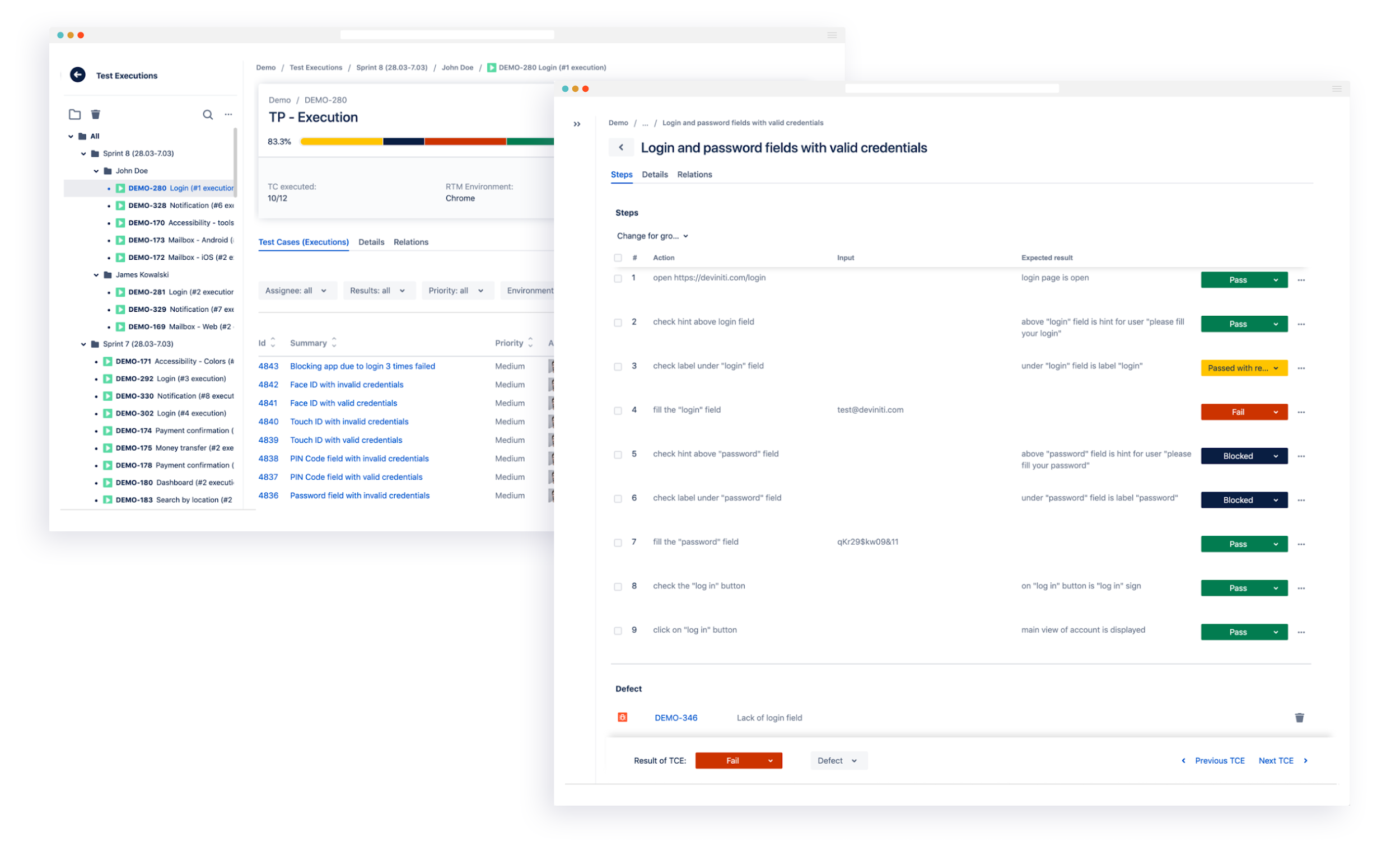
The third option to successfully execute the whole software project in Jira is adding a dedicated app from the Atlassian Marketplace. One of them is Requirements and Test Management for Jira (RTM). The app adds five modules to the software project which allow you to manage requirements, test cases, test plans, executions, and defects, and organize all these elements into transparent tree-structured views. This kind of solution provides you with plug-and-play configuration, full traceability of the objects and implemented changes, and also makes it possible to generate necessary test reports.

If your team uses Jira Data Center and needs more flexibility, another app of ours – TestFLO – gives you this possibility. You can choose if you prefer executing the whole process inside one Jira project or store requirements separately. The app allows creating test case repositories for cross-project testing as well.

Test management tools for Jira answer the problems of even most demanding teams, and their high-level tracking system prevents possible bugs in the final product. Read more on bringing test management process inside Jira on Deviniti blog:

  • Why using Jira as a testing tool is a good choice for your project
  • 6 steps to set up requirements management and testing in Jira
  • How to write effective test steps

—————————————————————–

  • Author bio: Katarzyna Kornaga is a Content Specialist focusing on requirements and test management at Deviniti – an Atlassian Platinum Solution Partner based in Poland. Kate discovers the mysteries of software development in order to share the knowledge with the readers interested in the subject.

Filed Under: EuroSTAR Conference Tagged With: software testing tools

Transition to Taas with the Sales Guy and the Goats

August 29, 2019 by Fiona Nic Dhonnacha

Most good testing service providers see the advantages of Testing as a Service (TaaS) for both their clients and themselves.  However, client concerns about the risks of transition can be a roadblock.  To see how goats can help to remove that roadblock, read on ….


“Crossing the River” to TaaS

I first heard “crossing the river” from a sales guy.  He explained that his sales technique was to show the client that they were currently on one side of the river, that his product was the other (more attractive) riverbank, and his job was to show them how to cross the river.

The Client’s Riverbank

Introducing a client to TaaS usually starts with a discussion about the pains of the way they currently engage external test resources – which, for most of them, is team augmentation (“body-shopping”).  Sometimes they are surprised to hear us, a supplier, admit that body-shopping is a win-lose relationship where the supplier is the winner, because body-shopping usually means certain profit with little effort and no real responsibility – and the client is the loser.  By the end of the discussion they are usually nodding their heads in agreement about the pains of body-shopping: the time and effort needed to find and select external resources; the struggles with performance and knowledge not matching claims made in a CV or an interview; high turnover and having to go through the process again and again.

Where the Grass is Greener

Then we explain how TaaS can create a win-win relationship.  We describe the principles and the specifics of our delivery models.  We show them how the burden of responsibility is transferred to the supplier and how the client can take advantage of the supplier’s expertise to boost the quality of their overall test process.

Where’s the Bridge?

By now the client usually agrees that the other riverbank looks greener and pleasanter.  When they start to think about crossing the river, however, they imagine that it will have strong currents, be filled with crocodiles and have no bridge; at this stage, panic can set in.

Sometimes the first reaction is “TaaS is not for us, we’re moving to Agile”.  This reaction may be a legacy of TaaS being offered by major vendors as a ‘test factory’ service, where the software and its specification are sent out for testing and a test report comes back.  This is a centralized testing service.  In Agile testing is devolved to the Scrum teams and centralized testing may look largely incompatible.  However, TaaS is highly compatible with Agile.

The foundation of TaaS is definition of services that meet client needs and provide value.  Services can be defined that support and extend Agile’s devolved testing.  Using services some functional or non-functional testing can be “outsourced” from Scrum teams, and some test support activities can be provided.  These can free up the scrum teams from repetitive tasks or help them with activities that require specialist skills.  This allows the Scrum team to focus on their core responsibilities and be fully involved in Agile’s key rituals.  When Agile is scaled up then TaaS can reduce costs significantly through economies of scale.

Whatever the SDLC TaaS can look scary to those with no previous experience with it.  For services to work well, the expectation of their outcomes must be clear from the start.  Clear means quantifiable, and that means metrics, but many potential clients will not be mature enough to define what they want in measurable terms.  TaaS also requires good governance and many clients will not, initially, know what this should look like. 

The Three Billy Goats Gruff

All change carries risk.  As testers we know that it’s critical to mitigate risk – it’s the core of what we do.  Risk is also partly why many people resist change.  “Better the devil you know”, as the English say.  If the transition to TaaS is to make it across the river, it has to be carefully managed. 

There’s a Norwegian nursery rhyme called ‘The Three Billy Goats Gruff’.  The goats were brothers: one was small, one was medium-sized and one was large.  They wanted to cross the river to eat the lush grass on the other side, but the only way was a bridge guarded by a hungry troll (who, by the way, was on a body-shop contract).  How did the goats get across?  They sent the small one over first.  When the troll tried to stop him, saying that he would “gobble him up”, the little goat said “Don’t eat me, I’m too small, wait for the next goat because he’s bigger”.  And so the troll let the smallest goat across.

Starting with something small is just one risk management approach we recommend.  Other good transition approaches are start with the familiar and start with the unpopular.  Let’s take regression testing as an example.  For most testing teams this is usually both familiar and unpopular.  If you have a well-maintained regression pack that has been run several times then you already know: 

  • how many tests it has,
  • what data are required,
  • how long it takes to prepare and run the tests,
  • what knowledge is needed to run them,
  • how many errors you typically find during execution,
  • how many regression bugs typically escape to production.

So, you have a set of metrics that can define your initial expectations about service performance and let you monitor the outcome.  You can try out both TaaS and your chosen provider in a relatively low-risk way, and make yourself popular with your testers who are freed of this monotonous job.  You can expect to get added flexibility and cost savings from the supplier.  When you are happy, you can send a medium-sized goat across.

In the nursery rhyme, the medium-sized goat played the same trick on the body-shopped troll that the smallest one did.  The biggest goat, last across the bridge, killed the troll.  We believe that, once a client starts with TaaS, they’ll soon wonder why they stuck for so long with that troll.


Phil Royston – CEO, Tesena

Having wandered reluctantly into IT about 30 years ago, my first contact with formal testing came unexpectedly in 2002 when I was told that I would be the Test Manager on the project I was working on. Maybe it was fate, but it seems I found my true calling. Or maybe my fate was to become the guy they called when there was a “problem in testing”. Whilst fire-fighting on troubled projects I began to tire and wonder if there wasn’t a better way. So five years ago I co-founded a testing start-up in Prague with a mission to change the testing world by making it work better.

Find out more about Tesena on www.tesena.com

Filed Under: EuroSTAR Conference Tagged With: EuroSTAR Conference

How to Network at a Conference

August 23, 2019 by Ronan Healy

It can be quite daunting attending a conference for the first time or attending a conference on your own. People talk about how important networking is, but when there are so many people, it can be difficult to know where to start. A good conference makes you push past your comfort zone. Making connections and meeting new people is a great way to improve your conference experience.

We have compiled some top tips to help you discover how to network at a conference. One of the best ways to start networking is in the Expo area. Here are some great ice breakers..

Stickers

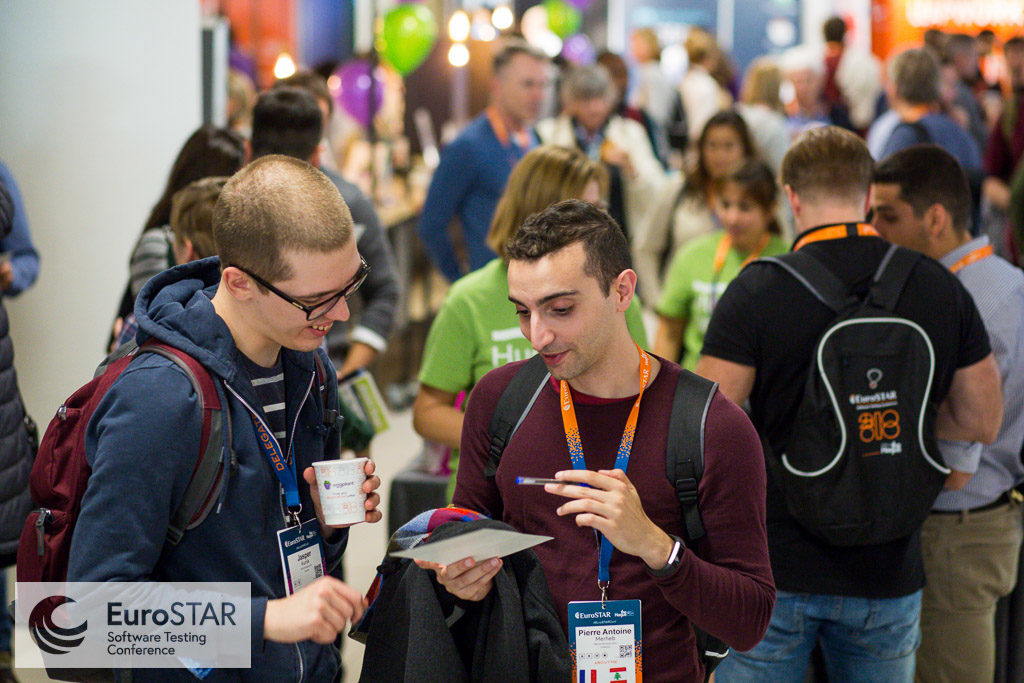
At EuroSTAR, stickers become a great conversation starter.  Go the Community Huddle to find the sticker table to personalise your conference badge with stickers that represent you.  It makes it very easy to strike a conversation to see you have something in common with someone.

Networking at a conference in the Community Huddle - Sticker table

Swag

Who doesn’t love free stuff?! Go on the hunt for some cool conference swag in the expo. You’ll never know who you’ll end up talking to while you’re searching for some free goodies. The exhibitors always have plenty of cool stuff to giveaway. View who will be exhibiting at the EuroSTAR Conference in Prague.

EuroSTAR Expo SWAG SauceLabs

Games

There’s always something going on the expo. Explore the expo to see what’s going on. Whether it’s the Huddle, the Test Lab, Expo stands, there are so many games and opportunities to chat to people while playing. It’s a great way to break the ice. Whether it’s a game of exploding kittens, a game of fishing in the duck pond. Also – there are plenty of prizes up for grabs!

Network at EuroSTAR Conference in the Community Huddle

Visit the Huddle

Visit the Community Huddle to help you meet new people. There are always events going on (the schedule will be released in October). You can meet speakers, other attendees, volunteers. Attendees hang out here for some down time in-between and during sessions also.

Grab a Tea or Coffee

You may have to queue for coffee, so while in the queue be sure to strike up a conversation with the person next to you. OR if you don’t want to wait, some of the exhibitors have coffee machine in their stands so go find them!

EuroSTAR Conference Expo Networking Tea & Coffee Break

So there’s our top tips & ice breakers for how to network at a conference. Some information is for the EuroSTAR Conference, but these tips can be brought to any conference you attend!

Book your ticket to #EuroSTARConf today and join the testing community in November for 4 days of testing excellence. 

Filed Under: EuroSTAR Conference

  • « Previous Page
  • Page 1
  • …
  • Page 10
  • Page 11
  • Page 12
  • Page 13
  • Page 14
  • …
  • Page 16
  • Next Page »
  • Code of Conduct
  • Privacy Policy
  • T&C
  • Media Partners
  • Contact Us

part of the