• Skip to main content
EuroSTAR 2027 - Sign up for early access

EuroSTAR Conference

Europe's Largest Software Testing Conference.

  • Programme
    • Call for Speakers
    • 2026 Programme
    • Community Hub
    • Awards
  • Attend
    • Why Attend
    • Bring your Team
    • Testimonials
  • Sponsor
    • Sponsor Opportunities
    • Sponsor Testimonials
  • About
    • About Us
    • Our Timeline
    • FAQ
    • Blog
    • Organisations
    • Contact Us
  • Book Now

EuroSTAR Conference

Meet The 2019 EuroSTAR Volunteers

October 23, 2019 by Ronan Healy

Each year, the EuroSTAR Volunteer Programme invites members of the testing community to join the conference team. This year, we go to Prague!

EuroSTAR Volunteers are a huge part of the conference, they do an incredible amount of work for the testing community. Thank you to all of our previous volunteers and thank you to everyone who applied for the 2019 programme. If you would like to enter the 2020 volunteer programme, you can sign-up here for EuroSTAR 2020 news, competitions, call for speakers, call for volunteers and new content.

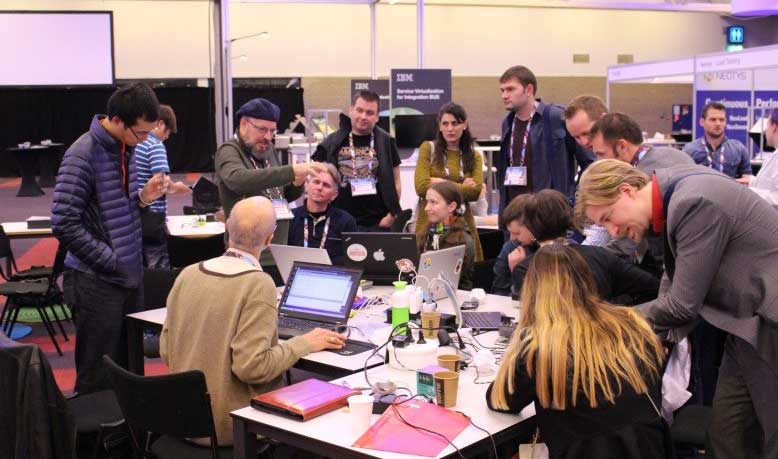
The Volunteers will be found in the different areas of the Huddle, in the Expo. The Huddle consists of the Huddle, the Test Lab & the Test Clinic.

We have been overwhelmed with the number of applications. It’s so great to see people getting involved and contributing their time to the testing community. The decision making process was difficult, but I am delighted to present to you the 2019 EuroSTAR Volunteers!

Huddle Director

Chris Armstrong


Firstly, we present to you our Huddle Director, Chris Armstrong! Chris will be leading all the EuroSTAR volunteers, and will be based in the Huddle. Chris has organised and planned all the awesome events in the community areas along side the volunteers. Learn more about Chris and the Huddle Team.Check out this blog post written by Chris from all his year’s experience as volunteering in the Huddle.View blog post.

Huddle Heroes

The Huddle will host games, competitions for prizes, soapbox sessions, speaker couch sessions. Come here to take a break in-between sessions, to network with the community, learn from speakers, decorate your delegate badge with stickers and connect with people with common interests. Learn more about what’s happening in the Huddle.

Colin Nee

Gosia Piekaska

Andreea Aniculaesei


Test Lab Champions

The Test Lab is the place to try out testing puzzles, engineer robots, face challenges and more. The first ever Test Lab was at EuroSTAR, 11 years ago. Find out more about the Test Lab here.

Dawn Haynes

Lenka Moutelíková

Julie Gardner

Test Clinic Doctors

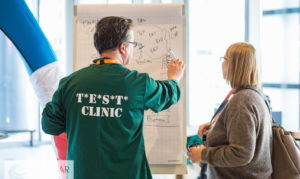
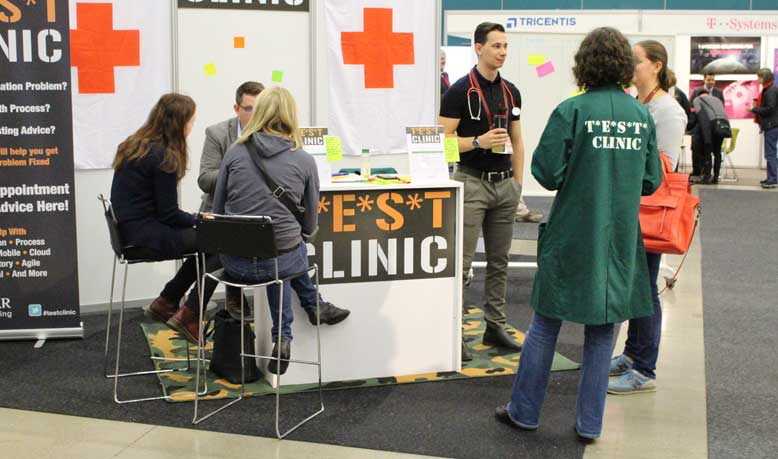
If you have a testing problem that you currently cant solve, the Test Clinic is the place for you to get it resolved. Our Test Clininc doctors will be on hand to help fix any issue you have and if they cant solve the problem, we have a number of consultant experts to that can help you. Solve testing problems in the Test Clinic. Find out more.

Russell Craxford

Dorota Koczar

EuroSTAR Cadets

The EuroSTAR Cadets are here to help you! They are dedicated and passionate about testing. Ask a question, strike a conversation, make sure to say hello!

Anthony Seumal

Dorota Wirkus

Nuno Rodrigues

Olimpia Daire

Rhoda Daquilanea

Tom Pryce

 Inken Henne


If you are attending EuroSTAR make sure to say hello and meet all the EuroSTAR volunteers and perhaps it might inspire you to apply for the EuroSTAR 2020 Volunteer’s Programme!


Learn about the Huddle, Test Clinic & Test Lab at EuroSTAR…

Filed Under: Community Hub, EuroSTAR Conference Tagged With: EuroSTAR Conference

How to Sketchnote

September 25, 2019 by Suzanne Meade

Our 2019 EuroSTAR Community Sketchnote Reporter is Katja Budnikov and we have asked her to share some tips on How to Sketchnote. You might be attending the EuroSTAR Conference in Prague and fancy a new way of taking notes to remember all the wonderful learnings you will take away.

There is a jam packed programme at this year’s EuroSTAR Conference so take a look and plan in advance so you know which topics you’ll be benefiting from.

This is a blog from Katja and she would be delighted to hear from you if you’d like to strike up  conversation. Don’t forget to say ‘Hi’ when you meet her in Prague this November.

How to Sketchnote

I often get asked: “How do you do your sketchnotes?“ Therefore I wanted to summarise my experience and help you to get started with sketchnoting.

Why I started to Sketchnote?

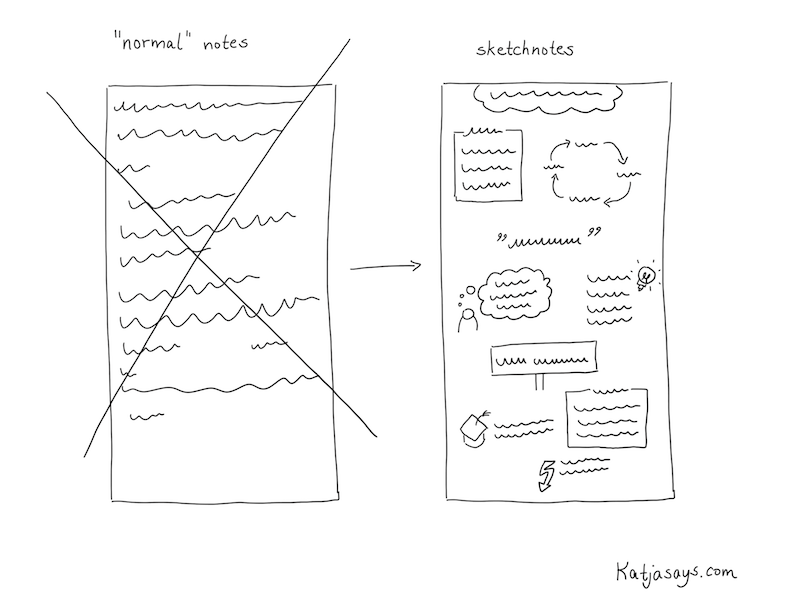
Well, I enjoy attending conferences and meetings. When I’m at an event, I take notes, so that I can remember things better. When I’m back home after a conference, I like to go through my notes and research things I found interesting (like tools, methods, etc.). But I often had the problem, that just writing down “normal“ notes either on my smartphone or with pen and paper wasn’t that effective. It wasn’t really easy to follow what was being said and I tended to write down too much unnecessary information so that I didn’t find the most interesting parts very easily. Also, I was sad that I couldn’t share those handwritten notes with others, as they weren’t really readable or beautiful. So I often transferred them to a document on my computer which I shared with colleagues or other interested people.

How to start sketchnoting

Here and there I saw people that did some sketchnotes or graphic recording at conferences. I thought that’s a cool idea, but I wasn’t sure if I can do that, as I’m not exactly the person who is a great artist. I didn’t think I can draw and that it would be very hard to get as good as those others. However, I really liked the idea of writing things down in a structured, readable way and playing with icons and colors. It is not only beautiful, but it’s also easier to remember stuff if you make it more attractive in a visual way. The other benefit is that you can share those visualizations with others. It is not possible to attend each and every event – there are just too many conferences around the world. So for me, it was always really interesting to follow people or hashtags on Twitter to see what is going on at events I couldn’t attend. Or even to see what other people share about the event I’m attending. With the help of sketchnotes, I was able to share my experience too.

The goal for me was to make my notes more beautiful for me so that I can follow along with my thoughts after returning home a little better. And also I wanted to share it with others so that they could get to know about the content as well. I thought: “If I can help one person to get an idea of what’s going on at an event I attend, that would be really awesome.” Spoiler: I now get a lot of responses for my sketchnotes and people seem to really enjoy that I share my experience in such a structured way.

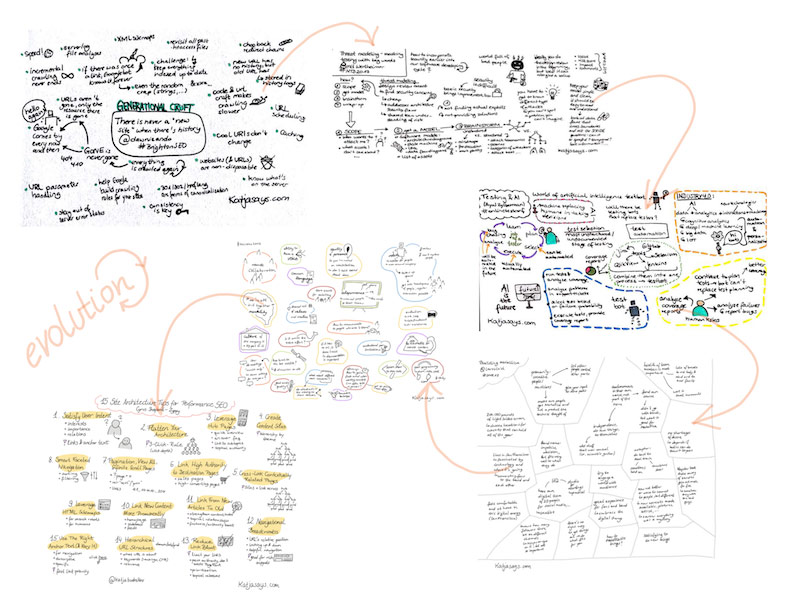
My Evolution of Sketchnoting

In the beginning I bought some notebooks and pens to start doing sketchnotes on paper. In the store, I got overwhelmed by the choice of colors so that I ended up buying almost every color in the store. The notebook I chose had thick pages so that the ink wouldn’t bleed through to the back of the paper and I chose the format A5, as it was easy to carry around and fit in small bags. Everything went well and I liked the feeling of writing and drawing with actual pens on paper, but the problem was the digitalising of the sketchnotes. There are loads of apps to make good pictures and even apps that add a whiteboard background to them to make the sketchnotes easier to read and of a better quality. But still, you have to take a proper picture. Which can be challenging at a conference, as there often isn’t enough light, or if there is light, you have a shadow on your sketchnote from the smartphone. Also, it takes time to take a good picture. You need to have a good underground (like a table, so that the sketchnote lies down in a flat way) or help from a second person and often you need to use a flashlight, which might annoy others around you. Therefore I started dreaming of a possibility to make the sketchnotes on an electronic device so that they are stored digitally from the beginning. This has a huge effect on the quality and you can share them in just some seconds.

I tried different solutions, like smart writing sets that use a pen that has an integrated camera that transfers what you write onto a screen. But they didn’t really satisfy me as not all the strokes I made with the pencil were detected and changing colors was really complicated. A friend of mine had an iPad and an Apple pencil and she allowed me to try to sketch something with it. And what can I say – it was love at first sight. I started saving money and bought an iPad and an Apple pencil for my birthday. Since then I’m doing my sketchnotes digitally. I tried lots of different apps until I chose “Sketches“ by Tayasui. It is very easy to use and has all the functions I need. There are more elaborate apps like Procreate, but those have just too much not needed functionality for me. However, everyone has to choose an app that is most suitable for them.

Evolving your sketchnotes
How to do Sketchnotes
  1. Prepare your schedule of the event
  2. Prepare the sketchnotes before the event
  3. At the event: Find a good spot
  4. Listen carefully, don’t get distracted
  5. Start with writing down text
  6. Add some borders etc. for the structure
  7. Add some icons to the text
  8. Add some colors
  9. Sign the sketchnote, add your handle
  10. Share your sketchnote with others
  11. Enjoy the reactions


Now you know why I started to sketchnote and what tools I use. So let’s come to the interesting part: How do I do my sketchnotes. I share my way of sketchnoting because everybody needs to find their own path.

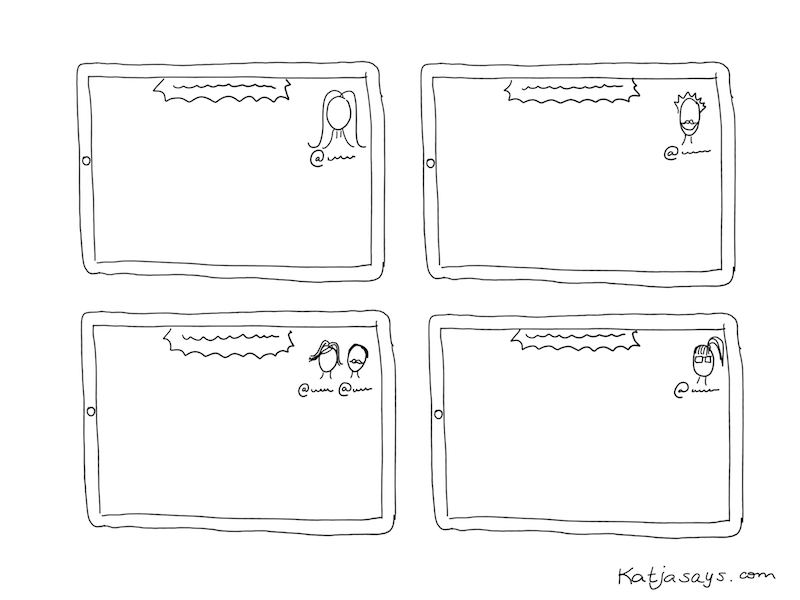
Before I attend a conference, I have a thorough look at the agenda. I choose the talks I want to see and write those down. As I want to share my sketchnotes of the talks on Twitter, I search for the Twitter handles of the speakers and write them down next to the talk name. That helps a lot because after the talk there is usually not enough time to search for the speaker on Twitter (if they don’t mention their handle on their presentation). For the last couple of conferences, I started to draw portraits of the speakers. It’s just something I want to try and what I enjoy more and more. I prepare those portraits in advance. So after choosing the talks I want to attend, I prepare sketchnotes for them. I write down the title of the talk, the Twitter handle of the speaker and sometimes I draw a speaker portrait from the pictures that are on the website of the conference.

How to prepare your sketchnote

Then the day of the conference arrives. In the room, I try to find a spot where I can sit quietly and won’t be interrupted that much. Usually, I like to sit at the end of a row, so that I can get up fast to change rooms and also because at least on one side there’s nobody sitting next to me who might be shaking my chair. The most important part is to have a good look at the presentation screen so that I can see and read everything easily. I have to listen very thoroughly what the speaker is talking about. Usually, in the beginning, there is some time spent on an introduction of the speaker and the speaker’s workplace. I don’t write that down. The challenge is to filter the information that is important and write it down. And at the same time continue to listen what the speaker continues to talk about. In the beginning, this is really hard and you can get the impression that you miss important stuff, but you will get used to it and it will get a little easier. So I’m very focused when listening to a talk. Priority number one is to write down the most important information. I try to think about what somebody needs to read to be able to understand what the talk was about, even if that person wasn’t present. Then, if there is time, I add some small icons to make the sketchnote more attractive visually. In the end, I add colors (sometimes during the talk if there is some time left). My time scope is: Start with a sketchnote the minute the speaker starts talking, finish the sketchnote when the talk is over and share it on Twitter immediately.

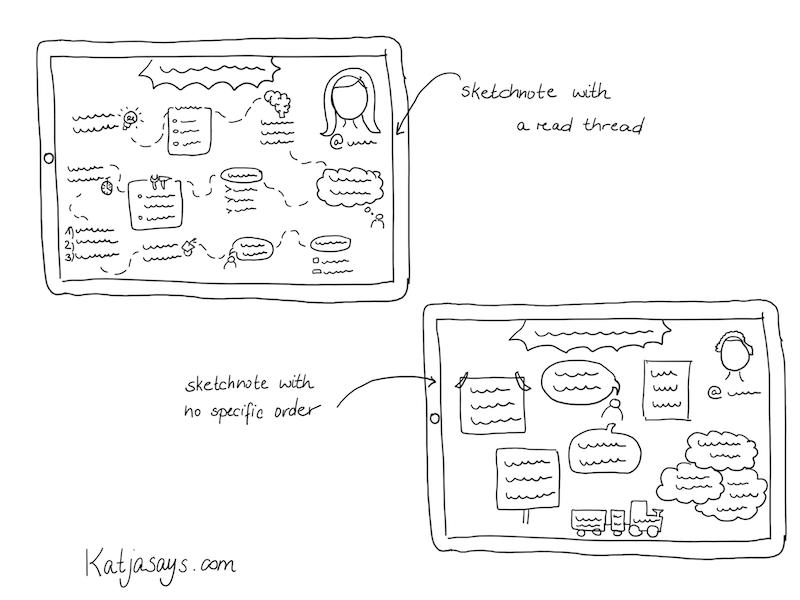
With experience, I got a good routine and now I know better how to fit a talk onto one page and how to structure it in an easy to follow way. But everybody has to find an own style of presenting the information. That can be in terms of icons you use (I have a set of icons I use regularly and I add some new once upon the appearance of new keywords and information), the color scheme (I now tend to use only a few colors to not overwhelm the reader) or the structure. Typically I try to use a red thread so that the reader can follow the information and knows, where the talk started or ended. Some information is written down in borders like boxes or signs or clouds or whatever seems fitting for me. Some talks don’t depend on following an order – then I just use borders or colors to separate the topics from each other. You just need to find a way that is most suitable for you – even if it differs a lot from the sketchnote you have seen others doing. The „typical“ sketchnotes I saw before I started doing some myself where highly visual with a lot of pictures, icons or colors and not so much text. Those are really beautiful but they don’t fulfill what I expect from my sketchnotes. I want them to be understandable for everybody and that, at least in my opinion, requires some more text.

How to organise your sketchnotes
Tips for New Sketchnoters
  1. Do it and overcome your fear
  2. Practice by sketchnoting videos
  3. Do them for yourself
  4. Find your own style
  5. Start small

The most important thing is: Just do it. Overcome your fear of not being good enough and just start doing sketchnotes. Forget the thought of them having to be perfect. Just try it. First, you can start with writing down the information and structure it in a way you are comfortable with. For example by using borders, boxes, different shapes to surround the information and arrows to connect it and to show the order. Then you can try to add some icons every now and then and to work with colors.

To get a little experience, you don’t need to do the sketchnote in public, for example in the middle of a crowd at a conference, but you can start to do sketchnotes of podcasts or recordings.

Forget the thought of somebody not liking your sketchnote. I never saw that somebody said that a sketchnote looks ugly – I always got nice feedback because at least you try to do them and they look much better than „normal“ notes that people make. Do the sketchnotes for yourself and not for somebody. If you share them and you don’t get any reaction – don’t be sad. At least you have some beautiful notes for yourself.

Find your own style. You are not comfortable with drawing portraits? Then don’t do it. You don’t know how to draw specific items? Then don’t draw them. Evolve at your own pace. Start small and try to add more and more things to your sketchnote until you find a format you are comfortable with. When you have found your style, try to use it consistently so that people can recognize your work. Don’t be afraid to experiment.

Find out more about Katja’s on her website Katjasays and you can follow her on twitter for updates.

We hope you will join us at this year’s EuroSTAR Conference where Katja will be sketchnoting. There are a range of tickets available from single day to 4 day. Tutorials always start filling up in September so we recommend booking as soon as possible.

SEE TICKET OPTIONS

Filed Under: EuroSTAR Conference Tagged With: EuroSTAR Conference

Introducing our Community Sketchnote Reporter

September 10, 2019 by Suzanne Meade

Each year at the EuroSTAR Conference, we welcome members of the community as ‘reporters’ who share their experience with the community on EuroSTAR Huddle and our social channels.

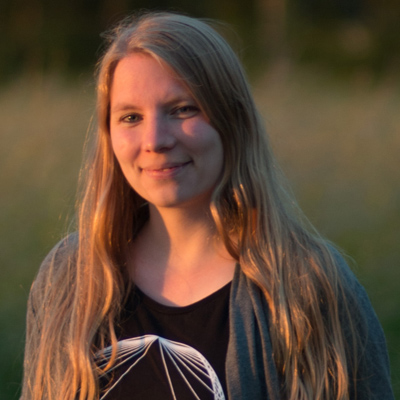
This year we are delighted to welcome Katja Budnikov as one of our Community Reporters. Katja is a sketchnoter from Northern Germany known Katja Budnikov sketchnoterfor her website Katjasays.com where she presents her sketchnotes of conference talks, webinars and articles. She loves attending testing and developer events like EuroSTAR and sharing her experience and learnings with others. That’s why she started with sketchnoting in 2016. First analog with pen and paper, now digitally with an iPad and Apple Pencil.

In her work life she started out in online marketing, then specialised in search engine optimisation and now is a quality assurance specialist who both does manual and automated software testing. Katja is a fan of websites with great quality.

In her day to day life Katja loves photography, especially taking photos of nature, though at the moment most of her pictures taken are from her dog Auri, a young Australian Shepherd, who is super cute and fun to take photos of. Katja loves to spend time with her dog and her partner, going out for walks, traveling and eating cake at a nearby coffee shop with a beautiful garden. Sometimes she is hacking on some projects of her own like a webcam to be able to watch her dog when she is out or automating her home. She recently had a lot of fun furnishing and decorating an apartment that she is renting out to guests, including refurbishing some of the furniture herself.

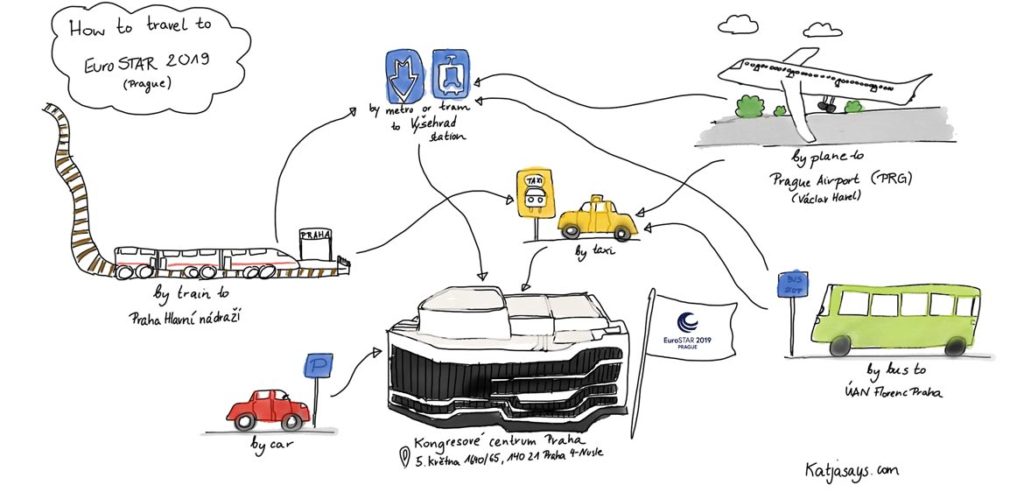
To begin her sketchnoting, Katja is shares how attendees can travel to the EuroSTAR Software Testing Conference in Prague, 11-14 Nov. If you are planning on flying, you will be well served by flight options. Fifty two airlines fly into Václav Havel Airport Prague from 110 destinations in 42 countries. There are lots of rail options too and if you are in central Prague, you can join us at the Prague Congress Centre by hopping on the metro line C (red line) to station “Vyšehrad”, which is right in front of the congress centre.

For Prague accommodation options at delegate rates see the EuroSTAR Hotel Page.

We look forward to welcoming you to the 27th EuroSTAR Software Testing Conference.

Getting to the EuroSTAR Conference


See more of Katja’s sketchnotes on her website Katjasays and you can follow her on twitter for updates.

Filed Under: EuroSTAR Conference, Uncategorized Tagged With: EuroSTAR Conference

Transition to Taas with the Sales Guy and the Goats

August 29, 2019 by Fiona Nic Dhonnacha

Most good testing service providers see the advantages of Testing as a Service (TaaS) for both their clients and themselves.  However, client concerns about the risks of transition can be a roadblock.  To see how goats can help to remove that roadblock, read on ….


“Crossing the River” to TaaS

I first heard “crossing the river” from a sales guy.  He explained that his sales technique was to show the client that they were currently on one side of the river, that his product was the other (more attractive) riverbank, and his job was to show them how to cross the river.

The Client’s Riverbank

Introducing a client to TaaS usually starts with a discussion about the pains of the way they currently engage external test resources – which, for most of them, is team augmentation (“body-shopping”).  Sometimes they are surprised to hear us, a supplier, admit that body-shopping is a win-lose relationship where the supplier is the winner, because body-shopping usually means certain profit with little effort and no real responsibility – and the client is the loser.  By the end of the discussion they are usually nodding their heads in agreement about the pains of body-shopping: the time and effort needed to find and select external resources; the struggles with performance and knowledge not matching claims made in a CV or an interview; high turnover and having to go through the process again and again.

Where the Grass is Greener

Then we explain how TaaS can create a win-win relationship.  We describe the principles and the specifics of our delivery models.  We show them how the burden of responsibility is transferred to the supplier and how the client can take advantage of the supplier’s expertise to boost the quality of their overall test process.

Where’s the Bridge?

By now the client usually agrees that the other riverbank looks greener and pleasanter.  When they start to think about crossing the river, however, they imagine that it will have strong currents, be filled with crocodiles and have no bridge; at this stage, panic can set in.

Sometimes the first reaction is “TaaS is not for us, we’re moving to Agile”.  This reaction may be a legacy of TaaS being offered by major vendors as a ‘test factory’ service, where the software and its specification are sent out for testing and a test report comes back.  This is a centralized testing service.  In Agile testing is devolved to the Scrum teams and centralized testing may look largely incompatible.  However, TaaS is highly compatible with Agile.

The foundation of TaaS is definition of services that meet client needs and provide value.  Services can be defined that support and extend Agile’s devolved testing.  Using services some functional or non-functional testing can be “outsourced” from Scrum teams, and some test support activities can be provided.  These can free up the scrum teams from repetitive tasks or help them with activities that require specialist skills.  This allows the Scrum team to focus on their core responsibilities and be fully involved in Agile’s key rituals.  When Agile is scaled up then TaaS can reduce costs significantly through economies of scale.

Whatever the SDLC TaaS can look scary to those with no previous experience with it.  For services to work well, the expectation of their outcomes must be clear from the start.  Clear means quantifiable, and that means metrics, but many potential clients will not be mature enough to define what they want in measurable terms.  TaaS also requires good governance and many clients will not, initially, know what this should look like. 

The Three Billy Goats Gruff

All change carries risk.  As testers we know that it’s critical to mitigate risk – it’s the core of what we do.  Risk is also partly why many people resist change.  “Better the devil you know”, as the English say.  If the transition to TaaS is to make it across the river, it has to be carefully managed. 

There’s a Norwegian nursery rhyme called ‘The Three Billy Goats Gruff’.  The goats were brothers: one was small, one was medium-sized and one was large.  They wanted to cross the river to eat the lush grass on the other side, but the only way was a bridge guarded by a hungry troll (who, by the way, was on a body-shop contract).  How did the goats get across?  They sent the small one over first.  When the troll tried to stop him, saying that he would “gobble him up”, the little goat said “Don’t eat me, I’m too small, wait for the next goat because he’s bigger”.  And so the troll let the smallest goat across.

Starting with something small is just one risk management approach we recommend.  Other good transition approaches are start with the familiar and start with the unpopular.  Let’s take regression testing as an example.  For most testing teams this is usually both familiar and unpopular.  If you have a well-maintained regression pack that has been run several times then you already know: 

  • how many tests it has,
  • what data are required,
  • how long it takes to prepare and run the tests,
  • what knowledge is needed to run them,
  • how many errors you typically find during execution,
  • how many regression bugs typically escape to production.

So, you have a set of metrics that can define your initial expectations about service performance and let you monitor the outcome.  You can try out both TaaS and your chosen provider in a relatively low-risk way, and make yourself popular with your testers who are freed of this monotonous job.  You can expect to get added flexibility and cost savings from the supplier.  When you are happy, you can send a medium-sized goat across.

In the nursery rhyme, the medium-sized goat played the same trick on the body-shopped troll that the smallest one did.  The biggest goat, last across the bridge, killed the troll.  We believe that, once a client starts with TaaS, they’ll soon wonder why they stuck for so long with that troll.


Phil Royston – CEO, Tesena

Having wandered reluctantly into IT about 30 years ago, my first contact with formal testing came unexpectedly in 2002 when I was told that I would be the Test Manager on the project I was working on. Maybe it was fate, but it seems I found my true calling. Or maybe my fate was to become the guy they called when there was a “problem in testing”. Whilst fire-fighting on troubled projects I began to tire and wonder if there wasn’t a better way. So five years ago I co-founded a testing start-up in Prague with a mission to change the testing world by making it work better.

Find out more about Tesena on www.tesena.com

Filed Under: EuroSTAR Conference Tagged With: EuroSTAR Conference

Bring Your Team To EuroSTAR Software Testing Conference

August 22, 2019 by Fiona Nic Dhonnacha

Spark Ideas, Share Solutions and Solve Problems at the Most Energetic Gathering of Software Testers in Europe

The EuroSTAR Software Testing Conference is not only the biggest and longest-running conference in Europe… it’s also the best! This is 4 days of high-energy learning and fun, with 1000 delegates from 50 countries and 350+ companies.The programme offers a mix of intensive tutorials ideal for in-depth training, visionary keynotes, hands-on workshops and experience-based track sessions.

We  do our best every year to give our attendees maximum opportunity to improve as test professionals! We also have networking events to help you meet new friends, fortify your passion for software, and return to your office with valuable connections.

This is where you’ll evolve your testing, and improve technical knowledge and connections. Bring your team to EuroSTAR from all areas and disciplines of your company – QA engineers, test architects, scrum masters – and reap the benefits of doing it together!

Bonus: if you test together, you save together! Get 5 tickets for the price of 4.

BOOK TICKETS

Cover more sessions at a team to increase learning and share knowledge. There’s plenty of choice for every type of tester team, with keynote sessions, tutorials, workshops and track talks to choose from.

“I’ve made friends at EuroSTAR who are friends for life. The people you meet at conferences like this, you bond with them over discussions about our industries, our shared problems, our shared solutions. It’s just a wonderful thing to do. It’s so powerful to meet other people and understand that you’re not alone – and to find the answers to problems together. Every year I come I learn such a lot from other people. It’s just great. I can’t recommend it enough.”

ISABEL EVANS, INDEPENDENT QUALITY & TESTING CONSULTANT

3 Things To Do as a Team at EuroStarConf 

1. Check out the Test Lab for a team-building experience

The EuroSTAR Test Lab gives you hands-on testing experience on ideas you’ve heard about at the Conference. It’s run by testers for testers, with a range of environments and testable systems to help you practice what you’ve learned. So, don’t worry about your level of experience because there’s something for everyone! Join your team – and fellow delegates – in completing practical challenges, exercises and games to improve your testing. Above all, it’s about having fun!

2. Ask the Test Doctor about your testing problems

The EuroSTAR Test Clinic is your chance to solve software testing problems, with the help of onsite test experts. Is your team stuck on something? The Test ‘Doctors’ offer coaching and guidance on ideas and solutions. Our Test Doctors are industry experts with years of testing experience and knowledge. Every year they strive for 100% of problems solved, and do their best to ensure you have a solution to implement on your return to work. So far, they have a 100% success rate!

3. Make new friends together!

So, after a hard day of learning it’s time to unwind our nighttime networking events. The Tester’s Party is on Tuesday night at the Municipal House, Prague’s most exuberantly art nouveau building. One of the biggest highlights of the conference each year is the EuroSTAR Awards: this is an amazing evening dedicated to celebrating the testing community. Celebrate with your crew and fellow testers or split attendance between both events and meet even more people!

There are lots more reasons to bring your team to EuroSTAR – strengthen bonds, forge new connections and get inspired by incredible new experiences. Furthermore, your team will retun to the office invigorated and ready to apply all your new knowledge!

BOOK TICKETS

Filed Under: EuroSTAR Conference Tagged With: EuroSTAR Conference

AI Test Automation and Human Factor

August 20, 2019 by Fiona Nic Dhonnacha

One of my childhood superheroes was the Terminator. The machine sent from the future to save the future. I remember tears in my eyes when the T-800 was lowering himself to the melted metal. Do you remember what he said before he did it? What were the last words he said to John Connor?

The Terminator: I now know why you cry, but it is something I can never do.

Was the Terminator true AI? Yes, he was. Did he have limitations? Yes, he did. Could he do everything that a human could do? No, he couldn’t.
As you know AI doesn’t exist. Period. If any of the test automation tools out there claims that they have AI, they are simply lying. They might have smart algorithms, advanced object identification methods but they are only as good as the developers who wrote them. That is not Artificial Intelligence. That is Human Intelligence wrapped in nice algorithms. And like the T-800 it can have its flaws and cannot fully mimic a human user. If the true AI would in fact exist, then would there be a need for any test automation platform at all? If the true AI would exist wouldn’t it just upgrade the test automation tool itself to work faster, better, more reliable? That would be a true AI.

Smart algorithms allow to work faster, but…

The greatly advertised AI functionalities of your new testing tool are nothing else than algorithms which allow to automate the manual steps you would need to take. Imagine that each time you want to find an object you need to go through the whole html tree and see what the best way is to identify it. The smart algorithms will do it for you, they will be faster, but they will only follow a pattern or in other words – follow the identification methods that their inventor thought of. That means that there might be edge cases where you will still need to do some manual work as the “AI” didn’t consider your pattern/scenario. Either way they will increase your productivity, you just need to keep in mind that they will not do everything for you.

Use “Smart” where it matters

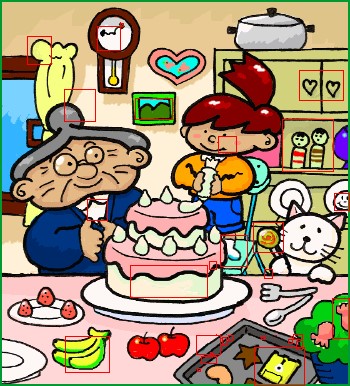
Consider the following scenario: you are manually executing a test case which checks the login functionality to your standalone software. You see the UserName and the Password field along with a Login button. So far so good. Now, imagine that instead of seeing the logo of your software you see a black image. You, as a human can interpret that as a bug. The automated test cases cannot, as it will only check the login functionality. You as a manual tester will report this bug, the automated test case will happily say that all is passed. As long as you won’t add a test case which will just check the logo each time you will never automatically find this bug. Bad, isn’t it? However, there is a way to solve this problem without having to implement dedicated automated test cases. Visual comparison. This is something that an algorithm can do better than a human. Look at the picture below.

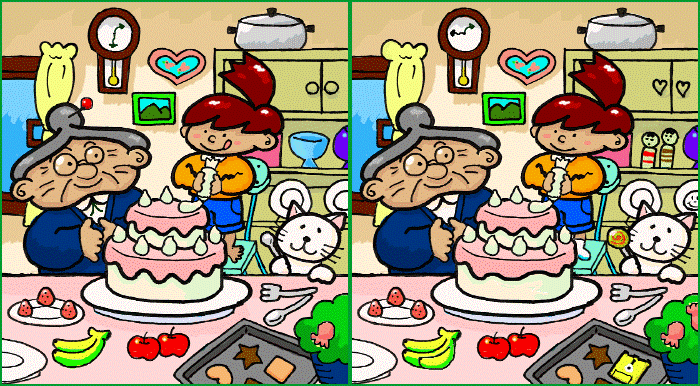
If you have kids, you probably know the game of spot the differences. How many differences can you find? How much time would it take? I have found 15 and it really took me some time. I am sure there are quite a few more.

How does spotting the differences apply to automatic test cases? It’s quite easy. Imagine you have executed your test case for the very first time. During the execution you have collected screenshots after executing each single test step. Those pictures should be your reference point.
Each time you will execute your test cases, your test automation solution should compare the screens with the reference screenshots and automatically detect the differences.

What is the result of the test case?

The valid question to ask is – what should happen to the automated test case result? There is no simple answer to that question. Depending on your approach you can either fail the test case (when you don’t expect a single deviation) or just throw a warning on the result. In the end what matters is that the visual difference doesn’t come unnoticed and that you will always be able to identify that something has unexpectedly changed in your software.

At TestResults.io we are using the Human Factor to give our customers the option to easily spot the changes in their UI. If you want to learn more email us or contact us directly.

Bonus

Just that you see how the UI differences could be shown for the user, look at how an output of a Human Factor algorithm could look like in reality.

Did you spot all the differences? 🙂

———————————

Wojciech Olchawa is a Product Manager and ISTQB certified Test Automation Engineer at progile, home of TestResults.io.

He worked as a SW Tester and Test Manager in various projects in the medical devices industry and airline sector. He applies his experience in software testing to shape TestResults.io and enable customers to benefit from high-class reliable Automated Testing.

Follow him on Linkedin where he likes to share his knowledge in videos or blog post.

 Test Results Resources

Filed Under: EuroSTAR Conference Tagged With: EuroSTAR Conference

8 Things You Need To Know About EuroSTAR Testing Conference Sessions

August 19, 2019 by Fiona Nic Dhonnacha

Keynotes? Track Talks? Lightning Strikes? Get to Know All the Different Conference Sessions!

Every year the EuroSTAR Software Testing Conference invites thought leaders, industry innovators and global trailblazers to share their knowledge, showcase their expertise and spark new ideas. What does this mean for you? 4 days of invaluable learning, new connections and fresh inspiration – all in one place.

We’ve got incredible keynote speakers, and many of the world’s leading experts presenting tutorials, track talks and so much more. But what’s involved in these sessions? Here’s your chance to find out, and make sure you know your Track Talks from your Lightning Strikes. Read on and get ready to accelerate your career!

GET TICKETS

Keynotes

Our keynote speakers this year give their expertise and insights on hot testing topics: Chris McKillop looks at popular myths about what AI is, and what the future of AI means for a wider society. Fiona Charles tackles difficult questions on the ethics of technology, and unveils the truth behind the cost to our privacy.  Dona Sarkar explains how to run your own insider program within your organisation; and Alexandre Bauduin shares his experience leading the complex testing challenges of a real-time Boeing 777 Flight Simulator!

Tutorials

Every year we carefully select the EuroSTAR Conference Tutorials for our delegates. They are designed to allow you to choose an area you want to explore in greater detail, or just dive into. There are 12 amazing tutorials to choose from and they are divided between Monday (6 tutorials) and Tuesday (6 tutorials). Topics include Python, Risk in Testing, Games & Testing, Performance Testing, Test Designs and much more. Tutorials are in-depth training sessions with expert speakers. This is where you learn practical new skills that you can apply to your job right away!

Track Talks

Track talks are 45 minutes long, and feature a range of themes and topics such as tools and automation, techniques, engineering and more. This year we’ve worked incredibly hard to ensure that there’s something to suit every tester – we want you to leave enlightened and inspired! Over 30 new & expert speakers will give a track talk on UI, agile, DevOps and lots more. We have invited many great speakers, including Jaroslaw Hryszko, Marina Bechaalani, and Martin Boesgaard, to name a few.

Lightning Strikes

The concept of Lightning Strikes is to challenge speakers to give an engaging talk in just 4 minutes! Five speakers each have 4 minutes and just two slides to give a complete presentation on their chosen topic. If they don’t finish on time, lightning will strike and they have to leave the stage immediately! Who will convey their points clearly and quickly? Who will be unceremoniously struck down? This year, we have added a second Lightening Strikes session on diversity (Thursday), where 5 speakers briefly share their thoughts on inclusion and diversity in testing.

Workshops

Workshops last 1 hour 45 minutes, and are designed to stimulate your logical and critical thinking, as well as spark creativity. It’s an energetic, hands-on way for you to learn new skills and get valuable testing practice. Workshops this year include planning and testing releases, puzzle solving and storytelling for testers.

What Else is Going On at EuroSTAR?

On top of our amazing speaker sessions, we also run interactive sessions. These help you find solutions to your testing problems, make new friends, and get hands-on testing experience!

Test Lab

First, it’s Test Lab: run by testers for testers, it’s your opportunity to gain hands-on testing experience on ideas you’ve heard about at the conference. It’s also a chance to learn something new outside of the conventional conference talks and your everyday working environment. Test Lab is for everybody, no matter your level or experience. Join fellow testers and QA professionals in completing practical challenges, exercises and games. A perfect way to improve your testing in an open, friendly atmosphere.

Test Clinic

The Test Clinic helps you solve your software testing problems, with the help of our onsite test experts. Our ‘Test Doctors’ are industry experts with years of testing experience and knowledge. They’re on hand to offer coaching and guidance on ideas and solutions. Every year the Test Doctors strive to solve 100% of problems, and won’t send you home until you have a solution to implement on your return! Is there something slowing your team down? Do you have an  idea that could help others improve? Bring it to the Test Clinic!

Huddle

Everything we do at EuroSTAR is to help testers achieve their full potential and grow as a community. A huge part of this is Huddle, where experts share their knowledge with the testing community. Huddle is completely FREE to join, and you gain full access to resources across all the latest topics in software testing and quality assurance. It’s all free of charge! Huddle comes to EuroSTAR in the form of soapbox sessions, speaker couch sessions, games, giveaways and lots more. It’s also an ideal place to go if you’re a first time attendee.

Now you know everything about the different EuroSTAR Conference Sessions! There’s only one thing left to do… book your ticket!

Book Now

Filed Under: EuroSTAR Conference, Uncategorized Tagged With: 2019, EuroSTAR Conference, software testing conference

API Documentation, Should I take it Seriously?

August 6, 2019 by Fiona Nic Dhonnacha

Empower your developers and users to integrate and deploy your APIs as swiftly as possible, with API documentation.

The Importance of API Documentation 

If you are serious about developing cutting edge APIs, you need to take your API documentation seriously. Just developing a cutting edge software application is not enough. You need to be able to communicate the benefits of your API; what it does, how it works and how to use it, and this must be done in a clear and effective manner. Documentation has a direct impact on the adoption, usage and success of your API. Documentation is an area where many developers and organisations struggle. In fact, many organisations actually find it much easier to develop complex code, than to create useful documentation to support their APIs.


What is API Documentation?

API documentation is an technical document, that contains clear instructions on how to effectively use and integrate with an API. It is a reference manual, containing all the information required to work with the API. When a user refers to the documentation, it should effectively communicate; how the API works, what it does and how to use it. However, traditionally organizations and developers allocated little to no time or resources for the creation of supporting documentation. In fact, it is often seen as an afterthought. The document should contain at least the following: Quick Start Guide, Examples, Functions, Parameters, Classes, Return types, Error Messages, Arguments and Formatting.  In essence, it is a blueprint for creating an API.


Who uses API Documentation?  

Your API documentation is an important reference, for internal & external developers. When creating API documentation you need to think of the audience.  The documentation will be consumed largely by developers, who think analytically, are precise and are actively trying to solve a complex problem with your API.  They are also time poor and working to a strict deadline.


What are Disadvantages of Inadequate API Documentation?

Failure to allocate adequate time and resources to the documentation of your API development will have severe consequences. Imagine the anarchy of trying to build a skyscraper, with a team of construction workers, without a detailed set of blueprints.  The lack of adequate API documentation, has resulted in major problems such as: increased cost of development and user frustration. For example, if a key member of a development  team leaves, the remaining team members should not be spending precious  time trying to figure out how the API functions and how to use it. Lack of documentation, also increases the amount  of time spent onboarding new team members, and results in users becoming frustrated and confused with your API. It is important to remember that if users find your API complicated and confusing they will look elsewhere for an alternative!


What are the Advantages of API Documentation?

API documentation will empower your developers and users to understand precisely how to use, test and deploy your API fast and effectively.  The goal of your documentation is to answer questions about your API clearly and precisely. It should enable teams to collaborate effectively when building API definitions, creating standards and reusing assets. Adequate documentation is the foundation for a good developer experience. It should communicate to the user, in a fast and effective manner. It is essential in reducing the learning curve for developers and enables them to build to a set of guidelines, improve team performance, while also reducing inaccuracies, delays and budget overruns.


What are the Tools Available for API Documentation?

Documentation has traditionally been written using regular content creation, maintenance tools and text editors. These methods are not effective or fit for purpose in today’s fast paced and competitive development environment. At SmartBear, we have been leading the way in creating innovative and industry leading tools to empower developers to create and share effective and impactive API documentation. SwaggerHub (https://swagger.io/tools/swaggerhub/)

SwaggerHub is our design and documentation platform which supports working with the OpenAPI specification at scale. SwaggerHub allows teams and organizations to collaborate on building API definitions, create standards and reusable assets to speed up the time it takes to define a new API and seamlessly integrate those definitions as part of a larger process.

SwaggerHub (https://swagger.io/tools/swaggerhub/) acts as a single source of truth for multiple teams across development, testing and operations. Regardless of how an API definition is being used – to write code against, validate an existing service or configure something like an API gateway – having a single location that any of these teams will have to look back on saves time, energy, and unnecessary confusion.


Developer Need API Documentation for Success 

In closing, it is important to remember that development teams, need to create detailed API documentation to support their APIs. API documentation enables developers and users, to  share, integrate and deploy APIs as swiftly as possible. For more information please visit www.SmartBear.com (Link: https://smartbear.com/)


———————————————-

Patrick is a marketing specialist at SmartBear, with experience in online services and ecommerce. SmartBear empowers developers and testers to create quality software by using innovative tools to build, test and monitor APIs. Over 6 million software professionals, and thousands of companies across the globe are using SmartBear tools to build, test, virtualize and monitor their software applications.


Filed Under: EuroSTAR Conference Tagged With: EuroSTAR Conference

  • « Previous Page
  • Page 1
  • …
  • Page 15
  • Page 16
  • Page 17
  • Page 18
  • Page 19
  • Next Page »
  • Code of Conduct
  • Privacy Policy
  • T&C
  • Media Partners
  • Contact Us

part of the