• Skip to main content
EuroSTAR 2027 - Sign up for early access

EuroSTAR Conference

Europe's Largest Software Testing Conference.

  • Programme
    • Call for Speakers
    • 2026 Programme
    • Community Hub
    • Awards
  • Attend
    • Why Attend
    • Bring your Team
    • Testimonials
  • Sponsor
    • Sponsor Opportunities
    • Sponsor Testimonials
  • About
    • About Us
    • Our Timeline
    • FAQ
    • Blog
    • Organisations
    • Contact Us
  • Book Now

Software Testing

How to Implement Software Test Automation: The QA Leader’s Guide

April 16, 2024 by Lauren Payne

When it comes to developing software, testing is not just a phase; it is a mission-critical function. Each line of code written demands meticulous scrutiny to ensure the end product meets user expectations.

Modern software has become far more complex than ever before. Today’s users expect more features and capabilities across multiple devices. There is increased demand for intuitive interfaces, real-time updates, and flawless performance — all necessitating exhaustive testing.

The need for a more efficient approach is apparent. Automation offers a beacon of hope for quality assurance (QA) leaders striving to optimize their processes.

QA Leaders: Today’s Automation Champions

Over the past decade, the role of the quality assurance (QA) leader has undergone a profound transformation. They have become the vanguards of automation, with the responsibility to steer their teams towards a more efficient and impactful testing process. This shift is not just a response to industry trends; it is a strategic move driven by the escalating complexity of modern software.

Of course, while automation enhances efficiency, it does not replace the critical role of human QA professionals. In fact, testing jobs in the US alone are predicted to increase by 25% in the next decade. Testers’ unique ability to think creatively, design complex test scenarios, and apply domain knowledge ensures that QA professionals will always play a key role in maintaining the overall quality of software products.

The Automation Advantage

When software development is moving at breakneck speed, with top companies deploying software multiple times per day, automation is the key to keeping up with the pace of innovation. Here are just some of the reasons why automation is so important for software testing:

  1. Speed and efficiency
  2. Consistency in performance
  3. Reusability of test scripts
  4. Improved test coverage
  5. Early detection of defects
  6. Resource savings
  7. Parallel testing
  8. Continuous testing

Automation in software testing is not just a trend, but a necessity.

Download the 30-60-90 day plan for qa leaders

Overcoming Common Implementation Hurdles

Despite the clear benefits of automation, there is still hesitation for some organizations to take the leap and automate their testing. This reluctance often stems from misconceptions about complexity and resource requirements.

Busting Complexity Myths

Contrary to popular belief, implementing test automation doesn’t require testers to be seasoned programmers. In fact, there’s an array of low-code and no-code tools specifically designed to empower testers to create effective test scripts without delving into complex coding.

The key lies in understanding that automation is not a barrier but a gateway to enhanced testing capabilities.

Unlocking the Door to Stakeholder Support

Another common hurdle for QA leaders is gaining stakeholder support for automation initiatives. Stakeholders often overlook the value of investing in software testing. However, research shows that organizations can achieve a net present value (NPV) of $4.69 million and an impressive return on investment (ROI) of 162% by leveraging the right automation tool.

When implemented thoughtfully, QA leaders can showcase improved efficiency, reduce time-to-market, and see tangible returns on investment within 9 months.

A Roadmap to Automation Success

Implementing automation need not be an arduous journey. When executed with precision, automation brings about transformative results. QA leaders can spearhead this transformation by focusing on three key aspects:

1. Accessible Automation Tools:

  • Explore user-friendly tools that require minimal coding expertise.
  • Leverage low code/no code platforms to empower testers without extensive programming backgrounds.
  • Opt for tools that offer UI testing capabilities, streamlining the process for non-technical team members.

2. Training and Support:

  • Invest in training programs to upskill the existing team on automation tools.
  • Provide continuous support and mentorship to ease the transition from manual to automated testing.
  • Foster a collaborative environment where knowledge sharing is encouraged.

3. Strategic Planning and Evaluation:

  • Develop a comprehensive 30-60-90 day plan outlining automation milestones.
  • Regularly evaluate progress and make necessary adjustments to ensure alignment with organizational goals.
  • Showcase tangible results and ROI metrics within the 90-day timeframe to secure future investment.

The Path Forward

For those intrigued by the prospect of transforming their testing processes, the eBook, A 30-60-90-Day Plan for QA Leaders, serves as a comprehensive guide. Your automation plan awaits, offering a blueprint for success in the world of test automation.

Author

Anna McCowan – Software Marketing Engineer

Anna McCowan is a software marketing manager at Keysight Technologies who joined the company as a technician in the wafer lab. Anna brings a wealth of technical knowledge from her bachelor’s degree in physics from Sonoma State University. She is a published technical writer who is passionate about educating others on the remarkable innovations in software technology, always striving to bring light to the advances in her field.

Keysight is an EXPO Gold Sponsor at EuroSTAR 2024, join us in Stockholm
Filed Under: Software Testing, Test Automation Tagged With: 2024, Expo

Empowering Enterprises with Seamless Test Execution on a Unified Test Execution Environment

April 2, 2024 by Lauren Payne

The digital landscape is evolving every day and ensuring software quality is extremely important To ensure the applications meet the standards of functionality, reliability, and performance, businesses rely on extensive testing practices. Nevertheless, there are many hurdles to overcome to conduct tests successfully and efficiently due to the sheer complexity and size of current software systems.

Overseeing test execution gets harder as businesses mature and their software ecosystems get more and more complex. Traditional approaches often result in inefficiencies, delays, and increased expenses because they use diverse tools, fragmented processes, and fragmented teams.

These challenges are easily resolved with a unified test execution infrastructure, providing an integrated structure for managing and carrying out tests over the entire software development lifecycle. Enterprises can broaden test execution with ease and maximize efficiency and quality via a unified infrastructure, which integrates testing tools, standardizes processes, and fosters cooperation.

Unified Test Execution – The Need of the Hour

Businesses frequently use an assortment of testing frameworks and tools to meet distinct technological and testing requirements. However supporting this fragmented ecosystem can be challenging and can cause problems with compatibility, integration, and overhead.

As teams or projects function independently in siloed test environments, it may result in duplication, inaccurate testing procedures, and a lack of visibility across the operation. It can hinder interactions, limit teamwork, and reduce the effectiveness of the testing process as a whole.

Establishing consistency, repeatability, and scalability in test execution requires standardizing testing procedures and centralizing testing infrastructure. Enterprises can gain greater oversight and insight over their testing attempts, enhance resource utilization, and accelerate workflows by implementing a unified approach in testing.

LambdaTest: Empowering Enterprises with AI-driven Test Execution

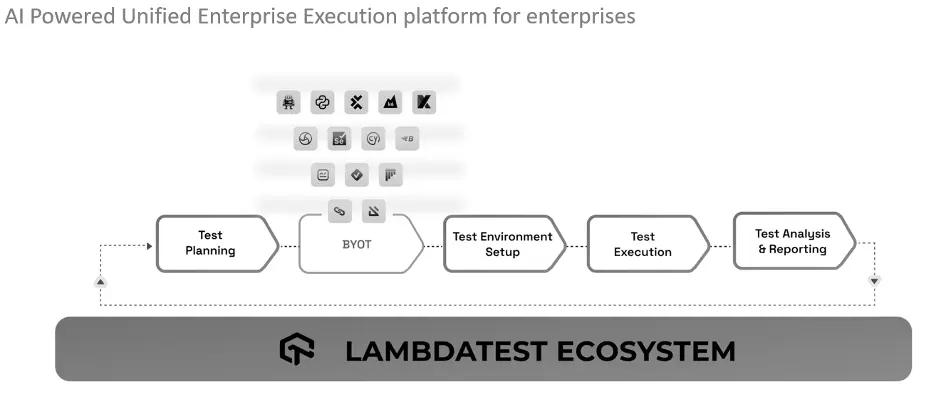
The unified test execution environment offered by LambdaTest revolutionized the way businesses plan, organize, and execute their testing activities. LambdaTest’s range of AI-powered capabilities enables enterprises to increase test efficiency, enhance test infrastructure management, and deliver software designed to be of better quality at scale.

Through an assortment of innovative capabilities, LambdaTest uses artificial intelligence (AI) to improve testing processes. Its Auto Heal feature efficiently recognizes and fixes issues with the test environment in real time, minimizing interruptions and ensuring testing operations progress. The capacity to identify test failures promptly with fail-fast capabilities allows teams to address vulnerabilities early in the development cycle and accelerate resolution, thus enhancing overall efficiency. Also, test cases get intelligently prioritized by the Test Case Prioritization functionality using AI algorithms based on their impact and likelihood of failure. Teams can reduce time-to-market and improve software quality by employing this strategic approach to focus on high-risk areas, increase testing coverage within restricted schedules, and swiftly address important issues. 

Moreover, GPT-powered RCA (Root Cause Analysis) offers deeper insights into the underlying causes of test failures by analyzing test results and historical data. By identifying patterns, trends, and potential correlations, the AI engine enables teams to address root causes effectively and prevent the recurrence of issues. Furthermore, the Test Intelligence module provides actionable insights derived from comprehensive test data and analytics. 

By aggregating metrics, performance indicators, and user feedback, LambdaTest empowers teams to make informed, data-driven decisions, optimize testing strategies, and continuously enhance software quality.

Conclusion

LambdaTest’s unified test execution environment, enriched with AI features such as Auto heal, Fail fast, Test case prioritization, GPT-powered RCA, and Test intelligence with test insights represents a significant advancement in enterprise test automation. By harnessing the power of AI, LambdaTest empowers organizations to streamline test execution, mitigate risks, and deliver superior software products that meet the demands of today’s dynamic market landscape.

Author


Mudit Singh

 A product and growth expert with 12+ years of experience building great software products. A part of LambdaTest’s founding team, Mudit Singh has been deep-diving into software testing processes working to bring all testing ecosystems to the cloud.  Mudit currently is Head of Marketing and Growth for LambdaTest.

Lambdatest is an EXPO Gold Sponsor at EuroSTAR 2024, join us in Stockholm.

Filed Under: Software Testing, Sponsor Tagged With: 2024, EuroSTAR Conference, Expo

How to choose between manual or automated testing for your software

March 19, 2024 by Lauren Payne

Testing software is the process of measuring a program against its design to find out if it behaves as intended. It’s performed in order to ensure that the developed app or system meets requirements and to enable further development of the product.

In the realm of software development, automated testing has become indispensable. Whilst it may require an initial investment, over time, it can more than repay the upfront cost. Manual testing offers advantages and disadvantages, such as being more prone to error yet providing insight into your visuals. Ultimately, it all comes down to what your project requires and the resources you have.

What is manual testing?

Manual testing is a type of application testing where QA or software engineers are tasked to execute test cases manually without using any automation tools. In this process, the testers utilize their own experience, knowledge, and technical skills to perform testing on the application or software in development. It’s done to find bugs and any issues in the software or application and ensure that it works properly once it goes live.

In contrast to automated testing, which can be left to run on its own, manual testing necessitates close involvement from QA engineers in all phases, from test case preparation through actual test execution.

Manual software testing with Test Center

Test Center, one of the tools in the Qt Quality Assurance Tools portfolio, provides a streamlined system for managing manual testing results, providing an overview of these alongside the automated test results. Additionally, there’s a test management section where the manual testing procedures and documentation can be set up and managed.

It has a split screen design where the left is for creating and managing the test hierarchy and includes making test suites, test cases, features, and scenarios. Meanwhile, the right pane is where changes to the test case or scenario’s description and prerequisites are made. It is also utilized to design and administer each part of a test.

What is automation testing?

Automation testing is the use of software tools and scripts to automate testing efforts. A tester will have to write test scripts that instruct the computer to perform a series of actions, such as checking for bugs or performing tasks on the target platform (e.g., mobile app or website). It helps to improve test coverage by enabling the running of more test cases than manual testing allows, and in less time.

Users with experience in scripting are needed. Tools like Selenium, QTP, UFT, and Squish are used for automation. Squish supports a number of non-proprietary programming languages, including Python, JavaScript, Ruby, Perl, and Tcl, thus, knowledge of them is advantageous.

Automated software testing with Squish

With Squish, you can automate your GUI testing across cross-platform desktop, mobile, embedded, and online apps and is usable on different development platforms. It simplifies what is typically a laborious and error-prone process – testing the user interface of today’s new and evolving apps.

Squish supports functional regression testing and automated GUI functional testing. It also helps you to automatically test your application in different environments, simulating users’ actions in a controlled and repeatable manner.

It includes: 

  • Full support for all leading GUI interfaces
  • Complete compatibility for various platforms (PCs, smartphones, web, and embedded platforms)
  • Test script recording
  • Robust and trustworthy object identification and verification techniques
  • Independent of visual appearance or screenshots
  • Efficient integrated development environment (IDE)
  • A large selection of widely used scripting languages for test scripting
  • Full support for behavior-driven development (BDD)
  • Full control with command line tools
  • Support for integrating test management with CI-Systems

Choosing manual or automated testing – Pros & Cons

There are a number of factors to consider when choosing between the two. For one, the biggest challenge facing software developers is the deadline. If the completion date is missed, then the company could lose customers. There is also an issue with budgets, as automated testing will require setup and maintenance.

Both solutions offer advantages and disadvantages, so you will need to examine them based on your needs. Here’s a closer look:

Manual testing

Pros:

  • Costs less than automated testing to initiate
  • Gives room for human perception, which helps provide insights into user experiences
  • Can provide valuable human feedback on your visuals (such as the colors, fonts, sizes, contrast, and button sizes used)
  • More efficient when test cases only need to be run once or twice
  • Small modifications can be applied quickly without having to be coded
  • Best for exploratory, usability, and ad-hoc testing

Cons:

  • Can be time-consuming and labor-intensive for QA engineers or testers
  • There is a possibility of human error
  • Cannot be reused – repetitiveness can lead to the work being quite tiring and dull for QA engineers or testers
  • Scales poorly as more manual testers would be needed for larger and more sophisticated applications

Automated testing 

Pros:

  • Works faster since it doesn’t rest or sleep
  • Has the ability to find more defects
  • Good for repetitive test cases
  • Can run multiple tests simultaneously
  • Increases the breadth of coverage compared to manual
  • Can be recorded and reused for similar test cases
  • Best for regression, performance, load, and highly repetitive functional test cases
  • Larger projects may require more manpower, but still less than manual testing as only new test scripts need to be written

Cons:

  • Exploratory testing is not possible
  • Needs to be coded
  • Unable to take human factors into account so it is unable to provide user experience feedback
  • Small modifications will have to be coded which can take time
  • Initial test setup and the required maintenance can be expensive

In most instances, automated testing provides advantages, but all technology has limits. When creating anything to enhance the consumer experience, human judgement and intuition provided by manual testing can make a difference.

Deciding on whether automated or manual testing is better for your organisation will largely depend on the number of test cases you need to run, the frequency of repeated tests, and the budget of your team. 

Ideally, your organisation should incorporate both as they each have their own merits. There are many instances where manual testing is still necessary and where automated testing could be more efficient. Either way, these two software testing methods are both important assets.

Read more about quality assurance from our comprehensive guide here: The complete guide to quality assurance in software development

Author


Sebastian Polzin, Product Marketing Manager,
Qt Quality Assurance

The Qt Company is an EXPO Gold Sponsor at EuroSTAR 2024, join us in Stockholm.

Filed Under: Gold, Software Testing, Sponsor Tagged With: 2024, EuroSTAR Conference, Expo

Software Testing In Regulated Industries

February 27, 2024 by Lauren Payne

In today’s landscape of digital adoption and the rapid growth of software technologies, many domains leveraging technology are within regulated industries. However, with the introduction of more technology comes the need for more software—and more software testing. This article will touch on the unique attributes, challenges, and considerations of software testing within these regulated domains.

Defining “regulated” industries

While many industries have specific guidelines and domain nuances, we will refer to “regulated” industries as those that are governed by overarching regulatory compliance standards or laws. 

These governance standards in most cases impact the depth, agility, and overall Software Development Lifecycle (SDLC) on how these standards are developed into requirements and then validated.

Below is a sampling of some of these domains:

  • Healthcare
  • Manufacturing
  • Banking/Finance
  • Energy
  • Telecommunications
  • Transportation
  • Agriculture
  • Life sciences 

Unique requirements

Common characteristics that teams will likely encounter when analyzing the software quality/testing requirements in these environments include:

  • Implementation of data privacy restriction laws (like HIPAA)
  • Detailed audit history/logging of detailed system actions
  • Disaster recovery and overall data retention (like HITRUST)
  • High standards for traceability and auditing “readiness”
  • Government compliance and/or oversight (like the Food and Drug Administration / FDA)

These common regulatory requirements are critical for planning and executing testing and establishing a quality of recording artifacts essential to supporting auditing and traceability.

Testing considerations & planning

Many testers and their teams are now being proactive in using paradigms such as shift-left to get early engagement during the SDLC. As part of early requirements planning through development and testing, specialized considerations should be taken within these regulated industries.

Requirements & traceability

  • The use of a centralized test repository for both manual and automation test results is critical
  • Tests and requirements should be tightly coupled and documented
  • Product owners and stakeholders should be engaged in user acceptance testing and demos to ensure compliance
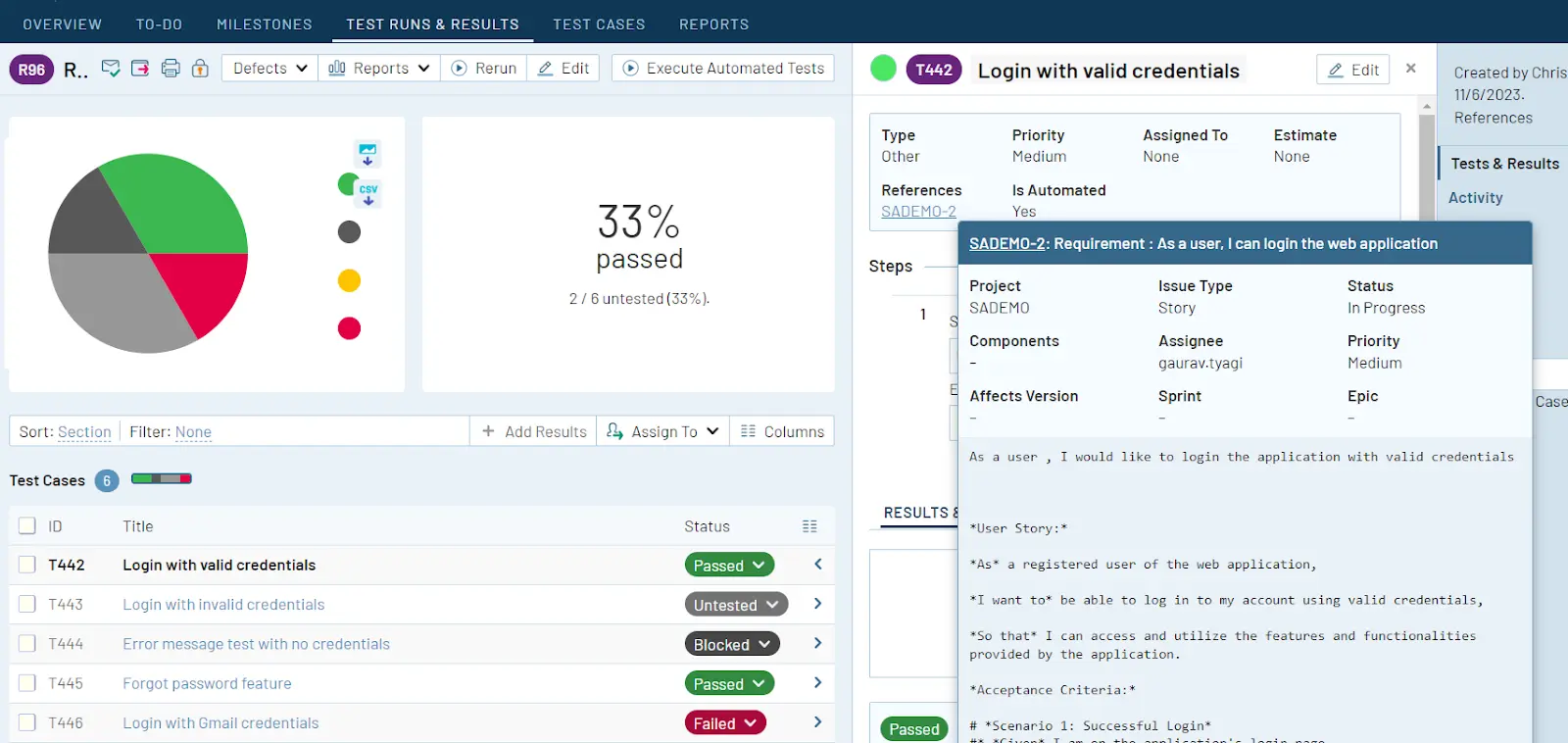
  • Test management platforms should be fully integrated with a requirement tracking  platform, such as Jira

Image: The TestRail Jira integration is compatible with compliance regulations and flexible enough to integrate with any workflow, achieving a balance between functionality and integration.

Once teams have solidified a process for defining and managing requirements and traceability, it becomes imperative to ensure that the quality of test records is not only accessible but also restricted to those who require it. 

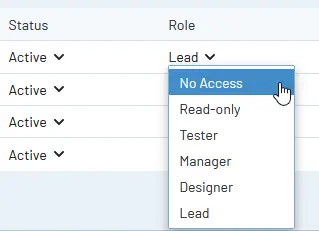
This controlled access is crucial, particularly in auditing situations, where the accuracy and reliability of test records may play a critical role. This approach for access controls is commonly referred to as the “least privilege” principle.

Image: With TestRail Enterprise role-based access controls, you can delegate access and administration privileges on a project-by-project basis

Test record access controls

  • Limit test management record access to the minimum required for team members
  • Ensure only current active team members have test record access
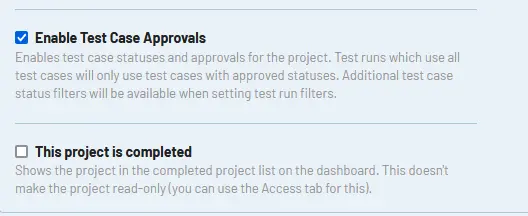
  • Implement a culture of peer reviews and approval to promote quality and accurate tests

Image: TestRail Enterprise teams can implement a test case approval process that ensures test cases meet organizational standards.

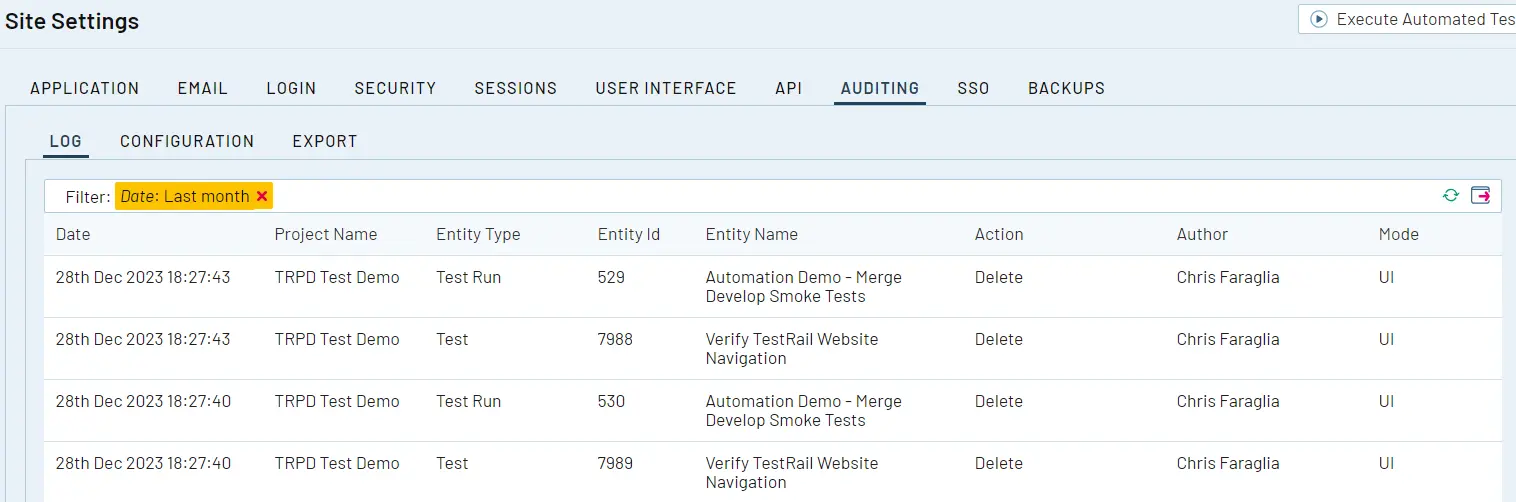
As test cases and test runs are created manually or using test automation integrations like the TestRail CLI, it is important to maintain persistent audit logging of these activities. Within regulated industries, audit requirements and “sampling” may require investigation of the history and completeness of a given test that was created and executed against a requirement.

Image: TestRail Enterprise’s audit logging system helps administrators track changes across the various entities within their TestRail instance. With audit logging enabled administrators can track every entity in their installation.

Audit history

It’s important to maintain a log that allows viewing of historical data on test case creation and execution. This supports audit readiness for requirements validation traceability.

Lastly, as teams focus on the development, testing, and delivery of software, we have to be mindful of disaster recovery and data retention of the artifacts we create. 

In the same thought process as disaster recovery of a given system under test, the quality of records for testing and release must persist to support compliance requirements and audits. Although centralized test management platforms with integrated restore capabilities are preferred, various tools and processes can be used to achieve this.

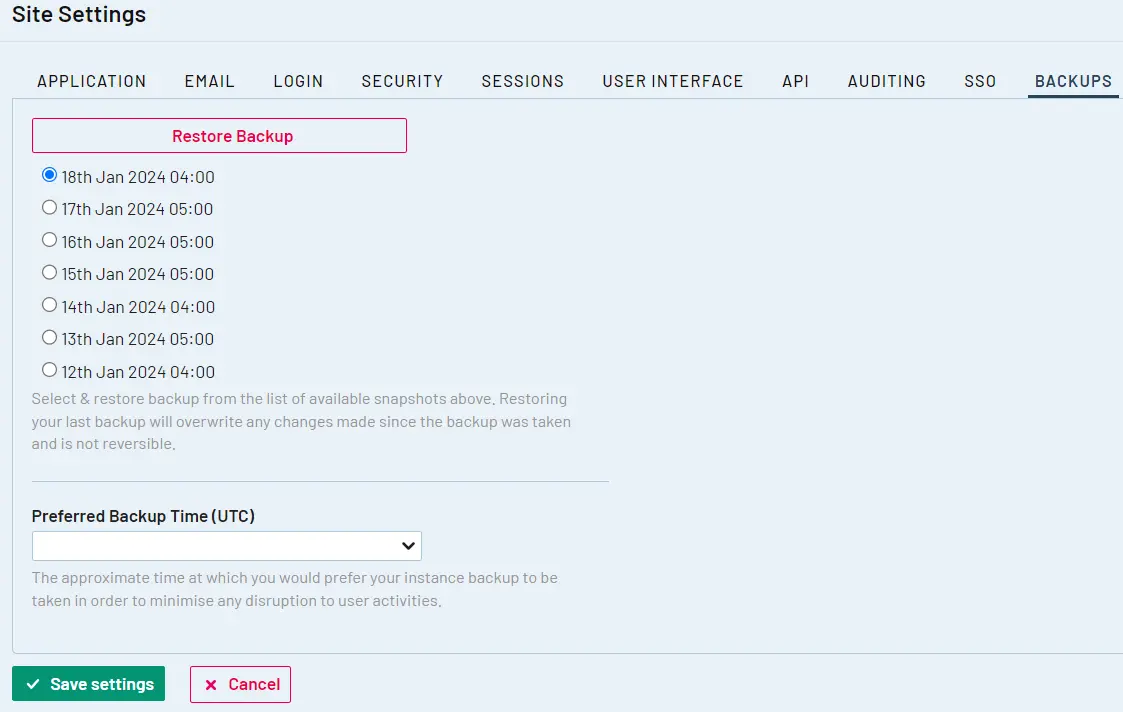
Image: TestRail Enterprise’s configurable backup and restore administration features enable administrators to specify a preferred backup time window, see when the last backup was completed, and restore the last backup taken.

Self-assessments & internal auditing

For all teams that are iterating on engineering, testing, and overall SDLC improvements, it’s important to dedicate time to perform self-assessments. 

Self-assessments in the context of software testing and quality in regulated environments can be a highly effective tool for identifying process gaps and shortcomings. 

Self-assessment/audit evaluation criteria

Examples of critical areas to include in your self-assessments or audit readiness exercises include:

  • Having full traceability via linkage of all tests to the corresponding requirements​ artifact (such as a Jira issue or defect)
  • Tests that have been planned and executed are linked to a given release event/designation
  • Failed tests for a given release or sprint are linked to a defect artifact (such as a Jira defect)

Once a self-assessment or internal audit is performed, ensure that the team collects actionable information such as improvements to requirements traceability or more detailed disaster recovery documentation that can be used to improve the overall SDLC with a focus on core compliance best practices and standards.

Bottom line

Additional considerations and requirements must be made across the SDLC when operating teams within regulated industries. The early inclusion of these additional requirements with all team members is critical to ensuring compliance and overall success in audits and other regulatory assessments. 

Key Takeaways

  • Focus on traceability, ensure linkage of tests to requirements
  • More focus on security and access controls testing
  • Centralize all test artifacts in a repository with backups/data retention
  • Plan and execute disaster recovery validation

Watch the Testing In Regulated Industries webinar on the TestRail Youtube channel for more information on the unique challenges and characteristics of software testing in regulated industries!

Author


Chris Faraglia
, Solution Architect and testing advocate for TestRail.

Chris has 15+ years of enterprise software development, integration and testing experience spanning domains of nuclear power generation and healthcare IT. His specific areas of interests include but are not limited to test management/quality assurance within regulated industries, test data management and automation integrations.

TestRail is an EXPO Gold Sponsor at EuroSTAR 2024, join us in Stockholm.

Filed Under: Gold, Software Testing, Sponsor, Uncategorized Tagged With: 2024, EuroSTAR Conference, Expo

How to overcome common challenges in Exploratory Testing

February 20, 2024 by Lauren Payne

Exploratory testing involves testing system behaviour under various scenarios, with a predefined goal but no predefined tests. This focus on discovering the unknown makes exploratory testing both powerful and challenging.

“Exploratory testing is a systematic approach for discovering risks using rigorous analysis techniques coupled with testing heuristics.”

-Elisabeth Hendrickson

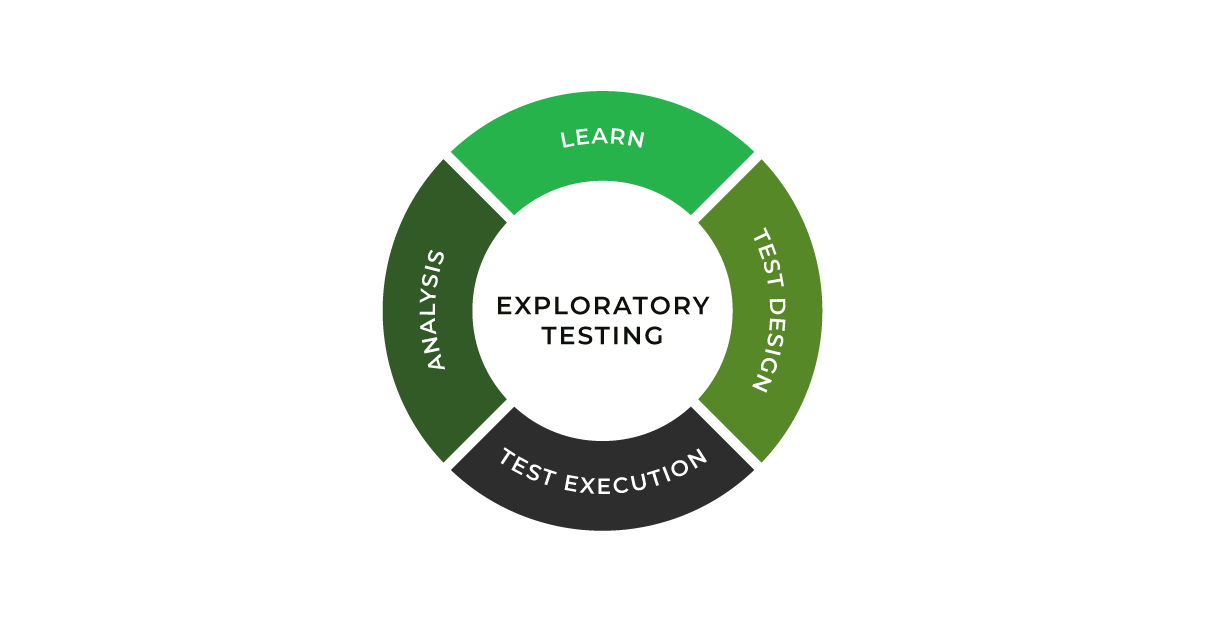
Although exploratory testing (ET) is not a new concept, its significance has increased exponentially in the dynamic field of software development. With its simultaneous learning, test design, and execution processes, ET represents a shift from the traditional, script-based testing methodologies. This approach is particularly beneficial in handling the complexities and unpredictabilities of modern software projects. It prepares testers to actively engage with the software, uncovering potential issues that scripted tests might overlook.

In exploratory testing, catching bugs is an adventure – a journey through the unknown aspects of software, where each test can reveal new insights. In the Agile world with rapid development cycles, exploratory testing stands out as a dynamic and responsive testing strategy, essential for ensuring software quality in a fast-paced environment.

Despite its advantages, exploratory testing has challenges that can interfere with its effectiveness. Testers often encounter hurdles in planning and adapting to newly discovered information, managing frequent context switches, maintaining comprehensive documentation, and effectively measuring the success of their testing efforts. Addressing these challenges is crucial for harnessing the full potential of ET. This blog will explore these common challenges and discuss how the Xray Exploratory App provides innovative solutions, enhancing the exploratory testing process and enabling testers to deliver high-quality results efficiently.

How to overcome challenges with Xray Exploratory App

The Xray Exploratory App proves to be a vital resource for successfully navigating these challenges. The tool supports the unique factors of exploratory testing, empowering testers to optimize their testing strategies while maintaining the flexibility and adaptability that exploratory testing demands. 

Planning and Learning

One of the primary challenges in exploratory testing is the balance between planning and learning. While ET is less structured than traditional testing, it still requires a level of planning to be effective. Xray Exploratory App facilitates one of the measures to counter this challenge and optimize your ET adoption –  session-based test management (SBTM). 

Testers must continuously learn from the software they are testing and adapt their approach accordingly. This requires understanding the project’s goals and the ability to quickly assimilate new information and apply it to testing strategies. One of the elements that helps with gaining the skills and experience is the structure of knowledge sharing. For example, if charters are handled as Jira stories, you get a centralized storage (a library of templates, of sorts) that has good examples which help educate any team member about the system and previous ET efforts.

Context Switching

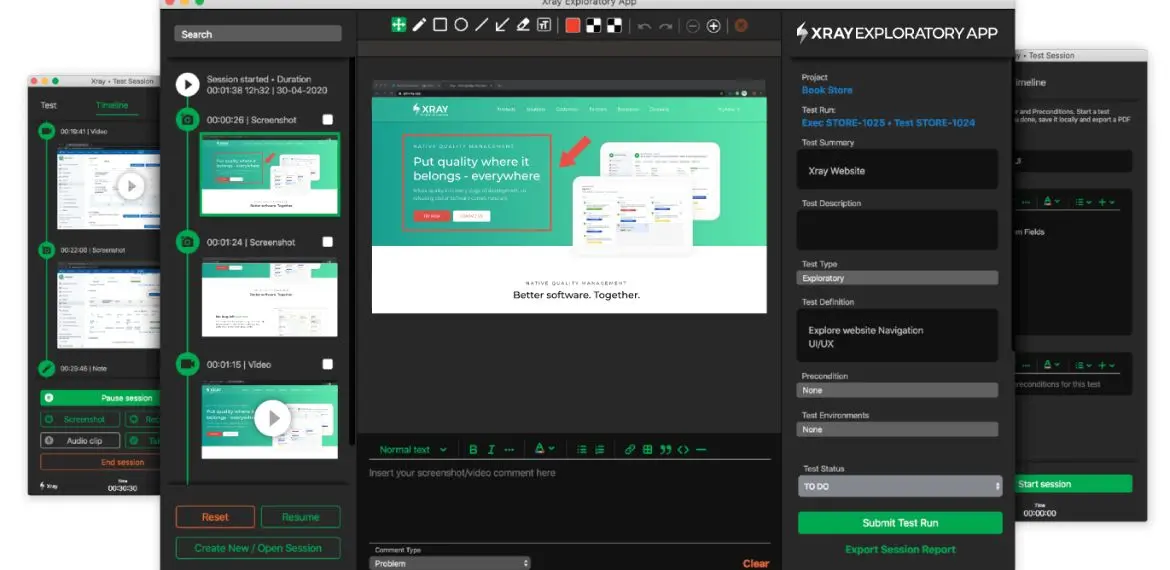
Testers in an exploratory setting often deal with context switches. They must juggle different aspects of the software, switch between various tasks, and respond to new findings in real-time. Managing these switches efficiently is crucial to maintain focus and avoid overlooking critical issues. Beyond common techniques like Pomodoro, you can leverage two key features of Xray Exploratory App – saving sessions locally and editing the detailed Timeline with all your findings.

Proper Documentation

Unlike scripted testing, where documentation is predefined, exploratory testing requires testers to document their findings as they explore. This can be challenging as it requires a balance between detailed documentation and the fluid nature of exploratory testing. Testers need to capture enough information to provide context and enable replication of failure and future test repeatability without getting bogged down in excessive detail.

Xray Exploratory App addresses this challenge with the easily created chronological history of not just text notes but also screenshots, videos, and issues/defects created in Jira during the session (which accelerates the feedback loop).

Reporting and Measuring Success

Another significant challenge in exploratory testing is effectively reporting and measuring success. Traditional testing metrics often do not apply to ET, as its dynamic nature does not lend itself easily to quantitative measurement. Defining meaningful metrics to capture the essence of exploratory testing’s success is crucial for validating its effectiveness and value within the broader testing strategy. In many cases, such definitions would be very company-specific.

The good news – the seamless integration between Xray Exploratory App and Xray/Jira allows you to leverage centralized test management features, such as real-time reporting on several possible metrics (e.g. number of defects, elapsed time). That improves visibility and allows to clearly determine the status of not only exploratory testing, but all testing activities.

For instance, if we want to track defects/issues resulting from exploratory testing, we can see them linked to the test issue in Jira/Xray, which will then allow us to check them in the Traceability report. 

Overall, these challenges, though daunting, are manageable. With the right approach and tools, testers can navigate the complexities of exploratory testing, turning these challenges into opportunities for delivering insightful and thorough software testing.

Future outlook of Exploratory Testing

Exploratory Testing is becoming more acknowledged as an indispensable part of the testing strategy, especially given the limitations of conventional scripted testing. The ability of ET to adapt and respond to the complexities and nuances of modern software development is exceptional. As we look towards the future, several key trends are emerging that are set to shape the landscape of exploratory testing.

Artificial Intelligence (AI)

AI has the potential to significantly transform exploratory testing by automating certain aspects of ideation and, more so, data analysis processes. Leveraging AI in software testing in the correct way can enhance the tester’s capabilities, enabling them to focus on more complex testing scenarios and extract deeper insights from test data. AI can assist in identifying patterns and predicting potential problem areas, making ET more efficient and effective.

Integrations with other tools

The future of exploratory testing will see greater integration with various development, testing, and business analysis tools. This compatibility will streamline the testing process, enabling seamless data flow and communication across platforms. One of the pain points this trend will aim to address is losing time in writing automation scripts as a result of ET. Such integrations will enhance the overall efficiency of the testing process, allowing testers to leverage a wider range of tools and resources during their exploratory sessions more easily.

Enhanced collaboration

As software development becomes more collaborative, exploratory testing also adapts to facilitate better teamwork. Tools like the Xray Exploratory App incorporate features that promote collaboration among testers and between testers and other stakeholders. This collaborative approach ensures a more comprehensive understanding and coverage of the software, leading to better testing outcomes.

Compliance and reporting

Exploratory testing is being used more and more in ensuring compliance, areas like Non-Functional Requirements testing (security and performance), to help find more convoluted flaws and bottlenecks in intricate software systems. The trend is not surprising as the cost of compliance is increasing, both from the customer and the regulatory perspective. 

With the increasing emphasis on compliance and accountability in software development, exploratory testing has to evolve to provide more robust reporting and documentation capabilities. The ability to generate detailed and meaningful reports is essential, and tools like Xray are focusing on enhancing these aspects to meet the growing compliance demands.

The Xray Exploratory App is at the forefront of these changes, continually adapting and evolving to meet the future demands of exploratory testing.

Chart new heights in testing with Xray Exploratory Testing App

Exploratory Testing has become indispensable in our increasingly sophisticated and customer-centric digital landscape. Its importance has expanded across various sectors, including e-commerce, healthcare, and finance, highlighting the universal need for high-quality software experiences. The unique approach of ET, with its focus on discovering the unknown through rigorous analysis and testing heuristics, positions it as a key strategy in addressing the complexities of modern software systems.

The Xray Exploratory App stands out as a vital resource in harnessing the full potential of exploratory testing. The tool enhances the testing process by addressing the everyday challenges of planning, context switching, documentation, and reporting. It enables testers to navigate the intricacies of ET with greater efficiency and effectiveness, ensuring comprehensive coverage and insightful test results.

Explore the capabilities of the Xray Exploratory App and see firsthand how it transforms the exploratory testing experience. Dive into the world of enhanced software testing with Xray and discover the difference it can make in delivering superior software quality.

Author


Ivan Filippov
, Solution Architect for Xray.

Ivan is passionate about test design, collaboration, and process improvement.

Xray is an EXPO Platinum partner at EuroSTAR 2024, join us in Stockholm.

Filed Under: Exploratory Testing, Platinum, Software Testing, Sponsor, Uncategorized Tagged With: 2024, EuroSTAR Conference, Expo, software testing conference, software testing tools

The Silver Bullet for Testing at Scale

August 21, 2023 by Lauren Payne

Thanks to Testory for providing us with this blog post.

Testing has always been a bottleneck in the development process. Since product teams often sacrifice time spent testing, the workload testers face ebbs and flows.

Your company’s testers most likely know what it’s like to work weekends and evenings when there’s a release coming up. At points like those, they generally have to take on low-level work to make sure they check everything and deliver a high-quality product. But that overworks them and leads to burnout.

Product teams often think about the silver bullet: how do you scale testing (increase capacity) instantly without just throwing money at the problem?

Before we answer that question, however, we should take a step back and look at the big picture. What challenges are inherent to testing?

Testing requirements by role

CTOProduct managerHead of testing
Faster time to marketYesYes–
Budget optimizationYesYes–
Product Quality for CustomersYesYesYes
Peak loads––Yes
Routine tasks––Yes
Variety of testing enviroments––Yes

Every role has its own problems. How do you solve them all at the same time?

A few years ago, we took a systematic approach to testing challenges, eventually coming up with a product for the largest IT company in our region. The solution married a variety of ML and other algorithms with traditional IT tools (Tracker, Wiki, TMS) and thousands of performers scattered across different time zones. That eliminated the bottleneck. With a dozen product teams online, they could scale testing or remove it altogether based on need.

On the one hand, we’re constantly improving our algorithms to give better feedback faster. On the other, our automated system selects professional testers who guarantee that same great result.

Another advantage our system offers is that it stands up well to load spikes around the clock rather than just during regular working hours.

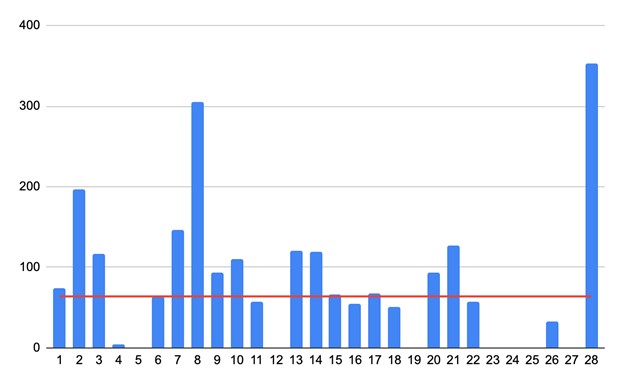
Let’s look at an example. In February 2023, a large customer handed Testory a process that included 2240 hours of work, 1321 of which were outside business hours.

As you can see on the graph, the load placed on testers was anything but even. There are a thousand reasons why that could be. Some peaks outpaced the capacity of a full-time team working regular hours, though expanding the team would have resulted in team members sitting around the rest of the time.

All that makes sense on the graph. The red line represents hours, with eight full-time employees sufficient to cover the total of 65. As you can see on the graph, the load was more frequently heavier, meaning that team of eight wouldn’t be up to the task, though there were also times were they wouldn’t have had enough work.

How does it work?

The customer embeds crowd testing in their development pipeline, calling the process from their TMS as needed and running regress testing in our product with external testers.

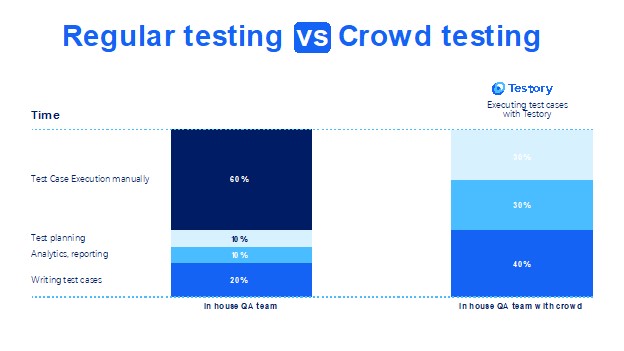
When they submit work for crowd testing, our algorithms scour our pool to select the best performers in terms of knowledge, speed, and availability, then distributing tasks so we can complete a thorough product test in the shortest possible time. We then double-check the result, compile a report, and send the report to the customer. That’s how we fit N hours of work into N/X hours.

The customer can scale up testing whenever they want, then scaling back and paying nothing when they don’t have work to do. It’s an on-demand service.

Performers enjoy an endless stream of work that’s perfect for their skill set in addition to some that pushes them to learn and grow. For our part, we offer testers special skill- and knowledge-based courses, stable payment that depends on how many tasks they complete, and the opportunity to work from anywhere in the world.

What’s the bottom line?

We free up resources our clients can rededicate toward interesting and higher-risk work, help out with peak loads, and streamline costs:

How can you get that for yourself?

Testory is a separate process and product born to help large companies. It’s for anyone trying to quickly deliver IT products that solve user problems. If you’re interested in leveraging our experience, get in touch, and we’ll build a roadmap for you.

Author

Mary Zakharova

Mary has been working with crowdtesting products for 6 years. She started her career as a community manager in a testers’ network.

In recent years, Mary has been in charge of the Testory product

Testory is an EXPO Exhibitor partner at EuroSTAR 2023

Filed Under: Software Testing, Uncategorized Tagged With: 2023, EuroSTAR Conference

How to Solve Your Recruitment Needs for Software Testers?

August 16, 2023 by Lauren Payne

Thanks to Talent2Test for providing us with this blog post.

The testing market is currently facing the same challenges as almost the entire IT industry. A lot of new projects are starting up, the challenge lies in finding the right profiles, with the right education for the right roles. Double match, win-win call it as you want. Often supplier and customer are fighting to get the upper hand in “winning the deal”: the best price, the best consultant,… and face each other’s agenda’s. These agenda’s prevent a smooth collaboration because one of both parties wants to win the deal.

From our years of experience in guiding and helping companies in their digital journeys, we developed a way of thinking that leads to a more profound collaboration. By noticing that, making a random match between request and offer is like flipping a coin, we decided to take the matter in our own hands and create a platform where both parties can meet each other and create a real win-win.

Our Answer to This Scarcity?

15 years ago, we started organizing classes for our customers. Throughout the years we started finetuning this setup and came to a format where the customer, the supplier and the consultant find the right way to go. Before the start we define the needs of the customer, what kind of profile do they need, which technologies do they prefer? Wat is the location of their offices? Based on this information, we start looking for possible candidates in collaboration with our brand “Cookie Crunchers”. The Cookies talk to the Juniors consultant’s and make a careful selection. The consultant does interviews with us as a supplier and with the customer to define if there is a match. We start the training, which is also a training based on the needs of the customer e.g. emphasis on manual testing, test automation…

Meet the friendly Carole, 23 years old, who decided this year: I want to delve into software testing. Today she is making waves as a software tester. How she achieved that, she is happy to tell!

A Leap of Faith

“During my studies Media & Entertainment I came into contact with a website for programming and front-end development, and this is where my love for IT arose. But after three years of studying, I just wanted to start working and gain experience on the job. On the advice of my aunt, I took the plunge and started applying for a job in IT without any degree or experience.”

Mission Accomplished

“Within two months I was allowed to start at a company as a functional software tester. I didn’t know anything about it, but I learned a lot in the process. Soon I felt like I could handle even more of a challenge. Quite coincidentally, I received a LinkedIn message from Merijn from Talent2Test: was I interested in a Software Testing Class? That’s how the ball started rolling.”

Software Tester of the Day

“After the class, I was able to start very quickly with a Talent2Test customer. I’m the only tester on the team so that takes a lot of responsibilities with it. It is a large, international company and there are many career opportunities. There is a lot of variation within IT and I speak English every day. I also have a very nice team that I can always turn to. When I started the Testing Class, I really wanted to go to automation, because I thought I had already seen the functional, but with my employer I really noticed that there are a lot of new functionalities and more involved.”

Career Boost

“I experienced the process at Cookie Crunchers very positively. The regular contact, follow-up and support; I had a really good feeling about it. There are also plenty of opportunities to follow training courses and take your knowledge to the next level. By starting at Cookie Crunchers, I now have so many more options and I’m glad I committed. The world of testing has opened up completely.”

Talent2Test – When Quality Matters

Want to know more about our junior classes? Are you looking for Software Tester? Or maybe you are a Software Tester looking for a new challenges or ways to improve your knowledge? Get in touch with Stijn, account manager.

a: Houtdok-Noordkaai 12, 2030 Antwerpen
m: +32 0497 64 10 25
e: Stijn.lekens@talent2test.be
w: www.talent2test.be

Author

Talent2Test

When quality matters, Talent2Test is your partner for software testing.

Talent2Test trains & supports and offer driven test engineers to help companies achieve the quality they need.

We have the flexibility of a local player, based in Antwerp. But also the ability to execute in an international environment. This due to the fact that we are part of the Nash Squared group.  

Talent2Test is an EXPO Exhibitor at EuroSTAR 2023

Filed Under: People, Software Testing Tagged With: 2023, EuroSTAR Conference

We’ve got the Stage – You’ve got the Story

July 17, 2023 by Lauren Payne

The 2024 EuroSTAR Software Testing Conference is going to Stockholm, Sweden.

If you’ve ever wanted to speak at EuroSTAR and share your story on Europe’s largest stage, the Call for Speakers is open until 17th September.

Now is the time to start thinking about what you’d like to share. What experiences will help others in the room. Perhaps it’s something that didn’t work at first but then you found a solution. It might be technical, or it might core skills.

EuroSTAR 2024 Programme Chair, Michael Bolton, is inviting you to explore the theme, ‘What Are We Doing Here?’ – it’s a wide-open question, with lots of possible interpretations and related questions.

Talk Type

We’ll share more on these later but for now, there will be three main types of talks:

  • Keynote – 60mins (45mins talk + 15mins Q&A)
  • Tutorials/Workshops – Full-day 7 hours OR Half-day 3.5 hours incl breaks
  • Track Talks – 60mins (40mins talk + 20mins valuable discussion)

Who?

Calling all testing enthusiasts and software quality advocates – whether you’re a veteran, or new to testing – to share your expertise, successes (and failures) with your peers; and spark new learnings, lively discussions, and lots of inspiration.

Think about what engages you in your work, engrosses you in testing, challenges you’ve faced, or new ideas you’ve sparked? Get in front of a global audience, raise your profile, and get involved with a friendly community of testers.

Here’s everything you need to know about taking the first step on to the EuroSTAR stage.

We invite speakers of all levels to submit their talk proposals and take the biggest stage in testing!

What Do I Need To Submit?

A clear title, a compelling abstract and 3 possible learnings that attendees will take from your talk – this is the main part of your submission. We’ll ask you to add in your contact details and tick some category boxes but your title, talk outline & key learnings are the key focus.

Topics for EuroSTAR 2024

Michael is calling for stories about testers’ experiences in testing work. At EuroSTAR 2024, we embrace diversity and value a wide range of perspectives. We’re most eager to hear stories about how you…

  • learned about products
  • recognised, investigated, and reported bugs
  • analysed and investigated risk
  • invented, developed, or applied tools
  • developed and applied a new useful skill
  • communicated with and reported to your clients
  • established, explained, defended, or elevated the testing role
  • Created or fostered testing or dev groups
  • recruited and trained people
  • made crucial mistakes and learned from them
START Your Submission

Mark Your Calendar

Here are some essential dates to keep in mind:

  • Call for Speakers Deadline: 17 September 2023
  • Speaker Selection Notification: Late November 2023
  • EuroSTAR Conference: 11-14 June 2024 in Sweden

If you’re feeling inspired, check out the full Call for Speakers details EuroSTAR attracts speakers from all over the world and we can get over 450 submissions. Each year, members of the EuroSTAR community give their time to assess each submission and their ratings help our Programme Committee select the most engaging and relevant talks. If you would like help writing a proposal see this handy submissions guide and you can reach out to us at any time.

EuroSTAR 2024 promises to be an extraordinary experience for both speakers and attendees. So, submit your talk proposal before 17 September 2023 and let’s come together in the beautiful city of Stockholm next June. Together we’ll make EuroSTAR 2024 an unforgettable celebration of software testing!

Filed Under: EuroSTAR Conference, Software Testing, Uncategorized Tagged With: EuroSTAR Conference

  • « Previous Page
  • Page 1
  • Page 2
  • Page 3
  • Page 4
  • Page 5
  • Next Page »
  • Code of Conduct
  • Privacy Policy
  • T&C
  • Media Partners
  • Contact Us

part of the